MCP核心概念,MCP服务开发实战
·
文章目录
MCP
https://modelcontextprotocol.io/
核心概念
MCP(模型上下文协议) 是一个由 Anthropic 创建的标准化通信协议。它的主要作用是让 AI 模型能够安全、规范地连接和使用外部工具与数据源。
想象一下:当你想让 AI 帮你创建文件、查询数据库或访问网络时,AI 模型本身并不能直接操作你的电脑或外部系统。这个时候需要一些外部工具来实现这些操作,这些外部工具是由编程语言编写的辅助工具,或者某些功能需要我们程序员自己来实现编写,那么这个时候ai模型需要与这些外部工具通信,就需要一个“桥梁”——而 MCP 就是这个桥梁
把 MCP 想象成 AI 的“USB 接口”:
- AI 模型本身就像一台没有外设的电脑
- MCP 提供了标准的“接口规范”
- 外部工具(文件系统、数据库、API)就像各种“USB 设备”
- 通过这个标准接口,AI 就能安全地使用各种扩展功能
为什么使用mcp
- 当ai模型自身能力不足以满足用户需求时,能让ai模型连接到外部工具来辅助实现用户的需求,比如创建文件写入文件内容。ai模型自身并不能实现,所以需要借助外力来实现,那么ai在和外部工具通信时需要有一个标准的通信协议,从而确保能够正常交互。这个标准的通信协议就是mcp。
- mcp通信支持两种通信方式。
- stdio : 推荐,高效/简洁/基于本地化的json RPC
- http: 可远程
- 总结:能够扩充ai能力,让 AI 可以执行原本无法完成的任务,如:
- 读取文件系统、数据库
- 访问网络资源
- 执行代码
- 调用 API等等
什么是mcp服务(MCP Server)
- mcp服务也就是ai模型所需要扩充的工具,本质是一个可执行程序,通过ai来调用,执行后返回结果,调用和返回的参数格式也被就是mcp通信协议所约束的规范,如果不统一规范,ai不知道执行工具时需要传递什么参数,乱传递参数,工具侧也不认识这些参数,工具侧执行结果返回如果不统一格式那么ai它也不认识。
mcp的简单实现和工作原理(stdio)
- 因为mcp通信的本质就是进程之间标准的输入和输出,加上统一规范的输入输出参数来达到安全正确的数据交互,所以大部分的编程语言都可以编写mcp服务,这里以node为例,先简单实现一个标准的输入输出
// 标准输出 由终端(客户端)捕获得到
// process.stdout.write('Hello World');
// 标准输入 监控来自终端(客户端)的输入
console.log('请输入内容:')
process.stdin.on('data', function (data) {
    console.log(data.toString());
    // 需要手动退出程序,除非你需要一直监听输入并返回处理结果
    process.exit();
})
- 标准的输入输出其实很简单。其实就算是一个console.log,由父进程启动子进程,两个进程之间就可以通信
简单的实现一个mcp服务
mcp服务代码,
- 调试时不能使用console.log 因为log算是标准的输出,用log会导致mcp服务不能正常运作,可以使用error作为调试信息,进程通信除了有标准的输入输出以外还是标准的错误输出
// simple-mcp-server.js
const fs = require('fs');
const path = require('path');

class SimpleMCPServer {
  constructor() {
    this.initialized = false; // 标记是否已完成初始化
    this.setupServer();
  }

  // 工具1:求和
  addNumbers(a, b) {
    console.error('[MCP] 调用求和工具');
    if (typeof a !== 'number' || typeof b !== 'number') {
      return {
        success: false,
        error: '参数必须是数字',
        message: `参数类型错误: a=${typeof a}, b=${typeof b}`
      };
    }
    const result = a + b;
    console.error(`[MCP] 计算结果: ${a} + ${b} = ${result}`);
    return {
      success: true,
      result: `计算结果:${result}`,
      message: `${a} + ${b} = ${result}`
    };
  }

  // 工具2:创建文件
  createFile(filePath, fileName, content) {
    console.error('[MCP] 调用创建文件工具');
    try {
      if (typeof filePath !== 'string' || typeof fileName !== 'string' || typeof content !== 'string') {
        throw new Error('所有参数必须是字符串');
      }

      // 清理路径
      const cleanPath = filePath.replace(/\.\./g, ''); // 防止路径遍历
      const fullPath = path.join(cleanPath, fileName);

      // 确保目录存在
      if (!fs.existsSync(cleanPath)) {
        fs.mkdirSync(cleanPath, { recursive: true });
      }

      // 写入文件
      fs.writeFileSync(fullPath, content, 'utf8');
      console.error(`[MCP] 文件创建成功: ${fullPath}`);

      return {
        success: true,
        message: `文件创建成功: ${fileName}`,
        path: fullPath,
        size: content.length
      };
    } catch (error) {
      console.error(`[MCP] 文件创建失败: ${error.message}`);
      return {
        success: false,
        error: error.message,
        message: `文件创建失败: ${error.message}`
      };
    }
  }

  // 处理初始化请求(握手)
  handleInitialize(params) {
    console.error('[MCP] 收到初始化请求');

    // 检查协议版本
    if (params.protocolVersion !== '2025-06-18') {
      return {
        jsonrpc: "2.0",
        id: params.requestId,
        error: {
          code: -32602,
          message: "不支持的协议版本"
        }
      };
    }

    this.initialized = true;
    console.error('[MCP] 初始化完成,服务器已就绪');

    return {
      jsonrpc: "2.0",
      id: params.requestId,
      result: {
        protocolVersion: "2025-06-18",
        capabilities: {
          tools: {},
          prompts: {},
          resources: {}
        },
        serverInfo: {
          name: "simple-mcp-server",
          version: "1.0.0"
        }
      }
    };
  }

  // 处理 JSON-RPC 请求
  handleRequest(request) {
    try {
      const data = JSON.parse(request);
      console.error(`[MCP] 收到请求: ${data.method || 'unknown'}, ID: ${data.id}`);

      // 1. 初始化请求(必须在其他请求之前)
      if (data.method === 'initialize') {
        return JSON.stringify(this.handleInitialize({
          requestId: data.id,
          protocolVersion: data.params?.protocolVersion,
          capabilities: data.params?.capabilities
        }));
      }


      // 2. 通知请求(不需要响应)
      if (data.method === 'notify/initialized') {
        console.error('[MCP] 客户端已就绪通知');
        return null; // 通知不需要响应
      }

      // 3. 列出可用工具
      if (data.method === 'tools/list') {
        const response = {
          jsonrpc: "2.0",
          id: data.id,
          result: {
            tools: [
              {
                name: "add",
                description: "计算两个数字的和",
                inputSchema: {
                  type: "object",
                  properties: {
                    a: {
                      type: "number",
                      description: "第一个数字"
                    },
                    b: {
                      type: "number",
                      description: "第二个数字"
                    }
                  },
                  required: ["a", "b"],
                  additionalProperties: false
                }
              },
              {
                name: "create_file",
                description: "创建文件并写入内容",
                inputSchema: {
                  type: "object",
                  properties: {
                    filePath: {
                      type: "string",
                      description: "文件路径(相对路径)"
                    },
                    fileName: {
                      type: "string",
                      description: "文件名"
                    },
                    content: {
                      type: "string",
                      description: "文件内容"
                    }
                  },
                  required: ["filePath", "fileName", "content"],
                  additionalProperties: false
                }
              }
            ]
          }
        };
        return JSON.stringify(response);
      }

      // 4. 调用工具
      if (data.method === 'tools/call') {
        const { name, arguments: args } = data.params;
        let result;

        if (name === 'add') {
          result = this.addNumbers(args.a, args.b);
        } else if (name === 'create_file') {
          result = this.createFile(args.filePath, args.fileName, args.content);
        } else {
          result = { success: false, error: `未知的工具: ${name}` };
        }

        const response = {
          jsonrpc: "2.0",
          id: data.id,
          result: {
            content: [
              {
                type: "text",
                text: JSON.stringify(result, null, 2)
              }
            ]
          }
        };
        return JSON.stringify(response);
      }

      // 5. 关闭请求
      if (data.method === 'shutdown') {
        console.error('[MCP] 收到关闭请求');
        const response = {
          jsonrpc: "2.0",
          id: data.id,
          result: null
        };

        // 延迟退出,让客户端有时间处理响应
        setTimeout(() => {
          console.error('[MCP] 服务器关闭');
          process.exit(0);
        }, 100);

        return JSON.stringify(response);
      }

      // 6. 其他请求返回错误
      return JSON.stringify({
        jsonrpc: "2.0",
        id: data.id,
        error: {
          code: -32601,
          message: "方法不存在"
        }
      });

    } catch (error) {
      console.error(`[MCP] 处理请求出错: ${error.message}`);
      return JSON.stringify({
        jsonrpc: "2.0",
        id: null,
        error: {
          code: -32700,
          message: "解析错误",
          data: error.message
        }
      });
    }
  }

  setupServer() {
    console.error('======================================');
    console.error('  简单 MCP 服务器 (纯 JavaScript)');
    console.error('  按 Ctrl+C 退出');
    console.error('======================================\n');

    // 监听标准输入
    process.stdin.setEncoding('utf8');

    let buffer = '';
    process.stdin.on('data', (chunk) => {
      buffer += chunk;

      // 检查是否收到完整请求(以换行符分隔)
      const requests = buffer.split('\n');
      buffer = requests.pop() || '';

      requests.forEach(request => {
        if (request.trim()) {
          try {
            const response = this.handleRequest(request);
            if (response) {
              process.stdout.write(response + '\n');
            }
          } catch (error) {
            console.error(`[MCP] 处理失败: ${error.message}`);
          }
        }
      });
    });

    // 错误处理
    process.stdin.on('error', (error) => {
      console.error(`[MCP] 输入流错误: ${error.message}`);
    });

    process.on('SIGINT', () => {
      console.error('\n[MCP] 服务器关闭');
      process.exit(0);
    });
  }
}

// 启动服务器
new SimpleMCPServer();
mcp服务测试(手动测试)
- 这个手动调试写的可能有点抽象,需要先启动脚本程序,然后在终端输入指定格式的json, 有点麻烦,你可以直接看后面的可视化调试。
初始化阶段
- 初始化测试, 向mcp服务输入 固定格式
{
    "jsonrpc": "2.0", // json rpc版本
    "id": 1, // id 用于多个请求时能够靳准对应上响应结果
    "method": "initialize", // 初始化 ,固定值
    "params": { // 请求参数
        "protocolVersion": "2025-06-18", // mcp版本
        "capabilities": {
            "tools": {

            },
            "prompts": {

            },
            "resources": {

            }
        },
        "clientInfo": { // 向服务器介绍自身信息
            "name": "test-client",
            "version": "1.0.0"
        }
    }
}
- 服务器响应 如果支持mcp服务
{
    "jsonrpc": "2.0",
    "id": 1,
    "result": {
        "protocolVersion": "2025-06-18",
        "capabilities": { // 表示服务器有哪些功能
            "tools": {

            },
            "prompts": {

            },
            "resources": {

            }
        },
        "serverInfo": { // 介绍服务器情况
            "name": "simple-mcp-server",
            "version": "1.0.0"
        }
    }
}
- 查询服务器是否准备就绪
{
  "jsonrpc": "2.0",
  "method": "notify/initialized",
  "params": {}
}
列出mcp服务有哪些工具
当ai知道这个mcp服务器有哪些工具可用
- 输入固定格式
{ "jsonrpc": "2.0", "id": 2, "method": "tools/list"}
- 响应内容
{
    "jsonrpc": "2.0",
    "id": 2,
    "result": {
        "tools": [ // 工具列表
            {
                "name": "add", // 工具名称
                "description": "计算两个数字的和", // 作用,用自然语言描述,方便ai理解
                "inputSchema": {
                    "type": "object",
                    "properties": {
                        "a": {
                            "type": "number",
                            "description": "第一个数字"
                        },
                        "b": {
                            "type": "number",
                            "description": "第二个数字"
                        }
                    },
                    "required": [// 必填参数
                        "a",
                        "b"
                    ],
                    "additionalProperties": false
                }
            },
            {
                "name": "create_file",
                "description": "创建文件并写入内容",
                "inputSchema": {
                    "type": "object",
                    "properties": {
                        "filePath": {
                            "type": "string",
                            "description": "文件路径(相对路径)"
                        },
                        "fileName": {
                            "type": "string",
                            "description": "文件名"
                        },
                        "content": {
                            "type": "string",
                            "description": "文件内容"
                        }
                    },
                    "required": [
                        "filePath",
                        "fileName",
                        "content"
                    ],
                    "additionalProperties": false
                }
            }
        ]
    }
}
工具测试
- 输入参数
{
  "jsonrpc": "2.0",
  "id": 3,
  "method": "tools/call",
  "params": {
    "name": "add", // 调用工具名称
    "arguments": { // 参数
      "a": 15,
      "b": 27
    }
  }
}
- 输出结果
{
    "jsonrpc": "2.0",
    "id": 3,
    "result": {
        "content": [
            {
                "type": "text",
                "text": "{\n  \"success\": true,\n  \"result\": 42,\n  \"message\": \"15 + 27 = 42\"\n}"
            }
        ]
    }
}
mcp服务测试(可视化工具)
- 通过npx安装
npx @modelcontextprotocol/inspector
# 注意:命令需要在mcp服务所在的目录下执行,不然等会启动不了服务
- 命令执行后会在终端有一个可以访问网页地址 http://localhost:6274/?MCP_PROXY_AUTH_TOKEN=…打开即可
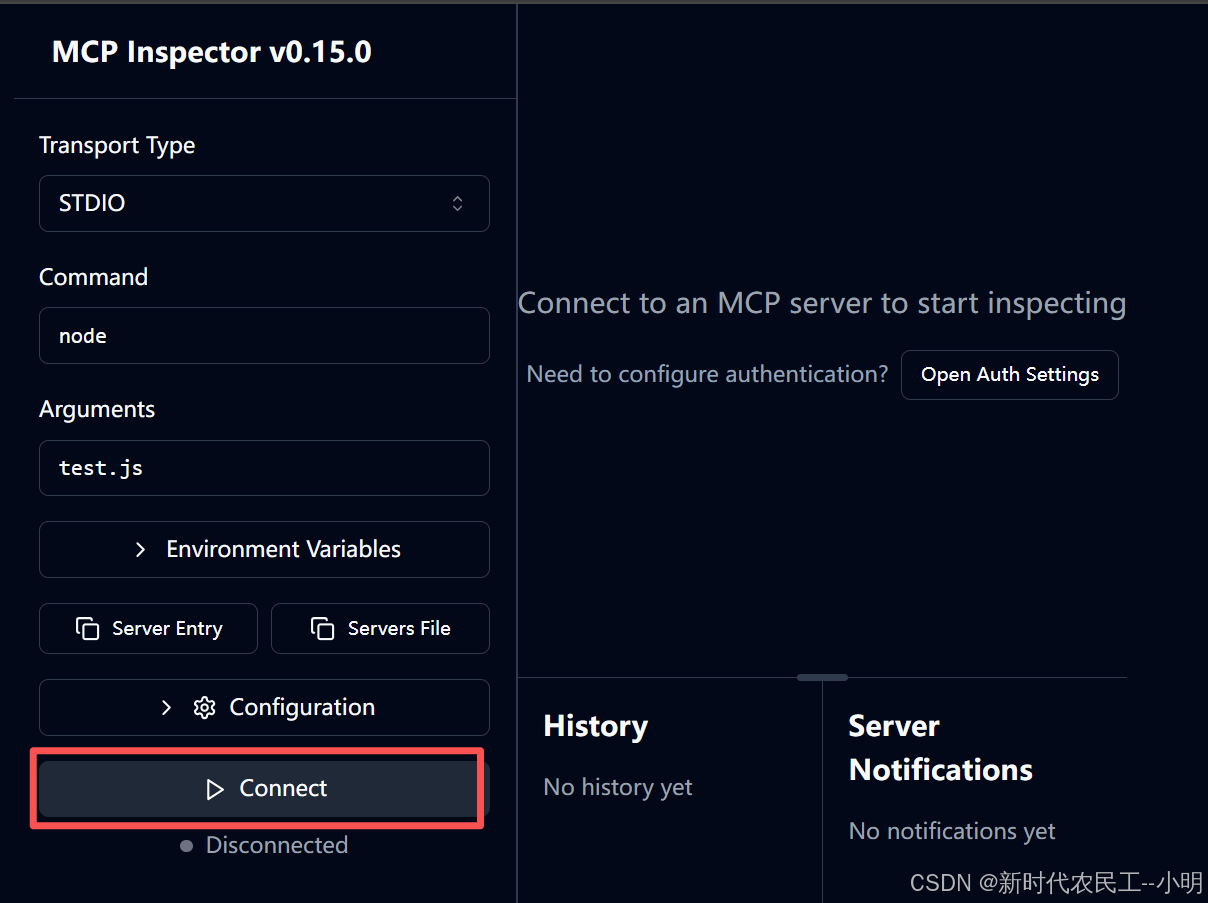
- 填写你的通信方式,启动命令及文件
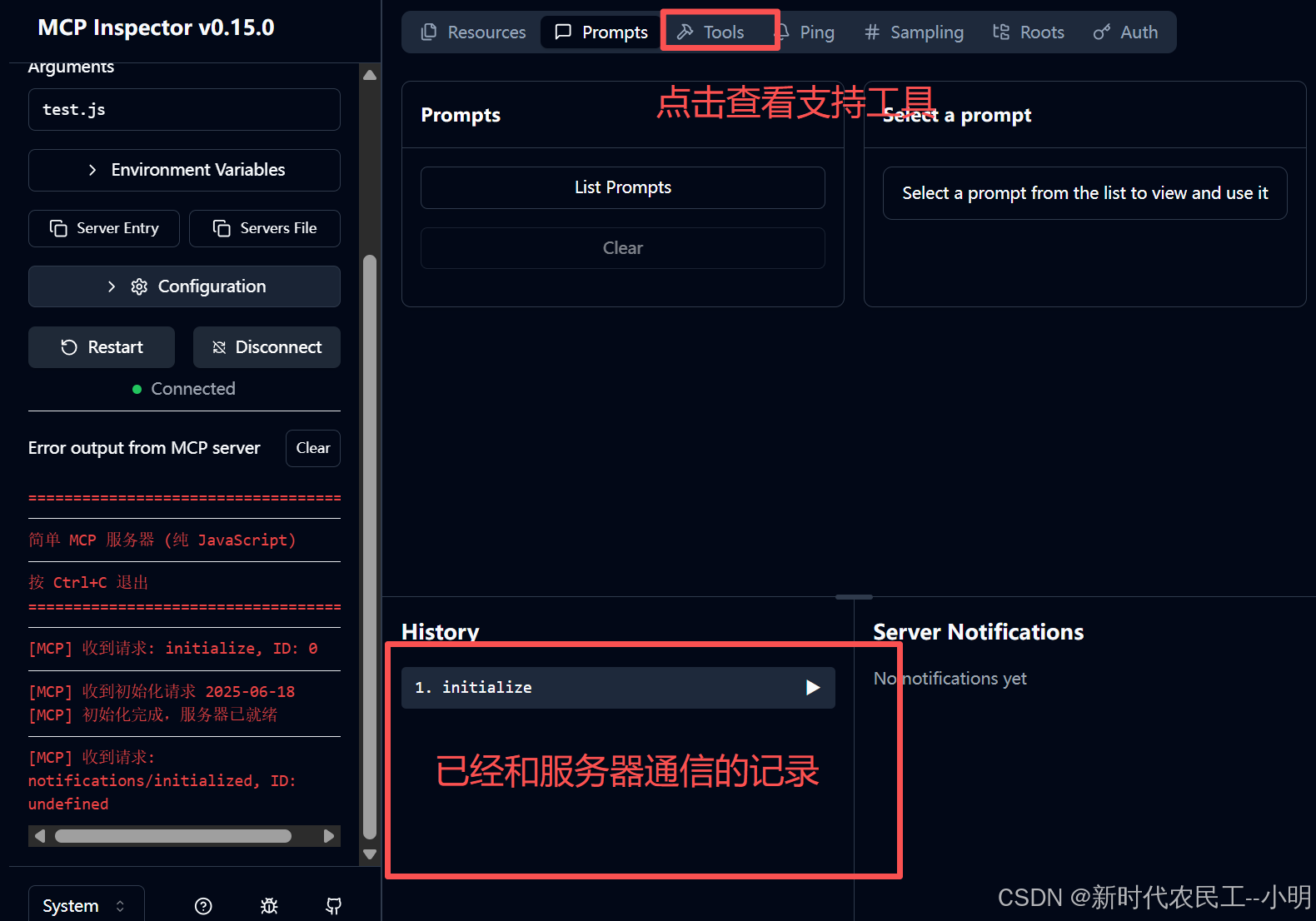
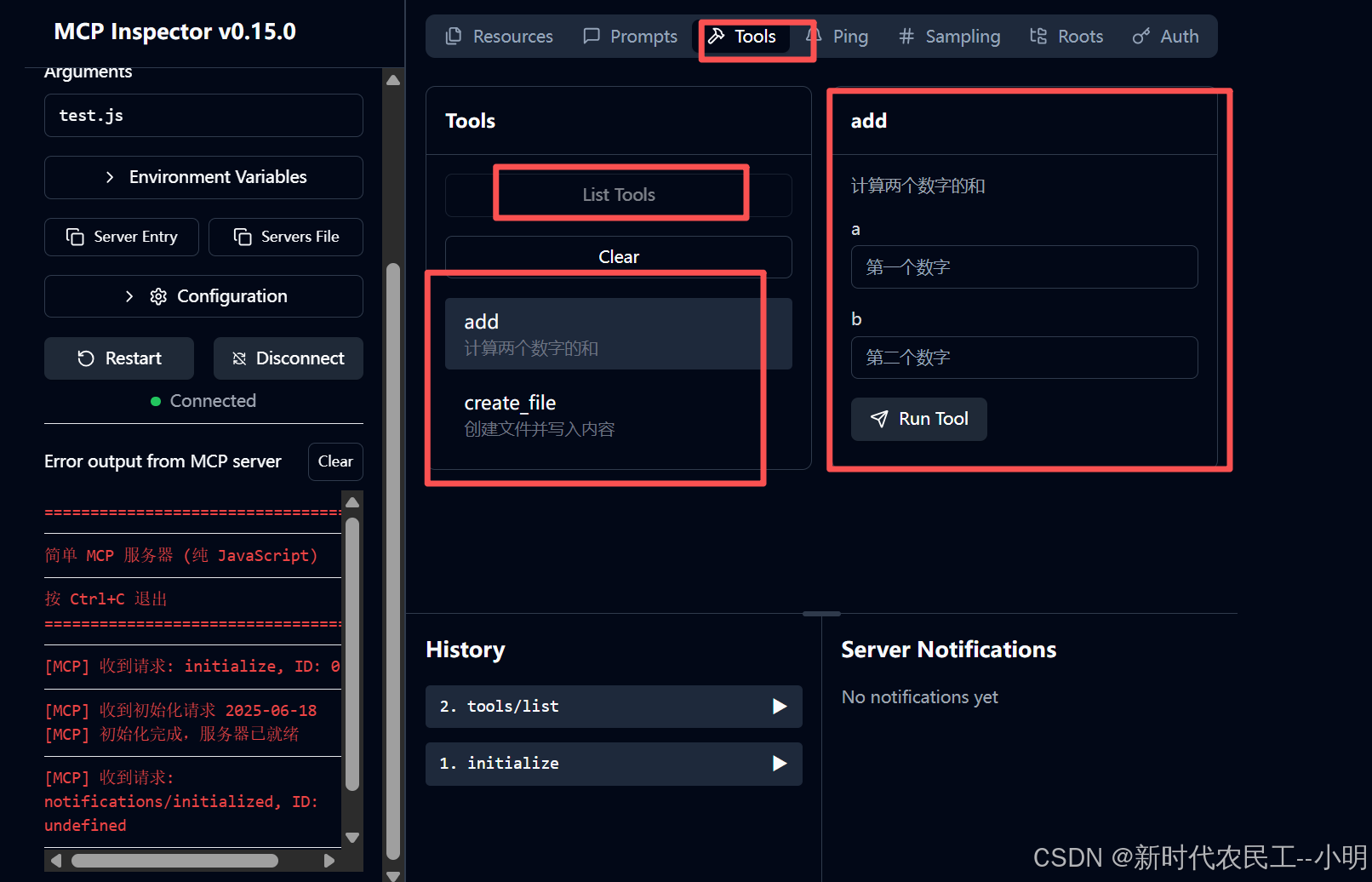
可依次点击并测试工具
基于mcp sdk实现mcp服务
npm install @modelcontextprotocol/sdk
- 代码, 测试流程和上面一样,如果可视化面板没反应可重启一下可视化服务
// simple-mcp-server-sdk.js
import { Server } from '@modelcontextprotocol/sdk/server/index.js';
import { StdioServerTransport } from '@modelcontextprotocol/sdk/server/stdio.js';
import {
  CallToolRequestSchema,
  ListToolsRequestSchema
} from '@modelcontextprotocol/sdk/types.js';
import fs from 'fs';
import path from 'path';
import { fileURLToPath } from 'url';

// 获取当前文件目录
const __dirname = path.dirname(fileURLToPath(import.meta.url));

class SimpleMCPServerSDK {
  constructor() {
    // 创建 MCP 服务器
    this.server = new Server(
      {
        name: 'simple-mcp-server',
        version: '1.0.0'
      },
      {
        capabilities: {
          tools: {},
        }
      }
    );

    this.setupHandlers();
  }

  // 工具1:求和
  addNumbers(a, b) {
    console.error('[MCP SDK] 调用求和工具');

    // 参数验证
    if (typeof a !== 'number' || typeof b !== 'number') {
      return {
        success: false,
        error: '参数必须是数字',
        message: `参数类型错误: a=${typeof a}, b=${typeof b}`
      };
    }

    const result = a + b;
    console.error(`[MCP SDK] 计算结果: ${a} + ${b} = ${result}`);

    return {
      success: true,
      result: `计算结果:${result}`,
      message: `${a} + ${b} = ${result}`
    };
  }

  // 工具2:创建文件
  createFile(filePath, fileName, content) {
    console.error('[MCP SDK] 调用创建文件工具');

    try {
      // 参数验证
      if (typeof filePath !== 'string' || typeof fileName !== 'string' || typeof content !== 'string') {
        throw new Error('所有参数必须是字符串');
      }

      // 清理路径
      const cleanPath = filePath.replace(/\.\./g, ''); // 防止路径遍历
      const fullPath = path.join(cleanPath, fileName);

      // 确保目录存在
      if (!fs.existsSync(cleanPath)) {
        fs.mkdirSync(cleanPath, { recursive: true });
      }

      // 写入文件
      fs.writeFileSync(fullPath, content, 'utf8');
      console.error(`[MCP SDK] 文件创建成功: ${fullPath}`);

      return {
        success: true,
        message: `文件创建成功: ${fileName}`,
        path: fullPath,
        size: content.length
      };
    } catch (error) {
      console.error(`[MCP SDK] 文件创建失败: ${error.message}`);
      return {
        success: false,
        error: error.message,
        message: `文件创建失败: ${error.message}`
      };
    }
  }

  // 设置请求处理器
  setupHandlers() {
    // 处理列出工具请求
    this.server.setRequestHandler(ListToolsRequestSchema, async () => {
      console.error('[MCP SDK] 收到列出工具请求');

      return {
        tools: [
          {
            name: 'add',
            description: '计算两个数字的和',
            inputSchema: {
              type: 'object',
              properties: {
                a: {
                  type: 'number',
                  description: '第一个数字'
                },
                b: {
                  type: 'number',
                  description: '第二个数字'
                }
              },
              required: ['a', 'b'],
              additionalProperties: false
            }
          },
          {
            name: 'create_file',
            description: '创建文件并写入内容',
            inputSchema: {
              type: 'object',
              properties: {
                filePath: {
                  type: 'string',
                  description: '文件路径(相对路径)'
                },
                fileName: {
                  type: 'string',
                  description: '文件名'
                },
                content: {
                  type: 'string',
                  description: '文件内容'
                }
              },
              required: ['filePath', 'fileName', 'content'],
              additionalProperties: false
            }
          }
        ]
      };
    });

    // 处理工具调用请求
    this.server.setRequestHandler(CallToolRequestSchema, async (request) => {
      const { name, arguments: args } = request.params;
      console.error(`[MCP SDK] 调用工具: ${name}`, args);

      try {
        let result;

        switch (name) {
          case 'add':
            // 验证参数
            if (args?.a === undefined || args?.b === undefined) {
              throw new Error('缺少必要参数: a 和 b');
            }
            if (typeof args.a !== 'number' || typeof args.b !== 'number') {
              throw new Error('参数 a 和 b 必须是数字');
            }

            result = this.addNumbers(args.a, args.b);
            break;

          case 'create_file':
            // 验证参数
            if (!args?.filePath || !args?.fileName || args?.content === undefined) {
              throw new Error('缺少必要参数: filePath, fileName, content');
            }
            if (typeof args.filePath !== 'string' ||
                typeof args.fileName !== 'string' ||
                typeof args.content !== 'string') {
              throw new Error('所有参数必须是字符串');
            }

            result = this.createFile(args.filePath, args.fileName, args.content);
            break;

          default:
            throw new Error(`未知的工具: ${name}`);
        }

        // 返回结果
        return {
          content: [
            {
              type: 'text',
              text: JSON.stringify(result, null, 2)
            }
          ]
        };

      } catch (error) {
        console.error(`[MCP SDK] 工具调用错误: ${error.message}`);

        return {
          content: [
            {
              type: 'text',
              text: JSON.stringify({
                success: false,
                error: error.message,
                message: `工具调用失败: ${error.message}`
              }, null, 2)
            }
          ],
          isError: true
        };
      }
    });
  }

  // 启动服务器
  async start() {
    try {
      console.error('======================================');
      console.error('  MCP 服务器 (使用官方SDK)');
      console.error('  可用工具:');
      console.error('  1. add - 计算两个数字的和');
      console.error('  2. create_file - 创建文件并写入内容');
      console.error('  按 Ctrl+C 退出');
      console.error('======================================\n');

      // 使用 stdio 传输
      const transport = new StdioServerTransport();

      // 连接传输层
      await this.server.connect(transport);

      console.error('[MCP SDK] 服务器已启动,等待连接...');

      // 设置优雅关闭
      this.setupGracefulShutdown();

    } catch (error) {
      console.error('[MCP SDK] 启动失败:', error);
      process.exit(1);
    }
  }

  // 设置优雅关闭
  setupGracefulShutdown() {
    const shutdown = async (signal) => {
      console.error(`\n[MCP SDK] 收到 ${signal} 信号,正在关闭...`);

      try {
        await this.server.close();
        console.error('[MCP SDK] 服务器已关闭');
        process.exit(0);
      } catch (error) {
        console.error('[MCP SDK] 关闭时出错:', error);
        process.exit(1);
      }
    };

    process.on('SIGINT', () => shutdown('SIGINT'));
    process.on('SIGTERM', () => shutdown('SIGTERM'));
  }
}

// 启动服务器
async function main() {
  const server = new SimpleMCPServerSDK();
  await server.start();
}

// 捕获未处理的Promise异常
process.on('unhandledRejection', (reason, promise) => {
  console.error('[MCP SDK] 未处理的Promise拒绝:', reason);
});

// 捕获未捕获的异常
process.on('uncaughtException', (error) => {
  console.error('[MCP SDK] 未捕获的异常:', error);
  process.exit(1);
});

main().catch((error) => {
  console.error('[MCP SDK] 启动失败:', error);
  process.exit(1);
});
将我们自己写的mcp服务连接到ai模型上去使用
- 这里以Trae来实验,打开Trae,找到 设置>mcp>t添加
{
  "mcpServers": {
 	... ... /// 每个mcp就是一个配置对象
    "My MCP Server": {
      "command": "node", // 这里是启动命令
      "args": [
        "D:/web/MCP/test.js" // mcp服务脚本的所在目录,绝对路径
      ]
    }
  }
}
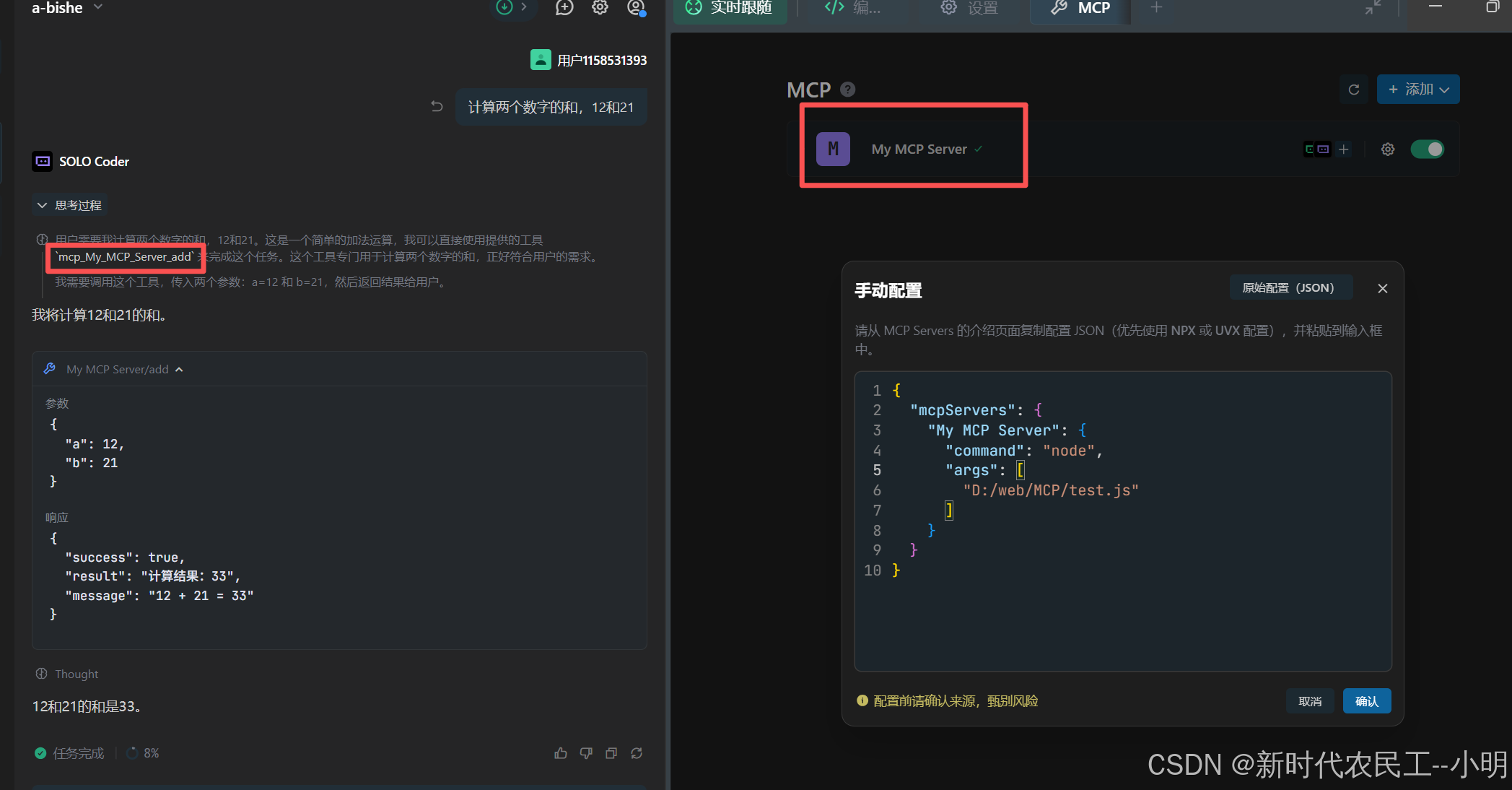
可以看到,模型调用我们添加的mcp服务中的求和函数,mcp服务开发完成后可以将项目上传到npm上,通过bpx的形式将服务添加到模型的工具箱。
- mcp host和mcp client mcp host是ai本身或者ai工具/编辑器用于调用mcp服务,mcp client是用于管理mcp服务,可以添加多个mcp服务
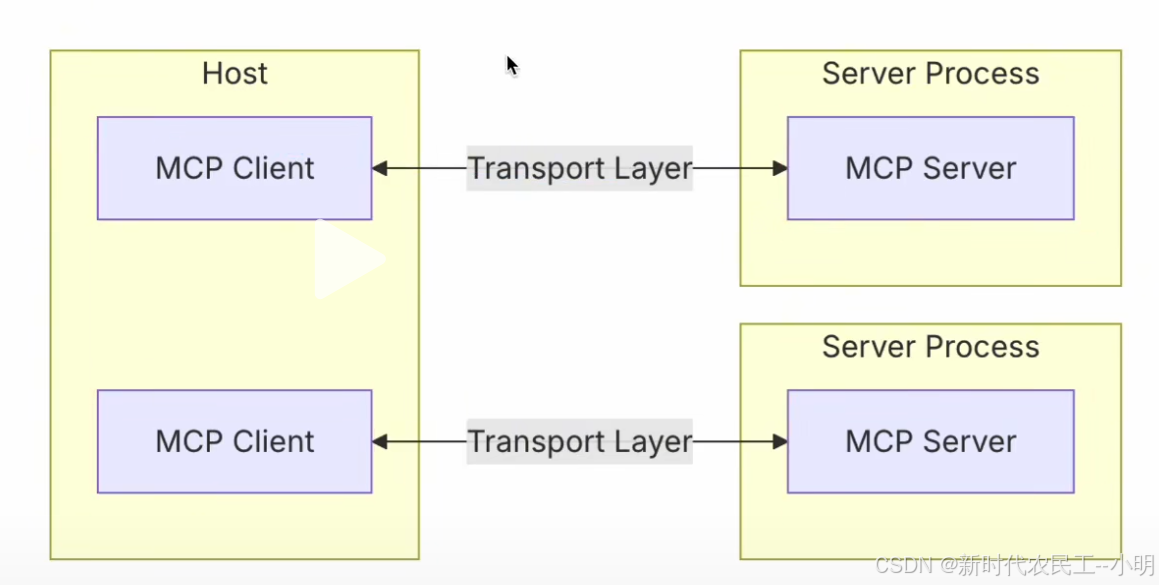
- ai模型于mcp之间的调用关系图
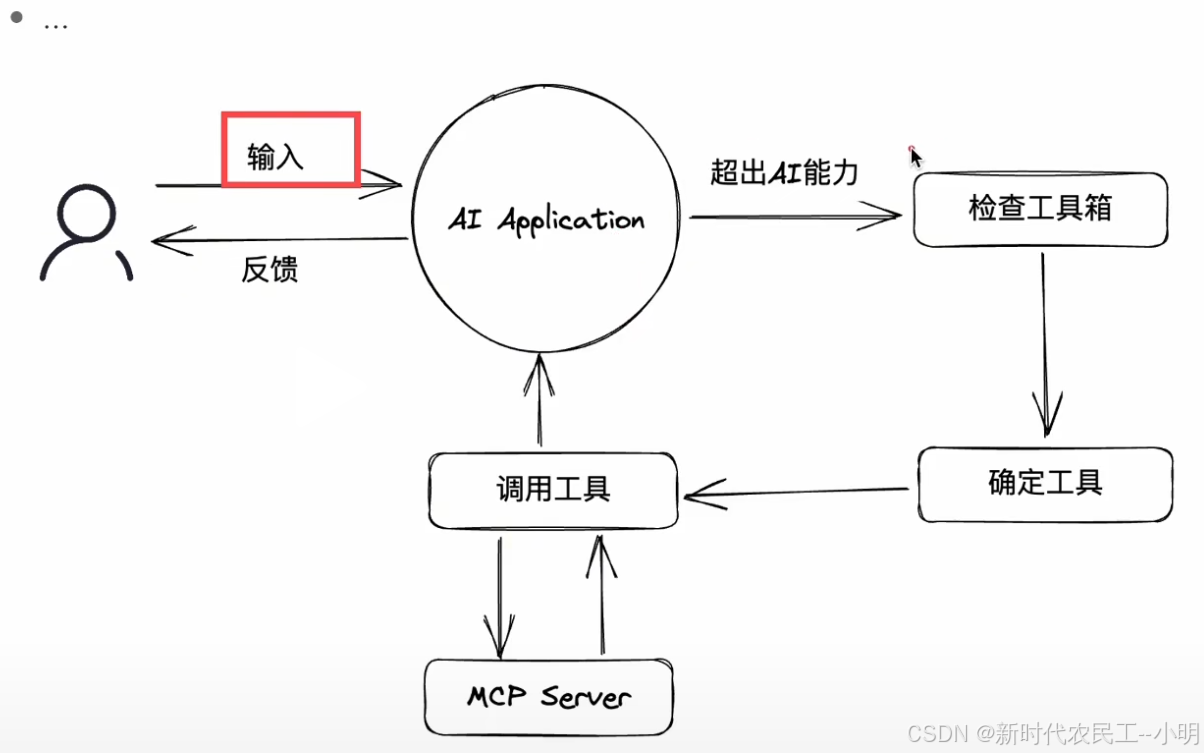
挂载第三方mcp服务
-
有很多开源的mcp服务聚会平台,可直接添加到模型工具箱中
https://github.com/modelcontextprotocol/servers
https://mcpservers.org/
https://mcp.so/
https://modelscope.cn/mcp -
这里个人比较推荐最后一个,这些MCP服务有nodejs的有py的还有Go的,使用前需先保证本地有可执行环境,
终结
- 当前ai模型不能实现的功能可自行编写工具进行辅助
- mcp服务开发完成后可发行到npm上供团队或开源使用
- 以上的内容均为个人心得,有错误的地方欢迎指出

有“AI”的1024 = 2048,欢迎大家加入2048 AI社区
更多推荐
 9
9 0
0- 0


 已为社区贡献1条内容

所有评论(0)