【祛魅】一篇文章带你读懂AI领域的各种名词
AI领域的名词越来越多,有人说AI的落地场景没看见多少,但是名词整了确实不少。那么今天,我就带大家祛祛魅,这些名词都是咋出来的?
提示词
user prompt
什么是提示词?提示词就是你要表达的想法什么?你想让别人或者AI帮你办什么事,要清晰的表达出来,这就是提示词,比如帮我生成简历,帮我生成一个国庆出游规划表,帮我生成一个笑话等等,提示词既可以是文字,也可以是语音、图片、文档等等,我们以和ChatGPT的交互为例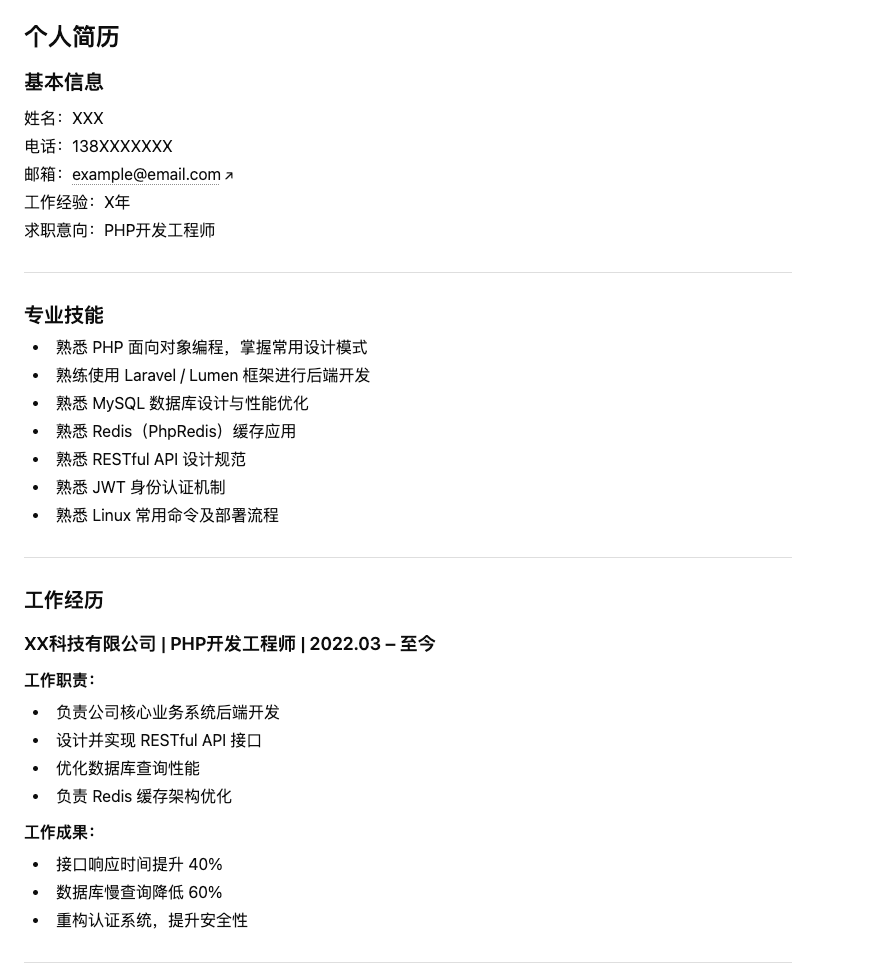
但是这种格式和内容不一定符合我们的预期,那么我们就可能就要吧啦吧啦跟他说很多规则。比如名字居中,日期加粗等等,但是这样的话我们使用起来就很费劲,每次都要说这么多。
command
这个时候,claude code提出一个方案,说这样,咱们把提示词结构化和抽象出来,放到一个配置文本中,例如 .claude/config.json 或 claude.json
{
  "commands": {
    "resume": {
      "description": "Generate a professional one-page resume in formal business tone",

      "prompt": "你是一名资深HR和技术面试官,请生成一份专业的一页中文简历。\n\n【基本要求】\n1. 使用正式商务语气\n2. 总长度控制在一页A4以内\n3. 结构清晰\n4. 使用Markdown排版\n\n【排版要求】\n- 姓名使用一级标题并居中表达\n- 联系方式单独一行\n- 日期加粗\n- 每个模块之间空一行\n\n【简历结构必须包含】\n1. 基本信息\n2. 专业技能\n3. 工作经历(按时间倒序,日期加粗)\n4. 项目经历\n5. 教育背景\n6. 自我评价\n\n【风格要求】\n- 逻辑清晰\n- 量化成果\n- 突出技术亮点\n- 避免空话套话\n\n【候选人信息】\n$1\n\n请直接输出最终简历,不要解释。"
    }
  }
}
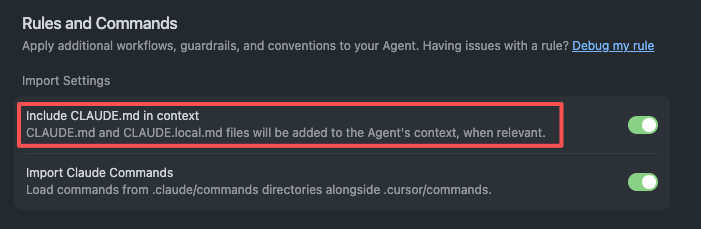
这样当我们使用的时候,使用快捷键的形式唤出command,比如 /resume 张三,3年PHP开发经验,熟悉Laravel,做过电商系统这种词的时候,就会触发该command,按prompt去生成。
system prompt
用户通过command,大大简化了提示词的输入,但是整合之后的prompt其实是很长的,提示词一多,AI理解起来准确度会更低。那怎么样让AI能够严格遵循我们想要的规则呢?那最好就是给一部分提示词增加点权重,让AI优先满足这个。那么这个增加了权重的提示词,就是system prompt。比如当我们去配置工作流的时候,就可以指定系统提示词和用户提示词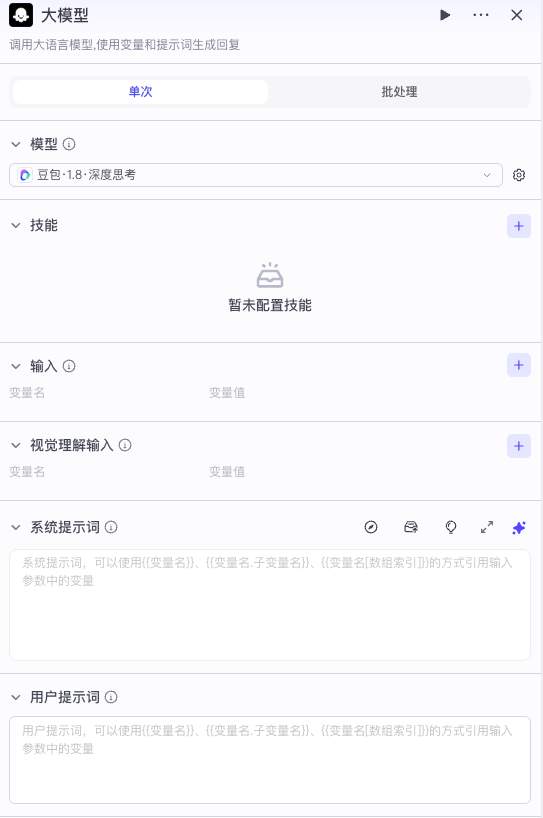
对于我们常用的一些AI软件,我们都是以文件的形式存放。比如cursor的.cursorrules和Claude code的claude.md,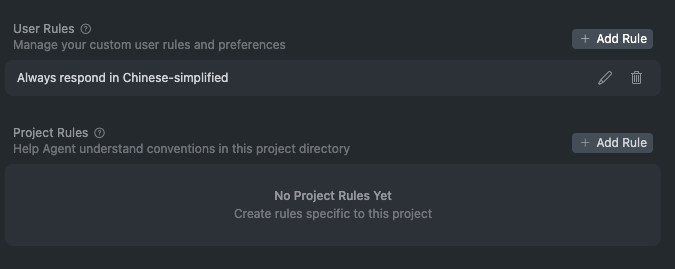
Cursor Rules 规则汇总
咱们拷贝一个看看是啥
You are a highly skilled Laravel package developer tasked with creating a new package. Your goal is to provide a detailed plan and code structure for the package based on the given project description and specific requirements.

1. Development Guidelines:

  - Use PHP 8.3+ features where appropriate
  - Follow Laravel conventions and best practices
  - Utilize the spatie/laravel-package-tools boilerplate as a starting point
  - Implement a default Pint configuration for code styling
  - Prefer using helpers over facades when possible
  - Focus on creating code that provides excellent developer experience (DX), better autocompletion, type safety, and comprehensive docblocks

2. Coding Standards and Conventions:

  - File names: Use kebab-case (e.g., my-class-file.php)
  - Class and Enum names: Use PascalCase (e.g., MyClass)
  - Method names: Use camelCase (e.g., myMethod)
  - Variable and Properties names: Use snake_case (e.g., my_variable)
  - Constants and Enum Cases names: Use SCREAMING_SNAKE_CASE (e.g., MY_CONSTANT)

3. Package Structure and File Organization:

  - Outline the directory structure for the package
  - Describe the purpose of each main directory and key files
  - Explain how the package will be integrated into a Laravel application

4. Testing and Documentation:

  - Provide an overview of the testing strategy (e.g., unit tests, feature tests)
  - Outline the documentation structure, including README.md, usage examples, and API references

Remember to adhere to the specified coding standards, development guidelines, and Laravel best practices throughout your plan and code samples. Ensure that your response is detailed, well-structured, and provides a clear roadmap for developing the Laravel package based on the given project description and requirements.
.claude/CLAUDE.md模板如下:
# Project: ShopFront

Next.js 14 e-commerce application with App Router, Stripe payments, and Prisma ORM.

## Code Style

- TypeScript strict mode, no `any` types
- Use named exports, not default exports
- CSS: Tailwind utility classes, no custom CSS files

## Commands

- `npm run dev`: Start development server (port 3000)
- `npm run test`: Run Jest tests
- `npm run test:e2e`: Run Playwright end-to-end tests
- `npm run lint`: ESLint check
- `npm run db:migrate`: Run Prisma migrations

## Architecture

- `/app`: Next.js App Router pages and layouts
- `/components/ui`: Reusable UI components
- `/lib`: Utilities and shared logic
- `/prisma`: Database schema and migrations
- `/app/api`: API routes

## Important Notes

- NEVER commit .env files
- The Stripe webhook handler in /app/api/webhooks/stripe must validate signatures
- Product images are stored in Cloudinary, not locally
- See @docs/authentication.md for auth flow details
metadata
我们平时使用AI可能会用与多种场景,比如写简历 写周报 写邮件 这些提示词我们不肯能塞到一个文件里面,这样既浪费token,准确度也不高,这个时候,我们就按场景把提示词拆分成一个个独立的md文件,拆分之后还需要AI知道我们的文件是干啥的,所以我们就在每个文件的开头加一段很短的描述信息,写清楚这个文件是干什么的,什么场景下调用等信息,这种简短的描述词就是metadata,AI只需要读取metadata就能知道要加载哪些文件。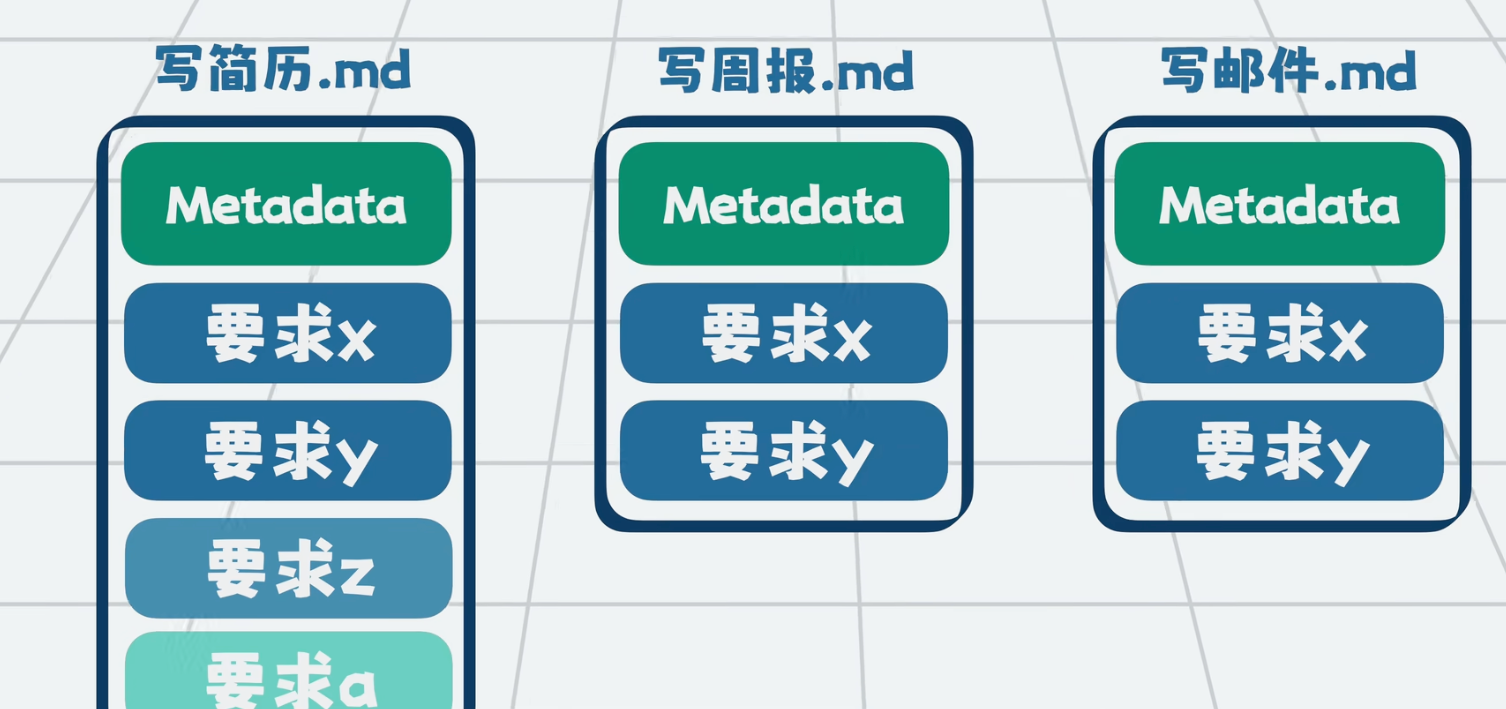
skill
在了解skill之前,我们先看一下reference和script
reference
当你以为meatadata就解决了一切的时候,问题来了,metadata解决了大场景的分类,但是 每个场景下可能有二级场景,举个例子,写简历这个提示词,它可能是偏前端的简历,也可能是运维的,服务端的简历,要体现出不同的工种,那么这个时候我们有两种做法,第一个是在简历的提示词里面整合所有的工种,或者是按不同工种放到不同的文件里面,并整合一个文件总纲,AI客户端调用cat命令读取总纲 按需读取文件的某一部分,这种按需读取数据的方式,就叫渐进式披露,这些被拆分的文件,就是reference,也就是参考资料,我们把这些放到reference目录下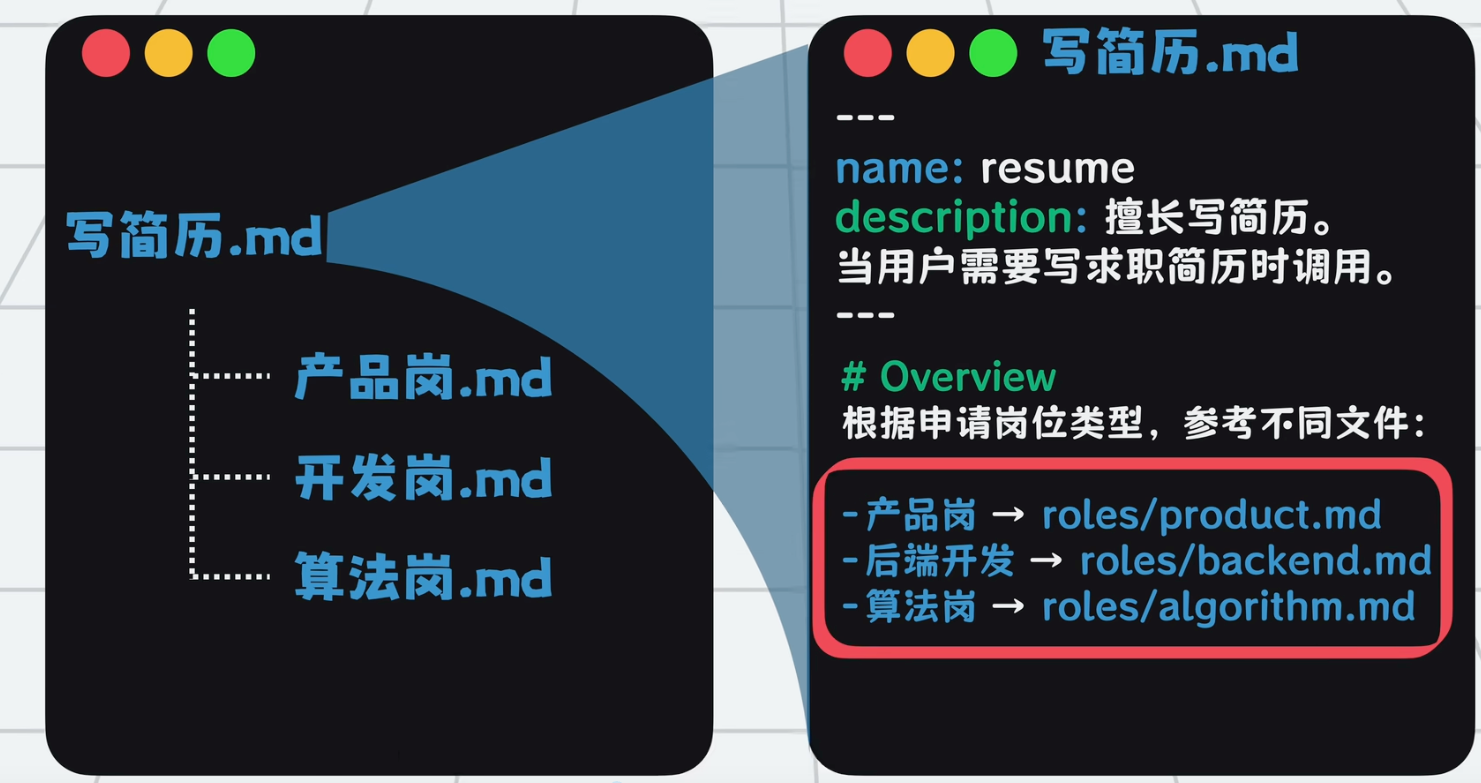
script
既然咱们可以调用系统命令读取文件,那么我们同样可以调用系统命令执行代码,比如通过你编写的Python脚本生成一个pdf文件,我们将这些可执行的脚本放到一个script目录中,并在提示词里写清楚什么情况调用什么脚本。
skill
好,接下来咱们把 metadata数据写到一个叫skill.md里面,并且写简历所涉及到的reference和script打包放到一个目录下,并起名为 resume_writer,这个东西就叫skill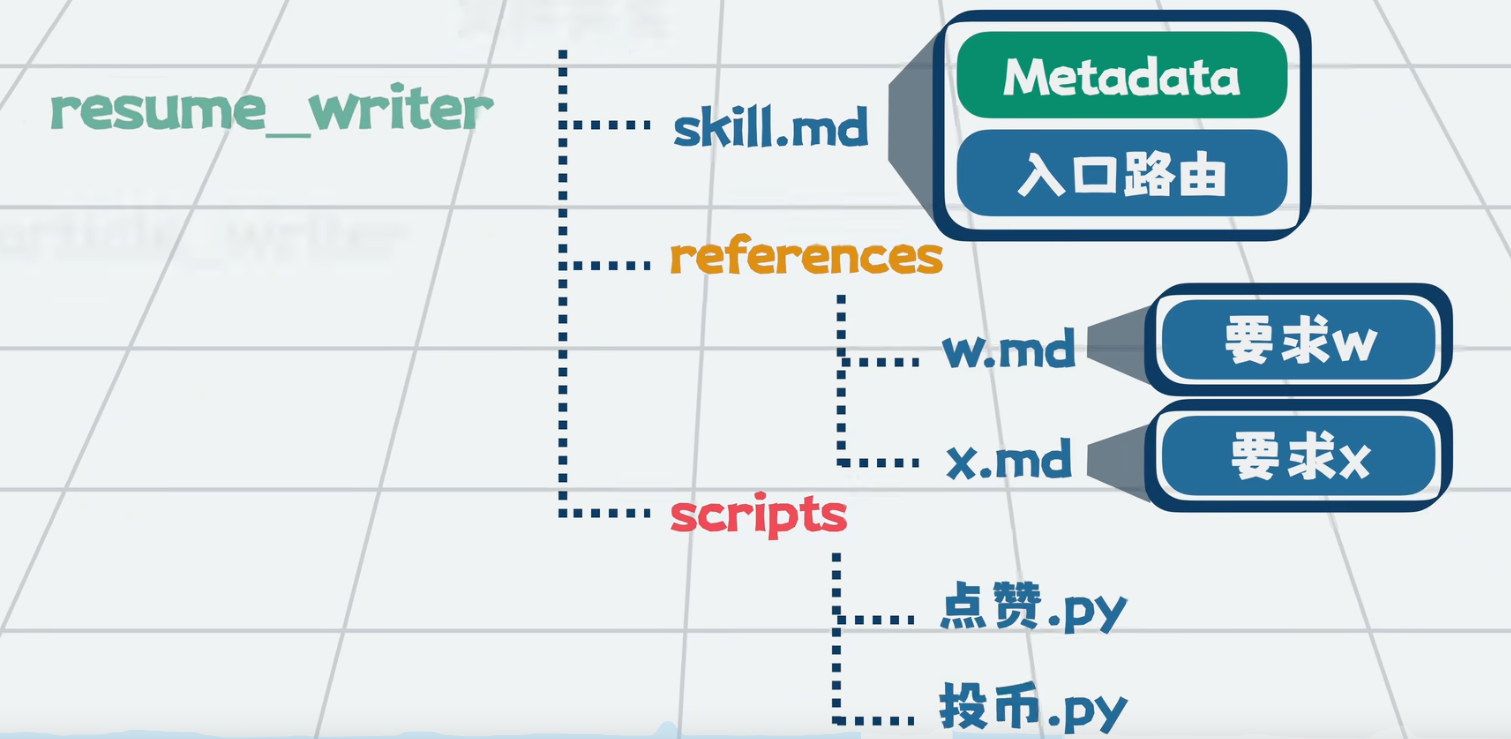
skill存放示例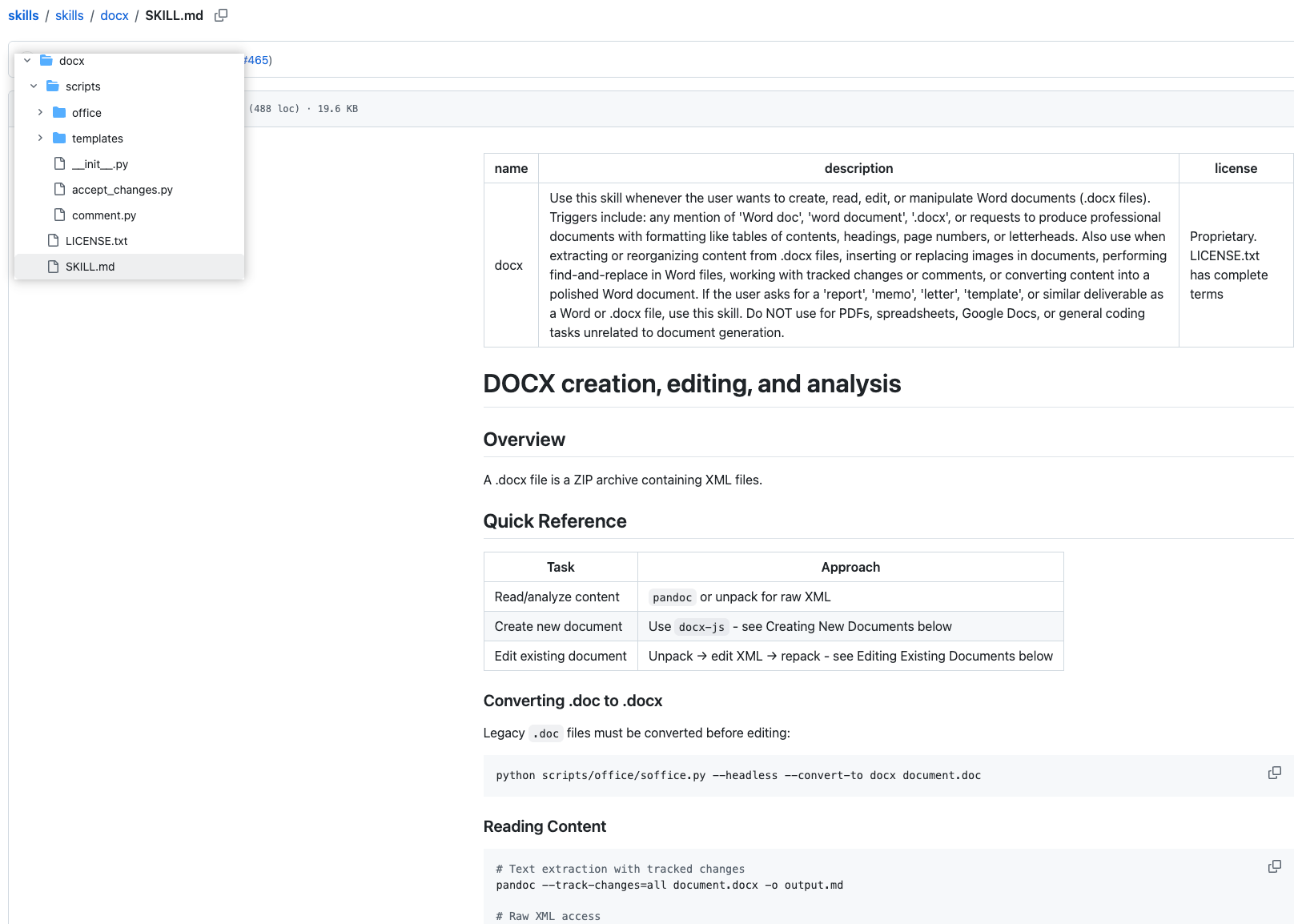
skill调用示例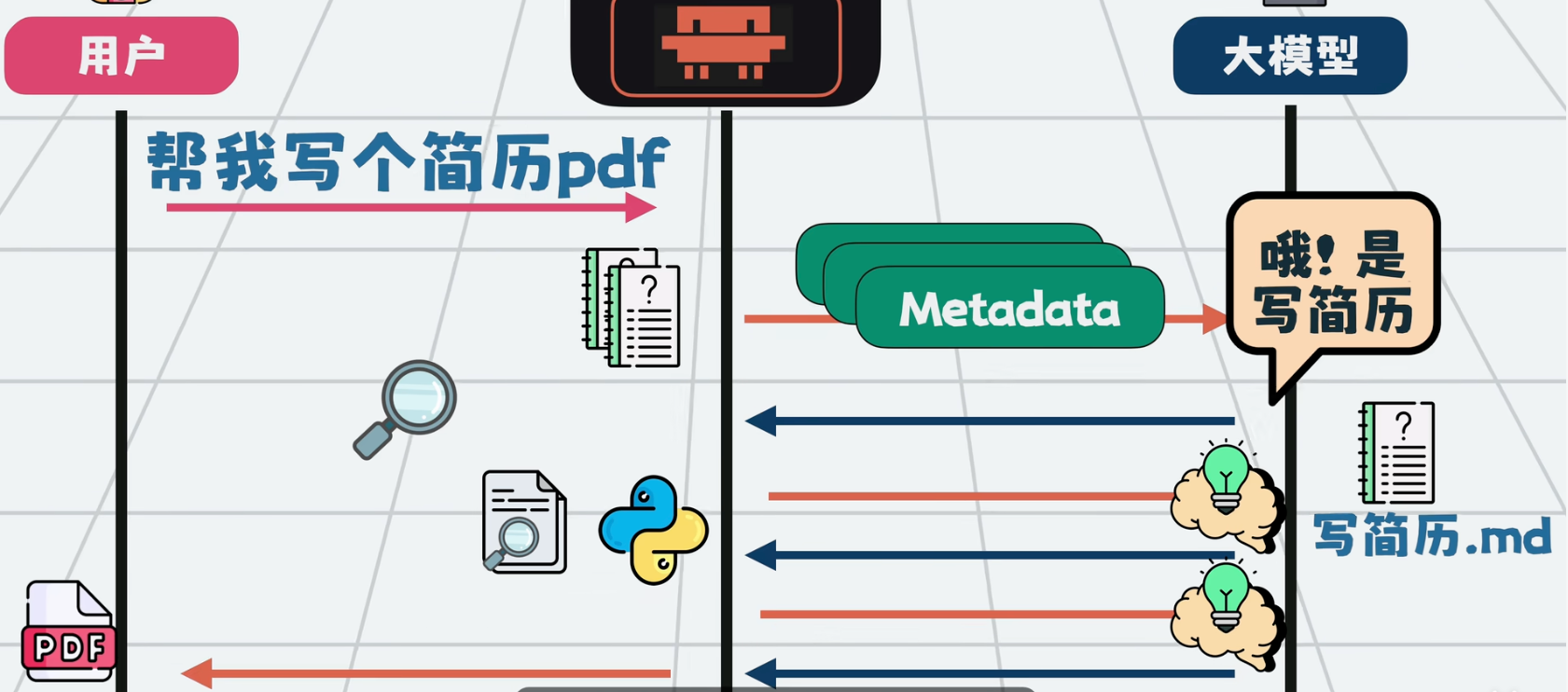
现在市面上有很多skill的仓库
skill仓库
Claude Skills: 从指令到资产的系统化构建指南
技能市场
MCP
我们前面说的skills,归根到底是告诉AI要怎么干一个事情,但是要干这个事情,可能需要一些工具来完成,比如你可以用script来执行脚本,也可以使用MCP。MCP最主要的是两个概念,一个是MCP协议,比如你想访问数据库,那么谁想要提供这个mcp工具,就得遵循mcp协议,遵循mcp实现的服务就是mcp服务。
workflow
这个我们我们都很熟悉了,就是完成一个任务,我们可以把任务拆分成好几个步骤,比如要制作一个视频,我们可以分为找选题->生成文案->生成分镜镜头->生成视频,以低代码的形式,通过拖拉拽和配置来实现,比如咱们用过的coze n8n dify等等。相比skills来说,可以这么简单理解,skills是由大模型驱动的动态的workflow
参考资料
名词祛魅:https://space.bilibili.com/302188068/search?keyword=7%E5%88%86%E9%92%9F
openclaw详解:https://www.bilibili.com/video/BV1naf7BhELi/?spm_id_from=333.1387.top_right_bar_window_history.content.click
openclaw文档:https://openclaw.cc/start/getting-started

有“AI”的1024 = 2048,欢迎大家加入2048 AI社区
更多推荐
 6
6 0
0- 0


 已为社区贡献2条内容

所有评论(0)