Oracle AI Database 26ai Data Guard Creation Using RMAN Active Duplicate
High availability is no longer optional. In modern enterprise environments, Oracle AI Database 26ai Data Guard plays a critical role in ensuring business continuity, disaster recovery, and minimal dow
High availability is no longer optional. In modern enterprise environments, Oracle AI Database 26ai Data Guard plays a critical role in ensuring business continuity, disaster recovery, and minimal downtime.
In this guide, we’ll walk through a real-world Oracle AI Database 26ai Data Guard creation using RMAN Active Duplicate, starting from one of the most critical and often misunderstood steps:
Table of Contents
Discover more
Oracle Data Guard
Computer data storage
Data Guard
Redo Logs
Oracle Database
sql
redo logs
rman
Db
backup
- Architecture Overview
- Step 1: Create PFILE for Standby (Critical Step)
- Step 2: Edit Standby PFILE Parameters
- Step 3: Configure TNS Services
- Step 4: Enable ARCHIVELOG on Primary
- Step 5: Add Standby Redo Logs
- Step 6: Start Standby Instance in NOMOUNT
- Step 7: RMAN Active Duplicate for Standby
- Step 8: Enable Data Guard Broker
- Step 9: Configure Data Guard Broker (DGMGRL)
- Step 10: Validate Standby
- Final Thoughts
Related posts

Oracle Database 19c to 26ai Upgrade Using AutoUpgrade: Step-by-Step Real-World Guide

Oracle 19c to Oracle 26ai Database Upgrade Using DBUA – Step-by-Step Real-World Guide
create pfile
cp inittest.ora inittetstby.ora
This article is written from a DBA’s perspective — practical, tested, and production-focused.
Architecture Overview
Discover more
Data Guard
Oracle RAC
Oracle Data Guard
RAC
Oracle Database
DATABASE
Database
Storage
sql
Db
- Primary Database:
test - Physical Standby Database:
teststby - Oracle Version: Oracle AI Database 26ai (23.26)
- Storage: ASM (
+DATA) - Duplication Method: RMAN Active Duplicate
- Broker: Data Guard Broker (DGMGRL)
Step 1: Create PFILE for Standby (Critical Step)
The foundation of Data Guard setup starts here.
Why this matters
If your PFILE is wrong, everything else will fail — startup, RMAN duplicate, or broker configuration.
Command
create pfile
cp inittest.ora inittetstby.ora
This step ensures we clone the primary initialization parameters and then adjust them for the standby environment.
This is why the focus keyword create pfile cp inittest.ora inittetstby.ora is so important — it defines the identity of your standby database.
Step 2: Edit Standby PFILE Parameters
Discover more
SQL
database
Backup
Software
DATABASE
Db
db
Database
Computer data storage
Redo Logs
After copying the PFILE, update the following parameters carefully.
Sample initteststby.ora
*.db_name='test'
*.db_unique_name='teststby'
*.control_files='+DATA/TESTSTBY/CONTROLFILE/current.299.1224326505','+DATA/TESTSTBY/CONTROLFILE/current.303.1224326505'
*.db_create_file_dest='+DATA'
*.db_recovery_file_dest='+DATA'
*.db_recovery_file_dest_size=13350469632
*.audit_file_dest='/u01/app/oracle/admin/teststby/adump'
*.diagnostic_dest='/u01/app/oracle'
*.enable_pluggable_database=true
*.remote_login_passwordfile='EXCLUSIVE'
*.sga_target=6G
*.pga_aggregate_target=2G
Discover more
Redo log
Oracle RAC
RAC
Redo Logs
db
redo logs
Data Guard
Software
database
Database
Key changes you must make
-
Change
db_unique_name -
Set
db_create_file_dest -
Set
db_recovery_file_dest -
Never change
db_name(must match primary)
Step 3: Configure TNS Services
Ensure bidirectional connectivity between primary and standby.
tnsnames.ora
TEST =
  (DESCRIPTION =
    (ADDRESS = (PROTOCOL = TCP)(HOST = 172.25.199.218)(PORT = 1521))
    (CONNECT_DATA =
      (SERVICE_NAME = test)
      (UR=A)
    )
  )

DR =
  (DESCRIPTION =
    (ADDRESS = (PROTOCOL = TCP)(HOST = 172.25.199.219)(PORT = 1521))
    (CONNECT_DATA =
      (SERVICE_NAME = teststby)
      (UR=A)
    )
  )
Discover more
Database
rman
Db
Software
Data Guard
Storage
Redo log
Oracle RAC
Backup
SQL
Test connectivity before proceeding — RMAN depends on this.
Step 4: Enable ARCHIVELOG on Primary
Data Guard cannot work without ARCHIVELOG mode.
shutdown immediate;
startup mount;
alter database archivelog;
alter database open;
Verify:
select log_mode from v$database;
Expected output:
ARCHIVELOG
Step 5: Add Standby Redo Logs
Check Primary Redo Thread Number:
 SELECT thread#, group#, sequence#, bytes/1024/1024, archived ,status FROM v$log ORDER BY thread#, group#;

   THREAD#     GROUP#  SEQUENCE# BYTES/1024/1024 ARC STATUS
---------- ---------- ---------- --------------- --- ----------------
         1          1          0             200 YES UNUSED
         1          2          0             200 YES UNUSED
         1          3          0             200 YES UNUSED
Standby redo logs should +1 online redo logs.
alter database add standby logfile thread 1 group 10 ('+DATA') size 200m;
alter database add standby logfile thread 1 group 11 ('+DATA') size 200m;
alter database add standby logfile thread 1 group 12 ('+DATA') size 200m;
alter database add standby logfile thread 1 group 13 ('+DATA') size 200m;
Check Standby Thread number for Standby redo logs configured for DR Server.
 SELECT thread#, group#, sequence#, bytes/1024/1024, archived, status FROM v$standby_log order by thread#, group#;

   THREAD#     GROUP#  SEQUENCE# BYTES/1024/1024 ARC STATUS
---------- ---------- ---------- --------------- --- ----------
         1         10          0             200 NO  UNASSIGNED
         1         11         80             200 YES ACTIVE
         1         12          0             200 YES UNASSIGNED
         1         13          0             200 YES UNASSIGNED
This step is mandatory for real-time apply.
Step 6: Start Standby Instance in NOMOUNT
Move the standby PFILE and start the instance.
mv initteststby.ora $ORACLE_HOME/dbs
startup nomount;
Ignore warnings about deprecated parameters — they are common in 26ai.
Step 7: RMAN Active Duplicate for Standby
Now the magic happens.
rman target sys/oracle123@test auxiliary sys/oracle123@dr
duplicate target database for standby from active database;
What RMAN does here:
- Copies control files
- Streams datafiles over the network
- Creates standby redo logs
- Mounts the standby database automatically
duplicate target database for standby from active database;
Starting Duplicate Db at 10-FEB-26
using target database control file instead of recovery catalog
allocated channel: ORA_AUX_DISK_1
channel ORA_AUX_DISK_1: SID=637 device type=DISK

contents of Memory Script:
{
   backup as copy reuse
   passwordfile auxiliary format  '/u01/app/oracle/product/23.26.0.0/dbhome_1/dbs/orapwteststby'   ;
}
executing Memory Script

Starting backup at 10-FEB-26
allocated channel: ORA_DISK_1
channel ORA_DISK_1: SID=630 device type=DISK
Finished backup at 10-FEB-26
duplicating Online logs to Oracle Managed File (OMF) location
duplicating Datafiles to Oracle Managed File (OMF) location

contents of Memory Script:
{
   sql clone "alter system set  control_files =
  ''+DATA/TESTSTBY/CONTROLFILE/current.396.1224837299'', ''+DATA/TESTSTBY/CONTROLFILE/current.397.1224837299'' comment=
 ''Set by RMAN'' scope=spfile";
   restore clone from service  'test' standby controlfile;
}
executing Memory Script

sql statement: alter system set  control_files =   ''+DATA/TESTSTBY/CONTROLFILE/current.396.1224837299'', ''+DATA/TESTSTBY/CONTROLFILE/current.397.1224837299'' comment= ''Set by RMAN'' scope=spfile

Starting restore at 10-FEB-26
using channel ORA_AUX_DISK_1

channel ORA_AUX_DISK_1: starting datafile backup set restore
channel ORA_AUX_DISK_1: using network backup set from service test
channel ORA_AUX_DISK_1: restoring control file
channel ORA_AUX_DISK_1: restore complete, elapsed time: 00:00:02
output file name=+DATA/TESTSTBY/CONTROLFILE/current.396.1224837299
output file name=+DATA/TESTSTBY/CONTROLFILE/current.397.1224837299
Finished restore at 10-FEB-26

contents of Memory Script:
{
   sql clone 'alter database mount standby database';
}
executing Memory Script

sql statement: alter database mount standby database

contents of Memory Script:
{
   set newname for clone tempfile  1 to new;
   set newname for clone tempfile  2 to new;
   set newname for clone tempfile  3 to new;
   switch clone tempfile all;
   set newname for clone datafile  1 to new;
   set newname for clone datafile  3 to new;
   set newname for clone datafile  4 to new;
   set newname for clone datafile  5 to new;
   set newname for clone datafile  6 to new;
   set newname for clone datafile  7 to new;
   set newname for clone datafile  8 to new;
   set newname for clone datafile  9 to new;
   set newname for clone datafile  10 to new;
   set newname for clone datafile  11 to new;
   set newname for clone datafile  12 to new;
   restore
   from  nonsparse   from service
 'test'   clone database
   ;
   sql 'alter system archive log current';
}
executing Memory Script

executing command: SET NEWNAME

executing command: SET NEWNAME

executing command: SET NEWNAME

renamed tempfile 1 to +DATA in control file
renamed tempfile 2 to +DATA in control file
renamed tempfile 3 to +DATA in control file

executing command: SET NEWNAME

executing command: SET NEWNAME

executing command: SET NEWNAME

executing command: SET NEWNAME

executing command: SET NEWNAME

executing command: SET NEWNAME

executing command: SET NEWNAME

executing command: SET NEWNAME

executing command: SET NEWNAME

executing command: SET NEWNAME

executing command: SET NEWNAME

Starting restore at 10-FEB-26
using channel ORA_AUX_DISK_1

channel ORA_AUX_DISK_1: starting datafile backup set restore
channel ORA_AUX_DISK_1: using network backup set from service test
channel ORA_AUX_DISK_1: specifying datafile(s) to restore from backup set
channel ORA_AUX_DISK_1: restoring datafile 00001 to +DATA
channel ORA_AUX_DISK_1: restore complete, elapsed time: 00:00:25
channel ORA_AUX_DISK_1: starting datafile backup set restore
channel ORA_AUX_DISK_1: using network backup set from service test
channel ORA_AUX_DISK_1: specifying datafile(s) to restore from backup set
channel ORA_AUX_DISK_1: restoring datafile 00003 to +DATA
channel ORA_AUX_DISK_1: restore complete, elapsed time: 00:00:25
channel ORA_AUX_DISK_1: starting datafile backup set restore
channel ORA_AUX_DISK_1: using network backup set from service test
channel ORA_AUX_DISK_1: specifying datafile(s) to restore from backup set
channel ORA_AUX_DISK_1: restoring datafile 00004 to +DATA
channel ORA_AUX_DISK_1: restore complete, elapsed time: 00:00:03
channel ORA_AUX_DISK_1: starting datafile backup set restore
channel ORA_AUX_DISK_1: using network backup set from service test
channel ORA_AUX_DISK_1: specifying datafile(s) to restore from backup set
channel ORA_AUX_DISK_1: restoring datafile 00005 to +DATA
channel ORA_AUX_DISK_1: restore complete, elapsed time: 00:00:16
channel ORA_AUX_DISK_1: starting datafile backup set restore
channel ORA_AUX_DISK_1: using network backup set from service test
channel ORA_AUX_DISK_1: specifying datafile(s) to restore from backup set
channel ORA_AUX_DISK_1: restoring datafile 00006 to +DATA
channel ORA_AUX_DISK_1: restore complete, elapsed time: 00:00:15
channel ORA_AUX_DISK_1: starting datafile backup set restore
channel ORA_AUX_DISK_1: using network backup set from service test
channel ORA_AUX_DISK_1: specifying datafile(s) to restore from backup set
channel ORA_AUX_DISK_1: restoring datafile 00007 to +DATA
channel ORA_AUX_DISK_1: restore complete, elapsed time: 00:00:01
channel ORA_AUX_DISK_1: starting datafile backup set restore
channel ORA_AUX_DISK_1: using network backup set from service test
channel ORA_AUX_DISK_1: specifying datafile(s) to restore from backup set
channel ORA_AUX_DISK_1: restoring datafile 00008 to +DATA
channel ORA_AUX_DISK_1: restore complete, elapsed time: 00:00:07
channel ORA_AUX_DISK_1: starting datafile backup set restore
channel ORA_AUX_DISK_1: using network backup set from service test
channel ORA_AUX_DISK_1: specifying datafile(s) to restore from backup set
channel ORA_AUX_DISK_1: restoring datafile 00009 to +DATA
channel ORA_AUX_DISK_1: restore complete, elapsed time: 00:00:15
channel ORA_AUX_DISK_1: starting datafile backup set restore
channel ORA_AUX_DISK_1: using network backup set from service test
channel ORA_AUX_DISK_1: specifying datafile(s) to restore from backup set
channel ORA_AUX_DISK_1: restoring datafile 00010 to +DATA
channel ORA_AUX_DISK_1: restore complete, elapsed time: 00:00:07
channel ORA_AUX_DISK_1: starting datafile backup set restore
channel ORA_AUX_DISK_1: using network backup set from service test
channel ORA_AUX_DISK_1: specifying datafile(s) to restore from backup set
channel ORA_AUX_DISK_1: restoring datafile 00011 to +DATA
channel ORA_AUX_DISK_1: restore complete, elapsed time: 00:00:03
channel ORA_AUX_DISK_1: starting datafile backup set restore
channel ORA_AUX_DISK_1: using network backup set from service test
channel ORA_AUX_DISK_1: specifying datafile(s) to restore from backup set
channel ORA_AUX_DISK_1: restoring datafile 00012 to +DATA
channel ORA_AUX_DISK_1: restore complete, elapsed time: 00:00:01
Finished restore at 10-FEB-26

sql statement: alter system archive log current

contents of Memory Script:
{
   switch clone datafile all;
}
executing Memory Script

datafile 1 switched to datafile copy
input datafile copy RECID=15 STAMP=1224837700 file name=+DATA/TESTSTBY/DATAFILE/system.398.1224837585
datafile 3 switched to datafile copy
input datafile copy RECID=16 STAMP=1224837700 file name=+DATA/TESTSTBY/DATAFILE/sysaux.399.1224837611
datafile 4 switched to datafile copy
input datafile copy RECID=17 STAMP=1224837701 file name=+DATA/TESTSTBY/DATAFILE/undotbs1.400.1224837635
datafile 5 switched to datafile copy
input datafile copy RECID=18 STAMP=1224837701 file name=+DATA/TESTSTBY/49F9D6621F742085E063D5C719AC6704/DATAFILE/system.401.1224837639
datafile 6 switched to datafile copy
input datafile copy RECID=19 STAMP=1224837701 file name=+DATA/TESTSTBY/49F9D6621F742085E063D5C719AC6704/DATAFILE/sysaux.402.1224837655
datafile 7 switched to datafile copy
input datafile copy RECID=20 STAMP=1224837701 file name=+DATA/TESTSTBY/DATAFILE/users.403.1224837669
datafile 8 switched to datafile copy
input datafile copy RECID=21 STAMP=1224837701 file name=+DATA/TESTSTBY/49F9D6621F742085E063D5C719AC6704/DATAFILE/undotbs1.404.1224837671
datafile 9 switched to datafile copy
input datafile copy RECID=22 STAMP=1224837701 file name=+DATA/TESTSTBY/49FA263B4CD35797E063D5C719AC8E41/DATAFILE/system.405.1224837677
datafile 10 switched to datafile copy
input datafile copy RECID=23 STAMP=1224837701 file name=+DATA/TESTSTBY/49FA263B4CD35797E063D5C719AC8E41/DATAFILE/sysaux.406.1224837693
datafile 11 switched to datafile copy
input datafile copy RECID=24 STAMP=1224837701 file name=+DATA/TESTSTBY/49FA263B4CD35797E063D5C719AC8E41/DATAFILE/undotbs1.407.1224837699
datafile 12 switched to datafile copy
input datafile copy RECID=25 STAMP=1224837701 file name=+DATA/TESTSTBY/49FA263B4CD35797E063D5C719AC8E41/DATAFILE/users.408.1224837703
Finished Duplicate Db at 10-FEB-26


RMAN> exit
No backup required — fast and efficient.
Step 8: Enable Data Guard Broker
On both primary and standby:
alter system set dg_broker_start=TRUE;
Verify parameters:
show parameter dg

NAME                                 TYPE        VALUE
------------------------------------ ----------- ------------------------------
adg_account_info_tracking            string      LOCAL
adg_redirect_dml                     boolean     FALSE
cell_offloadgroup_name               string
dg_broker_config_file1               string      /u01/app/oracle/product/23.26.
                                                 0.0/dbhome_1/dbs/dr1teststby.d
                                                 at
dg_broker_config_file2               string      /u01/app/oracle/product/23.26.
                                                 0.0/dbhome_1/dbs/dr2teststby.d
                                                 at
dg_broker_start                      boolean     TRUE
inmemory_adg_enabled                 boolean     TRUE
Step 9: Configure Data Guard Broker (DGMGRL)
Launch DGMGRL:
dgmgrl sys/oracle123
Create configuration
Syntax
 CREATE CONFIGURATION [<configuration-name>] [ [AS]
    PRIMARY DATABASE IS <db-unique-name>]
    CONNECT IDENTIFIER IS <connect-identifier>
    [ INCLUDE CURRENT DESTINATIONS ];
CREATE CONFIGURATION 'PROD to STBY'
AS PRIMARY DATABASE IS 'test'
CONNECT IDENTIFIER IS test;
Add standby
Syntax
 ADD { DATABASE | FAR_SYNC | MEMBER | RECOVERY_APPLIANCE } <db-unique-name>
    [AS CONNECT IDENTIFIER IS <connect-identifier>];
ADD DATABASE 'teststby'
AS CONNECT IDENTIFIER IS teststby
MAINTAINED AS PHYSICAL;
Enable configuration
ENABLE CONFIGURATION;
Step 10: Validate Standby
Check configuration
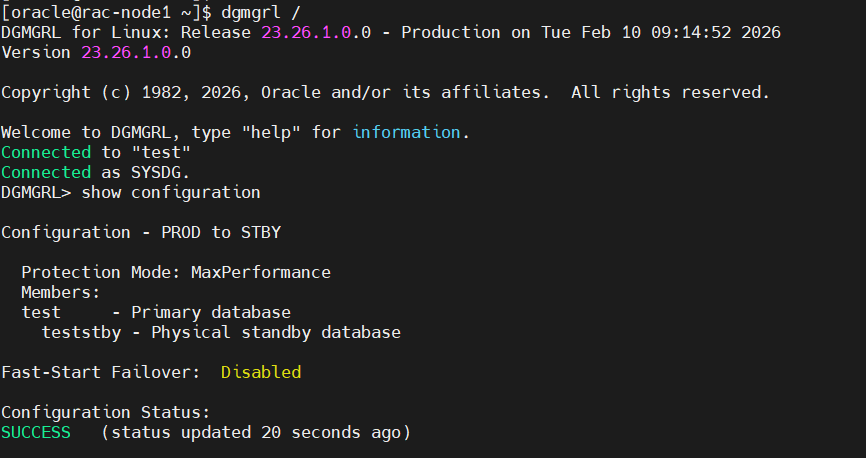
DGMGRL> show configuration

Configuration - PROD to STBY

  Protection Mode: MaxPerformance
  Members:
  test     - Primary database
    teststby - Physical standby database

Fast-Start Failover:  Disabled

Configuration Status:
SUCCESS   (status updated 20 seconds ago)
DGMGRL> VALIDATE DATABASE 'teststby';

  Database Role:     Physical standby database
  Primary Database:  test

  Ready for Switchover:  Yes
  Ready for Failover:    Yes (Primary Running)

  Flashback Database Status:
    Database  Status           Retention Target
    test      Off              1440
    teststby  Off              1440

  Managed by Clusterware:
    test    :  YES
    teststby:  NO

  Parameter Settings:
    Parameter                       test Value               teststby Value
    DB_BLOCK_CHECKING               FALSE                    FALSE
    DB_BLOCK_CHECKSUM               TYPICAL                  TYPICAL
    DB_LOST_WRITE_PROTECT           AUTO                     AUTO


DGMGRL>
Expected result:
-
Ready for Switchover
-
Ready for Failover
-
No transport or apply lag
Final Thoughts
Oracle AI Database 26ai makes Data Guard faster, cleaner, and more resilient, but success still depends on doing the basics right.
And it all starts with one deceptively simple step:
create pfile cp inittest.ora inittetstby.ora
Get that right, and the rest of the Data Guard build becomes smooth and predictable.

有“AI”的1024 = 2048,欢迎大家加入2048 AI社区
更多推荐


 9
9 0
0- 0


 已为社区贡献219条内容

所有评论(0)