Claude Code 从 0 到 1 实战全攻略:掌握下一代编程 Agent 的核心能力
摘要: Claude Code是一款强大的AI编程助手,支持代码生成、终端命令执行、多模态交互等丰富功能。本文详细介绍了其环境搭建、交互模式切换、权限管理等基础操作,并深入解析了复杂任务处理、MCP协议实现UI精准还原、上下文管理等高级功能。通过Hook自动化、Agent Skill定制、SubAgent独立任务处理等扩展功能,开发者可将其从基础工具升级为高效生产力平台。文章还以待办应用开发为例,
引言
背景介绍
在大模型驱动的编程助手时代,Claude Code 凭借其强大的自然语言处理能力和丰富的功能,已经成为众多开发者提升效率的新选择。它不仅能够生成代码,还能执行终端命令、调用外部工具、处理图片、管理后台任务,甚至支持自定义扩展。
问题陈述
然而,很多开发者在使用 Claude Code 时,往往只停留在“让 AI 写代码”的初级阶段,没有充分发挥其潜力。如何将 Claude Code 从“玩具”变为真正的“生产力工具”,是许多开发者面临的挑战。
文章目标
本文将系统梳理 Claude Code 的核心能力,并通过详细的示例和最佳实践,展示如何高效、安全、可维护地使用这一强大工具。无论你是初学者还是有经验的开发者,都能从本文中获得实用的知识和技能。
一、环境搭建与基础交互
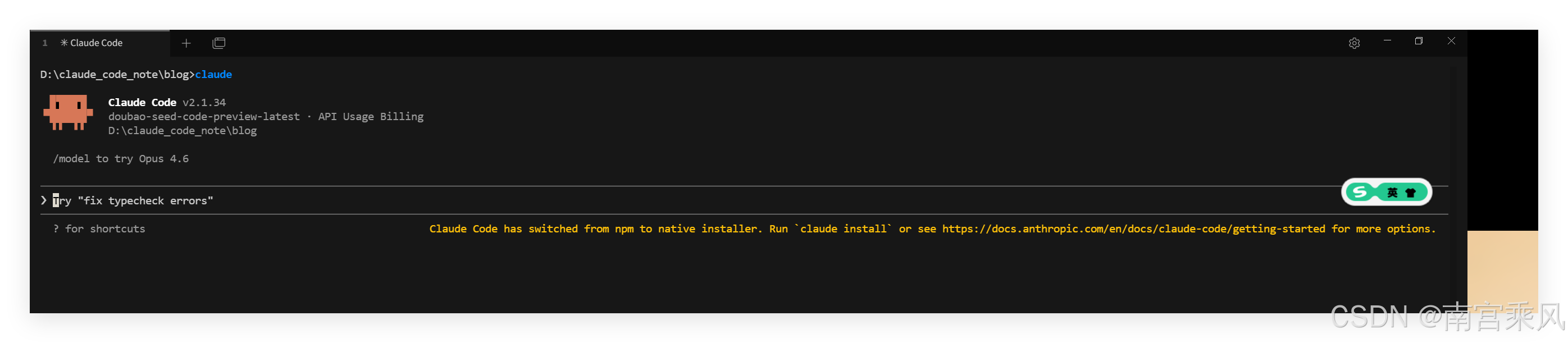
1. 安装与登录
- 官方安装:通过官方命令安装
claudeCLI,支持 macOS、Linux 和 Windows 系统。 - 认证方式:
- 订阅用户(Pro/Max):直接授权,享受无限制使用和优先支持。
- API Key 用户:按 Token 计费,适合小团队或个人开发者。
- 国产替代方案:通过设置环境变量,可使用 GLM、MiniMax 等国产大模型驱动 Claude Code,打破了对特定模型的绑定。
参考:
Claude Code连接国内大模型,便宜、高效。
国产大模型接入 Claude Code 教程:以 Doubao-Seed-Code 为例
2. 三种交互模式
Claude Code 提供三种操作模式,适应不同场景:
| 模式 | 行为 | 适用场景 |
|---|---|---|
| 默认模式(Default) | 每次文件修改前均需确认 | 初期探索、高安全性需求 |
| 自动模式(Accept Edits) | 自动执行所有文件写入 | 快速迭代、信任模型输出 |
| 规划模式(Plan Mode) | 仅讨论方案,不执行任何修改 | 架构设计、复杂需求拆解 |
切换方式:使用
Shift + Tab循环切换模式,这是提高效率的关键技巧。
3. 常用命令
# 打开当前目录下的聊天记录
claude --resume

# 继续当前目录的上一次聊天
claude -c

# 为项目生成或更新文档 CLAUDE.md
/init

# 给予全部权限(风险大)
# 开启聊天时赋予权限
claude -c --dangerously-skip-permissions
# 聊天时赋予权限
shift + TAB

# 开启 plan 模式(仅赋予 Read 权限,可用于快速了解代码库而不轻易更改)
两次 shift + TAB

# 开启思考模式
在提示词中加入 ultrathink 等关键字

# 选择模型
/model

# 查看上下文占用情况
/context

# 引用文件
@ + 文件名
| 命令 | 功能 | 使用频率 |
|---|---|---|
/help |
查看帮助 | ⭐⭐⭐⭐⭐ |
/clear |
清除历史 | ⭐⭐⭐⭐⭐ |
/memory |
项目记忆 | ⭐⭐⭐⭐ |
/cost |
Token 使用 | ⭐⭐⭐⭐ |
/compact |
压缩会话 | ⭐⭐⭐ |
/doctor |
系统检查 | ⭐⭐⭐ |
/config |
查看配置 | ⭐⭐ |
/init |
初始化项目 | ⭐⭐ |
二、复杂任务处理与终端控制
1. 执行终端命令
- 快速进入 Bash 模式:在输入框前加
!可直接执行任意终端命令(如!open index.html)。 - 权限控制机制:执行
mkdir、npm install等命令时,Claude Code 会主动请求授权,确保操作安全性。
2. 危险权限跳过(慎用!)
- 完全绕过权限确认:启动时添加
--dangerously-skip-permissions参数,可完全绕过权限确认。 - 模式显示:此时模式显示为
bypass permissions on。 - 安全警告:该选项赋予 Agent 完整终端权限,虽极大提升效率,但存在潜在风险,仅建议在受控环境中使用。
3. 后台任务管理
- 解决阻塞问题:长时间运行的服务(如
npm run dev)会阻塞主对话。 - 管理方法:
Ctrl + B:将当前任务转入后台;/tasks:查看所有后台任务;- 按
k:终止指定任务。
三、多模态与上下文管理
1. 图片输入支持 UI 还原
- 两种输入方式:
- 直接拖拽 PNG/JPG 到终端;
Ctrl + V粘贴(macOS 系统也需用Ctrl,非Cmd)。
- 局限性:基于截图生成的 UI 精度有限,字体、间距等细节可能存在偏差。
2. MCP(Model Context Protocol)实现精准还原
- 协议介绍:MCP 是大模型与外部服务的标准通信协议,实现更精准的 UI 还原。
- Figma MCP 示例:
- 安装 Figma MCP Server;
- 通过
/mcp命令授权并启用; - 提供 Figma 设计稿链接;
- Claude Code 自动调用
getDesignContext和getScreenshot,获取精确的设计参数(包括组件层级、样式、间距等); - 生成高保真 HTML/CSS 代码。
✅ 效果对比:MCP 生成的 UI 效果显著优于纯图像识别,推荐用于专业 UI 开发。
3. 上下文压缩与持久化
/compact命令:压缩当前会话上下文,保留关键信息,减少 Token 消耗;/clear命令:彻底清空上下文(适用于新任务);CLAUDE.md文件:项目级配置文件,每次启动自动加载。- 可写入项目说明、编码规范、用户偏好等;
- 支持中英文,可手动编辑;
- 通过
/memory快速打开编辑。
四、高级功能扩展与定制
1. Hook:自动化后处理
-
触发机制:在特定事件(如文件写入后)触发自定义脚本。
-
自动代码格式化示例:
# 在 settings.json 中配置 { "hooks": { "on_file_write": [ "jq -r '.file_path' | xargs prettier --write" ] } } -
配置级别:
- 项目本地(
settings.local.json,不提交 Git); - 项目共享(
settings.json,团队共用); - 用户全局(个人偏好)。
- 项目本地(
2. Agent Skill:动态 Prompt 插件
- 功能介绍:类似“技能说明书”,指导模型按特定格式响应。
- 使用场景:每日开发日报、API 文档生成等重复性任务。
- 创建方式:
- 在
~/.claude/skills/daily-report/SKILL.md中定义名称、描述和模板; - Claude Code 自动识别并调用;
- 也可通过
/daily-report主动触发。
- 在
3. SubAgent:独立上下文的子代理
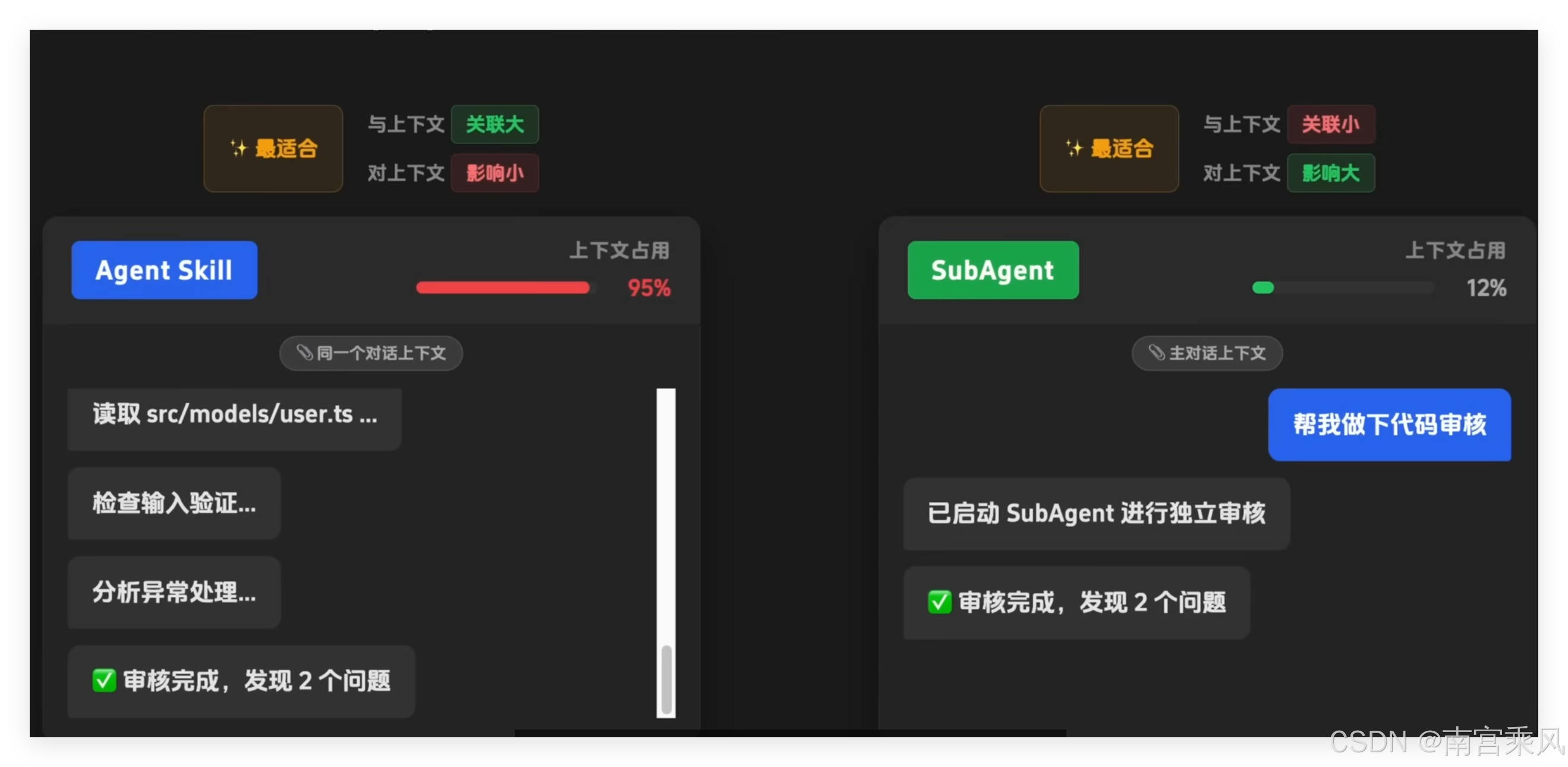
- 核心区别:
- Skill:共享主上下文,适合轻量、关联性强的任务;
- SubAgent:拥有独立上下文,适合重计算、高噪声任务(如代码审查、大型重构)。
- 创建流程:
/agent→ 创建新 Agent;- 定义职责、工具集(如只读)、模型、颜色标识;
- 编辑描述文件,明确审查规则或处理逻辑。
4. Plugin:能力全家桶
- 插件定义:将 Skill、SubAgent、Hook、MCP 等打包为插件。
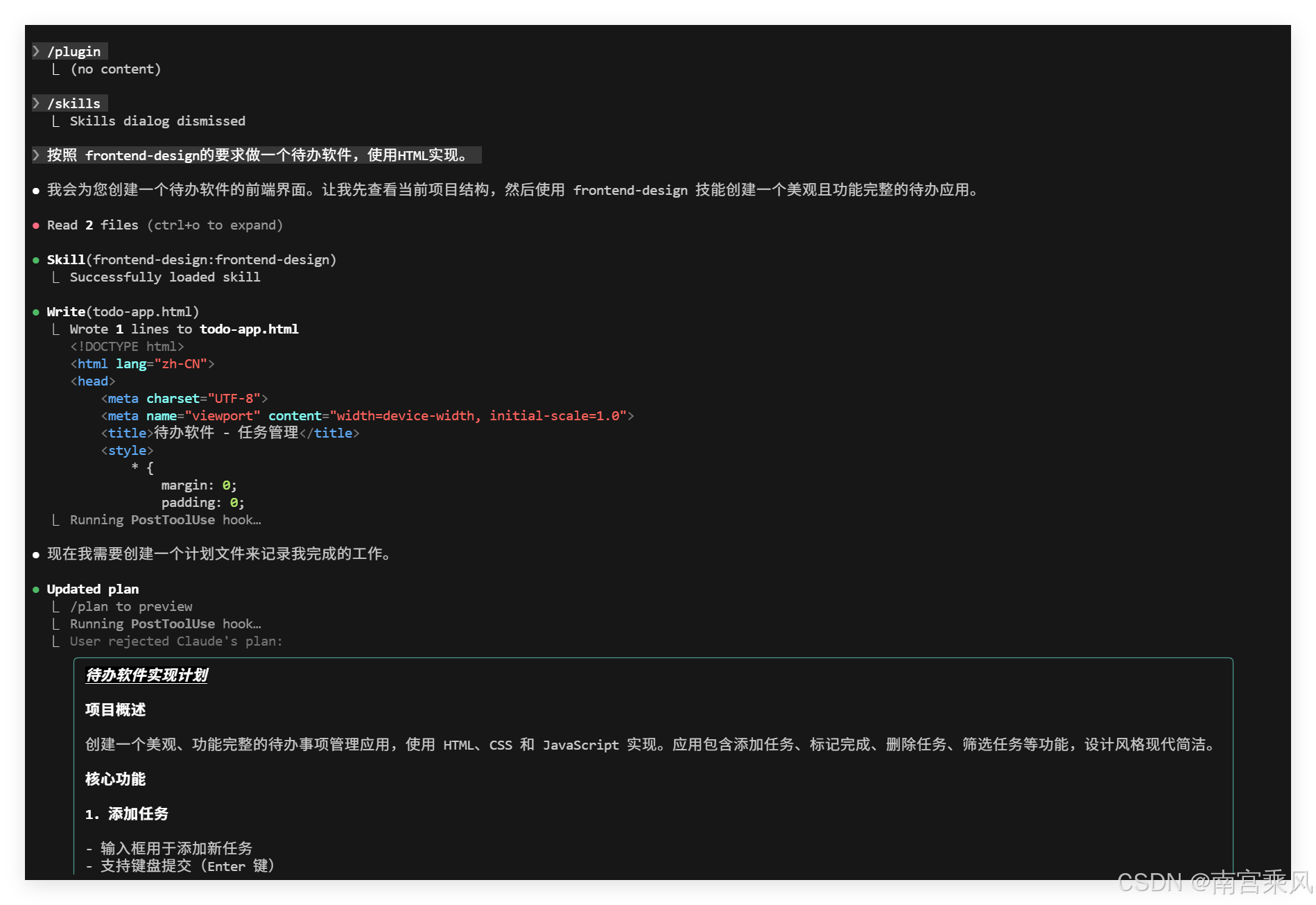
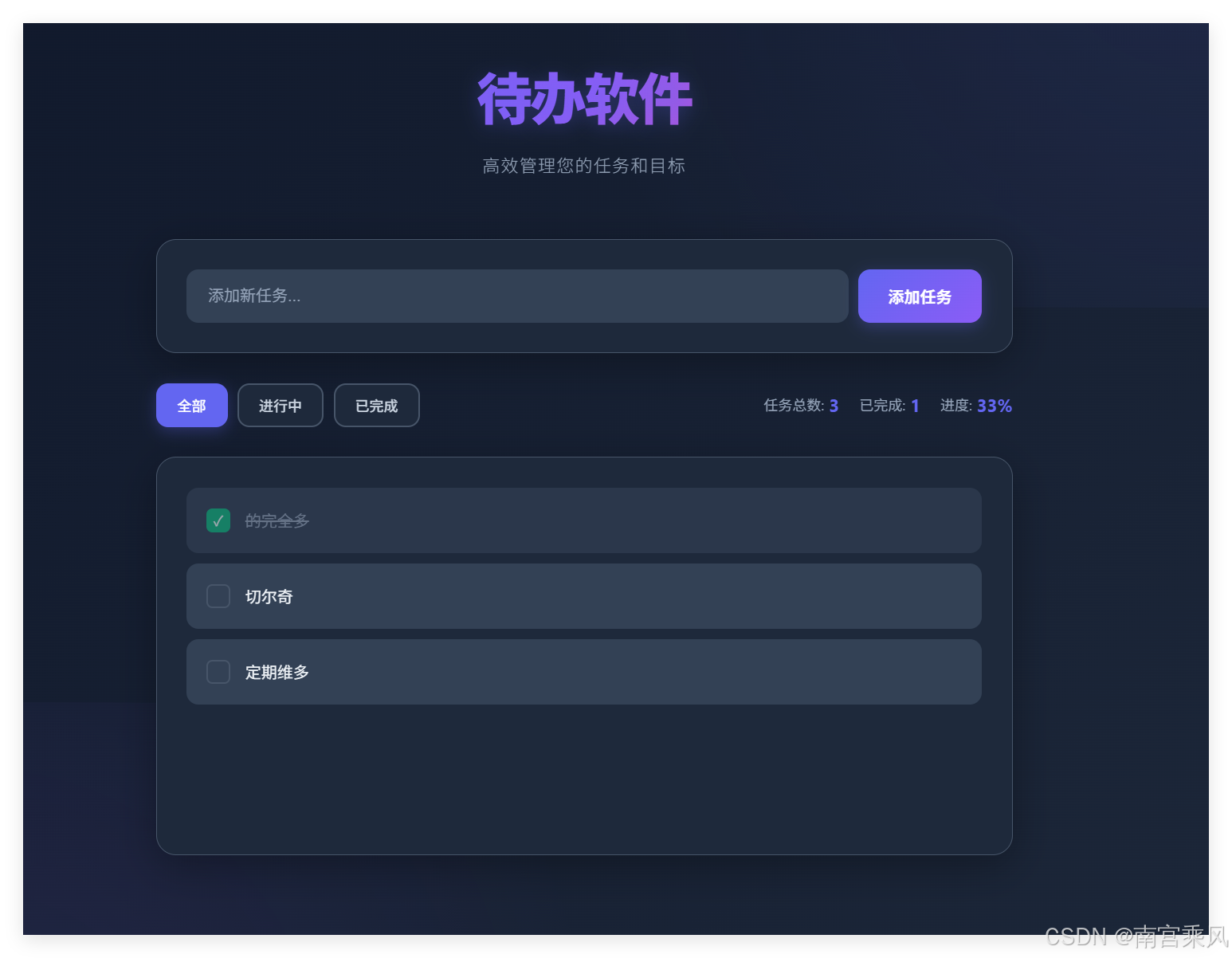
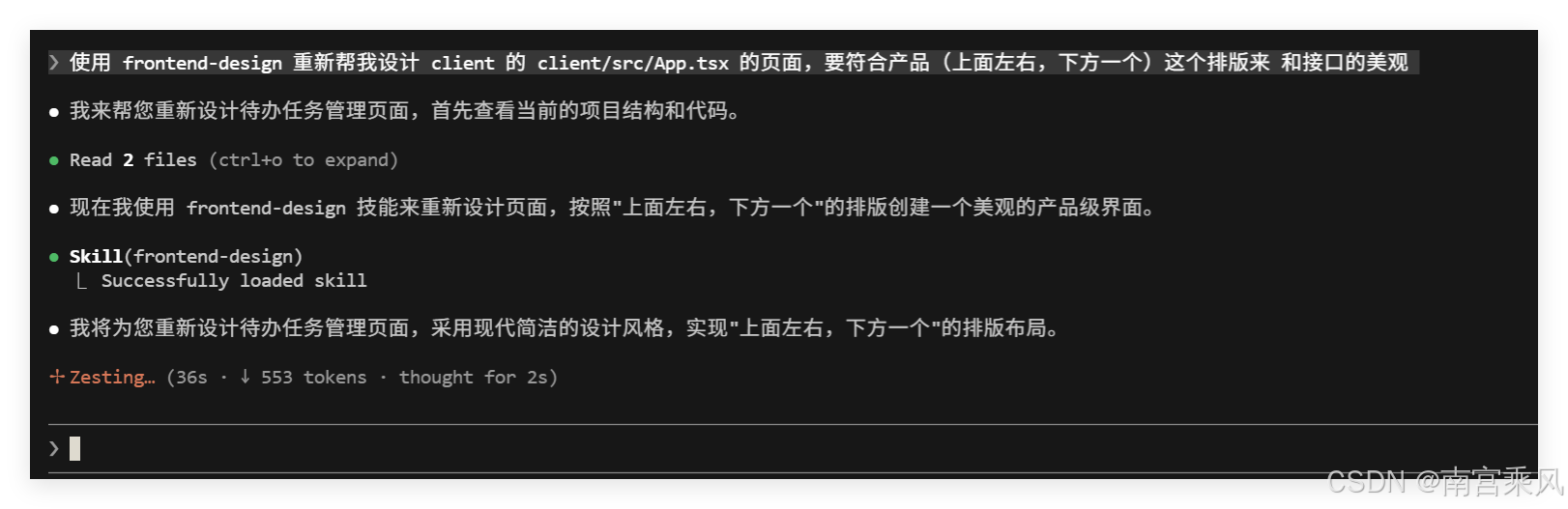
frontend-design插件示例:- 安装后自动注入 UI 设计规范;
- 生成的界面更现代、美观,打破“AI 默认紫”的刻板印象;
- 通过
/plugin管理安装与发现。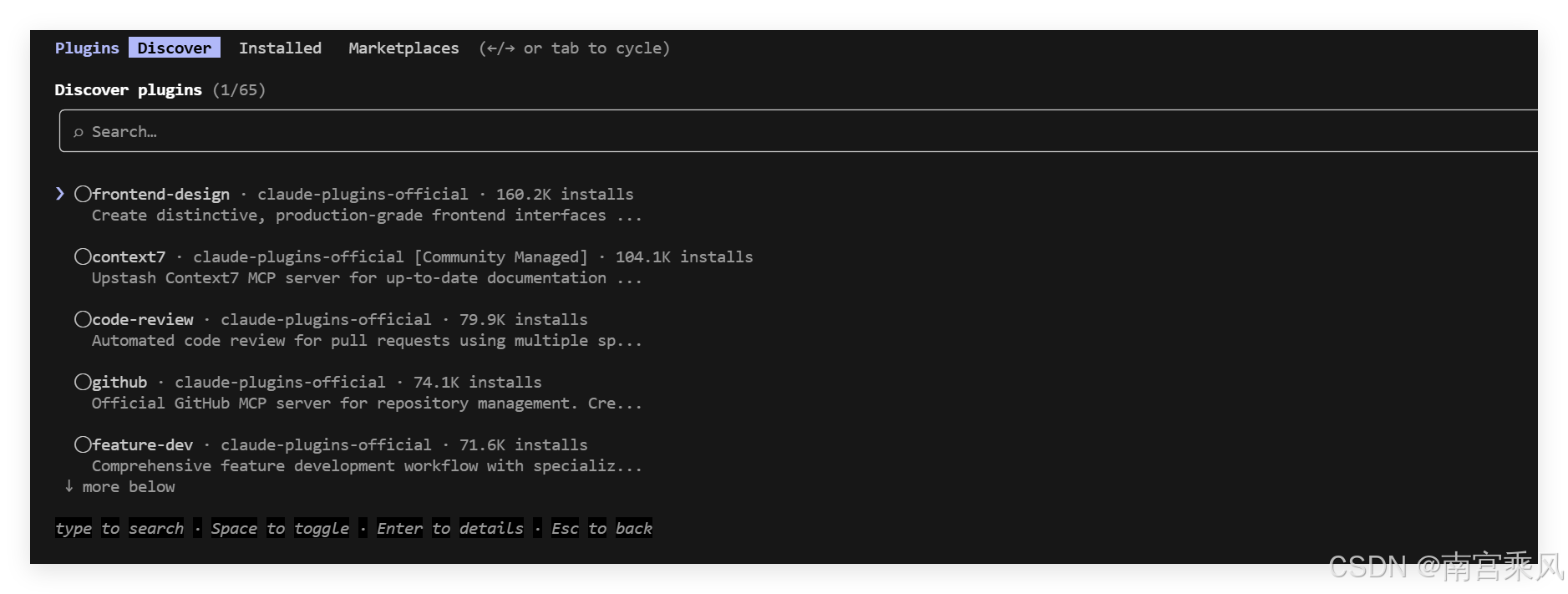
五、待办应用开发实战
1. 需求分析与架构设计
我们将开发一个简单但功能完整的待办应用,包括以下功能:
- 待办任务的添加、删除、标记完成/未完成
- 待办任务的分类管理
- 待办任务的搜索和筛选
- 响应式设计,支持移动端和桌面端
2. 技术栈选择
-
前端:React + TypeScript + Tailwind CSS
-
后端:Node.js + Express
-
数据库:SQLite(简单易部署)
-
工具:Claude Code(全程辅助开发)
-
工具:Claude Code(全程辅助开发)
3. 项目初始化与配置
# 创建项目目录
mkdir todo-app && cd todo-app

# 初始化前端项目
npx create-react-app client --template typescript
cd client && npm install -D tailwindcss@3.4.0 postcss@8 autoprefixer@10
cd client && npx tailwindcss init -p

# 初始化后端项目
mkdir server && cd server
npm init -y
npm install express sqlite3 cors
4. 后端开发(Node.js + Express)
// server/index.js
const express = require('express');
const sqlite3 = require('sqlite3').verbose();
const cors = require('cors');

const app = express();
app.use(cors());
app.use(express.json());

// 连接数据库
const db = new sqlite3.Database('./todos.db');

// 创建待办任务表
db.run(`CREATE TABLE IF NOT EXISTS todos (
  id INTEGER PRIMARY KEY AUTOINCREMENT,
  text TEXT NOT NULL,
  completed INTEGER DEFAULT 0,
  category TEXT DEFAULT 'General',
  createdAt DATETIME DEFAULT CURRENT_TIMESTAMP
)`);

// 获取所有待办任务
app.get('/api/todos', (req, res) => {
  const { category, completed } = req.query;
  let query = 'SELECT * FROM todos';
  let params = [];

  if (category || completed !== undefined) {
    query += ' WHERE';
    if (category) {
      query += ' category = ?';
      params.push(category);
    }
    if (completed !== undefined) {
      if (category) query += ' AND';
      query += ' completed = ?';
      params.push(completed);
    }
  }

  db.all(query, params, (err, rows) => {
    if (err) {
      res.status(500).json({ error: err.message });
      return;
    }
    res.json({ todos: rows });
  });
});

// 添加待办任务
app.post('/api/todos', (req, res) => {
  const { text, category } = req.body;

  if (!text) {
    res.status(400).json({ error: 'Text is required' });
    return;
  }

  db.run('INSERT INTO todos (text, category) VALUES (?, ?)', [text, category || 'General'], function(err) {
    if (err) {
      res.status(500).json({ error: err.message });
      return;
    }
    res.json({ id: this.lastID, text, category: category || 'General', completed: 0 });
  });
});

// 更新待办任务
app.put('/api/todos/:id', (req, res) => {
  const { id } = req.params;
  const { text, completed, category } = req.body;

  // 构建动态更新查询
  const updates = [];
  const params = [];

  if (text !== undefined) {
    updates.push('text = ?');
    params.push(text);
  }
  if (completed !== undefined) {
    updates.push('completed = ?');
    params.push(completed);
  }
  if (category !== undefined) {
    updates.push('category = ?');
    params.push(category);
  }

  if (updates.length === 0) {
    res.status(400).json({ error: 'No fields to update' });
    return;
  }

  params.push(id);
  const query = `UPDATE todos SET ${updates.join(', ')} WHERE id = ?`;

  db.run(query, params, function(err) {
    if (err) {
      res.status(500).json({ error: err.message });
      return;
    }

    // 查询更新后的完整记录
    db.get('SELECT * FROM todos WHERE id = ?', id, (err, row) => {
      if (err) {
        res.status(500).json({ error: err.message });
        return;
      }
      res.json(row);
    });
  });
});

// 删除待办任务
app.delete('/api/todos/:id', (req, res) => {
  const { id } = req.params;

  db.run('DELETE FROM todos WHERE id = ?', id, function(err) {
    if (err) {
      res.status(500).json({ error: err.message });
      return;
    }
    res.json({ id: parseInt(id) });
  });
});

// 启动服务器
const PORT = process.env.PORT || 3001;
app.listen(PORT, () => {
  console.log(`Server running on port ${PORT}`);
});
5. 前端开发(React + TypeScript)
// client/src/App.tsx
import React, { useState, useEffect } from 'react';
import './App.css';

interface Todo {
  id: number;
  text: string;
  completed: number;
  category: string;
  createdAt: string;
}

function App() {
  const [todos, setTodos] = useState<Todo[]>([]);
  const [newTodo, setNewTodo] = useState('');
  const [newCategory, setNewCategory] = useState('General');
  const [filterCategory, setFilterCategory] = useState('All');
  const [filterCompleted, setFilterCompleted] = useState('All');
  const [searchText, setSearchText] = useState('');

  // 从后端获取待办任务
  useEffect(() => {
    fetchTodos();
  }, [filterCategory, filterCompleted]);

  const fetchTodos = async () => {
    let url = 'http://localhost:3001/api/todos';
    const params = new URLSearchParams();

    if (filterCategory !== 'All') params.append('category', filterCategory);
    if (filterCompleted !== 'All') params.append('completed', filterCompleted === 'Completed' ? '1' : '0');

    if (params.toString()) url += `?${params.toString()}`;

    try {
      const response = await fetch(url);
      const data = await response.json();
      setTodos(data.todos);
    } catch (error) {
      console.error('Error fetching todos:', error);
    }
  };

  // 添加待办任务
  const addTodo = async (e: React.FormEvent) => {
    e.preventDefault();

    if (!newTodo.trim()) return;

    try {
      const response = await fetch('http://localhost:3001/api/todos', {
        method: 'POST',
        headers: { 'Content-Type': 'application/json' },
        body: JSON.stringify({ text: newTodo, category: newCategory })
      });

      const todo = await response.json();
      setTodos([...todos, todo]);
      setNewTodo('');
    } catch (error) {
      console.error('Error adding todo:', error);
    }
  };

  // 更新待办任务
  const updateTodo = async (id: number, updates: Partial<Todo>) => {
    try {
      const response = await fetch(`http://localhost:3001/api/todos/${id}`, {
        method: 'PUT',
        headers: { 'Content-Type': 'application/json' },
        body: JSON.stringify(updates)
      });

      const updatedTodo = await response.json();
      setTodos(todos.map(todo => todo.id === id ? updatedTodo : todo));
    } catch (error) {
      console.error('Error updating todo:', error);
    }
  };

  // 删除待办任务
  const deleteTodo = async (id: number) => {
    try {
      await fetch(`http://localhost:3001/api/todos/${id}`, { method: 'DELETE' });
      setTodos(todos.filter(todo => todo.id !== id));
    } catch (error) {
      console.error('Error deleting todo:', error);
    }
  };

  // 搜索待办任务
  const filteredTodos = todos.filter(todo =>
    todo.text && todo.text.toLowerCase().includes(searchText.toLowerCase())
  );

  // 获取所有唯一分类
  const categories = ['All', ...new Set(todos.map(todo => todo.category))];

  return (
    <div className="min-h-screen bg-gradient-to-br from-blue-50 via-purple-50 to-pink-50 py-8 px-4">
      <div className="max-w-7xl mx-auto">
        {/* 标题区域 */}
        <div className="text-center mb-12">
          <h1 className="text-5xl font-bold bg-gradient-to-r from-blue-600 to-purple-600 bg-clip-text text-transparent mb-4">
            待办任务管理
          </h1>
          <p className="text-gray-600 text-lg">高效管理您的日常任务,提升工作效率</p>
        </div>

        {/* 顶部左右布局 */}
        <div className="grid grid-cols-1 lg:grid-cols-2 gap-8 mb-12">
          {/* 左侧:添加任务表单 */}
          <div className="bg-white rounded-2xl shadow-xl p-8 hover:shadow-2xl transition-all duration-300 border border-blue-100">
            <h2 className="text-2xl font-bold text-gray-800 mb-6 flex items-center gap-2">
              <span className="w-3 h-8 bg-gradient-to-b from-blue-500 to-blue-600 rounded"></span>
              添加新任务
            </h2>
            <form onSubmit={addTodo} className="space-y-4">
              <div>
                <input
                  type="text"
                  placeholder="输入任务内容..."
                  value={newTodo}
                  onChange={(e) => setNewTodo(e.target.value)}
                  className="w-full px-5 py-4 border-2 border-gray-200 rounded-xl focus:border-blue-500 focus:ring-4 focus:ring-blue-100 transition-all duration-300 text-lg placeholder-gray-400"
                />
              </div>
              <div>
                <select
                  value={newCategory}
                  onChange={(e) => setNewCategory(e.target.value)}
                  className="w-full px-5 py-4 border-2 border-gray-200 rounded-xl focus:border-blue-500 focus:ring-4 focus:ring-blue-100 transition-all duration-300 text-lg bg-white"
                >
                  <option value="General">通用</option>
                  <option value="Work">工作</option>
                  <option value="Personal">个人</option>
                  <option value="Shopping">购物</option>
                </select>
              </div>
              <button
                type="submit"
                className="w-full py-4 bg-gradient-to-r from-blue-500 to-blue-600 text-white font-semibold rounded-xl hover:from-blue-600 hover:to-blue-700 transition-all duration-300 transform hover:scale-105 shadow-lg hover:shadow-xl flex items-center justify-center gap-2"
              >
                <svg className="w-5 h-5" fill="none" stroke="currentColor" viewBox="0 0 24 24">
                  <path strokeLinecap="round" strokeLinejoin="round" strokeWidth={2} d="M12 4v16m8-8H4" />
                </svg>
                添加任务
              </button>
            </form>
          </div>

          {/* 右侧:筛选和搜索 */}
          <div className="bg-white rounded-2xl shadow-xl p-8 hover:shadow-2xl transition-all duration-300 border border-purple-100">
            <h2 className="text-2xl font-bold text-gray-800 mb-6 flex items-center gap-2">
              <span className="w-3 h-8 bg-gradient-to-b from-purple-500 to-purple-600 rounded"></span>
              筛选和搜索
            </h2>
            <div className="space-y-4">
              <div>
                <select
                  value={filterCategory}
                  onChange={(e) => setFilterCategory(e.target.value)}
                  className="w-full px-5 py-4 border-2 border-gray-200 rounded-xl focus:border-purple-500 focus:ring-4 focus:ring-purple-100 transition-all duration-300 text-lg bg-white"
                >
                  {categories.map(category => (
                    <option key={category} value={category}>
                      {category === 'All' ? '所有分类' : category}
                    </option>
                  ))}
                </select>
              </div>
              <div>
                <select
                  value={filterCompleted}
                  onChange={(e) => setFilterCompleted(e.target.value)}
                  className="w-full px-5 py-4 border-2 border-gray-200 rounded-xl focus:border-purple-500 focus:ring-4 focus:ring-purple-100 transition-all duration-300 text-lg bg-white"
                >
                  <option value="All">所有状态</option>
                  <option value="Completed">已完成</option>
                  <option value="Incomplete">未完成</option>
                </select>
              </div>
              <div>
                <input
                  type="text"
                  placeholder="搜索任务..."
                  value={searchText}
                  onChange={(e) => setSearchText(e.target.value)}
                  className="w-full px-5 py-4 border-2 border-gray-200 rounded-xl focus:border-purple-500 focus:ring-4 focus:ring-purple-100 transition-all duration-300 text-lg placeholder-gray-400"
                />
              </div>
            </div>
          </div>
        </div>

        {/* 下方区域:任务列表和统计信息 */}
        <div className="bg-white rounded-2xl shadow-xl p-8 border border-pink-100">
          <h2 className="text-2xl font-bold text-gray-800 mb-6 flex items-center gap-2">
            <span className="w-3 h-8 bg-gradient-to-b from-pink-500 to-pink-600 rounded"></span>
            任务列表
          </h2>

          {/* 待办任务列表 */}
          <div className="space-y-4 mb-8">
            {filteredTodos.length === 0 ? (
              <div className="text-center py-16 bg-gradient-to-br from-gray-50 to-gray-100 rounded-xl">
                <div className="w-20 h-20 bg-gray-200 rounded-full mx-auto mb-6 flex items-center justify-center">
                  <svg className="w-10 h-10 text-gray-400" fill="none" stroke="currentColor" viewBox="0 0 24 24">
                    <path strokeLinecap="round" strokeLinejoin="round" strokeWidth={2} d="M9 5H7a2 2 0 00-2 2v10a2 2 0 002 2h8a2 2 0 002-2V7a2 2 0 00-2-2h-2M9 5a2 2 0 002 2h2a2 2 0 002-2M9 5a2 2 0 012-2h2a2 2 0 012 2m-3 7h3m-3 4h3m-6-4h.01M9 16h.01" />
                  </svg>
                </div>
                <p className="text-xl text-gray-600 font-medium">暂无待办任务</p>
                <p className="text-gray-500 mt-2">添加一些任务开始吧!</p>
              </div>
            ) : (
              filteredTodos.map(todo => (
                <div
                  key={todo.id}
                  className="bg-gradient-to-r from-gray-50 to-gray-100 rounded-xl p-6 hover:shadow-lg transition-all duration-300 border-l-4 border-gray-300 hover:border-blue-500"
                >
                  <div className="flex items-center justify-between">
                    <div className="flex items-center gap-4 flex-1">
                      <input
                        type="checkbox"
                        checked={todo.completed === 1}
                        onChange={(e) => updateTodo(todo.id, { completed: e.target.checked ? 1 : 0 })}
                        className="w-6 h-6 rounded border-gray-300 text-blue-500 focus:ring-blue-500 transition-all duration-300"
                      />
                      <div className="flex-1">
                        <p className={`text-lg font-medium ${todo.completed === 1 ? 'line-through text-gray-500' : 'text-gray-900'}`}>
                          {todo.text}
                        </p>
                        <p className="text-sm text-gray-500 mt-1">
                          <span className="inline-block px-2 py-1 bg-blue-100 text-blue-600 rounded text-xs font-semibold mr-2">
                            {todo.category}
                          </span>
                          {new Date(todo.createdAt).toLocaleString()}
                        </p>
                      </div>
                    </div>
                    <button
                      onClick={() => deleteTodo(todo.id)}
                      className="px-6 py-2 bg-gradient-to-r from-red-500 to-red-600 text-white rounded-lg hover:from-red-600 hover:to-red-700 transition-all duration-300 transform hover:scale-105 shadow-md hover:shadow-lg"
                    >
                      删除
                    </button>
                  </div>
                </div>
              ))
            )}
          </div>

          {/* 统计信息 */}
          <div className="grid grid-cols-1 md:grid-cols-3 gap-6 pt-8 border-t-2 border-gray-200">
            <div className="text-center p-6 bg-gradient-to-br from-blue-50 to-blue-100 rounded-xl">
              <p className="text-sm text-gray-600 font-semibold mb-2">总任务数</p>
              <p className="text-3xl font-bold text-blue-600">{todos.length}</p>
            </div>
            <div className="text-center p-6 bg-gradient-to-br from-green-50 to-green-100 rounded-xl">
              <p className="text-sm text-gray-600 font-semibold mb-2">已完成</p>
              <p className="text-3xl font-bold text-green-600">{todos.filter(todo => todo.completed === 1).length}</p>
            </div>
            <div className="text-center p-6 bg-gradient-to-br from-yellow-50 to-yellow-100 rounded-xl">
              <p className="text-sm text-gray-600 font-semibold mb-2">未完成</p>
              <p className="text-3xl font-bold text-yellow-600">{todos.filter(todo => todo.completed === 0).length}</p>
            </div>
          </div>
        </div>
      </div>
    </div>
  );
}

export default App;
// client/src/App.css
* {
  margin: 0;
  padding: 0;
  box-sizing: border-box;
}

.App {
  min-height: 100vh;
  font-family: 'Inter', -apple-system, BlinkMacSystemFont, 'Segoe UI', 'Roboto', 'Oxygen',
    'Ubuntu', 'Cantarell', 'Fira Sans', 'Droid Sans', 'Helvetica Neue',
    sans-serif;
  -webkit-font-smoothing: antialiased;
  -moz-osx-font-smoothing: grayscale;
}

/* 自定义动画 */
@keyframes fadeInUp {
  from {
    opacity: 0;
    transform: translateY(30px);
  }
  to {
    opacity: 1;
    transform: translateY(0);
  }
}

@keyframes pulse {
  0%, 100% {
    transform: scale(1);
  }
  50% {
    transform: scale(1.05);
  }
}

/* 响应式优化 */
@media (max-width: 768px) {
  .App {
    padding: 1rem;
  }

  h1 {
    font-size: 2.5rem !important;
  }

  h2 {
    font-size: 1.5rem !important;
  }

  .container {
    padding: 0 !important;
  }
}

/* 输入框聚焦效果 */
input:focus, select:focus {
  outline: none;
  box-shadow: 0 0 0 4px rgba(59, 130, 246, 0.1);
}

/* 按钮悬停效果 */
button:hover {
  transform: translateY(-2px);
}

/* 任务卡片动画 */
.todo-card {
  animation: fadeInUp 0.5s ease-out;
}

/* 统计卡片动画 */
.stat-card {
  animation: fadeInUp 0.5s ease-out 0.1s both;
}

.stat-card:nth-child(2) {
  animation-delay: 0.2s;
}

.stat-card:nth-child(3) {
  animation-delay: 0.3s;
}
/** @type {import('tailwindcss').Config} */
module.exports = {
  content: [
    "./src/**/*.{js,jsx,ts,tsx}",
  ],
  theme: {
    extend: {},
  },
  plugins: [],
}
{
  "compilerOptions": {
    "target": "es2015",
    "lib": [
      "dom",
      "dom.iterable",
      "esnext"
    ],
    "allowJs": true,
    "skipLibCheck": true,
    "esModuleInterop": true,
    "allowSyntheticDefaultImports": true,
    "strict": true,
    "forceConsistentCasingInFileNames": true,
    "noFallthroughCasesInSwitch": true,
    "module": "esnext",
    "moduleResolution": "node",
    "resolveJsonModule": true,
    "isolatedModules": true,
    "noEmit": true,
    "jsx": "react-jsx"
  },
  "include": [
    "src"
  ]
}
6. 项目运行与测试
# 启动后端服务器(在 server 目录)
cd server
npm start

# 启动前端开发服务器(在 client 目录)
cd client
npm start
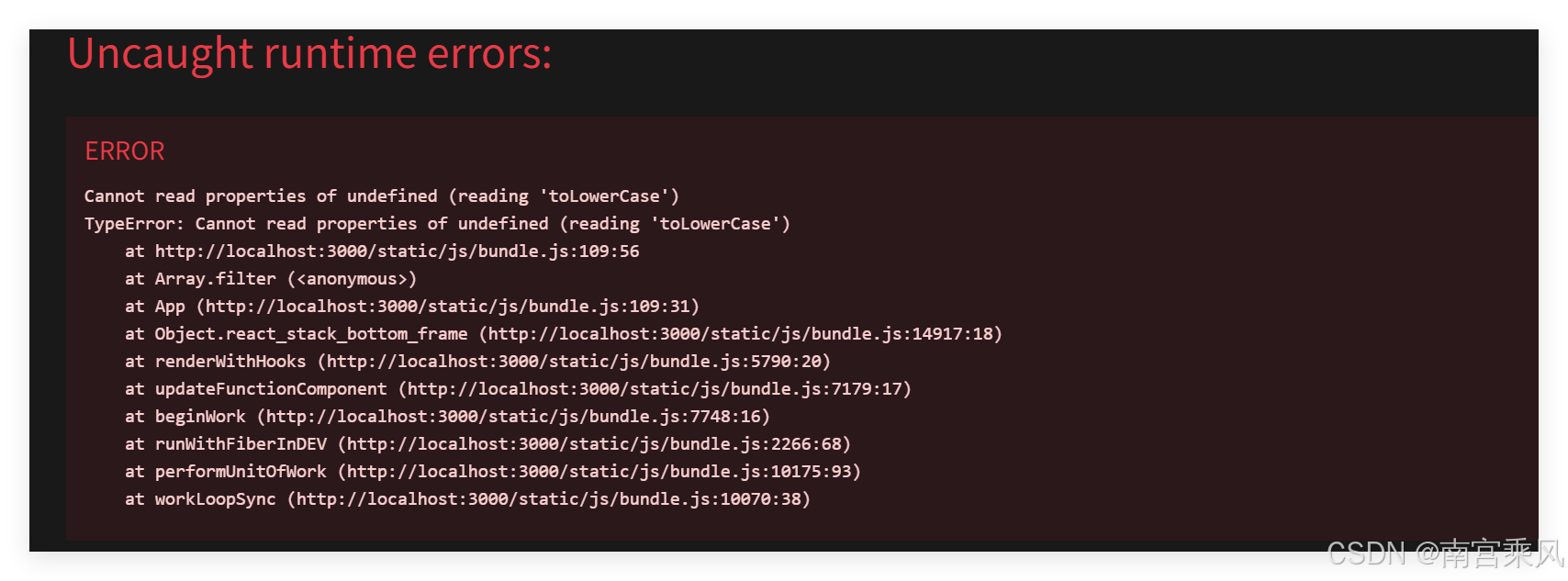
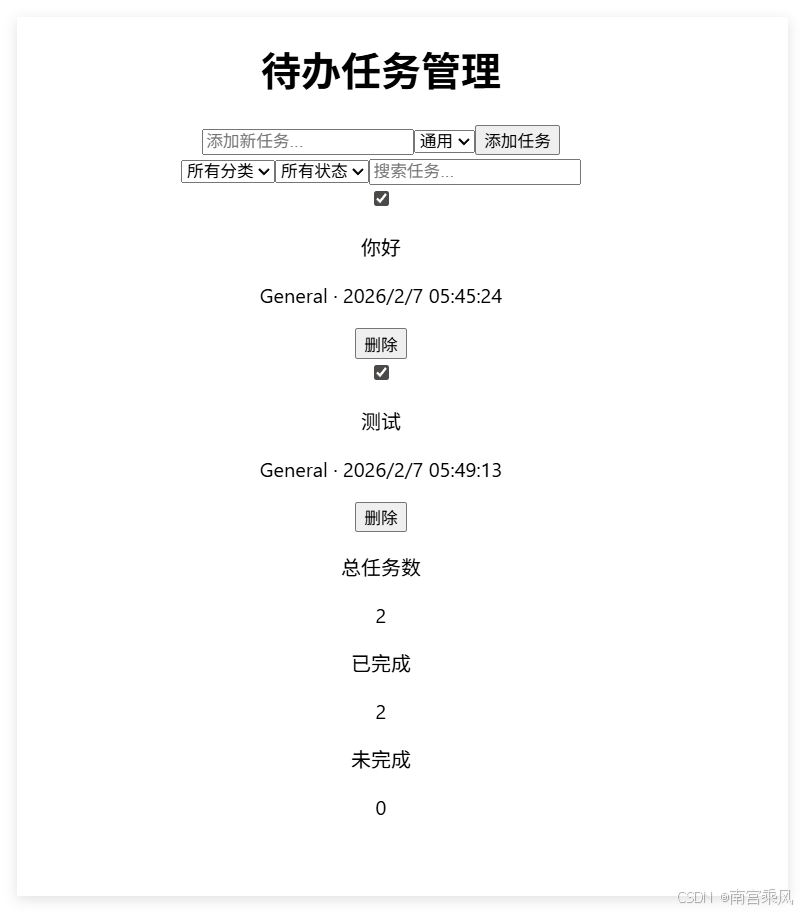
效果图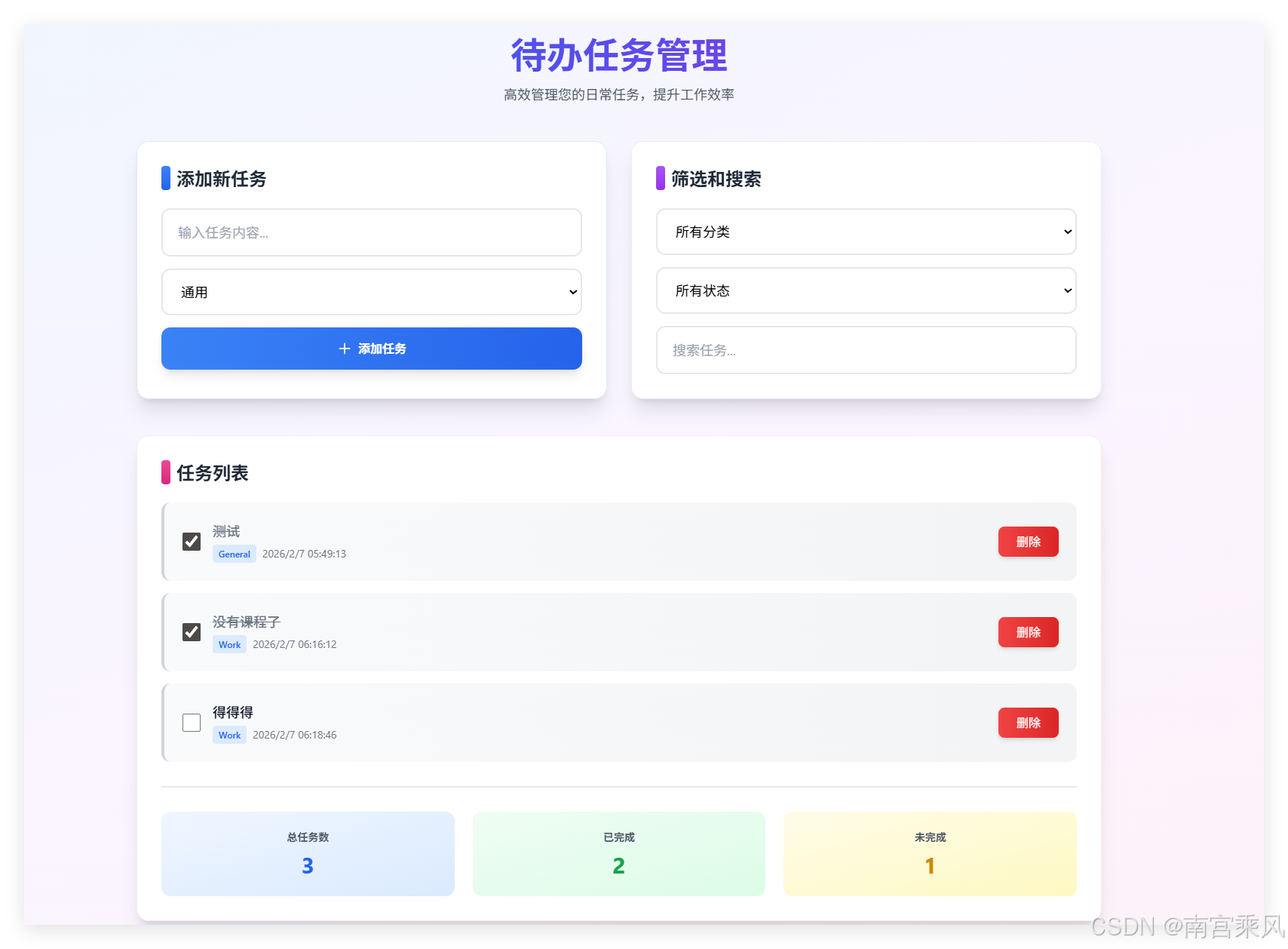
六、实用技巧与避坑指南
1. 回滚机制
- 进入回滚界面:使用
/rewind命令或双击ESC进入回滚界面; - 局限性:仅能回滚 Claude Code 直接写入的文件,无法撤销
npm install、mkdir等终端命令产生的副作用。建议配合 Git 使用。
2. 编辑体验优化
- 在 VS Code 中编辑长文本:使用
Ctrl + G打开 VS Code 编辑,避免误提交; - 换行操作:使用
Shift + Enter换行(旧版本可能不支持,需升级)。
我使用的tabby终端,换行是ctrl + j
ctrl+j,ctrl+enter
一定要shift + enter的话,在Windows terminal中ctrl + shift + ,快捷键在弹出来的settings.json中定制一下

    "actions":
    [
        {
            "command":
            {
                "action": "sendInput",
                "input": "\u001b\n"
            },
            "id": "User.sendInput.FE9C254"
        }
    ]
3. 会话恢复
- 恢复历史对话:退出后使用
/resume恢复历史对话; - 自动恢复会话:启动时加
-c(continue)参数自动恢复上一次会话。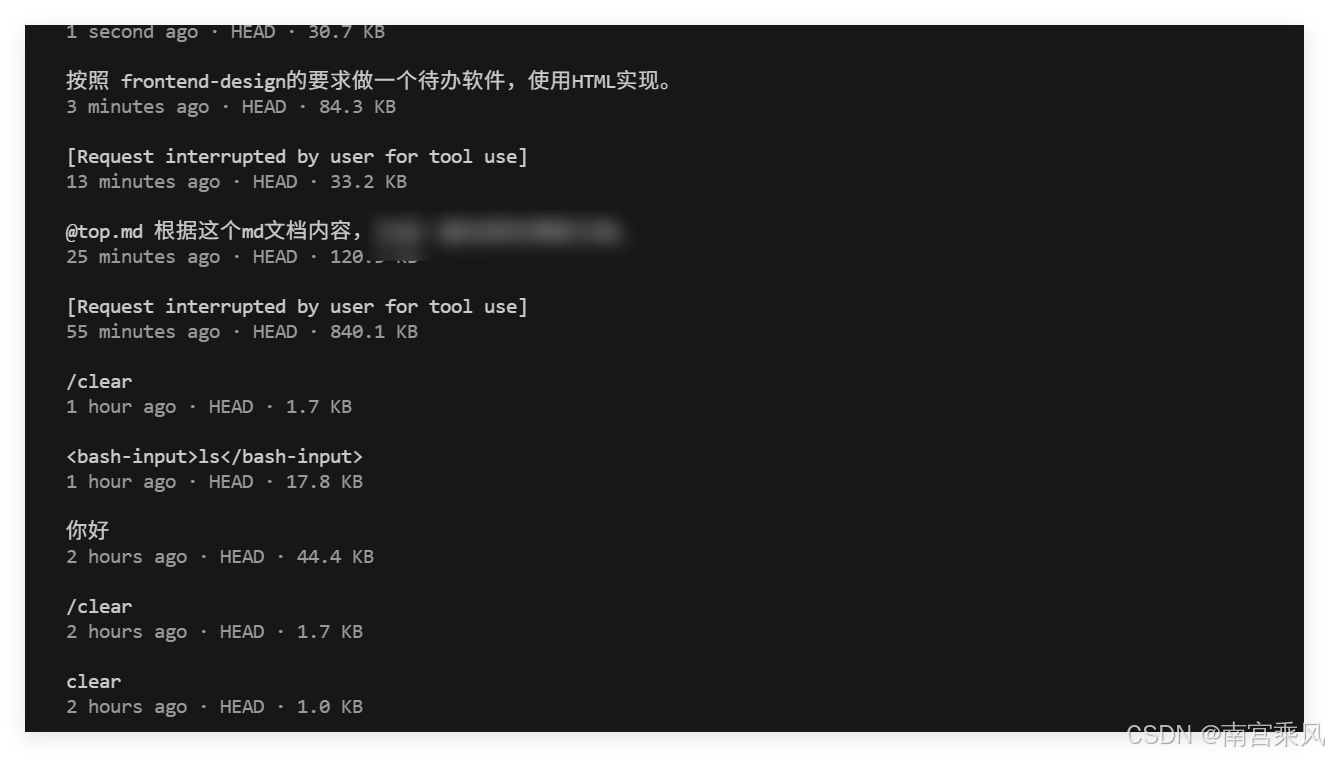
4. 代码质量控制
- 使用 SubAgent 进行代码审查:创建专门的 SubAgent 负责代码审查,提高代码质量;
- 配置 Hook 自动格式化:通过 Hook 自动格式化代码,确保代码风格一致;
- 添加测试:使用 Claude Code 辅助生成测试代码,提高代码可靠性。
常见问题与解答(Q&A)
1. Claude Code 与其他 AI 编程助手有何区别?
- 核心优势:Claude Code 支持终端命令执行、MCP 协议、SubAgent 隔离等高级功能,更适合工程化开发;
- 架构特点:采用模块化架构,支持自定义扩展和插件开发;
- 模型兼容性:不绑定特定模型,支持国产大模型替代方案。
2. 如何确保使用 Claude Code 的安全性?
- 合理使用权限控制:尽量避免使用
--dangerously-skip-permissions选项; - 配合 Git 使用:定期提交代码,使用回滚机制时更安全;
- 代码审查:对生成的代码进行审查,确保符合安全规范。
3. Claude Code 生成的代码质量如何?
- 质量评估:生成的代码质量较高,但仍需进行审查和测试;
- 优化建议:通过配置 coding standards 和使用 SubAgent 进行代码审查,提高代码质量;
- 最佳实践:将 Claude Code 作为辅助工具,结合自己的专业知识进行开发。
4. 如何使用 Claude Code 进行团队协作?
- 共享配置:使用
settings.json文件共享编码规范和配置; - 版本控制:配合 Git 进行代码管理,确保团队协作顺利;
- 任务分配:使用 SubAgent 分配不同的开发任务,提高协作效率。

有“AI”的1024 = 2048,欢迎大家加入2048 AI社区
更多推荐

 2
2 0
0- 0


 已为社区贡献10条内容

所有评论(0)