社会模拟|交互式的人群疏散模拟系统
人群疏散模拟是一个非常实用且有趣的研究方向。创建一个交互式的人群疏散模拟系统。
以下是效果图:
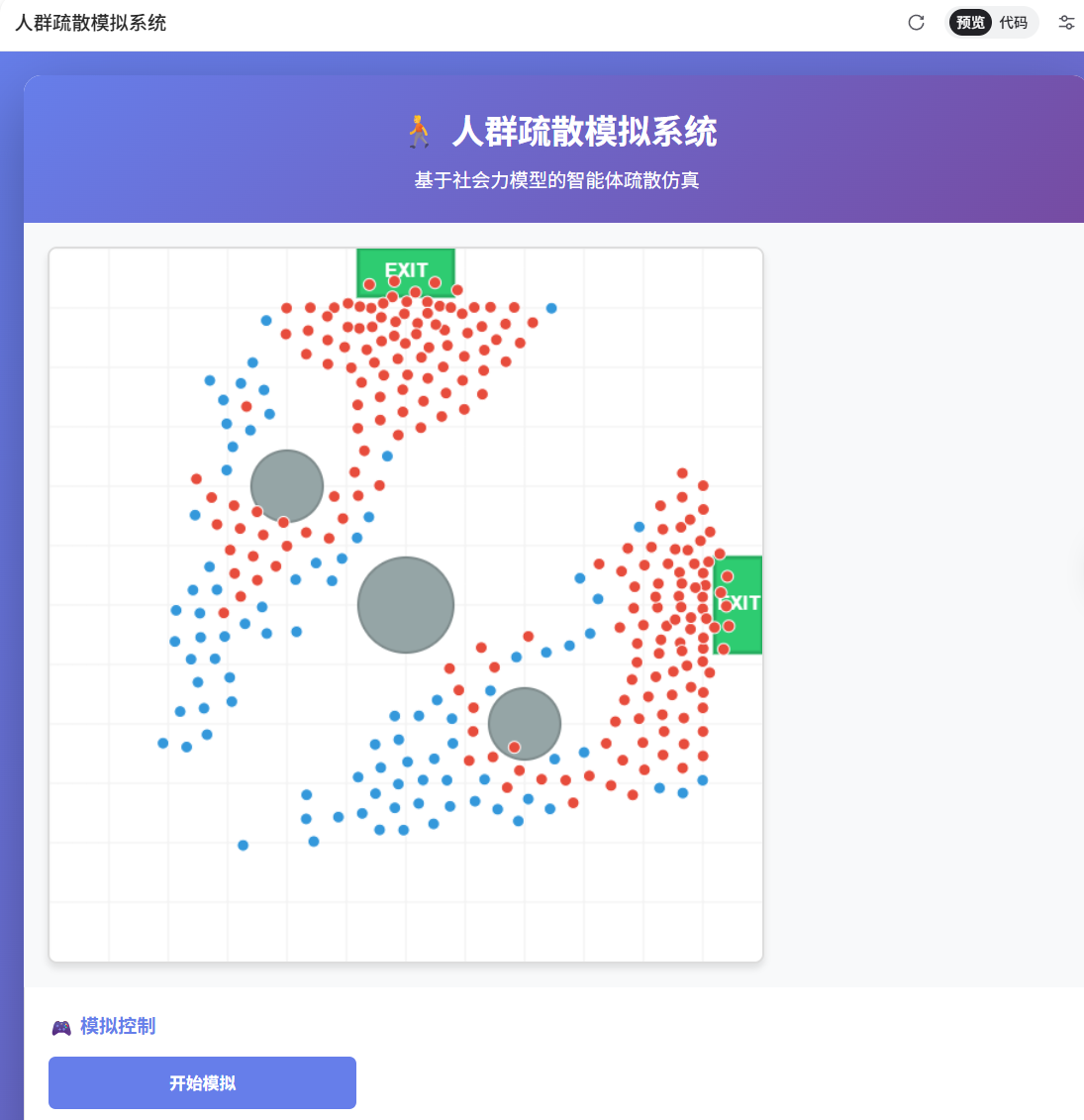
以下是基于主体的模型(ABM):
模拟特性
- 个体行为:每个人都是独立的智能体,会寻找最近的出口
- 避障机制:避免与其他人和障碍物碰撞
- 社会力模型:模拟人群的推挤和拥堵效应
- 多出口场景:可以设置多个疏散出口
- 实时可视化:动态展示疏散过程
创建这个模拟系统:
id: crowd_evacuation_sim
name: 人群疏散模拟系统
type: html
content: |-
  <!DOCTYPE html>
  <html lang="zh-CN">
  <head>
    <meta charset="UTF-8">
    <meta name="viewport" content="width=device-width, initial-scale=1.0">
    <title>人群疏散模拟系统</title>
    <style>
      * {
        margin: 0;
        padding: 0;
        box-sizing: border-box;
      }

      body {
        font-family: 'Segoe UI', Tahoma, Geneva, Verdana, sans-serif;
        background: linear-gradient(135deg, #667eea 0%, #764ba2 100%);
        padding: 20px;
        min-height: 100vh;
      }

      .container {
        max-width: 1200px;
        margin: 0 auto;
        background: white;
        border-radius: 15px;
        box-shadow: 0 20px 60px rgba(0,0,0,0.3);
        overflow: hidden;
      }

      .header {
        background: linear-gradient(135deg, #667eea 0%, #764ba2 100%);
        color: white;
        padding: 25px;
        text-align: center;
      }

      .header h1 {
        font-size: 28px;
        margin-bottom: 10px;
      }

      .content {
        display: flex;
        flex-wrap: wrap;
      }

      .canvas-container {
        flex: 1;
        min-width: 600px;
        padding: 20px;
        background: #f8f9fa;
      }

      canvas {
        display: block;
        background: white;
        border: 2px solid #ddd;
        border-radius: 8px;
        box-shadow: 0 4px 6px rgba(0,0,0,0.1);
      }

      .controls {
        width: 300px;
        padding: 20px;
        background: white;
        border-left: 1px solid #e0e0e0;
      }

      .control-group {
        margin-bottom: 20px;
        padding-bottom: 20px;
        border-bottom: 1px solid #e0e0e0;
      }

      .control-group:last-child {
        border-bottom: none;
      }

      .control-group h3 {
        color: #667eea;
        margin-bottom: 15px;
        font-size: 16px;
      }

      .control-item {
        margin-bottom: 12px;
      }

      label {
        display: block;
        margin-bottom: 5px;
        color: #555;
        font-size: 13px;
        font-weight: 500;
      }

      input[type="range"] {
        width: 100%;
        height: 6px;
        border-radius: 3px;
        background: #ddd;
        outline: none;
        -webkit-appearance: none;
      }

      input[type="range"]::-webkit-slider-thumb {
        -webkit-appearance: none;
        appearance: none;
        width: 16px;
        height: 16px;
        border-radius: 50%;
        background: #667eea;
        cursor: pointer;
      }

      input[type="range"]::-moz-range-thumb {
        width: 16px;
        height: 16px;
        border-radius: 50%;
        background: #667eea;
        cursor: pointer;
        border: none;
      }

      .value-display {
        display: inline-block;
        margin-left: 10px;
        color: #667eea;
        font-weight: bold;
      }

      button {
        width: 100%;
        padding: 12px;
        margin-bottom: 10px;
        border: none;
        border-radius: 6px;
        font-size: 14px;
        font-weight: 600;
        cursor: pointer;
        transition: all 0.3s;
      }

      .btn-primary {
        background: #667eea;
        color: white;
      }

      .btn-primary:hover {
        background: #5568d3;
        transform: translateY(-2px);
        box-shadow: 0 4px 8px rgba(102, 126, 234, 0.4);
      }

      .btn-secondary {
        background: #48bb78;
        color: white;
      }

      .btn-secondary:hover {
        background: #38a169;
        transform: translateY(-2px);
        box-shadow: 0 4px 8px rgba(72, 187, 120, 0.4);
      }

      .btn-danger {
        background: #f56565;
        color: white;
      }

      .btn-danger:hover {
        background: #e53e3e;
        transform: translateY(-2px);
        box-shadow: 0 4px 8px rgba(245, 101, 101, 0.4);
      }

      .stats {
        background: #f8f9fa;
        padding: 15px;
        border-radius: 8px;
        margin-top: 10px;
      }

      .stat-item {
        display: flex;
        justify-content: space-between;
        margin-bottom: 8px;
        font-size: 13px;
      }

      .stat-label {
        color: #666;
      }

      .stat-value {
        color: #667eea;
        font-weight: bold;
      }

      .legend {
        margin-top: 15px;
        padding: 15px;
        background: #f8f9fa;
        border-radius: 8px;
      }

      .legend-item {
        display: flex;
        align-items: center;
        margin-bottom: 8px;
        font-size: 13px;
      }

      .legend-color {
        width: 20px;
        height: 20px;
        border-radius: 50%;
        margin-right: 10px;
        border: 2px solid #ddd;
      }
    </style>
  </head>
  <body>
    <div class="container">
      <div class="header">
        <h1>🚶 人群疏散模拟系统</h1>
        <p>基于社会力模型的智能体疏散仿真</p>
      </div>

      <div class="content">
        <div class="canvas-container">
          <canvas id="simulationCanvas" width="600" height="600"></canvas>
        </div>

        <div class="controls">
          <div class="control-group">
            <h3>🎮 模拟控制</h3>
            <button class="btn-primary" onclick="startSimulation()">开始模拟</button>
            <button class="btn-secondary" onclick="pauseSimulation()">暂停/继续</button>
            <button class="btn-danger" onclick="resetSimulation()">重置</button>
          </div>

          <div class="control-group">
            <h3>⚙️ 参数设置</h3>
            <div class="control-item">
              <label>人群数量: <span class="value-display" id="peopleCountDisplay">100</span></label>
              <input type="range" id="peopleCount" min="50" max="300" value="100" onchange="updateDisplay()">
            </div>
            <div class="control-item">
              <label>移动速度: <span class="value-display" id="speedDisplay">1.0</span></label>
              <input type="range" id="speed" min="0.5" max="3" step="0.1" value="1.0" onchange="updateDisplay()">
            </div>
            <div class="control-item">
              <label>恐慌程度: <span class="value-display" id="panicDisplay">0.5</span></label>
              <input type="range" id="panic" min="0" max="1" step="0.1" value="0.5" onchange="updateDisplay()">
            </div>
          </div>

          <div class="control-group">
            <h3>📊 统计信息</h3>
            <div class="stats">
              <div class="stat-item">
                <span class="stat-label">已疏散:</span>
                <span class="stat-value" id="evacuated">0</span>
              </div>
              <div class="stat-item">
                <span class="stat-label">剩余人数:</span>
                <span class="stat-value" id="remaining">0</span>
              </div>
              <div class="stat-item">
                <span class="stat-label">疏散时间:</span>
                <span class="stat-value" id="time">0.0s</span>
              </div>
              <div class="stat-item">
                <span class="stat-label">平均速度:</span>
                <span class="stat-value" id="avgSpeed">0.0</span>
              </div>
            </div>
          </div>

          <div class="control-group">
            <h3>🎨 图例</h3>
            <div class="legend">
              <div class="legend-item">
                <div class="legend-color" style="background: #3498db;"></div>
                <span>正常移动</span>
              </div>
              <div class="legend-item">
                <div class="legend-color" style="background: #e74c3c;"></div>
                <span>拥挤状态</span>
              </div>
              <div class="legend-item">
                <div class="legend-color" style="background: #2ecc71;"></div>
                <span>出口</span>
              </div>
              <div class="legend-item">
                <div class="legend-color" style="background: #95a5a6;"></div>
                <span>障碍物</span>
              </div>
            </div>
          </div>
        </div>
      </div>
    </div>

    <script>
      const canvas = document.getElementById('simulationCanvas');
      const ctx = canvas.getContext('2d');

      let people = [];
      let exits = [];
      let obstacles = [];
      let isRunning = false;
      let isPaused = false;
      let evacuatedCount = 0;
      let simulationTime = 0;
      let animationId = null;

      // 人员类
      class Person {
        constructor(x, y) {
          this.x = x;
          this.y = y;
          this.vx = 0;
          this.vy = 0;
          this.radius = 5;
          this.maxSpeed = parseFloat(document.getElementById('speed').value);
          this.targetExit = null;
          this.evacuated = false;
          this.crowded = false;
        }

        findNearestExit() {
          let minDist = Infinity;
          let nearest = null;
          exits.forEach(exit => {
            const dist = Math.hypot(exit.x - this.x, exit.y - this.y);
            if (dist < minDist) {
              minDist = dist;
              nearest = exit;
            }
          });
          this.targetExit = nearest;
        }

        update() {
          if (this.evacuated) return;

          if (!this.targetExit) this.findNearestExit();

          // 目标方向力
          const dx = this.targetExit.x - this.x;
          const dy = this.targetExit.y - this.y;
          const dist = Math.hypot(dx, dy);

          if (dist < 10) {
            this.evacuated = true;
            evacuatedCount++;
            return;
          }

          // 期望速度
          const panicFactor = parseFloat(document.getElementById('panic').value);
          const desiredSpeed = this.maxSpeed * (1 + panicFactor * 0.5);
          let fx = (dx / dist) * desiredSpeed;
          let fy = (dy / dist) * desiredSpeed;

          // 社会力 - 避免与其他人碰撞
          this.crowded = false;
          people.forEach(other => {
            if (other === this || other.evacuated) return;

            const dx2 = this.x - other.x;
            const dy2 = this.y - other.y;
            const dist2 = Math.hypot(dx2, dy2);

            if (dist2 < this.radius * 4) {
              this.crowded = true;
              const repulsion = 50 / (dist2 + 1);
              fx += (dx2 / dist2) * repulsion;
              fy += (dy2 / dist2) * repulsion;
            }
          });

          // 避开障碍物
          obstacles.forEach(obs => {
            const dx3 = this.x - obs.x;
            const dy3 = this.y - obs.y;
            const dist3 = Math.hypot(dx3, dy3);

            if (dist3 < obs.radius + this.radius + 20) {
              const repulsion = 100 / (dist3 + 1);
              fx += (dx3 / dist3) * repulsion;
              fy += (dy3 / dist3) * repulsion;
            }
          });

          // 边界排斥
          if (this.x < 50) fx += 5;
          if (this.x > canvas.width - 50) fx -= 5;
          if (this.y < 50) fy += 5;
          if (this.y > canvas.height - 50) fy -= 5;

          // 更新速度和位置
          this.vx = fx * 0.1;
          this.vy = fy * 0.1;

          // 限制最大速度
          const speed = Math.hypot(this.vx, this.vy);
          if (speed > desiredSpeed) {
            this.vx = (this.vx / speed) * desiredSpeed;
            this.vy = (this.vy / speed) * desiredSpeed;
          }

          this.x += this.vx;
          this.y += this.vy;
        }

        draw() {
          if (this.evacuated) return;

          ctx.beginPath();
          ctx.arc(this.x, this.y, this.radius, 0, Math.PI * 2);
          ctx.fillStyle = this.crowded ? '#e74c3c' : '#3498db';
          ctx.fill();
          ctx.strokeStyle = 'white';
          ctx.lineWidth = 1;
          ctx.stroke();
        }
      }

      // 初始化场景
      function initScene() {
        people = [];
        exits = [
          { x: canvas.width - 20, y: canvas.height / 2, width: 40, height: 80 },
          { x: canvas.width / 2, y: 20, width: 80, height: 40 }
        ];

        obstacles = [
          { x: canvas.width / 2, y: canvas.height / 2, radius: 40 },
          { x: canvas.width / 3, y: canvas.height / 3, radius: 30 },
          { x: canvas.width * 2/3, y: canvas.height * 2/3, radius: 30 }
        ];

        evacuatedCount = 0;
        simulationTime = 0;

        const count = parseInt(document.getElementById('peopleCount').value);
        for (let i = 0; i < count; i++) {
          let x, y, valid;
          do {
            valid = true;
            x = 50 + Math.random() * (canvas.width - 100);
            y = 50 + Math.random() * (canvas.height - 100);

            // 检查是否与障碍物重叠
            obstacles.forEach(obs => {
              if (Math.hypot(x - obs.x, y - obs.y) < obs.radius + 10) {
                valid = false;
              }
            });
          } while (!valid);

          people.push(new Person(x, y));
        }
      }

      function drawScene() {
        ctx.clearRect(0, 0, canvas.width, canvas.height);

        // 绘制背景网格
        ctx.strokeStyle = '#f0f0f0';
        ctx.lineWidth = 1;
        for (let i = 0; i < canvas.width; i += 50) {
          ctx.beginPath();
          ctx.moveTo(i, 0);
          ctx.lineTo(i, canvas.height);
          ctx.stroke();
        }
        for (let i = 0; i < canvas.height; i += 50) {
          ctx.beginPath();
          ctx.moveTo(0, i);
          ctx.lineTo(canvas.width, i);
          ctx.stroke();
        }

        // 绘制障碍物
        obstacles.forEach(obs => {
          ctx.beginPath();
          ctx.arc(obs.x, obs.y, obs.radius, 0, Math.PI * 2);
          ctx.fillStyle = '#95a5a6';
          ctx.fill();
          ctx.strokeStyle = '#7f8c8d';
          ctx.lineWidth = 2;
          ctx.stroke();
        });

        // 绘制出口
        exits.forEach(exit => {
          ctx.fillStyle = '#2ecc71';
          ctx.fillRect(exit.x - exit.width/2, exit.y - exit.height/2, exit.width, exit.height);
          ctx.strokeStyle = '#27ae60';
          ctx.lineWidth = 3;
          ctx.strokeRect(exit.x - exit.width/2, exit.y - exit.height/2, exit.width, exit.height);

          // 出口标识
          ctx.fillStyle = 'white';
          ctx.font = 'bold 16px Arial';
          ctx.textAlign = 'center';
          ctx.textBaseline = 'middle';
          ctx.fillText('EXIT', exit.x, exit.y);
        });

        // 绘制人群
        people.forEach(person => person.draw());
      }

      function updateSimulation() {
        if (!isRunning || isPaused) return;

        people.forEach(person => person.update());
        simulationTime += 0.016;

        updateStats();
        drawScene();

        // 检查是否全部疏散
        if (evacuatedCount >= people.length) {
          isRunning = false;
          alert(`疏散完成!总用时: ${simulationTime.toFixed(2)}秒`);
          return;
        }

        animationId = requestAnimationFrame(updateSimulation);
      }

      function updateStats() {
        document.getElementById('evacuated').textContent = evacuatedCount;
        document.getElementById('remaining').textContent = people.length - evacuatedCount;
        document.getElementById('time').textContent = simulationTime.toFixed(1) + 's';

        let totalSpeed = 0;
        let count = 0;
        people.forEach(p => {
          if (!p.evacuated) {
            totalSpeed += Math.hypot(p.vx, p.vy);
            count++;
          }
        });
        const avgSpeed = count > 0 ? (totalSpeed / count).toFixed(2) : '0.00';
        document.getElementById('avgSpeed').textContent = avgSpeed;
      }

      function startSimulation() {
        if (isRunning) return;
        initScene();
        isRunning = true;
        isPaused = false;
        updateSimulation();
      }

      function pauseSimulation() {
        isPaused = !isPaused;
        if (!isPaused && isRunning) {
          updateSimulation();
        }
      }

      function resetSimulation() {
        isRunning = false;
        isPaused = false;
        if (animationId) {
          cancelAnimationFrame(animationId);
        }
        initScene();
        drawScene();
        updateStats();
      }

      function updateDisplay() {
        document.getElementById('peopleCountDisplay').textContent =
          document.getElementById('peopleCount').value;
        document.getElementById('speedDisplay').textContent =
          document.getElementById('speed').value;
        document.getElementById('panicDisplay').textContent =
          document.getElementById('panic').value;
      }

      // 初始化
      initScene();
      drawScene();
      updateStats();
    </script>
  </body>
  </html>
🎯 模拟系统功能说明
核心特性
-
社会力模型
- 目标导向力:每个人寻找最近的出口
- 排斥力:避免人与人之间碰撞
- 障碍物避让:绕过场景中的障碍物
-
可调参数
- 人群数量(50-300人):测试不同规模的疏散效率
- 移动速度(0.5-3.0):模拟不同人群的移动能力
- 恐慌程度(0-1):恐慌会增加移动速度但可能导致更多拥堵
-
视觉反馈
- 🔵 蓝色:正常移动状态
- 🔴 红色:拥挤状态(周围人太多)
- 🟢 绿色:出口位置
- ⚪ 灰色:障碍物
-
实时统计
- 已疏散人数
- 剩余人数
- 疏散时间
- 平均移动速度
使用建议
-
测试不同场景:
- 低恐慌 + 少人数 = 有序疏散
- 高恐慌 + 多人数 = 可能出现踩踏风险
-
观察拥堵点:注意出口附近的红色聚集,这是疏散瓶颈
-
优化策略:可以思考如何通过调整出口位置、增加出口数量来提高疏散效率
这个模拟可以用于:
- 🏢 建筑设计中的疏散规划
- 🎓 应急管理教学
- 📊 人群动力学研究
- 🎮 游戏开发参考
人群疏散模拟系统:从技术实现到研究价值的深度评述
这个人群疏散模拟系统展现了计算机仿真在应急管理和城市规划领域的典型应用。作为一个基于主体的模型(Agent-Based Model, ABM)实现,它不仅具有良好的交互性和可视化效果,更重要的是体现了复杂系统建模的核心思想。
技术架构的巧妙设计
该系统采用纯前端实现方案,通过HTML5 Canvas和JavaScript构建了一个完整的仿真环境。这种轻量级架构使得系统具有良好的可移植性和易用性——用户无需安装任何软件,仅通过浏览器即可进行实验。从技术实现角度看,系统的核心在于社会力模型(Social Force Model)的应用,这是Helbing和Molnár在1995年提出的经典行人动力学模型。
系统中每个个体被建模为独立的智能体(Agent),具有自主决策能力。其行为由三种力的叠加决定:
- 目标导向力:驱动个体向最近出口移动
- 社会排斥力:避免与其他个体发生碰撞
- 障碍物排斥力:绕过环境中的静态障碍
这种多力叠加的建模方式,恰当地捕捉了真实疏散场景中个体行为的复杂性。特别值得注意的是"恐慌程度"参数的引入——它通过增加期望速度来模拟心理因素对行为的影响,这是对传统物理模型的重要扩展。
研究方法论的启示
从数字人文和研究方法论的角度审视,这个系统体现了计算社会科学的典型范式:通过自下而上的建模方式,从个体行为规则推演出群体层面的涌现现象。这与传统的宏观统计分析形成鲜明对比。
系统的可调参数设计(人群数量、移动速度、恐慌程度)实际上构建了一个参数空间,研究者可以通过系统性地遍历这个空间来探索不同条件下的疏散效率。这种"计算实验"方法在伦理和成本上都优于真实场景测试,为应急预案的制定提供了科学依据。
然而,当前系统在研究深度上仍有提升空间。例如:
- 个体异质性:真实人群中存在老人、儿童、残障人士等不同群体,他们的移动能力和决策模式差异显著
- 社会关系网络:家庭成员、朋友之间的相互等待和协助行为在模型中缺失
- 信息传播机制:出口位置的认知、危险信息的扩散等认知层面因素未被考虑
跨学科应用的潜力
这个系统的价值不仅限于应急管理领域。从数字人文视角看,它为历史事件的重构提供了新工具。例如,研究者可以利用类似模型重现历史上的重大踩踏事故(如1896年俄国沙皇加冕典礼踩踏事件),通过调整参数来验证不同历史解释的合理性。
在城市规划领域,该模型可以扩展为大型公共空间(体育场、地铁站、商场)的疏散能力评估工具。通过与建筑信息模型(BIM)的集成,可以在设计阶段就发现潜在的疏散瓶颈。
从人工智能角度,系统中的个体决策机制可以进一步引入强化学习算法。让智能体通过试错学习最优疏散策略,这种"学习型疏散"可能发现人类直觉难以察觉的高效路径。
方法论的局限与改进方向
尽管社会力模型在行人动力学领域应用广泛,但其本质上是一个连续空间模型,这在处理复杂建筑结构(如楼梯、狭窄走廊)时存在局限。替代方案包括:
- 元胞自动机模型:将空间离散化为网格,更适合处理复杂拓扑结构
- 混合模型:在不同空间尺度上结合连续和离散方法
- 数据驱动方法:利用真实疏散演练的视频数据训练深度学习模型
在验证方面,当前系统缺乏与真实数据的对比。理想的研究流程应包括:
- 收集真实疏散演练的轨迹数据
- 通过参数校准使模型输出与真实数据匹配
- 使用独立数据集验证模型的预测能力
教学与传播价值
从知识传播角度看,这个系统是优秀的科普工具。其直观的可视化和实时交互使得复杂的数学模型变得可感知、可操作。这种"可玩性"降低了公众理解科学研究的门槛,体现了公众科学(Citizen Science)的理念。
对于教学而言,系统可以作为探究式学习的载体。学生通过调整参数、观察结果、提出假设、验证假设的循环过程,深化对复杂系统行为的理解。这比单纯讲授理论公式更能培养科学思维。
结语:从模拟到洞察
这个人群疏散模拟系统的价值不仅在于其技术实现的完整性,更在于它所代表的计算思维在社会问题解决中的应用。它提醒我们:许多看似混乱无序的社会现象,实际上可以通过简单规则的涌现来解释;而计算机仿真为我们提供了一个"虚拟实验室",让我们能够在安全、可控的环境中探索"如果……会怎样"的问题。
在数字人文研究日益强调方法创新的今天,这类仿真工具的开发和应用代表了一个重要方向:不是用技术取代人文思考,而是用技术增强我们理解人类行为和社会现象的能力。从这个意义上说,这个看似简单的疏散模拟系统,实际上打开了一扇通往更深层次研究的大门——它邀请我们思考:如何用计算的方式理解人的复杂性。

有“AI”的1024 = 2048,欢迎大家加入2048 AI社区
更多推荐



 8
8 0
0- 0


 已为社区贡献266条内容

所有评论(0)