ERROR: failed to solve: node:18-alpine解决办法
考虑由于网络问题导致Docker 无法从 Docker Hub 直接拉取。运行以上命令后,可以正常利用镜像创建容器。
·
利用命令:
docker build -t welcome-to-docker .创建容器时遇到如下报错:
ERROR: failed to solve: node:18-alpine: failed to resolve source metadata for docker.io/library/node:18-alpine: failed to authorize: failed to fetch oauth token: Post "https://auth.docker.io/token": dial tcp [2a03:2880:f112:83:face:b00c:0:25de]:443: connectex: A connection attempt failed because the connected party did not properly respond after a period of time, or established connection failed because connected host has failed to respond.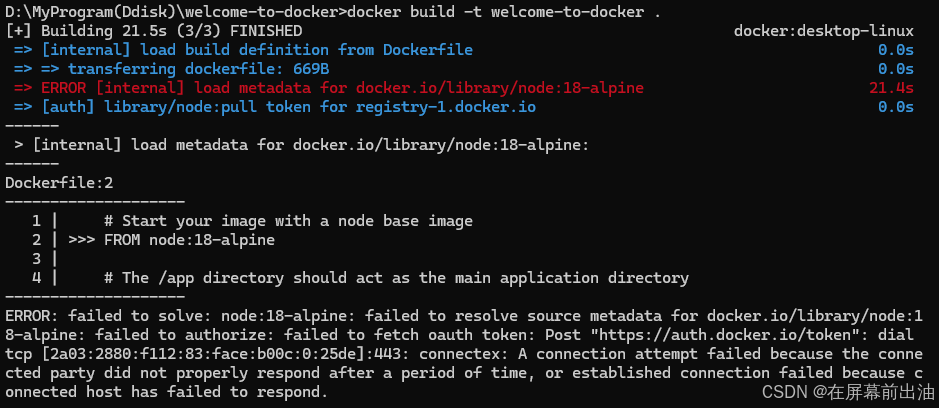
考虑由于网络问题导致Docker 无法从 Docker Hub 直接拉取 node:18-alpine 镜像。
解决方式:
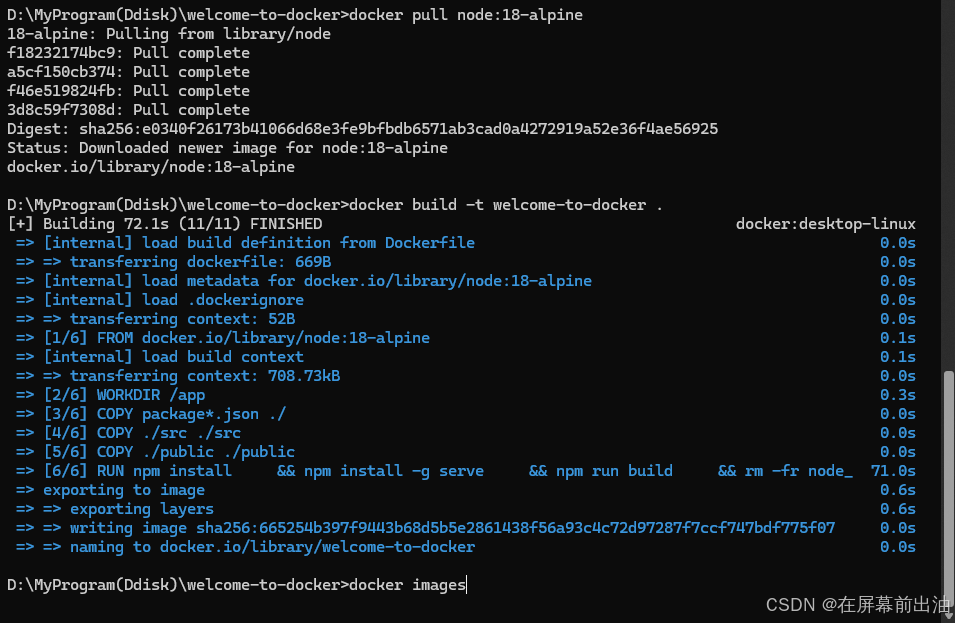
利用命令手动拉取 node:18-alpine 镜像:
docker pull node:18-alpine运行以上命令后,可以正常创建镜像、运行容器。

有“AI”的1024 = 2048,欢迎大家加入2048 AI社区
更多推荐


 11
11 0
0- 0


 已为社区贡献4条内容

所有评论(0)