记录nvm1.2.2新版本bug:error installing....The system cannot find the file specified.
背景:在运行一个前端项目的时候,发现用nvm装的node18版本太高,需要降版本到node14。边查边忙,找了两三天,试了各种方法,最终发现是版本问题。在nvm的安装目录双击unins000.exe卸载nvm。用nvm下载node18版本都没问题,正常。将nvm卸载,重装1.1.12即可。报错的版本是1.2.2。
·
error installing 14.21.3: open C:\Users\xxxx\AppData\Local\Temp\nvm-npm-2046767612\npm-v6.14.18.zip: The system cannot find the file specified.
背景:在运行一个前端项目的时候,发现用nvm装的node18版本太高,需要降版本到node14。
用nvm下载node18版本都没问题,正常。
但是下载18以下的版本以及其他一些版本,都报错找不到下载的临时文件:
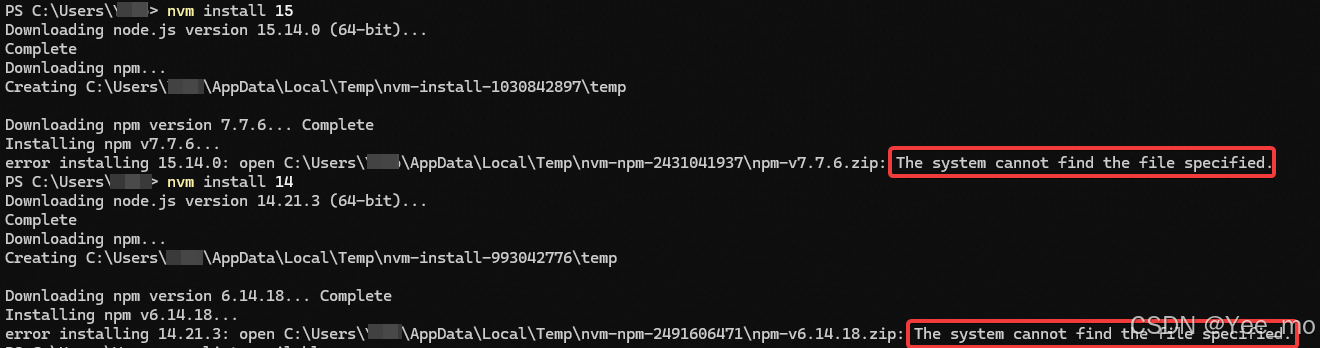
边查边忙,找了两三天,试了各种方法,最终发现是版本问题。
查看nvm版本
nvm -v报错的版本是1.2.2
将nvm卸载,重装1.1.12即可。
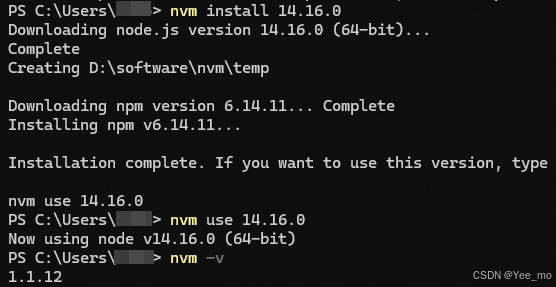
在nvm的安装目录双击unins000.exe卸载nvm
参考:

有“AI”的1024 = 2048,欢迎大家加入2048 AI社区
更多推荐



 44
44 0
0- 0


 已为社区贡献1条内容

所有评论(0)