【 Day 04】别让Agent在错误的阶段干错误的事
前三天的Agent用一个while循环处理所有步骤,复杂任务容易跳步或误操作。本篇引入有限状态机,将流程拆为规划、执行、审查三个状态,每个状态有独立提示词和工具集,状态切换由代码控制。用GLM-4.7-Flash实现,核心代码约80行。
前三天写的Agent,核心都是一个while循环:接收任务→调LLM→执行工具→把结果塞回history→再来一轮。简单任务没问题,但任务一复杂就乱套了。
比如你让Agent"先查时间,再算一年有多少秒,最后写入文件"。它可能查到时间后直接给你编了个数字,也可能算完了不写文件——因为所有步骤共用一个提示词、一套工具,LLM得自己判断现在该干嘛。提示词越长,它越容易跳步。
这篇用状态机解决这个问题。
一个while循环为什么不够用
先看前三天的写法:
while not done:
    response = llm.chat_json(task + history)
    action = response["action"]
    result = execute_tool(action)
    history.append(result)
所有步骤平等对待,没有"阶段"的概念。你在system prompt里写"先调研再分析再写报告",LLM可能调研到一半就开始写了,也可能写完了又回去搜。更麻烦的是,审核阶段你不希望它写文件,但write_file工具就摆在那里,它"顺手"就用了。
你没法靠提示词完全约束住这个。提示词是"建议",不是"强制"。
状态机的思路
把任务拆成几个明确的状态,每个状态有自己的提示词、自己的工具集、自己的处理逻辑。状态之间的切换由代码控制,不是LLM自己说了算。
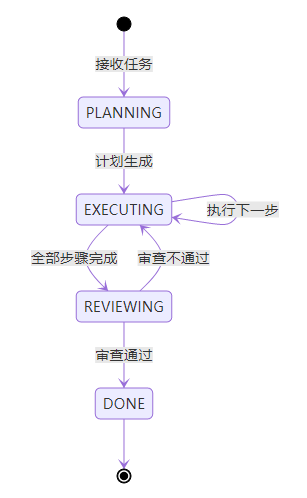
PLANNING只负责拆解任务,不碰工具。EXECUTING按计划逐步执行,可以用全部工具。REVIEWING只能读文件不能写文件——这个限制写在代码里,LLM再怎么"想写"也写不了。
核心代码
先定义状态。用枚举而不是字符串,拼错了IDE直接报错:
from enum import Enum, auto

class AgentState(Enum):
    IDLE = auto()
    PLANNING = auto()
    EXECUTING = auto()
    REVIEWING = auto()
    DONE = auto()
每个状态对应一个handler方法,主循环只做一件事:查表,调handler:
class StatefulAgent:
    def __init__(self, tools):
        self.llm = LLMClient(provider="glm")
        self.tools = {t.name: t for t in tools}
        self.state = AgentState.IDLE
        self.context = {}

    def run(self, task):
        self.state = AgentState.PLANNING
        self.context = {"task": task, "plan": [], "exec_index": 0,
                        "exec_results": [], "retry_count": 0}

        for _ in range(15):
            if self.state == AgentState.DONE:
                break
            handler = getattr(self, f"_handle_{self.state.name.lower()}", None)
            if handler:
                handler()
        return self.context.get("final_answer", "任务未完成")
PLANNING handler让LLM把任务拆成步骤列表,结果通过context传给EXECUTING:
    def _handle_planning(self):
        prompt = f"把任务拆成2-5步,每步指定工具和参数。任务:{self.context['task']}"
        resp = self.llm.chat_json(prompt, temperature=0.3)
        plan = json.loads(resp).get("steps", [])
        self.context["plan"] = plan
        self.state = AgentState.EXECUTING
EXECUTING每次执行计划中的一步,走完了就进REVIEWING。注意工具过滤——REVIEWING状态下write_file不会出现在可用工具里:
    STATE_TOOLS = {
        AgentState.PLANNING: [],
        AgentState.EXECUTING: None,       # None = 全部可用
        AgentState.REVIEWING: ["read_file"],  # 只能读
    }

    def _handle_executing(self):
        plan = self.context["plan"]
        idx = self.context["exec_index"]

        if idx >= len(plan):
            self.state = AgentState.REVIEWING
            return

        step = plan[idx]
        available = self._get_tools(AgentState.EXECUTING)
        result = self._call_llm_and_execute(step, available)
        self.context["exec_results"].append(result)
        self.context["exec_index"] = idx + 1

    def _handle_reviewing(self):
        results = self.context["exec_results"]
        prompt = f"审查结果是否完整正确:{json.dumps(results, ensure_ascii=False)}"
        resp = self.llm.chat_json(prompt, temperature=0.3)
        review = json.loads(resp)

        if review.get("verdict") == "pass":
            self.context["final_answer"] = review.get("summary", "")
            self.state = AgentState.DONE
        elif self.context["retry_count"] < 1:
            self.context["retry_count"] += 1
            self.context["exec_index"] = 0
            self.context["exec_results"] = []
            self.state = AgentState.EXECUTING  # 打回重做
        else:
            self.context["final_answer"] = review.get("summary", "审查未通过")
            self.state = AgentState.DONE
加新状态很简单:枚举加一个值,写一个_handle_xxx方法,在转移逻辑里接上就行,主循环不用动。
跑一下
tools = [
    Tool("calculate", "计算数学表达式", {"expression": "表达式"}, tool_calculate),
    Tool("get_time", "获取当前时间", {}, tool_get_time),
    Tool("write_file", "写入文件", {"filepath": "路径", "content": "内容"}, tool_write_file),
]

agent = StatefulAgent(tools)
result = agent.run("查当前时间,算365*24*60*60,结果写入seconds.txt")
print(result)
执行过程是:PLANNING拆出三步→EXECUTING依次调get_time、calculate、write_file→REVIEWING检查三步都做了、结果对不对→通过→DONE。每一步用什么提示词、能调什么工具,都是状态决定的,不是LLM自己选的。
完整代码包含四个工具(计算、时间、读文件、写文件)、详细日志输出和三个演示任务,放在CSDN下载区。
GLM-4.7-Flash永久免费,200K上下文,注册地址:https://open.bigmodel.cn/

有“AI”的1024 = 2048,欢迎大家加入2048 AI社区
更多推荐


 20
20 0
0- 0


 已为社区贡献3条内容

所有评论(0)