Python + FontTools 自动生成字体子集工具 & FontForge 实现字体加粗
·
Python + FontTools 自动生成字体子集工具 & FontForge 实现字体加粗
一、创建项目目录
fonttools/
│
├─ font_subset_core.py
├─ build.bat
└─ venv/
进入目录:
cd /d F:\tools\fonttools
二、创建虚拟环境
创建:
python -m venv venv
激活:
venv\Scripts\activate
成功后命令行会出现:
(venv)
验证:
where python
输出应类似:
F:\tools\fonttools\venv\Scripts\python.exe
三、安装依赖
安装 FontTools:
python -m pip install fonttools
安装 PyInstaller:
python -m pip install pyinstaller
验证 FontTools:
python -c "from fontTools.subset import main;print('OK')"
输出:
OK
说明环境正常。
四、核心脚本 font_subset_core.py
import sys
from pathlib import Path
from fontTools.subset import main as pyftsubset_main

FONT_EXTS = {".ttf", ".otf"}


def read_text_auto(path):
    data = Path(path).read_bytes()

    for enc in ("utf-8-sig", "utf-8", "gbk", "gb18030"):
        try:
            return data.decode(enc), enc
        except UnicodeDecodeError:
            pass

    return data.decode("gb18030", errors="ignore"), "gb18030-ignore"


def sort_key(c):
    code = ord(c)

    if '0' <= c <= '9':
        return (0, code)

    if 'A' <= c <= 'Z':
        return (1, code)

    if 'a' <= c <= 'z':
        return (2, code)

    if 0x4E00 <= code <= 0x9FFF:
        return (4, code)

    return (3, code)


def make_unique_chars(text):
    chars = {
        c
        for c in text
        if not c.isspace()
        and ord(c) >= 32
    }

    return "".join(sorted(chars, key=sort_key))


def build_subset(font_path, chars_path, out_font_path):
    pyftsubset_main([
        str(font_path),
        f"--text-file={chars_path}",
        f"--output-file={out_font_path}",
        "--layout-features=*",
        "--glyph-names",
        "--symbol-cmap",
        "--legacy-cmap",
        "--notdef-glyph",
        "--notdef-outline",`
        "--recommended-glyphs",
    ])


def main():
    if len(sys.argv) < 3:
        print("用法: font_subset_core.exe 字体.ttf 文本.txt")
        return

    font_path = Path(sys.argv[1])
    text_path = Path(sys.argv[2])

    if not font_path.exists():
        print("字体文件不存在:", font_path)
        return

    if not text_path.exists():
        print("文本文件不存在:", text_path)
        return

    if font_path.suffix.lower() not in FONT_EXTS:
        print("第一个参数必须是字体文件:", font_path)
        return

    text, enc = read_text_auto(text_path)
    chars = make_unique_chars(text)

    chars_path = text_path.with_name(text_path.stem + "_chars.txt")
    chars_path.write_text(chars, encoding="utf-8")

    out_font_path = font_path.with_name(font_path.stem + "_subset" + font_path.suffix)

    build_subset(font_path, chars_path, out_font_path)

    print("处理完成")
    print("识别编码 :", enc)
    print("字符数量 :", len(chars))
    print("字符文件 :", chars_path)
    print("子集字体 :", out_font_path)


if __name__ == "__main__":
    main()
命令格式:
python font_subset_core.py 字体.ttf 文本.txt
测试:
python font_subset_core.py test.ttf test.txt
处理完成
识别编码 : utf-8-sig
字符数量 : 247
字符文件 : test_chars.txt
子集字体 : test_subset.ttf
- 自动完成
读取文本
↓
去重
↓
排序
↓
生成 chars.txt
↓
调用 pyftsubset
↓
生成 subset.ttf
六、打包 EXE
使用 PyInstaller:
python -m PyInstaller -F --clean --collect-all fontTools --name FontSubset font_subset_core.py
参数说明:
-F               单文件
--clean          清理缓存
--collect-all    打包 FontTools 全部依赖
--name           EXE名称
打包完成:
dist/
└─ FontSubset.exe
FontSubset.exe 用于根据游戏文本自动生成字体子集。第一个参数为原始字体文件(支持 .ttf、.otf),第二个参数为文本文件(.txt)。程序会自动读取文本内容、提取所有可见字符、去重排序、生成字符集文件,并调用内置的 pyftsubset 生成子集字体。
使用方式:
FontSubset.exe FZBWKS.ttf all_text.txt
执行后会生成:
all_text_chars.txt     // 去重后的字符集
FZBWKS_subset.ttf      // 生成的子集字体
适用于传奇游戏、手游项目、UI字体优化等场景,可大幅缩小字体体积,同时保留项目实际使用到的全部字符。
无需安装:
Python
FontTools
PyInstaller
用户机器直接运行即可。
七、 字体加粗
安装 FontForge
下载地址
然后打开上面生成的字体子集。勾选如下红框可紧凑显示(忽略空格只显示有的字符)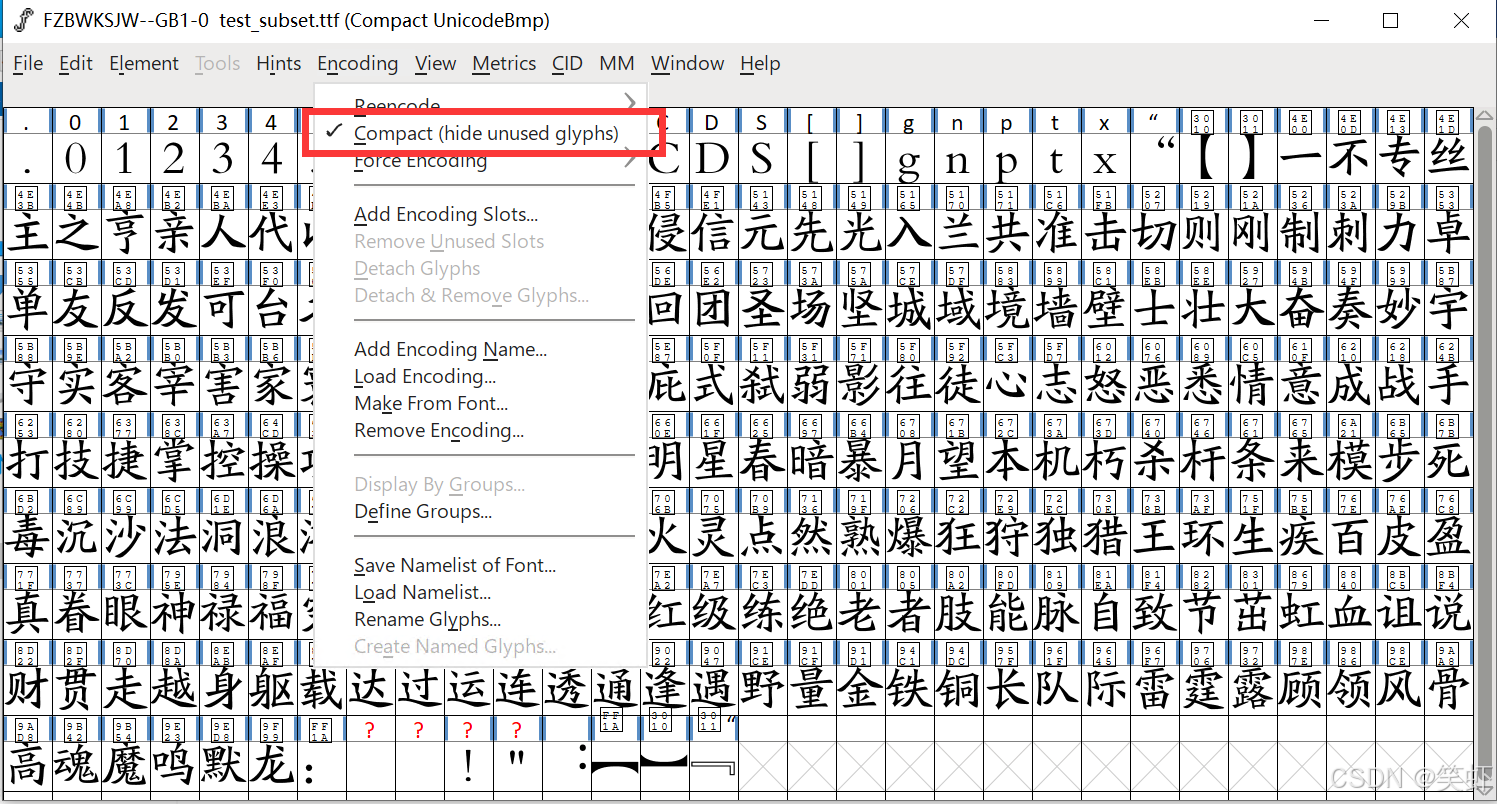
设置
Ctrl + A 全选,然后调整字体实现加粗。中文选 CJK 字中空隙保留选 Retain
我用 6 em units 这个要自己调看效果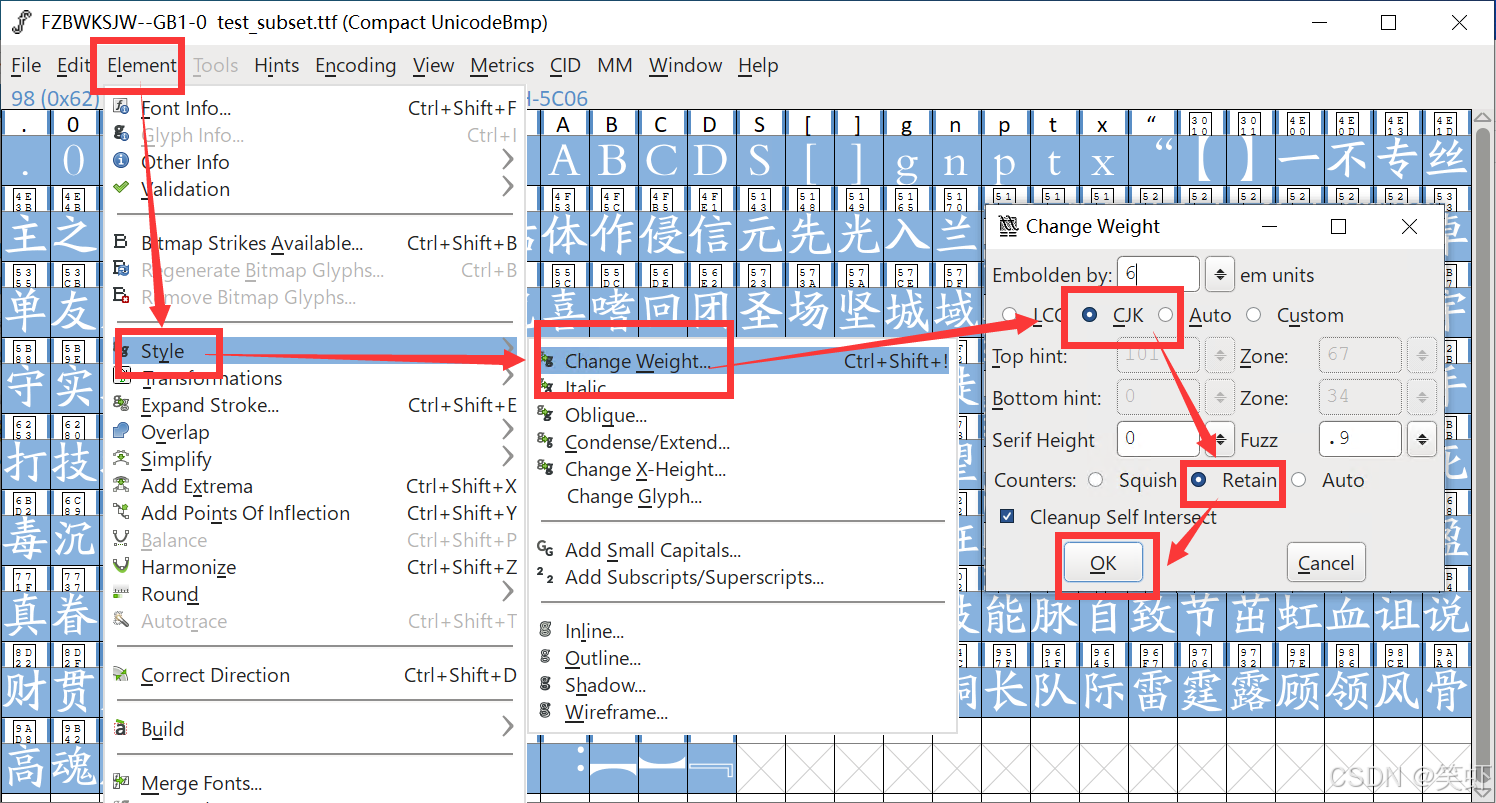
导出
将选中字符导出为字体文件(警告什么的,反正也不会处理,直接跳过)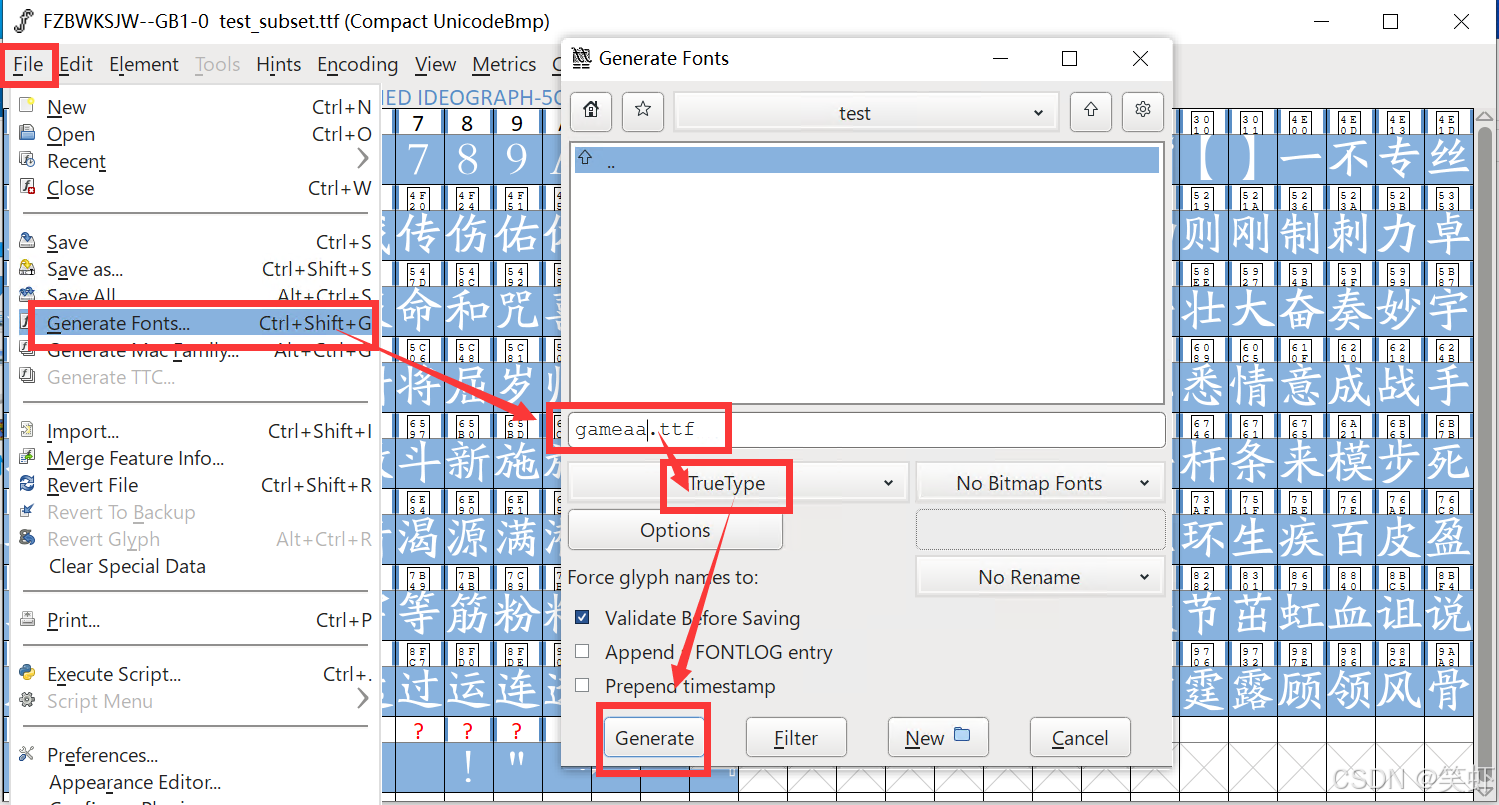
八、智能字体子集.bat
FontSubset.exe 辅助脚本
在 FontSubset.exe 所有目录创建文本文件,复制粘贴如下内容,然后文件改名为 智能字体子集.bat
@echo off
chcp 65001 >nul
setlocal enabledelayedexpansion

title FontSubset 智能拖拽脚本
mode con cols=120 lines=32
color 07

goto main
:fail
color 0C
title [ERROR] FontSubset 智能拖拽脚本
::echo %~1
for %%i in (%*) do echo %%i
echo ===============================================
exit /b 1

:main

echo.
echo ===============================================
echo           FontSubset 智能拖拽脚本
echo ===============================================
echo 用法: 将此脚本与 FontSubset.exe 放在同一目录下
echo   1. 拖入一个 .ttf 文件:		自动查找同目录同名 .txt 文件
echo   2. 拖入一个 .txt 文件:		自动查找同目录同名 .ttf 文件
echo   3. 同时拖入一个 .ttf + 一个 .txt:	直接使用这两个文件执行(文件名无需相同)
echo.
echo 例如:
echo   拖入: game.ttf 自动查找 game.txt
echo   执行: FontSubset.exe game.ttf game.txt
echo -----------------------------------------------
echo   拖入: 楷书.ttf + game.txt
echo   执行: FontSubset.exe 楷书.ttf game.txt
echo ===============================================
echo.

set "EXE=%~dp0FontSubset.exe"

if not exist "%EXE%" (
    call :fail "【错误】 找不到 FontSubset.exe"
    pause
    exit /b
)

if "%~1"=="" (
    call :fail "【错误】 请拖入 .ttf 或 .txt 文件"
    pause
    exit /b
)

set "TTF="
set "TXT="
set "BASE_DIR="
set "BASE_NAME="

:loop
if "%~1"=="" goto check

set "FILE=%~1"
set "EXT=%~x1"

if /i "%EXT%"==".ttf" (
    set "TTF=%FILE%"
    if not defined BASE_DIR set "BASE_DIR=%~dp1"
    if not defined BASE_NAME set "BASE_NAME=%~n1"
) else if /i "%EXT%"==".txt" (
    set "TXT=%FILE%"
    if not defined BASE_DIR set "BASE_DIR=%~dp1"
    if not defined BASE_NAME set "BASE_NAME=%~n1"
)

shift
goto loop

:check

if defined TTF if not defined TXT (
    for %%A in ("%TTF%") do (
        set "TXT=%%~dpnA.txt"
    )

    if not exist "!TXT!" (
        call :fail 【错误】找不到同名【txt】: !TXT!
        pause
        exit /b
    )
)

if defined TXT if not defined TTF (
    for %%A in ("%TXT%") do (
        set "TTF=%%~dpnA.ttf"
    )

    if not exist "!TTF!" (
        call :fail 【错误】找不到同名【ttf】: !TTF!
        pause
        exit /b
    )
)

if not defined TTF (
    call :fail "【错误】 没有找到 .ttf 文件"
    pause
    exit /b
)

if not defined TXT (
    call :fail "【错误】 没有找到 .txt 文件"
    pause
    exit /b
)

echo 当前字体文件: %TTF%
echo 当前字符文件: %TXT%
echo ===============================================
echo.

"%EXE%" "%TTF%" "%TXT%"

echo.
echo 执行完毕
pause
参考资料
https://github.com/fontforge/fontforge
Glyphr Studio(浏览器离线开源,轻量 AI 辅助)
yeungchenwa / FontDiffuser (本地开源 AI 模型,批量生成风格变体)

有“AI”的1024 = 2048,欢迎大家加入2048 AI社区
更多推荐

 11
11 0
0- 0


 已为社区贡献8条内容

所有评论(0)