AI编程1:基于 LangGraph 构建笑话生成工作流:条件分支
本文介绍了使用LangGraph构建自动化笑话生成工作流的实现方法。该系统通过阿里云百炼大模型实现"生成→检查→优化→润色"的完整流程,支持条件分支判断:当初始笑话不包含"@"符号时触发优化和润色环节,否则直接输出。工作流包含四个核心节点:生成初始笑话、检查妙语、添加文字游戏优化、加入转折润色。通过状态图管理流程数据,使用条件边实现分支逻辑。代码提供了Win
一、功能说明
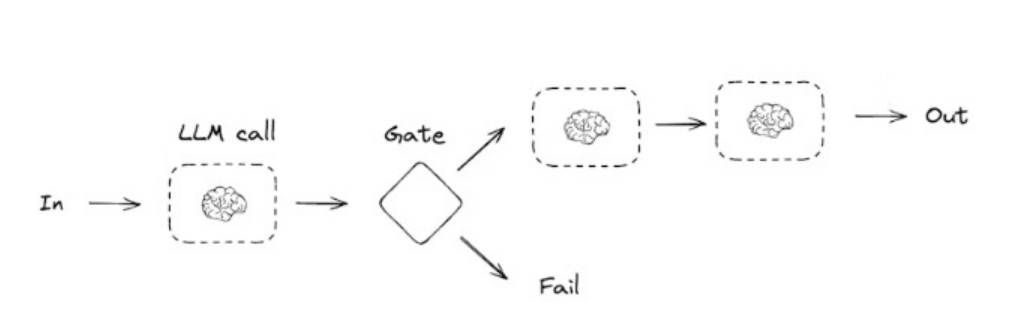
本文通过 LangGraph 搭建可视化工作流,调用阿里云百炼大模型实现「笑话生成→质量检查→优化改进→最终润色」的自动化流程,支持条件分支逻辑(检查不通过则触发优化 + 润色,通过则直接输出)。
二、环境准备
1. 安装依赖
# 升级pip
python.exe -m pip install --upgrade pip
# 安装langchain相关库
pip install --upgrade langchain langchain-core langchain-openai langchain-deepseek
2. 阿里云百炼配置
- 申请地址:https://bailian.console.aliyun.com/cn-beijing/?tab=model#/model-market/detail/qwen3-max-2026-01-23
- 获取 API Key(下文替换为 ***************)
三、完整代码实现
代码逻辑:
```
generate_joke:根据主题生成初始笑话
check_punchline:检查笑话是否有"妙语"(包含 ? 或 !)
improve_joke:添加文字游戏使笑话更有趣
polish_joke:添加出人意料的转折
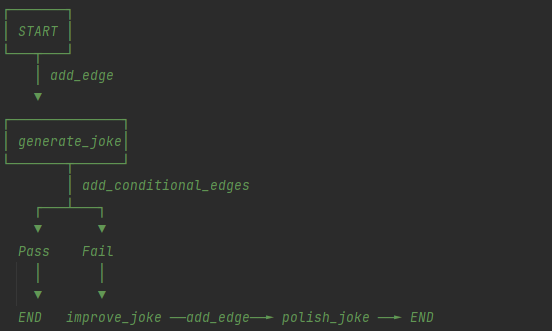
START → generate_joke → [检查] → 有妙语? → END
↓
没有妙语
↓
improve_joke → polish_joke → END
add_node(name, function)
添加节点 —— 工作流中的一个处理步骤
add_edge(from_node, to_node)
添加边 —— 无条件连接两个节点
add_conditional_edges(node, condition_func, mapping)
添加条件边 —— 根据条件分支到不同节点
workflow.add_conditional_edges(
"generate_joke", # 从哪个节点出发
check_punchline, # 条件函数(返回 "Pass" 或 "Fail")
{
"Fail": "improve_joke", # 返回 "Fail" → 去 improve_joke
"Pass": END # 返回 "Pass" → 结束
}
)
```
完整代码
python
运行
# -*- coding: utf-8 -*-

"""
langchain_test3
~~~~~~~~~~~~

:copyright: (c) 2026
:authors: WangQiaomei
:version: 1.0 of 2026/3/10

"""

"""
LangGraph+阿里云百炼 笑话生成工作流
流程逻辑:
START → generate_joke(生成初始笑话)→ check_punchline(检查妙语)
    → Pass(包含@)→ END
    → Fail(无@)→ improve_joke(添加文字游戏)→ polish_joke(添加转折)→ END
"""
from typing_extensions import TypedDict
from langgraph.graph import StateGraph, START, END
from langchain_openai import ChatOpenAI
import sys

# 修复Windows终端GBK编码问题
def safe_print(text):
    """GBK兼容打印,过滤无法编码的特殊字符"""
    print(text.encode('gbk', errors='ignore').decode('gbk'), end="\n", flush=True)

# 1. 初始化大模型(阿里云百炼)
llm = ChatOpenAI(
    model="qwen-plus",
    api_key="***************",  # 替换为你的阿里云百炼API Key
    base_url="https://dashscope.aliyuncs.com/compatible-mode/v1",
)

# 2. 定义工作流状态(存储流程中产生的所有数据)
class State(TypedDict):
    topic: str          # 笑话主题
    joke: str           # 初始生成的笑话
    improved_joke: str  # 优化后的笑话
    final_joke: str     # 最终润色的笑话

# 3. 定义工作流节点函数
def generate_joke(state: State):
    """节点1:根据主题生成初始笑话"""
    msg = llm.invoke(f"Write a short joke about {state['topic']}")
    return {"joke": msg.content}

def check_punchline(state: State):
    """节点2:检查笑话是否包含@(修改逻辑触发Fail分支)"""
    if "@" in state["joke"]:  # 改为检查@符号,初始笑话无@则返回Fail
        return "Pass"
    return "Fail"

def improve_joke(state: State):
    """节点3:为笑话添加文字游戏,提升趣味性"""
    msg = llm.invoke(f"Make this joke funnier by adding wordplay: {state['joke']}")
    return {"improved_joke": msg.content}

def polish_joke(state: State):
    """节点4:为笑话添加出人意料的转折"""
    msg = llm.invoke(f"Add a surprising twist to this joke: {state['improved_joke']}")
    return {"final_joke": msg.content}

# 4. 构建工作流
# 初始化状态图
workflow = StateGraph(State)

# 添加节点(每个节点对应一个处理函数)
workflow.add_node("generate_joke", generate_joke)   # 生成初始笑话
workflow.add_node("improve_joke", improve_joke)     # 优化笑话
workflow.add_node("polish_joke", polish_joke)       # 润色笑话

# 添加边(连接节点,定义执行顺序)
workflow.add_edge(START, "generate_joke")  # 开始 → 生成初始笑话

# 添加条件边(根据检查结果分支)
workflow.add_conditional_edges(
    "generate_joke",          # 起始节点:生成初始笑话
    check_punchline,          # 条件判断函数
    {
        "Fail": "improve_joke",  # 检查失败 → 优化笑话
        "Pass": END              # 检查通过 → 结束
    }
)

# 无条件边:优化笑话 → 润色笑话 → 结束
workflow.add_edge("improve_joke", "polish_joke")
workflow.add_edge("polish_joke", END)

# 5. 编译工作流
chain = workflow.compile()

# 6. 可视化工作流(需安装graphviz,注释掉也可运行)
# from IPython.display import Image, display
# display(Image(chain.get_graph().draw_mermaid_png()))

# 7. 执行工作流(主题:cats)
if __name__ == "__main__":
    # 调用工作流
    state = chain.invoke({"topic": "cats"})

    # 输出结果
    safe_print("=== 初始笑话 ===")
    safe_print(state["joke"])
    safe_print("\n=== 分割线 ===\n")

    if "improved_joke" in state:
        safe_print("=== 优化后笑话 ===")
        safe_print(state["improved_joke"])
        safe_print("\n=== 分割线 ===\n")

        safe_print("=== 最终笑话 ===")
        safe_print(state["final_joke"])
    else:
        safe_print("=== 最终笑话 ===")
        safe_print(state["joke"])
四、运行结果(主题:cats)
场景 1:修改检查逻辑前(检查?/!,通过)
=== 初始笑话 ===
Why did the cat sit on the computer?
*To keep an eye on the mouse… and also because it’s the warmest spot in the room.*

*(Bonus groan: It’s not *just* about the mouse—it’s a full-time surveillance gig with snacks.)*

=== 分割线 ===

=== 最终笑话 ===
Why did the cat sit on the computer?
*To keep an eye on the mouse… and also because it’s the warmest spot in the room.*

*(Bonus groan: It’s not *just* about the mouse—it’s a full-time surveillance gig with snacks.)*
场景 2:修改检查逻辑后(检查 @,不通过)
=== 初始笑话 ===
Why did the cat sit on the computer?
*To keep an eye on the mouse… and also because it’s the warmest spot in the room.*

*(Bonus groan: It’s not *just* about the mouse—it’s a full-time surveillance gig with built-in napping benefits.)*

=== 分割线 ===

=== 优化后笑话 ===
Here’s a punchier, wordplay-packed rewrite—layering tech puns, feline double meanings, and a *purr-fect* groan:

**Why did the cat sit on the computer?**
 *To keep an eye on the mouse…*
*(…and also because it’s the warmest spot in the room—*a true **hot seat** with built-in **cache** and **low battery** (yours, not hers).*

**Bonus groan:**
*It’s not just surveillance—it’s a full-time gig as Chief **Mousing Officer** (CMO), complete with:
 **Paw-licy updates** (she rewrites your keyboard shortcuts),
 **Fur-mal complaints** (about your typing speed),
 And mandatory **nap-pliance testing** (her tail is now a certified **trackpad**).*

*…She’s not lazy. She’s in **deep sleep mode**. And yes, she’s already filed her resignation from the *real* mouse-catching department.*

*(P.S. Her performance review says: “Exceeds KPIs for **cursor control**, **system overheating**, and **unauthorized file deletions** (via tail-swipe).”)*

**Why it works:**
- **"Hot seat"** = tech term + literal warmth + feline sunbathing.
- **"Cache"** = computing memory + *caché* (prestige… but she’s just napping).
- **"Low battery"** = your laptop *and* your will to resist her.
- **"Mousing Officer"** = CEO/CMO pun + literal mouse duty.
- **"Paw-licy," "Fur-mal," "nap-pliance"** = seamless feline + tech portmanteaus.
- The tail-as-trackpad? *Chef’s kiss.* And the resignation from "real mouse-catching"? A final, absurd mic-drop.

Now it’s not just a joke—it’s a *full-stack feline ops briefing*.

=== 分割线 ===

=== 最终笑话 ===
Here's the **surprising twist**—delivered with deadpan tech gravitas and a *genuine* plot hole that rewrites feline physics:
五、核心步骤总结
- 初始化模型:配置阿里云百炼 API,替换 token 为 ***************;
- 定义状态:通过 TypedDict 存储流程中所有数据(主题、各版本笑话);
- 编写节点函数:实现生成、检查、优化、润色四个核心功能;
- 构建工作流:
- add_node:注册节点;
- add_edge:配置无条件执行顺序;
- add_conditional_edges:配置条件分支(检查结果决定是否优化);
- 编译并执行:调用 chain.invoke 传入主题,输出结果。
关键点回顾
- LangGraph 核心是「状态 + 节点 + 边」,通过条件边实现分支逻辑,适合构建复杂工作流;
- 修改 check_punchline 的检查逻辑(从?/! 改为 @),可触发不同的执行分支;
- safe_print 函数解决 Windows 终端 GBK 编码无法显示特殊字符的问题。

有“AI”的1024 = 2048,欢迎大家加入2048 AI社区
更多推荐

 8
8 0
0- 0


 已为社区贡献2条内容

所有评论(0)