【由浅入深探究langchain】第二十二集-多智能体Supervisor Agent(下)
本文介绍了如何构建SupervisorAgent(主管智能体)来协调处理跨领域的复合任务。
前情提要
在上一集中,我们亲手打造了日历专家 Calendar Agent和邮件专家Email Agent。但现实场景往往更复杂,比如:“帮我定个周一的会,然后发邮件通知大家。”
面对这种跨领域的复合任务,我们需要一个“大脑”来统筹全局。这就是我们今天要聊的 Supervisor Agent(主管智能体)。
一、 核心逻辑:Agent 嵌套
下集最硬核的知识点在于:把 Agent 包装
在 LangChain 1.0 中,supervisor_agent 并不直接与底层的数据库或 API 交互,它的“工具箱”里装的是其他的 Agent。
-
上集:Agent 1 $\rightarrow$ 调用
Python Function。 -
下集:Supervisor $\rightarrow$ 调用
Agent Tool$\rightarrow$ 执行Agent 1。
成 Tool。
这种层级结构(Layered Architecture)极大地降低了单个 Agent 的 Prompt 复杂度,提高了稳定性。
二、完整代码
supervisor_agent.py
from langchain_openai import ChatOpenAI
kimi_model = ChatOpenAI(
    model="kimi-k2.5",
    api_key="sk-uQp***",
    base_url="https://api.moonshot.cn/v1",
     # 重点:这里严格对应 Kimi 的 API 结构
    extra_body={
        "thinking": {"type": "disabled"}
    }
)

from langchain_core.tools import tool
from langchain.agents import create_agent

SUPERVISOR_PROMPT=(
    "You are a helpful personal assistant."
    "You can schedule calendar events and send emails."
    "Break down user requests into appropriate tool calls and coordinate the results."
    "When a request involves multiple actions, use multiple tools in sequence."
)

from calendar_agent import calander_agent
from email_agent import email_agent

@tool
def schedule_event(request: str) -> str:
    """Schedule calendar events using natural language.

    Use this when the user wants to create, modify, or check calendar appointments.
    Handles date/time parsing, availability checking, and event creation.

    Input: Natural language scheduling request (e.g., 'meeting with design team next Tuesadt at 2pm')
    """
    result = calander_agent.invoke({
            "messages":[{"role":"user","content":request}]
        })
    return result["messages"][-1].text

@tool
def manage_email(request: str) -> str:
    """Send emails using natural language.
    Use this when the user wants to send notifications, reminders, or any emailcommunication. Handles recipient extraction, subject generation, and email composition.

    Input: Natural language email request (e.g., 'send them a reminder about the meeting')
    """
    result = email_agent.invoke({
            "messages":[{"role":"user","content":request}]
        })
    return result["messages"][-1].text

supervisor_agent = create_agent(
     model=kimi_model,
    system_prompt=SUPERVISOR_PROMPT,
    tools=[schedule_event,manage_email]
)

def test_supervisor_agent():
    query = "hello"
    for event in supervisor_agent.stream(
        {"messages":{"role":"user","content":query}},
        stream_mode="values"
    ):
        event["messages"][-1].pretty_print()
    query = "Schedule a team meeting ['aaa@abc.com'] on 2026-03-30 at 2pm, 1hour,then send email to notify the team."
    for event in supervisor_agent.stream(
        {"messages":{"role":"user","content":query}},
        stream_mode="values"
    ):
        event["messages"][-1].pretty_print()

test_supervisor_agent()
三、 代码详解:构建调度中心
1. 导入“组件化”的Agent
我们直接导入上集写好的 calander_agent 和 email_agent。在大型项目中,这种模块化导入让代码非常整洁。
from calendar_agent import calander_agent
from email_agent import email_agent
2. 将 Agent 封装为工具
我们定义了两个新工具:schedule_event 和 manage_email。
目的:
-
黑盒化:Supervisor 不需要知道怎么解析日期,它只需要把用户的原始需求(request)丢给
schedule_event工具。 -
状态隔离:子 Agent 的中间思考过程(Thinking)会被封装在工具内部,Supervisor 只能看到最终执行结果,防止上下文干扰。
@tool
def schedule_event(request: str) -> str:
    """Schedule calendar events using natural language.

    Use this when the user wants to create, modify, or check calendar appointments.
    Handles date/time parsing, availability checking, and event creation.

    Input: Natural language scheduling request (e.g., 'meeting with design team next Tuesadt at 2pm')
    """
    result = calander_agent.invoke({
            "messages":[{"role":"user","content":request}]
        })
    return result["messages"][-1].text

@tool
def manage_email(request: str) -> str:
    """Send emails using natural language.
    Use this when the user wants to send notifications, reminders, or any emailcommunication. Handles recipient extraction, subject generation, and email composition.

    Input: Natural language email request (e.g., 'send them a reminder about the meeting')
    """
    result = email_agent.invoke({
            "messages":[{"role":"user","content":request}]
        })
    return result["messages"][-1].text
3.定义主管:Supervisor 的职责(prompt)
SUPERVISOR_PROMPT = (
    "You are a helpful personal assistant."
    "Break down user requests into appropriate tool calls..."
)
4.构建agent
supervisor_agent = create_agent(
     model=kimi_model,
    system_prompt=SUPERVISOR_PROMPT,
    tools=[schedule_event,manage_email]
)
5.测试
我们让它"Schedule a team meeting ... then send email to notify the team."
理论上Supervisor 的执行流转如下:
识别任务 A:发现需要“订会议”,调用 schedule_event 工具。
触发子 Agent:calander_agent 介入,调用它自己的工具完成任务,并返回“Event created...”。
识别任务 B:Supervisor 收到 A 完成的消息后,发现还需要“发邮件”,于是调用 manage_email。
触发子 Agent:email_agent 介入,完成发送任务。
总结:Supervisor 汇总两次工具调用的结果,给用户最终反馈。
def test_supervisor_agent():
    query = "hello"
    for event in supervisor_agent.stream(
        {"messages":{"role":"user","content":query}},
        stream_mode="values"
    ):
        event["messages"][-1].pretty_print()
    query = "Schedule a team meeting ['aaa@abc.com'] on 2026-03-30 at 2pm, 1hour,then send email to notify the team."
    for event in supervisor_agent.stream(
        {"messages":{"role":"user","content":query}},
        stream_mode="values"
    ):
        event["messages"][-1].pretty_print()

test_supervisor_agent()
四、结果详解
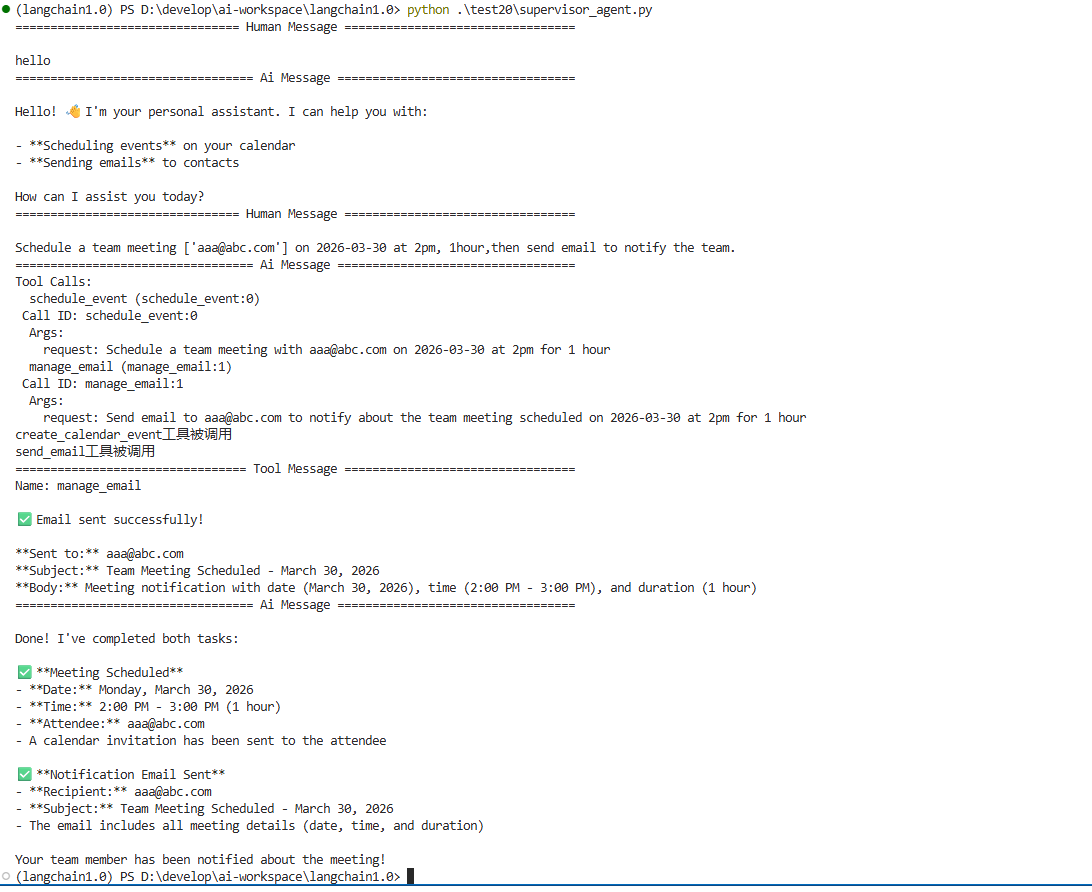
当输入:“订个会,然后发邮件通知” 时,我们可以看到 Supervisor 并没有直接输出文字,而是立刻生成了两个 Tool Calls:
schedule_event (Args: Schedule a team meeting...)
manage_email (Args: Send email to aaa@abc.com...)
打印中可以看到:
-
Calendar工具被调用。 -
send_email工具随后被调用。
这两个print语句是在两个work agents中的。模型通过一次响应(Response)输出了两个工具调用指令。这种“全能主管”的表现,极大提升了执行效率。
最终AI将结果重新格式化成了人类友好的报告,这种将“底层执行结果”转化为“高层业务总结”的能力,正是 LangChain 1.0 架构下多智能体的核心价值所在。
总结
通过这两集的学习,我们从 0 到 1 搭建了一个可以感知、思考、并驱动多个专家协作的 Personal Assistant。
-
上集:我们学会了如何给“手脚”(Worker Agents)安装工具。
-
下集:我们学会了如何给系统安装“大脑”(Supervisor)。
核心感悟: 在 AI 开发的新范式下,编写代码不再是编写逻辑,而是编写“契约”。你定义好 Agent 之间的边界和接口文档(Docstrings),剩下的协作逻辑,交给 LLM 去推理。

有“AI”的1024 = 2048,欢迎大家加入2048 AI社区
更多推荐

 8
8 0
0- 0


 已为社区贡献1条内容

所有评论(0)