GitNexus 集成架构与智能体增强
MCP 服务器:通过 stdio 与 AI 智能体通信,支持 7 个工具、资源读取和提示词生成。多仓库注册表 + 连接池实现了全局配置、按需加载的架构。Web UI:完全浏览器端实现,使用 WASM 技术栈(Tree-sitter WASM、KuzuDB WASM、transformers.js)。Web Worker 并行处理 + Sigma.js WebGL 渲染实现了流畅的用户体验。编辑器集
GitNexus 集成架构与智能体增强
MCP 服务器架构、Web UI 与 WASM 集成、编辑器集成与智能体技能
一、入口类与架构关系
GitNexus 的集成层由三个核心子系统构成:MCP 服务器(Model Context Protocol Server)、Web UI(Browser-based WASM)、编辑器集成(Editor Hooks & Agent Skills)。这三个子系统将知识图谱暴露给不同的使用场景,实现 AI 智能体的代码库感知能力。
1.1 核心类关系图
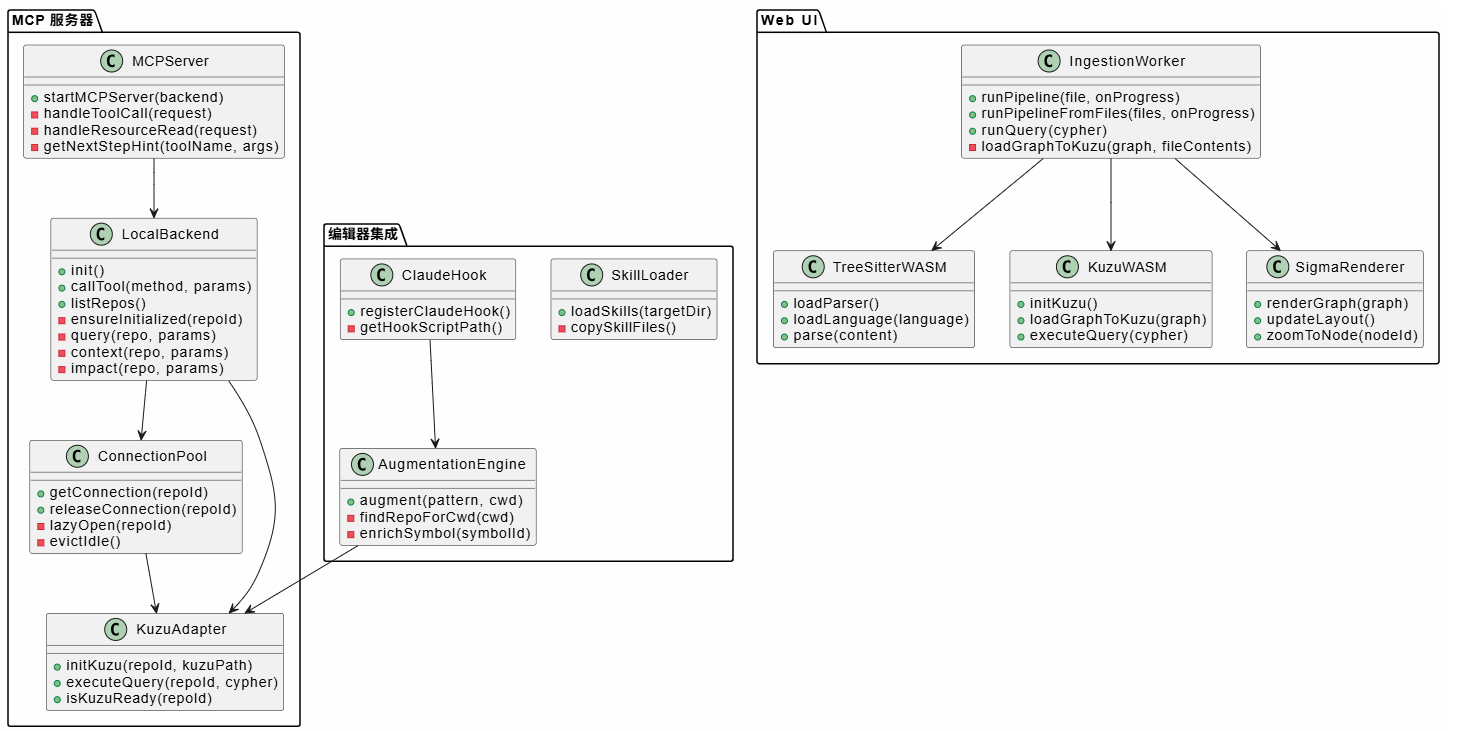
1.2 多仓库注册表架构
MCP 服务器使用全局注册表管理多个已索引仓库,实现一次配置、全局使用的目标。
注册表结构(~/.gitnexus/registry.json):
{
  "repos": [
    {
      "name": "my-app",
      "path": "/path/to/my-app",
      "storagePath": "/path/to/my-app/.gitnexus",
      "indexedAt": "2024-01-15T10:30:00Z",
      "lastCommit": "abc123",
      "stats": {
        "fileCount": 1234,
        "functionCount": 5678,
        "communityCount": 45,
        "processCount": 120
      }
    }
  ]
}
连接池管理:
- 懒加载:首次查询时打开 KuzuDB 连接
- 超时回收:5 分钟不活动自动关闭连接
- 并发限制:最多 5 个并发连接,超出则等待
二、关键流程描述
2.1 MCP 服务器启动与工具调用流程
MCP 服务器通过 stdio 与 AI 智能体通信,支持工具调用、资源读取和提示词生成。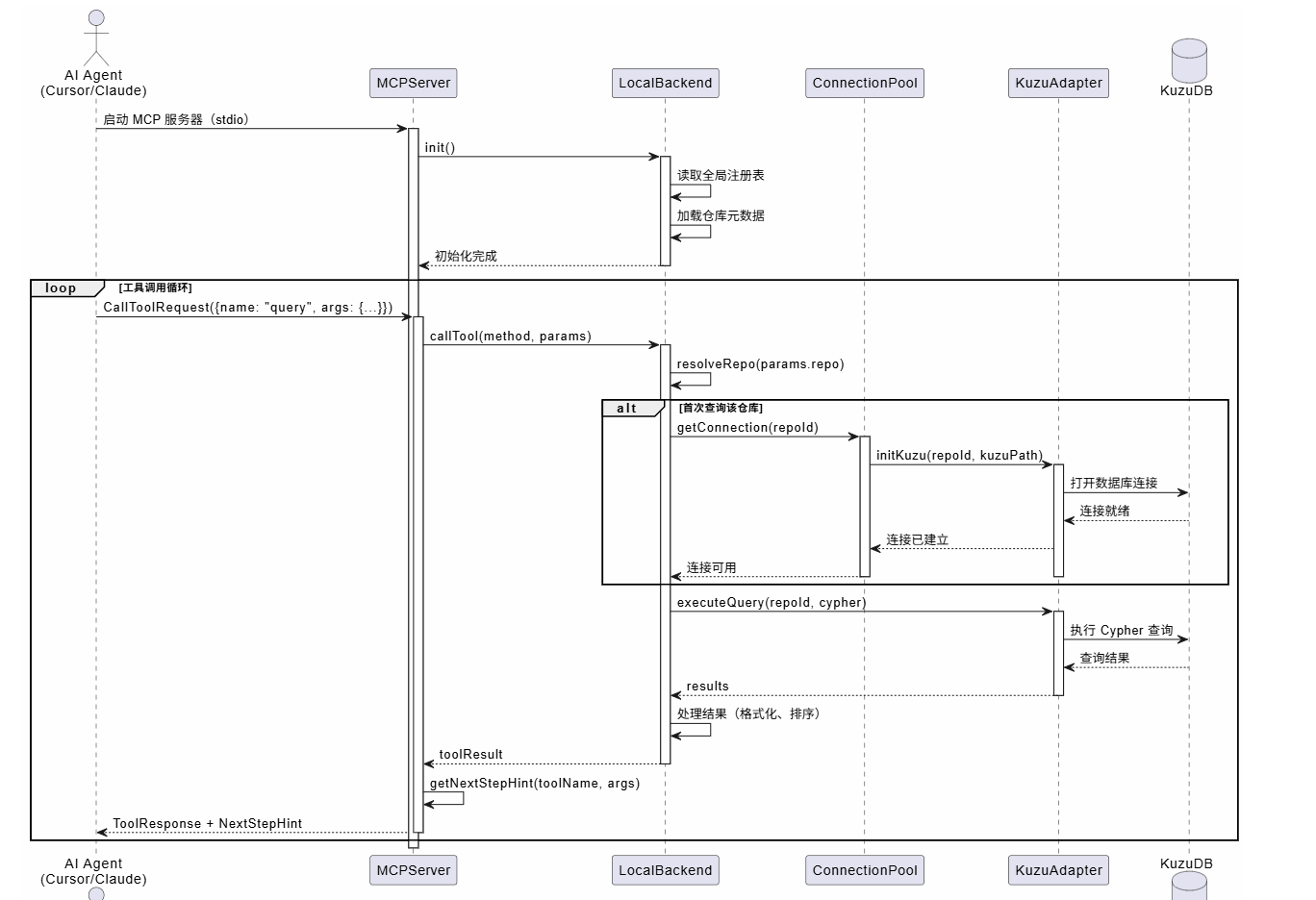
Next-Step Hints 机制:
MCP 服务器在每个工具响应后附加"下一步提示",引导智能体执行逻辑连贯的操作序列:
function getNextStepHint(toolName: string, args: Record<string, any>): string {
  switch (toolName) {
    case 'query':
      return '\n\n---\n**Next:** To understand a specific symbol in depth, use context({name: "<symbol_name>"})';
    case 'context':
      return '\n\n---\n**Next:** If planning changes, use impact({target: "<name>", direction: "upstream"})';
    case 'impact':
      return '\n\n---\n**Next:** Review d=1 items first (WILL BREAK). To check affected execution flows, READ gitnexus://repo/{name}/processes';
    // ...
  }
}
这种设计避免了智能体在单次工具调用后停止,创建了自引导的工作流。
2.2 Web UI 索引与可视化流程
Web UI 完全在浏览器中运行,使用 WASM 技术栈实现零服务器部署。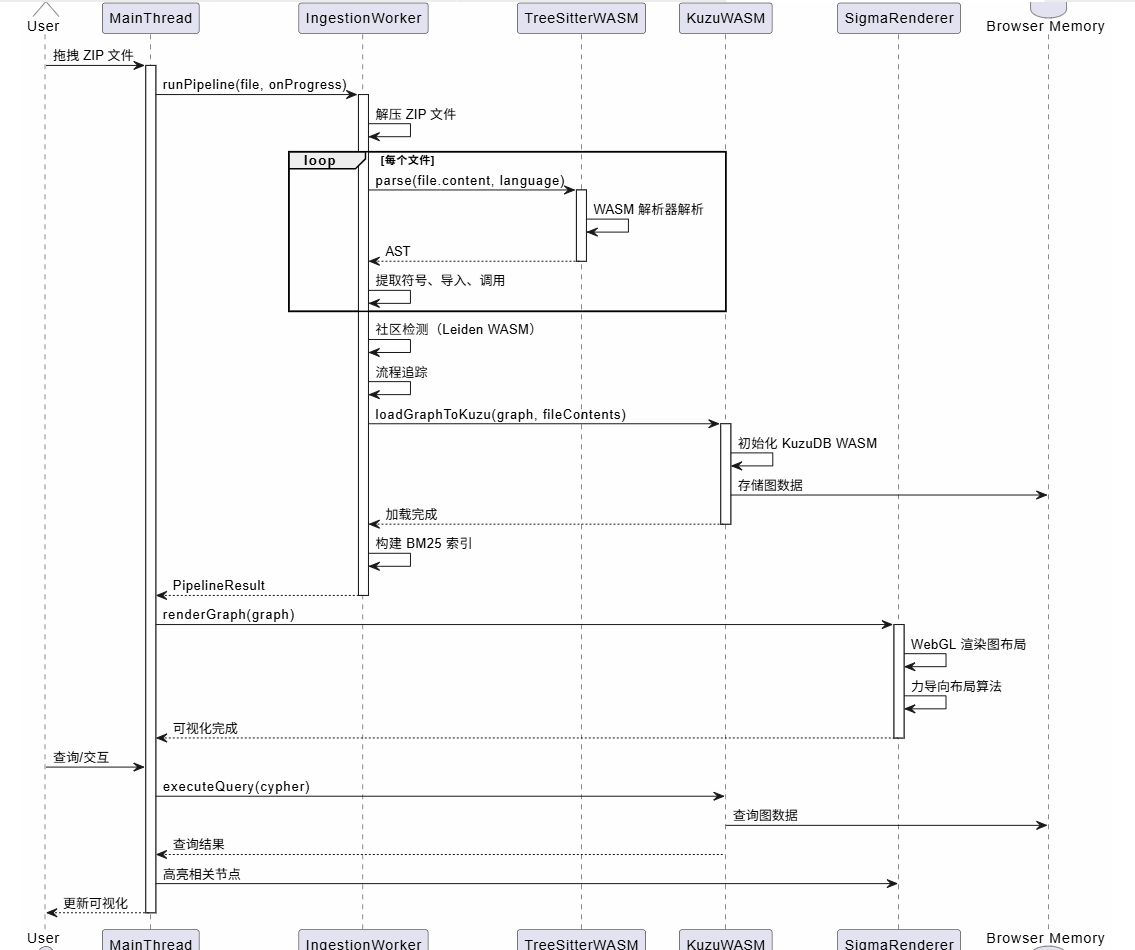
WASM 技术栈:
- Tree-sitter WASM:将 Tree-sitter 解析器编译为 WASM,在浏览器中解析代码
- KuzuDB WASM:将 KuzuDB 图数据库编译为 WASM,在浏览器中存储和查询图数据
- transformers.js:使用 WebGPU 或 WASM 后端生成嵌入向量
- Sigma.js:WebGL 渲染图可视化,支持大规模节点(10k+)
2.3 编辑器钩子与增强流程
编辑器钩子在智能体执行工具前拦截,自动注入知识图谱上下文。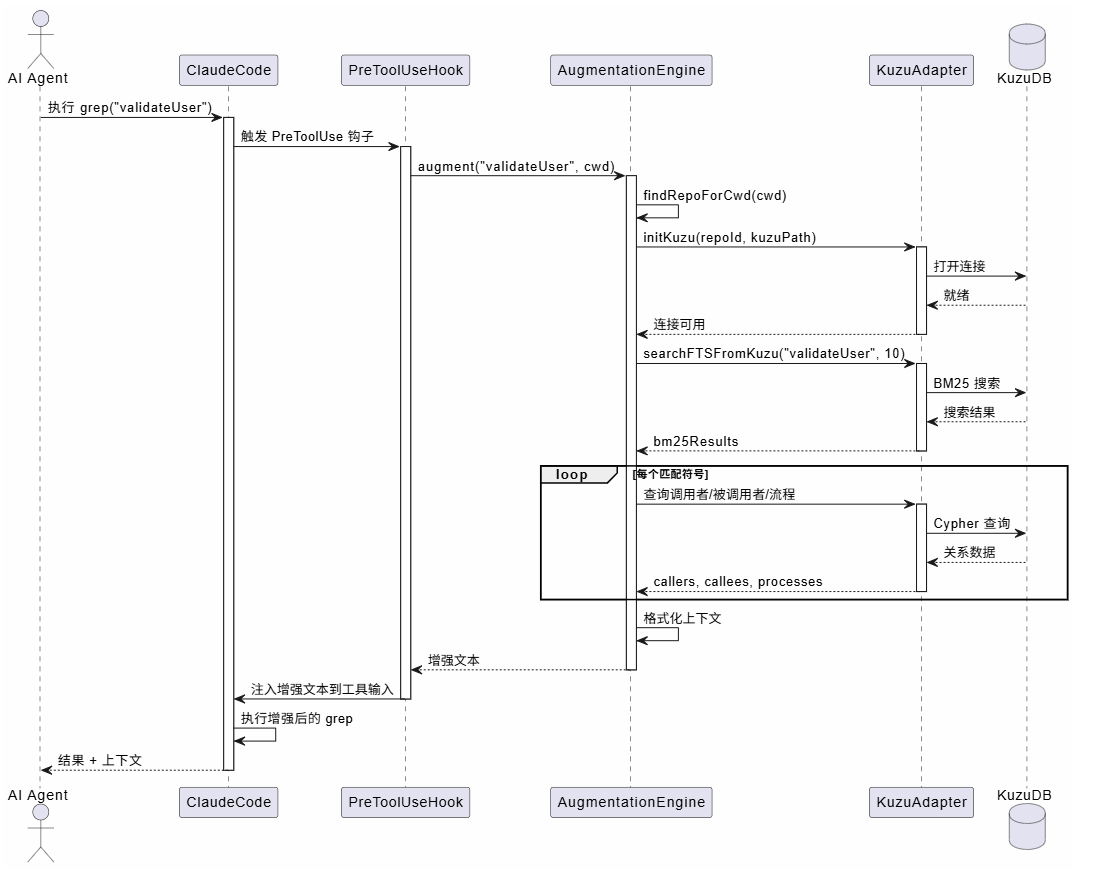
增强文本格式:
[GitNexus] 3 related symbols found:

validateUser (src/auth/validate.ts)
  Called by: handleLogin, handleRegister, UserController
  Calls: checkPassword, createSession
  Flows: LoginFlow (step 2/7), RegistrationFlow (step 3/5)

validateToken (src/auth/token.ts)
  Called by: validateUser
  Calls: decodeJWT, checkExpiry

...
这种增强使得智能体在执行 grep 时自动获得相关符号的调用关系和流程参与信息,无需额外查询。
三、关键实现点说明
3.1 MCP 工具实现:流程分组搜索
query 工具是 GitNexus 最复杂的工具,实现了流程分组的混合搜索。
实现流程:
async query(repo: RepoHandle, params: {
  query: string;
  limit?: number;
  max_symbols?: number;
}): Promise<any> {
  // 1. 混合搜索(BM25 + 语义)
  const [bm25Results, semanticResults] = await Promise.all([
    this.bm25Search(repo, searchQuery, searchLimit),
    this.semanticSearch(repo, searchQuery, searchLimit),
  ]);

  // 2. RRF 融合
  const merged = mergeWithRRF(bm25Results, semanticResults, searchLimit);

  // 3. 追踪到流程
  const processMap = new Map();
  for (const sym of merged) {
    const processRows = await executeQuery(repo.id, `
      MATCH (n {id: '${sym.nodeId}'})-[r:CodeRelation {type: 'STEP_IN_PROCESS'}]->(p:Process)
      RETURN p.id, p.label, p.heuristicLabel, p.processType, p.stepCount, r.step
    `);

    // 4. 按流程分组
    for (const row of processRows) {
      if (!processMap.has(row.pid)) {
        processMap.set(row.pid, {
          id: row.pid,
          label: row.label,
          totalScore: 0,
          symbols: [],
        });
      }
      processMap.get(row.pid).totalScore += sym.score;
      processMap.get(row.pid).symbols.push({
        ...sym,
        process_id: row.pid,
        step_index: row.step,
      });
    }
  }

  // 5. 按聚合分数排序
  const rankedProcesses = Array.from(processMap.values())
    .sort((a, b) => b.totalScore - a.totalScore)
    .slice(0, processLimit);

  return {
    processes: rankedProcesses.map(p => ({
      summary: p.heuristicLabel,
      priority: p.totalScore,
      symbol_count: p.symbols.length,
    })),
    process_symbols: rankedProcesses.flatMap(p => p.symbols),
  };
}
关键优化:
- 并行搜索:BM25 和语义搜索并行执行
- 流程分组:将匹配符号按参与的流程分组,提供上下文
- 内聚度加成:使用社区内聚度作为隐式排序信号(不暴露给用户)
3.2 连接池懒加载与超时回收
MCP 服务器支持多仓库,但并非所有仓库都会同时被查询。连接池实现了懒加载和超时回收。
class ConnectionPool {
  private connections: Map<string, { kuzuId: string; lastUsed: number }> = new Map();
  private readonly MAX_CONCURRENT = 5;
  private readonly IDLE_TIMEOUT = 5 * 60 * 1000; // 5 分钟

  async getConnection(repoId: string): Promise<void> {
    // 检查是否已有连接
    if (this.connections.has(repoId) && isKuzuReady(repoId)) {
      this.connections.get(repoId)!.lastUsed = Date.now();
      return;
    }

    // 检查并发限制
    if (this.connections.size >= this.MAX_CONCURRENT) {
      // 回收最久未使用的连接
      await this.evictIdle();
    }

    // 懒加载:首次查询时打开
    await initKuzu(repoId, kuzuPath);
    this.connections.set(repoId, {
      kuzuId: repoId,
      lastUsed: Date.now(),
    });
  }

  private async evictIdle(): Promise<void> {
    const now = Date.now();
    const idle = Array.from(this.connections.entries())
      .filter(([_, conn]) => now - conn.lastUsed > this.IDLE_TIMEOUT)
      .sort((a, b) => a[1].lastUsed - b[1].lastUsed);

    if (idle.length > 0) {
      const [repoId, _] = idle[0];
      await closeKuzu(repoId);
      this.connections.delete(repoId);
    }
  }
}
设计优势:
- 内存效率:仅打开被查询的仓库连接
- 自动回收:5 分钟不活动自动关闭,释放内存
- 并发控制:最多 5 个并发连接,避免资源耗尽
3.3 Web Worker 并行处理
Web UI 使用 Web Worker 在后台线程执行索引,避免阻塞主线程。
// Main Thread
const worker = new Worker(new URL('./workers/ingestion.worker.ts', import.meta.url), {
  type: 'module',
});

const workerApi = Comlink.wrap<typeof workerApi>(worker);

// 调用 Worker API
const result = await workerApi.runPipeline(file, (progress) => {
  // 进度回调在主线程执行
  updateProgressBar(progress);
});

// Worker Thread (ingestion.worker.ts)
const workerApi = {
  async runPipeline(
    file: File,
    onProgress: (progress: PipelineProgress) => void
  ): Promise<SerializablePipelineResult> {
    // 在 Worker 线程中执行索引
    const result = await runIngestionPipeline(file, onProgress);

    // 序列化结果(移除不可序列化的对象)
    return serializePipelineResult(result);
  },
};

// 暴露给主线程
Comlink.expose(workerApi);
Comlink 代理:
- 使用 Comlink 库实现主线程和 Worker 之间的透明通信
- 进度回调通过
Comlink.proxy()代理,在 Worker 中调用但在主线程执行 - 结果序列化:移除不可序列化的对象(如 AST 树),仅传输图数据
3.4 增强引擎快速路径
增强引擎设计为轻量级、快速路径,目标 <500ms 冷启动,<200ms 热启动。
性能优化:
export async function augment(pattern: string, cwd?: string): Promise<string> {
  // 1. 快速路径:仅使用 BM25(无嵌入生成)
  const bm25Results = await searchFTSFromKuzu(pattern, 10, repoId);

  // 2. 限制查询范围(仅前 5 个匹配)
  for (const result of bm25Results.slice(0, 5)) {
    // 3. 并行查询调用者/被调用者/流程
    const [callers, callees, processes] = await Promise.all([
      executeQuery(repoId, `MATCH (caller)-[:CALLS]->(n) RETURN caller.name LIMIT 3`),
      executeQuery(repoId, `MATCH (n)-[:CALLS]->(callee) RETURN callee.name LIMIT 3`),
      executeQuery(repoId, `MATCH (n)-[:STEP_IN_PROCESS]->(p) RETURN p.heuristicLabel LIMIT 3`),
    ]);
  }

  // 4. 格式化输出(纯文本,无复杂结构)
  return formatAsText(enriched);
}
设计决策:
- 无嵌入生成:仅使用 BM25,避免嵌入生成的延迟
- 限制查询范围:仅查询前 5 个匹配,减少数据库负载
- 并行查询:调用者/被调用者/流程并行查询
- 优雅失败:任何错误返回空字符串,不中断原始工具
3.5 智能体技能自动安装
GitNexus 在 gitnexus analyze 时自动安装智能体技能到 .claude/skills/。
技能文件结构:
.claude/skills/
├── gitnexus/
│   ├── exploring.md      # 代码库探索技能
│   ├── debugging.md      # 调试追踪技能
│   ├── impact-analysis.md # 影响分析技能
│   └── refactoring.md    # 重构规划技能
技能内容示例(exploring.md):
# Exploring Skill

When exploring unfamiliar code:

1. READ `gitnexus://repo/{name}/context` for codebase overview
2. Use `query({query: "keyword"})` to find relevant code
3. Use `context({name: "symbol"})` for 360-degree view
4. READ `gitnexus://repo/{name}/processes` to understand execution flows
这些技能文件被 Claude Code 自动加载,为智能体提供结构化的代码库探索指导。
四、总结
GitNexus 的集成架构通过三个子系统实现了知识图谱的多场景暴露:
- MCP 服务器:通过 stdio 与 AI 智能体通信,支持 7 个工具、资源读取和提示词生成。多仓库注册表 + 连接池实现了全局配置、按需加载的架构。
- Web UI:完全浏览器端实现,使用 WASM 技术栈(Tree-sitter WASM、KuzuDB WASM、transformers.js)。Web Worker 并行处理 + Sigma.js WebGL 渲染实现了流畅的用户体验。
- 编辑器集成:PreToolUse 钩子自动增强工具调用,AugmentationEngine 快速路径(<500ms)注入知识图谱上下文。智能体技能自动安装提供结构化指导。
技术亮点:
- Next-Step Hints:工具响应后自动引导下一步操作,创建自引导工作流
- 懒加载连接池:按需打开数据库连接,5 分钟超时自动回收
- 流程分组搜索:将匹配符号按流程分组,提供上下文感知的搜索结果
- WASM 技术栈:零服务器部署,完全浏览器端,保护隐私
- 快速增强路径:BM25 搜索 + 并行查询,<500ms 响应时间
这些设计使得 GitNexus 能够无缝集成到现有的 AI 代码助手工作流中,无需改变用户习惯,即可获得深度的代码库感知能力。无论是 CLI + MCP 的日常开发场景,还是 Web UI 的快速探索场景,GitNexus 都能提供一致、高效的知识图谱查询体验。

有“AI”的1024 = 2048,欢迎大家加入2048 AI社区
更多推荐

 10
10 0
0- 0


 已为社区贡献20条内容

所有评论(0)