Spring AI 1.x 系列【6】集成 DeepSeek + 智谱 GLM,实现多模型一键切换的 AI 聊天助手
·
文章目录
1. 项目介绍
从零搭建一套 AI 聊天助手,基于 Spring AI 同时集成 DeepSeek 和 智谱 GLM 两大主流模型,实现前端一键切换模型、流式对话等完整功能。
1.1 功能演示
顶部下拉框一键切换 DeepSeek / 智谱GLM 模型: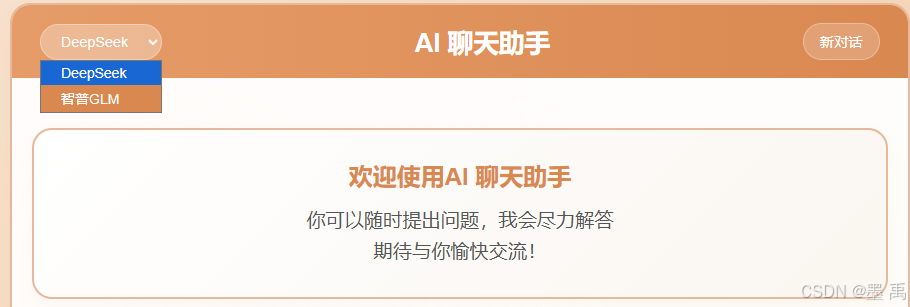
支持消息流式输出: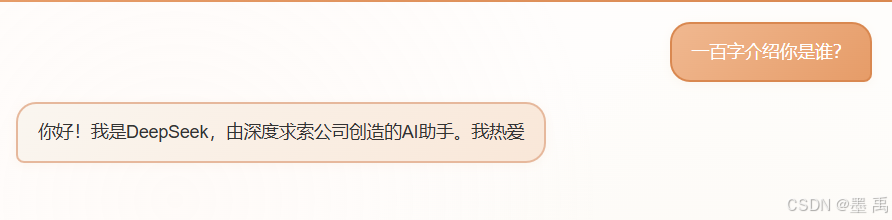
1.2 技术栈
核心技术栈:
-
前端:
Thymeleaf+SSE流式输出。 -
后端:
Spring Boot 3.5.x+Spring AI 1.1.2。 -
AI模型:DeepSeek Chat、智谱GLM-4。
2. 环境准备
2.1 申请 API Key
DeepSeek:前往 DeepSeek 开放平台 创建 API Key。
智谱 AI:前往 智谱开放平台 创建 API Key。
2.2 创建工程
工程结构如下: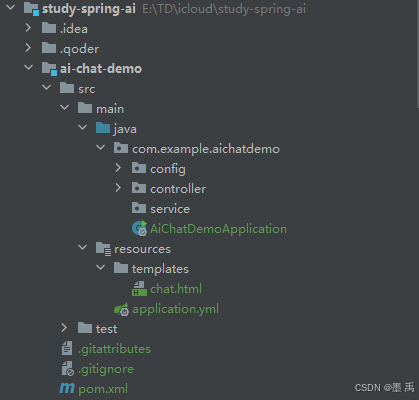
2.3 Maven 核心依赖
在 pom.xml 中引入 Spring AI 相关依赖,同时支持 DeepSeek 和智谱:
<?xml version="1.0" encoding="UTF-8"?>
<project xmlns="http://maven.apache.org/POM/4.0.0" xmlns:xsi="http://www.w3.org/2001/XMLSchema-instance"
         xsi:schemaLocation="http://maven.apache.org/POM/4.0.0 https://maven.apache.org/xsd/maven-4.0.0.xsd">
    <modelVersion>4.0.0</modelVersion>
    <parent>
        <groupId>com.study</groupId>
        <artifactId>study-spring-ai</artifactId>
        <version>0.0.1-SNAPSHOT</version>
        <relativePath>../pom.xml</relativePath>
    </parent>

    <groupId>com.example</groupId>
    <artifactId>ai-chat-demo</artifactId>
    <version>0.0.1-SNAPSHOT</version>
    <name>ai-chat-demo</name>
    <description>ai-chat-demo</description>

    <properties>
        <java.version>17</java.version>
        <maven.compiler.source>17</maven.compiler.source>
        <maven.compiler.target>17</maven.compiler.target>
    </properties>

    <dependencies>
        <dependency>
            <groupId>org.springframework.boot</groupId>
            <artifactId>spring-boot-starter-web</artifactId>
        </dependency>
        <dependency>
            <groupId>org.springframework.boot</groupId>
            <artifactId>spring-boot-starter-test</artifactId>
            <scope>test</scope>
        </dependency>

        <!--DeepSeek-->
        <dependency>
            <groupId>org.springframework.ai</groupId>
            <artifactId>spring-ai-starter-model-deepseek</artifactId>
        </dependency>
        <!--智谱AI-->
        <dependency>
            <groupId>org.springframework.ai</groupId>
            <artifactId>spring-ai-starter-model-zhipuai</artifactId>
        </dependency>
        <!-- Thymeleaf for web UI -->
        <dependency>
            <groupId>org.springframework.boot</groupId>
            <artifactId>spring-boot-starter-thymeleaf</artifactId>
        </dependency>

    </dependencies>

    <build>
        <plugins>
            <plugin>
                <groupId>org.springframework.boot</groupId>
                <artifactId>spring-boot-maven-plugin</artifactId>
            </plugin>
        </plugins>
    </build>

</project>
3. 后端实现
3.1 配置文件
配置两大模型的 API 信息:
server:
  port: 8081
spring:
  application:
    name: ai-chat-demo
  ai:
    chat:
      client:
        enabled: false
    # DeepSeek 配置
    deepseek:
      api-key: 你的 DeepSeek API Key
      base-url: https://api.deepseek.com
      model: deepseek-chat
    # 智谱 GLM 配置
    zhipu:
      api-key: 你的 智谱 API Key
      base-url: https://open.bigmodel.cn/api/paas
      model: glm-4
3.2 对话客户端配置类
创建两个独立的 ChatClient Bean,分别对应 DeepSeek 和智谱:
@Configuration
public class ChatClientConfig {

    @Bean("zhiPuAiChatClient")
    public ChatClient zhiPuAiChatClient(ZhiPuAiChatModel zhiPuAiChatModel) {
        return ChatClient.builder(zhiPuAiChatModel)
                .build();
    }

    @Bean("deepSeekChatClient")
    public ChatClient deepSeekChatClient(DeepSeekChatModel deepSeekChatModel) {
        return ChatClient.builder(deepSeekChatModel)
                .build();
    }
}
3.3 对话生成访问接口
通过 model 参数动态选择模型,兼容普通接口和流式接口:
import org.springframework.ai.chat.client.ChatClient;
import org.springframework.beans.factory.annotation.Autowired;
import org.springframework.beans.factory.annotation.Qualifier;
import org.springframework.http.MediaType;
import org.springframework.stereotype.Controller;
import org.springframework.web.bind.annotation.*;
import reactor.core.publisher.Flux;

import java.util.Map;
import java.util.UUID;

@Controller
public class ChatController {

    // 注入 DeepSeek 和智谱的 ChatClient
    private final ChatClient deepSeekChatClient;
    private final ChatClient zhiPuAiChatClient;

    // 构造方法注入多个 ChatClient(替换原有单一注入)
    @Autowired
    public ChatController(
            @Qualifier("deepSeekChatClient") ChatClient deepSeekChatClient,
            @Qualifier("zhiPuAiChatClient") ChatClient zhiPuAiChatClient) {
        this.deepSeekChatClient = deepSeekChatClient;
        this.zhiPuAiChatClient = zhiPuAiChatClient;
    }

    // 首路由,返回聊天页面
    @GetMapping("/")
    public String chatPage() {
        return "chat";
    }

    /**
     * 非流式生成接口(支持模型切换)
     *
     * @param message 用户消息
     * @param model   模型名称(deepseek/zhipu,默认deepseek)
     * @return 模型回复
     */
    @GetMapping("/ai/generate")
    @ResponseBody
    public Map<String, String> generate(
            @RequestParam(value = "message", defaultValue = "你好") String message,
            @RequestParam(value = "model", defaultValue = "deepseek") String model) {
        try {
            // 根据模型名称获取对应的 ChatClient
            ChatClient targetClient = getChatClientByModel(model);
            String response = targetClient.prompt()
                    .user(message)
                    .call()
                    .content();
            return Map.of("generation", response, "usedModel", model); // 新增返回使用的模型,方便前端确认
        } catch (Exception e) {
            return Map.of("generation", "错误: " + e.getMessage(), "usedModel", model);
        }
    }

    /**
     * 流式生成接口(支持模型切换)
     *
     * @param message 用户消息
     * @param model   模型名称(deepseek/zhipu,默认deepseek)
     * @return 流式响应
     */
    @GetMapping(value = "/ai/generate/stream", produces = MediaType.TEXT_EVENT_STREAM_VALUE)
    @ResponseBody
    public Flux<String> generateStream(
            @RequestParam(value = "message", defaultValue = "你好") String message,
            @RequestParam(value = "model", defaultValue = "deepseek") String model) {
        try {
            // 根据模型名称获取对应的 ChatClient
            ChatClient targetClient = getChatClientByModel(model);
            return targetClient.prompt()
                    .user(message)
                    .stream()
                    .content()
                    .onErrorResume(e -> Flux.just("错误: " + e.getMessage()));
        } catch (IllegalArgumentException e) {
            // 模型名称错误时返回提示
            return Flux.just("错误: " + e.getMessage());
        }
    }

     /**
     * 创建新会话,返回新的会话ID
     *
     * @return 新会话ID
     */
    @GetMapping("/api/conversation/new")
    @ResponseBody
    public Map<String, String> newConversation() {
        return Map.of("conversationId", UUID.randomUUID().toString());
    }

    /**
     * 核心:根据模型名称获取对应的 ChatClient
     *
     * @param model 模型名称(deepseek/zhipu)
     * @return 对应的 ChatClient
     * @throws IllegalArgumentException 模型不支持时抛出异常
     */
    private ChatClient getChatClientByModel(String model) {
        return switch (model.toLowerCase()) {
            case "deepseek" -> deepSeekChatClient;
            case "zhipu", "glm" -> zhiPuAiChatClient;
            default -> throw new IllegalArgumentException("不支持的模型:" + model);
        };
    }
}
4. 前端页面
在 resources/templates 目录下创建聊天界面 chat.html ,重点涉及:
- 接收后端流式响应(
SSE/Server-Sent Events)处理,实现实时打字效果。 - 模型切换下拉框,传递
model参数。
<!DOCTYPE html>
<html lang="zh-CN" xmlns:th="http://www.thymeleaf.org">
<head>
    <meta charset="UTF-8">
    <meta name="viewport" content="width=device-width, initial-scale=1.0">
    <title>AI聊天助手</title>
    <style>
        * {
            margin: 0;
            padding: 0;
            box-sizing: border-box;
        }

        body {
            font-family: 'Arial', 'Microsoft YaHei', sans-serif;
            background: linear-gradient(135deg, #f9e7d8 0%, #f5d6b8 50%, #e8c8a0 100%);
            height: 100vh;
            overflow: hidden;
            position: relative;
        }

        .chat-container {
            width: 95%;
            max-width: 900px;
            height: 90vh;
            background: rgba(255, 255, 255, 0.95);
            border-radius: 20px;
            box-shadow: 0 10px 30px rgba(222, 184, 135, 0.15);
            display: flex;
            flex-direction: column;
            overflow: hidden;
            position: relative;
            margin: 20px auto;
            border: 2px solid #e6b89c;
        }

        .chat-header {
            background: linear-gradient(90deg, #e69c68 0%, #d98850 100%);
            color: white;
            padding: 18px;
            text-align: center;
            font-size: 1.6rem;
            font-weight: 600;
            position: relative;
            display: flex;
            justify-content: space-between;
            align-items: center;
        }

        .chat-header-title {
            flex: 1;
            text-align: center;
        }

        /* 新增:模型选择下拉框样式 */
        .model-selector {
            background: rgba(255, 255, 255, 0.2);
            border: 1px solid rgba(255, 255, 255, 0.3);
            color: white;
            padding: 8px 16px;
            border-radius: 20px;
            font-size: 0.9rem;
            cursor: pointer;
            transition: all 0.3s ease;
            margin-left: 10px;
            outline: none;
        }

        .model-selector:hover {
            background: rgba(255, 255, 255, 0.3);
        }

        .model-selector option {
            background: #d98850;
            color: white;
            border: none;
        }

        .new-chat-btn {
            background: rgba(255, 255, 255, 0.2);
            border: 1px solid rgba(255, 255, 255, 0.3);
            color: white;
            padding: 8px 16px;
            border-radius: 20px;
            cursor: pointer;
            font-size: 0.9rem;
            transition: all 0.3s ease;
            margin-right: 10px;
        }

        .new-chat-btn:hover {
            background: rgba(255, 255, 255, 0.3);
            transform: translateY(-2px);
        }

        .header-placeholder {
            width: 80px;
        }

        .chat-messages {
            flex: 1;
            padding: 20px;
            overflow-y: auto;
            background: radial-gradient(circle at 20% 30%, rgba(249, 231, 216, 0.1) 0%, transparent 50%),
            radial-gradient(circle at 80% 70%, rgba(232, 200, 160, 0.1) 0%, transparent 50%);
        }

        .message {
            margin-bottom: 20px;
            display: flex;
            animation: fadeIn 0.5s ease-out;
        }

        @keyframes fadeIn {
            from {
                opacity: 0;
                transform: translateY(20px) scale(0.95);
            }
            to {
                opacity: 1;
                transform: translateY(0) scale(1);
            }
        }

        .user-message {
            justify-content: flex-end;
        }

        .ai-message {
            justify-content: flex-start;
        }

        .message-content {
            max-width: 75%;
            padding: 15px 20px;
            border-radius: 20px;
            font-size: 1.1rem;
            line-height: 1.5;
            position: relative;
            box-shadow: 0 2px 10px rgba(222, 184, 135, 0.1);
            border: 2px solid transparent;
        }

        .user-message .message-content {
            background: linear-gradient(135deg, #f0b890 0%, #e69c68 100%);
            color: white;
            border-color: #d98850;
            border-bottom-right-radius: 8px;
        }

        .ai-message .message-content {
            background: linear-gradient(135deg, #faf6f0 0%, #f9e7d8 100%);
            color: #333;
            border-color: #e6b89c;
            border-bottom-left-radius: 8px;
        }

        .chat-input {
            padding: 20px;
            background: #faf6f0;
            border-top: 2px solid #e6b89c;
            display: flex;
            gap: 15px;
            position: relative;
        }

        .message-input {
            flex: 1;
            padding: 15px 20px;
            border: 2px solid #e6b89c;
            border-radius: 30px;
            font-size: 1.1rem;
            outline: none;
            background: rgba(255, 255, 255, 0.9);
            transition: all 0.3s ease;
            box-shadow: 0 2px 8px rgba(222, 184, 135, 0.1);
        }

        .message-input:focus {
            border-color: #d98850;
            box-shadow: 0 2px 15px rgba(217, 136, 80, 0.2);
            transform: scale(1.01);
        }

        .send-button {
            padding: 15px 30px;
            background: linear-gradient(135deg, #e69c68 0%, #d98850 100%);
            color: white;
            border: none;
            border-radius: 30px;
            font-size: 1.1rem;
            font-weight: 600;
            cursor: pointer;
            transition: all 0.3s ease;
            box-shadow: 0 2px 10px rgba(217, 136, 80, 0.2);
        }

        .send-button:hover {
            transform: translateY(-2px);
            box-shadow: 0 4px 15px rgba(217, 136, 80, 0.3);
        }

        .send-button:active {
            transform: translateY(0);
        }

        .send-button::after {
            content: "→";
            margin-left: 8px;
            display: inline-block;
            transition: transform 0.3s ease;
        }

        .send-button:hover::after {
            transform: translateX(5px);
        }

        .send-button:disabled {
            opacity: 0.6;
            cursor: not-allowed;
            transform: none;
            box-shadow: none;
        }

        .typing-indicator {
            display: none;
            padding: 15px 20px;
            background: linear-gradient(135deg, #faf6f0 0%, #f9e7d8 100%);
            border: 2px solid #e6b89c;
            border-radius: 20px;
            border-bottom-left-radius: 8px;
            margin-bottom: 20px;
            position: relative;
        }

        .typing-indicator.show {
            display: flex;
            align-items: center;
        }

        .typing-dots {
            display: flex;
            align-items: center;
            gap: 6px;
        }

        .typing-dot {
            width: 10px;
            height: 10px;
            background: #d98850;
            border-radius: 50%;
            animation: typing 1.4s infinite ease-in-out;
        }

        .typing-dot:nth-child(1) { animation-delay: 0s; }
        .typing-dot:nth-child(2) { animation-delay: 0.2s; }
        .typing-dot:nth-child(3) { animation-delay: 0.4s; }

        @keyframes typing {
            0%, 60%, 100% { transform: translateY(0) scale(1); opacity: 0.7; }
            30% { transform: translateY(-8px); opacity: 1; }
        }

        .welcome-message {
            text-align: center;
            color: #555;
            font-size: 1.2rem;
            margin: 30px 0;
            padding: 30px;
            background: linear-gradient(135deg, #fff 0%, #faf6f0 100%);
            border-radius: 20px;
            border: 2px solid #e6b89c;
            box-shadow: 0 4px 15px rgba(222, 184, 135, 0.1);
        }

        .welcome-message h3 {
            color: #d98850;
            margin-bottom: 15px;
            font-size: 1.5rem;
            font-weight: 600;
        }

        .welcome-message p {
            line-height: 1.6;
        }

        .chat-messages::-webkit-scrollbar {
            width: 8px;
        }

        .chat-messages::-webkit-scrollbar-track {
            background: rgba(249, 231, 216, 0.2);
            border-radius: 4px;
        }

        .chat-messages::-webkit-scrollbar-thumb {
            background: linear-gradient(135deg, #e69c68 0%, #d98850 100%);
            border-radius: 4px;
        }

        .chat-messages::-webkit-scrollbar-thumb:hover {
            background: linear-gradient(135deg, #d98850 0%, #c87840 100%);
        }
    </style>
</head>
<body>
<div class="chat-container">
    <div class="chat-header">
        <!-- 新增:模型选择下拉框 -->
        <select class="model-selector" id="modelSelector">
            <option value="deepseek">DeepSeek</option>
            <option value="zhipu">智谱GLM</option>
        </select>

        <span class="chat-header-title">AI 聊天助手</span>
        <button class="new-chat-btn" id="newChatBtn">新对话</button>
    </div>

    <div class="chat-messages" id="chatMessages">
        <div class="welcome-message" id="welcomeMessage">
            <h3>欢迎使用AI 聊天助手</h3>
            <p>你可以随时提出问题,我会尽力解答<br>
                期待与你愉快交流!</p>
        </div>
    </div>

    <div class="typing-indicator" id="typingIndicator">
        <div class="typing-dots">
            <div class="typing-dot"></div>
            <div class="typing-dot"></div>
            <div class="typing-dot"></div>
        </div>
        <span style="margin-left: 15px; color: #d98850; font-weight: 600;">正在思考中...</span>
    </div>

    <div class="chat-input">
        <input type="text"
               class="message-input"
               id="messageInput"
               placeholder="请输入你想说的话..."
               autocomplete="off">
        <button class="send-button" id="sendButton">发送</button>
    </div>
</div>

<script>
    const chatMessages = document.getElementById('chatMessages');
    const messageInput = document.getElementById('messageInput');
    const sendButton = document.getElementById('sendButton');
    const typingIndicator = document.getElementById('typingIndicator');
    const welcomeMessage = document.getElementById('welcomeMessage');
    const newChatBtn = document.getElementById('newChatBtn');
    // 新增:获取模型选择器DOM
    const modelSelector = document.getElementById('modelSelector');

    // 当前会话ID(用于记忆功能)
    let conversationId = 'default';

    // 创建新会话
    async function createNewConversation() {
        try {
            const response = await fetch('/api/conversation/new');
            const data = await response.json();
            conversationId = data.conversationId;

            // 清空聊天消息
            chatMessages.innerHTML = '';

            // 显示欢迎消息
            const newWelcome = document.createElement('div');
            newWelcome.className = 'welcome-message';
            newWelcome.id = 'welcomeMessage';
            newWelcome.innerHTML = `
                <h3>欢迎使用AI 聊天助手</h3>
                <p>你可以随时提出问题,我会尽力解答<br>
                    期待与你愉快交流!</p>
            `;
            chatMessages.appendChild(newWelcome);

            console.log('新会话已创建:', conversationId);
        } catch (error) {
            console.error('创建新会话失败:', error);
            // 即使失败也生成一个本地ID
            conversationId = 'local-' + Date.now();
        }
    }

    // 发送消息函数(使用流式接口)
    async function sendMessage() {
        const message = messageInput.value.trim();
        if (!message) return;

        // 隐藏欢迎消息
        const welcomeMsg = document.getElementById('welcomeMessage');
        if (welcomeMsg) {
            welcomeMsg.style.display = 'none';
        }

        // 添加用户消息到聊天界面
        addMessage(message, 'user');

        // 清空输入框
        messageInput.value = '';

        // 显示正在输入指示器
        showTypingIndicator();

        // 禁用发送按钮
        sendButton.disabled = true;

        // 预先创建AI消息容器(用于流式显示)
        const aiMessageDiv = createAIMessageContainer();

        try {
            // 新增:获取选中的模型值
            const selectedModel = modelSelector.value;

            // 修改:请求URL中添加model参数
            const response = await fetch(`/ai/generate/stream?message=${encodeURIComponent(message)}&conversationId=${encodeURIComponent(conversationId)}&model=${encodeURIComponent(selectedModel)}`, {
                method: 'GET',
                headers: {
                    'Accept': 'text/event-stream',
                }
            });

            if (!response.ok) {
                throw new Error(`HTTP error! status: ${response.status}`);
            }

            // 隐藏正在输入指示器(开始接收数据时隐藏)
            hideTypingIndicator();

            // 读取流式响应
            const reader = response.body.getReader();
            const decoder = new TextDecoder();
            let fullResponse = '';

            while (true) {
                const { done, value } = await reader.read();
                if (done) break;

                // 解码数据块
                const chunk = decoder.decode(value, { stream: true });

                // SSE 格式:每行以 "data:" 开头
                const lines = chunk.split('\n');
                for (const line of lines) {
                    if (line.startsWith('data:')) {
                        const data = line.substring(5).trim();
                        if (data) {
                            fullResponse += data;
                            // 更新AI消息内容
                            updateAIMessageContent(aiMessageDiv, fullResponse);
                        }
                    } else if (line.trim() && !line.startsWith(':')) {
                        // 处理非标准SSE格式(直接返回文本)
                        fullResponse += line;
                        updateAIMessageContent(aiMessageDiv, fullResponse);
                    }
                }
            }

            // 如果没有收到任何内容
            if (!fullResponse) {
                updateAIMessageContent(aiMessageDiv, '抱歉,没有收到回复。');
            }

        } catch (error) {
            // 隐藏正在输入指示器
            hideTypingIndicator();

            // 显示错误消息
            updateAIMessageContent(aiMessageDiv, '抱歉,处理你的请求时出现了错误,请稍后再试。');
            console.error('Error:', error);
        } finally {
            // 重新启用发送按钮
            sendButton.disabled = false;
            messageInput.focus();
        }
    }

    // 创建AI消息容器(用于流式显示)
    function createAIMessageContainer() {
        const messageDiv = document.createElement('div');
        messageDiv.className = 'message ai-message';

        const contentDiv = document.createElement('div');
        contentDiv.className = 'message-content';
        contentDiv.textContent = '';

        messageDiv.appendChild(contentDiv);
        chatMessages.appendChild(messageDiv);

        // 滚动到最新消息
        chatMessages.scrollTop = chatMessages.scrollHeight;

        return contentDiv;
    }

    // 更新AI消息内容(流式更新)
    function updateAIMessageContent(contentDiv, content) {
        contentDiv.textContent = content;
        // 滚动到最新消息
        chatMessages.scrollTop = chatMessages.scrollHeight;
    }

    // 添加消息到聊天界面(保留用于用户消息)
    function addMessage(content, sender) {
        const messageDiv = document.createElement('div');
        messageDiv.className = `message ${sender}-message`;

        const contentDiv = document.createElement('div');
        contentDiv.className = 'message-content';
        contentDiv.textContent = content;

        messageDiv.appendChild(contentDiv);
        chatMessages.appendChild(messageDiv);

        // 滚动到最新消息
        chatMessages.scrollTop = chatMessages.scrollHeight;
    }

    // 显示正在输入指示器
    function showTypingIndicator() {
        typingIndicator.classList.add('show');
        chatMessages.scrollTop = chatMessages.scrollHeight;
    }

    // 隐藏输入指示器
    function hideTypingIndicator() {
        typingIndicator.classList.remove('show');
    }

    // 事件监听器
    sendButton.addEventListener('click', sendMessage);

    messageInput.addEventListener('keypress', (e) => {
        if (e.key === 'Enter' && !e.shiftKey) {
            e.preventDefault();
            sendMessage();
        }
    });

    // 新对话按钮
    newChatBtn.addEventListener('click', createNewConversation);

    // 页面加载完成后聚焦输入框
    document.addEventListener('DOMContentLoaded', () => {
        messageInput.focus();
    });
</script>
</body>
</html>

有“AI”的1024 = 2048,欢迎大家加入2048 AI社区
更多推荐

 32
32 0
0- 0


 已为社区贡献40条内容

所有评论(0)