35. rancher Windows worker node stuck in ‘Waiting for Node Ref‘ state with no VM found error
Windows worker node stuck in 'Waiting for Node Ref' state with no VM found error
Windows 工作节点卡在“等待节点引用”状态,且未找到虚拟机错误
- Rancher v2.6+ 牧场主 v2.6+
- Rancher-provisioned RKE2 cluster, with the vSphere Cloud Provider (vSphere CPI/CSI)
Rancher-provisioned RKE2 cluster, with the vSphere Cloud Provider (vSphere CPI/CSI)
- Attempting to add a Windows worker node to a cluster, with the Linux control plane and worker nodes already configured. The Windows node appears as added and active in the Cluster Nodes view but remains in a 'Waiting for Node Ref' state within Rancher Cluster Management. The node is otherwise functional in the cluster.
尝试在集群中添加一个 Windows 工作节点,Linux 控制平面和工作节点已经配置好。在集群节点视图中,Windows 节点显示为已添加且活跃,但在 Rancher 集群管理中仍处于“等待节点参照”状态。节点在集群中其他方面是正常的。 - An error of the format below is seen in the logs of the vsphere-cpi-cloud-controller-manager Pod, in the affected cluster, while registering the new Windows worker node:
在受影响集群中,vsphere-cpi-cloud-controller-manager Pod 的日志中可以看到以下格式的错误,当时注册新的 Windows 工作节点:Unable to find VM by DNS Name. VM DNS Name: mynodename Error while looking for vm=mynodename(byName) in vc=vck8s01 and datacenter=vck8sDatacenter: No VM found Did not find node mynodename in vc=vck8s01 and datacenter=vck8sDatacenter
Confirm whether the node name in Kubernetes matches the FQDN of the VM in vCenter, as reported by VMware tools, including the domain. If it is not, as a workaround, add the FQDN to the NodeName in the Rancher UI by navigating to Cluster Management -> [relevant cluster] > Registration -> Step2 (Advanced). This ensures the nodes register with the cluster successfully and become active.
确认 Kubernetes 中的节点名称是否与 VMware 工具(包括域)报告的虚拟机 vCenter 中的 FQDN 一致。如果没有,作为变通方法,通过进入 Cluster Management -> [相关集群] > 注册 -> Step2(高级)将 FQDN 添加到 Rancher UI 的节点名中。这确保节点成功注册并激活集群。
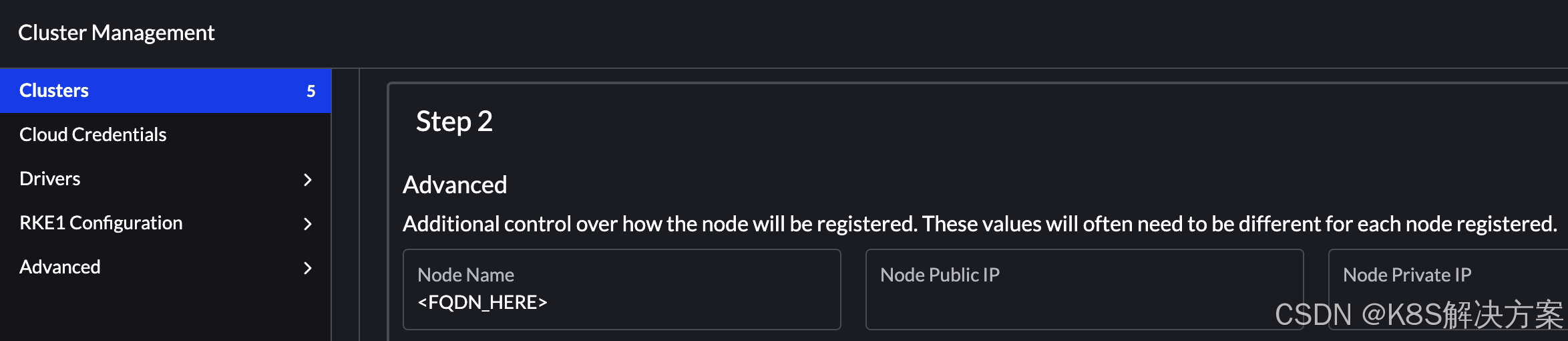
The Windows worker nodes were not using the FQDN, causing a VM not found error. This prevented the nodes from registering correctly with the cluster.
Windows 工作节点未使用 FQDN,导致虚拟机未找到错误。这导致节点无法正确注册到集群。
RKE2 Windows 代理节点安装
- https://docs.rke2.io/install/quickstart#windows-agent-worker-node-installation

有“AI”的1024 = 2048,欢迎大家加入2048 AI社区
更多推荐

 14
14 0
0- 0


 已为社区贡献3条内容

所有评论(0)