LangChain Skills 实战教程(非常详细),手把手构建 SQL 助手!
在先前的文章中,我们探讨了如何通过 Deep Agents CLI 模拟 Deep Agent 使用 Skills 的模式。如今,LangChain 已原生支持这一特性,极大地简化了开发流程。本文将带领大家深入体验这一功能,构建一个更智能的 SQL 助手。
在先前的文章中,我们探讨了如何通过 Deep Agents CLI 模拟 Deep Agent 使用 Skills 的模式。如今,LangChain 已原生支持这一特性,极大地简化了开发流程。本文将带领大家深入体验这一功能,构建一个更智能的 SQL 助手。
构建复杂的 AI Agent 时,开发者往往陷入两难境地:是将所有上下文(数据库表结构、API 文档、业务规则)一次性注入 System Prompt,导致上下文窗口(Context Window)溢出且分散模型注意力?还是选择成本高昂的频繁微调(Fine-tuning)?
Skills 模式(Skills Pattern) 提供了一条优雅的中间路线。它通过动态加载所需知识,实现了上下文的高效利用。LangChain 对此模式的原生支持,意味着我们可以更轻松地构建具备“按需学习”能力的 Agent。
本文将结合官方文档 Build a SQL assistant with on-demand skills,引导读者从零开始,构建一个支持“按需加载知识”的 SQL Assistant。
1. 核心概念:为何选择 Skills 模式?
传统 SQL Agent 的局限性
在传统的 SQL Agent 架构中,我们通常需要在 System Prompt 中提供完整的 Database Schema。随着业务发展,当表数量扩展到数百张时,这种方式会带来显著问题:
- Token 消耗巨大:每次对话都携带大量无关的表结构,造成资源浪费。
- 幻觉风险增加:过多的无关干扰信息会降低模型的推理准确性。
- 维护困难:所有业务线的知识紧密耦合,难以独立迭代。
Skills 模式:基于渐进式披露的解决方案
Skills 模式基于**渐进式披露(Progressive Disclosure)**原则,将知识获取过程分层处理:
- Agent 初始状态:仅掌握有哪些“技能”(Skills)及其简要描述(Description),保持轻量级。
- 运行时加载:当面对具体问题(如“查询库存”)时,Agent 主动调用工具(
load_skill)加载该技能详细的上下文(Schema + Prompt)。 - 执行任务:基于加载的精确上下文,执行具体的任务(如编写并执行 SQL)。
这种模式有效支持了无限扩展和团队解耦,使 Agent 能够适应日益复杂的业务场景。
2. 系统架构设计
本实战项目将构建一个包含两个核心 Skills 的 SQL Assistant,以演示该模式的实际应用:
- Sales Analytics(销售分析):负责
sales_data表,处理收入统计、订单趋势分析等。 - Inventory Management(库存管理):负责
inventory_items表,处理库存水平监控、位置查询等。
系统工作流 (Workflow)
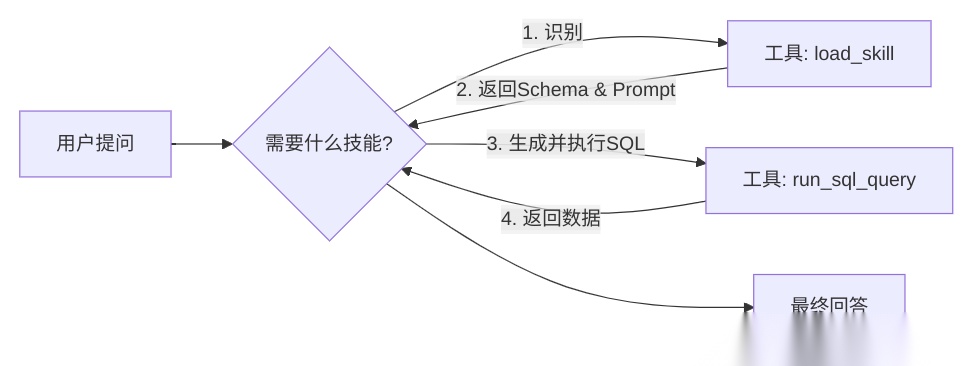
3. 开发环境搭建
本项目采用 Python uv 进行高效的依赖管理。
核心依赖安装
uv add langchain langchain-openai langgraph psycopg2-binary python-dotenv langchain-community
PostgreSQL 环境配置
本地启动一个 Postgres 实例,并创建 agent_platform 数据库。我们提供了 setup_db.py 脚本来自动初始化表结构和测试数据(详见文末源码)。
4. 核心实现步骤详解
步骤一:定义领域技能 (The Knowledge)
我们将技能定义为字典结构,模拟从文件系统或数据库加载的过程。请注意区分 description(供 Agent 决策选型使用)和 content(实际加载的详细上下文)。
SKILLS = { "sales_analytics": { "description": "Useful for analyzing sales revenue, trends...", "content": """... Table Schema: sales_data ...""" }, "inventory_management": { "description": "Useful for checking stock levels...", "content": """... Table Schema: inventory_items ...""" }}
步骤二:实现核心工具 (The Capabilities)
Agent 依赖两个关键工具来完成任务:
load_skill(skill_name): 在运行时动态加载指定技能的详情。run_sql_query(query): 执行具体的 SQL 语句。
步骤三:编排 Agent 逻辑 (The Brain)
利用 LangGraph 构建 ReAct Agent。System Prompt 在此处起着关键作用,它指导 Agent 严格遵循 Identify -> Load -> Query 的标准作业程序(SOP)。
system_prompt = """1. Identify the relevant skill.2. Use 'load_skill' to get schema.3. Write and execute SQL using 'run_sql_query'....Do not guess table names. Always load the skill first."""
5. 运行效果验证
通过运行 test_agent.py,我们对 Sales 和 Inventory 两个不同领域的查询进行了测试。以下是控制台的实际输出日志,展示了 Agent 如何根据问题动态加载技能:
Testing Sales Query...Agent calling tools: [{'name': 'load_skill', 'args': {'skill_name': 'sales_analytics'}, 'id': 'call_f270d76b7ce4404cb5f61bf2', 'type': 'tool_call'}]Tool output:You are a Sales Analytics Expert.You have access to the 'sales_data' table.Table Schema:- id: integer...Agent calling tools: [{'name': 'run_sql_query', 'args': {'query': 'SELECT SUM(amount) as total_revenue FROM sales_data;'}, 'id': 'call_b4f3e686cc7f4f22b3bb9ea7', 'type': 'tool_call'}]Tool output: [(Decimal('730.50'),)]...Agent response: The total revenue is $730.50.Testing Inventory Query...Agent calling tools: [{'name': 'load_skill', 'args': {'skill_name': 'inventory_management'}, 'id': 'call_18c823b2d5064e95a0cfe2e3', 'type': 'tool_call'}]Tool output:You are an Inventory Management Expert.You have access to the 'inventory_items' table.Table Schema...Agent calling tools: [{'name': 'run_sql_query', 'args': {'query': "SELECT warehouse_location FROM inventory_items WHERE product_name = 'Laptop';"}, 'id': 'call_647ee3a444804bd98a045f00', 'type': 'tool_call'}]Tool output: [('Warehouse A',)]...Agent response: The Laptop is located in **Warehouse A**.
6. 完整源码参考
以下是项目的完整源代码,包含数据库初始化脚本和 Agent 主程序。
1. 数据库初始化 (setup_db.py)
import psycopg2from psycopg2.extensions import ISOLATION_LEVEL_AUTOCOMMITimport osfrom dotenv import load_dotenvload_dotenv()# 请确保在 .env 中配置数据库连接信息DB_HOST = os.getenv("DB_HOST", "localhost")DB_PORT = os.getenv("DB_PORT", "5432")DB_USER = os.getenv("DB_USER", "postgres")DB_PASSWORD = os.getenv("DB_PASSWORD", "your_password") # 请替换为实际密码DB_NAME = os.getenv("DB_NAME", "agent_platform")def create_database(): try: # Connect to default 'postgres' database to create new db conn = psycopg2.connect( host=DB_HOST, port=DB_PORT, user=DB_USER, password=DB_PASSWORD, dbname="postgres" ) conn.set_isolation_level(ISOLATION_LEVEL_AUTOCOMMIT) cur = conn.cursor() # Check if database exists cur.execute(f"SELECT 1 FROM pg_catalog.pg_database WHERE datname = '{DB_NAME}'") exists = cur.fetchone() ifnot exists: print(f"Creating database {DB_NAME}...") cur.execute(f"CREATE DATABASE {DB_NAME}") else: print(f"Database {DB_NAME} already exists.") cur.close() conn.close() except Exception as e: print(f"Error creating database: {e}")def create_tables_and_data(): try: conn = psycopg2.connect( host=DB_HOST, port=DB_PORT, user=DB_USER, password=DB_PASSWORD, dbname=DB_NAME ) cur = conn.cursor() # Create Sales Table print("Creating sales_data table...") cur.execute(""" CREATE TABLE IF NOT EXISTS sales_data ( id SERIAL PRIMARY KEY, transaction_date DATE, product_id VARCHAR(50), amount DECIMAL(10, 2), region VARCHAR(50) ) """) # Create Inventory Table print("Creating inventory_items table...") cur.execute(""" CREATE TABLE IF NOT EXISTS inventory_items ( id SERIAL PRIMARY KEY, product_id VARCHAR(50), product_name VARCHAR(100), stock_count INTEGER, warehouse_location VARCHAR(50) ) """) # Insert Mock Data print("Inserting mock data...") cur.execute("TRUNCATE sales_data, inventory_items") sales_data = [ ('2023-01-01', 'P001', 100.00, 'North'), ('2023-01-02', 'P002', 150.50, 'South'), ('2023-01-03', 'P001', 120.00, 'East'), ('2023-01-04', 'P003', 200.00, 'West'), ('2023-01-05', 'P002', 160.00, 'North') ] cur.executemany( "INSERT INTO sales_data (transaction_date, product_id, amount, region) VALUES (%s, %s, %s, %s)", sales_data ) inventory_data = [ ('P001', 'Laptop', 50, 'Warehouse A'), ('P002', 'Mouse', 200, 'Warehouse B'), ('P003', 'Keyboard', 150, 'Warehouse A'), ('P004', 'Monitor', 30, 'Warehouse C') ] cur.executemany( "INSERT INTO inventory_items (product_id, product_name, stock_count, warehouse_location) VALUES (%s, %s, %s, %s)", inventory_data ) conn.commit() cur.close() conn.close() print("Database setup complete.") except Exception as e: print(f"Error setting up tables: {e}")if __name__ == "__main__": create_database() create_tables_and_data()
2. Agent 主程序 (main.py)
import osfrom typing import Annotated, Literal, TypedDict, Union, Dictfrom dotenv import load_dotenvfrom langchain_openai import ChatOpenAIfrom langchain_core.tools import toolfrom langchain_core.messages import SystemMessage, HumanMessage, AIMessage, ToolMessagefrom langchain_community.utilities import SQLDatabasefrom langchain_community.agent_toolkits import SQLDatabaseToolkitfrom langgraph.graph import StateGraph, START, END, MessagesStatefrom langgraph.prebuilt import ToolNode, tools_conditionload_dotenv()# --- Configuration ---BASE_URL = os.getenv("BASIC_MODEL_BASE_URL")API_KEY = os.getenv("BASIC_MODEL_API_KEY")MODEL_NAME = os.getenv("BASIC_MODEL_MODEL")DB_URI = f"postgresql://{os.getenv('DB_USER')}:{os.getenv('DB_PASSWORD')}@{os.getenv('DB_HOST')}:{os.getenv('DB_PORT')}/{os.getenv('DB_NAME')}"# --- Database Setup ---db = SQLDatabase.from_uri(DB_URI)# --- Skills Definition ---SKILLS: Dict[str, Dict[str, str]] = { "sales_analytics": { "description": "Useful for analyzing sales revenue, trends, and regional performance.", "content": """You are a Sales Analytics Expert.You have access to the 'sales_data' table.Table Schema:- id: integer (primary key)- transaction_date: date- product_id: varchar(50)- amount: decimal(10, 2)- region: varchar(50)Common queries:- Total revenue: SUM(amount)- Revenue by region: GROUP BY region- Sales trend: GROUP BY transaction_date""" }, "inventory_management": { "description": "Useful for checking stock levels, product locations, and warehouse management.", "content": """You are an Inventory Management Expert.You have access to the 'inventory_items' table.Table Schema:- id: integer (primary key)- product_id: varchar(50)- product_name: varchar(100)- stock_count: integer- warehouse_location: varchar(50)Common queries:- Check stock: WHERE product_name = '...'- Low stock: WHERE stock_count < threshold""" }}# --- Tools ---@tooldef load_skill(skill_name: str) -> str: """ Load the detailed prompt and schema for a specific skill. Available skills: - sales_analytics: For sales, revenue, and transaction analysis. - inventory_management: For stock, products, and warehouse queries. """ skill = SKILLS.get(skill_name) ifnot skill: returnf"Error: Skill '{skill_name}' not found. Available skills: {list(SKILLS.keys())}" return skill["content"]@tooldef run_sql_query(query: str) -> str: """ Execute a SQL query against the database. Only use this tool AFTER loading the appropriate skill to understand the schema. """ try: return db.run(query) except Exception as e: returnf"Error executing SQL: {e}"@tooldef list_tables() -> str: """List all available tables in the database.""" return str(db.get_usable_table_names())tools = [load_skill, run_sql_query, list_tables]# --- Agent Setup ---llm = ChatOpenAI( base_url=BASE_URL, api_key=API_KEY, model=MODEL_NAME, temperature=0)llm_with_tools = llm.bind_tools(tools)# --- Graph Definition ---class AgentState(MessagesState): # We can add custom state if needed, but MessagesState is sufficient for simple chat passdef agent_node(state: AgentState): messages = state["messages"] response = llm_with_tools.invoke(messages) return {"messages": [response]}workflow = StateGraph(AgentState)workflow.add_node("agent", agent_node)workflow.add_node("tools", ToolNode(tools))workflow.add_edge(START, "agent")workflow.add_conditional_edges("agent", tools_condition)workflow.add_edge("tools", "agent")app = workflow.compile()# --- Main Execution ---if __name__ == "__main__": system_prompt = """You are a helpful SQL Assistant.You have access to specialized skills that contain database schemas and domain knowledge.To answer a user's question:1. Identify the relevant skill (sales_analytics or inventory_management).2. Use the 'load_skill' tool to get the schema and instructions.3. Based on the loaded skill, write and execute a SQL query using 'run_sql_query'.4. Answer the user's question based on the query results.Do not guess table names. Always load the skill first.""" print("SQL Assistant initialized. Type 'quit' to exit.") print("-" * 50) messages = [SystemMessage(content=system_prompt)] # Pre-warm connection check try: print(f"Connected to database: {DB_URI.split('@')[-1]}") except Exception as e: print(f"Database connection warning: {e}") whileTrue: try: user_input = input("User: ") if user_input.lower() in ["quit", "exit"]: break messages.append(HumanMessage(content=user_input)) # Stream the execution print("Agent: ", end="", flush=True) final_response = None for event in app.stream({"messages": messages}, stream_mode="values"): # In 'values' mode, we get the full state. We just want to see the last message if it's new. last_message = event["messages"][-1] # Update our message history with the latest state pass # After stream finishes, the last state has the final answer final_state = app.invoke({"messages": messages}) last_msg = final_state["messages"][-1] if isinstance(last_msg, AIMessage): print(last_msg.content) messages = final_state["messages"] # Update history print("-" * 50) except Exception as e: print(f"\nError: {e}") break
学AI大模型的正确顺序,千万不要搞错了
🤔2026年AI风口已来!各行各业的AI渗透肉眼可见,超多公司要么转型做AI相关产品,要么高薪挖AI技术人才,机遇直接摆在眼前!
有往AI方向发展,或者本身有后端编程基础的朋友,直接冲AI大模型应用开发转岗超合适!
就算暂时不打算转岗,了解大模型、RAG、Prompt、Agent这些热门概念,能上手做简单项目,也绝对是求职加分王🔋
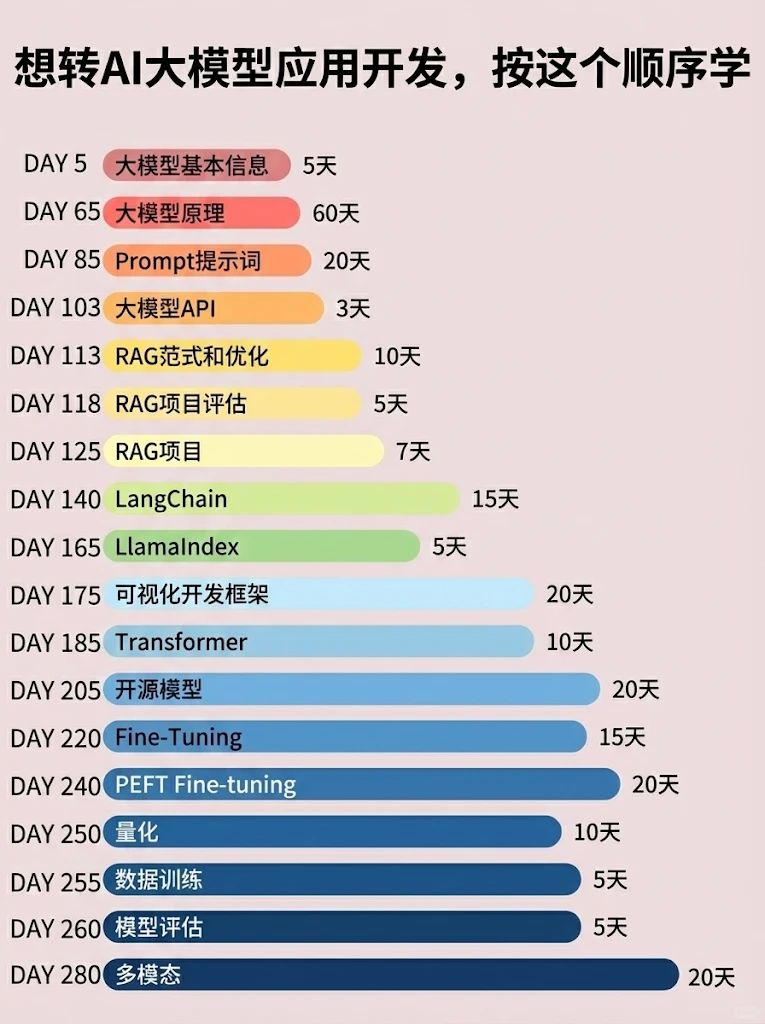
📝给大家整理了超全最新的AI大模型应用开发学习清单和资料,手把手帮你快速入门!👇👇
学习路线:
✅大模型基础认知—大模型核心原理、发展历程、主流模型(GPT、文心一言等)特点解析
✅核心技术模块—RAG检索增强生成、Prompt工程实战、Agent智能体开发逻辑
✅开发基础能力—Python进阶、API接口调用、大模型开发框架(LangChain等)实操
✅应用场景开发—智能问答系统、企业知识库、AIGC内容生成工具、行业定制化大模型应用
✅项目落地流程—需求拆解、技术选型、模型调优、测试上线、运维迭代
✅面试求职冲刺—岗位JD解析、简历AI项目包装、高频面试题汇总、模拟面经
以上6大模块,看似清晰好上手,实则每个部分都有扎实的核心内容需要吃透!
我把大模型的学习全流程已经整理📚好了!抓住AI时代风口,轻松解锁职业新可能,希望大家都能把握机遇,实现薪资/职业跃迁~
这份完整版的大模型 AI 学习资料已经上传CSDN,朋友们如果需要可以微信扫描下方CSDN官方认证二维码免费领取【保证100%免费】


有“AI”的1024 = 2048,欢迎大家加入2048 AI社区
更多推荐
 8
8 0
0- 0


 已为社区贡献676条内容

所有评论(0)