OpenClaw 多机器人多 Agent 模式:打造你的 AI 助手团队
OpenClaw多Agent模式为企业提供高效的AI助手团队解决方案。通过创建4个独立的飞书机器人(主助理、内容创作、技术开发、AI资讯),每个连接专属Gateway和Agent模型(如Claude Opus/Sonnet、Gemini 2.5),实现专业分工。相比单Agent模式,多Gateway架构具有配置清晰、互不干扰、无需手动切换等优势。系统采用Profile隔离机制,各Agent拥有独立
OpenClaw 多机器人多 Agent 模式:打造你的 AI 助手团队
完整教程:https://awesome.tryopenclaw.asia/docs/04-practical-cases/15-solo-entrepreneur-cases.html
16.1 为什么需要多 Agent?
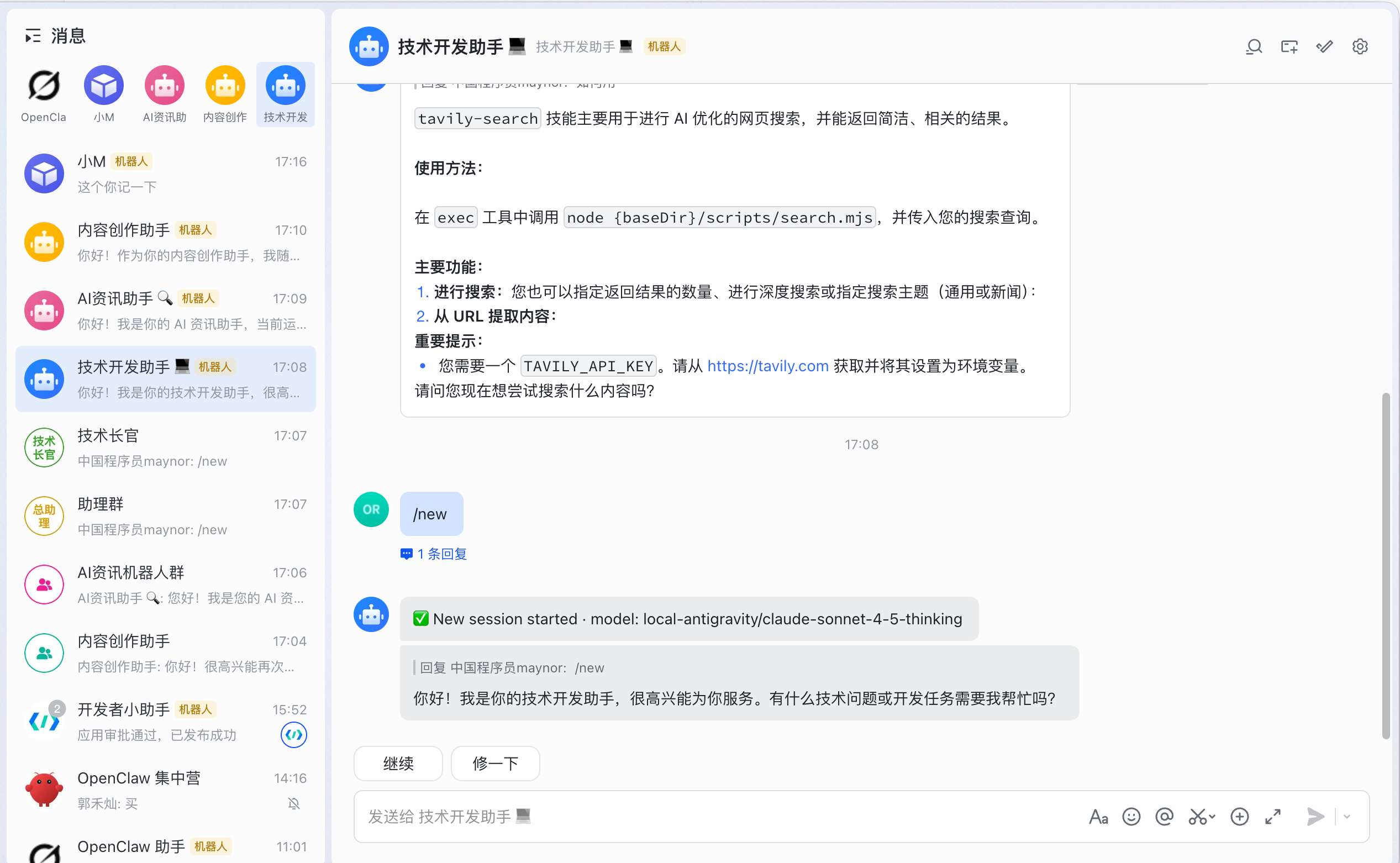
作为超级个体创业者,你可能需要不同类型的 AI 助手来处理不同的工作:
- 主助理:使用最强大的模型(Claude Opus)处理复杂任务
- 内容创作助手:专注于文章写作、文案创作
- 技术开发助手:处理代码开发、技术问题
- AI 资讯助手:快速获取和整理 AI 行业动态
传统的单 Agent 模式需要频繁切换模型和上下文,效率低下。多 Agent 模式让你可以同时拥有多个专业助手,各司其职。
16.2 实现方案对比
方案一:单 Gateway + Bindings(不推荐)
{
  "bindings": [
    {
      "agentId": "main-agent",
      "match": {
        "channel": "feishu",
        "peer": {
          "kind": "group",
          "id": "oc_xxx"
        }
      }
    }
  ]
}
问题:
- ❌ OpenClaw 2026.2.9 的 bindings 功能不稳定
- ❌ peer.id 匹配经常失败
- ❌ 所有群组都路由到同一个 agent
- ❌ 需要
/reset+/agent命令手动切换
方案二:多 Gateway + 多飞书机器人(推荐)✅
核心思路:
- 创建 4 个飞书机器人应用
- 启动 4 个独立的 OpenClaw Gateway
- 每个 Gateway 连接一个飞书机器人
- 每个 Gateway 使用不同的 Agent 和模型
优势:
- ✅ 完全独立,互不干扰
- ✅ 直接私聊不同机器人即可切换 agent
- ✅ 不需要群组配置
- ✅ 不需要手动切换命令
- ✅ 配置清晰,易于管理
- ✅ 可以独立重启某个 Gateway
16.3 架构设计
整体架构
┌─────────────────────────────────────────────────────────┐
│                      飞书 (Feishu)                       │
├─────────────────────────────────────────────────────────┤
│  机器人1: 主助理          机器人2: 内容创作助手          │
│  机器人3: 技术开发助手    机器人4: AI资讯助手            │
└─────────────────────────────────────────────────────────┘
                          ↓ WebSocket
┌─────────────────────────────────────────────────────────┐
│                   OpenClaw Gateway 层                    │
├──────────────┬──────────────┬──────────────┬────────────┤
│ Gateway 1    │ Gateway 2    │ Gateway 3    │ Gateway 4  │
│ 端口: 18789  │ 端口: 18790  │ 端口: 18791  │ 端口: 18792│
│ Profile:     │ Profile:     │ Profile:     │ Profile:   │
│ main-        │ content-     │ tech-dev     │ ai-news    │
│ assistant    │ creator      │              │            │
└──────────────┴──────────────┴──────────────┴────────────┘
                          ↓
┌─────────────────────────────────────────────────────────┐
│                      Agent 层                            │
├──────────────┬──────────────┬──────────────┬────────────┤
│ main-agent   │ content-agent│ tech-agent   │ainews-agent│
│ Claude Opus  │ Claude Sonnet│ Claude Sonnet│ Gemini 2.5 │
│ 4.6 Thinking │ 4.5          │ 4.5 Thinking │ Flash      │
└──────────────┴──────────────┴──────────────┴────────────┘
Profile 隔离机制
使用 --profile <name> 参数,OpenClaw 会:
- 配置文件:
~/.openclaw-<name>/openclaw.json - 状态数据:
~/.openclaw-<name>/ - 独立端口:18789, 18790, 18791, 18792
- 独立会话:完全隔离的上下文
16.4 配置步骤
第一步:创建飞书机器人应用
在飞书开放平台创建 4 个机器人应用:
-
主助理
- 应用名称:主助理
- 描述:处理复杂任务的主力助手
- 获取 App ID 和 App Secret
-
内容创作助手
- 应用名称:内容创作助手
- 描述:专注内容创作和文案写作
- 获取 App ID 和 App Secret
-
技术开发助手
- 应用名称:技术开发助手
- 描述:处理代码开发和技术问题
- 获取 App ID 和 App Secret
-
AI资讯助手
- 应用名称:AI资讯助手
- 描述:快速获取 AI 行业资讯
- 获取 App ID 和 App Secret
重要配置:
- 启用机器人能力
- 配置事件订阅:选择"长连接"模式
- 添加权限:消息接收、消息发送
第二步:配置 Agent
创建 4 个 Agent 配置目录:
mkdir -p agent-configs/{main-agent,content-agent,tech-agent,ainews-agent}
为每个 Agent 创建配置文件:
agent-configs/main-agent/USER.md:
# 用户信息

- 姓名:Maynor
- 职业:超级个体创业者
- 工作领域:AI 技术、内容创作、技术开发
agent-configs/main-agent/SOUL.md:
# Agent 身份

你是 Maynor 的主助理,负责处理各类复杂任务。
使用 Claude Opus 4.6 Thinking 模型,提供最高质量的服务。
类似地为其他 3 个 Agent 创建配置文件。
第三步:运行配置脚本
使用自动化脚本创建多 Gateway 配置:
# 下载配置脚本
curl -O https://example.com/setup-multi-gateway.sh
chmod +x setup-multi-gateway.sh

# 运行配置脚本
./setup-multi-gateway.sh
脚本会自动:
- 停止当前 Gateway
- 备份现有配置
- 创建 4 个独立的 Profile 配置
- 生成管理脚本
第四步:启动所有 Gateway
# 启动所有 Gateway
./start-all-gateways.sh

# 检查状态
./check-gateways.sh

# 验证配置
./verify-setup.sh
16.5 使用方法
直接私聊机器人
这是最简单的使用方式:
-
处理复杂任务
- 在飞书中搜索"主助理"机器人
- 直接发送消息
- 自动使用 Claude Opus 4.6 Thinking
-
创作内容
- 搜索"内容创作助手"机器人
- 发送写作需求
- 自动使用 Claude Sonnet 4.5
-
开发代码
- 搜索"技术开发助手"机器人
- 发送技术问题
- 自动使用 Claude Sonnet 4.5 Thinking
-
获取资讯
- 搜索"AI资讯助手"机器人
- 请求最新动态
- 自动使用 Gemini 2.5 Flash(快速响应)
在群组中使用(可选)
如果需要在群组中使用:
- 将对应的机器人添加到群组
- @ 机器人发送消息
- 每个群组可以添加多个机器人,灵活切换
建议:
- 工作群:添加主助理 + 技术开发助手
- 内容创作群:添加内容创作助手
- 资讯群:添加 AI资讯助手
16.6 管理和维护
日常管理
# 查看所有 Gateway 状态
./check-gateways.sh

# 查看实时日志
tail -f logs-main-assistant.log
tail -f logs-content-creator.log
tail -f logs-tech-dev.log
tail -f logs-ai-news.log

# 查看所有日志
tail -f logs-*.log
重启 Gateway
# 重启所有
./stop-all-gateways.sh
sleep 2
./start-all-gateways.sh

# 重启单个
ps aux | grep "openclaw.*--profile main-assistant"
kill <PID>
./start-main-assistant.sh
修改配置
# 编辑配置
vim ~/.openclaw-main-assistant/openclaw.json

# 验证配置
jq . ~/.openclaw-main-assistant/openclaw.json

# 重启生效
# (停止并重启对应的 Gateway)
监控资源
# 查看内存占用
ps aux | grep openclaw-gateway | awk '{print $4, $11}'

# 查看 CPU 占用
ps aux | grep openclaw-gateway | awk '{print $3, $11}'

# 查看端口占用
lsof -i :18789
lsof -i :18790
lsof -i :18791
lsof -i :18792
16.7 实战案例
案例一:内容创作工作流
场景:写一篇技术文章
-
构思阶段
- 私聊"主助理":讨论文章主题和大纲
- 使用 Claude Opus 进行深度思考
-
写作阶段
- 私聊"内容创作助手":撰写文章内容
- 使用 Claude Sonnet 快速生成
-
代码示例
- 私聊"技术开发助手":编写代码示例
- 使用 Claude Sonnet Thinking 确保代码质量
-
资讯补充
- 私聊"AI资讯助手":获取最新技术动态
- 使用 Gemini Flash 快速检索
案例二:技术开发工作流
场景:开发一个新功能
-
需求分析
- 主助理:分析需求,设计架构
-
代码实现
- 技术开发助手:编写代码,调试问题
-
文档编写
- 内容创作助手:编写技术文档
-
技术调研
- AI资讯助手:查找相关技术资料
案例三:日常工作场景
上午 9:00 - 规划工作
- 主助理:制定今天的工作计划
上午 10:00 - 写作
- 内容创作助手:撰写文章
下午 2:00 - 开发
- 技术开发助手:编写代码
下午 4:00 - 学习
- AI资讯助手:了解行业动态
晚上 8:00 - 总结
- 主助理:总结今天的工作
16.8 性能和成本
资源占用
- 内存:每个 Gateway 约 400MB
- 总内存:4 个 Gateway 约 1.6GB
- CPU:空闲时几乎为 0,处理时根据任务而定
- 磁盘:配置文件和日志约 100MB
成本分析
假设使用自建 API 代理:
| Agent | 模型 | 用途 | 月使用量 | 月成本 |
|---|---|---|---|---|
| main-agent | Claude Opus 4.6 | 复杂任务 | 100万 tokens | $15 |
| content-agent | Claude Sonnet 4.5 | 内容创作 | 200万 tokens | $6 |
| tech-agent | Claude Sonnet 4.5 | 技术开发 | 150万 tokens | $4.5 |
| ainews-agent | Gemini 2.5 Flash | 资讯获取 | 300万 tokens | $0 |
| 总计 | - | - | 750万 tokens | $25.5 |
成本优化建议:
- 简单任务使用 Gemini Flash(免费)
- 复杂任务才使用 Claude Opus
- 内容创作使用 Claude Sonnet(性价比高)
16.9 故障排查
Gateway 启动失败
症状:运行 ./start-all-gateways.sh 后,./check-gateways.sh 显示进程未运行
排查步骤:
# 1. 查看日志
tail -50 logs-main-assistant.log

# 2. 检查配置
jq . ~/.openclaw-main-assistant/openclaw.json

# 3. 检查端口占用
lsof -i :18789

# 4. 运行 doctor
openclaw --profile main-assistant doctor
常见问题:
- 配置文件格式错误:运行
jq验证 - 端口被占用:更换端口或停止占用进程
- 飞书配置错误:检查 App ID 和 App Secret
机器人无响应
症状:在飞书中 @ 机器人,没有回复
排查步骤:
# 1. 检查 Gateway 是否运行
./check-gateways.sh

# 2. 查看实时日志
tail -f logs-main-assistant.log

# 3. 检查飞书连接
grep "WebSocket client started" logs-main-assistant.log
常见原因:
- Gateway 未启动:运行
./start-all-gateways.sh - 飞书连接断开:检查网络,重启 Gateway
- 配置错误:验证飞书 App ID 和 Secret
使用了错误的 Agent
症状:私聊"内容创作助手",但使用的是 Claude Opus 模型
原因:配置文件中 Agent 设置错误
解决:
# 检查配置
jq '.agents.list[0].id, .agents.list[0].model.primary' \
  ~/.openclaw-content-creator/openclaw.json

# 应该输出:
# "content-agent"
# "local-antigravity/claude-sonnet-4-5"
16.10 高级技巧
技巧一:使用 tmux 管理
# 创建 tmux 会话
tmux new -s openclaw

# 分割窗口
Ctrl+b %  # 垂直分割
Ctrl+b "  # 水平分割

# 在不同窗口中运行不同的 Gateway
./start-main-assistant.sh
./start-content-creator.sh
./start-tech-dev.sh
./start-ai-news.sh

# 查看所有日志
tail -f logs-*.log
技巧二:配置开机自启动
使用 launchd(macOS):
# 创建 plist 文件
cat > ~/Library/LaunchAgents/com.openclaw.main-assistant.plist << 'EOF'
<?xml version="1.0" encoding="UTF-8"?>
<!DOCTYPE plist PUBLIC "-//Apple//DTD PLIST 1.0//EN"
  "http://www.apple.com/DTDs/PropertyList-1.0.dtd">
<plist version="1.0">
<dict>
    <key>Label</key>
    <string>com.openclaw.main-assistant</string>
    <key>ProgramArguments</key>
    <array>
        <string>/usr/local/bin/openclaw</string>
        <string>--profile</string>
        <string>main-assistant</string>
        <string>gateway</string>
        <string>run</string>
    </array>
    <key>RunAtLoad</key>
    <true/>
    <key>KeepAlive</key>
    <true/>
</dict>
</plist>
EOF

# 加载服务
launchctl load ~/Library/LaunchAgents/com.openclaw.main-assistant.plist
技巧三:日志轮转
# 创建日志轮转脚本
cat > rotate-logs.sh << 'EOF'
#!/bin/zsh
for log in logs-*.log; do
    if [ -f "$log" ] && [ $(stat -f%z "$log") -gt 10485760 ]; then
        mv "$log" "$log.$(date +%Y%m%d_%H%M%S)"
        touch "$log"
    fi
done
EOF

chmod +x rotate-logs.sh

# 添加到 crontab(每小时执行)
crontab -e
# 添加:0 * * * * /path/to/rotate-logs.sh
16.11 总结
多 Gateway + 多飞书机器人的方案是目前最稳定、最简单的多 Agent 实现方式:
核心优势:
- ✅ 直接私聊不同机器人,自动使用对应 agent
- ✅ 完全独立,互不干扰
- ✅ 不需要复杂的 bindings 配置
- ✅ 不需要手动切换命令
- ✅ 配置清晰,易于管理
适用场景:
- 超级个体创业者
- 需要多个专业助手
- 不同任务使用不同模型
- 追求稳定性和可靠性
下一步:
- 创建飞书机器人应用
- 运行配置脚本
- 启动所有 Gateway
- 开始使用你的 AI 助手团队!

有“AI”的1024 = 2048,欢迎大家加入2048 AI社区
更多推荐
 0
0 0
0- 0


 已为社区贡献50条内容

所有评论(0)