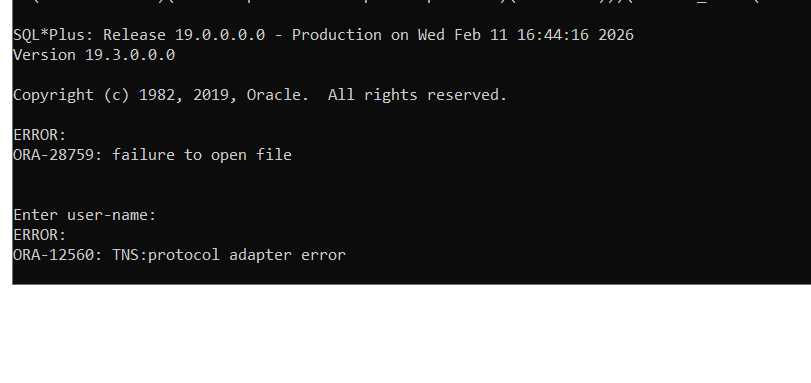
ORA-28759: failure to open file
Applies To
All Users
Summary
sqlplus connection to ADW/ATP Database fails with following error:
Command Executed
sqlplus <username>/<password>@<Alias>
Error Reported
ORA-28759: failure to open file
Solution
1. Extract the wallet zip file downloaded from ADW/ATP administration page and copy the sqlnet.ora to the path defined for environment variable TNS_ADMIN or copy to ORACLE_HOME/network/admin
2. Correct the WALLET_LOCATION value in sqlnet.ora of the client. If wallet location is D:\walletdownload\wallet, then sqlnet.ora should have the following location:
WALLET_LOCATION = (SOURCE = (METHOD = file) (METHOD_DATA = (DIRECTORY="D:\walletdownload\wallet")))
Attachments :
Cause
Error ORA-28759 could occur due to any of the following reasons
- sqlnet.ora not copied to the correct path
- Wallet location in sqlnet.ora file is not correct
-
Hi Ivan,
Did you set the wallet_root to /etc/ORACLE/WALLETS/ 这个是TDE需要的
If so then that will be the one that is read.
-
Jorg, Pallavi,
Sorry for my late answer. No, I've not set wallet_root. Is wallet_root needed for a tcps connection? I think it is needed for TDE.
wallet_root is defined in the database but for a tcps sqlplus connection this is not needed???这个是TDE需要的
And it is a PDB. As I said the tcps doe work fine in my case but I had to copy it to
/etc/ORACLE/WALLETS/oracle
regards,
-
Thanks. I've placed the
SSL_CLIENT_AUTHENTICATION = FALSE
WALLET_LOCATION =
(SOURCE =
(METHOD = FILE)
(METHOD_DATA =
(DIRECTORY = /u01/app/network/admin/Wallet)
)
)Settings in the listener.ora file on the db server and I works fine now. I had the placed only in the sqlnet.ora file. No wallet_root created.
regards,
Ivan
Configuring and enabling SSL connection
I'm trying to configure an SSL connection (DB version 11.2.0.1.0).Both client and server are on the same maschine.
My listener.ora, sqlnet.ora, tnsnames.ora files are:
---listener.ora
SID_LIST_LISTENER =
(SID_LIST =
(SID_DESC =
(SID_NAME = CLRExtProc)
(ORACLE_HOME = ...\product\11.2.0\dbhome_1)
(PROGRAM = extproc)
(ENVS = "EXTPROC_DLLS=ONLY:...\product\11.2.0\dbhome_1\bin\oraclr11.dll")
)
)
SSL_CLIENT_AUTHENTICATION = TRUE
LISTENER =
(DESCRIPTION_LIST =
(DESCRIPTION =
(ADDRESS = (PROTOCOL = IPC)(KEY = EXTPROC1521))
)
(DESCRIPTION =
(ADDRESS = (PROTOCOL = TCP)(HOST = localhost)(PORT = 1521))
)
(DESCRIPTION =
(ADDRESS = (PROTOCOL = TCPS)(HOST = localhost)(PORT = 2484))
)
)
ADR_BASE_LISTENER = ...\app\pachowicz
WALLET_LOCATION =
(SOURCE =
(METHOD = FILE)
(METHOD_DATA =
(DIRECTORY = ...\product\11.2.0\dbhome_1\BIN\owm\wallets\pachowicz)
)
)
---sqlnet.ora
SQLNET.AUTHENTICATION_SERVICES= (BEQ, TCPS, NTS)
SSL_VERSION = 0
NAMES.DIRECTORY_PATH= (TNSNAMES, EZCONNECT)
SSL_CLIENT_AUTHENTICATION = TRUE
WALLET_LOCATION =
(SOURCE =
(METHOD = FILE)
(METHOD_DATA =
(DIRECTORY = ...\product\11.2.0\dbhome_1\BIN\owm\wallets\pachowicz)
)
)
SSL_SERVER_DN_MATCH=OFF
ADR_BASE = ...\product\11.2.0\dbhome_1\log
---tnsnames.ora
ORCL =
(DESCRIPTION =
(ADDRESS = (PROTOCOL = TCP)(HOST = localhost)(PORT = 1521))
(CONNECT_DATA =
(SERVER = DEDICATED)
(SERVICE_NAME = orcl)
)
)
ORCLSSL =
(DESCRIPTION =
(ADDRESS = (PROTOCOL = TCPS)(HOST = localhost)(PORT = 2484))
(CONNECT_DATA =
(SERVER = DEDICATED)
(SERVICE_NAME = orcl)
)
)
While trying to execute 'connect/@orclssl' using sqlplus (client, server is on the same maschine) I get:
ORA-28860 - fatal SSL error.
I ran a trace and the first result was:
...
Opening file ...\product\11.2.0\dbhome_1\localhost_orcl\sysman\config\server\ewallet.p12 with READ ONLY permissions
(3308) nziropen: entry
(3308) nzdfo_open: entry
(3308) snzdfo_open_file: entry
Opening file ...\product\11.2.0\dbhome_1\localhost_orcl\sysman\config\server\cwallet.sso with READ ONLY permissions
File Open/Close error
File Open/Close error
rio open failed with error 28759
...
and later
...
(3308) nzospLog: entry
[Hash Input] length = 42
[Raw read] length = 5
[Raw read] length = 1414
(3308) nzospLog: entry
[SSL READ] length = 1419
*** ssl_DecodeRecord failed: returned [0x81010004] CIC_ERR_SMALL_BUFFER
(3308) nzospLog: entry
which shows the wallet was taken from a different location. I copied both ewallet.p12 and cwallet.sso files to '..\config\server'
but then I got :
...
Could not open wallet from file:...:\app\pachowicz\product\11.2.0\dbhome_1\localhost_orcl\sysman\config\server: NZ error 29106
(3160) nztwOpenWallet: exit
Any suggestions on how to work around ORA-28860 exception?
Answers
-
Hi,
Refer below Note.
Note.843500.1 SSL/TCPS Connection Is Failing With ORA-28860
Regards, -
Thanks,
I installed Oracle Database on two machines and followed the example in 401251.1 note, PRECISELY.
Plus (note 843500.1):
If the requirement is to turn on the client authentication then :
1. Set SSL_CLIENT_AUTHENTICATION=TRUE on the database server's SQLNET.ORA
2. Set SSL_CLIENT_AUTHENTICATION=FALSE on the database server's LISTENER.ORA
3. Do not set this parameter on client's SQLNET.ORA
If the SSL authentication is not needed then do not set this parameter at all.
I generated client and server keys:
--server
orapki wallet create -wallet ./server_wallet -auto_login -pwd Welcome1
orapki wallet add -wallet ./server_wallet -dn "CN=server" -keysize 512 -self_signed -validity 365 -pwd Welcome1
orapki wallet export -wallet ./server_wallet -dn "CN=server" -cert server_ca.cert
--client
orapki wallet create -wallet ./client_wallet -auto_login -pwd Welcome2
orapki wallet add -wallet ./client_wallet -dn "CN=adam" -keysize 512 -self_signed -validity 365 -pwd Welcome2
orapki wallet export -wallet ./client_wallet -dn "CN=adam" -cert client_ca.cert
imported them:
--client
orapki wallet add -wallet ./client_wallet -trusted_cert -cert server_ca.cert -pwd Welcome2
--server
orapki wallet add -wallet ./server_wallet -trusted_cert -cert client_ca.cert -pwd Welcome1
Set the wallet location in sqlnet.ora:
WALLET_LOCATION =
(SOURCE =
(METHOD = FILE)
(METHOD_DATA =
(DIRECTORY = ...product\11.2.0\dbhome_1\client_wallet)
)
)
tnsnames.ora:
LCRO =
(DESCRIPTION =
(ADDRESS_LIST =
(ADDRESS = (PROTOCOL = TCPS)(HOST = xx.xxx.x.xx)(PORT = 1522))
)
(CONNECT_DATA =
(SERVICE_NAME = LCRO)
)
)
tnsping lcro is successful.
Executing sqlplus /@lcro produces ORA-01017: invalid username/password; logon denied
The user at the server side was created:
create user adam identified externally as 'CN=adam';
Statements:
alter system set remote_os_authent=FALSE scope=spfile;
alter system set os_authent_prefix='' scope=spfile;
were called on both client and sever, and both databases were restarted.
I also set SSL_SERVER_DN_MATCH=No in client's sqlnet.ora.
Net tracing produces simililar results, that is:
...\product\11.2.0\dbhome_1\localhost_orcl\sysman\config\server\ewallet.p12
...\product\11.2.0\dbhome_1\localhost_orcl\sysman\config\server\cwallet.sso
are being opend regardless of sqlnet.ora WALLET_LOCATION. Why?
Copying files from client_wallet to that location gives the same result as before.
Any additional hints? - You may try setting TNS_ADMIN variable to explicitly to point to the SQLNET.ora that holds the WALLET_LOCATION.
Regards,
Saurabh Manroy
-
Thanks.
I tried by it didn't work either.
When I deleted certificates from ./client_wallet and ran tnsping for the lcro SSL connection it threw
TNS-12560: TNS:protocol adapter error. That is a good sign meaning my cerificates are used.
I think the problem is somewhere else. It's like there is no match for 'adam' user at the server side
with the indentification in the client certificate:
certificates for the client:
orapki wallet create -wallet ./client_wallet -auto_login -pwd Welcome2
orapki wallet add -wallet ./client_wallet -dn "cn=adam" -keysize 512 -self_signed -validity 365 -pwd Welcome2
orapki wallet export -wallet ./client_wallet -dn "cn=adam" -cert client_ca.cert
client_ca.cert is imported at the server side:
orapki wallet add -wallet ./server_wallet -trusted_cert -cert client_ca.cert -pwd Welcome1
user at the server side is created:
create user adam identified externally as 'cn=adam';
grant create session to adam;
client listener.ora has:
SSL_CLIENT_AUTHENTICATION = FALSE
client sqlnet.ora has:
SSL_VERSION = 0
WALLET_LOCATION =
(SOURCE =
(METHOD = FILE)
(METHOD_DATA =
(DIRECTORY = ...\product\11.2.0\dbhome_1\client_wallet)
)
)
SSL_SERVER_DN_MATCH=No
client tnsnames.ora has:
LCRO =
(DESCRIPTION =
(ADDRESS_LIST =
(ADDRESS = (PROTOCOL = TCPS)(HOST = xx.xxx.x.xx)(PORT = 1522))
)
(CONNECT_DATA =
(SERVICE_NAME = LCRO)
)
)
server listener.ora has:
LISTENER =
(DESCRIPTION_LIST =
(DESCRIPTION =
(ADDRESS = (PROTOCOL = IPC)(KEY = EXTPROC1521))
)
(DESCRIPTION =
(ADDRESS = (PROTOCOL = TCP)(HOST = xx.xxx.x.xx)(PORT = 1521))
)
(DESCRIPTION =
(ADDRESS = (PROTOCOL = TCPS)(HOST = xx.xxx.x.xx3)(PORT = 1522))
)
)
WALLET_LOCATION =
(SOURCE=
(METHOD=File)
(METHOD_DATA=
(DIRECTORY=D:\oracle\11g\product\11.2.0\dbhome_1\server_wallet)))
SSL_CLIENT_AUTHENTICATION=FALSE
server sqlnet.ora has:
SQLNET.AUTHENTICATION_SERVICES= (NTS, BEQ, TCPS)
SSL_VERSION = 0
SSL_CLIENT_AUTHENTICATION = TRUE
WALLET_LOCATION =
(SOURCE =
(METHOD = FILE)
(METHOD_DATA =
(DIRECTORY =\oracle\11g\product\11.2.0\dbhome_1\server_wallet)
)
)
on both client and server:
alter system set remote_os_authent=FALSE scope=spfile;
alter system set os_authent_prefix='' scope=spfile;
and I still get ORA-01017 invalid username password logon denied when calling sqlplus /@lcro
any more hints? -
Problem solved.
It was a trivial mistake. Certificates generated for the client where with the OS user name not 'adam'.
Creating a DB user with a name that maches client OS user fixes the problem.
Thanks for your help, though.

有“AI”的1024 = 2048,欢迎大家加入2048 AI社区
更多推荐

 13
13 0
0- 0


 已为社区贡献15条内容

所有评论(0)