【AI AGENT学习】让AI生成学习计划的第12天-Agent 核心概念 + ReAct 模式
·
Day 12:Agent 核心概念 + ReAct 模式
今日目标
- 理解什么是 AI Agent,它和普通 LLM 调用的本质区别
- 掌握 ReAct(Reasoning + Acting)这个最基础的 Agent 范式
- 从零手写一个 ReAct Agent(不依赖框架)
一、什么是 Agent?
普通 LLM 调用:
用户问题 → LLM → 回答

Agent:
用户问题 → LLM 思考要做什么 → 调用工具 → 观察结果 → 继续思考 → ... → 最终回答
Agent 的核心能力是 自主决策:LLM 不只是回答问题,而是决定「下一步该做什么」。
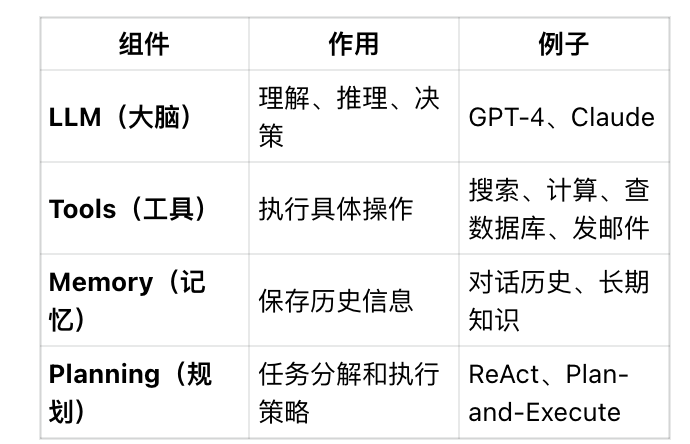
Agent 的四个组成部分:
二、ReAct 模式详解
ReAct = Reasoning + Acting
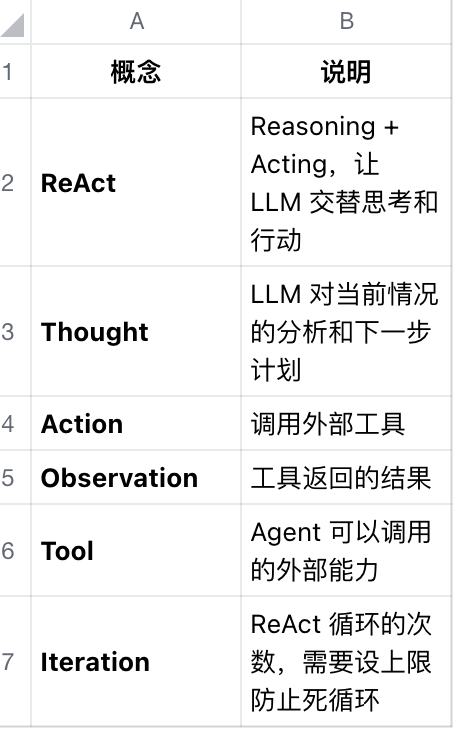
这是最经典、最基础的 Agent 模式。核心思想是让 LLM 交替进行:
- Thought(思考):分析当前情况,决定下一步
- Action(行动):调用某个工具
- Observation(观察):获取工具返回的结果
- 循环直到得出最终答案
ReAct 执行流程示例
用户:北京今天的温度是多少华氏度?

Thought: 用户问的是北京今天的温度,需要用华氏度表示。
         我需要先查询北京的天气获取摄氏度,然后转换成华氏度。
Action: search_weather("北京")
Observation: 北京今天晴,气温 25°C

Thought: 现在我知道北京是 25°C,需要转换成华氏度。
         公式是 F = C × 9/5 + 32
Action: calculate("25 * 9 / 5 + 32")
Observation: 77

Thought: 我已经得到了华氏度的结果,可以回答用户了。
Final Answer: 北京今天的温度是 77°F(25°C)。
三、动手实现:从零写一个 ReAct Agent
今天我们不用任何框架,纯手写一个 ReAct Agent,这样你能彻底理解它的工作原理。
第一步:定义工具
"""
Day 12: 手写 ReAct Agent
"""

import json
import re
from openai import OpenAI

# 如果你用 Poe API 或其他兼容接口,修改这里
client = OpenAI(
    api_key="your-api-key",
    base_url="https://api.openai.com/v1"  # 或你的 API 地址
)

# ============ 第一步:定义工具 ============

def search_weather(city: str) -> str:
    """模拟天气查询工具"""
    # 实际项目中这里会调用真实的天气 API
    weather_data = {
        "北京": "晴,气温 25°C,湿度 40%",
        "上海": "多云,气温 28°C,湿度 65%",
        "广州": "雷阵雨,气温 32°C,湿度 80%",
        "深圳": "晴转多云,气温 30°C,湿度 70%",
    }
    return weather_data.get(city, f"未找到 {city} 的天气信息")


def calculate(expression: str) -> str:
    """安全的数学计算工具"""
    try:
        # 只允许基本数学运算
        allowed_chars = set("0123456789+-*/.() ")
        if not all(c in allowed_chars for c in expression):
            return "错误:表达式包含不允许的字符"
        result = eval(expression)
        return str(result)
    except Exception as e:
        return f"计算错误:{e}"


def search_knowledge(query: str) -> str:
    """模拟知识库搜索"""
    # 实际项目中这里会查向量数据库
    knowledge_base = {
        "python": "Python 是一种解释型、面向对象的高级编程语言,由 Guido van Rossum 于 1991 年创建。",
        "agent": "AI Agent 是能够自主感知环境、做出决策并执行行动的智能系统。",
        "react": "ReAct 是一种 Agent 范式,让 LLM 交替进行推理(Reasoning)和行动(Acting)。",
    }
    query_lower = query.lower()
    for key, value in knowledge_base.items():
        if key in query_lower:
            return value
    return f"未找到与 '{query}' 相关的信息"


# 工具注册表
TOOLS = {
    "search_weather": {
        "function": search_weather,
        "description": "查询指定城市的天气信息。参数:city(城市名)"
    },
    "calculate": {
        "function": calculate,
        "description": "执行数学计算。参数:expression(数学表达式,如 '2 + 3 * 4')"
    },
    "search_knowledge": {
        "function": search_knowledge,
        "description": "搜索知识库。参数:query(搜索关键词)"
    }
}
第二步:构造 ReAct Prompt
# ============ 第二步:ReAct Prompt 模板 ============

def build_react_prompt(user_question: str, tools: dict) -> str:
    """构建 ReAct 系统提示词"""

    # 生成工具描述
    tool_descriptions = "\n".join([
        f"- {name}: {info['description']}"
        for name, info in tools.items()
    ])

    system_prompt = f"""你是一个能够使用工具解决问题的 AI 助手。

你可以使用以下工具:
{tool_descriptions}

请严格按照以下格式思考和行动:

Thought: [分析当前情况,思考下一步该做什么]
Action: [工具名称]
Action Input: [工具的输入参数]

当你调用工具后,会收到:
Observation: [工具返回的结果]

然后你可以继续思考,或者给出最终答案:
Thought: [基于观察结果的进一步思考]
Final Answer: [给用户的最终回答]

重要规则:
1. 每次只能调用一个工具
2. 必须先 Thought,再决定 Action
3. 当你有足够信息时,输出 Final Answer 结束
4. 如果工具调用失败,尝试其他方法或告知用户

现在开始回答用户的问题。"""

    return system_prompt
第三步:解析 LLM 输出
# ============ 第三步:解析 LLM 输出 ============

def parse_llm_output(output: str) -> dict:
    """解析 LLM 的输出,提取 Thought/Action/Final Answer"""

    result = {
        "thought": None,
        "action": None,
        "action_input": None,
        "final_answer": None
    }

    # 提取 Thought
    thought_match = re.search(r"Thought:\s*(.+?)(?=Action:|Final Answer:|$)", output, re.DOTALL)
    if thought_match:
        result["thought"] = thought_match.group(1).strip()

    # 检查是否是最终答案
    final_match = re.search(r"Final Answer:\s*(.+?)$", output, re.DOTALL)
    if final_match:
        result["final_answer"] = final_match.group(1).strip()
        return result

    # 提取 Action 和 Action Input
    action_match = re.search(r"Action:\s*(\w+)", output)
    if action_match:
        result["action"] = action_match.group(1).strip()

    input_match = re.search(r"Action Input:\s*(.+?)(?=\n|$)", output, re.DOTALL)
    if input_match:
        result["action_input"] = input_match.group(1).strip()

    return result
第四步:执行工具
# ============ 第四步:执行工具 ============

def execute_tool(action: str, action_input: str, tools: dict) -> str:
    """执行指定的工具"""

    if action not in tools:
        return f"错误:未知的工具 '{action}'。可用工具:{list(tools.keys())}"

    tool_func = tools[action]["function"]

    try:
        # 处理输入参数(去掉可能的引号)
        clean_input = action_input.strip().strip('"').strip("'")
        result = tool_func(clean_input)
        return result
    except Exception as e:
        return f"工具执行错误:{e}"
第五步:ReAct 主循环
# ============ 第五步:ReAct 主循环 ============

def react_agent(user_question: str, max_iterations: int = 5, verbose: bool = True) -> str:
    """
    ReAct Agent 主函数

    参数:
        user_question: 用户的问题
        max_iterations: 最大迭代次数(防止无限循环)
        verbose: 是否打印中间过程
    """

    # 构建初始 prompt
    system_prompt = build_react_prompt(user_question, TOOLS)

    # 对话历史
    messages = [
        {"role": "system", "content": system_prompt},
        {"role": "user", "content": user_question}
    ]

    if verbose:
        print(f"\n{'='*60}")
        print(f"用户问题:{user_question}")
        print('='*60)

    for i in range(max_iterations):
        if verbose:
            print(f"\n--- 迭代 {i+1} ---")

        # 调用 LLM
        response = client.chat.completions.create(
            model="gpt-4",  # 或你使用的模型
            messages=messages,
            temperature=0,  # 用低温度保证稳定性
            max_tokens=1000
        )

        llm_output = response.choices[0].message.content

        if verbose:
            print(f"LLM 输出:\n{llm_output}")

        # 解析输出
        parsed = parse_llm_output(llm_output)

        # 如果有最终答案,结束循环
        if parsed["final_answer"]:
            if verbose:
                print(f"\n{'='*60}")
                print(f"最终答案:{parsed['final_answer']}")
                print('='*60)
            return parsed["final_answer"]

        # 如果需要执行工具
        if parsed["action"] and parsed["action_input"]:
            observation = execute_tool(parsed["action"], parsed["action_input"], TOOLS)

            if verbose:
                print(f"执行工具:{parsed['action']}({parsed['action_input']})")
                print(f"观察结果:{observation}")

            # 把 LLM 的输出和工具结果加入对话历史
            messages.append({"role": "assistant", "content": llm_output})
            messages.append({"role": "user", "content": f"Observation: {observation}"})
        else:
            # 解析失败,尝试让 LLM 重新格式化
            messages.append({"role": "assistant", "content": llm_output})
            messages.append({
                "role": "user",
                "content": "请按照规定的格式(Thought/Action/Final Answer)继续回答。"
            })

    return "抱歉,我无法在限定步骤内完成这个任务。"
第六步:测试
# ============ 第六步:测试 ============

if __name__ == "__main__":
    # 测试用例 1:简单的工具调用
    print("\n" + "="*80)
    print("测试 1:单一工具调用")
    print("="*80)
    result = react_agent("上海今天天气怎么样?")

    # 测试用例 2:需要多步推理
    print("\n" + "="*80)
    print("测试 2:多步推理(天气 + 计算)")
    print("="*80)
    result = react_agent("北京今天的温度是多少华氏度?")

    # 测试用例 3:知识查询
    print("\n" + "="*80)
    print("测试 3:知识库查询")
    print("="*80)
    result = react_agent("什么是 ReAct?")

    # 测试用例 4:复杂问题
    print("\n" + "="*80)
    print("测试 4:复杂问题")
    print("="*80)
    result = react_agent("北京和上海今天哪个城市更热?热多少度?")
四、今日练习
必做任务
- 运行上述代码,观察 Agent 的执行过程,理解 Thought → Action → Observation 的循环
- 添加一个新工具:实现一个 get_current_time() 工具,然后测试问题"现在几点了?"
- 处理失败情况:故意问一个工具无法回答的问题(比如"纽约天气"),观察 Agent 如何处理
进阶任务 - 改进解析逻辑:当前的正则解析比较脆弱,试着让它更鲁棒
- 添加对话历史:让 Agent 能记住之前的对话,比如先问"北京天气",再问"那里热吗"
五、关键概念总结

有“AI”的1024 = 2048,欢迎大家加入2048 AI社区
更多推荐


 10
10 0
0- 0


 已为社区贡献2条内容

所有评论(0)