[Web] Achiever · 魔女的奖券 | 任务管理奖励小厚米
·
前言
👻 Achiever · 魔女的奖券
类型: 一个基于 Web 的 任务管理与激励小工具. PC端适配更好, 移动端也可食用.
框架: HTML/CSS + 原生 JS,数据存储在 localStorage.
适用人群:喜欢轻量任务管理和每日激励的用户.
简而言之就是:
添加计划 → 完成任务 → 魔力日历自动涨 → 奖券转盘抽奖 → 可爱特效飞满屏 ✨🐱
美图
话不多说家人们, 一二三上链接:
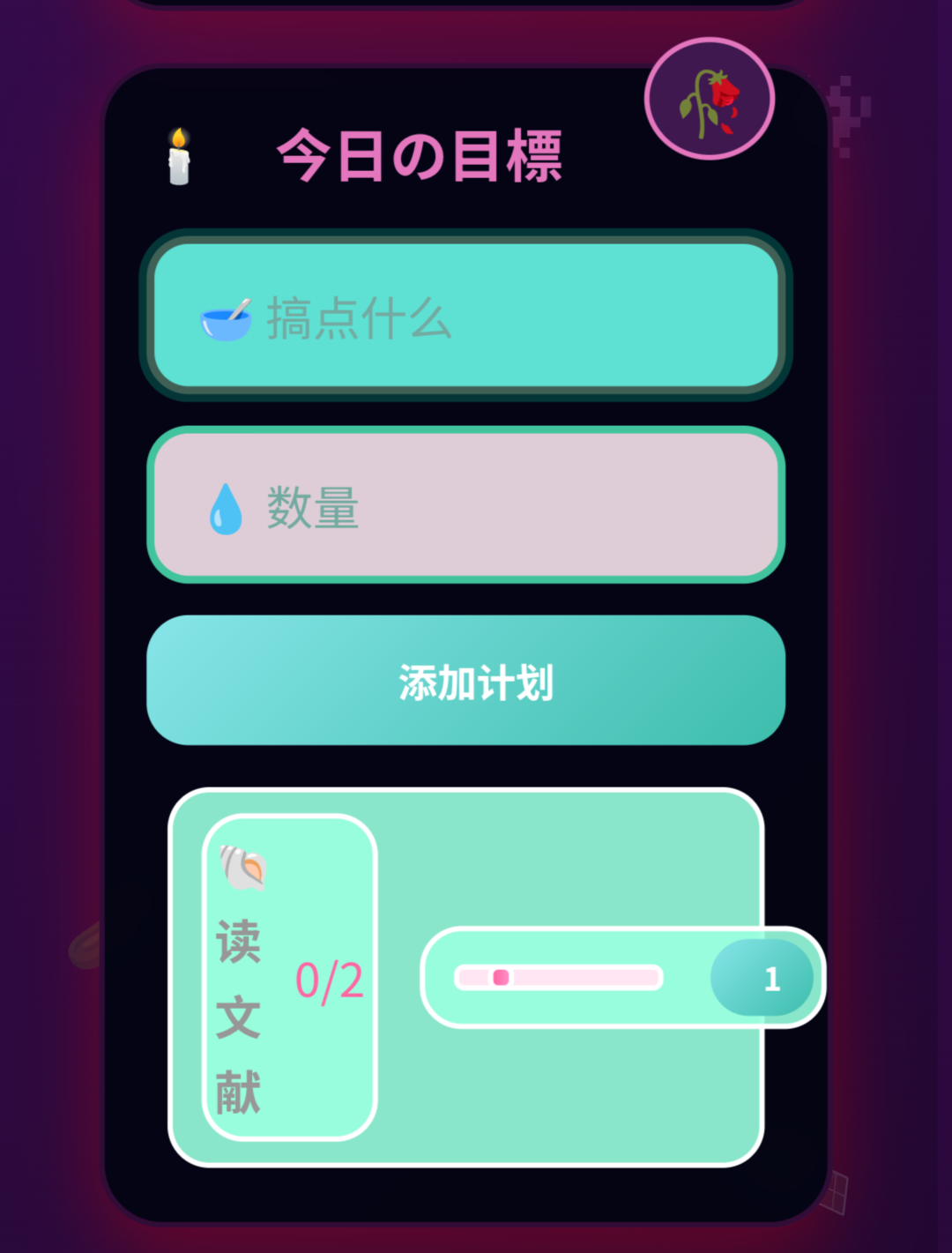
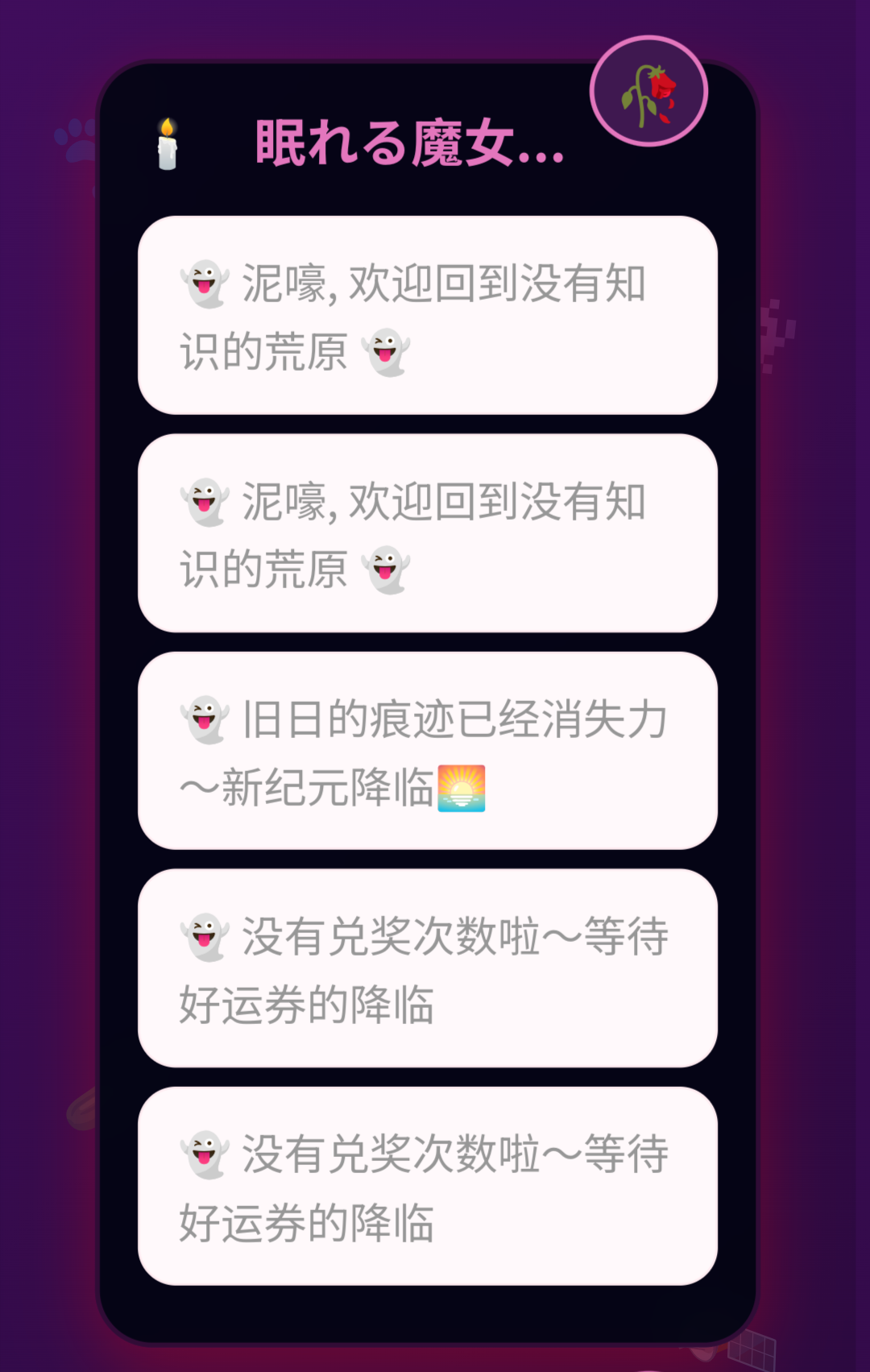
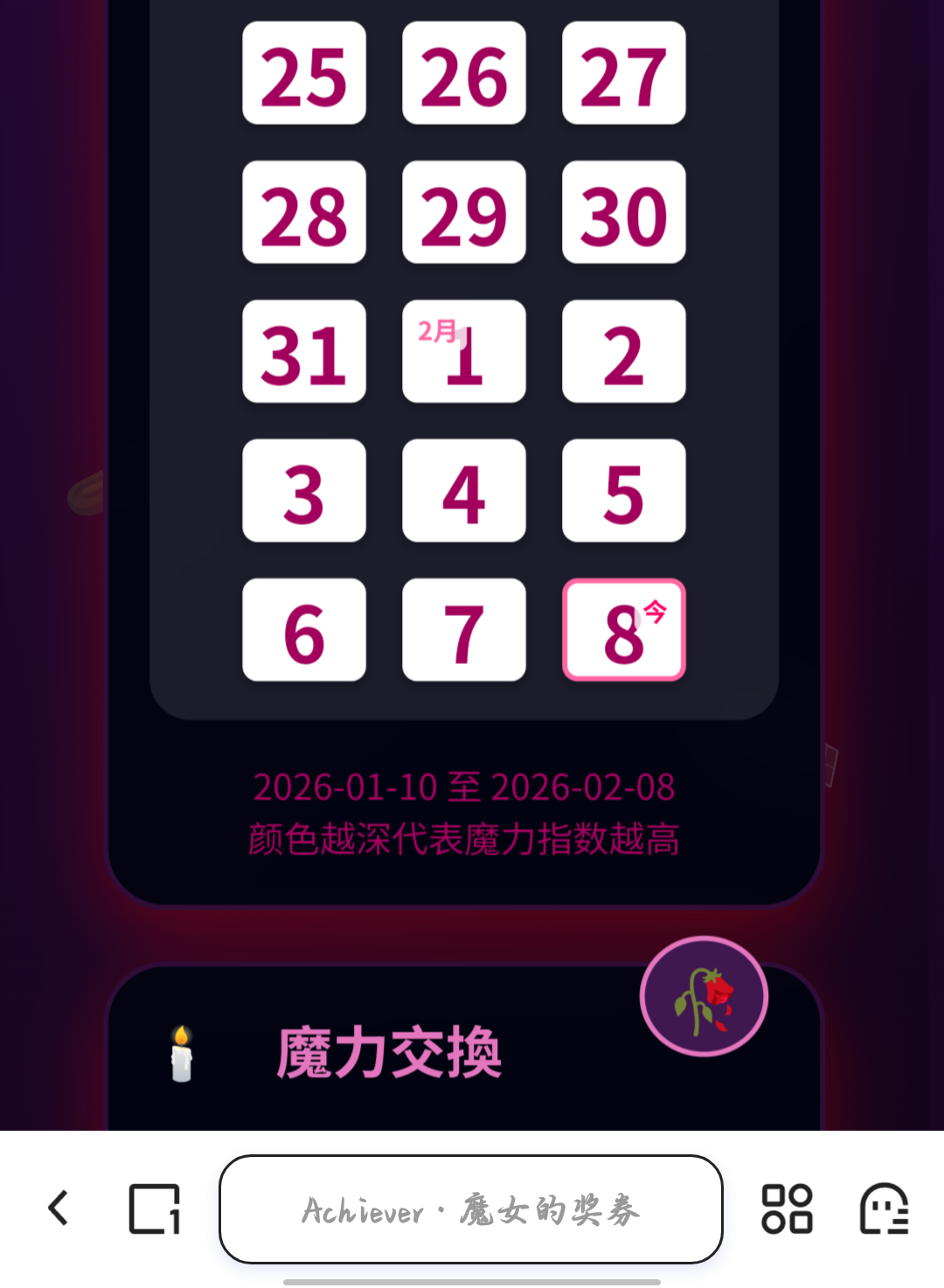
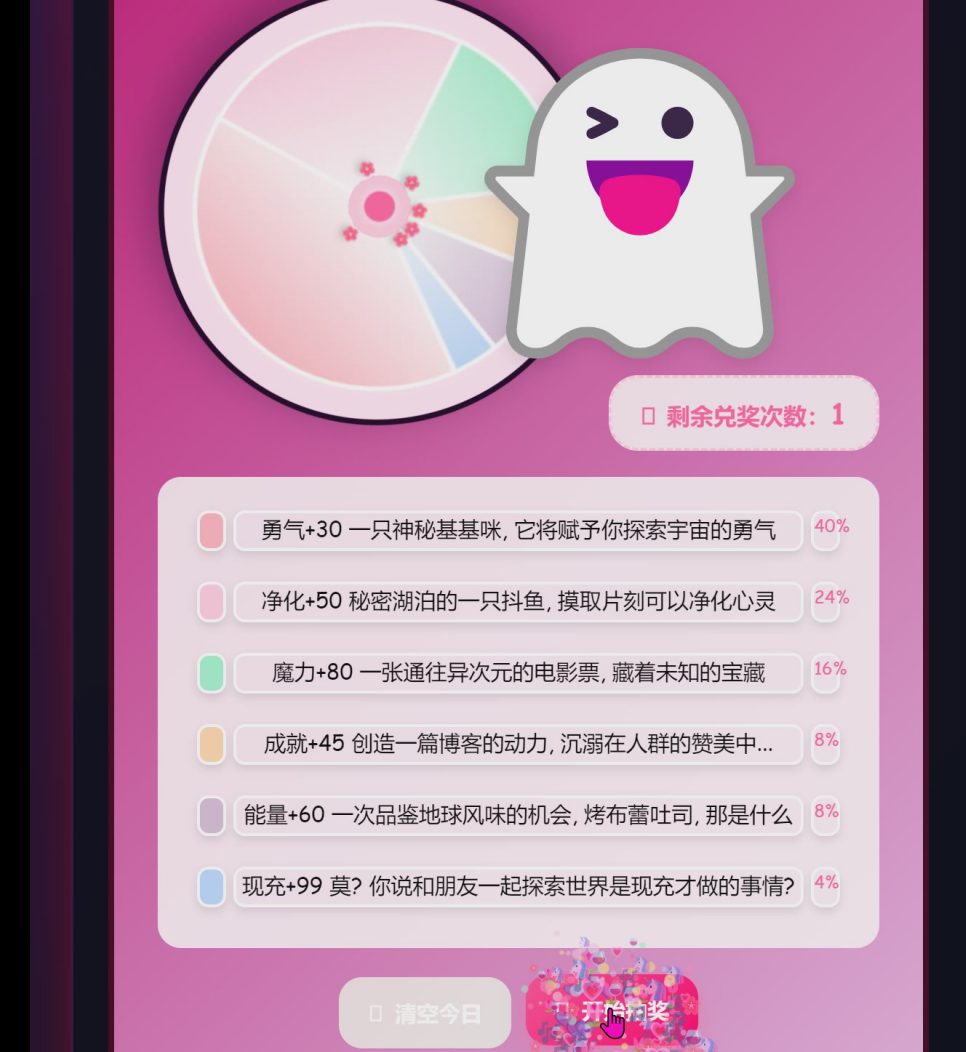
代码是几个AI开报告写的, 参数是自个调的, 又压缩了下结构, 看起来一坨. 反耳, 跑出来还算不错奥.
后话
万一还能参考呢, , ,
<!DOCTYPE html>
<!-- saved from url=(0047)file:///D:/Program%20Files/Achiever/index5.html -->
<html lang="zh-CN"><head><meta http-equiv="Content-Type" content="text/html; charset=UTF-8">
<title>Achiever · 魔女的奖券</title>
<meta name="viewport" content="width=device-width, initial-scale=1.0">
<link rel="stylesheet" href="./Achiever · 魔女的奖券_files/all.min.css">
<link rel="icon" href="data:image/svg+xml,<svg xmlns='http://www.w3.org/2000/svg' viewBox='0 0 100 100'><text y='.9em' font-size='90'>%F0%9F%91%BB</text></svg>">
<style>
*{box-sizing:border-box}
body{margin:0;padding:40px;font-family:'Comic Sans MS','Segoe UI Emoji',-apple-system,BlinkMacSystemFont,sans-serif;
background:linear-gradient(135deg,#400d5c 0%,#000000 100%);min-height:100vh;position:relative;overflow-x:hidden}
body::before{content:"✨";position:fixed;font-size:20px;opacity:0.3;z-index:-1}
.card{background:rgba(0, 3, 15, 0.9);border-radius:24px;padding:24px;margin-bottom:20px;box-shadow:0 10px 30px rgba(255, 0, 0, 0.3);border:2px solid #300c36;position:relative;backdrop-filter:blur(10px)}
.card::before{content:"🥀";position:absolute;top:-12px;right:20px;font-size:24px;background:rgb(63, 24, 80);padding:4px 8px;border-radius:50%;border:2px solid #e376bd}
h2{margin:0 0 16px;font-size:22px;color:#e376bd;font-weight:bold;display:flex;align-items:center;gap:8px}
h2::before{content:"🕯";font-size:20px}
.row{display:flex;gap:12px;margin-bottom:16px}
input{padding:14px 16px;border-radius:16px;font-size:18px;border:3px solid #41c39e;background:rgba(246, 227, 235, 0.9);flex:1;transition:all 0.3s ease;font-family:inherit}
input:focus{outline:none;border-color:#406055;box-shadow:0 0 0 3px rgba(0, 255, 195, 0.2);background:rgb(94, 224, 211)}
input::placeholder{color:#73aaa1}
button{padding:14px 20px;border-radius:16px;font-size:15px;border:none;cursor:pointer;color:#fff;font-weight:bold;transition:all 0.3s ease;font-family:inherit;display:flex;align-items:center;justify-content:center;gap:8px}
button:hover{transform:translateY(-2px);box-shadow:0 6px 12px rgba(255, 0, 0, 0.15)}
button:active{transform:translateY(0)}
button.primary{background:linear-gradient(135deg,#ff82b4 0%,#ff4fa7 100%)}
button.primary:hover{background:linear-gradient(135deg,#ff5297 0%,#ff016b 100%);box-shadow:0 6px 15px rgba(255,102,163,0.4)}
button.secondary{background:linear-gradient(135deg,#87e5e8 0%,#3dbdac 100%)}
button.secondary:hover{background:linear-gradient(135deg,#3ee7d0 0%,#00a09e 100%);box-shadow:0 6px 15px rgba(110,231,183,0.4)}
button.danger{background:linear-gradient(135deg,#f2e4e5 0%,#f0eaeb 100%)}
button.danger:hover{background:linear-gradient(135deg,#ac9fa0 0%,#736064 100%);box-shadow:0 6px 15px rgba(251,113,133,0.4)}
.log{font-size:18px;color:#979797;line-height:1.6}
#chat p{padding:12px 16px;background:#fff9fb;border-radius:16px;margin:8px 0;border:1px solid #ffecf1;animation:fadeIn 0.5s ease}
#wheelBox{display:inline-block;margin:auto;padding:30px;background:linear-gradient(135deg,rgba(217, 34, 135, 0.9) 0%,rgba(255, 198, 247, 0.9) 100%);border-radius:24px;border:4px solid #3b0117;text-align:center;position:relative}
#wheelCanvas{width:305px;height:300px;border-radius:50%;box-shadow:0 10px 30px rgba(21, 1, 34, 0.4);border:4px solid rgb(25, 1, 32)}
.pointer{position:absolute;top:20px;left:65%;transform:translateX(-50%);z-index:10}
.pointer::before{content:"👻";font-size:210px;filter:drop-shadow(0 4px 6px rgba(0,0,0,0.1))}
@media (max-width:768px){
.pointer::before {
font-size:80px; /* 手机端缩小 */
}
}
#lotteryRemain{font-size:16px;color:#ff66a3;font-weight:bold;margin:8px 0;padding:10px 20px;background:rgba(255,248,251,0.9);border-radius:20px;border:2px dashed #ffcfe1;display:inline-block}
.legend{padding:15px;background:rgba(255,248,251,0.9);border-radius:16px;margin-top:10px;font-size:15px;max-width:100%;overflow-x:hidden}
.legend div{display:flex;align-items:center;gap: 5px;margin-bottom:5px;padding:8px 12px;border-radius:12px;transition:transform 0.3s ease;flex-wrap:wrap;min-height:34px}
@media (max-width:768px){
.legend div span:nth-child(2) { /* 中间文字 */
white-space: normal; /* 自动换行 */
min-width: 0; /* 避免固定最小宽度撑开 */
flex: 1 1 90%; /* 占满可用宽度 */
}
.legend div span:nth-child(3) { /* 概率文字 */
flex-shrink: 0; /* 不被挤掉 */
}
}
.legend div:hover{transform:translateX(5px);background:rgb(255, 197, 226)}
.legend span{display:inline-block;width:20px;height:28px;border-radius:8px;border:2px solid white;box-shadow:0 3px 6px rgba(0,0,0,0.1);flex-shrink:0}
#planList div{display:flex;align-items:center;justify-content:space-between;padding:3px 3px;margin:5px 8px;background:rgba(153, 255, 223, 0.9);border-radius:16px;border:2px solid #ffffff}
#planList button{padding:8px 16px;font-size:15px;border-radius:18px}
.particle-container{position:fixed;top:0;left:0;width:100%;height:100%;pointer-events:none;z-index:1000}
@keyframes fadeIn{from{opacity:0;transform:translateY(10px)}to{opacity:1;transform:translateY(0)}}
@keyframes float{0%,100%{transform:translateY(0)rotate(0deg)}50%{transform:translateY(-20px)rotate(10deg)}}
@keyframes sparkle{0%,100%{opacity:0.3;transform:scale(1)}50%{opacity:1;transform:scale(1.2)}}
.float-decor{position:fixed;z-index:-1;opacity:0.2;animation:float 6s ease-in-out infinite}
.decor1{top:10%;left:5%;font-size:40px;animation-delay:0s}
.decor2{top:20%;right:8%;font-size:32px;animation-delay:1s}
.decor3{bottom:30%;left:7%;font-size:36px;animation-delay:2s}
.decor4{bottom:15%;right:10%;font-size:44px;animation-delay:3s}
@media (max-width:768px){.row{flex-direction:column}#wheelCanvas{width:240px;height:240px}.card{padding:16px}}
/* 添加一些额外的样式 */
.card h2 i {color: #ff0000;margin-right: 8px;}
#calendar {min-height: 12px;}
/* 日历格子的悬停动画 */
@keyframes pulse {0% { transform: scale(1); }50% { transform: scale(1.1); }100% { transform: scale(1); }}
#calendar div:hover {animation: pulse 0.5s ease;}
</style>
</head>
<body>
<div class="float-decor decor1">🐾</div>
<div class="float-decor decor2">👾</div>
<div class="float-decor decor3">🥒</div>
<div class="float-decor decor4">🛰</div>
<div class="particle-container" id="particleContainer"></div>
<div class="card"><h2><i class="fas fa-comments"></i> 眠れる魔女...</h2><div id="chat" class="log"><p>👻 泥嚎, 欢迎回到没有知识的荒原 👻</p></div></div>
<div class="card"><h2><i class="fas fa-tasks"></i> 今日の目標</h2><div class="row">
<input id="planName" placeholder="🥣 搞点什么">
<input id="planTarget" type="number" min="1" placeholder="💧 数量">
<button id="addPlan" class="secondary"><i class="fas fa-plus"></i> 添加计划</button></div><div id="planList" class="log"><div>
<div><strong>🐚 读文献</strong><span style="color:#ff66a3;font-size:18px;margin-left:8px;">0/5</span></div>
<div style="display:flex;align-items:center;gap:10px;"><div style="width:80px;height:8px;background:#ffe6f2;border-radius:4px;
overflow:hidden;"><div style="width:0%;height:100%;background:linear-gradient(90deg, #ff66a3, #ff8ec6);border-radius:4px;"></div>
</div><button class="secondary" style="padding:6px 12px;font-size:12px;"><i class="fas fa-plus"></i> 1</button></div>
</div><div>
<div><strong>🐚 喝水</strong><span style="color:#ff66a3;font-size:18px;margin-left:8px;">0/3</span></div>
<div style="display:flex;align-items:center;gap:10px;"><div style="width:80px;height:8px;background:#ffe6f2;border-radius:4px;
overflow:hidden;"><div style="width:0%;height:100%;background:linear-gradient(90deg, #ff66a3, #ff8ec6);border-radius:4px;"></div>
</div><button class="secondary" style="padding:6px 12px;font-size:12px;"><i class="fas fa-plus"></i> 1</button></div>
</div><div>
<div><strong>🐚 背单词</strong><span style="color:#ff66a3;font-size:18px;margin-left:8px;">0/1</span></div>
<div style="display:flex;align-items:center;gap:10px;"><div style="width:80px;height:8px;background:#ffe6f2;border-radius:4px;
overflow:hidden;"><div style="width:0%;height:100%;background:linear-gradient(90deg, #ff66a3, #ff8ec6);border-radius:4px;"></div>
</div><button class="secondary" style="padding:6px 12px;font-size:12px;"><i class="fas fa-plus"></i> 1</button></div>
</div></div></div>
<div class="card">
<h2><i class="fas fa-calendar-days"></i> 魔力日历</h2>
<div id="calendar" style="display: flex; flex-wrap: wrap; gap: 14px; justify-content: center; padding: 15px; background: rgba(255, 248, 251, 0.1); border-radius: 16px; margin-top: 10px;">
<!-- JavaScript会在这里动态生成日历 -->
</div>
<div style="text-align: center; margin-top: 15px; color: #a2005c; font-size: 14px;">
<i class="fas fa-magic"></i> 颜色越深代表魔力指数越高
</div>
</div>
</div>
<div class="card"><h2><i class="fas fa-gift"></i> 魔力交換</h2><div id="wheelBox"><canvas id="wheelCanvas" width="280" height="280"></canvas><div class="pointer"></div>
<div id="lotteryRemain"><i class="fas fa-ticket-alt"></i> 剩余兑奖次数:<span style="font-size:20px;color:#ff66a3;">0</span> </div><div class="legend" id="wheelLegend"><div><span style="background: rgb(255, 182, 193);"></span><span style="flex: 1 1 0%; min-width: 120px; word-break: break-word;">勇气+30 一只神秘基基咪, 它将赋予你探索宇宙的勇气 </span><span style="color: rgb(255, 102, 163); font-size: 12px; flex-shrink: 0; margin-left: auto;">40%</span></div><div><span style="background: rgb(255, 207, 225);"></span><span style="flex: 1 1 0%; min-width: 120px; word-break: break-word;">净化+50 秘密湖泊的一只抖鱼, 摸取片刻可以净化心灵</span><span style="color: rgb(255, 102, 163); font-size: 12px; flex-shrink: 0; margin-left: auto;">24%</span></div><div><span style="background: rgb(167, 243, 208);"></span><span style="flex: 1 1 0%; min-width: 120px; word-break: break-word;">魔力+80 一张通往异次元的电影票, 藏着未知的宝藏</span><span style="color: rgb(255, 102, 163); font-size: 12px; flex-shrink: 0; margin-left: auto;">16%</span></div><div><span style="background: rgb(255, 216, 177);"></span><span style="flex: 1 1 0%; min-width: 120px; word-break: break-word;">成就+45 创造一篇博客的动力, 沉溺在人群的赞美中...</span><span style="color: rgb(255, 102, 163); font-size: 12px; flex-shrink: 0; margin-left: auto;">8%</span></div><div><span style="background: rgb(216, 191, 216);"></span><span style="flex: 1 1 0%; min-width: 120px; word-break: break-word;">能量+60 一次品鉴地球风味的机会, 烤布蕾吐司, 那是什么</span><span style="color: rgb(255, 102, 163); font-size: 12px; flex-shrink: 0; margin-left: auto;">8%</span></div><div><span style="background: rgb(191, 219, 254);"></span><span style="flex: 1 1 0%; min-width: 120px; word-break: break-word;">现充+99 莫? 你说和朋友一起探索世界是现充才做的事情?</span><span style="color: rgb(255, 102, 163); font-size: 12px; flex-shrink: 0; margin-left: auto;">4%</span></div></div><div style="display:flex;gap:10px;justify-content:center;margin-top:20px;">
<button id="clearToday" class="danger"><i class="fas fa-broom"></i> 清空今日</button><button id="draw" class="primary"><i class="fas fa-gift"></i> 开始抽奖</button></div></div></div>
<script>
const $ = id => document.getElementById(id),
today = () => new Date().toISOString().slice(0, 10), load = (k, d = []) => JSON.parse(localStorage.getItem(k) || JSON.stringify(d)), save = (k, v) => localStorage.setItem(k, JSON.stringify(v));
const chat = $('chat'), say = t => { const p = document.createElement('p'); p.innerHTML = `👻 ${t}`;
chat.appendChild(p); chat.scrollTop = chat.scrollHeight; createParticles(100, chat.getBoundingClientRect().left + 50, chat.getBoundingClientRect().top + 50); }; say('泥嚎, 欢迎回到没有知识的荒原 👻');
const PLAN_KEY = 'plans';
let plans = [];
function saveTodayPlans(items) {
const allPlans = load('plans') || {};
allPlans[today()] = items;
save('plans', allPlans);
}
function loadTodayPlans() {
const allPlans = load('plans') || {};
return allPlans[today()] || [];
}
function initApp() {
checkNewDay(); // ⏰ 第一行!必须最早
plans = loadTodayPlans(); // ⭐ 只加载“今天”的计划
renderPlans();
renderCalendar();
}
$('addPlan').onclick = () => {
const n = $('planName').value.trim();
const t = +$('planTarget').value;
if (!n || !t) {
say('请填写完整的计划信息哦~ 🤭');
return;
}
const newPlan = {
name: n,
target: t,
done: 0
};
plans.push(newPlan);
saveTodayPlans(plans);
$('planName').value = '';
$('planTarget').value = '';
renderPlans();
};
const LAST_DAY_KEY = 'last_active_day';
function checkNewDay() {
const todayStr = today();
const lastDay = load('last_active_day', null);
if (lastDay !== todayStr) {
save('plans', {
date: todayStr,
items: []
});
save('last_active_day', todayStr);
}
}
// 初始化显示计划
initApp();
const LOTTERY_KEY = 'lottery_remain';
function addLottery() {
const d = today(), m = load(LOTTERY_KEY, {});
m[d] = (m[d] || 0) + 1;
save(LOTTERY_KEY, m); updateRemain(); createParticles(150, $('lotteryRemain').getBoundingClientRect().left + 50, $('lotteryRemain').getBoundingClientRect().top + 10);
}
function useLottery() { const d = today(), m = load(LOTTERY_KEY, {}); if (!m[d] || m[d] <= 0) return false; m[d]--; save(LOTTERY_KEY, m); updateRemain(); return true; }
function updateRemain() {
const m = load(LOTTERY_KEY, {}), count = m[today()] || 0;
$('lotteryRemain').innerHTML = `<i class="fas fa-ticket-alt"></i> 剩余兑奖次数:<span style="font-size:20px;color:#ff66a3;">${count}</span> ${count > 0 ? '' : ''}`;
}
updateRemain();
function createParticles(count, x, y) {
const container = $('particleContainer'), particleColors = ['#ff66a3', '#ff8ec6', '#ffcfe1', '#a7f3d0', '#bfdbfe', '#fde68a', '#fbcfe8'],
emojis = ['🎶', '💗', '🌷', '🦄', '🍷', '🎵', '💜', '🌸'];
for (let i = 0; i < count; i++) {
const particle = document.createElement('div');
particle.style.position = 'fixed'; particle.style.left = x + 'px'; particle.style.top = y + 'px'; particle.style.zIndex = '1000'; particle.style.pointerEvents = 'none'; particle.style.userSelect = 'none';
if (Math.random() > 0.5) { particle.style.width = Math.random() * 8 + 4 + 'px'; particle.style.height = particle.style.width;
particle.style.backgroundColor = particleColors[Math.floor(Math.random() * particleColors.length)]; particle.style.borderRadius = '50%'; }
else { particle.innerHTML = emojis[Math.floor(Math.random() * emojis.length)]; particle.style.fontSize = Math.random() * 16 + 12 + 'px'; }
const angle = Math.random() * Math.PI * 2, speed = Math.random() * 2 + 1, distance = Math.random() * 100 + 50;
particle.style.opacity = '1'; particle.style.transform = 'translate(0, 0) scale(1)';
container.appendChild(particle);
const startTime = Date.now(), duration = 1000 + Math.random() * 500;
function animate() {
const elapsed = Date.now() - startTime, progress = elapsed / duration;
if (progress < 1) { const currentDistance = distance * progress, currentX = Math.cos(angle) * currentDistance, currentY = Math.sin(angle) * currentDistance, scale = 1 - progress;
particle.style.transform = `translate(${currentX}px, ${currentY}px) scale(${scale})`; particle.style.opacity = 1 - progress; requestAnimationFrame(animate); }
else { particle.remove(); }
}
requestAnimationFrame(animate);
}
}
// 生成过去30天的日期数组
function generatePast30Days() {
const dates = [];
for (let i = 29; i >= 0; i--) {
const date = new Date();
date.setDate(date.getDate() - i);
dates.push(date.toISOString().slice(0, 10));
}
return dates;
}
// 渲染日历
function renderCalendar() {
const calendarEl = document.getElementById('calendar');
if (!calendarEl) return;
calendarEl.innerHTML = '';
const dates = generatePast30Days();
const todayStr = today();
dates.forEach(date => {
const dayEl = document.createElement('div');
const score = calculateMagicScore(date);
// 根据魔力指数设置颜色深浅
const hue = 330; // 粉色系
const saturation = 70;
const lightness = 100 - (score * 60);
// 调整日历格子大小
const isMobile = window.innerWidth <= 768;
const size = isMobile ? 40 : 70;
const fontSize = isMobile ? 30 : 40;
dayEl.style.cssText = `
width: ${size*1.2}px;
height: ${size}px;
background: hsl(${hue}, ${saturation}%, ${lightness}%);
border-radius: 6px;
cursor: pointer;
position: relative;
transition: transform 0.2s ease, box-shadow 0.2s ease;
border: ${date === todayStr ? '2px solid #ff66a3' : '1px solid rgba(255, 255, 255, 0.1)'};
box-shadow: 0 2px 4px rgba(0, 0, 0, 0.2);
display: flex;
align-items: center;
justify-content: center;
font-size: ${fontSize}px;
color: ${score > 0.5 ? '#fff' : '#a2005c'};
font-weight: bold;
`;
dayEl.title = `${date}\n魔力指数: ${Math.round(score * 100)}%`;
// 添加日期数字
const dateObj = new Date(date);
const dateNum = dateObj.getDate();
const month = dateObj.getMonth() + 1;
const dayOfMonth = dateNum;
dayEl.textContent = dateNum;
// 如果是每月的第一天,显示月份
if (dayOfMonth === 1) {
const monthEl = document.createElement('div');
monthEl.style.cssText = `
position: absolute;
top: 2px;
left: 2px;
font-size: 10px;
color: #ff66a3;
font-weight: bold;
background: rgba(255, 255, 255, 0.8);
padding: 1px 3px;
border-radius: 3px;
`;
monthEl.textContent = `${month}月`;
dayEl.appendChild(monthEl);
}
// 如果是今天,添加特殊标记
if (date === todayStr) {
const todayMark = document.createElement('div');
todayMark.style.cssText = `
position: absolute;
top: 2px;
right: 2px;
font-size: 10px;
color: #ff0066;
font-weight: bold;
background: rgba(255, 255, 255, 0.8);
padding: 1px 3px;
border-radius: 3px;
`;
todayMark.textContent = '今';
dayEl.appendChild(todayMark);
}
// 悬停效果
dayEl.addEventListener('mouseenter', () => {
dayEl.style.transform = 'scale(1.2)';
dayEl.style.boxShadow = '0 4px 8px rgba(255, 102, 163, 0.3)';
});
dayEl.addEventListener('mouseleave', () => {
dayEl.style.transform = 'scale(1)';
dayEl.style.boxShadow = '0 2px 4px rgba(0, 0, 0, 0.2)';
});
// 点击显示详细信息
dayEl.addEventListener('click', () => {
showDayDetails(date, score);
});
calendarEl.appendChild(dayEl);
});
// 在日历下方显示日期范围
const firstDate = dates[0];
const lastDate = dates[dates.length - 1];
const dateRangeText = `${firstDate} 至 ${lastDate}`;
// 移除原有的日期范围显示,添加新的
const existingRange = calendarEl.nextElementSibling;
if (existingRange && existingRange.style.textAlign === 'center') {
existingRange.innerHTML = `
<i class="fas fa-calendar"></i> ${dateRangeText}
<br><i class="fas fa-magic"></i> 颜色越深代表魔力指数越高
`;
}
}
function calculateMagicScore(date) {
// 获取历史记录 - 我们需要一个新的存储来记录每天的数据
const HISTORY_KEY = 'plan_history';
const history = load(HISTORY_KEY, {});
// 如果有当天的历史记录,就使用它
if (history[date]) {
const dayData = history[date];
let totalDone = 0;
let totalTarget = 0;
dayData.tasks.forEach(task => {
totalDone += task.done;
totalTarget += task.target;
});
return totalTarget > 0 ? totalDone / totalTarget : 0;
}
// 如果是今天,使用当前计划数据
if (date === today()) {
const plans = loadTodayPlans();
let totalDone = 0;
let totalTarget = 0;
plans.forEach(plan => {
totalDone += plan.done;
totalTarget += plan.target;
});
return totalTarget > 0 ? totalDone / totalTarget : 0;
}
// 其他日期(过去没有记录的)返回0
return 0;
}
// 添加一个新的函数来记录每天的数据
function recordDailyProgress() {
const HISTORY_KEY = 'plan_history';
const history = load(HISTORY_KEY, {});
const todayStr = today();
const plans = loadTodayPlans();
// ✅ 每次都覆盖当天的数据
history[todayStr] = {
date: todayStr,
tasks: plans.map(plan => ({
name: plan.name,
done: plan.done,
target: plan.target
}))
};
save(HISTORY_KEY, history);
}
// 修改 renderPlans 函数,在每次更新时记录进度
function renderPlans() {
const box = $('planList');
box.innerHTML = '';
if (plans.length === 0) { box.innerHTML = '<p style="text-align:center;color:#ffa8cc;">🎐 还没有计划哦,快添加一个吧!</p>'; return; }
plans.forEach((p, index) => {
const d = document.createElement('div'),
progress = (p.done / p.target) * 100, emoji = progress >= 100 ? '🐟' : progress >= 50 ? '🎖' : '🐚';
d.innerHTML = `
<div><strong>${emoji} ${p.name}</strong><span style="color:#ff66a3;font-size:18px;margin-left:8px;">${p.done}/${p.target}</span></div>
<div style="display:flex;align-items:center;gap:10px;"><div style="width:80px;height:8px;background:#ffe6f2;border-radius:4px;
overflow:hidden;"><div style="width:${progress}%;height:100%;background:linear-gradient(90deg, #ff66a3, #ff8ec6);border-radius:4px;"></div>
</div><button class="secondary" style="padding:6px 12px;font-size:12px;"><i class="fas fa-plus"></i> 1</button></div>
`;
d.querySelector('button').onclick = () => {
if (p.done < p.target) {
p.done++;
saveTodayPlans(plans);
// 记录每日进度
recordDailyProgress();
renderPlans();
createParticles(50, d.querySelector('button').getBoundingClientRect().left + 10, d.querySelector('button').getBoundingClientRect().top + 10);
if (p.done === p.target) {
say(`你完成了「${p.name}」! 😋`);
addLottery();
}
}
};
box.appendChild(d);
});
// 记录当前进度
recordDailyProgress();
// 更新日历
setTimeout(() => {
renderCalendar();
}, 50);
}
// 显示某天的详细信息
function showDayDetails(date, score) {
const HISTORY_KEY = 'plan_history';
const history = load(HISTORY_KEY, {});
const dateStr = new Date(date).toLocaleDateString('zh-CN', {
weekday: 'long',
year: 'numeric',
month: 'long',
day: 'numeric'
});
let message = `📅 ${dateStr}\n`;
message += `✨ 魔力指数: ${Math.round(score * 100)}%\n\n`;
if (history[date]) {
const dayData = history[date];
message += '📊 当日任务完成情况:\n';
dayData.tasks.forEach(task => {
const progress = task.target > 0 ? (task.done / task.target) * 100 : 0;
message += `• ${task.name}: ${task.done}/${task.target} (${Math.round(progress)}%)\n`;
});
} else if (date === today()) {
const plans = loadTodayPlans();
if (plans.length > 0) {
message += '📊 当前任务情况:\n';
plans.forEach(plan => {
const progress = (plan.done / plan.target) * 100;
message += `• ${plan.name}: ${plan.done}/${plan.target} (${Math.round(progress)}%)\n`;
});
} else {
message += '📭 没有记录任务';
}
} else {
message += '📭 当日没有记录数据';
}
alert(message);
}
// 如果你想查看所有存储的数据,可以添加一个调试按钮
function showAllStorage() {
let message = '📦 本地存储数据:\n\n';
for (let i = 0; i < localStorage.length; i++) {
const key = localStorage.key(i);
const value = localStorage.getItem(key);
message += `🔑 ${key}:\n${value}\n\n`;
}
console.log(message);
// 可以用 console 查看,或者显示在页面上
say('存储数据已输出到控制台(按F12查看)🔍');
}
class LotteryWheel {
constructor(canvas, legend, prizes) {
this.c = canvas; this.ctx = canvas.getContext('2d'); this.legend = legend; this.prizes = prizes; this.total = prizes.reduce((s, p) => s + p.weight, 0); this.currentRotation = 0; this.draw(); this.drawLegend();
}
draw() {
const centerX = 140, centerY = 140, radius = 130; this.ctx.clearRect(0, 0, 280, 280); let startAngle = -Math.PI / 2;
const bgGradient = this.ctx.createRadialGradient(centerX, centerY, 0, centerX, centerY, radius);
bgGradient.addColorStop(0, '#fff9fb'); bgGradient.addColorStop(1, '#ffe6f2'); this.ctx.fillStyle = bgGradient; this.ctx.fillRect(0, 0, 280, 280);
this.prizes.forEach((p, i) => {
const sliceAngle = (p.weight / this.total) * 2 * Math.PI, endAngle = startAngle + sliceAngle, midAngle = startAngle + sliceAngle / 2;
this.ctx.beginPath(); this.ctx.moveTo(centerX, centerY); this.ctx.arc(centerX, centerY, radius - 10, startAngle, endAngle); this.ctx.closePath();
const gradient = this.ctx.createLinearGradient(centerX + Math.cos(midAngle) * radius, centerY + Math.sin(midAngle) * radius, centerX, centerY);
gradient.addColorStop(0, p.color); gradient.addColorStop(1, this.lightenColor(p.color, 40)); this.ctx.fillStyle = gradient; this.ctx.fill();
this.ctx.strokeStyle = 'white'; this.ctx.lineWidth = 3; this.ctx.stroke();
this.ctx.save(); this.ctx.translate(centerX, centerY); this.ctx.rotate(midAngle); this.ctx.textAlign = 'center'; this.ctx.textBaseline = 'middle';
this.ctx.shadowColor = 'rgba(0, 0, 0, 0.2)'; this.ctx.shadowBlur = 4; this.ctx.shadowOffsetX = 2; this.ctx.shadowOffsetY = 2;
const emojiMap = { '一只神秘基基咪': '🐱💤', '秘密湖泊的一只抖鱼': '🐠', ' 一张通往异次元的电影票': '🎞', '创造一篇博客的动力': '📡', '一次品鉴地球风味的机会': '🍨', '和朋友探索世界的力量': '🏄♂️✨' };
const emoji = emojiMap[p.text.split(' ')[0]] || '🌸'; const textRadius = radius * 0.2;
this.ctx.fillText(emoji, textRadius, 0); this.ctx.shadowColor = 'transparent'; this.ctx.restore();
startAngle = endAngle;
});
this.ctx.beginPath(); this.ctx.arc(centerX, centerY, 20, 0, Math.PI * 2); this.ctx.fillStyle = '#ff66a3'; this.ctx.fill();
const centerGradient = this.ctx.createRadialGradient(centerX, centerY, 0, centerX, centerY, 15);
centerGradient.addColorStop(0, '#ffffff'); centerGradient.addColorStop(1, '#ffcfe1'); this.ctx.fillStyle = centerGradient; this.ctx.fill();
this.ctx.beginPath(); this.ctx.arc(centerX, centerY, 10, 0, Math.PI * 2); this.ctx.fillStyle = '#ff66a3'; this.ctx.fill();
}
lightenColor(color, percent) {
const num = parseInt(color.slice(1), 16), amt = Math.round(2.55 * percent), R = (num >> 16) + amt, G = (num >> 8 & 0x00FF) + amt, B = (num & 0x0000FF) + amt;
return `#${(0x1000000 + (R < 255 ? R < 1 ? 0 : R : 255) * 0x10000 + (G < 255 ? G < 1 ? 0 : G : 255) * 0x100 + (B < 255 ? B < 1 ? 0 : B : 255)).toString(16).slice(1)}`;
}
drawLegend() {
this.legend.innerHTML = '';
this.prizes.forEach(p => {
const div = document.createElement('div'), colorSpan = document.createElement('span'); colorSpan.style.background = p.color;
const textSpan = document.createElement('span'); textSpan.textContent = p.text; textSpan.style.flex = '1'; textSpan.style.minWidth = '120px'; textSpan.style.wordBreak = 'break-word';
const probSpan = document.createElement('span'); probSpan.textContent = `${Math.round((p.weight / this.total) * 100)}%`; probSpan.style.color = '#ff66a3'; probSpan.style.fontSize = '12px'; probSpan.style.flexShrink = '0'; probSpan.style.marginLeft = 'auto';
div.appendChild(colorSpan); div.appendChild(textSpan); div.appendChild(probSpan); this.legend.appendChild(div);
});
}
spin(callback) {
const randomValue = Math.random() * this.total; let accumulatedWeight = 0, selectedPrize = null, selectedIndex = 0;
for (let i = 0; i < this.prizes.length; i++) { accumulatedWeight += this.prizes[i].weight;
if (randomValue <= accumulatedWeight) { selectedPrize = this.prizes[i]; selectedIndex = i; break; } }
let startAngle = -Math.PI / 2; for (let i = 0; i < selectedIndex; i++) { startAngle += (this.prizes[i].weight / this.total) * 2 * Math.PI; }
const prizeMidAngle = startAngle + (this.prizes[selectedIndex].weight / this.total) * Math.PI, targetAngleRad = -Math.PI / 2;
let rotationDegrees = (targetAngleRad - prizeMidAngle) * 180 / Math.PI % 360;
if (rotationDegrees < 0) rotationDegrees += 360;
const totalRotation = rotationDegrees + 720;
createParticles(200, $('draw').getBoundingClientRect().left + 50, $('draw').getBoundingClientRect().top + 20);
this.currentRotation += totalRotation; this.c.style.transition = 'transform 3s cubic-bezier(0.17, 0.67, 0.12, 0.99)'; this.c.style.transform = `rotate(${this.currentRotation}deg)`;
setTimeout(() => { createParticles(300, this.c.getBoundingClientRect().left + 140, this.c.getBoundingClientRect().top + 140); this.c.style.boxShadow = '0 0 30px rgba(255, 102, 163, 0.8)';
setTimeout(() => { this.c.style.boxShadow = '0 10px 30px rgba(255, 182, 193, 0.4)'; }, 1000); callback(selectedPrize); }, 3000);
return selectedPrize;
}
}
const prizes = [
{ text: '勇气+30 一只神秘基基咪, 它将赋予你探索宇宙的勇气 ', weight: 5, color: '#ffb6c1' },
{ text: '净化+50 秘密湖泊的一只抖鱼, 摸取片刻可以净化心灵', weight: 3, color: '#ffcfe1' },
{ text: '魔力+80 一张通往异次元的电影票, 藏着未知的宝藏', weight: 2, color: '#a7f3d0' },
{ text: '成就+45 创造一篇博客的动力, 沉溺在人群的赞美中...', weight: 1, color: '#ffd8b1' },
{ text: '能量+60 一次品鉴地球风味的机会, 烤布蕾吐司, 那是什么', weight: 1, color: '#d8bfd8' },
{ text: '现充+99 莫? 你说和朋友一起探索世界是现充才做的事情?', weight: 0.5, color: '#bfdbfe' },
];
const wheel = new LotteryWheel($('wheelCanvas'), $('wheelLegend'), prizes);
$('draw').onclick = () => {
if (!useLottery()) { say('没有兑奖次数啦~等待好运券的降临'); return; }
say('🎰 命运开始转动... 好运降临!');
wheel.spin(p => { const emojis = { '一只神秘基基咪': '🐱💤', '秘密湖泊的一只抖鱼': '🐠', ' 一张通往异次元的电影票': '🎞', '创造一篇博客的动力': '📡', '一次品鉴地球风味的机会': '🍨', '和朋友探索世界的力量': '🏄♂️✨' };
say(`😮你获得了:${p.text} ${emojis[p.text.split(' ')[0]] || '✨'}`); });
};
$('clearToday').onclick = () => {
if (!confirm('⚠确定要清空今日的进度吗?此操作将重置所有计划进度并清空今日的抽奖次数。\n\n注意:历史记录不会被清除!')) return;
createParticles(100, $('clearToday').getBoundingClientRect().left + 40, $('clearToday').getBoundingClientRect().top + 15);
// 重置所有计划的进度为0
plans.forEach(p => { p.done = 0; });
saveTodayPlans(plans);
// 记录清空操作
recordDailyProgress();
renderPlans();
// 清空今日的抽奖次数
const m = load(LOTTERY_KEY, {});
m[today()] = 0;
save(LOTTERY_KEY, m);
updateRemain();
say('旧日的痕迹已经消失力~新纪元降临🌅');
};
// 添加一个清理历史记录的函数(可选)
function clearAllHistory() {
if (confirm('⚠⚠⚠ 警告:这将清除所有历史记录,包括过去每天的进度数据!此操作不可撤销。确定要继续吗?')) {
localStorage.removeItem('plan_history');
say('所有历史记录已清除 🔥');
renderCalendar();
}
}
// 在页面加载时初始化
window.addEventListener('load', () => {
// 记录初始进度
recordDailyProgress();
// 初始化日历
renderCalendar();
setTimeout(() => {
createParticles(200, window.innerWidth / 2, window.innerHeight / 2);
}, 500);
});
// 窗口大小改变时重新渲染日历以适应不同屏幕
window.addEventListener('resize', () => {
setTimeout(() => {
renderCalendar();
}, 100);
});
</script>
</body></html>

有“AI”的1024 = 2048,欢迎大家加入2048 AI社区
更多推荐



 10
10 0
0- 0


 已为社区贡献1条内容

所有评论(0)