虚幻状态树解析
StateTree是虚幻引擎引入的一个现代化状态管理系统,提供更强大更灵活的状态管理能力,凡是涉及更复杂的AI行为,角色状态管理或者游戏流程控制,StateTree系统将会是一个非常有价值的工具。
在开始解析之前,先找一下State Tree和Gameplay State Tree的位置,这样的话方便在必要的时候阅读源码
插件源码的位置分别是:
Engine\Plugins\Runtime\StateTree
Engine\Plugins\Runtime\GameplayStateTree
StateTree
StateTree包含三个模块:
StateTreeModule(核心运行时模块)负责状态树的执行,状态转化和任务管理,当游戏运行时,驱动AI行为,游戏流程控制
StateTreeEditorModule(编辑器模块),这是State Tree系统的 可视化编辑器模块 ,提供状态树的可视化编辑、调试和编译功能,在开发阶段虚幻编辑器中创建和编辑状态树
StateTreeTestSuite(测试套件模块)这是State Tree系统的 单元测试模块 ,包含对State Tree核心功能的自动化测试,构建过程中验证State Tree的稳定性
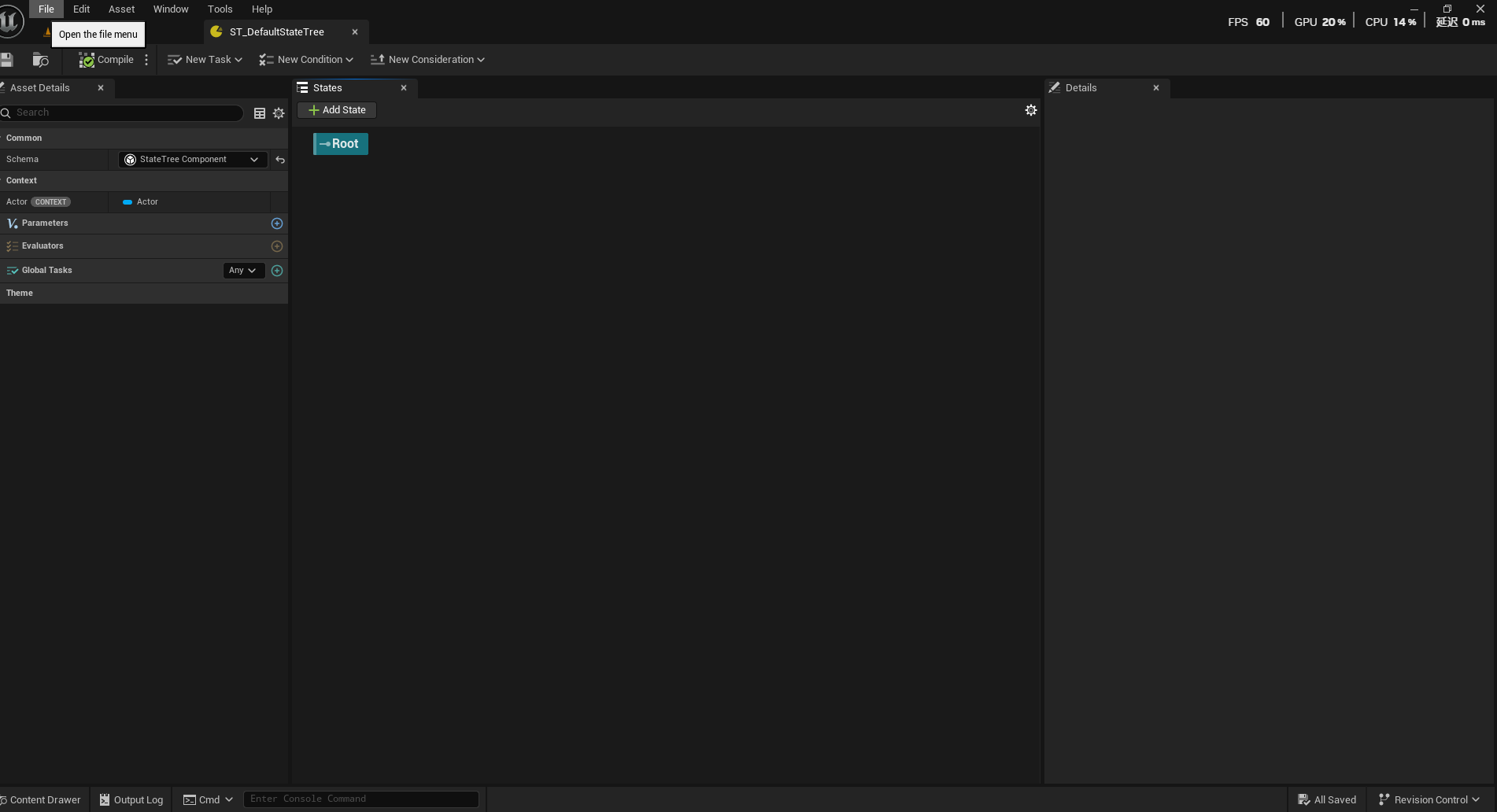
选择不同的Schema(状态树模式),包含给其他Actor使用的状态树组件和给AI使用的AI状态树组件,这个Schema是由GamePlayeStateTree模块提供的,Context Actor Class的主要作用是 确保StateTree能够正确绑定到特定类型的Actor属性 ,选择好对应的Actor以后,StateTree接下来的任务和条件就可以通过这个Context Actor来访问Actor的属性和方法。
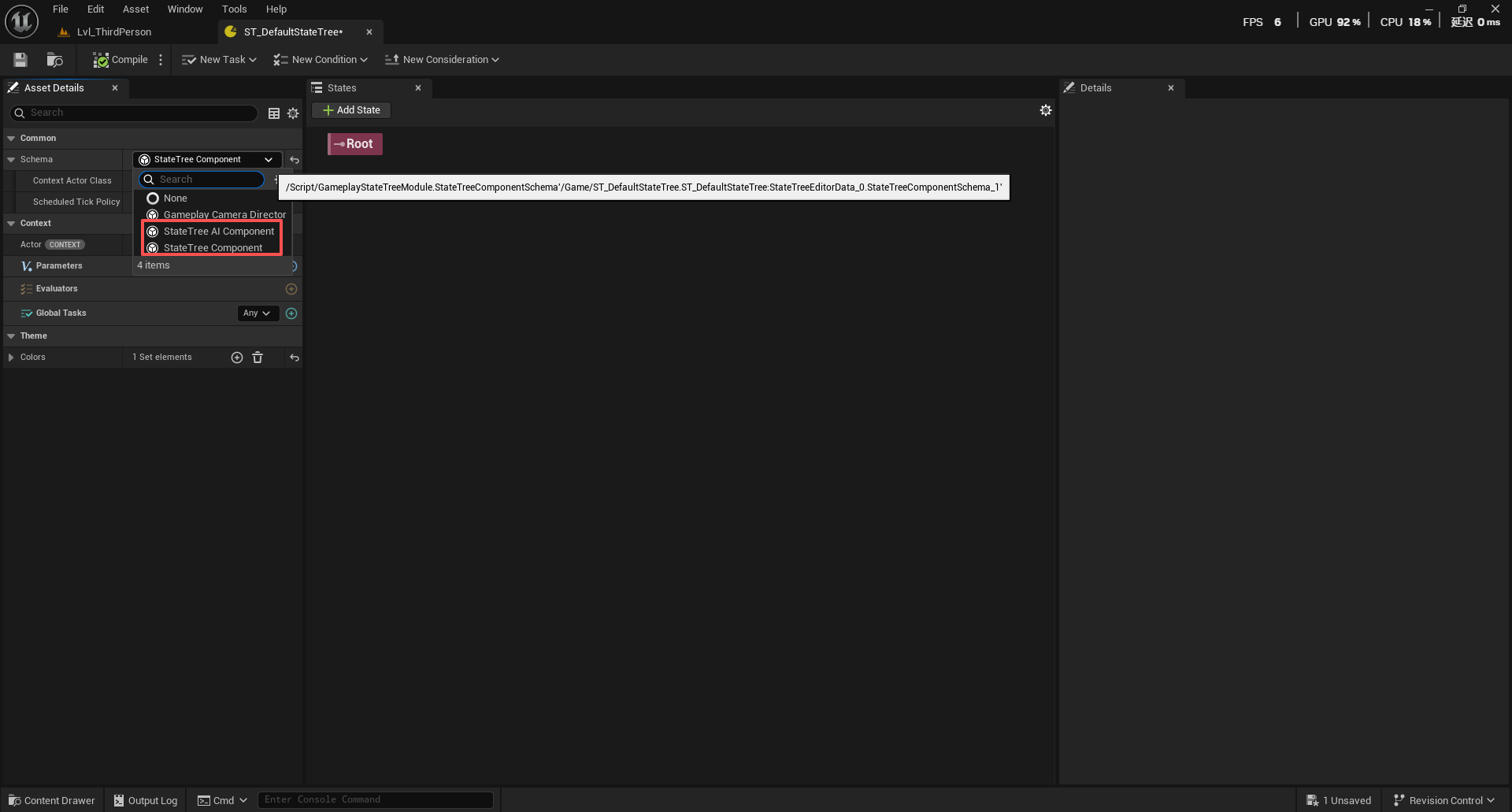
Scheduled Tick Policy是一个枚举对象,它的作用是控制StateTree的Tick更新策略,目的是实现性能优化
StateTree 支持调度 Tick(例如,仅每 0.5 秒 Tick 一次),传递给任务 <font style="color:rgb(25, 27, 31);background-color:rgb(248, 248, 250);">Tick</font> 函数的 <font style="color:rgb(25, 27, 31);background-color:rgb(248, 248, 250);">DeltaTime</font> 实际上是自上次 Tick 以来经过的总时间,而非当前帧的帧时间 ,和Tick是有区别的。
UENUM()
enum class EStateTreeComponentSchemaScheduledTickPolicy : uint8
{
    Default,   // 默认策略,这意味着将使用全局配置变量来决定何时睡眠
    Allowed,   // 强制允许Scheduled Tick,StateTree可以自由决定何时进入睡眠
    Denied,    // 禁止Scheduled Tick,要求StateTree必须每帧更新,不能睡眠
};
这事关“睡眠”机制,睡眠其实就是让StateTree停止每帧更新状态,只在需要的时候调用TickComponent,由此诞生三种策略:
Default策略的主要配置方式是控制台,也就是得通过控制台来全局控制StateTree是否休眠
StateTree.Component.DefaultScheduledTickAllowed true
StateTree.Component.DefaultScheduledTickAllowed false
Allowed根据任务需求调整Tick频率,比如自带的任务Delay,当进入延时后,请求X秒后唤醒,期间就进入睡眠状态,X秒后TickComponent重新被调用,Delay任务的Tick也会启用。Allowed 策略不受控制台变量影响,即使全局禁用Scheduled Tick,Allowed策略仍然可以优化
Denied策略则无论怎么尝试睡眠都会忽略请求,始终返回MakeEveryFrames()。
Tasks
Tasks 是 StateTree 中在激活状态下执行的逻辑单元,代表状态中的具体行为,完整生命流程:
EnterState()->Tick()->TriggerTransitions()(转换触发时调用,若启用的话)->状态完成->StateCompleted()(反向顺序的状态完成时调用)->ExitState()(退出状态时调用)
StateTree运行时每帧从根到叶调用每个State里的Task的Tick,如果Task成功/失败,停止后续Task的Tick;从叶到根逆序调用所有激活State的Task的StateComplete
一个StateTree里可以有多个Task,并且这些Task是同一帧内开始执行EnterState,如果要按顺序执行,就要把当前状态作为子状态放到根状态之下
状态:MainState(父状态)
└─ 子状态A:InitState
   └─ 任务A:初始化
   └─ 转换:完成后 → 子状态B
└─ 子状态B:LogicState
   └─ 任务B:执行逻辑
   └─ 转换:完成后 → 子状态C
└─ 子状态C:CleanupState
   └─ 任务C:清理

子状态A完成后,才进入子状态B
顺序执行:A → B → C
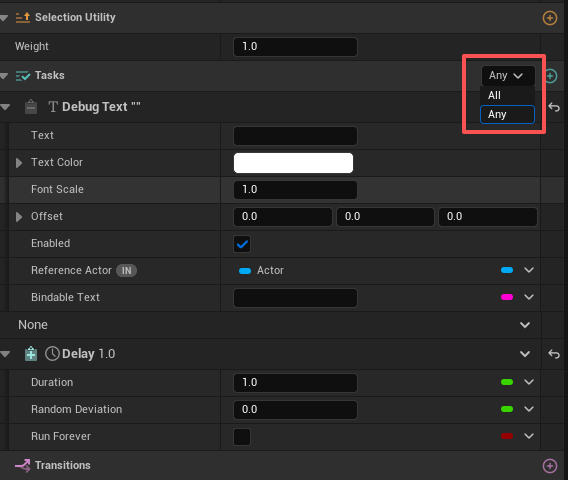
Any模式表示任何任务Succeeded的时候都会完成状态
All模式表示所有任务完成,状态才会完成
[[nodiscard]] ETaskCompletionStatus GetCompletionStatus() const
{
    const T FirstCompletionBitsMasked = (*FirstCompletionBits) & CompletionMask;
    const T SecondCompletionBitsMasked = (*SecondCompletionBits) & CompletionMask;

    if ((SecondCompletionBitsMasked & FirstCompletionBitsMasked) != 0)
    {
        return ETaskCompletionStatus::Failed;
    }

    //  All模式
    if (TaskControl == EStateTreeTaskCompletionType::All)
    {
        // 所有任务都Succeeded → 状态Succeeded
        if (SecondCompletionBitsMasked == CompletionMask)
        {
            return ETaskCompletionStatus::Succeeded;
        }
        // 所有任务都Stopped → 状态Stopped
        if (FirstCompletionBitsMasked == CompletionMask)
        {
            return ETaskCompletionStatus::Stopped;
        }
        // 混合状态:如果有Succeeded和Stopped,返回Succeeded
        return (FirstCompletionBitsMasked | SecondCompletionBitsMasked) == CompletionMask
            ? ETaskCompletionStatus::Succeeded
            : EStateTreeRunStatus::Running;
    }
    // Any模式
    else
    {
        // 任何一个任务Succeeded → 状态Succeeded
        if (SecondCompletionBitsMasked != 0)
        {
            return ETaskCompletionStatus::Succeeded;
        }
        // 任何一个任务Stopped → 状态Stopped
        return FirstCompletionBitsMasked != 0
            ? ETaskCompletionStatus::Stopped
            : EStateTreeRunStatus::Running;
    }
}
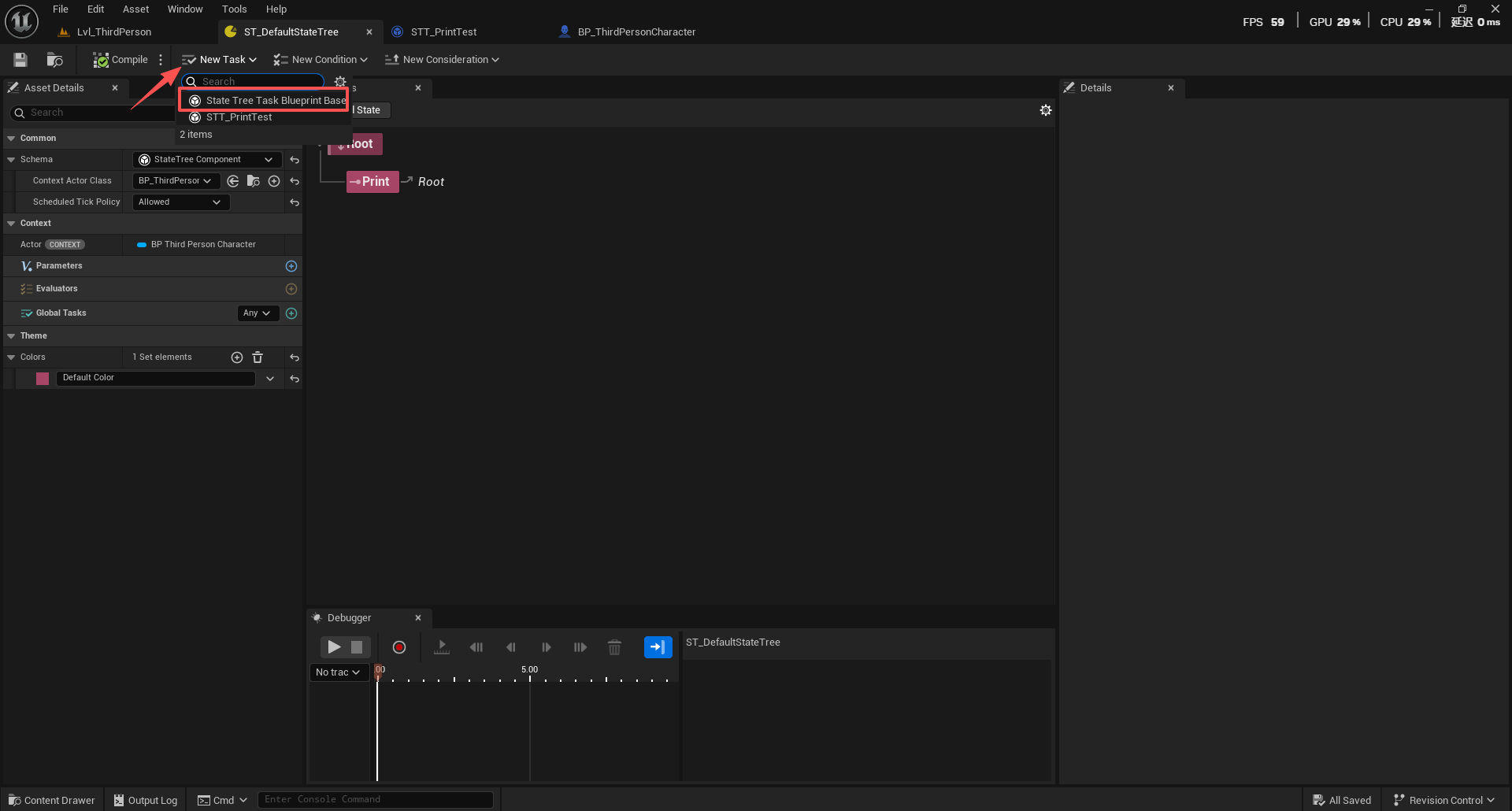
StateTreeTaskBlueprintBase
点击NewTask创建一个新的任务,任务继承自StateTreeTaskBlueprintBase,当然,在创建蓝图类里选择继承这个类也可以创建这个任务。
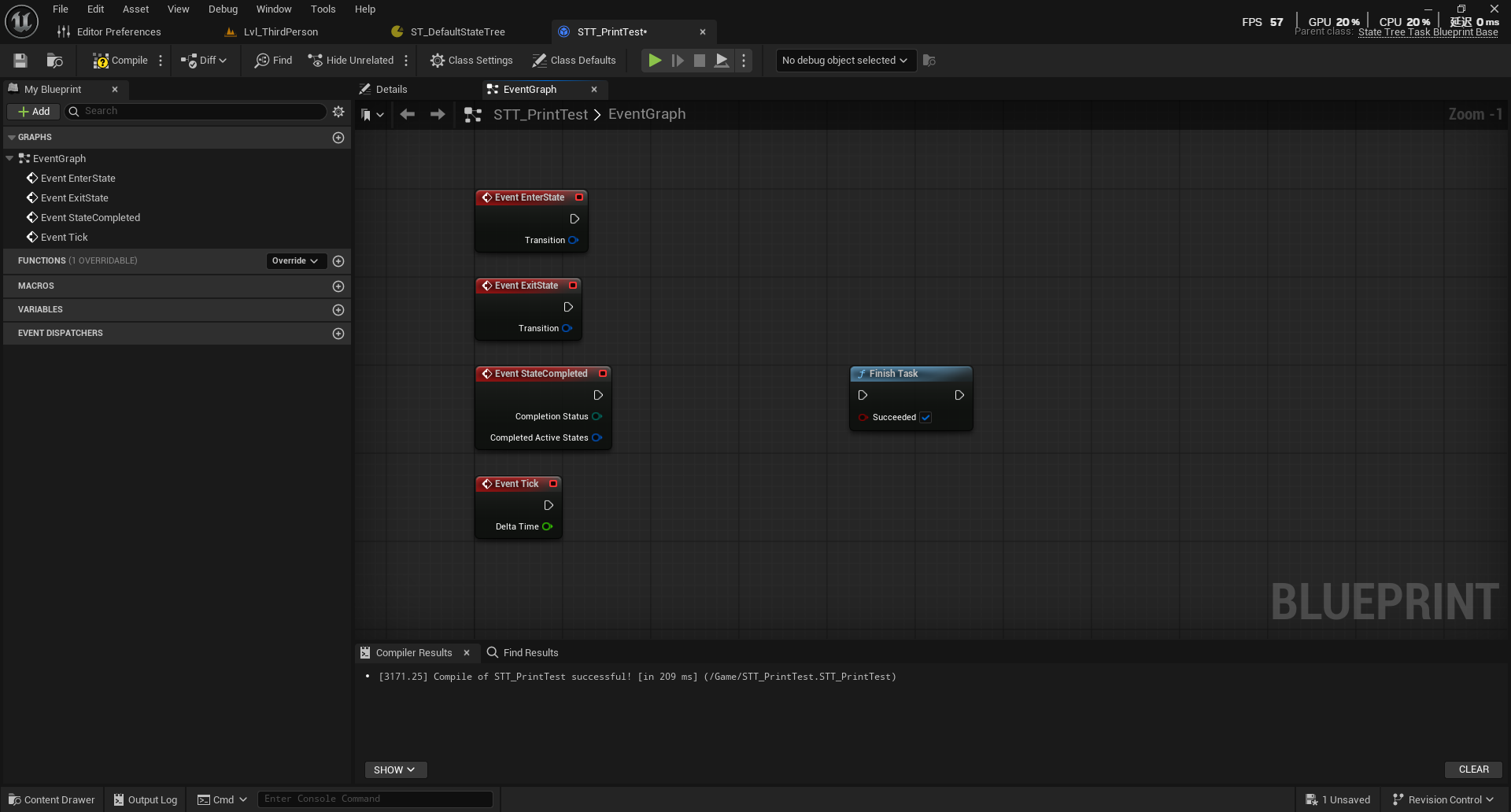
这个类包含四个重要的事件调用,进入EventEnterState - 状态进入事件,EventExitState - 状态退出事件,EventStateCompleted- 状态完成事件,EventTick - Tick事件。
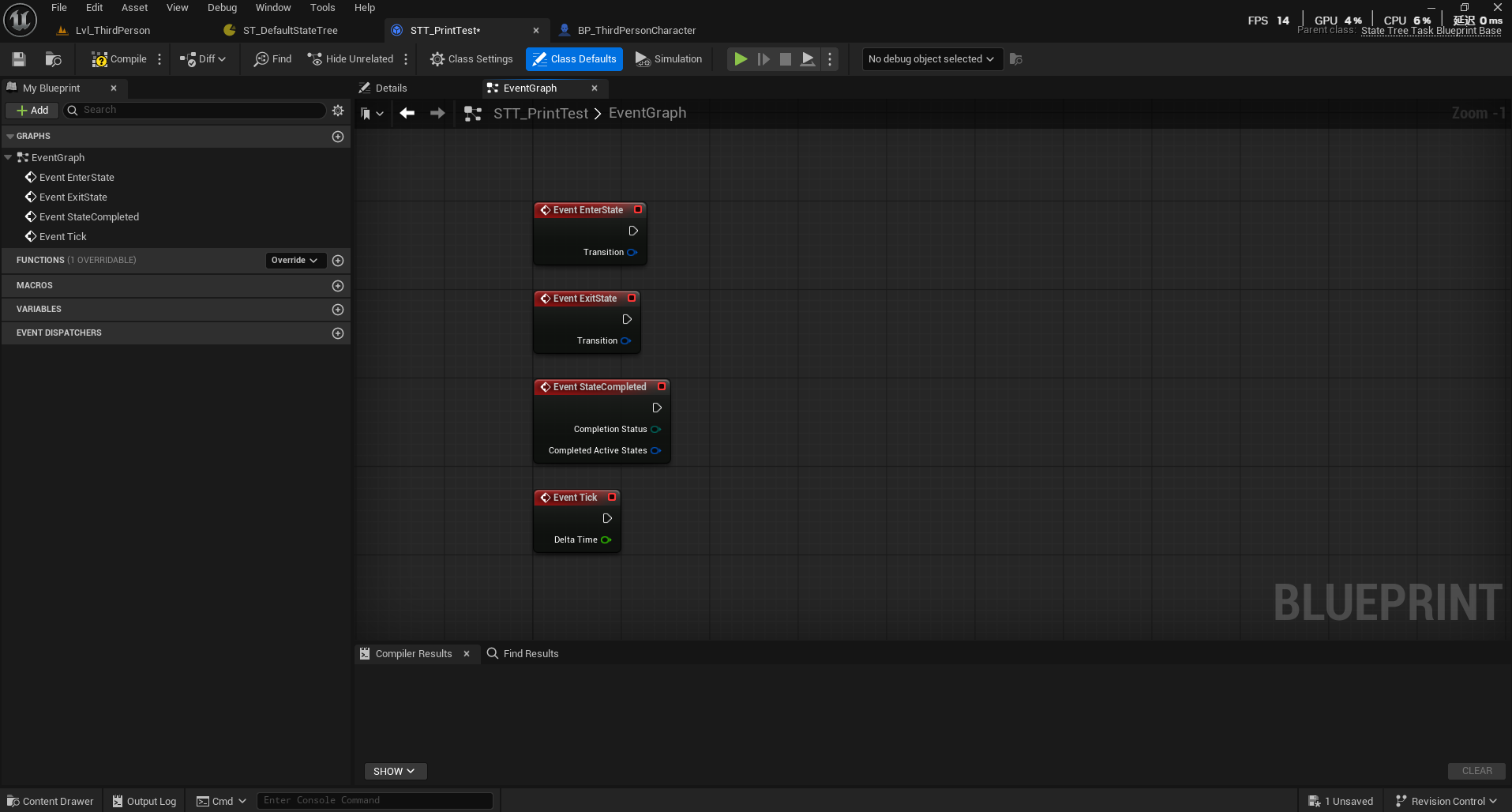
EventEnterState在状态树开始执行时或状态转换时调用
而状态树开始进入状态从调用组件的StartLogic开始,然后选择对应的状态进入(SelectState()),因为需要知道在状态树开启的时候先进入哪个状态,在此之前需要构建从根状态到目标状态的完整路径,用于后续的状态选择检查
状态树结构:
- 根状态
  - 巡逻状态
    - 移动任务状态

目标状态: 移动任务状态
构建路径: [根状态, 巡逻状态, 移动任务状态]
接下来要做一种情况,就是查找共同帧,帧对于状态树来说是用于记录正在执行的状态树资产和活动状态,是状态树执行环境的匹配检查,有一种情况,如果某个或某些状态链接了其他的状态树资产,此时当前状态树A属于活动帧A,链接的状态树B属于活动帧B,那么在查找共同帧的时候,会检查目标状态是否属于当前活动帧的状态树然后尝试匹配
int32 CurrentFrameIndex = INDEX_NONE;
int32 CurrentStateTreeIndex = INDEX_NONE;

for (int32 FrameIndex = Exec.ActiveFrames.Num() - 1; FrameIndex >= 0; FrameIndex--)
{
    const FStateTreeExecutionFrame& Frame = Exec.ActiveFrames[FrameIndex];
    if (Frame.StateTree == NextStateTree)  // 检查状态树资产
    {
        CurrentStateTreeIndex = FrameIndex;
        if (Frame.RootState == NextRootState)  // 检查根状态
        {
            CurrentFrameIndex = FrameIndex;
            break;
        }
    }
}
于是有三种情况
1.完全匹配:说明当前状态和目标状态都属于一个根状态下,最大化复用现有执行环境,子树不用初始化
2.状态树匹配但根状态不匹配:说明当前状态和目标状态不在一个根状态下(可能经过Transition跳过去了),子树需要初始化
3.完全不匹配:当前状态和目标状态都不在一个状态树内,目标状态链接了其他的状态树资产
SelectState返回true的时候,才会调用EnterState。
根据以上的查找结果来确定初始状态的转换类型EStateTreeStateChangeType(Changed/Sustained),在EnterState中根据转换类型来决定是否调用EnterState
/** State change type. Passed to EnterState() and ExitState() to indicate how the state change affects the state and Evaluator or Task is on. */
UENUM()
enum class EStateTreeStateChangeType : uint8
{
    /** Not an activation */
    None,

    /** The state became activated or deactivated. */
    Changed,

    /** The state is parent of new active state and sustained previous active state. */
    Sustained,
};
changed类型转换来自“完全不同的状态路径”,例如:
当前状态路径: 根状态 → 巡逻状态 → 移动状态
目标状态路径: 根状态 → 攻击状态 → 瞄准状态

转换类型: Changed(完全不同的状态路径)
EnterState调用: 必须调用(所有状态都需要重新进入)
而Sustained转换是共享父状态的,例如
当前状态路径: 根状态 → 战斗状态 → 近战攻击状态
目标状态路径: 根状态 → 战斗状态 → 远程攻击状态

转换类型: Sustained(共享"战斗状态"父状态)
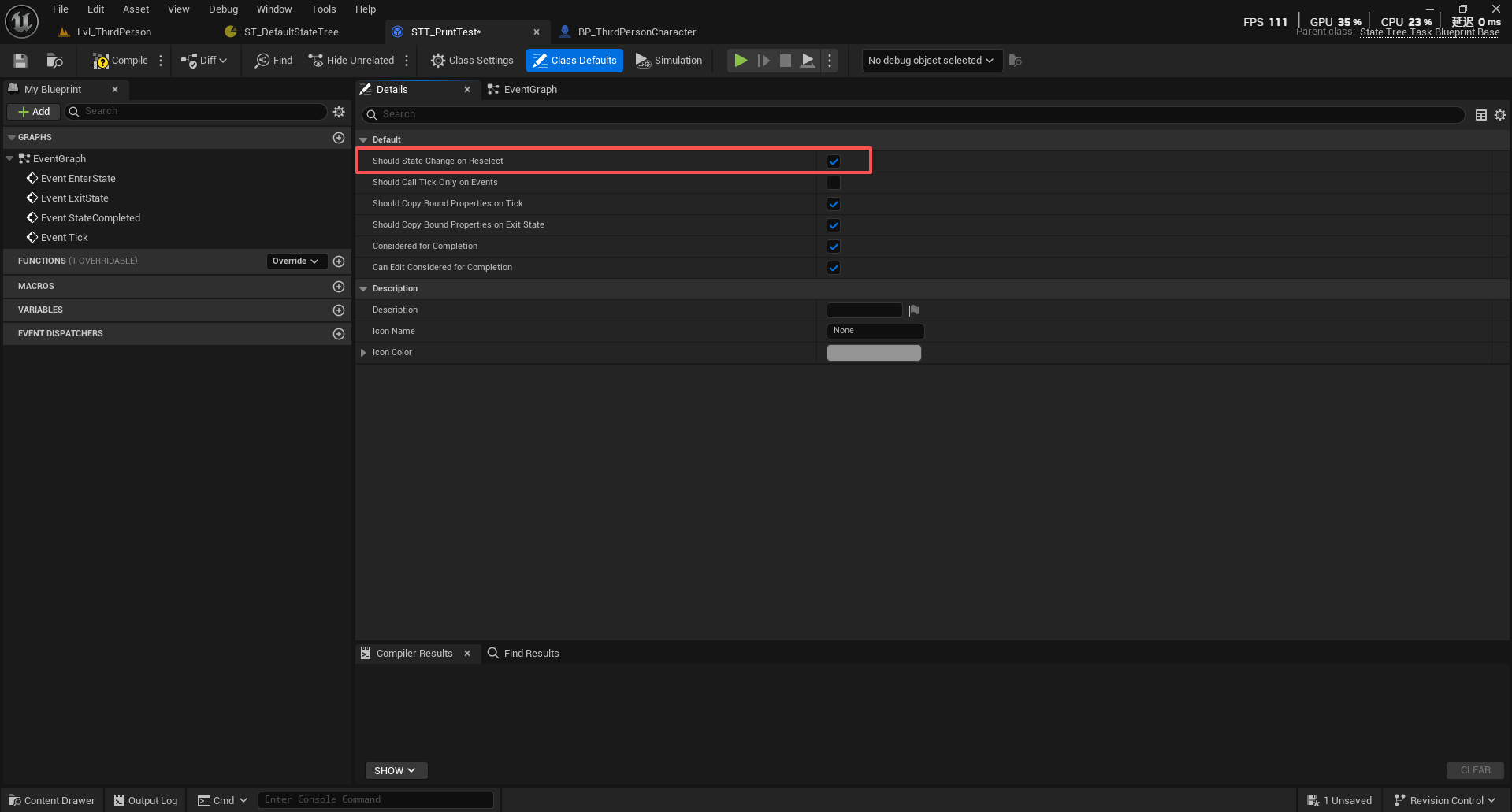
EnterState调用: 取决于bShouldStateChangeOnReselect
bShouldStateChangeOnReselect的作用就是控制Sustained转换时的行为,为true时转换时也调用EnterState,反之。
EnterState还有一种调用情况是在状态转换在状态树Tick进行时,每帧检查,如果允许转换则先退出当前状态,然后再调用EnterState()。
允许转换的主要判定在TriggerTransitions,这个函数的目的就是处理所有可能的转换请求(外部请求,延迟转换,任务转换,状态转换)
第一种是外部请求,通过RequestTransition 方法请求转换,请求会被缓冲,在下一个TriggerTransitions 调用时处理,外部请求通常具有最高优先级
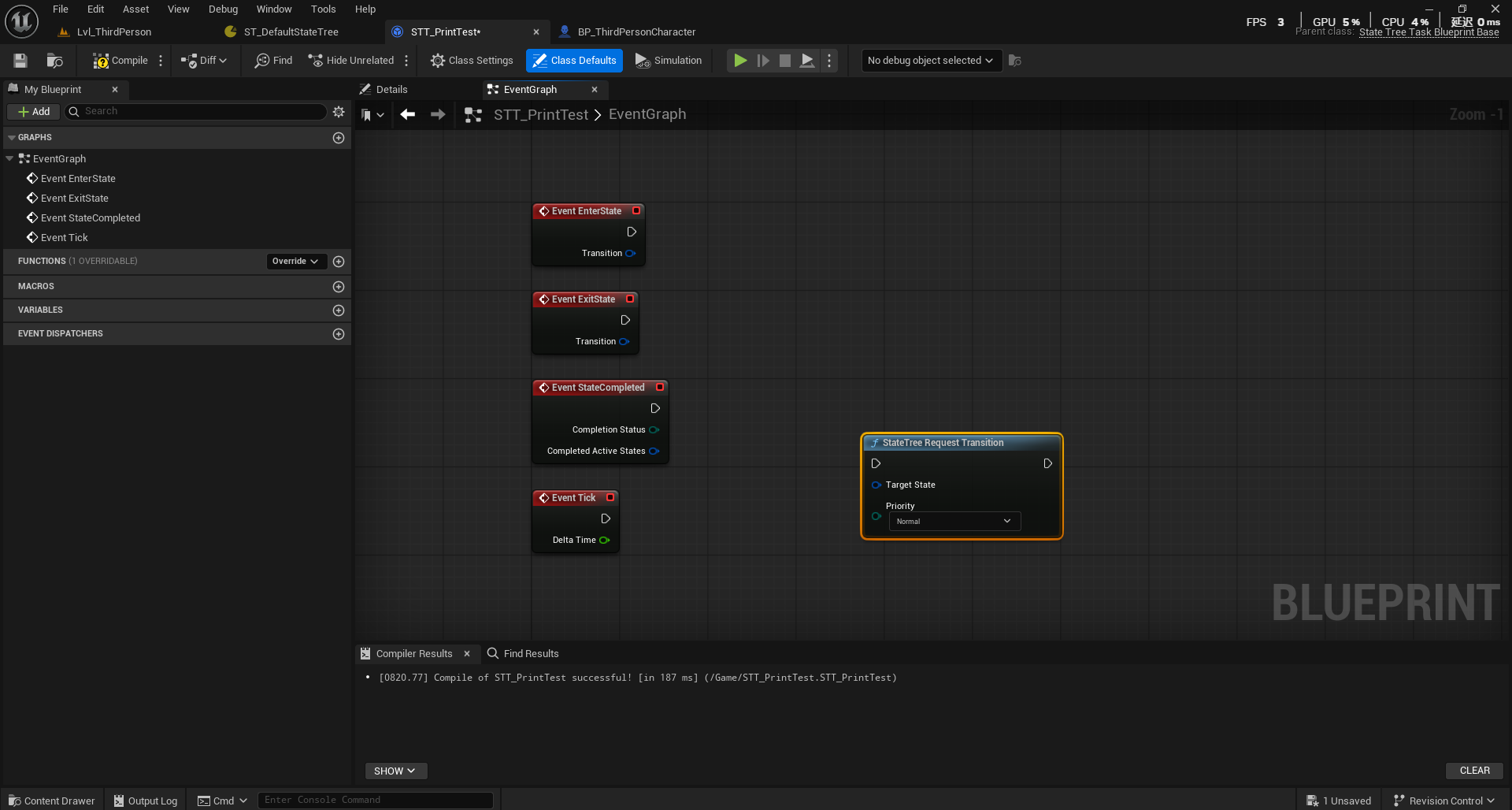
第二种转换源是延迟转换,当设置了Tick的转换条件满足且设置了延迟的时候,在 TriggerTransitions 函数中检测到延迟转换条件,延迟转换的优先级是可控的,延迟转换在转换条件满足但需要延迟执行时创建
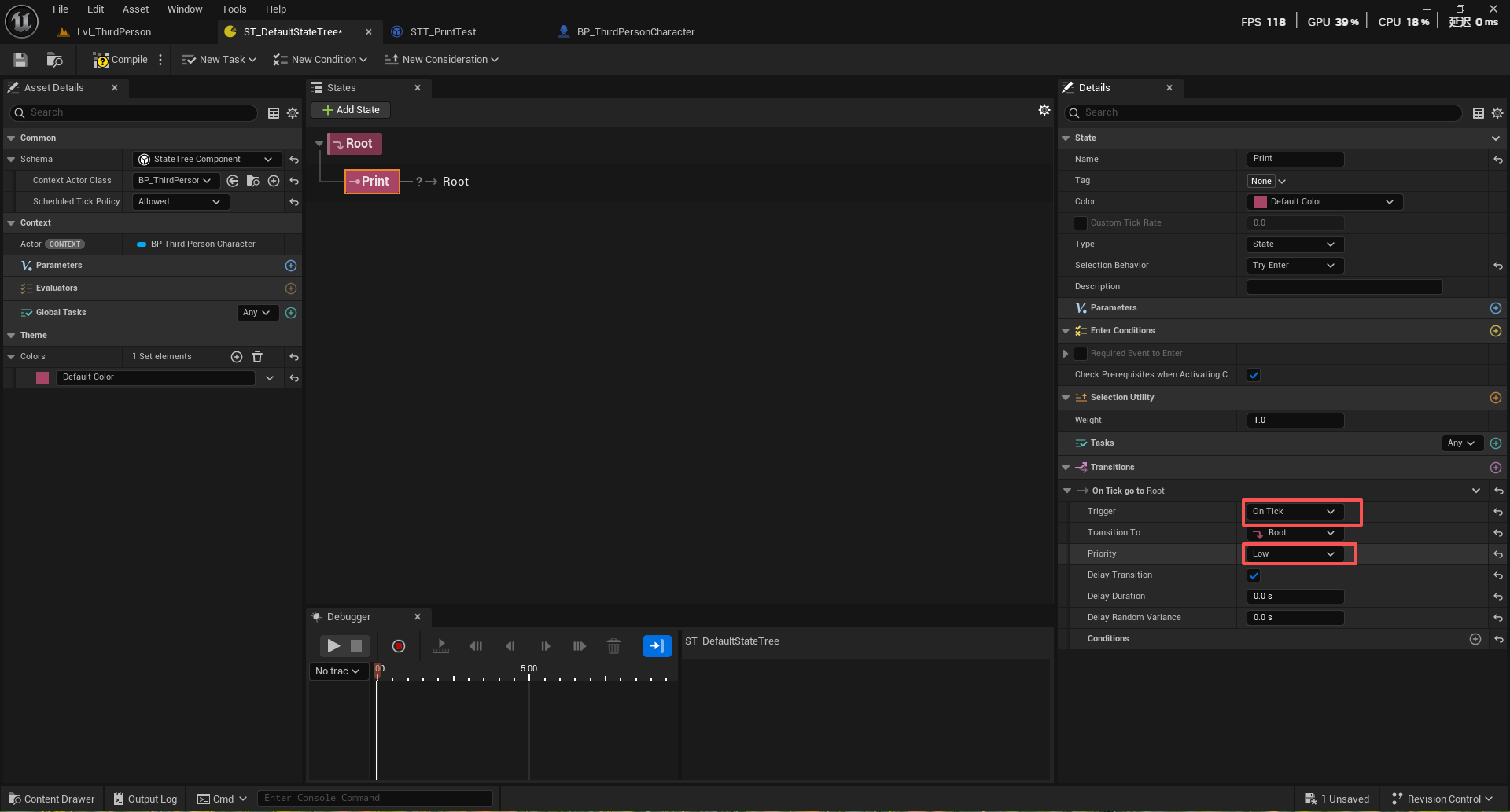
第三种是任务触发的转换(Task-based Transitions),任务触发的转换是一种由任务自身逻辑决定是否触发状态转换的机制,任务转换允许任务在运行时动态决定是否需要转换状态。
第四种是状态转换条件(State Transition Conditions),当状态进入时,其所有转换条件开始生效,执行阶段也是调用RequestTransition来进行请求进入EnterState
ExitState发生在当任务结束时,当前状态发生改变时,状态树停止时,ExitState的调用顺序时从子状态到父状态,另外之前说的状态转换类型Changed总是会调用ExitState,bShouldStateChangeOnReselect为true时也是反之不会,意思就是在状态转换的时候根据条件调用每个Task的退出逻辑。ExitState触发时会保存当前的状态转换类型信息,再一次进入该状态的时候会读取保存的状态转换类型信息。
StateCompleted发生在:状态进入时,如果Task立即返回成功或失败(而不是Running),则立即调用StateCompleted;当Tick执行以后,状态从Running变为成功或失败以后也会调用;状态转换后,如果新状态立即完成(不是Running),立即调用StateCompleted。需要注意的时,和ExitState不一样,StateCompleted是在状态**完成/失败**时调用,而不是退出时(ExitState)调用,区分这个很重要,还有一个是,只有调用了EnterState的Task才可以调用StateCompleted。
从 StateTreeExecutionTypes.h 可以看到
enum class EStateTreeRunStatus : uint8
{
    /** Tree is still running. */
    Running,        // 状态仍在运行中

    /** The State Tree was requested to stop without a particular success or failure state. */
    Stopped,        // 状态树被请求停止

    /** Tree execution has stopped on success. */
    Succeeded,      // 状态执行成功完成

    /** Tree execution has stopped on failure. */
    Failed,         // 状态执行失败完成

    /** Status not set. */
    Unset,          // 状态未设置
};
每个Task的Tick方法都会返回当前的状态,默认情况下返回Running,在StateTreeExecutionContext.cpp中:
// Tick tasks on active states.
Exec.LastTickStatus = TickTasks(DeltaTime);

// Report state completed immediately (and no global task completes)
if (Exec.LastTickStatus != EStateTreeRunStatus::Running &&
    Exec.RequestedStop == EStateTreeRunStatus::Unset &&
    PreviousTickStatus == EStateTreeRunStatus::Running)
{
    StateCompleted();  // 状态完成时调用
}
可以看StateTreeMoveToTask.cpp,里面有例子:
EStateTreeRunStatus FStateTreeMoveToTask::Tick(FStateTreeExecutionContext& Context, const float DeltaTime) const
{
    FInstanceDataType& InstanceData = Context.GetInstanceData(*this);
    if (InstanceData.MoveToTask)
    {
        if (InstanceData.bTrackMovingGoal && !InstanceData.TargetActor)
        {
            const FVector CurrentDestination = InstanceData.MoveToTask->GetMoveRequestRef().GetDestination();
            if (FVector::DistSquared(CurrentDestination, InstanceData.Destination) > (InstanceData.DestinationMoveTolerance * InstanceData.DestinationMoveTolerance))
            {
                UE_VLOG(Context.GetOwner(), LogStateTree, Log, TEXT("FStateTreeMoveToTask destination has moved enough. Restarting task."));
                return PerformMoveTask(Context, *InstanceData.AIController);
            }
        }

        return EStateTreeRunStatus::Running;
    }

    return EStateTreeRunStatus::Failed;
}
使用Finish Task来标记Task完成,此时状态就会变成Successed,在下一帧的时候就会调用StateCompleted。
在Task里将创建出的变量添加到“Context”可以与状态树的Context对象进行链接(类型需要一致)
链接将意味着两个对象会同步更新,但是是单向同步的,也就是Context->Task,整个过程是值复制而不是指针引用,之后当上下文对象更新的时候,这个Task里链接的变量也会更新。
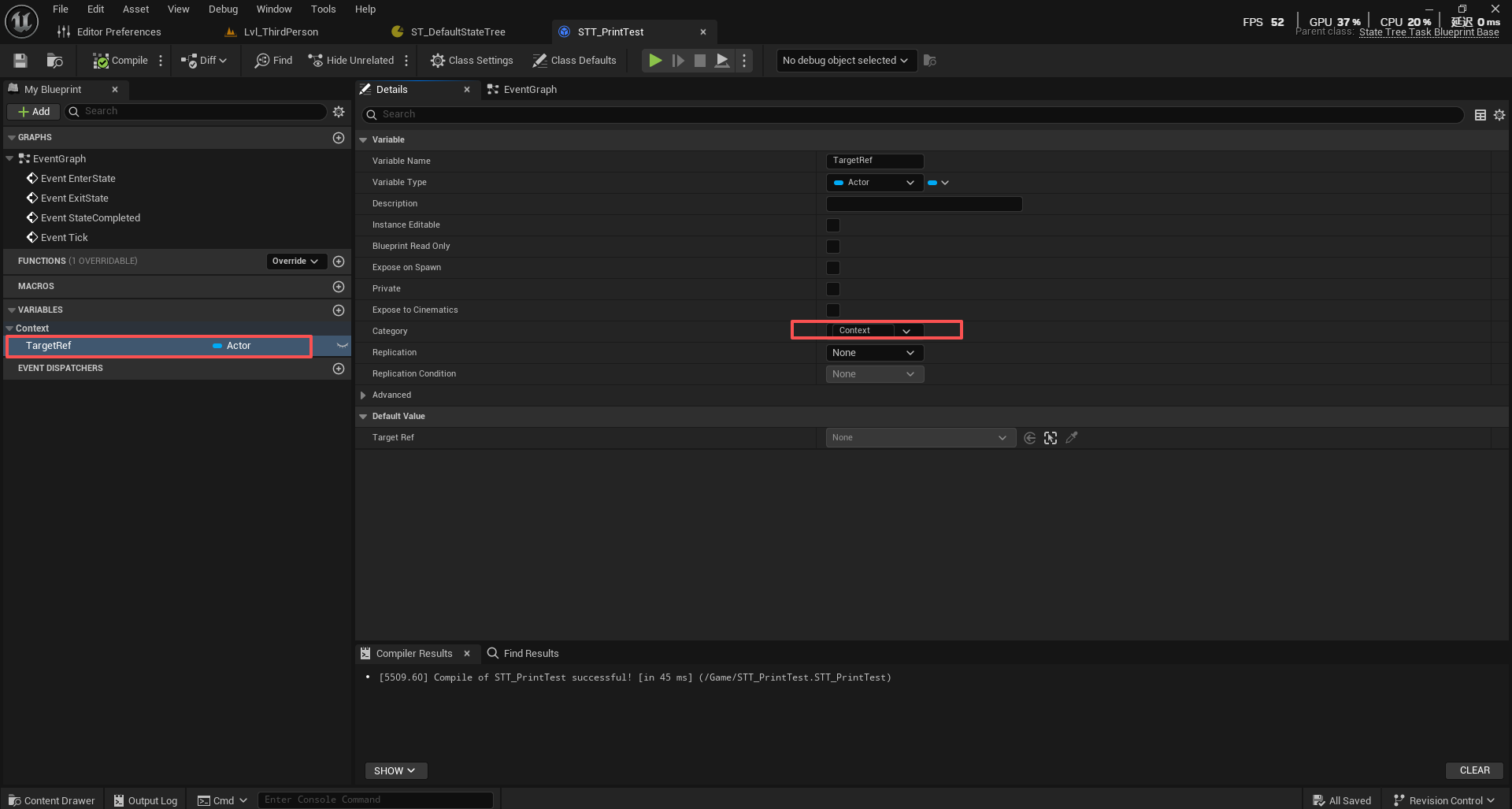
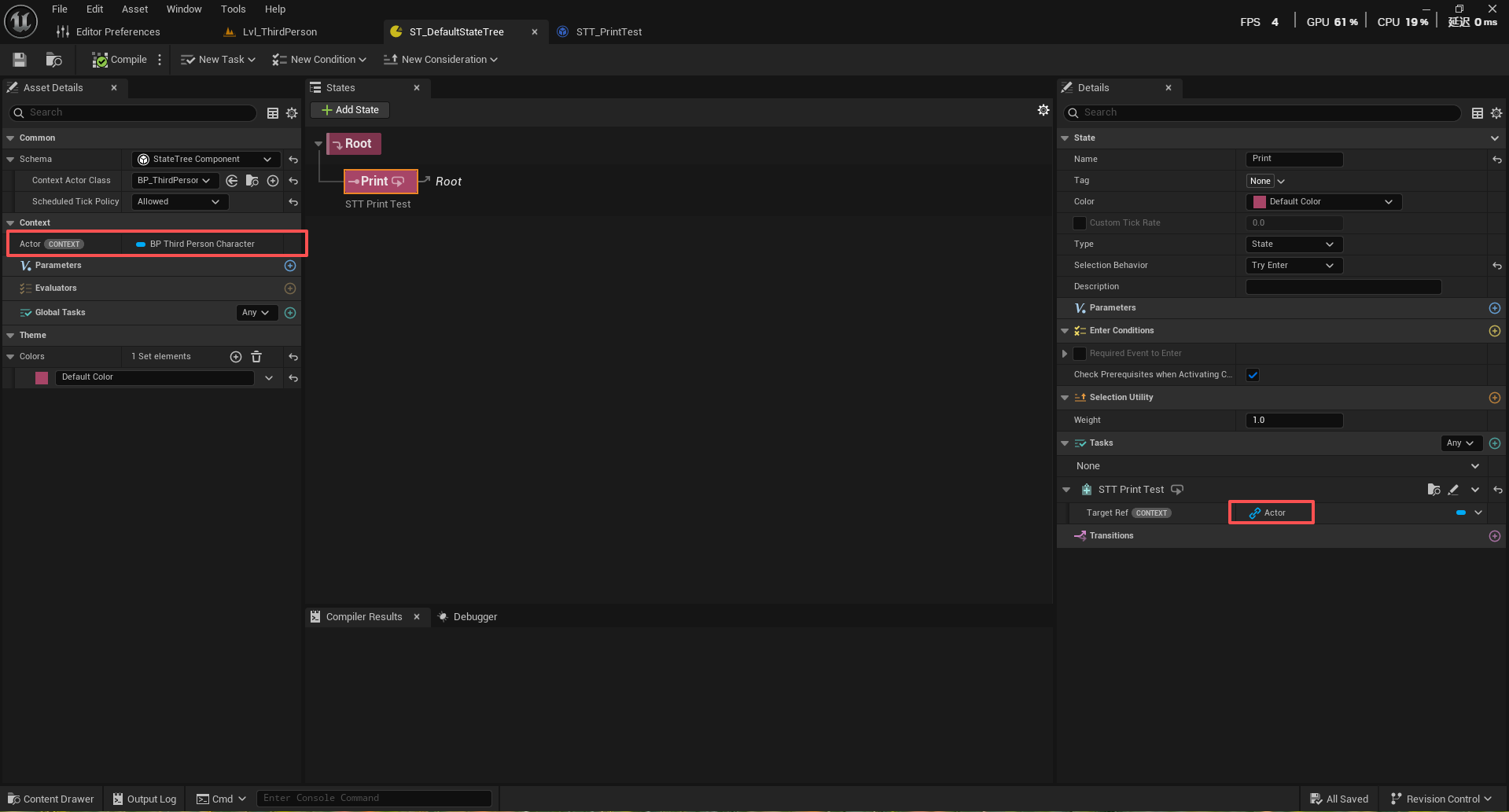
还有一种类别是“Input”,这需要让变量强制绑定上下文,否则编译失败
还有一种类别是“OutPut”,这将导致Task内部的变量会输出到状态树上,然后其他的节点,比如下一个Task节点就可以绑定它
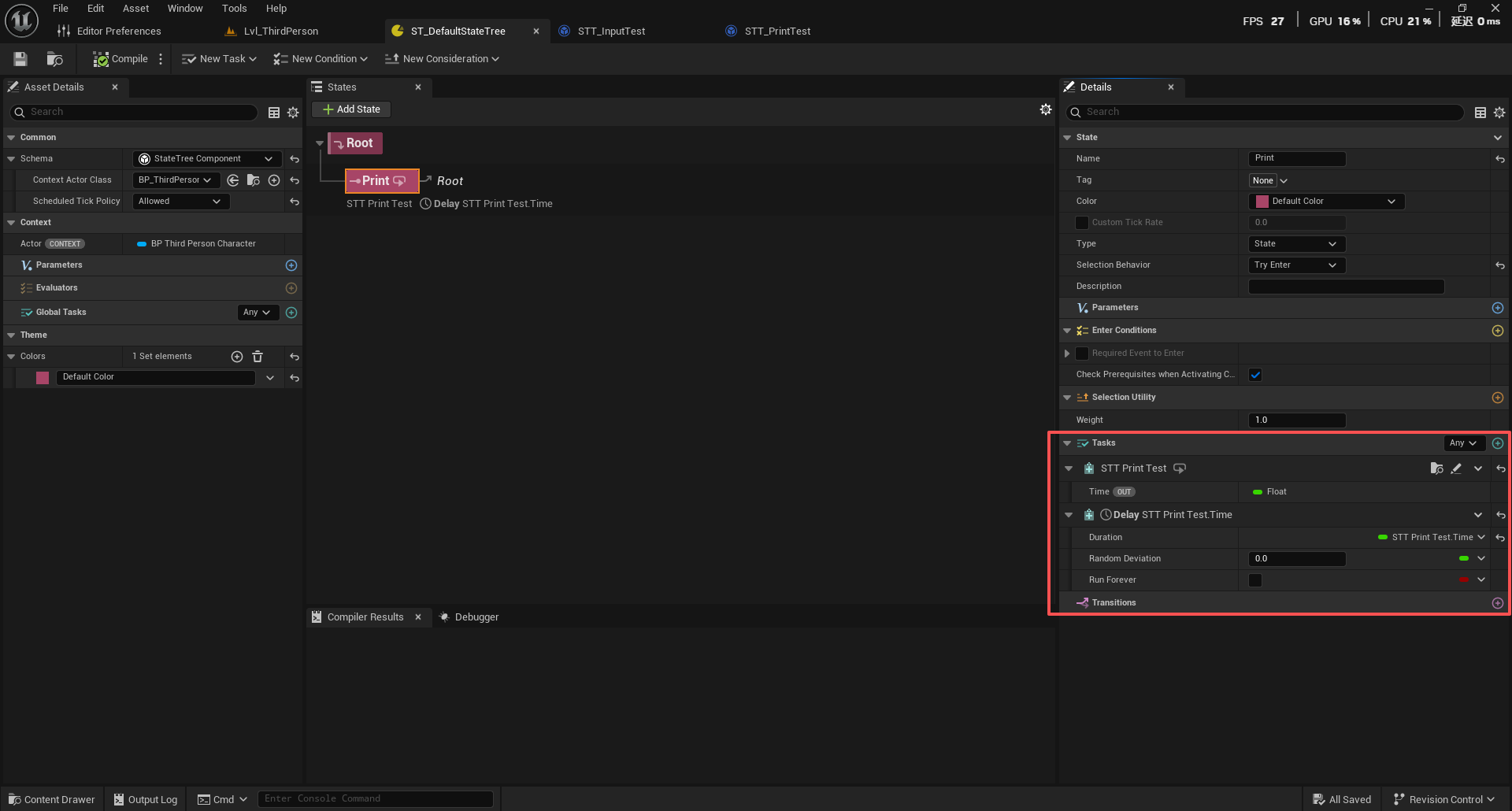
Transitions
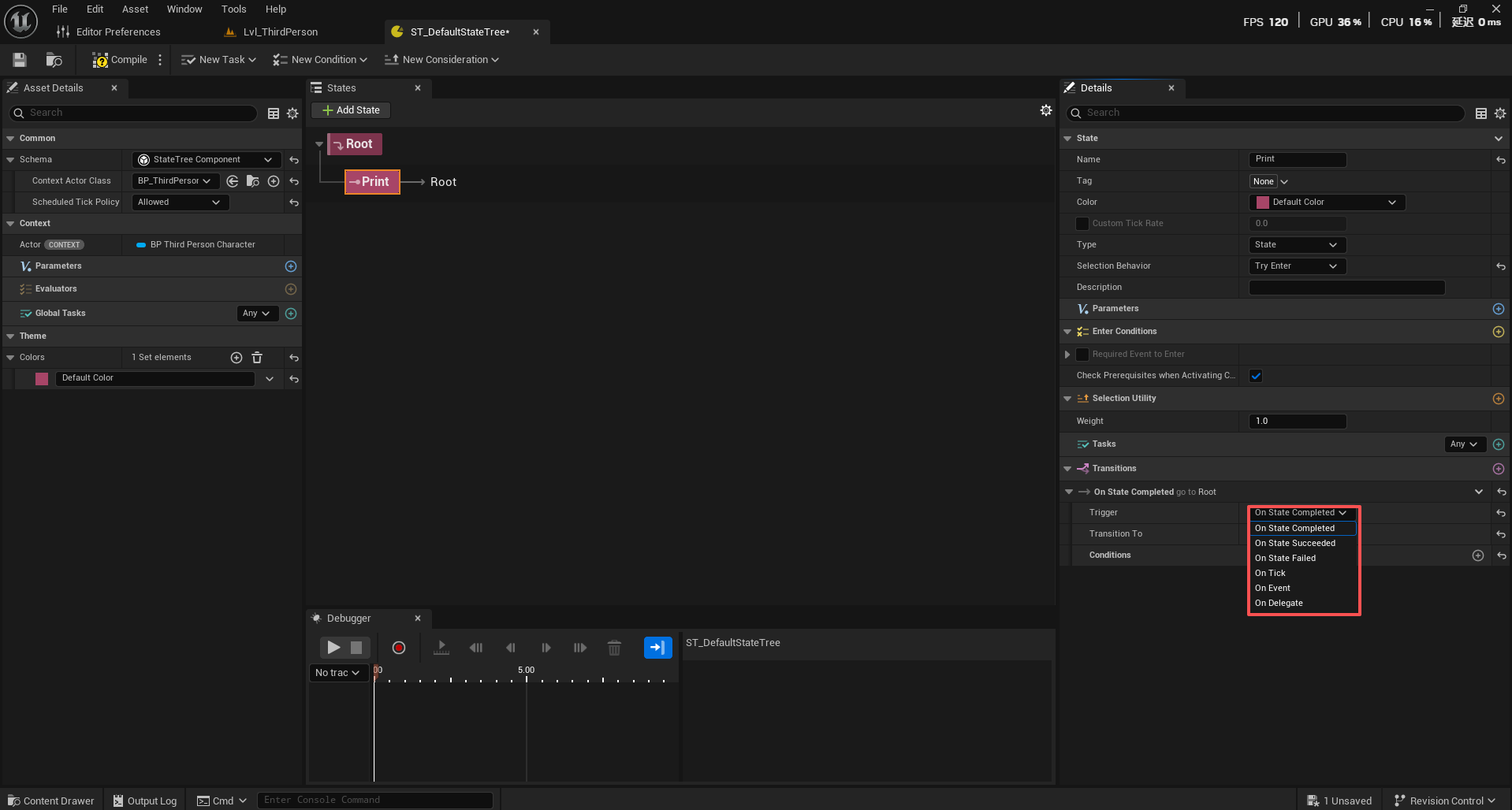
上面提到过一嘴当状态进入时,其所有转换条件开始生效,执行阶段也是调用RequestTransition来进行请求进入EnterState,状态转换条件共有五种:
enum class EStateTreeTransitionTrigger : uint8
{
    OnStateCompleted,    // 状态完成时触发
    OnStateSucceeded,    // 状态成功时触发
    OnStateFailed,       // 状态失败时触发
    OnTick,             // 每帧检查触发
    OnEvent,            // 事件触发
    OnDelegate          // 委托触发
};
OnStateCompleted(状态完成时触发):当状态完成的时候(无论成功还是失败),如上面说的StateCompleted的情况是Successed或Faild,都会是StateCompleted,那么就会触发这个转换条件,StateCompleted是自子到父的。
OnStateSucceeded(状态成功时触发)和OnStateFailed(状态失败时触发)则是细分情况触发,这里不说了
OnTick(每帧检查触发):设定延迟,然后下一帧检查,每帧检查延迟还剩多少时间,时间到则触发
注意:只有打开DelayTransition上面说的才会生效,否则会直接转换
OnEvent在事件发送以后不会立即执行,通过ScheduleNextTick()调度确保事件在下一帧处理,当ConsumEventOnSelect为true时,表示事件被“消费”,其他转换无法再使用这个事件;为false时,事件可以被多个转换共享使用。
StateTree持有一个“事件队列”,先入先出的结构,用于存储和管理状态树需要处理的事件,在StateTreeEvents.h中,其核心定义:
USTRUCT()
struct FStateTreeEventQueue
{
    GENERATED_BODY()

    /** Maximum number of events that can be buffered. */
    static constexpr int32 MaxActiveEvents = 64;

    UPROPERTY()
    TArray<FStateTreeSharedEvent> SharedEvents;
};
它最多能容纳64个事件,超出的可能会被丢弃,新事件通过SendEvent() 添加到数组末尾,事件处理通过 ForEachEvent() 从数组开头开始遍历,在TriggerTransitions()中按顺序遍历事件队列中的每个事件,对于每个事件,按顺序检查所有OnEvent类型的Transition,这意味着队列中靠前的事件会优先被匹配
if (Transition.Trigger == EStateTreeTransitionTrigger::OnEvent)
                {
                    check(Transition.RequiredEvent.IsValid());

                    TConstArrayView<FStateTreeSharedEvent> EventsQueue = GetEventsToProcessView();
                    for (const FStateTreeSharedEvent& Event : EventsQueue)
                    {
                        check(Event.IsValid());
                        if (Transition.RequiredEvent.DoesEventMatchDesc(*Event))
                        {
                            TransitionEvents.Emplace(&Event);
                        }
                    }
                }
事件通过SendEvent()添加,通常由外部代码主动调用,被调用时会立即添加到事件队列
void FStateTreeMinimalExecutionContext::SendEvent(const FGameplayTag Tag, const FConstStructView Payload, const FName Origin)
{
    CSV_SCOPED_TIMING_STAT_EXCLUSIVE(StateTree_SendEvent);

    if (!IsValid())
    {
        STATETREE_LOG(Warning, TEXT("%hs: StateTree context is not initialized properly ('%s' using StateTree '%s')"),
            __FUNCTION__, *GetNameSafe(&Owner), *GetFullNameSafe(&RootStateTree));
        return;
    }

    STATETREE_LOG(VeryVerbose, TEXT("Send Event '%s'"), *Tag.ToString());
    UE_STATETREE_DEBUG_LOG_EVENT(this, Log, TEXT("Send Event '%s'"), *Tag.ToString());

    FStateTreeEventQueue& LocalEventQueue = Storage.GetMutableEventQueue();
    LocalEventQueue.SendEvent(&Owner, Tag, Payload, Origin);
    ScheduleNextTick();

    UE_STATETREE_DEBUG_SEND_EVENT(this, &RootStateTree, Tag, Payload, Origin);
}
在 StateTreeTransitionTest.cpp中,这是一个状态转换的测试脚本,从中我们可以看到发送事件具体是怎么做的以及数据是如何包装的
Exec.SendEvent(GetTestTag1(), FConstStructView::Make(FStateTreeTest_PropertyStructA{0}));
        Exec.SendEvent(GetTestTag1(), FConstStructView::Make(FStateTreeTest_PropertyStructA{1}));
使用FConstStructView::Make() 的完整包装机制,在SttateTreeTransitionTest中,定义了一个结构体,这个结构体在实际项目中,可以是任意的,但都需要使用FConstStructView进行包装。
USTRUCT()
struct FStateTreeTest_PropertyStructA
{
    GENERATED_BODY()

    UPROPERTY()
    int32 A;  // 包含一个整数字段A
};
因此SendEvent包装payload的流程是:首先创建一个临时的结构体对象
FStateTreeTest_PropertyStructA tempStruct{0};
相当于
FStateTreeTest_PropertyStructA tempStruct;
tempStruct.A = 0;
FConstStructView::Make()方法:
template<typename T>
static FConstStructView Make(const T& Struct)
{
    UE::StructUtils::CheckStructType<T>();  // 检查类型有效性
    return FConstStructView(
        TBaseStructure<T>::Get(),           // 获取结构体的UScriptStruct
        reinterpret_cast<const uint8*>(&Struct)  // 将对象指针转换为字节指针
    );
}
FConstStructView的构造函数
FConstStructView(const UScriptStruct* InScriptStruct, const uint8* InStructMemory = nullptr)
    : ScriptStruct(InScriptStruct)  // 存储结构体类型信息
    , StructMemory(InStructMemory)     // 存储结构体数据指针
{}
包装后的payloadView包含两个关键成员:ScriptStruct指向FStateTreeTest_PropertyStructA::StaticStruct(),
StructMemory指向临时对象 tempStruct 的内存地址。
这么包装的目的是确保类型安全和类型匹配,也就是OnEvent需要确保的Payload数据完全匹配,因为包含一个指向数据对象内存地址的指针,因此不会涉及到数据拷贝。
OnDelegate允许外部事件异步触发状态转换,当外部代码调用BroadcastDelegate()方法的时候,会立即执行绑定的委托回调,但状态转换的实际处理要等到下一次 TickTriggerTransitions() 调用
void FStateTreeExecutionContext::BroadcastDelegate(const FStateTreeDelegateDispatcher& Dispatcher)
{
    if (!Dispatcher.IsValid() || !IsValid())
    {
        return;
    }

    // 立即执行绑定的委托
    GetExecState().DelegateActiveListeners.BroadcastDelegate(Dispatcher, GetExecState());

    // 标记委托已广播,触发状态树重新评估
    if (UE::StateTree::ExecutionContext::MarkDelegateAsBroadcasted(Dispatcher, *CurrentFrame, GetMutableInstanceData()->GetMutableStorage()))
    {
        ScheduleNextTick(); // 安排下一次tick
    }
}
在Task里创建StateTreeDelegateDispather变量,然后在Transition里进行绑定
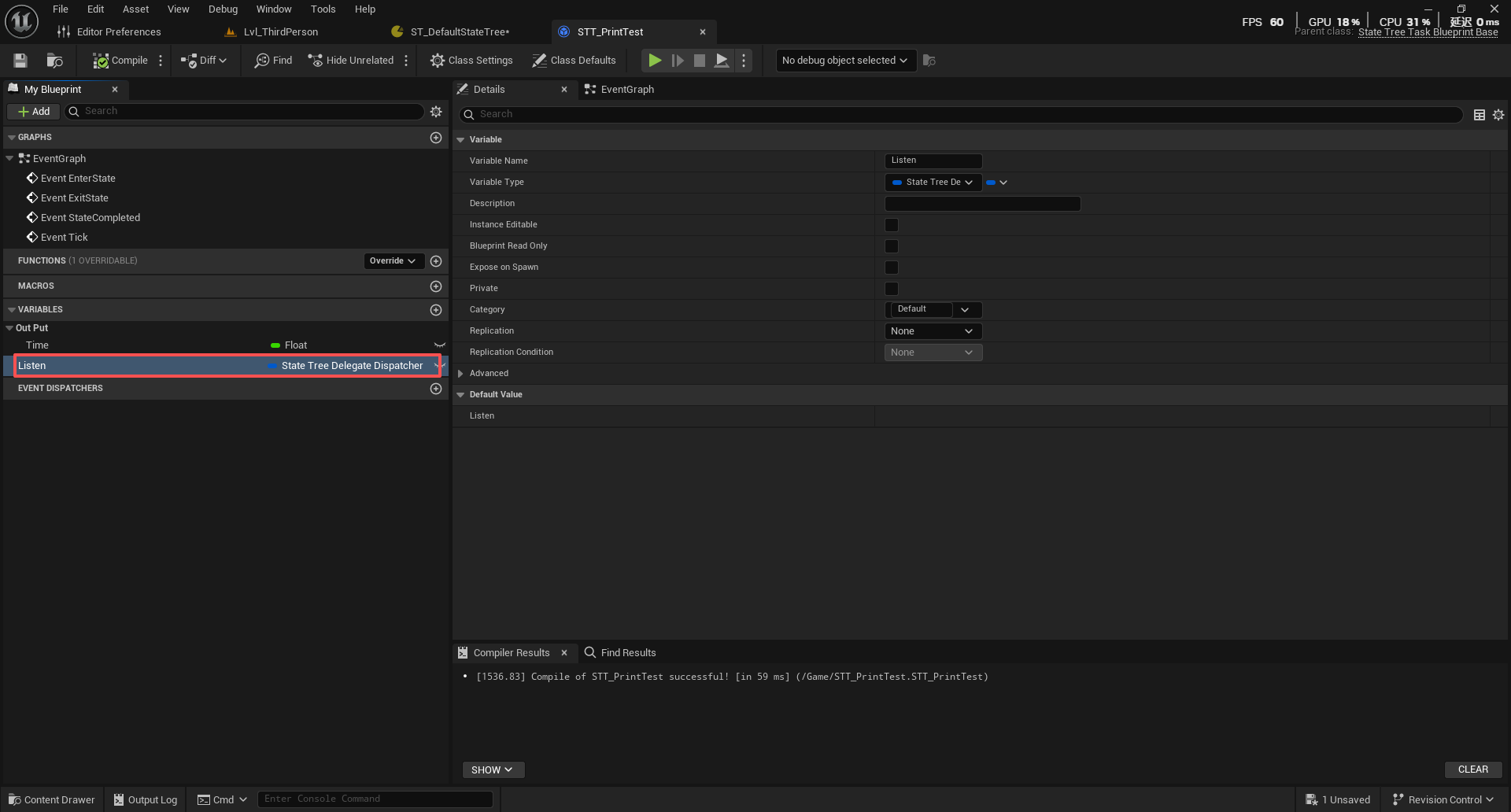
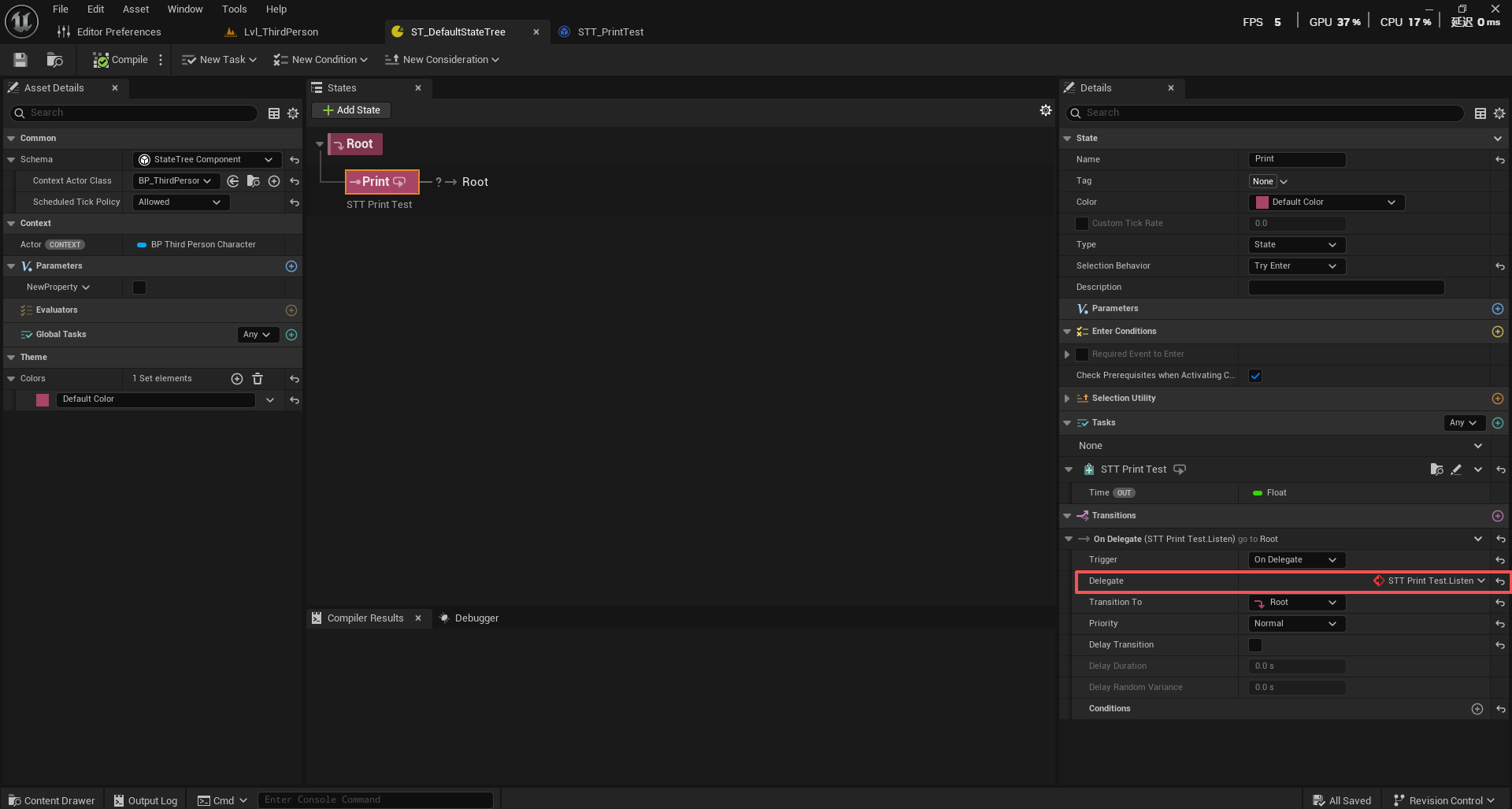
委托绑定与当前的状态相关联,当状态退出的时候,相关的委托监听器会自动清理,目的是避免在状态外部持有委托引用(硬引用),可能会导致悬挂指针,使用弱引用或确保引用生命周期匹配,OnDelegate Transition不涉及事件消费。
Conditions
状态树的Conditions允许储存多个条件类型与条件操作符并可以灵活组合来构建复杂的决策逻辑用以驱动状态
基础数据结构:
/**
 * Base struct for all conditions.
 */
USTRUCT(meta = (Hidden))
struct FStateTreeConditionBase : public FStateTreeNodeBase
{
	GENERATED_BODY()

	/** @return True if the condition passes. */
	virtual bool TestCondition(FStateTreeExecutionContext& Context) const { return false; }

	/**
	 * Called when a new state is entered and task is part of active states.
	 * Note: The condition instance data is shared between all the uses a State Tree asset.
	 *       You should not modify the instance data in this callback.
	 * @param Context Reference to current execution context.
	 * @param Transition Describes the states involved in the transition
	 * @return Succeed/Failed will end the state immediately and trigger to select new state, Running will carry on to tick the state.
	 */
	virtual void EnterState(FStateTreeExecutionContext& Context, const FStateTreeTransitionResult& Transition) const {}

	/**
	 * Called when a current state is exited and task is part of active states.
	 * Note: The condition instance data is shared between all the uses a State Tree asset.
	 *       You should not modify the instance data in this callback.
	 * @param Context Reference to current execution context.
	 * @param Transition Describes the states involved in the transition
	 */
	virtual void ExitState(FStateTreeExecutionContext& Context, const FStateTreeTransitionResult& Transition) const {}

	/**
	 * Called right after a state has been completed, but before new state has been selected. StateCompleted is called in reverse order to allow to propagate state to other Tasks that
	 * are executed earlier in the tree. Note that StateCompleted is not called if conditional transition changes the state.
	 * Note: The condition instance data is shared between all the uses a State Tree asset.
	 *       You should not modify the instance data in this callback.
	 * @param Context Reference to current execution context.
	 * @param CompletionStatus Describes the running status of the completed state (Succeeded/Failed).
	 * @param CompletedActiveStates Active states at the time of completion.
	 */
	virtual void StateCompleted(FStateTreeExecutionContext& Context, const EStateTreeRunStatus CompletionStatus, const FStateTreeActiveStates& CompletedActiveStates) const {}

	UPROPERTY()
	EStateTreeExpressionOperand Operand = EStateTreeExpressionOperand::And;

	UPROPERTY()
	int8 DeltaIndent = 0;

	UPROPERTY()
	EStateTreeConditionEvaluationMode EvaluationMode = EStateTreeConditionEvaluationMode::Evaluated;

	/** If set to true, EnterState, ExitState, and StateCompleted are called on the condition. */
	uint8 bHasShouldCallStateChangeEvents : 1 = false;

	/**
	 * If set to true, the condition will receive EnterState/ExitState even if the state was previously active.
	 * Default value is true.
	 */
	uint8 bShouldStateChangeOnReselect : 1 = true;
};
TestCondition 函数是Conditions最核心的函数,用来判断条件是否成立,Context 提供了执行上下文,可以获取各种数据,对应StateTree的Context。
EnterState(状态进入时调用),ExitState(状态退出时调用),StateCompleted(状态完成时调用)让Conditions有机会相应状态变化
Operand属性用于控制Conditions之间的逻辑关系,在多个Condition的情况下,通过该变量进行控制:
/** Operand in an expression */
UENUM()
enum class EStateTreeExpressionOperand : uint8
{
    /** Copy result */
    Copy UMETA(Hidden),

    /** Combine results with AND. */
    And,

    /** Combine results with OR. */
    Or,
};
Copy (复制):直接复制前一个条件的结果,内部使用,用于表达式求值
And (逻辑与):将当前条件与前一个条件进行"与"运算,条件A && 条件B (两个条件都必须为真)
Or (逻辑或):将当前条件与前一个条件进行"或"运算,条件A || 条件B (任意一个条件为真即可)
DeltaIndent属性(缩进级别):控制条件在条件树中的层次结构,0 :根级别条件,+1 :第一级缩进(相对于前一个条件),+2 :第二级缩进,-1 :减少一级缩进。缩进场景示例:
条件A (DeltaIndent = 0, Operand = And)  // 生命值 < 50
条件B (DeltaIndent = +1, Operand = And) // 并且(
条件C (DeltaIndent = +2, Operand = And) //   (看到敌人
条件D (DeltaIndent = +2, Operand = Or)  //   或者听到声音)
条件E (DeltaIndent = +1, Operand = And) //  并且有弹药)
条件F (DeltaIndent = 0, Operand = And)  // 并且不是眩晕状态
// 逻辑:生命值<50 && ((看到敌人 || 听到声音) && 有弹药) && 不是眩晕状态
在实际使用中,通过这两个按钮来表示加一层/减一层操作
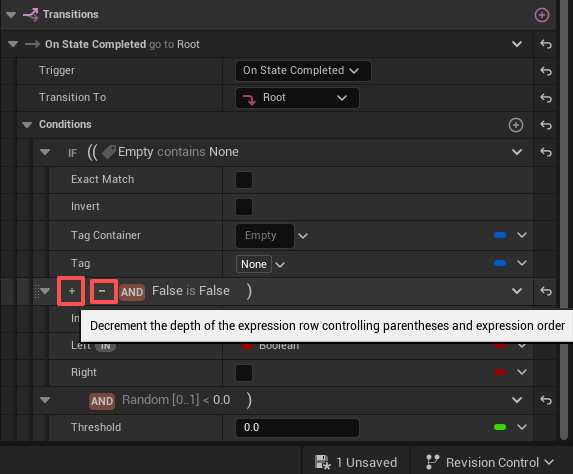
EvaluationMode属性(评估模式)
/** Defines how to assign the result of a condition to evaluate.  */
UENUM()
enum class EStateTreeConditionEvaluationMode : uint8
{
    /** Condition is evaluated to set the result. This is the normal behavior. */
    Evaluated,

    /** Do not evaluate the condition and force result to 'true'. */
    ForcedTrue,

    /** Do not evaluate the condition and force result to 'false'. */
    ForcedFalse,
};
Evaluated (正常评估):正常执行条件的 TestCondition() 函数,根据实际逻辑返回结果,以Condition返回什么为准
ForcedTrue (强制为真):跳过条件测试,直接返回 true
ForcedFalse (强制为假):跳过条件测试,直接返回 false
bHasShouldCallStateChangeEvents这个属性控制Conditions是否接收状态变化事件的通知(EnterState,ExitState,StateCompleted)。当状态发生变化时,Conditions可以选择是否响应这些变化
EnterState() :进入状态时调用
ExitState() :退出状态时调用
StateCompleted() :状态完成时调用
当设置为 false 时 (默认值):Conditions不会收到状态变化回调,只会在需要**判断条件时(TestAllConditions)**调用 TestCondition()
bool FStateTreeExecutionContext::TestAllConditions(
    const FStateTreeExecutionFrame* CurrentParentFrame,
    const FStateTreeExecutionFrame& CurrentFrame,
    const int32 ConditionsOffset,
    const int32 ConditionsNum)
{
    // 遍历所有条件
    for (int32 Index = 0; Index < ConditionsNum; Index++)
    {
        const int32 ConditionIndex = ConditionsOffset + Index;
        const FStateTreeConditionBase& Cond = CurrentFrame.StateTree->Nodes[ConditionIndex].Get<const FStateTreeConditionBase>();

        // 获取条件实例数据
        const FStateTreeDataView ConditionInstanceView = GetDataView(CurrentParentFrame, CurrentFrame, Cond.InstanceDataHandle);

        // 调用TestCondition函数
        bool bValue = Cond.TestCondition(*this);
    }
}
bShouldStateChangeOnReselect属性在**重新选择状态时(状态树重新选择当前已经处于活动状态Running的状态)**是否应该触发状态变化,为true时即使重新选择相同的状态,也会触发EnterState/ExitState,为false则重新选择相同状态时,不会触发EnterState/ExitState
Conditions可以配置多个,它们在FStateTreeExecutionContext::TestAllConditions中进行统一处理:
bool FStateTreeExecutionContext::TestAllConditions(const FStateTreeExecutionFrame* CurrentParentFrame, const FStateTreeExecutionFrame& CurrentFrame, const int32 ConditionsOffset, const int32 ConditionsNum)
{
	CSV_SCOPED_TIMING_STAT_EXCLUSIVE(StateTree_TestConditions);

	if (ConditionsNum == 0)
	{
		return true;
	}

	TStaticArray<EStateTreeExpressionOperand, UE::StateTree::MaxExpressionIndent + 1> Operands(InPlace, EStateTreeExpressionOperand::Copy);
	TStaticArray<bool, UE::StateTree::MaxExpressionIndent + 1> Values(InPlace, false);

	int32 Level = 0;

	for (int32 Index = 0; Index < ConditionsNum; Index++)
	{
		const int32 ConditionIndex = ConditionsOffset + Index;
		const FStateTreeConditionBase& Cond = CurrentFrame.StateTree->Nodes[ConditionIndex].Get<const FStateTreeConditionBase>();
		const FStateTreeDataView ConditionInstanceView = GetDataView(CurrentParentFrame, CurrentFrame, Cond.InstanceDataHandle);
		FNodeInstanceDataScope DataScope(*this, &Cond, ConditionIndex, Cond.InstanceDataHandle, ConditionInstanceView);

		bool bValue = false;
		if (Cond.EvaluationMode == EStateTreeConditionEvaluationMode::Evaluated)
		{
			// Copy bound properties.
			if (Cond.BindingsBatch.IsValid())
			{
				// Use validated copy, since we test in situations where the sources are not always valid (e.g. enter conditions may try to access inactive parent state).
				if (!CopyBatchWithValidation(CurrentParentFrame, CurrentFrame, ConditionInstanceView, Cond.BindingsBatch))
				{
					// If the source data cannot be accessed, the whole expression evaluates to false.
					UE_STATETREE_DEBUG_CONDITION_EVENT(this, ConditionIndex, ConditionInstanceView, EStateTreeTraceEventType::InternalForcedFailure);
					UE_STATETREE_DEBUG_LOG_EVENT(this, Warning, TEXT("Evaluation forced to false: source data cannot be accessed (e.g. enter conditions trying to access inactive parent state)"));
					Values[0] = false;
					break;
				}
			}

			UE_STATETREE_DEBUG_CONDITION_TEST_CONDITION(this, CurrentFrame.StateTree, Index);

			bValue = Cond.TestCondition(*this);
			UE_STATETREE_DEBUG_CONDITION_EVENT(this, ConditionIndex, ConditionInstanceView, bValue ? EStateTreeTraceEventType::Passed : EStateTreeTraceEventType::Failed);

			// Reset copied properties that might contain object references.
			if (Cond.BindingsBatch.IsValid())
			{
				CurrentFrame.StateTree->PropertyBindings.Super::ResetObjects(Cond.BindingsBatch, ConditionInstanceView);
			}
		}
		else
		{
			bValue = Cond.EvaluationMode == EStateTreeConditionEvaluationMode::ForcedTrue;
			UE_STATETREE_DEBUG_CONDITION_EVENT(this, ConditionIndex, FStateTreeDataView{}, bValue ? EStateTreeTraceEventType::ForcedSuccess : EStateTreeTraceEventType::ForcedFailure);
		}

		const int32 DeltaIndent = Cond.DeltaIndent;
		const int32 OpenParens = FMath::Max(0, DeltaIndent) + 1;	// +1 for the current value that is stored at the empty slot at the top of the value stack.
		const int32 ClosedParens = FMath::Max(0, -DeltaIndent) + 1;

		// Store the operand to apply when merging higher level down when returning to this level.
		// @todo: remove this conditions in 5.1, needs resaving existing StateTrees.
		const EStateTreeExpressionOperand Operand = Index == 0 ? EStateTreeExpressionOperand::Copy : Cond.Operand;
		Operands[Level] = Operand;

		// Store current value at the top of the stack.
		Level += OpenParens;
		Values[Level] = bValue;

		// Evaluate and merge down values based on closed braces.
		// The current value is placed in parens (see +1 above), which makes merging down and applying the new value consistent.
		// The default operand is copy, so if the value is needed immediately, it is just copied down, or if we're on the same level,
		// the operand storing above gives handles with the right logic.
		for (int32 Paren = 0; Paren < ClosedParens; Paren++)
		{
			Level--;
			switch (Operands[Level])
			{
			case EStateTreeExpressionOperand::Copy:
				Values[Level] = Values[Level + 1];
				break;
			case EStateTreeExpressionOperand::And:
				Values[Level] &= Values[Level + 1];
				break;
			case EStateTreeExpressionOperand::Or:
				Values[Level] |= Values[Level + 1];
				break;
			}
			Operands[Level] = EStateTreeExpressionOperand::Copy;
		}
	}

	return Values[0];
}
TStaticArray是静态数组,编译时确定大小,分配在栈上,函数内部首先分配了两个栈TStaticArray,Operands 栈记录每个层级的逻辑操作符,Values 栈记录每个层级的条件评估结果,通过两个栈实现复杂的逻辑表达式求值
static_assert(UE::StateTree::MaxExpressionIndent == 4);表示这个栈最多为4+1=5层,+1是为根级别预留一个位置,这就意味着表达式最多可以嵌套5层,因为是栈的结构,先入后出,这就表面最内部的表达式会最先处理;初始值EStateTreeExpressionOperand::Copy 表示所有元素初始化为 Copy,值栈Values所有元素均为false,初始化后:
// 操作符栈 Operands[5]
索引 0: EStateTreeExpressionOperand::Copy
索引 1: EStateTreeExpressionOperand::Copy
索引 2: EStateTreeExpressionOperand::Copy
索引 3: EStateTreeExpressionOperand::Copy
索引 4: EStateTreeExpressionOperand::Copy

// 值栈 Values[5]
索引 0: false
索引 1: false
索引 2: false
索引 3: false
索引 4: false

实际项目(层级)表示案例:
条件A && (条件B || (条件C && (条件D || 条件E)))

层级0: 最终结果
层级1: 条件A && (条件B || ...)
层级2: 条件B || (条件C && ...)
层级3: 条件C && (条件D || 条件E)
层级4: 条件D || 条件E
Level初始化当前栈层级为0(根级别),跟踪当前在表达式树中的深度
for (int32 Index = 0; Index < ConditionsNum; Index++)遍历所有需要测试的条件,逐个评估每个条件,按顺序去总结集合所有Conditions,然后用TStaticArray去储存评估结果和层级,去处理一个状态中的所有Conditions
在FStateTreeExecutionContext::Tick中会调用TickTriggerTransitionsInternal,TestAllConditions发生在里面,之前我们说过,只要你创建了Transition,就会添加到TransitionEvents,这代表有转换事件需要处理,那么每次处理转换的时候,都会评估所有的Conditions并储存一次结果
for (const FStateTreeSharedEvent* TransitionEvent : TransitionEvents)
                {
                    bool bPassed = false;
                    {
                        FCurrentlyProcessedTransitionEventScope TransitionEventScope(*this, TransitionEvent ? TransitionEvent->Get() : nullptr);
                        UE_STATETREE_DEBUG_TRANSITION_EVENT(this, FStateTreeTransitionSource(CurrentFrame.StateTree, FStateTreeIndex16(TransitionIndex), Transition.State, Transition.Priority), EStateTreeTraceEventType::OnEvaluating);
                        UE_STATETREE_DEBUG_SCOPED_PHASE(this, EStateTreeUpdatePhase::TransitionConditions);
                        bPassed = TestAllConditions(CurrentParentFrame, CurrentFrame, Transition.ConditionsBegin, Transition.ConditionsNum);
                    }

                    ......
在SelectStateInternal方法也就是选择下一个状态之前,也会进行一次评估,检查状态进入条件时,也会评估状态是否允许进入
if (bShouldPrerequisitesBeChecked)
        {
            // Check that the state can be entered
            UE_STATETREE_DEBUG_ENTER_PHASE(this, EStateTreeUpdatePhase::EnterConditions);
            const bool bEnterConditionsPassed = TestAllConditions(CurrentParentFrame, CurrentFrame, NextState.EnterConditionsBegin, NextState.EnterConditionsNum);
            UE_STATETREE_DEBUG_EXIT_PHASE(this, EStateTreeUpdatePhase::EnterConditions);

            if (!bEnterConditionsPassed)
            {
                continue;
            }
        }
Evaluator
状态树的评估器提供计算和暴露数据供Conditions和Tasks使用,但它本身不是状态转换器,仅提供数据,评估器的生命周期是状态树启动到状态树结束时,启动也是如此,评估器不存在“完成时调用”的概念。状态树启动时,评估器先于状态任务(Task)启动,自身更新频率是每帧(Tick),其特点就是在整个状态树生命周期内有效,持属性绑定,数据可被其他节点使用。
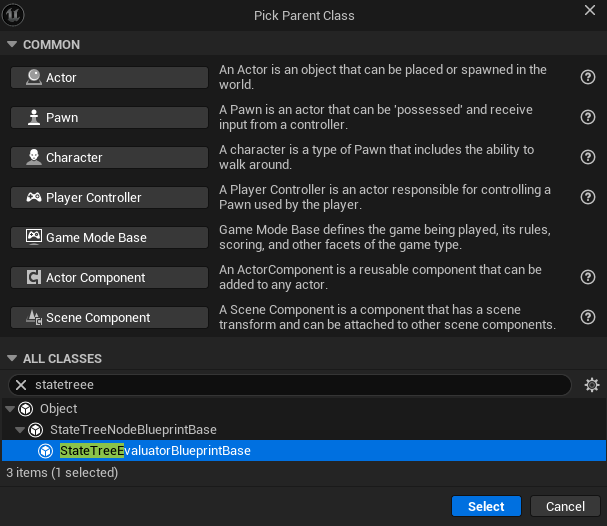
评估器同样可以创建特殊的Category来用于特殊暴露,链接上下文,单向输出等
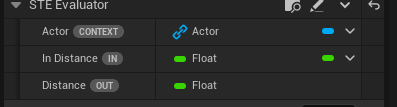
在任务中暴露的参数可以与评估器进行链接,这样就能确保评估器里计算的数据传输到任务里
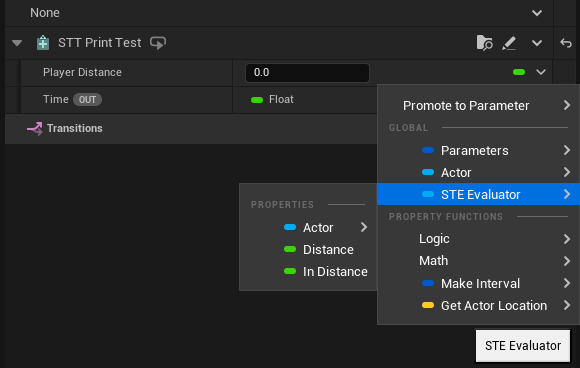
绑定传输的核心就是解析原路径,获取源数据以后执行属性复制。
EnterCondition
EnterConditions 是进入状态的门槛,决定一个状态是否可以被选择进入,与Transition Condition不同的是,Transition是过渡,也就是状态是否能到另一个状态的判断,而EnterConditions是在每次进入状态(EnterState)之前判断
EnterConditions同样也支持多个判断条件的嵌套计算,其添加的Conditions实例和Trantision的Conditions实例是一样的,只是判断的时机不一样
这里需要注意一点,EnterConditions检查不是总是执行的!只有在以下情况下才会检查:
状态是目标状态 bIsDestinationState = true,意味着当前状态树选定了最终要转换的目标状态,这个变量在StateTreeExecutionContext.cpp第5351行
或者状态设置了bCheckPrerequisitesWhenActivatingChildDirectly标志,这个标志控制当过渡直接激活子状态时,是否检查父状态的进入条件。当设置为true时:即使过渡直接指向子状态,也会检查父状态的EnterConditions,当设置为false时:如果过渡直接指向子状态,会跳过父状态的EnterConditions检查

理由:EnterConditions在检查时,数据源可能不总是有效的(比如尝试访问非活动的父状态数据),系统会使用验证过的副本来处理这种情况,这一目的是为了确保数据绑定正确,否则不会进入状态!
还有一点是:当状态被重新选择时(Sustained状态变化),EnterConditions可以选择是否重新调用状态变化事件。这通过Condition内部bShouldStateChangeOnReselect标志控制。
Selection Behavior(选择行为)
Selection Behavior(选择行为) 是状态树中定义当父状态被选中时,如何处理其子状态的行为策略。它决定了状态树在运行时如何从多个可能的子状态中选择一个来激活。
上面提到两个变量bIsDestinationState和bCheckPrerequisitesWhenActivatingChildDirectly,这两个布尔变量控制着是否需要在状态选择时检查进入条件 ,是状态树选择行为的关键决策点。
enum class EStateTreeStateSelectionBehavior : uint8
{
    /** 状态不能被直接选择 */
    None,

    /** 当状态被考虑选择时,即使它有子状态也会被选中 */
    TryEnterState,

    /** 尝试按顺序选择第一个子状态,如果没有子状态则选择当前状态 */
    TrySelectChildrenInOrder,

    /** 随机打乱子状态顺序并尝试选择第一个 */
    TrySelectChildrenAtRandom,

    /** 尝试选择效用分数最高的子状态 */
    TrySelectChildrenWithHighestUtility,

    /** 根据效用分数加权随机选择子状态 */
    TrySelectChildrenAtRandomWeightedByUtility,

    /** 尝试触发转换而不是选择状态 */
    TryFollowTransitions,
};
TryEnterState(尝试进入状态):当状态被考虑选择时,即使它有子状态也会被选中,运行时,直接激活当前状态,然后根据当前状态的选择行为处理子状态。
TrySelectChildrenInOrder(按顺序尝试选择子状态):按子状态在编辑器中的顺序尝试选择第一个可用的子状态,运行时,遍历所有子状态,直到SelectStateInternal返回true。
TrySelectChildrenAtRandom(随机尝试选择子状态):随机打乱子状态顺序并尝试选择第一个可用的子状态
TrySelectChildrenWithHighestUtility(尝试选择效用最高的子状态):选择效用分数Weight权重最高的子状态
TrySelectChildrenAtRandomWeightedByUtility(按效用加权随机选择子状态): 根据效用分数加权随机选择子状态
TryFollowTransitions(尝试遵循转换):尝试触发转换而不是选择状态,运行时优先检查转换条件,如果满足则执行转换
Consideration(效用因素)
Consideration是StateTree中用于 Utility Selection(效用选择) 的核心组件。它代表一个 评估因素 ,用于计算某个状态或行为的"吸引力"或"效用值"。
USTRUCT(meta = (Hidden))
struct FStateTreeConsiderationBase : public FStateTreeNodeBase
{
    GENERATED_BODY()

    UE_API FStateTreeConsiderationBase();

public:
    UE_API float GetNormalizedScore(FStateTreeExecutionContext& Context) const;

protected:
    virtual float GetScore(FStateTreeExecutionContext& Context) const { return 0.f; };

public:
    UPROPERTY()
    EStateTreeExpressionOperand Operand;

    UPROPERTY()
    int8 DeltaIndent;
};
GetNormalizedScore函数最终会返回一个0.0-1.0的评分值,归一化确保所有Consideration的评分在相同的数值范围内,GetScore返回原始评分值
float FStateTreeConsiderationBase::GetNormalizedScore(FStateTreeExecutionContext& Context) const
{
    return FMath::Clamp(GetScore(Context), 0.f, 1.f);
}
评估计算的核心发生在 FStateTreeExecutionContext::EvaluateUtility,这个方法发生在当SelectionBehavior设置为TrySelectChildrenWithHighestUtility和TrySelectChildrenAtRandomWeightedByUtility的时候在 SelectStateInternal 函数的子状态选择逻辑中选择效用评分最高的子状态/基于效用评分进行 加权随机选择。
float FStateTreeExecutionContext::EvaluateUtility(const FStateTreeExecutionFrame* CurrentParentFrame, const FStateTreeExecutionFrame& CurrentFrame, const int32 ConsiderationsOffset, const int32 ConsiderationsNum, const float StateWeight)
{
    // @todo: Tracing support
    CSV_SCOPED_TIMING_STAT_EXCLUSIVE(StateTree_EvaluateUtility);

    if (ConsiderationsNum == 0)
    {
        return .0f;
    }

    TStaticArray<EStateTreeExpressionOperand, UE::StateTree::MaxExpressionIndent + 1> Operands(InPlace, EStateTreeExpressionOperand::Copy);
    TStaticArray<float, UE::StateTree::MaxExpressionIndent + 1> Values(InPlace, false);

    int32 Level = 0;
    float Value = .0f;
    for (int32 Index = 0; Index < ConsiderationsNum; Index++)
    {
        const int32 ConsiderationIndex = ConsiderationsOffset + Index;
        const FStateTreeConsiderationBase& Consideration = CurrentFrame.StateTree->Nodes[ConsiderationIndex].Get<const FStateTreeConsiderationBase>();
        const FStateTreeDataView ConsiderationInstanceView = GetDataView(CurrentParentFrame, CurrentFrame, Consideration.InstanceDataHandle);
        FNodeInstanceDataScope DataScope(*this, &Consideration, ConsiderationIndex, Consideration.InstanceDataHandle, ConsiderationInstanceView);

        // Copy bound properties.
        if (Consideration.BindingsBatch.IsValid())
        {
            // Use validated copy, since we test in situations where the sources are not always valid (e.g. considerations may try to access inactive parent state).
            if (!CopyBatchWithValidation(CurrentParentFrame, CurrentFrame, ConsiderationInstanceView, Consideration.BindingsBatch))
            {
                // If the source data cannot be accessed, the whole expression evaluates to zero.
                Values[0] = .0f;
                break;
            }
        }

        Value = Consideration.GetNormalizedScore(*this);

        // Reset copied properties that might contain object references.
        if (Consideration.BindingsBatch.IsValid())
        {
            CurrentFrame.StateTree->PropertyBindings.Super::ResetObjects(Consideration.BindingsBatch, ConsiderationInstanceView);
        }

        const int32 DeltaIndent = Consideration.DeltaIndent;
        const int32 OpenParens = FMath::Max(0, DeltaIndent) + 1;    // +1 for the current value that is stored at the empty slot at the top of the value stack.
        const int32 ClosedParens = FMath::Max(0, -DeltaIndent) + 1;

        // Store the operand to apply when merging higher level down when returning to this level.
        const EStateTreeExpressionOperand Operand = Index == 0 ? EStateTreeExpressionOperand::Copy : Consideration.Operand;
        Operands[Level] = Operand;

        // Store current value at the top of the stack.
        Level += OpenParens;
        Values[Level] = Value;

        // Evaluate and merge down values based on closed braces.
        // The current value is placed in parens (see +1 above), which makes merging down and applying the new value consistent.
        // The default operand is copy, so if the value is needed immediately, it is just copied down, or if we're on the same level,
        // the operand storing above gives handles with the right logic.
        for (int32 Paren = 0; Paren < ClosedParens; Paren++)
        {
            Level--;
            switch (Operands[Level])
            {
            case EStateTreeExpressionOperand::Copy:
                Values[Level] = Values[Level + 1];
                break;
            case EStateTreeExpressionOperand::And:
                Values[Level] = FMath::Min(Values[Level], Values[Level + 1]);
                break;
            case EStateTreeExpressionOperand::Or:
                Values[Level] = FMath::Max(Values[Level], Values[Level + 1]);
                break;
            }
            Operands[Level] = EStateTreeExpressionOperand::Copy;
        }
    }

    return StateWeight * Values[0];
}
执行时会遍历所有Considers,获取实例数据视图,通过 GetDataView 获取Consideration的实例数据,然后根据两种情况去计算最终的效用值,这个表达式也是和Condition一样支持嵌套计算的,因此其也创建了TStaticArray栈思想去存储计算
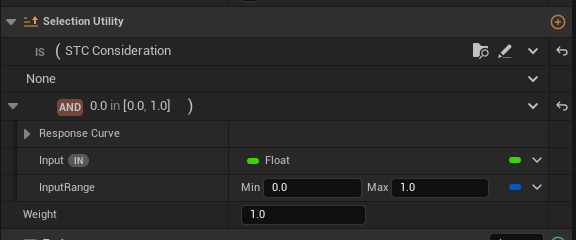
Consideration计算出的评分会和StateWeight(编辑器上的Weight)进行计算,输出最终的该状态的评估值。
// 紧急躲避(最高优先级)
紧急躲避.Weight = 3.0
紧急躲避.Consideration评分 = 0.3
最终评分 = 0.3 × 3.0 = 0.9

// 普通攻击(中等优先级)
普通攻击.Weight = 1.5
普通攻击.Consideration评分 = 0.8
最终评分 = 0.8 × 1.5 = 1.2

// 选择结果:普通攻击(1.2 > 0.9)
// 即使紧急躲避优先级高,但条件太差也不会被选择
Type
Type让状态树更加模块化和可维护,实际构建需要根据具体需求选择合适的类型来组织你的状态逻辑
UENUM()
enum class EStateTreeStateType : uint8
{
    /** A State containing tasks and child states. */
    State,

    /** A State containing just child states. */
    Group,

    /** A State that is linked to another state in the tree (the execution continues on the linked state). */
    Linked,

    /** A State that is linked to another StateTree asset (the execution continues on the Root state of the linked asset). */
    LinkedAsset,

    /** A subtree that can be linked to. */
    Subtree,
};
State(状态):最基本的状态单位,可以添加任务(Task),条件(Conditions),过渡(Transition)
Group(状态组):Group是一个只包含子状态的容器状态。它本身不包含具体的逻辑任务,主要作用是组织和管理子状态,Group状态本身不能直接被选择(无法使用Selection Behavior),它的作用是根据其选择行为来决定进入哪个子状态。
意思就是状态树在选择状态组的时候,不会且不可能会进入(EnterState)这个标记为状态组类型的状态,而是会立即检查它的子状态是否满足可进入的条件,也就是省略掉了进入状态组状态的步骤,因为省略掉了该步骤,这也就导致Task不会在该标记状态组的状态上发生,但过渡(Transition),效用(Consideration)依旧有效,因为它并不会无条件进入子状态,Group类型的状态缺失了正常状态的Enter → Tick → Exit 的生命周期。
Linked(链接状态):Linked是 链接到同一状态树中另一个状态的状态 ,执行时会直接跳转到被链接的状态
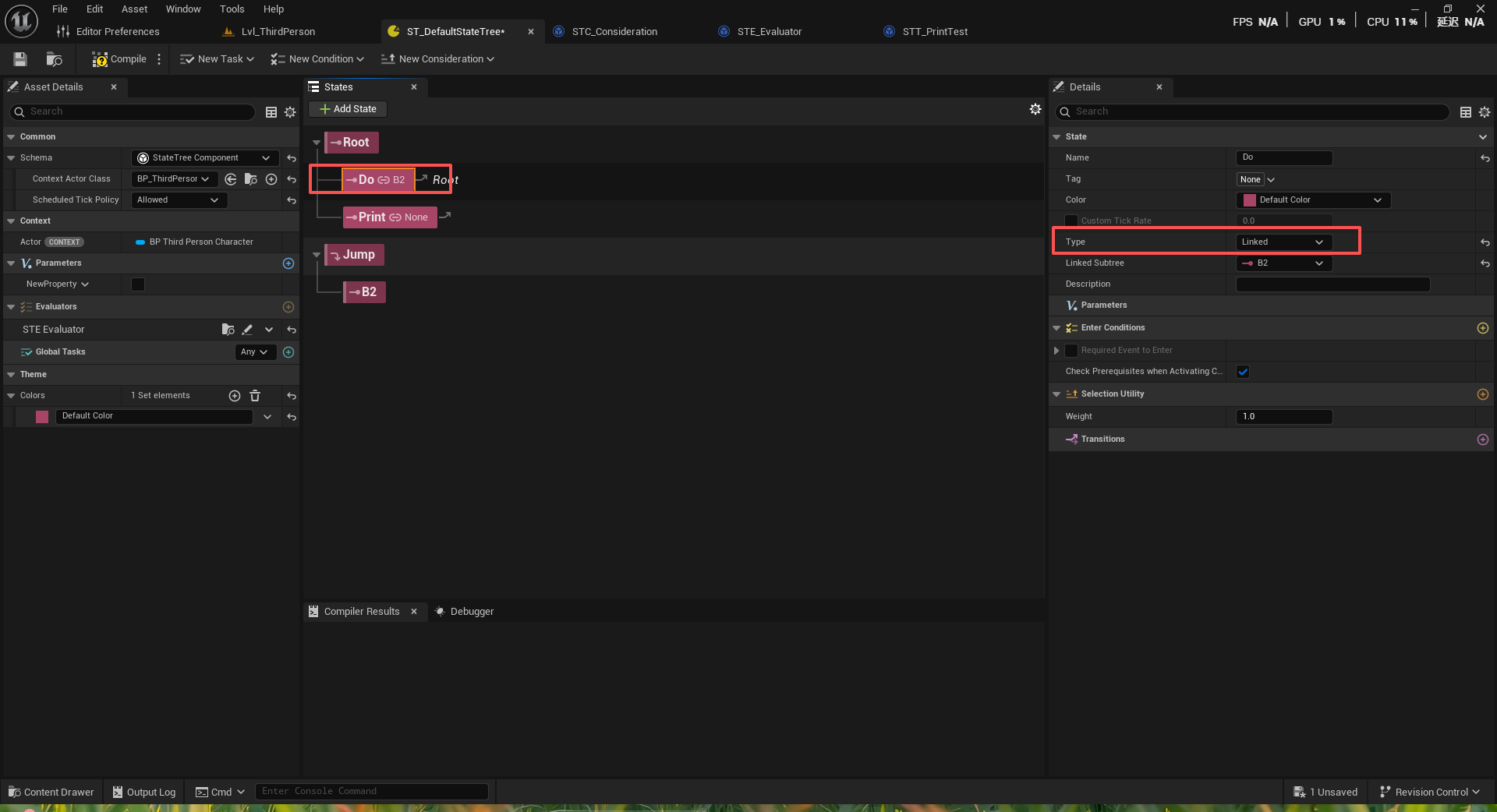
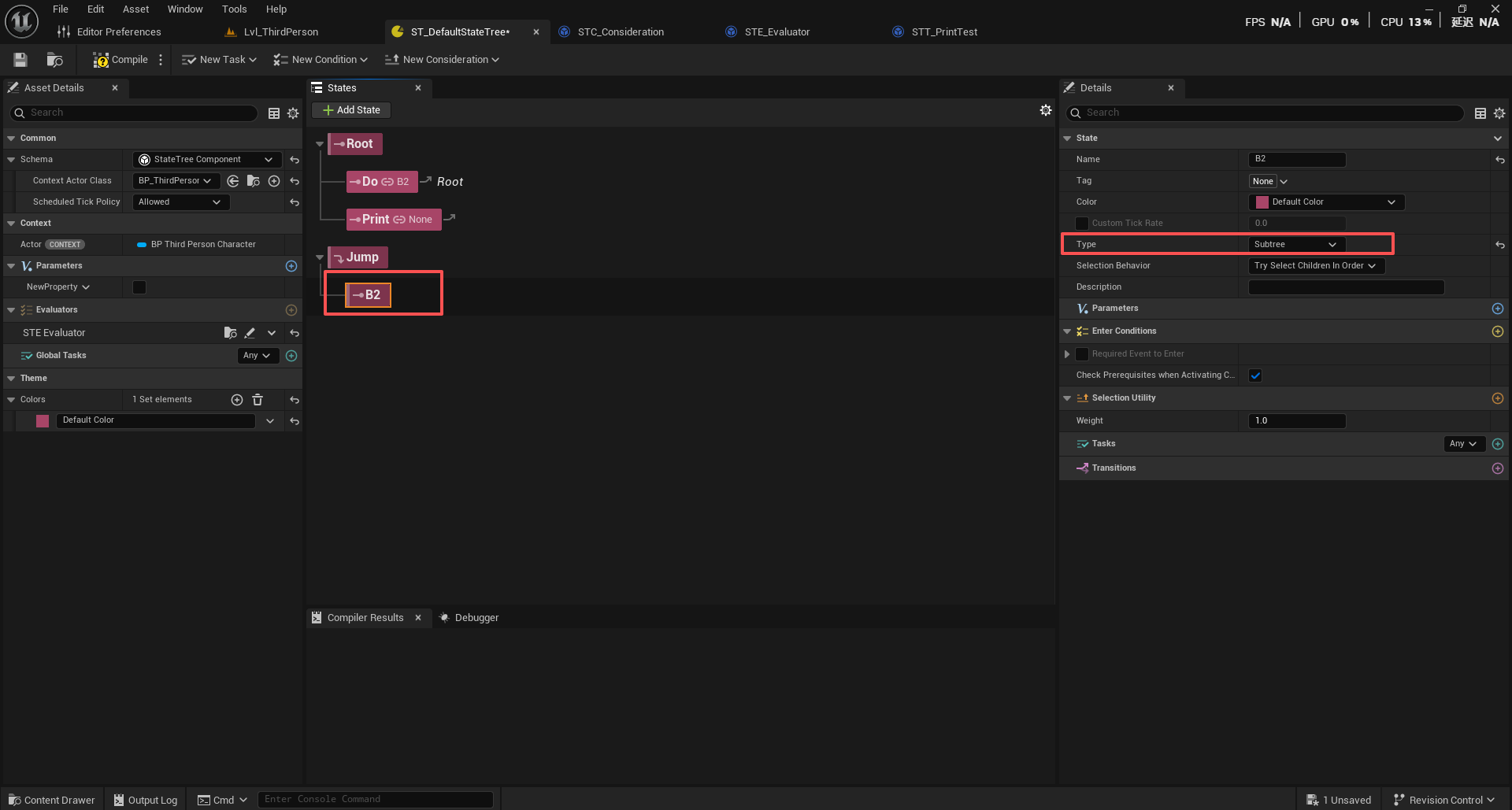
这个类型标记有两个重要的操作
创建新的执行帧 :为链接状态创建独立的执行环境
防止递归 :检查并防止无限递归链接(状态A链接到状态B,状态B又链接回状态A)
执行帧(Execution Frame) 是状态树中实现状态重用和参数传递的核心机制。通过为每个链接状态创建独立的执行环境。状态和链接的状态分别就是两个不同的执行帧A和B,这两个不同的执行帧有着不同的参数,创建独立的环境以后,被链接的对象状态不会影响到链接的对象状态,执行帧让不同的状态可以"并行"工作 ,每个状态有自己的参数空间,互不干扰;Linked的主要作用是避免重复定义相同的状态逻辑,提高代码复用性,比如任何状态都可能会到死亡状态,无论在哪个树层,那么只需要链接到那个死亡状态即可,不管它在哪个层。
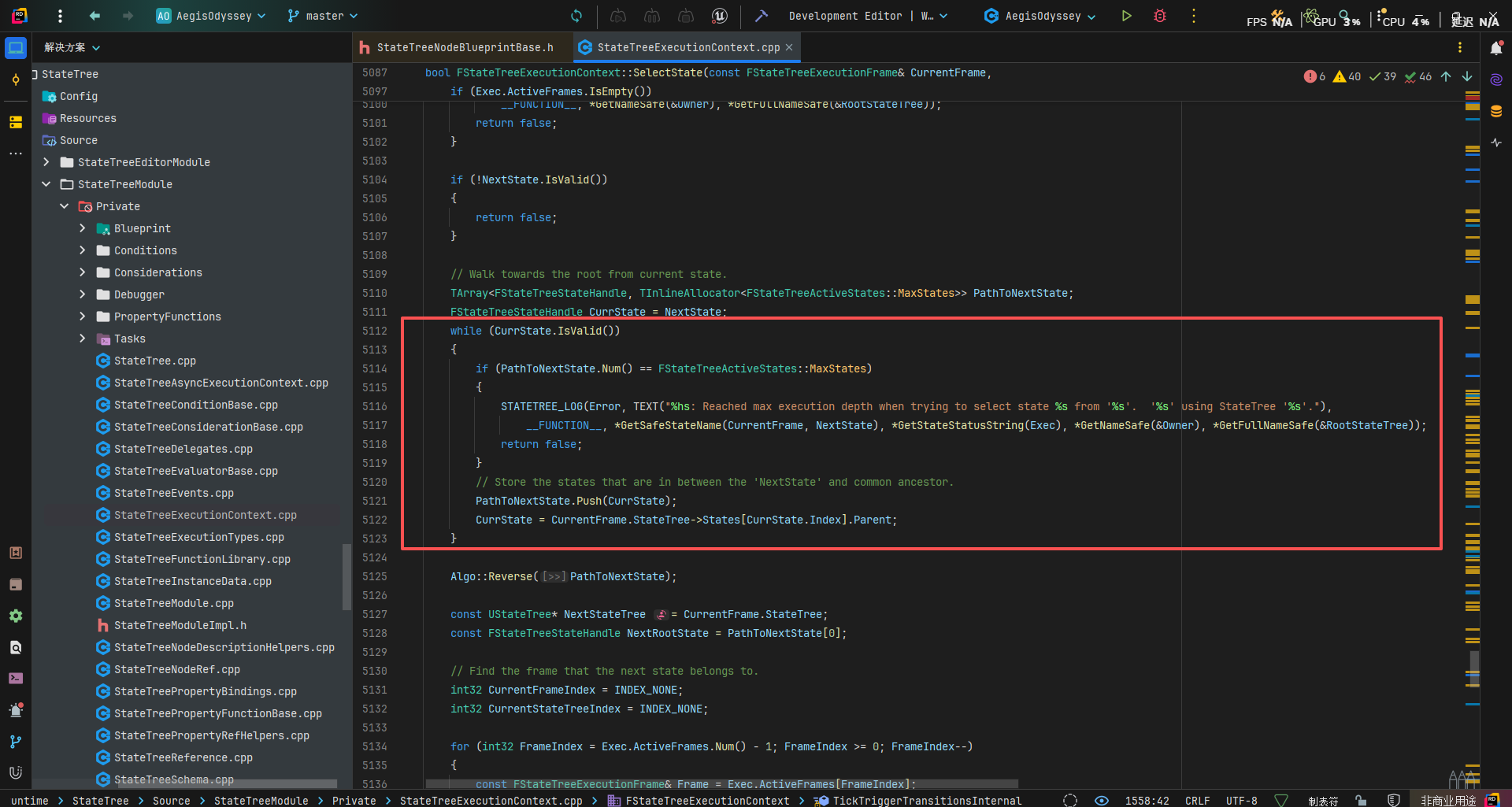
Linked Asset(链接到对应的资产状态):链接到另一个状态树资产的状态 ,执行时会跳转到被链接资产的根状态,和上面的Link方法都有一个要注意的地方那就是它们做了帧数限制,那就是限制尝试链接的状态次数过多!
还是在StateTreeExecutionContext.cpp/.h中:
/** Max number of execution frames handled during state selection. */
static constexpr int32 MaxExecutionFrames = 8;

bool IsFull() const
{
    return SelectedFrames.Num() == MaxExecutionFrames;
}

if (OutSelectionResult.IsFull())
{
    STATETREE_LOG(Error, TEXT("%hs: Reached max execution depth when trying to select state %s from '%s'.  '%s' using StateTree '%s'."),
        __FUNCTION__, *GetSafeStateName(CurrentFrame, NextStateHandle), *GetStateStatusString(Exec), *GetNameSafe(&Owner), *GetFullNameSafe(CurrentFrame.StateTree));
    break;
}
这一目的是保护内存和CPU被过渡使用,也是避免无限递归,令状态树陷入死循环的情况,如果选择相同的状态树资产,也会有这个问题
另外,在链接资产的时候,会将当前状态树的Parameters的数据句柄允许另一个状态树资产访问,这样该状态树就可以访问到之前状态树的参数了,因为过程不是复制的所以会减少内存占用,同时避免大数据等的复制开销。
SubTree是 可以被链接的子树 。这是一个相对特殊的状态类型,主要用于组织状态结构和提供链接点,在**同一状态树内部**组织状态结构,不创建新的执行帧,但共享当前执行的上下文,直接继承父状态的参数和上下文。
状态树和行为树的区别
Behavior Tree的树形结构在复杂场景下会变得极其庞大,节点间的依赖关系难以维护,而StateTree将复杂的树形逻辑转换为层次化状态机 ,每个状态都是自包含的单元,大大简化了维护。
首先,在运行过程中,CPU会缓存一次加载连续内存块,CPU缓存离CPU核心近,因为电子信号传输的时间问题,所以离CPU核心越近,缓存读写速度越快,而缓存命中又不需要在主内存进行,只在CPU进行。
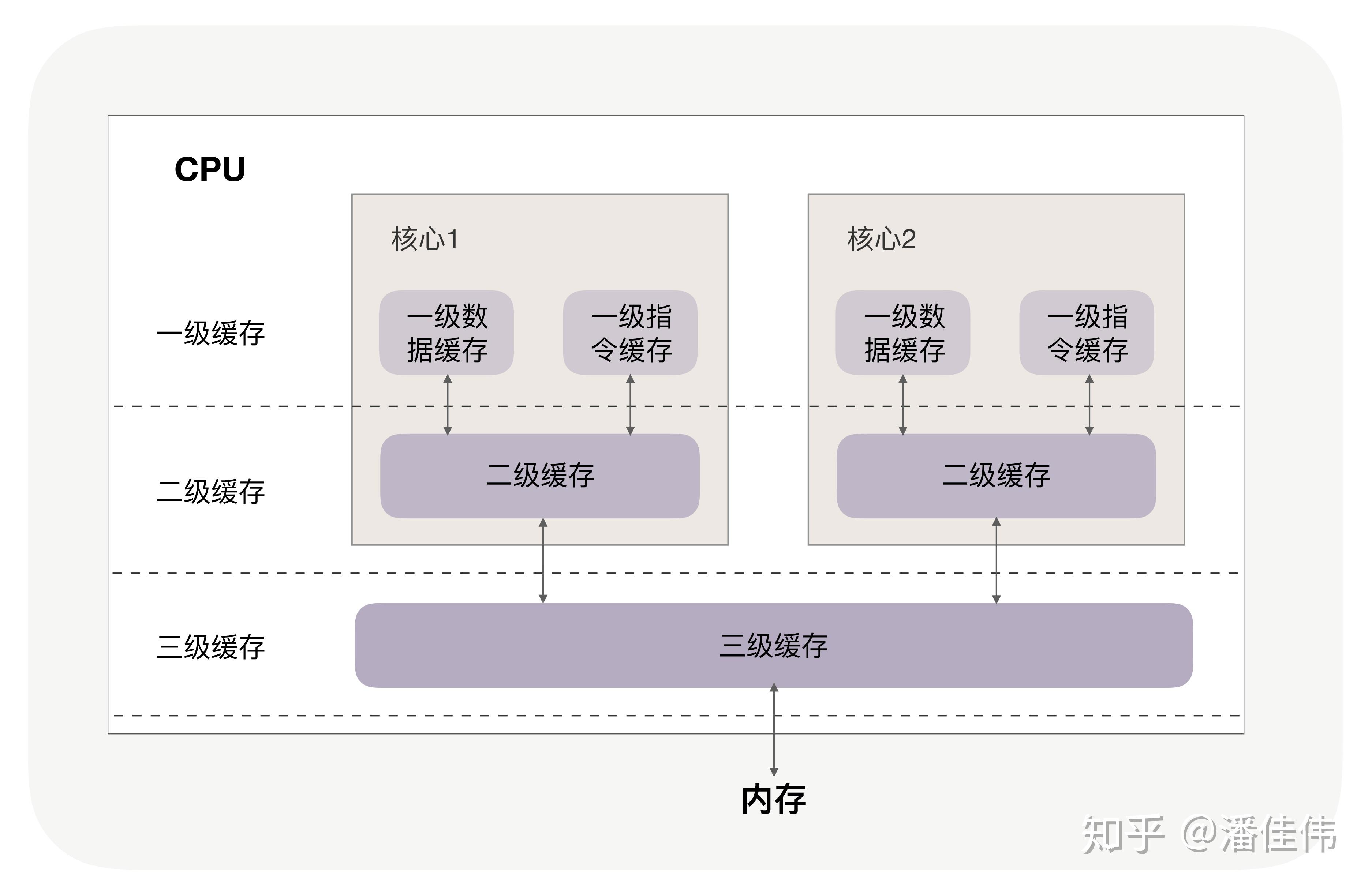
缓存命中相关:https://zhuanlan.zhihu.com/p/209181629
如果数据在其中是连续的,那么一次就可以加载多个相关数据,提高了命中率,反之离散的,就需要多次加载不同的内存块(跳跃访问)。
struct FBehaviorTreeInstance
{
    /** root node in template */
    UBTCompositeNode* RootNode;

    /** active node in template */
    UBTNode* ActiveNode;

    /** active auxiliary nodes */
    TArray<UBTAuxiliaryNode*> ActiveAuxNodes;

    /** active parallel tasks */
    TArray<FBehaviorTreeParallelTask> ParallelTasks;

    /** memory: instance */
    TArray<uint8> InstanceMemory;

    /** index of identifier (BehaviorTreeComponent.KnownInstances) */
    uint8 InstanceIdIndex;

....
可以看到行为树同样维护连续的指针数组和数据数组,但在实际访问中,访问路径是离散的,原因是行为树是树形结构,而**树形结构的访问是非连续的访问模式**,一定程度上降低了CPU的缓存命中,且状态树Tick情况是自根节点向下并重新评估,在实际情况下,AI繁多情况下,会降低性能。
而虚幻的状态树StateTree本质上是“状态机+行为树”,状态机的特点体现于其状态转移不需要树形遍历,直接跳转即可
struct FCompactStateTreeState {
    /** Parent state handle, invalid if root state. */
    FStateTreeStateHandle Parent = FStateTreeStateHandle::Invalid;

    /** Index to first child state */
    uint16 ChildrenBegin = 0;

    /** Index one past the last child state. */
    uint16 ChildrenEnd = 0;

    ...
每个状态都直接存储父节点和子节点范围,在编译时就已经确定好路径,路径是连续的数组,每个路径包含目标状态的位置,状态节点和数据存储也是在连续的内存块内。状态树在选择状态的时候直接传输即可
// Path from the first new state up to the NextState
TConstArrayView<FStateTreeStateHandle> NewStatesPathToNextState(&PathToNextState[FirstNewStateIndex], PathToNextState.Num() - FirstNewStateIndex);

if (SelectStateInternal(..., NewStatesPathToNextState, ...))
在状态树中,我们上面介绍过的条件,任务,效用等特点是行为树特点,包括多种子状态选择策略(序列、选择、随机等)然后通过树形结构组织决策逻辑,但虚幻的状态树突破点在于针对上面所说的性能问题将原本的树形遍历选择状态替换成了用状态机来选择状态,而且引入层级状态(状态可以有子状态)
在实际使用中,小规模智能用 BT,大规模状态或通用流程用 ST,两者可混搭,各取所长。

有“AI”的1024 = 2048,欢迎大家加入2048 AI社区
更多推荐


 18
18 0
0- 0


 已为社区贡献1条内容

所有评论(0)