03.02.04.06 Access the Settings of a Property Editor in a Detail View 在详细视图中访问属性编辑器的设置
Access the Settings of a Property Editor in a Detail View 在详细视图中访问属性编辑器的设置
This lesson explains how to access editors in a Detail View and change their settings.
本课程讲解如何在详情视图中访问编辑器并更改其设置。
The instructions below show how to make the Birthday property editor display a scrollable date picker in its drop-down window.
以下说明展示了如何使生日属性编辑器在其下拉窗口中显示可滚动的日期选择器。
Note
Before you proceed, take a moment to review the previous lessons:
在继续之前,请先回顾一下之前的课程:
- Implement a Data Model: Basics 实现数据模型:基础
- Add a Simple Action 添加一个简单的操作
Step-by-Step Instructions 分步说明
1.In the MySolution.Blazor.Server and MySolution.Win projects, add a View Controller to the Controllers folder. Name the new controller DateEditCalendarController. Specify the controller ancestor class ObjectViewController:
在 MySolution.Blazor.Server 和 MySolution.Win 项目中,向 Controllers 文件夹添加一个视图控制器。将新控制器命名为 DateEditCalendarController。指定控制器祖先类为 ObjectViewController:
**ASP.NET Core Blazor**
C#
using DevExpress.ExpressApp;
using MySolution.Module.BusinessObjects;
// ...
namespace MySolution.Blazor.Server.Controllers {
    public class DateEditCalendarController : ObjectViewControllerDetailView, Employee> {
    // ...
    }
}
**Windows Forms**
C#
using MySolution.Module.BusinessObjects;

namespace MySolution.Win.Controllers {
    public class DateEditCalendarController : ObjectViewControllerDetailView, Employee> {
        public DateEditCalendarController() {
            //...
        }
        // ...
    }
}
The DateEditCalendarController inherits from the ObjectViewController base class. The parameters of the base class enable the Controller only for Detail Views that display and edit Employee objects.
DateEditCalendarController继承自ObjectViewController基类。该基类的参数使控制器仅适用于显示和编辑Employee对象的详细视图。
2.Override the OnActivated method. Use the DetailViewExtensions.CustomizeViewItemControl method to access the Birthday property editor settings:
重写 OnActivated 方法。使用 DetailViewExtensions.CustomizeViewItemControl 方法访问生日属性编辑器设置:
**ASP.NET Core Blazor**
C#
// ...
using DevExpress.ExpressApp.Blazor.Editors;

namespace MySolution.Blazor.Server.Controllers {
    public partial class DateEditCalendarController : ObjectViewControllerDetailView, Employee> {
        protected override void OnActivated() {
            base.OnActivated();
            //Access the Birthday property editor settings
            View.CustomizeViewItemControl(this, SetCalendarView, nameof(Employee.Birthday));
        }

        private void SetCalendarView(DateTimePropertyEditor propertyEditor) {
            //Set the date picker display mode to scroll picker
            propertyEditor.ComponentModel.PickerDisplayMode = DevExpress.Blazor.DatePickerDisplayMode.ScrollPicker;
        }
    }
}
**Windows Forms**
C#
using DevExpress.ExpressApp;
using DevExpress.ExpressApp.Editors;
using DevExpress.XtraEditors;
using MySolution.Module.BusinessObjects;

namespace MySolution.Win.Controllers {
    //...
    public class DateEditCalendarController : ObjectViewControllerDetailView, Employee> {
        public DateEditCalendarController() {
             // ...
        }
        protected override void OnActivated() {
            base.OnActivated();
            //Access the Birthday property editor settings
            View.CustomizeViewItemControl(this, SetCalendarView, nameof(Employee.Birthday));
        }
        private void SetCalendarView(ViewItem viewItem) {
            //Set the currently displayed View Item control to a drop-down calendar
            DateEdit dateEdit = (DateEdit)viewItem.Control;
            //Set the appearance of the calendar in the drop-down window
            dateEdit.Properties.CalendarView = DevExpress.XtraEditors.Repository.CalendarView.TouchUI;
        }
     //...
    }
}
3.Run the application and open the Employee Detail View. The Birthday editor shows a scrollable date picker in its drop-down window:
运行应用程序并打开员工详细信息视图。生日编辑器的下拉窗口中显示了一个可滚动的日期选择器。
ASP.NET Core Blazor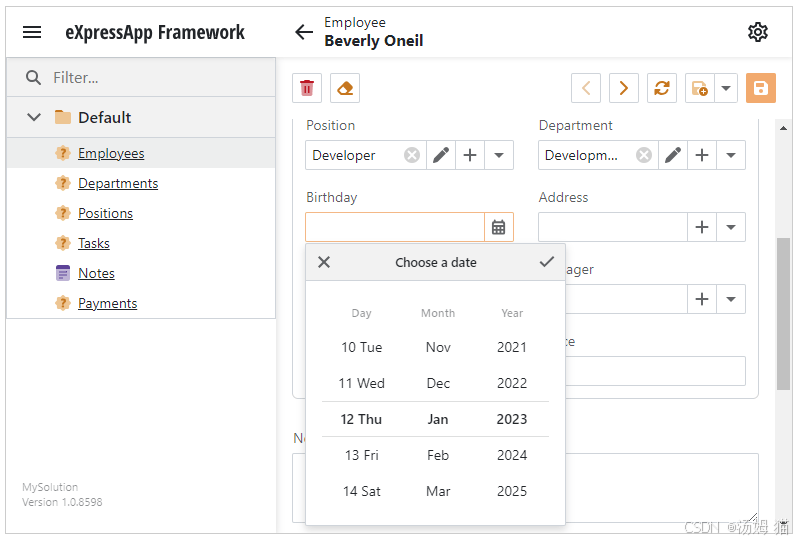
Windows Forms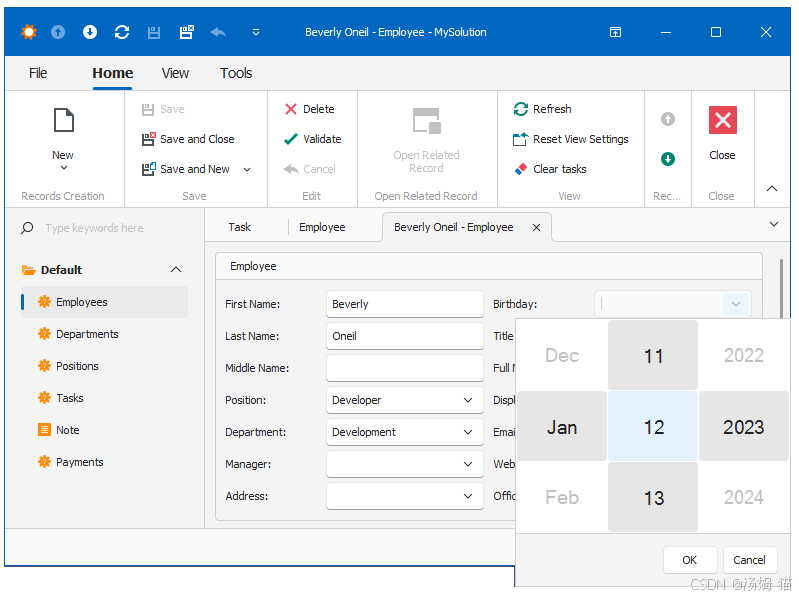
Tip
For general information on Property Editor architecture and UI Controls used by XAF, review the following articles:
要了解XAF使用的属性编辑器架构和UI控件的概述,请查阅以下文章:
- Implement a Property Editor Based on a Custom Component (Blazor)
基于自定义组件实现属性编辑器(Blazor)- Implement a Property Editor Based on a Custom Control (WinForms)
基于自定义控件实现属性编辑器(WinForms)- Data Types of Business Class Properties and Built-in Property Editors
商业类属性的数据类型与内置属性编辑器

有“AI”的1024 = 2048,欢迎大家加入2048 AI社区
更多推荐



 7
7 0
0- 0


 已为社区贡献11条内容

所有评论(0)