Flutter鸿蒙开发指南(十):获取特惠推荐数据(AI)
摘要:本文详细介绍了使用TraeAI开发Flutter应用特惠推荐功能的全过程。首先通过JSON数据生成对应的Dart模型类,包括商品项、商品列表和子类型等数据结构。然后实现API接口封装和数据获取逻辑,完成首页组件数据初始化。在UI展示部分,重点构建了特惠推荐组件(HmSuggestion),处理了图片加载错误优化,实现了商品列表的动态渲染。最终实现了包含顶部标题、左侧图片和右侧商品列表的特惠推
前言
在上一章节中,我们借助TraeAI快速开发了我们的项目。本章节我们继续使用TraeAI完成我们的项目开发吧!下面说一下本章节获取特惠推荐数据的步骤。
步骤:
(1)请求地址常量(AI)
(2)根据JSON转换对象模型(AI)
(3)封装API请求对象(AI)
(4)初始化获取数据(AI)
(5)传递数据到子组件(AI)
(6)拷贝图片资源/取三条子选项进行渲染(手动实现)
一、特惠数据模型
1.1 添加特惠推荐接口常量
特惠推荐的JSON数据
{
    "code": "1",
    "msg": "操作成功",
    "result": {
        "id": "897682543",
        "title": "特惠推荐",
        "subTypes": [
            {
                "id": "912000341",
                "title": "抢先尝鲜",
                "goodsItems": {
                    "counts": 459,
                    "pageSize": 10,
                    "pages": 46,
                    "page": 1,
                    "items": [
                        {
                            "id": "1750713979950333956",
                            "name": "Balva 日本制高级时尚太阳镜 方框",
                            "desc": "抵挡99%紫外线太阳镜",
                            "price": "1213.00",
                            "picture": "https://yjy-teach-oss.oss-cn-beijing.aliyuncs.com/meikou/235220/p5.png",
                            "orderNum": 17
                        },
                        {
                            "id": "1750713979895808015",
                            "name": "COGIT UV休闲百搭牛仔帽 深蓝色",
                            "desc": "不压发型 清凉舒适",
                            "price": "116.00",
                            "picture": "https://yjy-teach-oss.oss-cn-beijing.aliyuncs.com/meikou/250541/p3.png",
                            "orderNum": 18
                        },
                        {
                            "id": "1750713979900002316",
                            "name": "CA4LA AKA SIX CHECK TRAPPER HAT ORANGE ONESIZE 货号:MOR00097",
                            "desc": "暖色格调飞行帽",
                            "price": "1809.00",
                            "picture": "https://yjy-teach-oss.oss-cn-beijing.aliyuncs.com/meikou/254345/p1.png",
                            "orderNum": 10
                        },
                        {
                            "id": "1750713979652538372",
                            "name": "ROOTOTE DELI 个性时尚大容量手提包 黑色豹纹",
                            "desc": "大容量实用手提包",
                            "price": "298.00",
                            "picture": "https://yjy-teach-oss.oss-cn-beijing.aliyuncs.com/meikou/250011/p5.png",
                            "orderNum": 13
                        },
                        {
                            "id": "1750713979929362433",
                            "name": "手袋动物园 防寒保暖可爱动物手套 咖色小熊",
                            "desc": "两用保暖动物小手套",
                            "price": "198.00",
                            "picture": "https://yjy-teach-oss.oss-cn-beijing.aliyuncs.com/meikou/238258/p1.png",
                            "orderNum": 13
                        },
                        {
                            "id": "1750713979203747840",
                            "name": "CU2 舒适减负背包 紫色",
                            "desc": "舒适轻松实现大容量出行",
                            "price": "2419.00",
                            "picture": "https://yjy-teach-oss.oss-cn-beijing.aliyuncs.com/meikou/255004/p1.png",
                            "orderNum": 25
                        },
                        {
                            "id": "1750713979900002312",
                            "name": "kaorinomori 毛边针织条带帽Bebe黑色 56cm~58cm(97)",
                            "desc": "秋冬必备萌系帽",
                            "price": "537.00",
                            "picture": "https://yjy-teach-oss.oss-cn-beijing.aliyuncs.com/meikou/256104/p9.png",
                            "orderNum": 9
                        },
                        {
                            "id": "1750713979900002317",
                            "name": "CA4LA CHARI3 CHARCOAL GRAY ONESIZE 货号:TAM02605",
                            "desc": "温暖实用,型格百搭",
                            "price": "787.00",
                            "picture": "https://yjy-teach-oss.oss-cn-beijing.aliyuncs.com/meikou/254354/p1.png",
                            "orderNum": 8
                        },
                        {
                            "id": "1750713979925168129",
                            "name": "KNITTING INN 羊毛毛毡格纹围巾 赤褐色",
                            "desc": "厚实柔软有弹性",
                            "price": "1019.00",
                            "picture": "https://yjy-teach-oss.oss-cn-beijing.aliyuncs.com/meikou/42590/p1.png",
                            "orderNum": 15
                        },
                        {
                            "id": "1379052170040578049",
                            "name": "极光限定 珠光蓝珐琅锅",
                            "desc": null,
                            "price": "199.00",
                            "picture": "http://yjy-xiaotuxian-dev.oss-cn-beijing.aliyuncs.com/picture/2021-04-05/7f483771-6831-4a7a-abdb-2625acb755f3.png",
                            "orderNum": 929
                        }
                    ]
                }
            },
            {
                "id": "912000342",
                "title": "新品预告",
                "goodsItems": {
                    "counts": 459,
                    "pageSize": 10,
                    "pages": 46,
                    "page": 1,
                    "items": [
                        {
                            "id": "1750713979900002312",
                            "name": "kaorinomori 毛边针织条带帽Bebe黑色 56cm~58cm(97)",
                            "desc": "秋冬必备萌系帽",
                            "price": "537.00",
                            "picture": "https://yjy-teach-oss.oss-cn-beijing.aliyuncs.com/meikou/256104/p9.png",
                            "orderNum": 9
                        },
                        {
                            "id": "1750713979929362433",
                            "name": "手袋动物园 防寒保暖可爱动物手套 咖色小熊",
                            "desc": "两用保暖动物小手套",
                            "price": "198.00",
                            "picture": "https://yjy-teach-oss.oss-cn-beijing.aliyuncs.com/meikou/238258/p1.png",
                            "orderNum": 13
                        },
                        {
                            "id": "1750713979950333956",
                            "name": "Balva 日本制高级时尚太阳镜 方框",
                            "desc": "抵挡99%紫外线太阳镜",
                            "price": "1213.00",
                            "picture": "https://yjy-teach-oss.oss-cn-beijing.aliyuncs.com/meikou/235220/p5.png",
                            "orderNum": 17
                        },
                        {
                            "id": "1750713979900002316",
                            "name": "CA4LA AKA SIX CHECK TRAPPER HAT ORANGE ONESIZE 货号:MOR00097",
                            "desc": "暖色格调飞行帽",
                            "price": "1809.00",
                            "picture": "https://yjy-teach-oss.oss-cn-beijing.aliyuncs.com/meikou/254345/p1.png",
                            "orderNum": 10
                        },
                        {
                            "id": "1750713979925168129",
                            "name": "KNITTING INN 羊毛毛毡格纹围巾 赤褐色",
                            "desc": "厚实柔软有弹性",
                            "price": "1019.00",
                            "picture": "https://yjy-teach-oss.oss-cn-beijing.aliyuncs.com/meikou/42590/p1.png",
                            "orderNum": 15
                        },
                        {
                            "id": "1379052170040578049",
                            "name": "极光限定 珠光蓝珐琅锅",
                            "desc": null,
                            "price": "199.00",
                            "picture": "http://yjy-xiaotuxian-dev.oss-cn-beijing.aliyuncs.com/picture/2021-04-05/7f483771-6831-4a7a-abdb-2625acb755f3.png",
                            "orderNum": 929
                        },
                        {
                            "id": "1750713979895808015",
                            "name": "COGIT UV休闲百搭牛仔帽 深蓝色",
                            "desc": "不压发型 清凉舒适",
                            "price": "116.00",
                            "picture": "https://yjy-teach-oss.oss-cn-beijing.aliyuncs.com/meikou/250541/p3.png",
                            "orderNum": 18
                        },
                        {
                            "id": "1750713979652538372",
                            "name": "ROOTOTE DELI 个性时尚大容量手提包 黑色豹纹",
                            "desc": "大容量实用手提包",
                            "price": "298.00",
                            "picture": "https://yjy-teach-oss.oss-cn-beijing.aliyuncs.com/meikou/250011/p5.png",
                            "orderNum": 13
                        },
                        {
                            "id": "1750713979900002317",
                            "name": "CA4LA CHARI3 CHARCOAL GRAY ONESIZE 货号:TAM02605",
                            "desc": "温暖实用,型格百搭",
                            "price": "787.00",
                            "picture": "https://yjy-teach-oss.oss-cn-beijing.aliyuncs.com/meikou/254354/p1.png",
                            "orderNum": 8
                        },
                        {
                            "id": "1750713979203747840",
                            "name": "CU2 舒适减负背包 紫色",
                            "desc": "舒适轻松实现大容量出行",
                            "price": "2419.00",
                            "picture": "https://yjy-teach-oss.oss-cn-beijing.aliyuncs.com/meikou/255004/p1.png",
                            "orderNum": 25
                        }
                    ]
                }
            }
        ]
    }
}
修改lib/constants/index.dart代码
//全局状态
class GlobalConstants {
  //基础地址
  static const String BASE_URL = "https://meikou-api.itheima.net/";

  //超时时间
  static const int TIME_OUT = 10;

  //成功状态
  static const String SUCCESS_CODE = "1";
}

//存放请求地址接口的常量
class HttpConstants {
  //轮播图接口
  static const String BANNER_LIST = "/home/banner";

  //分类列表接口
  static const String CATEGORY_LIST = "/home/category/head";

  //特惠推荐地址
  static const String PRODUCT_LIST = "/hot/preference";
}
1.2 使用Trae AI生成数据模型
将home.dart文件和特惠推荐.json拖入到输入框,给出指令:"根据特惠推荐.json中的数据在home.dart中生成对应的类型文件 包含工厂转化函数"
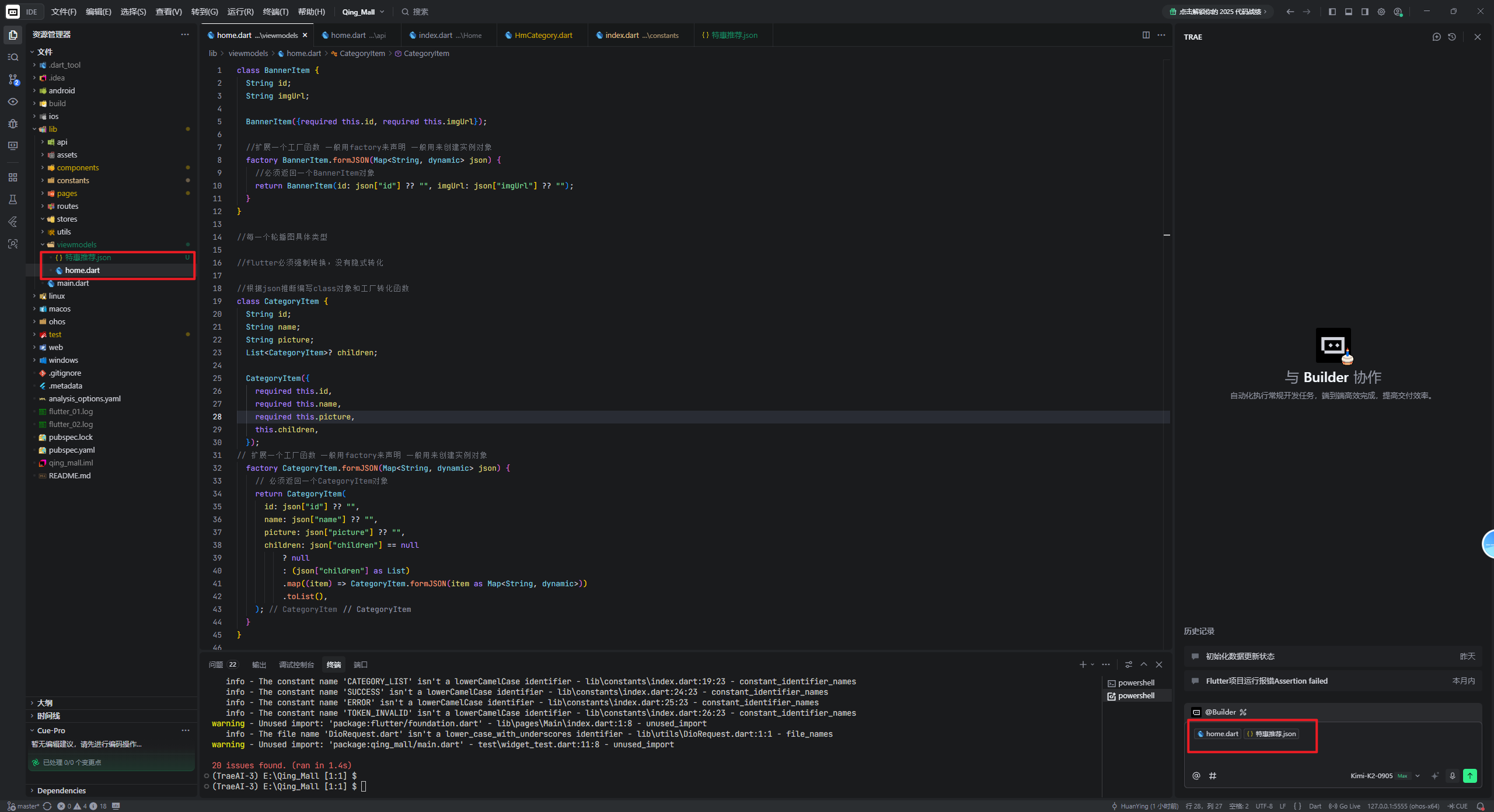
AI生成了以下代码:
// 商品项
class GoodsItem {
  String id;
  String name;
  String? desc;
  String price;
  String picture;
  int orderNum;

  GoodsItem({
    required this.id,
    required this.name,
    this.desc,
    required this.price,
    required this.picture,
    required this.orderNum,
  });

  factory GoodsItem.fromJSON(Map<String, dynamic> json) {
    return GoodsItem(
      id: json["id"] ?? "",
      name: json["name"] ?? "",
      desc: json["desc"],
      price: json["price"] ?? "",
      picture: json["picture"] ?? "",
      orderNum: json["orderNum"] ?? 0,
    );
  }
}

// 商品列表
class GoodsItems {
  int counts;
  int pageSize;
  int pages;
  int page;
  List<GoodsItem> items;

  GoodsItems({
    required this.counts,
    required this.pageSize,
    required this.pages,
    required this.page,
    required this.items,
  });

  factory GoodsItems.fromJSON(Map<String, dynamic> json) {
    return GoodsItems(
      counts: json["counts"] ?? 0,
      pageSize: json["pageSize"] ?? 0,
      pages: json["pages"] ?? 0,
      page: json["page"] ?? 0,
      items: (json["items"] as List?)
          ?.map((item) => GoodsItem.fromJSON(item as Map<String, dynamic>))
          .toList() ?? [],
    );
  }
}

// 子类型
class SubType {
  String id;
  String title;
  GoodsItems goodsItems;

  SubType({
    required this.id,
    required this.title,
    required this.goodsItems,
  });

  factory SubType.fromJSON(Map<String, dynamic> json) {
    return SubType(
      id: json["id"] ?? "",
      title: json["title"] ?? "",
      goodsItems: GoodsItems.fromJSON(json["goodsItems"] ?? {}),
    );
  }
}

// 特惠推荐结果
class SpecialOfferResult {
  String id;
  String title;
  List<SubType> subTypes;

  SpecialOfferResult({
    required this.id,
    required this.title,
    required this.subTypes,
  });

  factory SpecialOfferResult.fromJSON(Map<String, dynamic> json) {
    return SpecialOfferResult(
      id: json["id"] ?? "",
      title: json["title"] ?? "",
      subTypes: (json["subTypes"] as List?)
          ?.map((item) => SubType.fromJSON(item as Map<String, dynamic>))
          .toList() ?? [],
    );
  }
}

// 特惠推荐响应
class SpecialOfferResponse {
  String code;
  String msg;
  SpecialOfferResult result;

  SpecialOfferResponse({
    required this.code,
    required this.msg,
    required this.result,
  });

  factory SpecialOfferResponse.fromJSON(Map<String, dynamic> json) {
    return SpecialOfferResponse(
      code: json["code"] ?? "",
      msg: json["msg"] ?? "",
      result: SpecialOfferResult.fromJSON(json["result"] ?? {}),
    );
  }
}
1.3 构建商品类与特惠推荐类
但是我们在轮播图的章节,是没有要code、msg、result这个结构的,我们是在dio请求工具里进一步解构,需要的是result对象
以下代码生成的code、msg、result我们是不需要的,我们用不上,直接删除下列代码。
// 特惠推荐响应
class SpecialOfferResponse {
  String code;
  String msg;
  SpecialOfferResult result;

  SpecialOfferResponse({
    required this.code,
    required this.msg,
    required this.result,
  });

  factory SpecialOfferResponse.fromJSON(Map<String, dynamic> json) {
    return SpecialOfferResponse(
      code: json["code"] ?? "",
      msg: json["msg"] ?? "",
      result: SpecialOfferResult.fromJSON(json["result"] ?? {}),
    );
  }
}
然后编写lib/api/home.dart代码,在最下方注释特惠推荐地址,就会自动输出以下代码
//特惠推荐地址
Future<SpecialOfferResult> getProductListAPI() async {
  // 返回请求
  return SpecialOfferResult.fromJSON(
      await dioRequest.get(HttpConstants.PRODUCT_LIST));
}
在_getCategoryList()下回车,AI会自动补全代码。然后再到HmSuggetsion中的
const HmSuggestion({super.key, required this.specialOfferResult});此处上方,AI会给出代码。
二、API接口与数据获取
2.1 首页组件数据初始化
lib/pages/Home/index.dart代码
import 'package:flutter/cupertino.dart';
import 'package:qing_mall/api/home.dart';
import 'package:qing_mall/components/Home/HmCategory.dart';
import 'package:qing_mall/components/Home/HmHot.dart';
import 'package:qing_mall/components/Home/HmMoreList.dart';
import 'package:qing_mall/components/Home/HmSlider.dart';
import 'package:qing_mall/components/Home/HmSuggestion.dart';
import 'package:qing_mall/viewmodels/home.dart';

class HomeView extends StatefulWidget {
  const HomeView({super.key});

  @override
  State<HomeView> createState() => _HomeViewState();
}

class _HomeViewState extends State<HomeView> {
  //分类列表
  List<CategoryItem> _categoryList = [];

  //轮播图列表
  List<BannerItem> _bannerList = [
    // BannerItem(
    //   id: "1",
    //   imgUrl: "https://yjy-teach-oss.oss-cn-beijing.aliyuncs.com/meituan/1.jpg",
    // ),
    // BannerItem(
    //   id: "2",
    //   imgUrl: "https://yjy-teach-oss.oss-cn-beijing.aliyuncs.com/meituan/2.png",
    // ),
    // BannerItem(
    //   id: "3",
    //   imgUrl: "https://yjy-teach-oss.oss-cn-beijing.aliyuncs.com/meituan/3.jpg",
    // ),
  ];

  //获取滚动容器的内容

  List<Widget> _getScrollChildren() {
    return [
      //包裹普通widget的sliver家族的组件内容
      SliverToBoxAdapter(child: HmSlider(bannerList: _bannerList)), //轮播图组件
      //放置分类组件
      SliverToBoxAdapter(child: SizedBox(height: 10)),
      //SliverGrid SliverList指南纵向排列
      SliverToBoxAdapter(child: HmCategory(categoryList: _categoryList)), //分类组件
      SliverToBoxAdapter(child: SizedBox(height: 10)),
      SliverToBoxAdapter(child: HmSuggestion(specialOfferResult: _specialOfferResult)), //推荐组件
      SliverToBoxAdapter(child: SizedBox(height: 10)),

      //Flex和Expanded配合起来可以均分比例
      SliverToBoxAdapter(
        child: Padding(
            padding: EdgeInsets.symmetric(horizontal: 10),
            child: Flex(
              direction: Axis.horizontal,
              children: [
                Expanded(child: HmHot()),
                SizedBox(
                  width: 10,
                ),
                Expanded(child: HmHot()),
              ],
            )),
      ),
      SliverToBoxAdapter(child: SizedBox(height: 10)),
      HmMorelist(), //无限滚动列表
    ];
  }

  //特惠推荐
  SpecialOfferResult _specialOfferResult = SpecialOfferResult(
    id: "",
    title: "",
    subTypes: [],
  );

  @override
  void initState() {
    // TODO: implement initState
    super.initState();
    _getBannederList();
    _getCategoryList();
    _getProductList();
  }

  //获取特惠推荐
  void _getProductList() async {
    _specialOfferResult = await getProductListAPI();
    setState(() {});
  }

  //获取分类列表
  void _getCategoryList() async {
    _categoryList = await getCategoryListAPI();
    setState(() {});
  }

  void _getBannederList() async {
    _bannerList = await getBannerListAPI();
    setState(() {});
  }

  @override
  Widget build(BuildContext context) {
    //CustomScrollview要求:必须是sliver家族的内容
    return CustomScrollView(slivers: _getScrollChildren());
  }
}
lib/components/Home/HmSuggestion.dart代码
import 'package:flutter/material.dart';
import 'package:qing_mall/viewmodels/home.dart';

class HmSuggestion extends StatefulWidget {
  //父传子
  final SpecialOfferResult specialOfferResult;

  const HmSuggestion({super.key, required this.specialOfferResult});

  @override
  State<HmSuggestion> createState() => _HmSuggestionState();
}

class _HmSuggestionState extends State<HmSuggestion> {
  @override
  Widget build(BuildContext context) {
    return Padding(
        padding: EdgeInsets.symmetric(horizontal: 10),
        child: Container(
            color: Colors.blue,
            alignment: Alignment.center,
            height: 300,
            child: Text(
              "推荐",
              style: TextStyle(color: Colors.white),
            )));
  }
}
2.2 特惠推荐数据获取与状态管理
复制以下图片到assets目录,可以在我的代码仓库找:https://gitcode.com/Deng666/shangcheng.git
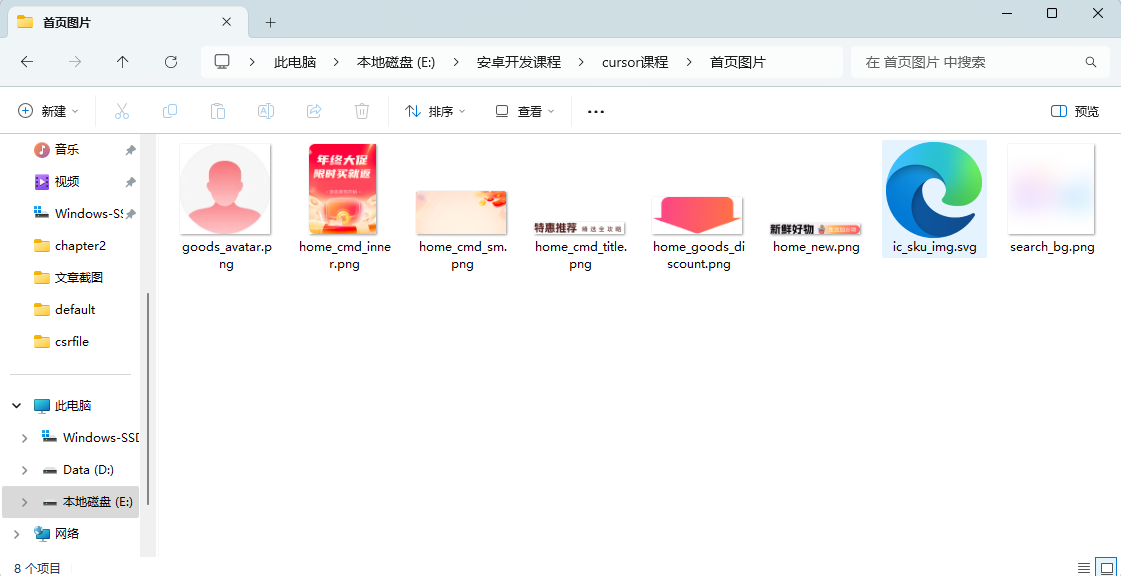
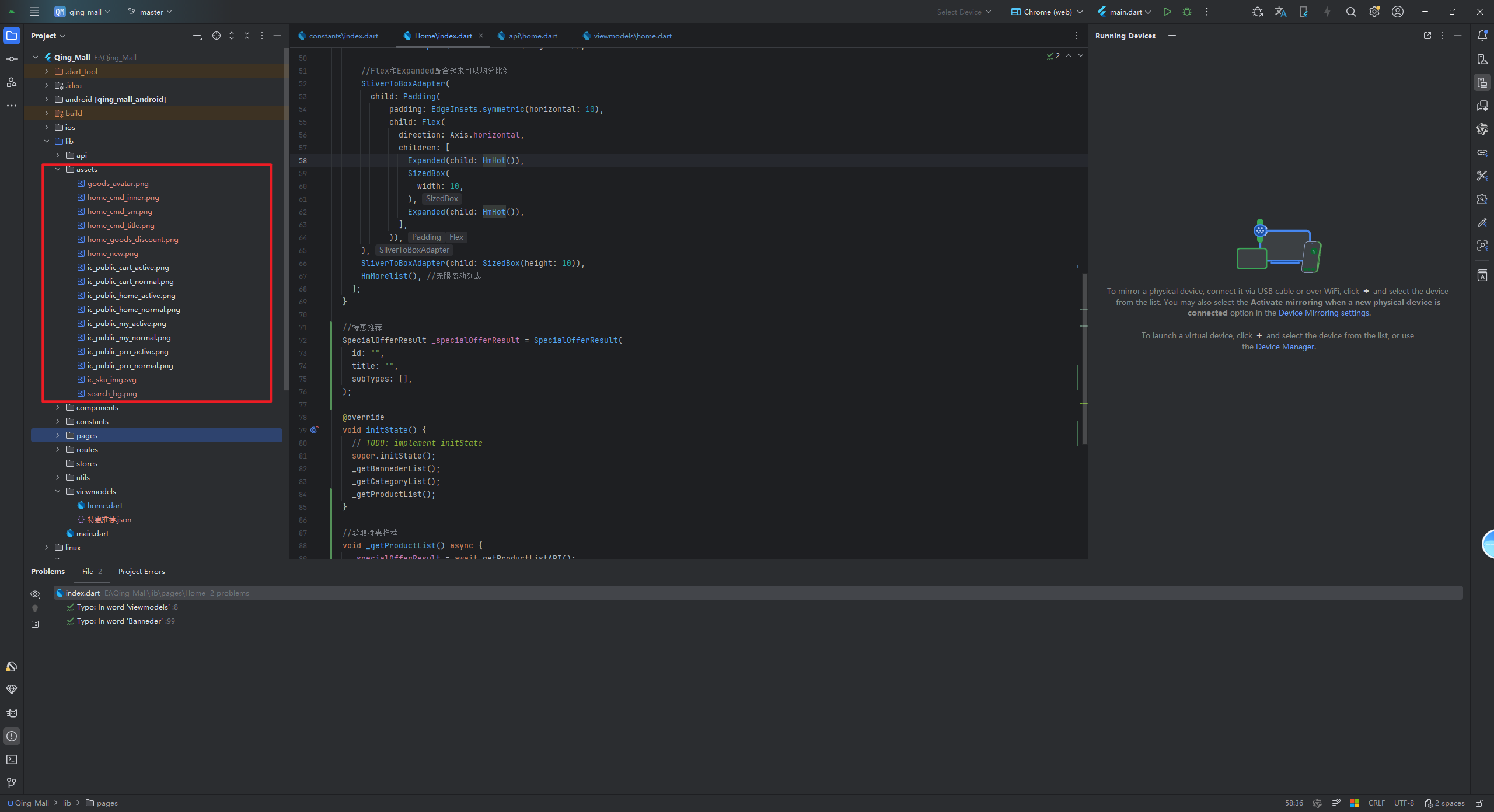
编写lib/components/Home/HmSuggestion.dart代码
import 'package:flutter/material.dart';
import 'package:qing_mall/viewmodels/home.dart';

class HmSuggestion extends StatefulWidget {
  //父传子
  final SpecialOfferResult specialOfferResult;

  const HmSuggestion({super.key, required this.specialOfferResult});

  @override
  State<HmSuggestion> createState() => _HmSuggestionState();
}

class _HmSuggestionState extends State<HmSuggestion> {
  //完成渲染

  @override
  Widget build(BuildContext context) {
    return Padding(
        padding: EdgeInsets.symmetric(horizontal: 10),
        child: Container(
            alignment: Alignment.center,
            height: 300,
            decoration: BoxDecoration(
                color: Colors.blue,
                borderRadius: BorderRadius.circular(12),
                image: DecorationImage(
                  image: AssetImage("lib/assets/home_cmd_sm.png"),
                  fit: BoxFit.cover,
                )),
            child: Text(
              "推荐",
              style: TextStyle(color: Colors.white),
            )));
  }
}
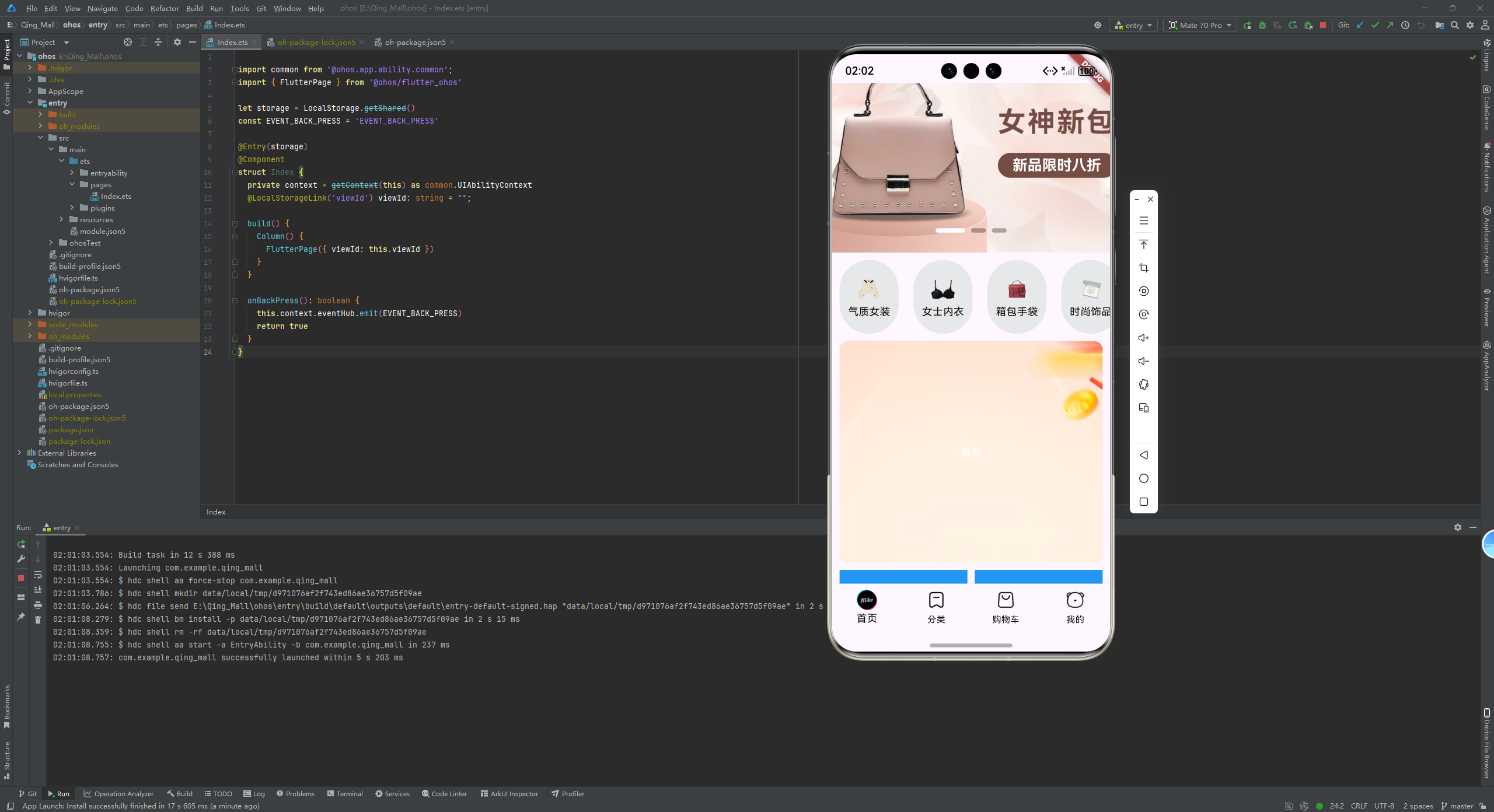
2.3 完善特惠推荐相关UI
现在我们需要完成特惠推荐这里的相关UI
HmSuggestion.dart代码
import 'package:flutter/material.dart';
import 'package:qing_mall/viewmodels/home.dart';

class HmSuggestion extends StatefulWidget {
  //父传子
  final SpecialOfferResult specialOfferResult;

  const HmSuggestion({super.key, required this.specialOfferResult});

  @override
  State<HmSuggestion> createState() => _HmSuggestionState();
}

class _HmSuggestionState extends State<HmSuggestion> {
  Widget _buildHeader() {
    return Row(
      children: [
        Text("特惠推荐",
            style: TextStyle(
                color: const Color.fromARGB(255, 86, 24, 20),
                fontSize: 18,
                fontWeight: FontWeight.w700)),
        SizedBox(width: 10),
        Text(
          "精选省攻略",
          style: TextStyle(
            fontSize: 12,
            color: const Color.fromARGB(255, 124, 63, 58),
          ),
        ),
      ],
    );
  }

  //左侧结构
  Widget _buildLeft() {
    return Container(
      width: 100,
      height: 140,
      decoration: BoxDecoration(
          borderRadius: BorderRadius.circular(10),
          image: DecorationImage(
              image: AssetImage("lib/assets/home_cmd_inner.png"), fit: BoxFit.cover)),
    );
  }

  //完成渲染
  @override
  Widget build(BuildContext context) {
    return Padding(
        padding: EdgeInsets.symmetric(horizontal: 10),
        child: Container(
            alignment: Alignment.center,
            height: 300,
            padding: EdgeInsets.all(12),
            decoration: BoxDecoration(
                color: Colors.blue,
                borderRadius: BorderRadius.circular(12),
                image: DecorationImage(
                  image: AssetImage("lib/assets/home_cmd_sm.png"),
                  fit: BoxFit.cover,
                )),
            child: Column(
              children: [
                //顶部内容
                _buildHeader(),
                Row(
                  children: [_buildLeft()],
                )
              ],
            )));
  }
}
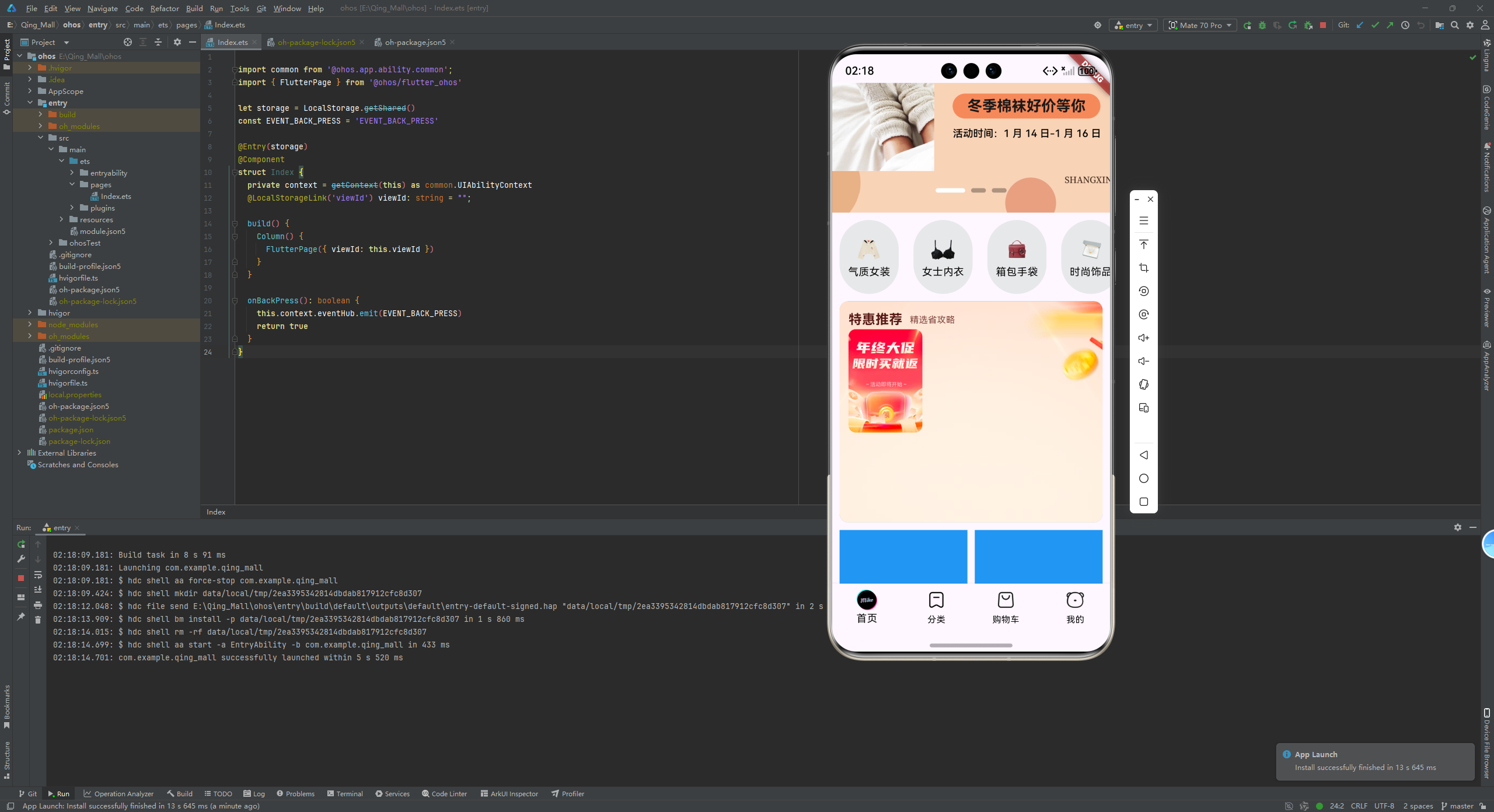
继续修改HmSuggestion.dart代码
import 'package:flutter/material.dart';
import 'package:qing_mall/viewmodels/home.dart';

class HmSuggestion extends StatefulWidget {
  //父传子
  final SpecialOfferResult specialOfferResult;

  const HmSuggestion({super.key, required this.specialOfferResult});

  @override
  State<HmSuggestion> createState() => _HmSuggestionState();
}

class _HmSuggestionState extends State<HmSuggestion> {

//取前三条数据
List<GoodsItem> _getDisplayItems(){
  return widget.specialOfferResult.subTypes.first.goodsItems.items.take(3).toList();
}


  Widget _buildHeader() {
    return Row(
      children: [
        Text("特惠推荐",
            style: TextStyle(
                color: const Color.fromARGB(255, 86, 24, 20),
                fontSize: 18,
                fontWeight: FontWeight.w700)),
        SizedBox(width: 10),
        Text(
          "精选省攻略",
          style: TextStyle(
            fontSize: 12,
            color: const Color.fromARGB(255, 124, 63, 58),
          ),
        ),
      ],
    );
  }

  //左侧结构
  Widget _buildLeft() {
    return Container(
      width: 100,
      height: 140,
      decoration: BoxDecoration(
          borderRadius: BorderRadius.circular(10),
          image: DecorationImage(
              image: AssetImage("lib/assets/home_cmd_inner.png"), fit: BoxFit.cover)),
    );
  }

  List<Widget> _getChildrenList(){
    List<GoodsItem> list = _getDisplayItems();//取到前3条数据
    return List.generate(list.length, (int index){
      return Column(
        children: [
          //裁剪圆角 ClipRect 可以包裹子元素 裁剪图片设置圆角
          ClipRRect(
            borderRadius: BorderRadius.circular(8),
            child: Image.network(list[index].picture,width: 100,height: 140,fit: BoxFit.cover),
            ),
            SizedBox(height: 10),
            Container(
               padding: EdgeInsets.symmetric(horizontal: 10,vertical: 4),
              decoration: BoxDecoration(
                borderRadius: BorderRadius.circular(12),
                color: Color.fromARGB(255, 240, 96, 12),
              ),
              child: Text("¥${list[index].price}",style: TextStyle(color: Colors.white),),
            )
        ],

      );
    });
  }

  //完成渲染
  @override
  Widget build(BuildContext context) {
    return Padding(
        padding: EdgeInsets.symmetric(horizontal: 10),
        child: Container(
            alignment: Alignment.center,
            padding: EdgeInsets.all(12),
            decoration: BoxDecoration(
                color: Colors.blue,
                borderRadius: BorderRadius.circular(12),
                image: DecorationImage(
                  image: AssetImage("lib/assets/home_cmd_sm.png"),
                  fit: BoxFit.cover,
                )),
            child: Column(
              children: [
                //顶部内容
                _buildHeader(),
                SizedBox(height: 10),
                Row(
                  children: [_buildLeft(),Expanded(child: Row(
                    mainAxisAlignment: MainAxisAlignment.spaceEvenly,
                    children: _getChildrenList()))],
                )
              ],
            )));
  }
}
运行,然后模拟器会有报错
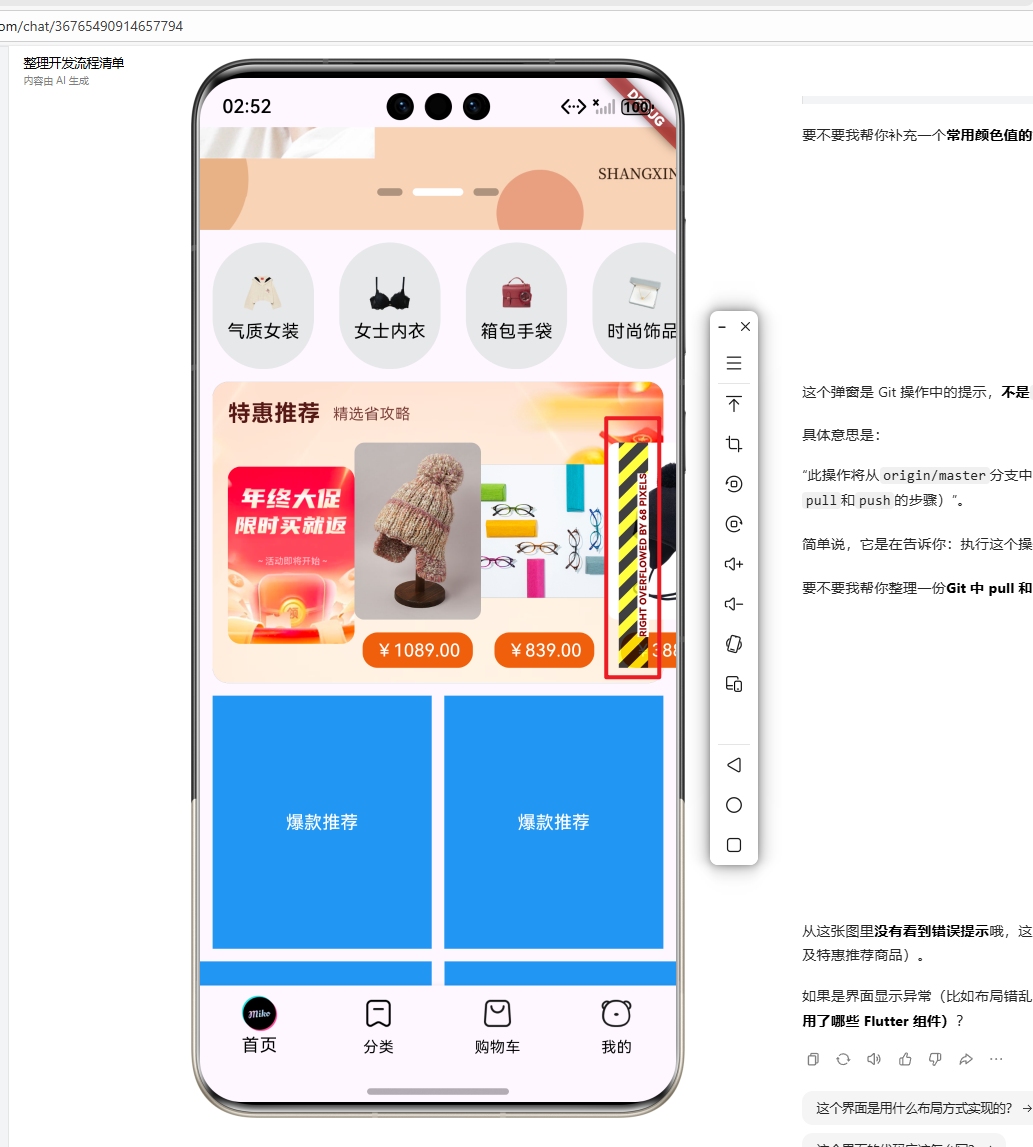
2.4 图片加载与错误处理优化
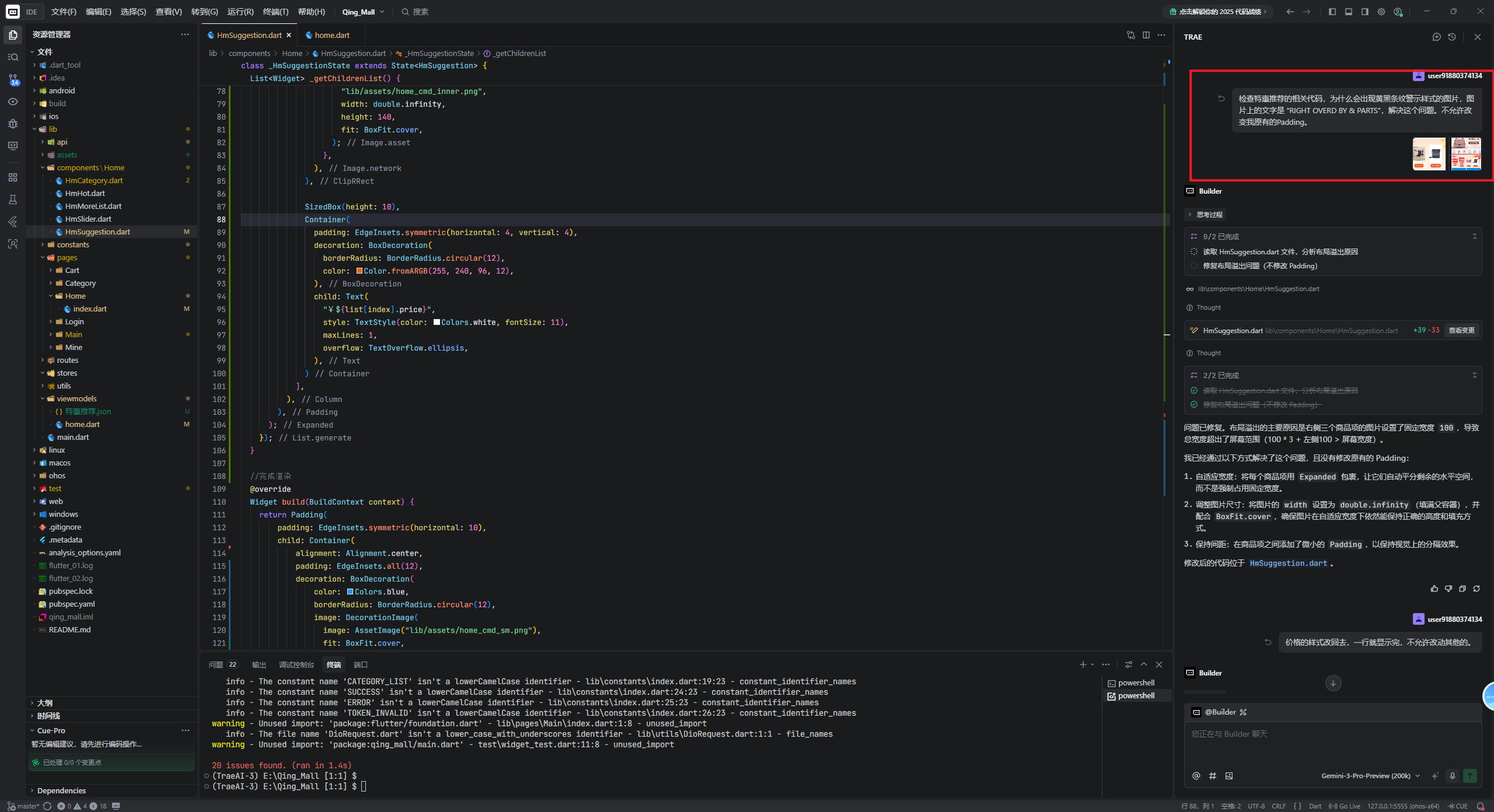
这个时候让AI解决,但是解决过程有点漫长,不过还在最终解决了,这里我就不给详细的过程了。大概就是复述自己的问题,让AI解决,尽量保持原有的UI结构。
HmSuggestion.dart代码
import 'package:flutter/material.dart';
import 'package:qing_mall/viewmodels/home.dart';

class HmSuggestion extends StatefulWidget {
  //父传子
  final SpecialOfferResult specialOfferResult;

  const HmSuggestion({super.key, required this.specialOfferResult});

  @override
  State<HmSuggestion> createState() => _HmSuggestionState();
}

class _HmSuggestionState extends State<HmSuggestion> {
//取前三条数据
  List<GoodsItem> _getDisplayItems() {
    //在初始化还没获取到数据直接返回空列表
    if (widget.specialOfferResult.subTypes.isEmpty) {
      return [];
    }

    return widget.specialOfferResult.subTypes.first.goodsItems.items
        .take(3)
        .toList();
  }

  Widget _buildHeader() {
    return Row(
      children: [
        Text("特惠推荐",
            style: TextStyle(
                color: const Color.fromARGB(255, 86, 24, 20),
                fontSize: 18,
                fontWeight: FontWeight.w700)),
        SizedBox(width: 10),
        Text(
          "精选省攻略",
          style: TextStyle(
            fontSize: 12,
            color: const Color.fromARGB(255, 124, 63, 58),
          ),
        ),
      ],
    );
  }

  //左侧结构
  Widget _buildLeft() {
    return Container(
      width: 75,
      height: 140,
      decoration: BoxDecoration(
          borderRadius: BorderRadius.circular(10),
          image: DecorationImage(
              image: AssetImage("lib/assets/home_cmd_inner.png"),
              fit: BoxFit.cover)),
    );
  }

  List<Widget> _getChildrenList() {
    List<GoodsItem> list = _getDisplayItems(); //取到前3条数据
    return List.generate(list.length, (int index) {
      return Expanded(
        child: Padding(
          padding: const EdgeInsets.symmetric(horizontal: 4.0),
          child: Column(
            children: [
              //裁剪圆角 ClipRect 可以包裹子元素 裁剪图片设置圆角
              ClipRRect(
                borderRadius: BorderRadius.circular(8),
                child: Image.network(
                  list[index].picture,
                  width: double.infinity,
                  height: 140,
                  fit: BoxFit.cover,
                  errorBuilder: (context, error, stackTrace) {
                    // 返回一个新的部件体替换原有图片
                    return Image.asset(
                      "lib/assets/home_cmd_inner.png",
                      width: double.infinity,
                      height: 140,
                      fit: BoxFit.cover,
                    );
                  },
                ),
              ),

              SizedBox(height: 10),
              Container(
                padding: EdgeInsets.symmetric(horizontal: 4, vertical: 4),
                decoration: BoxDecoration(
                  borderRadius: BorderRadius.circular(12),
                  color: Color.fromARGB(255, 240, 96, 12),
                ),
                child: Text(
                  "¥${list[index].price}",
                  style: TextStyle(color: Colors.white, fontSize: 11),
                  maxLines: 1,
                  overflow: TextOverflow.ellipsis,
                ),
              )
            ],
          ),
        ),
      );
    });
  }

  //完成渲染
  @override
  Widget build(BuildContext context) {
    return Padding(
        padding: EdgeInsets.symmetric(horizontal: 10),
        child: Container(
            alignment: Alignment.center,
            padding: EdgeInsets.all(12),
            decoration: BoxDecoration(
                color: Colors.blue,
                borderRadius: BorderRadius.circular(12),
                image: DecorationImage(
                  image: AssetImage("lib/assets/home_cmd_sm.png"),
                  fit: BoxFit.cover,
                )),
            child: Column(
              children: [
                //顶部内容
                _buildHeader(),
                SizedBox(height: 10),
                Row(
                  children: [
                    _buildLeft(),
                    SizedBox(width: 4),
                    Expanded(
                        child: Row(
                            mainAxisAlignment: MainAxisAlignment.spaceEvenly,
                            children: _getChildrenList()))
                  ],
                )
              ],
            )));
  }
}
viewmodels/home.dart代码
class BannerItem {
  String id;
  String imgUrl;

  BannerItem({required this.id, required this.imgUrl});

  //扩展一个工厂函数 一般用factory来声明 一般用来创建实例对象
  factory BannerItem.formJSON(Map<String, dynamic> json) {
    //必须返回一个BannerItem对象
    return BannerItem(id: json["id"] ?? "", imgUrl: json["imgUrl"] ?? "");
  }
}

// 商品项
class GoodsItem {
  String id;
  String name;
  String? desc;
  String price;
  String picture;
  int orderNum;

  GoodsItem({
    required this.id,
    required this.name,
    this.desc,
    required this.price,
    required this.picture,
    required this.orderNum,
  });

  factory GoodsItem.fromJSON(Map<String, dynamic> json) {
    return GoodsItem(
      id: json["id"] ?? "",
      name: json["name"] ?? "",
      desc: json["desc"],
      price: json["price"] ?? "",
      picture: json["picture"] ?? "",
      orderNum: json["orderNum"] ?? 0,
    );
  }
}

// 商品列表
class GoodsItems {
  int counts;
  int pageSize;
  int pages;
  int page;
  List<GoodsItem> items;

  GoodsItems({
    required this.counts,
    required this.pageSize,
    required this.pages,
    required this.page,
    required this.items,
  });

  factory GoodsItems.fromJSON(Map<String, dynamic> json) {
    return GoodsItems(
      counts: json["counts"] ?? 0,
      pageSize: json["pageSize"] ?? 0,
      pages: json["pages"] ?? 0,
      page: json["page"] ?? 0,
      items: (json["items"] as List?)
          ?.map((item) => GoodsItem.fromJSON(item as Map<String, dynamic>))
          .toList() ?? [],
    );
  }
}

// 子类型
class SubType {
  String id;
  String title;
  GoodsItems goodsItems;

  SubType({
    required this.id,
    required this.title,
    required this.goodsItems,
  });

  factory SubType.fromJSON(Map<String, dynamic> json) {
    return SubType(
      id: json["id"] ?? "",
      title: json["title"] ?? "",
      goodsItems: GoodsItems.fromJSON(json["goodsItems"] ?? {}),
    );
  }
}

// 特惠推荐结果
class SpecialOfferResult {
  String id;
  String title;
  List<SubType> subTypes;

  SpecialOfferResult({
    required this.id,
    required this.title,
    required this.subTypes,
  });

  factory SpecialOfferResult.fromJSON(Map<String, dynamic> json) {
    return SpecialOfferResult(
      id: json["id"] ?? "",
      title: json["title"] ?? "",
      subTypes: (json["subTypes"] as List?)
          ?.map((item) => SubType.fromJSON(item as Map<String, dynamic>))
          .toList() ?? [],
    );
  }
}


//每一个轮播图具体类型

//flutter必须强制转换,没有隐式转化

//根据json推断编写class对象和工厂转化函数
class CategoryItem {
  String id;
  String name;
  String picture;
  List<CategoryItem>? children;

  CategoryItem({
    required this.id,
    required this.name,
    required this.picture,
    this.children,
  });
// 扩展一个工厂函数 一般用factory来声明 一般用来创建实例对象
  factory CategoryItem.formJSON(Map<String, dynamic> json) {
    // 必须返回一个CategoryItem对象
    return CategoryItem(
      id: json["id"] ?? "",
      name: json["name"] ?? "",
      picture: json["picture"] ?? "",
      children: json["children"] == null
          ? null
          : (json["children"] as List)
          .map((item) => CategoryItem.formJSON(item as Map<String, dynamic>))
          .toList(),
    ); // CategoryItem
  }
}
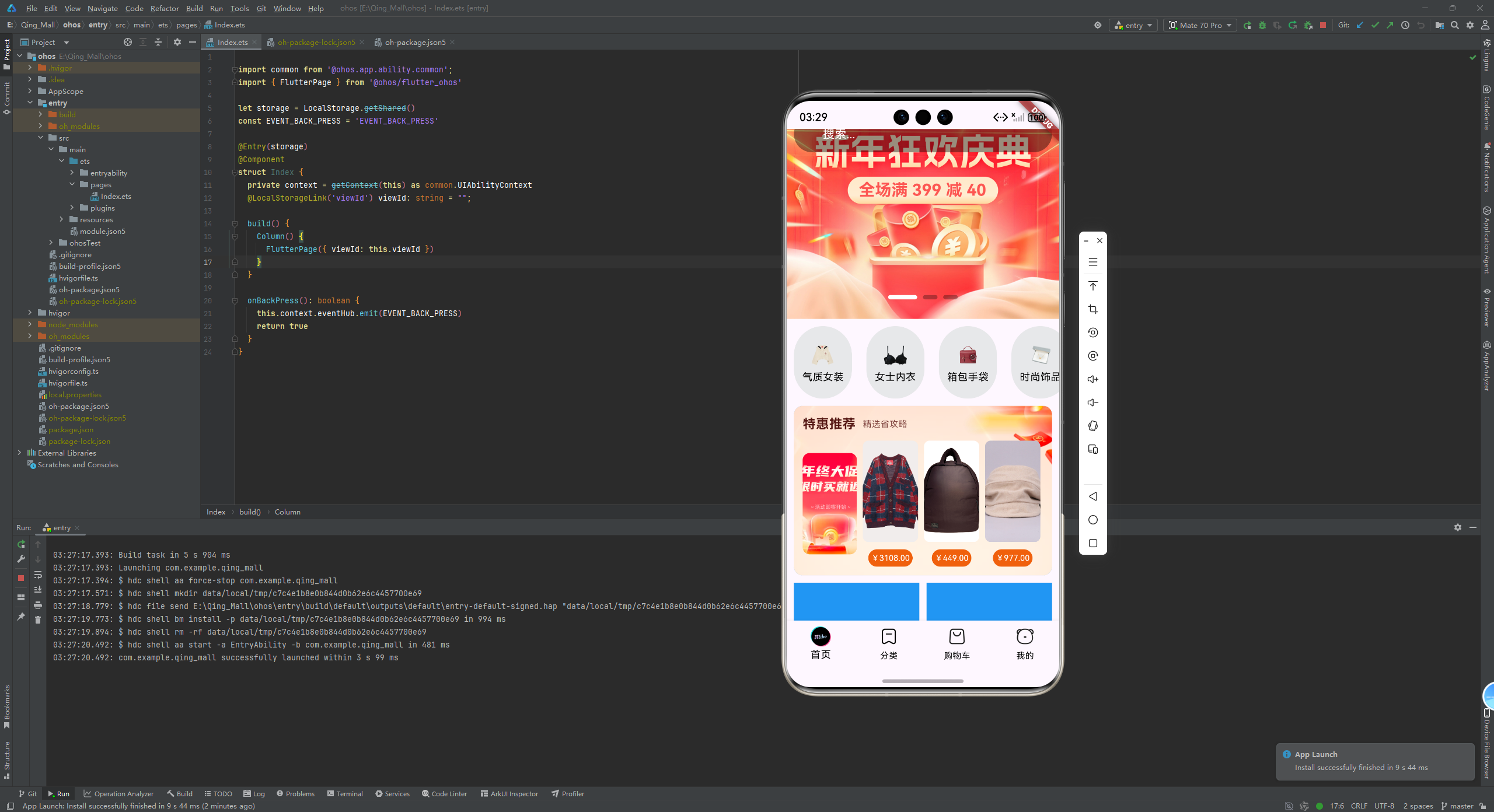
运行鸿蒙模拟器,效果如图
别忘了提交代码哦~,使用Android Studio进行Git可视化操作
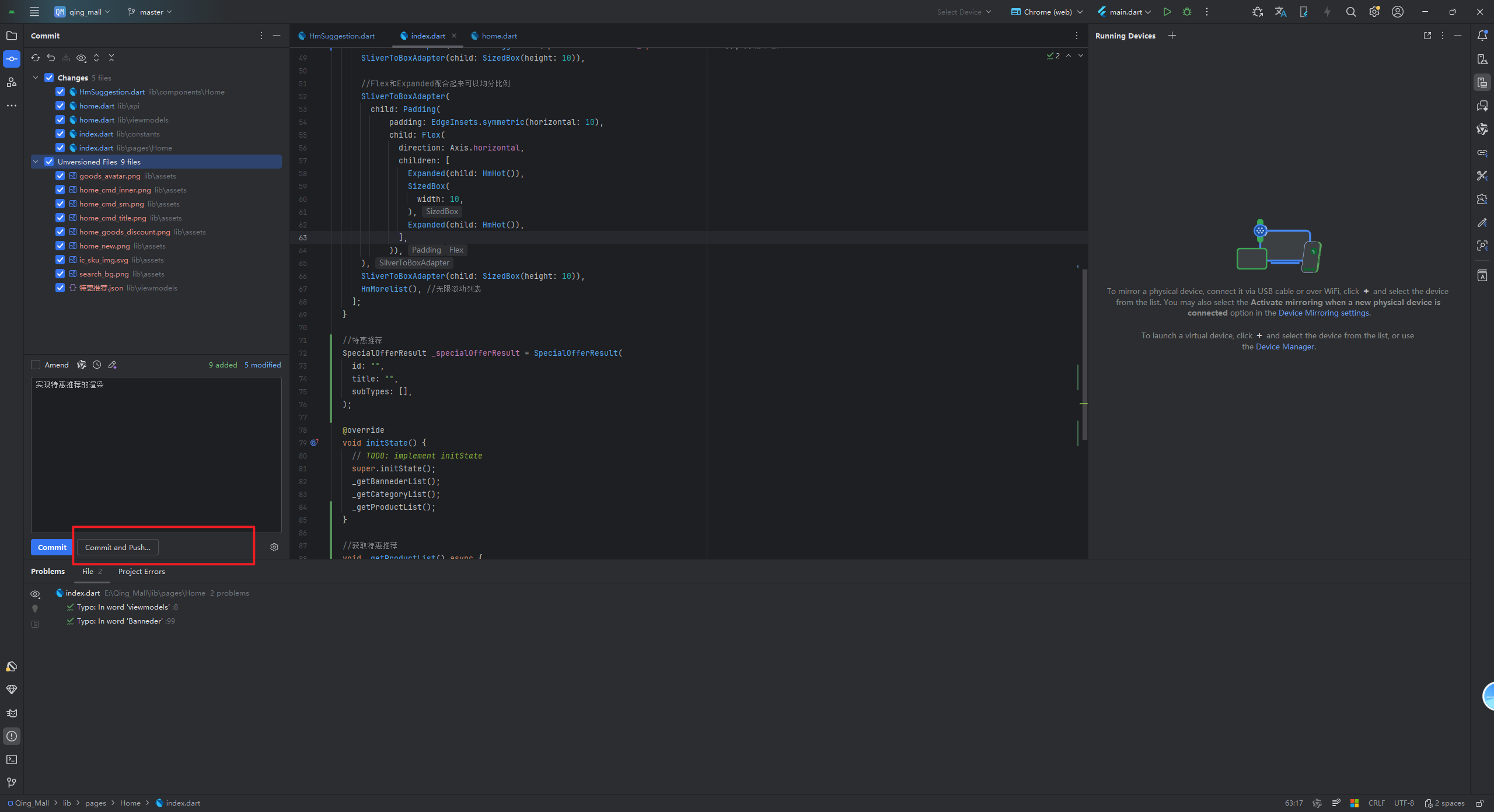
如果在文章中遇到问题,可拉下来源码进行查阅:https://AtomGit.com/Deng666/shangcheng.git
三、总结
本章通过Trae AI辅助编程,完整实现了特惠推荐功能的开发。主要完成了接口常量添加、数据模型构建、API接口封装、数据获取与UI展示的全流程。使用工厂模式转换JSON数据,实现了商品列表的动态渲染,并优化了图片加载错误处理。至此,首页特惠推荐模块开发完成,应用功能进一步完善。
最后,感谢大家的观看,如果本文章对你有帮助,请点个赞吧!~如果有疑问,可以在评论区留言,看到会回复。
欢迎加入开源鸿蒙跨平台社区:
https://openharmonycrossplatform.csdn.net

有“AI”的1024 = 2048,欢迎大家加入2048 AI社区
更多推荐

 14
14 0
0- 0


 已为社区贡献3条内容

所有评论(0)