【Laya】体积雾环境效果
·
体积雾环境效果
一个基于 LayaAir 的 2D 体积雾特效系统,通过多层软边粒子叠加创建逼真的体积雾效果。
效果预览
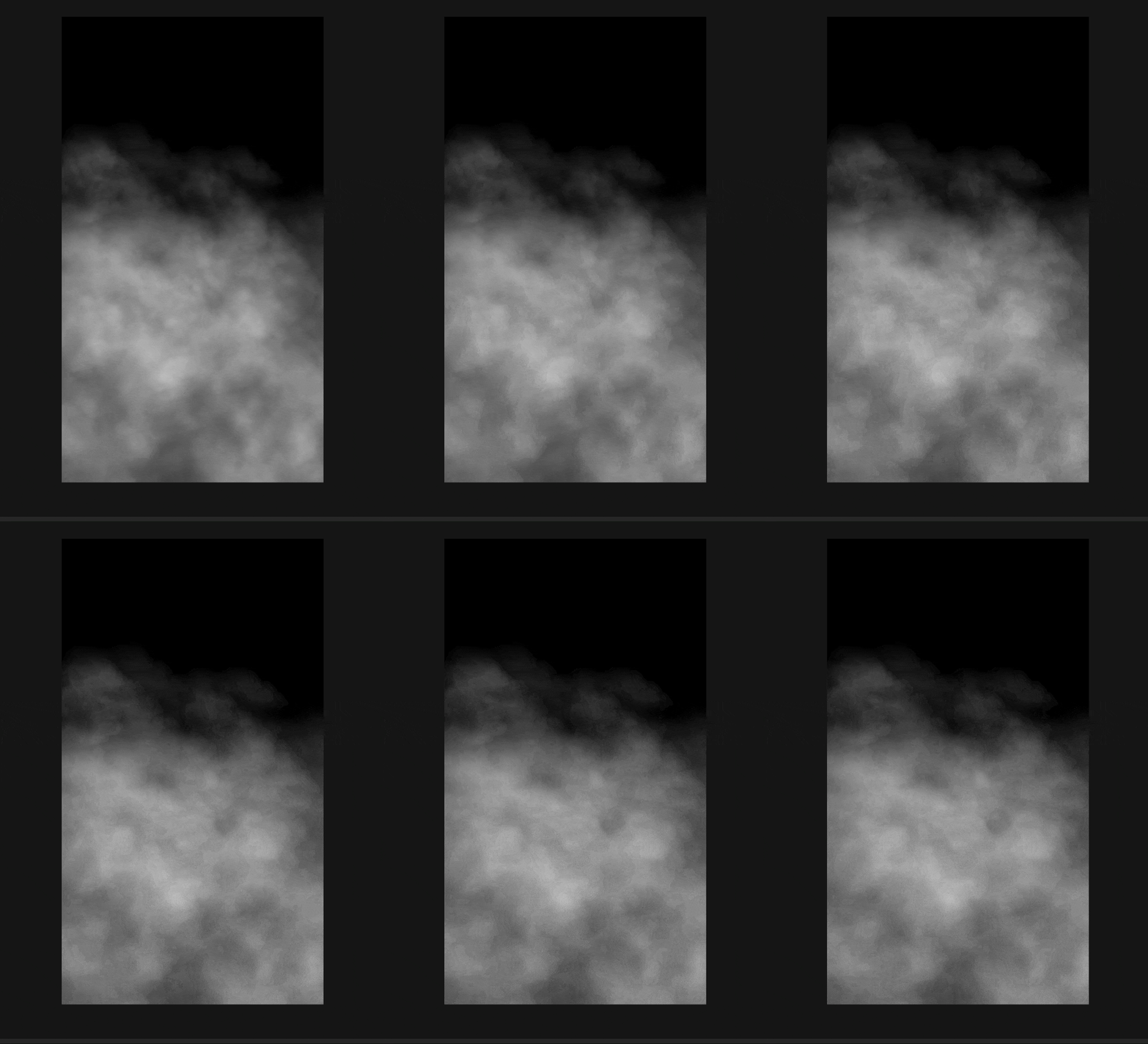
文件结构
environment/
└── FogSystem.ts    # 体积雾效果完整实现
快速使用
方式一:IDE 中挂载脚本
- 在 IDE 中创建一个 2D Sprite 节点
- 添加
FogEnvironmentScript组件 - (可选)在属性面板中拖入雾纹理图片
- 在属性面板中调整参数
方式二:代码中使用
import { FogEnvironmentScript } from "./environment/FogSystem";

// 添加雾脚本
const fogScript = sprite.addComponent(FogEnvironmentScript);

// 动态调整参数
fogScript.setScrollSpeed(0.2);        // 设置滚动速度
fogScript.setBaseAlpha(0.15);         // 设置基础透明度
fogScript.setDensity(1);              // 设置雾密度
fogScript.setVerticalFalloff(0.7);    // 设置垂直衰减
配置参数
| 参数 | 类型 | 说明 | 默认值 |
|---|---|---|---|
fogTexture |
Texture | 雾纹理图片(可选,不设置则使用默认椭圆绘制) | null |
scrollSpeed |
Number | 滚动速度 | 0.2 |
baseAlpha |
Number | 基础透明度 (0.05-0.8) | 0.2 |
density |
Number | 雾密度 (0.5-3) | 1 |
verticalFalloff |
Number | 垂直衰减 (0-1,顶部变淡程度) | 0.7 |
fogTop |
Number | 雾顶部位置 (0-1,屏幕百分比) | 0.1 |
fogBottom |
Number | 雾底部位置 (0-1,屏幕百分比) | 0.85 |
效果参考
| 效果 | 透明度 | 密度 | 垂直衰减 |
|---|---|---|---|
| 晨雾 | 0.1-0.15 | 0.8 | 0.8 |
| 薄雾 | 0.15-0.2 | 1 | 0.6 |
| 浓雾 | 0.25-0.35 | 1.5 | 0.4 |
| 迷雾 | 0.35-0.5 | 1.8 | 0.2 |
实现原理
核心架构
FogEnvironmentScript (主脚本)
    │
    └── VolumetricFogSystem (体积雾系统)
            └── FogLayer[] (雾层数组,4层)
1. 雾层 (FogLayer)
每个雾层由多个软边椭圆粒子叠加而成,形成体积雾效果:
class FogLayer {
    sprite: Laya.Sprite;
    vx: number;              // 移动速度
    startX: number;          // 起始X位置
    width: number;           // 层宽度(比屏幕宽,实现无缝滚动)
}
2. 体积雾粒子
有纹理时:使用 drawTexture 绘制雾纹理图片
const texWidth = texture.width;
const texHeight = texture.height;
const scale = 0.5 + Math.random() * 1.5;

this.sprite.graphics.drawTexture(
    texture,
    px, py,
    texWidth * scale,
    texHeight * scale
);
无纹理时:每个"雾团"由三个同心椭圆叠加,创建柔和边缘
// 外圈 - 很淡
this.sprite.graphics.drawEllipse(
    px, py,
    puffWidth, puffHeight,
    `rgba(${r}, ${g}, ${b}, ${puffAlpha * 0.3})`,
    null, 0
);

// 中圈 - 稍亮
this.sprite.graphics.drawEllipse(
    px + puffWidth * 0.1, py + puffHeight * 0.1,
    puffWidth * 0.7, puffHeight * 0.7,
    `rgba(${r}, ${g}, ${b}, ${puffAlpha * 0.5})`,
    null, 0
);

// 内圈 - 最亮
this.sprite.graphics.drawEllipse(
    px + puffWidth * 0.15, py + puffHeight * 0.15,
    puffWidth * 0.4, puffHeight * 0.4,
    `rgba(${r}, ${g}, ${b}, ${puffAlpha * 0.7})`,
    null, 0
);
3. 雾分布控制
通过 fogTop 和 fogBottom 控制雾在屏幕上的垂直分布:
// 全屏覆盖
fogScript.setFogArea(0, 1);

// 底部雾(地面积雾)
fogScript.setFogArea(0.6, 0.95);

// 顶部雾(高山云雾)
fogScript.setFogArea(0, 0.4);

// 中部雾(山谷雾)
fogScript.setFogArea(0.3, 0.7);
分布示例:
| 设置 | 效果 |
|---|---|
0, 1 |
全屏覆盖 |
0.6, 0.95 |
底部雾 |
0, 0.4 |
顶部雾 |
0.3, 0.7 |
中部雾 |
4. 视差效果
4 层雾气具有不同的速度和透明度,创造深度感:
const layerRatio = i / (layerCount - 1);
const speed = this.config.scrollSpeed * (0.3 + layerRatio * 0.7); // 远处慢,近处快
const alpha = this.config.baseAlpha * (0.5 + layerRatio * 0.5);     // 远处淡,近处浓
| 层 | 速度系数 | 透明度系数 |
|---|---|---|
| 第1层(最远) | 0.3 | 0.5 |
| 第2层 | 0.57 | 0.83 |
| 第3层 | 0.85 | 1.17 |
| 第4层(最近) | 1.0 | 1.0 |
5. 垂直衰减
雾气在每层内部从上到下逐渐变浓:
const normalizedY = py / height;
const falloff = 1 - (normalizedY * verticalFalloff * 0.5);
const puffAlpha = alpha * falloff * (0.5 + Math.random() * 0.5);
6. 无缝滚动
每层宽度为屏幕宽度的 1.5-2 倍,当滚动到一定位置时重置:
update(): void {
    this.startX += this.vx;

    // 无缝循环滚动
    if (this.startX > -this.width * 0.25) {
        this.startX = -this.width * 0.75;
    }

    this.sprite.x = this.startX;
}
API 参考
FogEnvironmentScript
| 方法 | 说明 |
|---|---|
setScrollSpeed(speed) |
设置滚动速度 |
setBaseAlpha(alpha) |
设置基础透明度 (0.05-0.8) |
setDensity(density) |
设置雾密度 (0.5-3) |
setVerticalFalloff(falloff) |
设置垂直衰减 (0-1) |
setTexture(texture) |
设置雾纹理 |
setFogArea(top, bottom) |
设置雾分布范围 (0-1) |
VolumetricFogSystem
| 方法 | 说明 |
|---|---|
setScrollSpeed(speed) |
设置滚动速度 |
setBaseAlpha(alpha) |
设置基础透明度 |
setDensity(density) |
设置雾密度 |
setVerticalFalloff(falloff) |
设置垂直衰减 |
destroy() |
销毁系统 |
使用场景
森林晨雾
const fogScript = scene2D.addComponent(FogEnvironmentScript);
fogScript.setScrollSpeed(0.15);
fogScript.setBaseAlpha(0.15);
fogScript.setDensity(0.8);
fogScript.setFogArea(0, 0.9);  // 覆盖大部分屏幕
恐怖迷雾
async onAwake() {
    // 深色背景
    Laya.stage.bgColor = "#0a0a10";

    const fogScript = this.owner.addComponent(FogEnvironmentScript);
    fogScript.setScrollSpeed(0.1);
    fogScript.setBaseAlpha(0.3);
    fogScript.setDensity(1.5);
    fogScript.setFogArea(0, 1);  // 全屏雾
}
海边雾气
const fogScript = this.owner.addComponent(FogEnvironmentScript);
fogScript.setScrollSpeed(0.25);
fogScript.setBaseAlpha(0.18);
fogScript.setDensity(1);
fogScript.setFogArea(0.5, 1);  // 下半部分雾
深山浓雾
const fogScript = this.owner.addComponent(FogEnvironmentScript);
fogScript.setScrollSpeed(0.08);
fogScript.setBaseAlpha(0.35);
fogScript.setDensity(1.8);
fogScript.setFogArea(0, 0.7);  // 上半部分雾
地面积雾
const fogScript = this.owner.addComponent(FogEnvironmentScript);
fogScript.setScrollSpeed(0.1);
fogScript.setBaseAlpha(0.25);
fogScript.setDensity(1.2);
fogScript.setFogArea(0.7, 1);  // 只在底部30%区域
效果组合
雨雾交加
const sprite = new Laya.Sprite();
sprite.addComponent(RainEnvironmentScript);
const fog = sprite.addComponent(FogEnvironmentScript);
fog.setBaseAlpha(0.2);
fog.setDensity(1.2);
恐怖环境(雾 + 荧光)
const sprite = new Laya.Sprite();
const fog = sprite.addComponent(FogEnvironmentScript);
fog.setBaseAlpha(0.3);
fog.setDensity(1.5);
const glow = sprite.addComponent(GlowEnvironmentScript);
glow.setGlowIntensity(2);
扩展建议
添加颜色变化
const FOG_COLORS = [
    {r: 240, g: 248, b: 255},  // 白色
    {r: 200, g: 220, b: 230},  // 灰蓝
    {r: 180, g: 200, b: 210},  // 深灰蓝(阴天)
    {r: 255, g: 240, b: 220},  // 暖色(日落雾)
];
添加动态雾气密度变化
class DynamicFog extends Laya.Script {
    private fog!: FogEnvironmentScript;
    private time: number = 0;

    async onAwake() {
        this.fog = this.owner.addComponent(FogEnvironmentScript);
    }

    onUpdate() {
        this.time += 0.01;
        // 雾气密度缓慢脉动
        const density = 1 + Math.sin(this.time) * 0.3;
        this.fog.setDensity(density);
    }
}
多方向雾气
// 添加垂直移动的雾气
update(): void {
    this.startX += this.vx;
    this.startY += this.vy;  // 垂直漂移

    // 循环逻辑...
}

有“AI”的1024 = 2048,欢迎大家加入2048 AI社区
更多推荐


 13
13 0
0- 0


 已为社区贡献35条内容

所有评论(0)