一个多模态项目:细粒度空间感知能力的实时多模态智能体
多模态大模型项目,欢迎一起学习,求一个star!
最近学习多模态大模型,做了一个项目,供大家参考一起学习。
如果喜欢的话可以给我一个star嘛,谢谢大家!
github链接:https://github.com/wolfvoid/FMU-Agent/
👁️ FMU-Agent
Fine-Grained Multimodal Understanding Agent with MLLM & SAM2
A Real-time, Intent-Driven Visual Agent featuring “Spotlight” Prompting and Self-Verification.
🚀 Introduction (项目简介)
FMU-Agent 是一个具备细粒度空间感知能力的实时多模态智能体。用户可以通过点击图像中的任意物体或输入文本指令,获得精准的描述生成与目标定位服务。
针对现有 MLLM 在微小物体定位和复杂指代上的不足,FMU-Agent 引入了创新的 “Spotlight”(聚光灯)视觉提示算法,并结合 SAM2 的实时分割能力与 vLLM 的高吞吐推理,实现了毫秒级的视觉交互体验。
不同于传统的“看图说话”,FMU-Agent 具备 System 2 级别的自我反思能力,通过 推理时循环验证 (Inference-Time Cycle-Verification) 机制,显著降低了空间幻觉。
✨ Key Features (核心特性)
- 👆 Click-to-Chat (点击即交互): 结合 SAM2,实现对任意细粒度物体的实时分割与多轮深度对话。
- 🔍 Text-to-Box (意图驱动定位): 支持显式指令(如 “Find: the red cup”),精准定位并绘制目标 BBox。
- 🎨 Spotlight Visual Prompting: 独创的“背景压暗+真值保留+白色轮廓”算法,解决传统红膜遮挡纹理的问题。
- 🛡️ Cycle-Consistency Verification: 推理时自动反向验证(Text → \to → Box → \to → IoU),拦截幻觉输出。
- ⚡ Decoupled Architecture: 前端 (Gradio)、视觉 (SAM2)、推理 (vLLM) 三层解耦,支持多 GPU 流水线部署。
🎞️ Demo (演示)
任务 1:细粒度文本生成 (Image Captioning)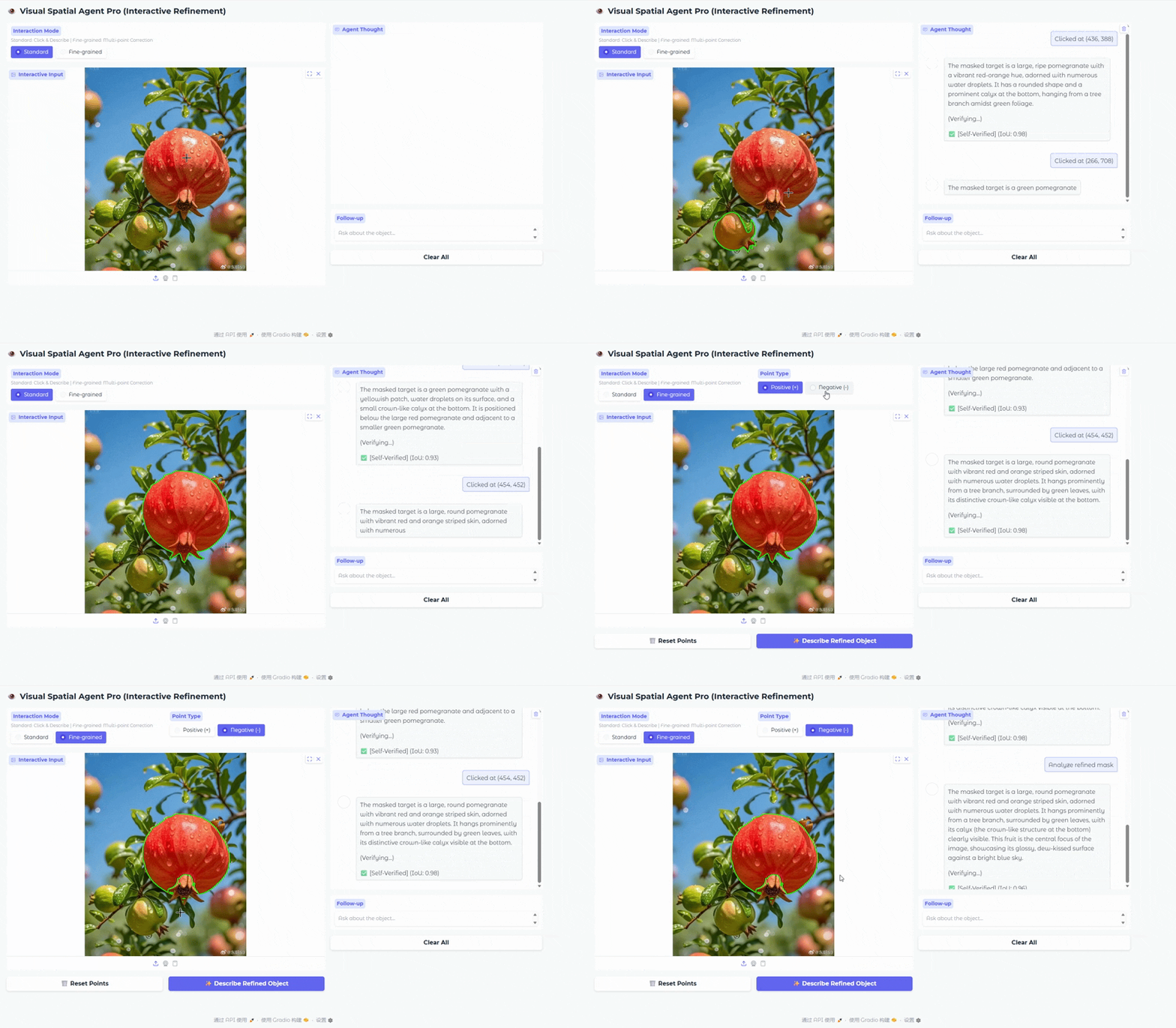
任务 2:内容精确定位 (Grounding)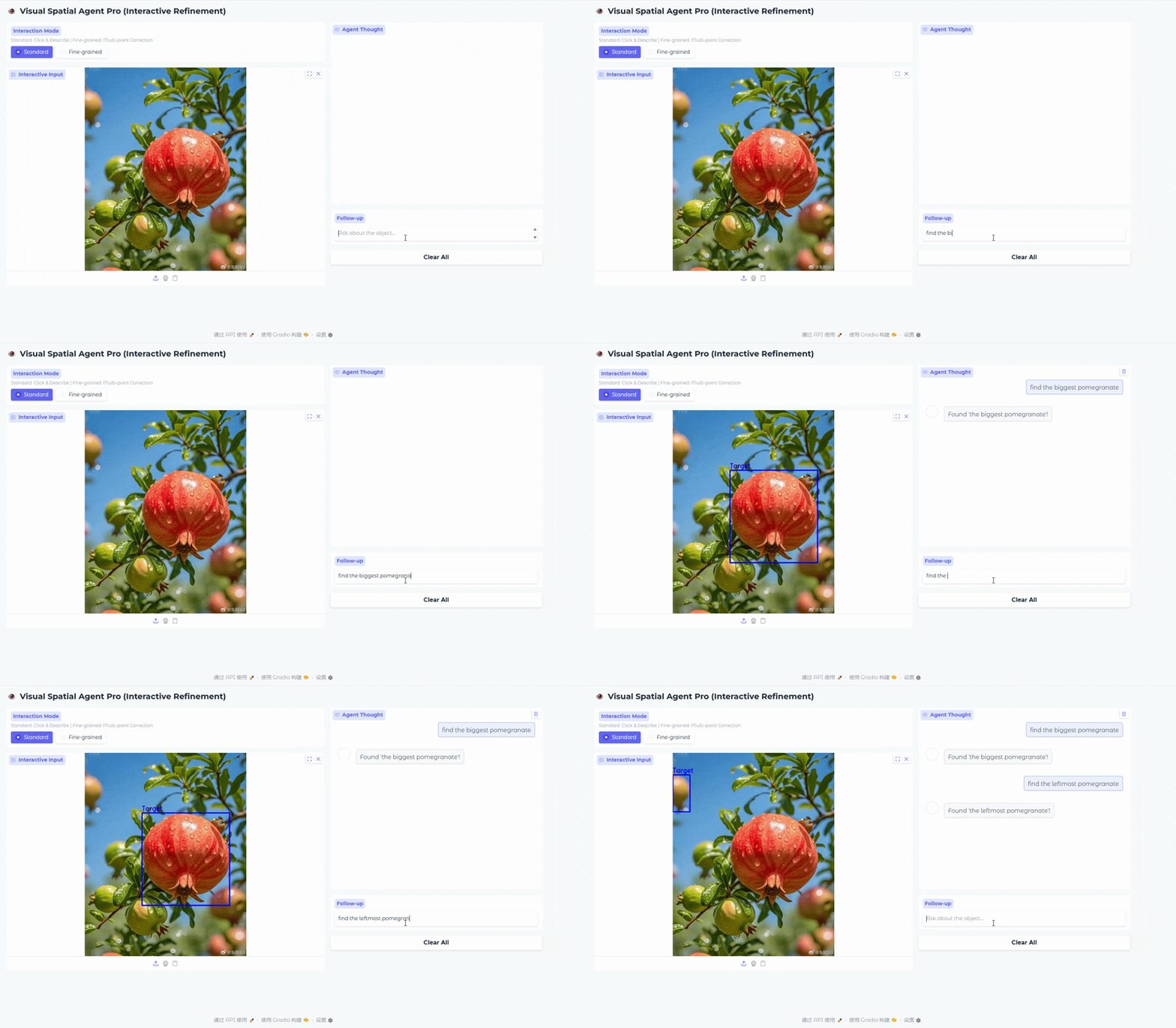
🧠 Methodology (算法原理)
1. Spotlight Visual Prompting (聚光灯提示)
传统的 Overlay(红色半透明掩膜)会改变物体像素颜色,导致模型将红色物体误判为粉色。FMU-Agent 采用 Spotlight Mode:
- Dimming: 背景亮度降低 50%,形成强对比。
- Fidelity: 目标区域保留 100% 原始像素,零颜色污染。
- Indicator: 绘制 1px 极细白色轮廓,作为非语义的人工边界指示。
2. Cycle-Consistency Verification (闭环验证)
FMU-Agent 在推理阶段引入自我博弈机制:
- Generate: 用户点击 → \to → 生成描述 T T T。
- Reverse: 将 T T T 输入模型 → \to → 预测坐标 B p r e d B_{pred} Bpred。
- Verify: 计算 B p r e d B_{pred} Bpred 与原始 Mask M M M 的交并比 IoU ( B p r e d , M ) \text{IoU}(B_{pred}, M) IoU(Bpred,M)。
- Decision: 若 IoU < T h r e s h o l d \text{IoU} < Threshold IoU<Threshold,标记为低置信度或触发重生成。
🛠️ Architecture (系统架构)
FMU-Agent 采用三层解耦架构以最大化吞吐量:
📊 Data Preparation (数据准备)
We use COCO 2017 Val set for evaluation, you can also use other datasets. Download COCO 2017 Val images and annotations:
# Download COCO 2017 Val Set
wget http://images.cocodataset.org/zips/val2017.zip
wget http://images.cocodataset.org/annotations/annotations_trainval2017.zip
# or you can use a python script to download
python tools/download_coco.py
We provide the Spotlight Data Engine used to train FMU-Agent. To reproduce our training data:
# Generate Spotlight-Augmented COCO Dataset
python tools/prepare_finetune_data.py \
    --coco_dir ./coco/val2017 \
    --output_dir ./dataset/spotlight_images
Note: This script requires an OpenAI API Key for GPT-4o distillation.
🛠️ Fine-Tuning (微调)
We use LLaMA-Factory for efficient and easy-to-use fine-tuning. Follow the steps below to fine-tune the model on your own dataset.
1. Installation
If you haven’t installed LLaMA-Factory yet, please set it up first:
git clone https://github.com/hiyouga/LLaMA-Factory.git
cd LLaMA-Factory
pip install -e .[metrics]
2. Prepare Dataset
LLaMA-Factory requires a specific data format (Alpaca or ShareGPT style) and a registry entry in dataset_info.json.
Step 1: Format your data For Vision-Language tasks, we recommend the ShareGPT format. Save your data as data/my_custom_data.json:
    [
        {
            "id": "identity_0",
            "conversations": [
            {
                "from": "user",
                "value": "<image>Describe this image."
            },
            {
                "from": "assistant",
                "value": "This is a detailed description of the image..."
            }
            ],
            "images": [
            "/path/to/image_01.jpg"
            ]
        }
    ]
Step 2: Register your dataset Edit LLaMA-Factory/data/dataset_info.json and append your dataset definition:
    "my_custom_dataset": {
        "file_name": "my_custom_data.json",
        "formatting": "sharegpt",
        "columns": {
            "messages": "conversations",
            "images": "images"
        }
    }
- Start Training
Use the following command to start LoRA fine-tuning. We provide a sample script scripts/finetune.sh for reference.
Note:
-
Ensure --template matches your base model (e.g., qwen2_vl).
-
Adjust --per_device_train_batch_size and --gradient_accumulation_steps based on your GPU memory.
-
If you encounter OOM (Out of Memory), try enabling DeepSpeed Zero2 or Zero3 by adding --deepspeed examples/deepspeed/ds_z2_config.json.
-
Once training is complete, refer to the Merge LoRA weights section to merge the adapter into the base model.
🗓️ Roadmap
- [✅] Release Inference Code & Gradio Demo
- [✅] Release “Spotlight” Data Generation Script
- Release Pre-trained LoRA Weights
🖊️ Citation
If you find this project useful, please cite:
@misc{fmu-agent2026,
  title={FMU-Agent: Fine-Grained Multimodal Understanding Agent with MLLM & SAM2},
  author={wolf void},
  year={2026},
  publisher={GitHub},
  journal={GitHub repository},
  howpublished={\url{https://github.com/wolfvoid/FMU-Agent}}
}
📄 License
This project is licensed under the Apache 2.0 License. Based on Qwen3-VL and SAM2.

有“AI”的1024 = 2048,欢迎大家加入2048 AI社区
更多推荐
 11
11 0
0- 0


 已为社区贡献57条内容

所有评论(0)