UnSola:屏幕文字识别PaddleOCR模块
·
前言
一款电脑智能助手肯定是需要能够拥有看见屏幕的“眼睛”,而最基础的视觉就是使用OCR使得这个助手能识别屏幕上的文字。
接一下上一篇博客的内容,在原有的基础上,我将智谱模型换成了deepseek,最开始选择智谱的原因是因为免费,并且deepseek账号注册第一个月不让充钱(第一次见送钱不要的!!)然后之前不是说ai识别控制指令不稳定嘛,我发现换成deepseek暂时没有遇见这个问题,原来是智慧问题嘛(实在是我想它给我OCR的控制指令非常不稳定,所以就坚决换了。)
问题总结
- 版本冲突问题,PaddleOCR需要搭配paddlepaddle一起安装,这两个的版本必须要注意,我目前用的版本是paddleocr-3.3.2,paddlepaddle-gpu-2.6.2,paddlepaddle-3.0.0。如果paddlepaddle使用3.3.0版本会由于版本较新,有部分内容paddlerORC还没有兼容导致运行报错。如果paddlepaddle使用2.7.0左右版本会需要搭配1.x的numpy,而我环境中numpy是2.x,如果降低版本会由于太旧与整个环境冲突,出现问题。
paddleocr>=3.3.2
paddlepaddle-gpu>=2.6.2
paddlepaddle>=3.0.0
- API调用问题,由于我是面向AI编程,然后AI就疯狂乱调用PaddleOCR的API,实在是受不了,还是乖乖去官网上看文档了。看了文档才发现,官方分了文字识别和文字检测,简单来说,文字识别是识别文字是什么但是没有文字的位置,而文字检测是识别有文字的位置而没有文字是什么,那么很正常就想到将两者进行结合使用。(当然,似乎官方也提供了结合的API)
文本检测模块官方调用代码
from paddleocr import TextDetection

model = TextDetection()
output = model.predict("general_ocr_001.png")
for res in output:
    res.print()
    res.save_to_img(save_path="./output/")
    res.save_to_json(save_path="./output/res.json")
文本识别模块官方调用代码
from paddleocr import TextRecognition

model = TextRecognition()
output = model.predict(input="general_ocr_rec_001.png")
for res in output:
    res.print()
    res.save_to_img(save_path="./output/")
    res.save_to_json(save_path="./output/res.json")
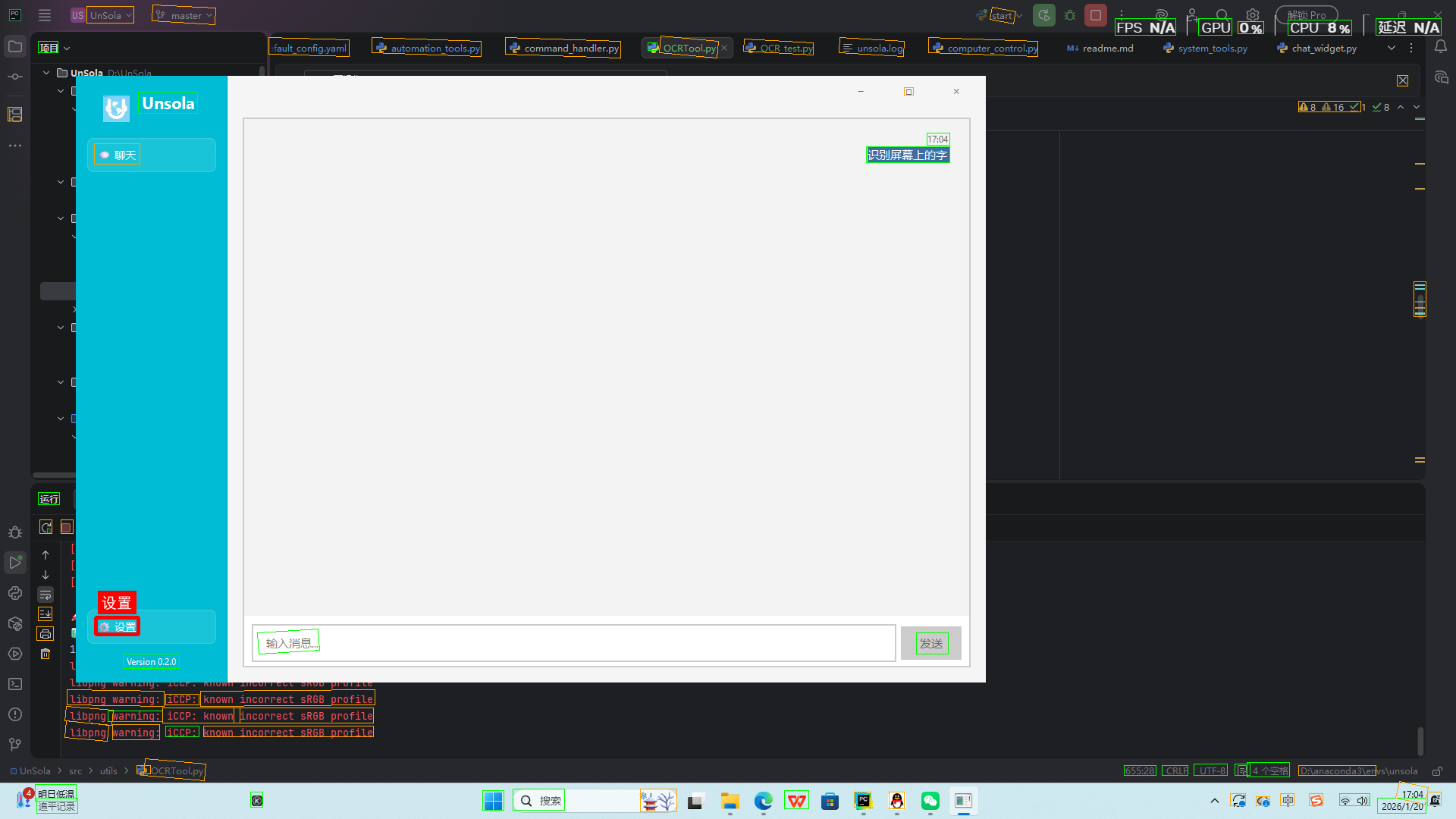
代码很简单,这里就不解释了,我暂时的使用方法是先使用文本检测得到屏幕内所有文字的位置,然后对置信度最高的那个文字进行文本识别。(当然,完全可以全部进行文本识别或者先框规定区域再进行文本检测,这些后续再处理)
效果展示
核心代码
OCRTool类模块
import os
import time
from typing import List, Dict, Optional, Union, Tuple
import numpy as np
from PIL import Image, ImageGrab, ImageFont, ImageDraw
import cv2
try:
from paddleocr import PaddleOCR, TextDetection
PADDLEOCR_AVAILABLE = True
except ImportError:
PADDLEOCR_AVAILABLE = False
print("警告: PaddleOCR未安装,请运行: pip install paddleocr paddlepaddle")
class OCRTool:
"""OCR工具类,负责所有OCR相关操作"""
def __init__(self,
use_gpu: bool = False,
lang: str = 'ch',
show_log: bool = False,
model_dirs: Optional[Dict] = None,
logger=None):
"""
初始化OCR引擎
Args:
use_gpu: 是否使用GPU加速
lang: 识别语言 ('ch'中文, 'en'英文, 'multi'多语言)
show_log: 是否显示详细日志
model_dirs: 自定义模型路径
logger: 可选的日志记录器
"""
self.use_gpu = use_gpu
self.lang = lang
self.show_log = show_log
self.model_dirs = model_dirs or {}
self.logger = logger
# 初始化OCR引擎
self.ocr_engine = self._init_ocr_engine()
# 性能统计
self.stats = {
'total_requests': 0,
'total_characters': 0,
'avg_process_time': 0,
'last_operation_time': None,
'success_count': 0,
'error_count': 0
}
self._log_info(f"OCRTool初始化完成 (语言: {lang}, GPU: {use_gpu})")
def _init_ocr_engine(self):
"""智能初始化PaddleOCR,测试所有可能的参数组合"""
if not PADDLEOCR_AVAILABLE:
raise ImportError("PaddleOCR未安装,请运行: pip install paddleocr paddlepaddle")
try:
ocr = TextDetection(model_name="PP-OCRv5_server_det")
return ocr
except Exception as e:
self._log_info("初始化OCR识别")
# 如果所有组合都失败,尝试导入检查
self._log_error("所有参数组合都失败,尝试诊断问题...")
# 检查PaddlePaddle安装
try:
import paddle
self._log_info(f"PaddlePaddle版本: {paddle.__version__}")
self._log_info(f"是否编译CUDA: {paddle.device.is_compiled_with_cuda()}")
except Exception as e:
self._log_error(f"PaddlePaddle检查失败: {e}")
raise Exception("OCR引擎初始化失败:所有参数组合都无效")
def recognize_from_file(self,
image_path: str,
save_result: bool = False,
output_dir: str = "./data/OCR_Results",
recognize_best_box: bool = True) -> Dict:
"""
从图片文件识别文字
Args:
image_path: 图片路径
save_result: 是否保存识别结果
output_dir: 结果保存目录
Returns:
识别结果字典
"""
start_time = time.time()
try:
self._log_debug(f"开始识别文件: {image_path}")
# 检查文件是否存在
if not os.path.exists(image_path):
self._log_error(f"图片文件不存在: {image_path}")
raise FileNotFoundError(f"图片文件不存在: {image_path}")
# 获取文件大小
file_size = os.path.getsize(image_path) / 1024 # KB
self._log_debug(f"文件大小: {file_size:.2f}KB")
# 1. 文字检测
from paddleocr import TextDetection
det_model = TextDetection(model_name="PP-OCRv5_server_det")
det_results = det_model.predict(image_path, batch_size=1)
# 2. 格式化检测结果
detection_result = self._format_ocr_result(det_results)
if not detection_result['success']:
self._log_warning("未检测到任何文字区域")
return detection_result
self._log_info(f"检测到 {detection_result['total_items']} 个文字区域")
# 3. 获取最高置信度的检测框
highest_confidence_box = self.get_highest_confidence_result(detection_result)
print(f"最高置信度检测框: {highest_confidence_box}")
# 4. 如果启用识别,对最高置信度区域进行文字识别
recognition_result = None
if recognize_best_box and highest_confidence_box:
recognition_result = self._recognize_text_in_box(
image_path,
highest_confidence_box['bbox']
)
# 合并结果
combined = self._combine_results(highest_confidence_box, recognition_result)
# 5. 合并结果
final_result = {
'success': True,
'detection': detection_result,
'highest_confidence_box': highest_confidence_box,
'recognition': recognition_result,
'combined_result': combined,
'timestamp': time.time(),
'text': combined.get('text', '') if combined else ''
}
# 6. 更新统计信息
self._update_stats(final_result, start_time, success=True)
# 7. 保存结果
if save_result:
self._save_combined_result(image_path, final_result, output_dir)
process_time = time.time() - start_time
self._log_info(f"文件识别完成: {image_path}, 检测到 {detection_result['total_items']} 个区域, "
f"识别文字: {final_result['combined_result'].get('text', '无')}, "
f"耗时: {process_time:.2f}秒")
return final_result
except Exception as e:
self._update_stats(None, start_time, success=False)
self._log_error(f"文件识别失败: {image_path}, 错误: {str(e)}")
raise Exception(f"OCR识别失败: {str(e)}")
def recognize_from_image(self,
image: Union[np.ndarray, Image.Image],
save_result: bool = False,
output_dir: str = "./data/OCR_Results",
recognize_best_box:bool =True) -> Dict:
"""
从内存中的图像识别文字
Args:
image: PIL.Image 或 numpy数组
save_result: 是否保存结果
output_dir: 结果保存目录
Returns:
识别结果字典
"""
start_time = time.time()
try:
self._log_debug("开始识别内存图像")
# 获取图像尺寸
if isinstance(image, Image.Image):
img_size = f"{image.width}x{image.height}"
image_array = np.array(image)
else:
img_size = f"{image.shape[1]}x{image.shape[0]}"
image_array = image
self._log_debug(f"图像尺寸: {img_size}")
# 1. 文字检测
from paddleocr import TextDetection
det_model = TextDetection(model_name="PP-OCRv5_server_det")
det_results = det_model.predict(image_array, batch_size=1)
# 2. 格式化检测结果
detection_result = self._format_ocr_result(det_results)
if not detection_result['success']:
self._log_warning("未检测到任何文字区域")
return detection_result
self._log_info(f"检测到 {detection_result['total_items']} 个文字区域")
# 3. 获取最高置信度的检测框
highest_confidence_box = self.get_highest_confidence_result(detection_result)
print(f"最高置信度检测框: {highest_confidence_box}")
# 4. 如果启用识别,对最高置信度区域进行文字识别
recognition_result = None
if recognize_best_box and highest_confidence_box:
recognition_result = self._recognize_text_in_box(
image_array,
highest_confidence_box['bbox']
)
# 合并结果
combined = self._combine_results(highest_confidence_box, recognition_result)
# 5. 合并结果
final_result = {
'success': True,
'detection': detection_result,
'highest_confidence_box': highest_confidence_box,
'recognition': recognition_result,
'combined_result': combined,
'timestamp': time.time(),
'text': combined.get('text', '') if combined else ''
}
# 6. 更新统计信息
self._update_stats(final_result, start_time, success=True)
# 7. 保存结果
if save_result:
self._save_combined_result(image_array, final_result, output_dir)
process_time = time.time() - start_time
self._log_info(f"文件识别完成: {image_array}, 检测到 {detection_result['total_items']} 个区域, "
f"识别文字: {final_result['combined_result'].get('text', '无')}, "
f"耗时: {process_time:.2f}秒")
return final_result
except Exception as e:
self._update_stats(None, start_time, success=False)
self._log_error(f"图像识别失败: {str(e)}")
raise Exception(f"OCR识别失败: {str(e)}")
def recognize_from_screen(self,
region: Optional[Tuple[int, int, int, int]] = None,
save_result: bool = False,
output_dir: str = "./data/OCR_Results") -> Dict:
"""
从屏幕截图识别文字
Args:
region: 截图区域 (x1, y1, x2, y2),None表示全屏
save_result: 是否保存结果
output_dir: 结果保存目录
Returns:
识别结果字典
"""
start_time = time.time()
try:
region_info = f"区域: {region}" if region else "全屏"
self._log_debug(f"开始屏幕识别: {region_info}")
# 截图
if region:
screenshot = ImageGrab.grab(bbox=region)
self._log_debug(f"截取区域: {region}, 尺寸: {screenshot.width}x{screenshot.height}")
else:
screenshot = ImageGrab.grab()
self._log_debug(f"全屏截图, 尺寸: {screenshot.width}x{screenshot.height}")
# 识别
result = self.recognize_from_image(screenshot, save_result, output_dir)
process_time = time.time() - start_time
self._log_info(f"屏幕识别完成: {region_info}, 识别到 {result['total_items']} 个项目, "
f"耗时: {process_time:.2f}秒")
return result
except Exception as e:
self._log_error(f"屏幕OCR识别失败: {str(e)}")
raise Exception(f"屏幕OCR识别失败: {str(e)}")
def recognize_text_in_region(self,
image_path: str,
region: Tuple[int, int, int, int],
save_result: bool = False) -> Dict:
"""
识别图片中指定区域内的文字
Args:
image_path: 图片路径
region: 区域坐标 (x1, y1, x2, y2)
save_result: 是否保存结果
Returns:
识别结果字典
"""
start_time = time.time()
try:
self._log_debug(f"开始区域识别: {image_path}, 区域: {region}")
# 读取图片并裁剪区域
image = Image.open(image_path)
cropped_image = image.crop(region)
self._log_debug(f"原始图片尺寸: {image.width}x{image.height}, "
f"裁剪区域尺寸: {cropped_image.width}x{cropped_image.height}")
# 识别裁剪后的图片
result = self.recognize_from_image(cropped_image, save_result)
# 调整坐标(从裁剪区域坐标转换到原始图片坐标)
x1, y1, x2, y2 = region
for item in result['details']:
# 调整边界框坐标
bbox = item['bbox']
adjusted_bbox = [
[bbox[0][0] + x1, bbox[0][1] + y1],
[bbox[1][0] + x1, bbox[1][1] + y1],
[bbox[2][0] + x1, bbox[2][1] + y1],
[bbox[3][0] + x1, bbox[3][1] + y1]
]
item['bbox'] = adjusted_bbox
# 调整中心点坐标
item['center'] = (item['center'][0] + x1, item['center'][1] + y1)
process_time = time.time() - start_time
self._log_info(f"区域识别完成: {image_path}, 区域: {region}, "
f"识别到 {result['total_items']} 个项目, 耗时: {process_time:.2f}秒")
return result
except Exception as e:
self._log_error(f"区域OCR识别失败: {image_path}, 区域: {region}, 错误: {str(e)}")
raise Exception(f"区域OCR识别失败: {str(e)}")
def search_text_on_screen(self,
text: str,
region: Optional[Tuple[int, int, int, int]] = None,
case_sensitive: bool = False,
confidence_threshold: float = 0.7) -> List[Dict]:
"""
在屏幕上搜索特定文字
Args:
text: 要搜索的文字
region: 搜索区域
case_sensitive: 是否区分大小写
confidence_threshold: 置信度阈值
Returns:
匹配结果列表
"""
start_time = time.time()
try:
region_info = f"区域: {region}" if region else "全屏"
search_info = f"搜索文字: '{text}', 区分大小写: {case_sensitive}, 置信度阈值: {confidence_threshold}"
self._log_debug(f"开始文字搜索: {search_info}, {region_info}")
# 识别屏幕文字
ocr_result = self.recognize_from_screen(region)
# 搜索匹配的文字
matches = []
search_text = text if case_sensitive else text.lower()
for item in ocr_result['details']:
item_text = item['text'] if case_sensitive else item['text'].lower()
confidence = item['confidence']
# 检查是否包含搜索文本且置信度达标
if search_text in item_text and confidence >= confidence_threshold:
matches.append({
'text': item['text'],
'confidence': confidence,
'bbox': item['bbox'],
'center': item['center'],
'full_match': (search_text == item_text)
})
process_time = time.time() - start_time
self._log_info(f"文字搜索完成: 找到 {len(matches)} 个匹配项, "
f"耗时: {process_time:.2f}秒, 搜索条件: '{text}'")
if matches:
self._log_debug(f"匹配结果前3项: {matches[:3]}")
return matches
except Exception as e:
self._log_error(f"文字搜索失败: {str(e)}")
raise Exception(f"文字搜索失败: {str(e)}")
def extract_text_only(self, image_source: Union[str, np.ndarray, Image.Image]) -> str:
"""
仅提取文字内容(快速模式)
Args:
image_source: 图片路径、numpy数组或PIL Image
Returns:
提取的文字内容
"""
start_time = time.time()
try:
source_type = type(image_source).__name__
self._log_debug(f"开始快速提取文字, 源类型: {source_type}")
if isinstance(image_source, str):
self._log_debug(f"从文件提取: {image_source}")
result = self.recognize_from_file(image_source, save_result=False)
else:
self._log_debug("从图像提取")
result = self.recognize_from_image(image_source, save_result=False)
# 提取所有文字
texts = [item['text'] for item in result['details']]
extracted_text = '\n'.join(texts)
process_time = time.time() - start_time
self._log_info(f"快速提取完成, 提取到 {len(texts)} 段文字, "
f"总字符数: {len(extracted_text)}, 耗时: {process_time:.2f}秒")
return extracted_text
except Exception as e:
self._log_error(f"快速提取失败: {str(e)}")
return ""
def _recognize_text_in_box(self, image_path, bbox):
"""
在指定边界框内进行文字识别
Args:
image_path: 原始图片路径
bbox: 边界框坐标 [[x1,y1], [x2,y2], [x3,y3], [x4,y4]]
Returns:
文字识别结果
"""
try:
import cv2
import numpy as np
from paddleocr import TextRecognition
# 1. 读取原始图片
img = cv2.imread(image_path)
if img is None:
self._log_error(f"无法读取图片: {image_path}")
return None
# 2. 提取边界框坐标
x_coords = [point[0] for point in bbox]
y_coords = [point[1] for point in bbox]
x1, y1 = int(min(x_coords)), int(min(y_coords))
x2, y2 = int(max(x_coords)), int(max(y_coords))
# 添加一点边距(避免裁剪太紧)
margin = 2
x1, y1 = max(0, x1 - margin), max(0, y1 - margin)
x2, y2 = min(img.shape[1], x2 + margin), min(img.shape[0], y2 + margin)
# 3. 裁剪区域
cropped_img = img[y1:y2, x1:x2]
if cropped_img.size == 0:
self._log_warning("裁剪区域为空")
return None
# 4. 保存为临时文件(TextRecognition需要文件路径)
import tempfile
import os
temp_dir = tempfile.mkdtemp()
temp_path = os.path.join(temp_dir, "cropped_text.png")
cv2.imwrite(temp_path, cropped_img)
self._log_debug(f"裁剪区域保存到: {temp_path}, 尺寸: {cropped_img.shape[1]}x{cropped_img.shape[0]}")
# 5. 文字识别
rec_model = TextRecognition(model_name="PP-OCRv5_server_rec")
rec_results = rec_model.predict(temp_path, batch_size=1)
# 6. 格式化识别结果
recognition_result = self._format_ocr_result(rec_results)
# 7. 清理临时文件
try:
os.remove(temp_path)
os.rmdir(temp_dir)
except:
pass
self._log_info(f"区域识别完成: 位置({x1},{y1})-({x2},{y2}), "
f"识别到文字: {recognition_result.get('text', '无')}")
return recognition_result
except Exception as e:
self._log_error(f"区域文字识别失败: {e}")
return None
def _combine_results(self, detection_box, recognition_result):
"""
合并检测和识别结果
Args:
detection_box: 检测框信息
recognition_result: 文字识别结果
Returns:
合并后的结果
"""
combined = {
'detection_confidence': detection_box.get('confidence', 0.0),
'bbox': detection_box.get('bbox', []),
'center': detection_box.get('center', (0, 0)),
'bbox_width': detection_box.get('bbox_width', 0),
'bbox_height': detection_box.get('bbox_height', 0)
}
if recognition_result and recognition_result.get('success', False):
# 获取识别结果中的最高置信度文字
rec_details = recognition_result.get('details', [])
if rec_details:
best_recognition = max(rec_details, key=lambda x: x.get('confidence', 0))
combined.update({
'text': best_recognition.get('text', ''),
'recognition_confidence': best_recognition.get('confidence', 0.0),
'recognition_details': recognition_result
})
else:
combined['text'] = recognition_result.get('text', '')
combined['recognition_confidence'] = 0.0
else:
combined['text'] = '未识别到文字'
combined['recognition_confidence'] = 0.0
combined['recognition_error'] = recognition_result.get('error',
'识别失败') if recognition_result else '无识别结果'
# 计算综合置信度
combined['combined_confidence'] = (
combined['detection_confidence'] * 0.4 +
combined['recognition_confidence'] * 0.6
)
return combined
def _save_combined_result(self, image_path, combined_result, output_dir):
"""
保存合并的识别结果
"""
try:
os.makedirs(output_dir, exist_ok=True)
# 生成文件名
timestamp = int(time.time())
basename = os.path.basename(image_path)
name_without_ext = os.path.splitext(basename)[0]
# 保存JSON结果
json_path = os.path.join(output_dir, f"{name_without_ext}_combined_{timestamp}.json")
import json
with open(json_path, 'w', encoding='utf-8') as f:
json.dump(combined_result, f, ensure_ascii=False, indent=2)
# 保存文本结果(主要识别内容)
txt_path = os.path.join(output_dir, f"{name_without_ext}_text_{timestamp}.txt")
with open(txt_path, 'w', encoding='utf-8') as f:
combined_text = combined_result.get('combined_result', {}).get('text', '')
f.write(combined_text)
# 保存可视化结果
self._visualize_detection_and_recognition(
image_path,
combined_result,
os.path.join(output_dir, f"{name_without_ext}_visual_{timestamp}.png")
)
self._log_info(f"合并结果已保存到: {json_path}, {txt_path}")
except Exception as e:
self._log_error(f"保存合并结果失败: {str(e)}")
def _visualize_detection_and_recognition(self, image_path, result, save_path):
"""
可视化检测和识别结果
"""
try:
import cv2
import numpy as np
img = cv2.imread(image_path)
if img is None:
return
# 获取检测框
detection_result = result.get('detection', {})
detection_details = detection_result.get('details', [])
# 绘制所有检测框
for item in detection_details:
bbox = item.get('bbox', [])
if bbox and len(bbox) == 4:
pts = np.array(bbox, dtype=np.int32)
# 低置信度用黄色,高置信度用绿色
confidence = item.get('confidence', 0)
color = (0, 255, 0) if confidence > 0.8 else (0, 165, 255)
cv2.polylines(img, [pts], isClosed=True, color=color, thickness=1)
# 高亮显示最高置信度检测框
highest_box = result.get('highest_confidence_box', {})
if highest_box and 'bbox' in highest_box:
bbox = highest_box['bbox']
pts = np.array(bbox, dtype=np.int32)
cv2.polylines(img, [pts], isClosed=True, color=(0, 0, 255), thickness=3)
# 添加识别文字
text = result.get('combined_result', {}).get('text', '')
if text:
# 在框上方添加文字
x_coords = [p[0] for p in bbox]
y_coords = [p[1] for p in bbox]
x_center = int((min(x_coords) + max(x_coords)) / 2)
y_top = min(y_coords) - 10
# ====== 使用PIL绘制中文文字 ======
# 1. 将OpenCV图像转换为PIL格式
img_rgb = cv2.cvtColor(img, cv2.COLOR_BGR2RGB)
img_pil = Image.fromarray(img_rgb)
draw = ImageDraw.Draw(img_pil)
# 2. 加载中文字体(最简单:使用系统字体)
try:
# Windows字体路径
font_path = "C:/Windows/Fonts/simhei.ttf" # 黑体
if os.path.exists(font_path):
font = ImageFont.truetype(font_path, 20)
else:
# 如果找不到字体,使用默认字体(可能显示方框)
font = ImageFont.load_default()
except:
font = ImageFont.load_default()
# 3. 获取文字尺寸
try:
# Pillow 10.0.0+
text_bbox = draw.textbbox((0, 0), text, font=font)
text_width = text_bbox[2] - text_bbox[0]
text_height = text_bbox[3] - text_bbox[1]
except:
# Pillow 9.x
text_width, text_height = draw.textsize(text, font=font)
# 4. 绘制文字背景(用PIL画矩形)
draw.rectangle([
x_center - text_width // 2 - 5,
y_top - text_height - 5,
x_center + text_width // 2 + 5,
y_top + 5
], fill=(255, 0, 0)) # RGB红色
# 5. 绘制中文文字
draw.text((x_center - text_width // 2, y_top - text_height),
text, font=font, fill=(255, 255, 255))
# 6. 转换回OpenCV格式
img = cv2.cvtColor(np.array(img_pil), cv2.COLOR_RGB2BGR)
cv2.imwrite(save_path, img)
self._log_debug(f"可视化结果已保存: {save_path}")
except Exception as e:
self._log_error(f"可视化失败: {e}")
def get_highest_confidence_result(self, formatted_result):
"""
从格式化结果中提取置信度最高的内容
Args:
formatted_result: 格式化后的OCR结果
Returns:
最高置信度的内容字典
"""
if not formatted_result['success'] or formatted_result['total_items'] == 0:
return None
# 从details中找到置信度最高的项
details = formatted_result['details']
highest_item = max(details, key=lambda x: x['confidence'])
return {
'text': highest_item['text'],
'confidence': highest_item['confidence'],
'bbox': highest_item['bbox'],
'center': highest_item['center'],
'bbox_width': highest_item['bbox_width'],
'bbox_height': highest_item['bbox_height']
}
def _format_detection_result(self, raw_results) -> Dict:
"""
格式化文字检测原始结果 - 适配TextDetection.predict()的输出
Args:
raw_results: TextDetection.predict()返回的字典列表
Returns:
格式化后的结果字典,包含所有检测框的位置和置信度
"""
details = []
try:
# raw_results 是一个列表,第一个元素包含检测信息
if isinstance(raw_results, list) and len(raw_results) > 0:
detection_info = raw_results[0]
self._log_debug(f"检测信息键: {detection_info.keys()}")
# 提取检测框和置信度
if 'dt_polys' in detection_info and 'dt_scores' in detection_info:
dt_polys = detection_info['dt_polys'] # 形状: (n, 4, 2)
dt_scores = detection_info['dt_scores'] # 长度: n
self._log_info(f"检测到 {len(dt_polys)} 个文字区域")
# 处理每个检测框
for i in range(len(dt_polys)):
try:
# 获取多边形坐标 (4个点,每个点有x,y)
polygon = dt_polys[i]
# 转换为标准的bbox格式 [左上, 右上, 右下, 左下]
bbox = []
for point in polygon:
bbox.append([int(point[0]), int(point[1])])
# 计算边界框的几何属性
x_coords = [p[0] for p in bbox]
y_coords = [p[1] for p in bbox]
bbox_width = max(x_coords) - min(x_coords)
bbox_height = max(y_coords) - min(y_coords)
center_x = (min(x_coords) + max(x_coords)) / 2
center_y = (min(y_coords) + max(y_coords)) / 2
confidence = float(dt_scores[i]) if i < len(dt_scores) else 0.0
# 创建检测框项
item = {
'text': f"检测框_{i + 1}", # 文字检测不提供文字内容
'confidence': confidence,
'bbox': bbox, # 真实的边界框坐标
'center': (center_x, center_y),
'bbox_width': bbox_width,
'bbox_height': bbox_height,
'box_index': i,
'polygon': polygon.tolist() if hasattr(polygon, 'tolist') else polygon,
'type': 'text_detection'
}
details.append(item)
self._log_debug(f"检测框{i + 1}: 置信度={confidence:.4f}, "
f"位置=({min(x_coords)},{min(y_coords)})-"
f"({max(x_coords)},{max(y_coords)})")
except Exception as e:
self._log_error(f"处理检测框{i}时出错: {e}")
if details:
confidences = [item['confidence'] for item in details]
self._log_info(f"检测完成: {len(details)} 个区域, "
f"置信度范围: {min(confidences):.4f}-{max(confidences):.4f}")
except Exception as e:
self._log_error(f"格式化检测结果时发生错误: {e}")
return {
'success': False,
'total_items': 0,
'text': '',
'details': [],
'timestamp': time.time(),
'error': str(e)
}
# 创建最终结果字典
result = {
'success': len(details) > 0,
'total_items': len(details),
'text': f"检测到 {len(details)} 个文字区域",
'details': details,
'timestamp': time.time(),
'result_type': 'text_detection'
}
if not result['success']:
self._log_warning("未检测到任何文字区域")
return result
def _format_ocr_result(self, raw_results) -> Dict:
"""
智能格式化OCR结果 - 根据结果类型自动选择解析方式
注意:这个函数现在会检测结果是识别结果还是检测结果
"""
# 先尝试判断结果类型
if self._is_detection_result(raw_results):
self._log_info("检测到文字检测结果,使用检测解析器")
return self._format_detection_result(raw_results)
else:
self._log_info("检测到文字识别结果,使用识别解析器")
return self._format_recognition_result(raw_results)
def _is_detection_result(self, raw_results):
"""
判断是否为文字检测结果
检测结果的判断依据:
1. 包含'dt_polys'键
2. 包含'dt_scores'键
"""
try:
if isinstance(raw_results, list) and len(raw_results) > 0:
first_item = raw_results[0]
if isinstance(first_item, dict):
return 'dt_polys' in first_item and 'dt_scores' in first_item
except:
pass
return False
def _format_recognition_result(self, raw_results) -> Dict:
"""
格式化文字识别结果 - 这是你原来的识别解析函数
重命名以区分检测和识别
"""
# 这是你原来的_format_ocr_result函数的代码,只是改了名字
details = []
all_text = []
# 调试信息:显示原始结果类型
self._log_debug(f"原始结果类型: {type(raw_results)}")
try:
# 情况1:如果raw_results是列表
if isinstance(raw_results, list):
for i, result in enumerate(raw_results):
try:
# 调试:打印每个结果的详细信息
self._log_debug(f"结果[{i}]: {result}")
# 提取文字和置信度
text, confidence = self._extract_from_result_dict(result)
if text:
# 创建结果项 - 对于纯文本识别,没有bbox信息
item = {
'text': text,
'confidence': confidence,
'bbox': [[0, 0], [100, 0], [100, 50], [0, 50]],
'center': (50, 25),
'bbox_width': 100,
'bbox_height': 50,
'item_index': i
}
details.append(item)
all_text.append(text)
self._log_debug(f"识别到第{i + 1}项: '{text}' (置信度: {confidence:.4f})")
except Exception as e:
self._log_error(f"处理第{i + 1}个结果时出错: {e}")
# 情况2:如果raw_results是字典
elif isinstance(raw_results, dict):
text, confidence = self._extract_from_result_dict(raw_results)
if text:
item = {
'text': text,
'confidence': confidence,
'bbox': [[0, 0], [100, 0], [100, 50], [0, 50]],
'center': (50, 25),
'bbox_width': 100,
'bbox_height': 50,
'item_index': 0
}
details.append(item)
all_text.append(text)
# 情况3:其他格式
else:
self._log_warning(f"无法识别的结果格式: {type(raw_results)}")
# 尝试转换为字符串处理
try:
result_str = str(raw_results)
if result_str and result_str.strip():
item = {
'text': result_str.strip(),
'confidence': 1.0,
'bbox': [[0, 0], [100, 0], [100, 50], [0, 50]],
'center': (50, 25),
'bbox_width': 100,
'bbox_height': 50,
'item_index': 0
}
details.append(item)
all_text.append(result_str.strip())
except:
pass
except Exception as e:
self._log_error(f"格式化结果时发生错误: {e}")
return {
'success': False,
'total_items': 0,
'text': '',
'details': [],
'timestamp': time.time(),
'error': str(e)
}
# 创建最终结果字典
result = {
'success': len(details) > 0,
'total_items': len(details),
'text': '\n'.join(all_text),
'details': details,
'timestamp': time.time(),
'result_type': 'text_recognition'
}
if result['success']:
# 计算置信度统计
confidences = [item['confidence'] for item in details]
if confidences:
self._log_info(f"识别完成: {len(details)} 个项目, "
f"置信度范围: {min(confidences):.4f}-{max(confidences):.4f}, "
f"平均: {np.mean(confidences):.4f}")
else:
self._log_warning("未识别到任何文字")
if raw_results is not None:
self._log_debug(f"原始结果内容: {raw_results}")
return result
def _extract_from_result_dict(self, result_dict):
"""
从字典结果中提取文字和置信度
Args:
result_dict: 包含识别结果的字典
Returns:
(text, confidence) 元组
"""
text = ""
confidence = 0.0
try:
# 调试:打印字典结构
self._log_debug(f"解析字典: {result_dict}")
# 情况1:字典包含'res'键(TextRecognition的标准输出格式)
if 'res' in result_dict:
res_data = result_dict['res']
self._log_debug(f"res内容: {res_data}")
if isinstance(res_data, dict):
# 提取文字
if 'rec_text' in res_data:
text = res_data['rec_text']
elif 'text' in res_data:
text = res_data['text']
elif 'ocr_text' in res_data:
text = res_data['ocr_text']
elif 'result' in res_data:
text = res_data['result']
# 提取置信度
if 'rec_score' in res_data:
confidence = float(res_data['rec_score'])
elif 'score' in res_data:
confidence = float(res_data['score'])
elif 'confidence' in res_data:
confidence = float(res_data['confidence'])
elif 'prob' in res_data:
confidence = float(res_data['prob'])
# 情况2:字典直接包含文本和置信度
elif 'text' in result_dict:
text = result_dict['text']
confidence = result_dict.get('confidence',
result_dict.get('score',
result_dict.get('rec_score', 0.0)))
# 情况3:尝试查找所有可能的键
else:
# 搜索可能的文本键
for key in ['rec_text', 'text', 'ocr_text', 'result', 'content', 'words']:
if key in result_dict:
value = result_dict[key]
if isinstance(value, str):
text = value
elif isinstance(value, list) and len(value) > 0:
# 如果是列表,取第一个元素
text = str(value[0])
else:
text = str(value)
break
# 搜索可能的置信度键
for key in ['rec_score', 'score', 'confidence', 'prob', 'probability']:
if key in result_dict:
try:
confidence = float(result_dict[key])
break
except (ValueError, TypeError):
continue
# 情况4:如果还没找到,尝试递归搜索嵌套字典
if not text or text.strip() == "":
text = self._find_text_recursively(result_dict)
# 清理文本
if text:
text = text.strip()
# 移除可能的JSON格式字符串中的引号
if text.startswith('"') and text.endswith('"'):
text = text[1:-1]
elif text.startswith("'") and text.endswith("'"):
text = text[1:-1]
# 如果text是数字,转换为字符串
if isinstance(text, (int, float)):
text = str(text)
# 确保confidence是浮点数且在0-1之间
if confidence is None:
confidence = 0.0
else:
try:
confidence = float(confidence)
# 如果置信度大于1,可能是百分比,转换为小数
if confidence > 1.0:
confidence = confidence / 100.0
# 确保在合理范围内
confidence = max(0.0, min(1.0, confidence))
except (ValueError, TypeError):
confidence = 0.0
# 如果text为空但字典有其他信息,返回JSON字符串
if not text and result_dict:
import json
try:
text = json.dumps(result_dict, ensure_ascii=False, indent=None)
# 如果JSON太长,截断
if len(text) > 100:
text = text[:100] + "..."
confidence = 0.5
except:
text = str(result_dict)
self._log_debug(f"提取结果: text='{text}', confidence={confidence:.4f}")
except Exception as e:
self._log_error(f"提取字典结果时出错: {e}")
text = str(result_dict)
confidence = 0.0
return text, confidence
def _find_text_recursively(self, data, max_depth=3, current_depth=0):
"""
递归查找字典或列表中的文本
Args:
data: 要搜索的数据
max_depth: 最大递归深度
current_depth: 当前递归深度
Returns:
找到的文本或空字符串
"""
if current_depth >= max_depth:
return ""
try:
# 如果是字典
if isinstance(data, dict):
# 首先检查常见的文本键
for key in ['rec_text', 'text', 'result', 'content', 'words', 'ocr_text']:
if key in data:
value = data[key]
if isinstance(value, str) and value.strip():
return value.strip()
elif isinstance(value, list) and len(value) > 0:
# 如果是字符串列表,合并它们
if all(isinstance(item, str) for item in value):
return ' '.join(item.strip() for item in value if item.strip())
else:
return str(value[0])
elif value is not None:
return str(value).strip()
# 递归检查所有值
for key, value in data.items():
# 跳过某些键以加快搜索
if key in ['dt_polys', 'dt_scores', 'input_path', 'page_index', 'input_img']:
continue
result = self._find_text_recursively(value, max_depth, current_depth + 1)
if result:
return result
# 如果是列表
elif isinstance(data, list):
for item in data:
result = self._find_text_recursively(item, max_depth, current_depth + 1)
if result:
return result
# 如果是字符串
elif isinstance(data, str) and data.strip():
return data.strip()
# 如果是其他类型,转换为字符串
elif data is not None:
return str(data).strip()
except Exception as e:
self._log_debug(f"递归查找文本时出错: {e}")
return ""
def _get_confidence_range(self, result: Dict) -> str:
"""获取置信度范围字符串"""
if not result['details']:
return "无结果"
confidences = [item['confidence'] for item in result['details']]
return f"{min(confidences):.2f}-{max(confidences):.2f}"
def _save_ocr_result(self, image_path: str, result: Dict, output_dir: str):
"""
保存OCR结果到文件
Args:
image_path: 原始图片路径
result: OCR结果
output_dir: 输出目录
"""
try:
# 创建输出目录
os.makedirs(output_dir, exist_ok=True)
# 生成文件名
timestamp = int(time.time())
basename = os.path.basename(image_path)
name_without_ext = os.path.splitext(basename)[0]
# 保存JSON结果
json_path = os.path.join(output_dir, f"{name_without_ext}_ocr_{timestamp}.json")
import json
with open(json_path, 'w', encoding='utf-8') as f:
json.dump(result, f, ensure_ascii=False, indent=2)
# 保存文本结果
txt_path = os.path.join(output_dir, f"{name_without_ext}_text_{timestamp}.txt")
with open(txt_path, 'w', encoding='utf-8') as f:
f.write(result['text'])
self._log_info(f"OCR结果已保存到: {json_path}, {txt_path}")
except Exception as e:
self._log_error(f"保存OCR结果失败: {str(e)}")
def _update_stats(self, result: Dict, start_time: float, success: bool = True):
"""更新性能统计"""
process_time = time.time() - start_time
self.stats['total_requests'] += 1
self.stats['last_operation_time'] = process_time
if success:
self.stats['success_count'] += 1
if result:
self.stats['total_characters'] += len(result['text'])
else:
self.stats['error_count'] += 1
# 计算平均处理时间
successful_requests = self.stats['success_count']
if successful_requests == 1:
self.stats['avg_process_time'] = process_time
elif successful_requests > 1:
self.stats['avg_process_time'] = (self.stats['avg_process_time'] * (
successful_requests - 1) + process_time) / successful_requests
# 每10次请求记录一次统计信息
if self.stats['total_requests'] % 10 == 0:
self._log_stats()
def _log_stats(self):
"""记录统计信息"""
stats_info = (
f"OCR统计: 总请求数={self.stats['total_requests']}, "
f"成功={self.stats['success_count']}, 失败={self.stats['error_count']}, "
f"平均耗时={self.stats['avg_process_time']:.2f}秒, "
f"总字符数={self.stats['total_characters']}"
)
self._log_info(stats_info)
def _log_debug(self, message: str):
"""记录调试日志"""
if self.logger:
self.logger.debug(f"[OCRTool] {message}")
elif self.show_log:
print(f"[DEBUG] [OCRTool] {message}")
def _log_info(self, message: str):
"""记录信息日志"""
if self.logger:
self.logger.info(f"[OCRTool] {message}")
elif self.show_log:
print(f"[INFO] [OCRTool] {message}")
def _log_warning(self, message: str):
"""记录警告日志"""
if self.logger:
self.logger.warning(f"[OCRTool] {message}")
else:
print(f"[WARNING] [OCRTool] {message}")
def _log_error(self, message: str):
"""记录错误日志"""
if self.logger:
self.logger.error(f"[OCRTool] {message}")
else:
print(f"[ERROR] [OCRTool] {message}")
def get_statistics(self) -> Dict:
"""获取统计信息"""
return self.stats.copy()
def reset_statistics(self):
"""重置统计信息"""
self.stats = {
'total_requests': 0,
'total_characters': 0,
'avg_process_time': 0,
'last_operation_time': None,
'success_count': 0,
'error_count': 0
}
self._log_info("统计信息已重置")
代码有些冗余还没有修改,目前对外主要调用的recognize_from_file函数和recognize_from_screen函数,其他还没有测试。
总结
后续,计划是想先让助手先学会打字,之前的一些问题结合OCR能得到解决,但是我突然又在想为什么不直接复制文字,等我再琢磨琢磨,打字实现起来有点麻烦,但是更加符合人对于电脑的控制。

有“AI”的1024 = 2048,欢迎大家加入2048 AI社区
更多推荐

 23
23 0
0- 0


 已为社区贡献4条内容

所有评论(0)