50天50个小项目 (React19 + Tailwindcss V4) ✨ | InsectCatchGame(捕捉昆虫游戏)
📅 今天我们继续 50 个小项目挑战!——InsectCatchGame组件
仓库地址:https://gitee.com/hhm-hhm/50days50projects.git
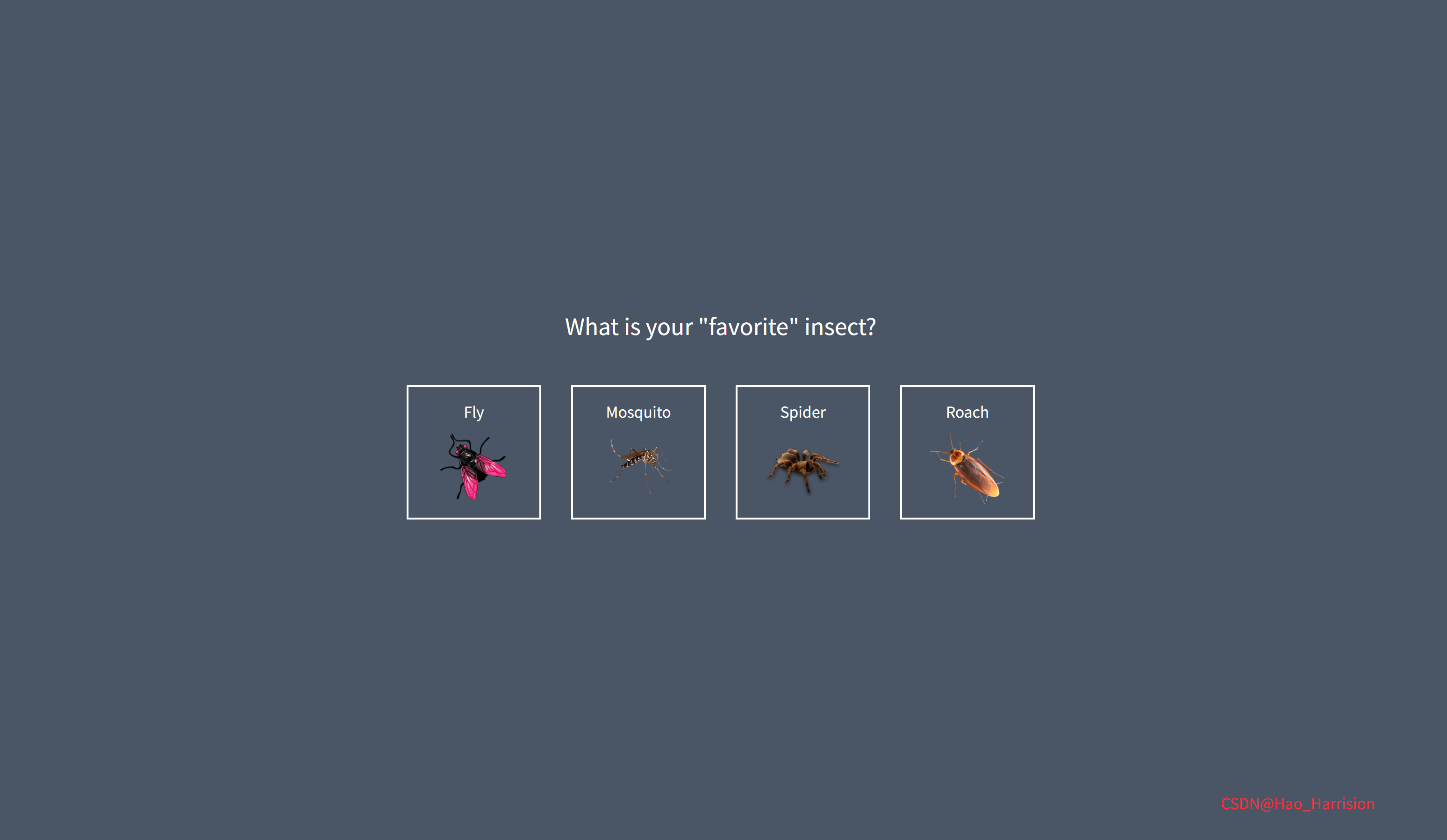
使用 React19 和 Tailwindcss V4 实用优先的样式框架,一步步构建一个有趣的小游戏——“抓昆虫”(Catch The Insect),来打造一个响应式、交互性强的游戏应用。这个游戏虽然简单,但包含了状态管理、计时器、动画、事件处理等前端开发中的关键概念。
🎮 游戏概述
“抓昆虫”是一款看似简单实则极具挑战性的游戏。玩家需要在屏幕上点击快速移动的昆虫来得分,但随着时间推移,昆虫会越来越多,最终变得几乎不可能完成。这不仅考验反应速度,也是一场耐心的较量!
🎯 游戏目标
选择你喜欢(或最讨厌)的昆虫作为目标。
在限定时间内尽可能多地点击昆虫以获得高分。
体验“不可能完成”的挑战乐趣。
🔧 InsectCatchGame.tsx组件实现
// src/components/InsectCatchGame.tsx

import { useState, useEffect, useRef } from 'react'

interface Insect {
    id: number
    name: string
    src: string
}

interface ActiveInsect {
    x: number
    y: number
    rotation: number
    caught: boolean
}

const InsectCatchGame = () => {
    const [currentScreen, setCurrentScreen] = useState<'start' | 'select' | 'game'>('start')
    const [selectedInsect, setSelectedInsect] = useState<Insect | null>(null)
    const [score, setScore] = useState(0)
    const [time, setTime] = useState(0)
    const [messageVisible, setMessageVisible] = useState(false)
    const [activeInsects, setActiveInsects] = useState<ActiveInsect[]>([])

    const gameTimerRef = useRef<NodeJS.Timeout | null>(null)
    const insectTimerRef = useRef<NodeJS.Timeout | null>(null)
    const selectedInsectRef = useRef<Insect | null>(null) // 👈 新增

    // 同步 selectedInsect 到 ref
    useEffect(() => {
        selectedInsectRef.current = selectedInsect
    }, [selectedInsect])

    // 昆虫列表
    const insectsList: Insect[] = [
        { id: 1, name: 'Fly', src: 'http://pngimg.com/uploads/fly/fly_PNG3946.png' },
        {
            id: 2,
            name: 'Mosquito',
            src: 'http://pngimg.com/uploads/mosquito/mosquito_PNG18175.png',
        },
        { id: 3, name: 'Spider', src: 'http://pngimg.com/uploads/spider/spider_PNG12.png' },
        { id: 4, name: 'Roach', src: 'http://pngimg.com/uploads/roach/roach_PNG12163.png' },
    ]

    // 格式化时间 (mm:ss)
    const formattedTime = `${String(Math.floor(time / 60)).padStart(2, '0')}:${String(time % 60).padStart(2, '0')}`

    const selectInsect = (insect: Insect) => {
        setSelectedInsect(insect)
        setCurrentScreen('game')
        startGame()
    }

    const startGame = () => {
        setScore(0)
        setTime(0)
        setMessageVisible(false)
        setActiveInsects([])

        gameTimerRef.current = setInterval(() => {
            setTime((prev) => prev + 1)
        }, 1000)

        setTimeout(createInsect, 1000) // 现在 safe
    }

    // ✅ 修复后的 createInsect:使用 ref 获取最新 insect
    const createInsect = () => {
        const insect = selectedInsectRef.current
        if (!insect) return

        const x = Math.random() * (window.innerWidth - 100) + 50
        const y = Math.random() * (window.innerHeight - 100) + 50
        const rotation = Math.random() * 360

        setActiveInsects((prev) => [...prev, { x, y, rotation, caught: false }])

        insectTimerRef.current = setTimeout(createInsect, 1000 + Math.random() * 500)
    }

    // 捕捉昆虫
    const catchInsect = (index: number) => {
        // 更新该昆虫为“已捕捉”
        setActiveInsects((prev) =>
            prev.map((insect, i) => (i === index ? { ...insect, caught: true } : insect))
        )

        // 增加分数
        setScore((prev) => {
            const newScore = prev + 1
            if (newScore > 19) {
                setMessageVisible(true)
            }
            return newScore
        })

        // 200ms 后移除该昆虫
        setTimeout(() => {
            setActiveInsects((prev) => prev.filter((_, i) => i !== index))
        }, 200)

        // 500ms 后再生成一个新昆虫
        setTimeout(createInsect, 500)
    }

    // 图片加载失败处理
    const handleImageError = (e: React.SyntheticEvent<HTMLImageElement>) => {
        e.currentTarget.src = 'https://via.placeholder.com/100?text=No+Image'
    }

    // 清理定时器(组件卸载时)
    useEffect(() => {
        return () => {
            if (gameTimerRef.current) clearInterval(gameTimerRef.current)
            if (insectTimerRef.current) clearTimeout(insectTimerRef.current)
        }
    }, [])

    return (
        <div className="relative h-screen w-screen overflow-hidden bg-gray-600 font-['Press_Start_2P'] text-white">
            {/* 开始屏幕 */}
            {currentScreen === 'start' && (
                <div className="transition-margin flex h-full w-full flex-col items-center justify-center duration-500 ease-out">
                    <h1 className="mb-8 text-center text-4xl leading-tight">Catch The Insect</h1>
                    <button
                        onClick={() => setCurrentScreen('select')}
                        className="cursor-pointer bg-white px-6 py-4 text-[#516dff] hover:opacity-90 focus:outline-none">
                        Play Game
                    </button>
                </div>
            )}

            {/* 选择昆虫屏幕 */}
            {currentScreen === 'select' && (
                <div className="transition-margin flex h-full w-full flex-col items-center justify-center duration-500 ease-out">
                    <h1 className="mb-8 text-center text-2xl">What is your "favorite" insect?</h1>
                    <ul className="flex list-none flex-wrap justify-center p-0">
                        {insectsList.map((insect) => (
                            <li key={insect.id} className="m-4">
                                <button
                                    onClick={() => selectInsect(insect)}
                                    className="flex h-36 w-36 cursor-pointer flex-col items-center justify-center border-2 border-white bg-transparent text-white transition-colors hover:bg-white hover:text-[#516dff]">
                                    <p className="mb-2">{insect.name}</p>
                                    <img
                                        src={insect.src}
                                        alt={insect.name}
                                        className="h-20 w-20 object-contain"
                                        onError={handleImageError}
                                    />
                                </button>
                            </li>
                        ))}
                    </ul>
                </div>
            )}

            {/* 游戏屏幕 */}
            {currentScreen === 'game' && selectedInsect && (
                <div className="relative h-full w-full">
                    <h3 className="absolute top-5 left-5 text-xl">Time: {formattedTime}</h3>
                    <h3 className="absolute top-5 right-5 text-xl">Score: {score}</h3>

                    {/* 嘲讽消息 */}
                    {messageVisible && (
                        <div className="absolute top-0 left-1/2 z-10 w-full -translate-x-1/2 transform bg-black/50 py-5 text-center opacity-100 transition-all duration-500">
                            <p className="leading-relaxed">
                                Are you annoyed yet?
                                <br />
                                You are playing an impossible game!!
                            </p>
                        </div>
                    )}

                    {/* 活跃昆虫 */}
                    {activeInsects.map((insect, index) => (
                        <div
                            key={index}
                            className="absolute flex cursor-pointer items-center justify-center transition-transform duration-300 ease-in-out"
                            style={{
                                top: `${insect.y}px`,
                                left: `${insect.x}px`,
                                transform: `translate(-50%, -50%) scale(${insect.caught ? 0 : 1}) rotate(${insect.rotation}deg)`,
                            }}
                            onClick={() => catchInsect(index)}>
                            <img
                                src={selectedInsect.src}
                                alt={selectedInsect.name}
                                className="h-24 w-24 object-contain"
                            />
                        </div>
                    ))}
                </div>
            )}

            <div className="absolute right-20 bottom-10 text-red-500">CSDN@Hao_Harrision</div>
        </div>
    )
}

export default InsectCatchGame
🔄 转换说明(Vue → React)
| 功能 | Vue 实现 | React 实现 | 说明 |
|---|---|---|---|
| 多屏状态 | v-if / v-else-if | {screen === 'xxx' && (...)} | React 使用条件渲染 |
| 响应式数据 | ref() | useState() | 状态拆分为多个独立 state |
| 定时器管理 | 全局变量 | useRef 保存 timer ID | 避免闭包和重复清理 |
| 计算属性 | computed(() => ...) | 直接变量或 useMemo | 时间格式简单,直接计算 |
| 列表渲染 | v-for | .map() | 使用 key={id} 或 index |
| 事件处理 | @click="fn" | onClick={() => fn()} | 注意箭头函数传参 |
| 图片错误 | @error | onError | React 事件命名规范 |
| 生命周期清理 | onBeforeUnmount | useEffect 返回清理函数 | 确保定时器被清除 |
| 动态样式 | :style="{...}" | style={{...}} | 内联样式对象写法 |
| 字体 | font-[Press_Start_2P] | 相同(需引入) | Tailwind 支持任意字体 |
📝 关键技术点说明
1. 不可变状态更新
- 使用
setActiveInsects(prev => [...])确保状态不可变 - 捕捉昆虫时用
map更新特定项,删除时用filter
2. 定时器安全清理
- 使用
useRef存储setInterval/setTimeoutID - 在
useEffect清理函数中清除,防止内存泄漏
3. 字体加载(Press Start 2P)
在 index.html 中添加:
<link href="https://fonts.googleapis.com/css2?family=Press+Start+2P&display=swap" rel="stylesheet">否则会回退到默认等宽字体。
4. 动画与过渡
transition-transform duration-300:昆虫缩放/旋转平滑transition-all duration-500:消息淡入scale(0)实现“捕捉后消失”效果
✅ 总结
该 InsectCatchGame.tsx 组件:
- 完整复刻了原 Vue 游戏的 三屏流程、计时、计分、嘲讽消息、无限生成 机制
- 使用 TypeScript 接口 明确数据结构
- 遵循 React 最佳实践(不可变更新、effect 清理、受控事件)
- 兼容 Tailwind CSS 所有原子类
- 可直接用于 Vite + React + TS 项目
🎨 TailwindCSS 样式重点讲解
🎯 Tailwind CSS 类名作用说明表
| 类名 | 作用说明 |
|---|---|
relative | 设置相对定位(position: relative),为内部绝对定位元素提供定位上下文 |
h-screen | 高度等于视口高度(height: 100vh) |
w-screen | 宽度等于视口宽度(width: 100vw) |
overflow-hidden | 隐藏超出容器的内容(防止昆虫移出屏幕时出现滚动条) |
bg-[#516dff] | 背景颜色设为自定义紫色(#516dff),使用 Tailwind 的任意值语法 |
font-['Press_Start_2P'] | 设置字体为 Press Start 2P(需提前引入 Google Font),使用任意值语法支持带空格的字体名 |
text-white | 默认文字颜色为白色 |
flex | 启用 Flexbox 布局 |
h-full | 高度 100%(相对于父容器) |
w-full | 宽度 100% |
flex-col | Flex 主轴方向为垂直(column) |
items-center | 子元素在交叉轴(水平方向)居中对齐 |
justify-center | 子元素在主轴(垂直方向)居中对齐 |
transition-margin | ⚠️ 注意:Tailwind 默认无此工具类! 可能是误写,实际应为 transition-all 或无此效果。建议移除或替换为 transition-transform / transition-opacity |
duration-500 | 过渡动画持续时间为 500ms |
ease-out | 使用 cubic-bezier(0, 0, 0.2, 1) 缓动函数(减速缓出) |
mb-8 | 下边距 margin-bottom: 2rem(32px) |
text-center | 文字水平居中 |
text-4xl | 字号 2.25rem(36px) |
leading-tight | 行高较紧凑(line-height: 1.25) |
cursor-pointer | 鼠标悬停时显示手型光标(表示可点击) |
bg-white | 背景白色 |
px-6 | 水平内边距 padding-left/right: 1.5rem(24px) |
py-4 | 垂直内边距 padding-top/bottom: 1rem(16px) |
text-[#516dff] | 文字颜色为紫色(与背景色一致) |
hover:opacity-90 | 鼠标悬停时透明度变为 90%(轻微反馈) |
focus:outline-none | 获得焦点时移除默认浏览器 outline(提升 UI 纯净度) |
text-2xl | 字号 1.5rem(24px) |
list-none | 移除列表默认样式(list-style: none) |
flex-wrap | Flex 子元素允许换行 |
p-0 | 内边距为 0(移除 <ul> 默认 padding) |
m-4 | 外边距 margin: 1rem(16px) |
h-36 | 高度 9rem(144px) |
w-36 | 宽度 9rem(144px) |
border-2 | 边框宽度 2px |
border-white | 边框颜色为白色 |
bg-transparent | 背景透明 |
transition-colors | 为颜色变化(如 hover)添加过渡动画 |
hover:bg-white | 悬停时背景变白 |
hover:text-[#516dff] | 悬停时文字变紫 |
mb-2 | 下边距 0.5rem(8px) |
h-20 | 高度 5rem(80px) |
w-20 | 宽度 5rem(80px) |
object-contain | 图片保持宽高比并完整显示(不裁剪) |
absolute | 绝对定位(用于时间/分数和昆虫) |
top-5 | 距离顶部 1.25rem(20px) |
left-5 | 距离左侧 1.25rem(20px) |
right-5 | 距离右侧 1.25rem(20px) |
text-xl | 字号 1.25rem(20px) |
z-10 | 层叠上下文层级为 10(确保消息在昆虫上方) |
-translate-x-1/2 | 向左偏移自身宽度的 50%(配合 left-1/2 实现水平居中) |
transform | 启用 CSS transform(旧版浏览器兼容) |
bg-black/50 | 黑色背景 + 50% 透明度(rgba(0,0,0,0.5)) |
py-5 | 垂直内边距 1.25rem(20px) |
opacity-100 | 完全不透明(配合 transition 实现淡入) |
transition-all | 为所有可动画属性启用过渡 |
h-24 | 高度 6rem(96px) |
w-24 | 宽度 6rem(96px) |
transition-transform | 仅为 transform 属性启用过渡(性能更优) |
duration-300 | 过渡持续时间 300ms |
ease-in-out | 使用 cubic-bezier(0.4, 0, 0.2, 1) 缓动(先加速后减速) |
🦌 路由组件 + 常量定义
router/index.tsx 中 children数组中添加子路由
{
    path: '/',
    element: <App />,
    children: [
       ...
       {
                path: '/InsectCatchGame',
                lazy: () =>
                    import('@/projects/InsectCatchGame').then((mod) => ({
                        Component: mod.default,
                    })),
            },
    ],
 },
constants/index.tsx 添加组件预览常量
import demo50Img from '@/assets/pic-demo/demo-50.png'
省略部分....
export const projectList: ProjectItem[] = [
    省略部分....
    {
        id: 50,
        title: 'Insect Catch Game',
        image: demo50Img,
        link: 'InsectCatchGame',
    },
]
🚀 小结
这个项目非常适合用来学习 React19 的 useState 以及如何结合 Tailwindcss V4实现流畅的动画效果。它既是一个小游戏,也是一个绝佳的学习案例。
✅ 难度递增系统:随着分数提高,昆虫移动速度加快或出现更多种类。
✅排行榜功能:结合 localStorage 保存最高分。
✅主题切换:白天/黑夜模式。
✅昆虫行为模拟:让昆虫有简单的行为,如躲避鼠标、随机游走。
现在,你准备好挑战自己的耐心了吗?快去试试看能坚持多久!🪰
📅 明日预告: 👉 下一篇,我们将完成收尾工作,完成项目的下半部分主要是介绍以下课程的合作者About组件和一个Footer组件,也是项目的最后一篇文章。🚀
感谢阅读,欢迎点赞、收藏和分享 😊
原文链接:https://blog.csdn.net/qq_44808710/article/details/149797339
每天造一个轮子,码力暴涨不是梦!🚀

有“AI”的1024 = 2048,欢迎大家加入2048 AI社区
更多推荐

 34
34 0
0- 0


 已为社区贡献43条内容

所有评论(0)