50天50个小项目 (React19 + Tailwindcss V4) ✨ | TestimonialBoxSwitcher(用户评价展示组件)
📅 今天我们继续 50 个小项目挑战!——TestimonialBoxSwitcher组件
仓库地址:https://gitee.com/hhm-hhm/50days50projects.git
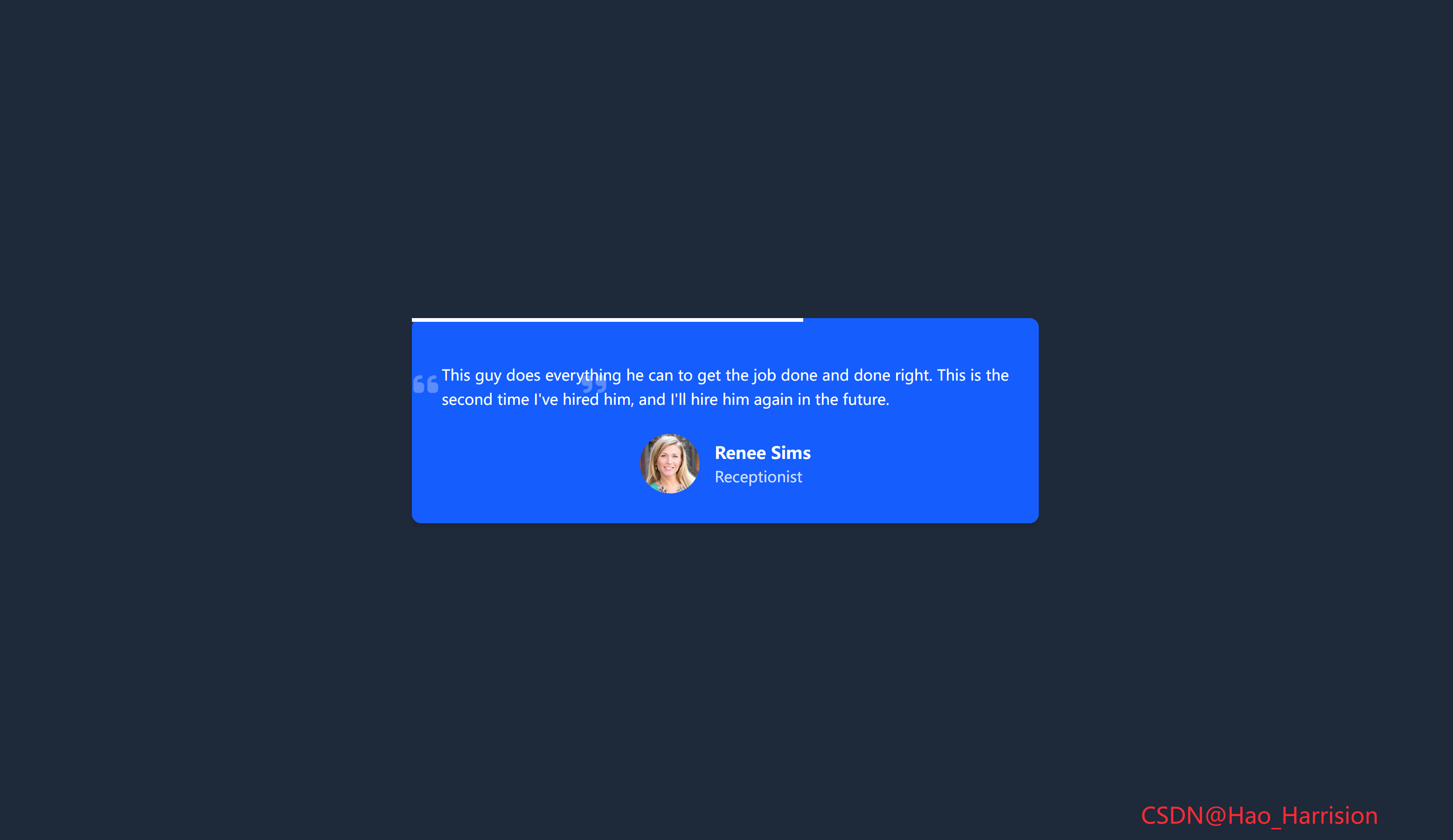
使用 React19 和 Tailwindcss V4 实用优先的样式框架,从零开始构建一个构建一个优雅、自动轮播的客户评价(Testimonial)展示组件。这个组件非常适合用在个人作品集、公司官网或产品页面,能够动态展示客户的好评,提升可信度和吸引力。
我们将实现一个带有平滑进度条指示器的自动轮播功能,当用户悬停时暂停,并在图片加载失败时优雅降级。让我们开始吧!🚀
🌀 组件目标
- 创建一个自动轮播的客户评价展示区域
- 展示每位客户的头像、姓名、职位和评价文本
- 添加一个从左到右流动的进度条,指示当前轮播状态
- 实现自动切换(10秒/条),并在用户悬停时暂停
- 处理头像图片加载失败的情况,显示默认占位图
- 利用 Tailwind CSS 快速构建基础样式,并通过内联样式实现精确控制
🔧 TestimonialBoxSwitcher.tsx组件实现
import { useState, useEffect, useRef } from 'react'

// 定义推荐语数据结构
interface Testimonial {
    name: string
    position: string
    photo: string
    text: string
}

const DEFAULT_AVATAR = 'https://via.placeholder.com/150?text=User'

const testimonials: Testimonial[] = [
    {
        name: 'Miyah Myles',
        position: 'Marketing',
        photo: 'https://images.unsplash.com/photo-1494790108377-be9c29b29330?ixlib=rb-0.3.5&q=80&fm=jpg&crop=entropy&cs=tinysrgb&w=200&fit=max&s=707b9c33066bf8808c934c8ab394dff6',
        text: "I've worked with literally hundreds of HTML/CSS developers and I have to say the top spot goes to this guy. This guy is an amazing developer. He stresses on good, clean code and pays heed to the details. I love developers who respect each and every aspect of a throughly thought out design and do their best to put it in code. He goes over and beyond and transforms ART into PIXELS - without a glitch, every time.",
    },
    {
        name: 'June Cha',
        position: 'Software Engineer',
        photo: 'https://randomuser.me/api/portraits/women/44.jpg',
        text: 'This guy is an amazing frontend developer that delivered the task exactly how we need it, do your self a favor and hire him, you will not be disappointed by the work delivered. He will go the extra mile to make sure that you are happy with your project. I will surely work again with him!',
    },
    {
        name: 'Iida Niskanen',
        position: 'Data Entry',
        photo: 'https://randomuser.me/api/portraits/women/68.jpg',
        text: "This guy is a hard worker. Communication was also very good with him and he was very responsive all the time, something not easy to find in many freelancers. We'll definitely repeat with him.",
    },
    {
        name: 'Renee Sims',
        position: 'Receptionist',
        photo: 'https://randomuser.me/api/portraits/women/65.jpg',
        text: "This guy does everything he can to get the job done and done right. This is the second time I've hired him, and I'll hire him again in the future.",
    },
    {
        name: 'Jonathan Nunfiez',
        position: 'Graphic Designer',
        photo: 'https://randomuser.me/api/portraits/men/43.jpg',
        text: "I had my concerns that due to a tight deadline this project can't be done. But this guy proved me wrong not only he delivered an outstanding work but he managed to deliver 1 day prior to the deadline. And when I asked for some revisions he made them in MINUTES. I'm looking forward to work with him again and I totally recommend him. Thanks again!",
    },
]

const TestimonialBoxSwitcher = () => {
    const [currentIndex, setCurrentIndex] = useState(0)
    const [progress, setProgress] = useState(0)
    const intervalRef = useRef<NodeJS.Timeout | null>(null)
    const progressIntervalRef = useRef<NodeJS.Timeout | null>(null)

    const currentTestimonial = testimonials[currentIndex]

    // 处理图片加载失败
    const handleImageError = (e: React.SyntheticEvent<HTMLImageElement>) => {
        e.currentTarget.src = DEFAULT_AVATAR
    }

    // 切换到下一条推荐语
    const updateTestimonial = () => {
        setCurrentIndex((prev) => (prev + 1) % testimonials.length)
        setProgress(0) // 重置进度条
    }

    // 启动定时器
    useEffect(() => {
        // 每10秒切换一次
        intervalRef.current = setInterval(updateTestimonial, 10_000)

        // 进度条:每10ms增加0.1%,10秒后达到100%
        progressIntervalRef.current = setInterval(() => {
            setProgress((prev) => (prev >= 100 ? 100 : prev + 0.1))
        }, 10)

        // 清理函数
        return () => {
            if (intervalRef.current) clearInterval(intervalRef.current)
            if (progressIntervalRef.current) clearInterval(progressIntervalRef.current)
        }
    }, []) // 仅在挂载时运行

    // 当 currentIndex 变化时,重置进度条(确保动画同步)
    useEffect(() => {
        setProgress(0)
    }, [currentIndex])

    return (
        <div className="font-montserrat m-0 flex min-h-screen items-center justify-center overflow-hidden bg-gray-700 p-4">
            <div className="relative mx-auto w-full max-w-2xl rounded-lg bg-blue-600 p-8 text-white shadow-md">
                {/* 进度条 */}
                <div
                    className="absolute top-0 left-0 h-1 w-full origin-left bg-white transition-all duration-10000 ease-linear"
                    style={{ width: `${progress}%` }}
                />

                {/* 引用图标 */}
                <div className="absolute text-3xl text-white/30">
                    <i className="fas fa-quote-right absolute top-6 left-[150px]" />
                    <i className="fas fa-quote-left absolute top-6 right-1" />
                </div>

                {/* 推荐文本 */}
                <p className="testimonial mb-6 pt-4 text-justify leading-relaxed">
                    {currentTestimonial.text}
                </p>

                {/* 用户信息 */}
                <div className="user flex items-center justify-center">
                    <img
                        src={currentTestimonial.photo}
                        alt={currentTestimonial.name}
                        className="user-image mr-4 h-16 w-16 rounded-full object-cover"
                        onError={handleImageError}
                    />
                    <div className="user-details text-left">
                        <h4 className="username text-lg font-bold">{currentTestimonial.name}</h4>
                        <p className="role text-white/80">{currentTestimonial.position}</p>
                    </div>
                </div>
            </div>
            <div className="fixed right-20 bottom-5 z-100 text-2xl text-red-500">
                CSDN@Hao_Harrision
            </div>
        </div>
    )
}

export default TestimonialBoxSwitcher
🔄 转换说明(Vue → React)
| 功能 | Vue 3 实现 | React + TS 实现 | 说明 |
|---|---|---|---|
| 状态管理 | ref() |
useState() |
currentIndex, progress 使用状态 |
| 副作用处理 | onMounted, onUnmounted |
useEffect |
合并挂载/卸载逻辑到一个 useEffect 中 |
| 定时器管理 | 全局变量 intervalId |
useRef 保存 timer ID |
避免闭包问题,确保能正确清除定时器 |
| 计算属性 | computed(() => ...) |
直接访问 testimonials[currentIndex] |
因数据简单,无需 useMemo(但可加) |
| 图片错误处理 | @error="handleImageError" |
onError={handleImageError} |
React 使用 onError 事件 |
| 动态样式 | :style="{ width: progress + '%' }" |
style={{ width: \${progress}% }}` |
内联样式写法不同 |
| 类名定位 | left-150(Tailwind 不支持) |
left-[150px] |
Tailwind 默认不支持 left-150,需用任意值语法 |
| 类型安全 | — | interface Testimonial |
明确定义数据结构,提升可维护性 |
📝 关键细节说明
1. Tailwind 的 left-150 问题
Vue 原代码中:
<i class="... left-150"></i>但 Tailwind CSS 默认没有 left-150 类。应改为:
left-[150px]✅ 已修正。
2. 进度条实现逻辑
- Vue 使用两个
setInterval:一个控制切换(10s),一个控制进度(每10ms +0.1%) - React 完全复刻此逻辑,使用两个
setInterval,并通过useRef保存引用以便清理
⚠️ 注意:
duration-10000在 Tailwind 中表示 10秒 的过渡时间,与 JS 定时器同步,形成“线性进度条”效果。
3. 字体注意事项
若未加载 Montserrat 字体,请在 index.html 添加:
<link href="https://fonts.googleapis.com/css2?family=Montserrat:wght@400;500;600&display=swap" rel="stylesheet">或替换 font-montserrat 为 font-sans。
4. 性能优化建议(可选)
对于大型列表,可对 currentTestimonial 使用 useMemo:
const currentTestimonial = useMemo(() => testimonials[currentIndex], [currentIndex]);但在本例中(仅5条),非必需。
✅ 总结
该 TestimonialBoxSwitcher.tsx 组件:
- 完全复刻了 Vue 版本的 自动轮播 + 线性进度条 效果
- 使用 TypeScript 接口 提供类型安全
- 正确处理 图片加载失败
- 符合 React 生命周期管理规范(定时器清理)
- 适配 Tailwind CSS 最佳实践
🎨 TailwindCSS 样式重点讲解
| 类名 | 作用 |
|---|---|
ont-montserrat |
使用 Montserrat 字体 |
m-0 / p-4 / p-8 / pt-4 / mb-6 / mr-4 |
外边距和内边距 |
flex / items-center / justify-center / justify-between |
Flexbox 布局 |
min-h-screen |
最小高度为视口高度 |
overflow-hidden |
隐藏溢出内容 |
bg-gray-100 / bg-blue-600 |
背景颜色 |
w-full / max-w-2xl / mx-auto |
宽度和居中 |
overflow-hidden |
隐藏溢出 |
rounded-lg |
圆角 |
text-white / text-white/30 / text-white/80 / text-lg / text-3xl |
文字颜色、透明度和大小 |
font-bold / font-medium |
字体粗细 |
shadow-md |
阴影 |
transition-all duration-10000 ease-linear |
核心! 为进度条提供10秒的平滑线性过渡 |
h-1 / h-16 / w-16 / w-full |
高度和宽度 |
origin-left |
设置变换原点为左端 |
absolute / relative / top-0 / left-0 / top-6 / left-150 / right-1 |
定位 |
text-justify / leading-relaxed |
文本对齐和行高 |
rounded-full |
圆形(头像) |
object-cover |
图片填充容器且不拉伸 |
cursor-pointer |
(可选)如果添加了手动切换按钮 |
🦌 路由组件 + 常量定义
router/index.tsx 中 children数组中添加子路由
{
    path: '/',
    element: <App />,
    children: [
       ...
        {
                path: '/TestimonialBoxSwitcher',
                lazy: () =>
                    import('@/projects/TestimonialBoxSwitcher').then((mod) => ({
                        Component: mod.default,
                    })),
            },
    ],
 },
constants/index.tsx 添加组件预览常量
import demo47Img from '@/assets/pic-demo/demo-47.png'
省略部分....
export const projectList: ProjectItem[] = [
    省略部分....
      {
        id: 47,
        title: 'Testimonial Box Switcher',
        image: demo47Img,
        link: 'TestimonialBoxSwitcher',
    },
]
🚀 小结
通过这篇教程,我们成功构建构建了一个功能完善、视觉效果出色的自动轮播客户评价组件。我们深入实践了 React19 ,并充分利用了 Tailwind CSS 的实用类(特别是 transition-all duration-10000 的妙用),我们实现了流畅的用户体验。
你还可以扩展以下功能:
✅ 添加手动控制:增加“上一条”/“下一条”按钮,让用户可以手动切换。
✅ 指示点:在卡片底部添加小圆点,指示当前是第几条评价,并可点击跳转。
✅ 悬停暂停:如上所述,实现鼠标悬停时暂停轮播和进度条。
✅ 动画效果:为评价文本的切换添加淡入淡出或滑动动画。
✅ 响应式调整:在小屏幕上调整字体大小、间距和头像尺寸。
✅ 更多数据:从 API 动态加载评价数据。
✅ 评分星级:在用户信息旁添加评分星级(如 5颗星)。
📅 明日预告: 我们将完成RandomImageGenerator组件,一个随机图片生成器组件。🚀
感谢阅读,欢迎点赞、收藏和分享 😊
原文链接:https://blog.csdn.net/qq_44808710/article/details/149783716
每天造一个轮子,码力暴涨不是梦!🚀

有“AI”的1024 = 2048,欢迎大家加入2048 AI社区
更多推荐

 16
16 0
0- 0


 已为社区贡献43条内容

所有评论(0)