Langchain4j(三)Tools工具
这里需要注意的是由于在一次任务的处理过程中可能需要根据顺序调用多个函数,所以当大模型接收到AI应用发送的数据继续拆解任务,如果发现还需要调用其他的函数,则会重复4.1~4.4这几个步骤,直到无需调用函数,最终把生成的结果响应该AI应用,并由AI应用发送给用户。在咱们的AI志愿填报顾问中,将来要做这么一个功能,每次回答完用户的问题后,都会在答案的最后附上这么一句话: 志愿填报需要考虑的因素有很多,如
一、准备工作
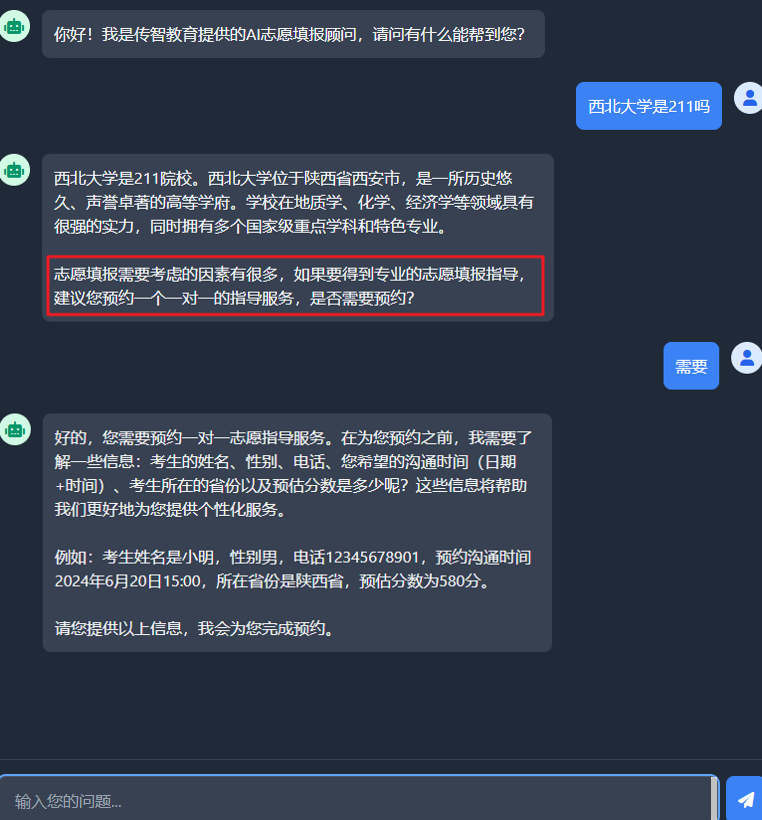
在咱们的AI志愿填报顾问中,将来要做这么一个功能,每次回答完用户的问题后,都会在答案的最后附上这么一句话: 志愿填报需要考虑的因素有很多,如果要得到专业的志愿填报指导,建议您预约一个一对一的指导服务,是否需要预约?
当用户表达出需要预约的意愿并提交了姓名, 性别, 电话等信息后,我们的程序就需要数据库中添加一条信息,记录预约详情。
所以开发这个功能的前提是我们得先准备好mysql数据库环境,把crud的代码开发好,将来当用户提交了考生信息后才能调用这些代码往数据库中添加数据。
1.准备数据库环境
这里依然采用docker部署,执行下面这条命令安装并运行mysql
docker run --name mysql -d -p 3307:3306 -e MYSQL_ROOT_PASSWORD=1234 mysql
3306是容器里面的端口,3307是映射到windows上的端口,后面访问需要使用3307
使用图形化界面新建Mysql连接
运行下面的sql文件
create database  if  not exists volunteer;
use volunteer;
create table if not exists reservation
(
    id                 bigint  primary key auto_increment   not null comment '主键ID',
    name               varchar(50) not null comment '考生姓名',
    gender             varchar(2)  not null comment '考生性别',
    phone              varchar(20) not null comment '考生手机号',
    communication_time datetime    not null comment '沟通时间',
    province           varchar(32) not null comment '考生所处的省份',
    estimated_score    int         not null comment '考生预估分数'
)
2.引入依赖
<dependency>
    <groupId>org.projectlombok</groupId>
    <artifactId>lombok</artifactId>
 </dependency>

<dependency>
    <groupId>org.mybatis.spring.boot</groupId>
    <artifactId>mybatis-spring-boot-starter</artifactId>
    <version>3.0.3</version>
 </dependency>

<dependency>
    <groupId>com.mysql</groupId>
    <artifactId>mysql-connector-j</artifactId>
</dependency>
3. 配置数据库连接信息
spring:
  datasource:
    username: root
    password: 1234
    url: jdbc:mysql://localhost:3307/volunteer?useUnicode=true&characterEncoding=utf-8&useSSL=false&serverTimezone=Asia/Shanghai&allowPublicKeyRetrieval=true
    driver-class-name: com.mysql.cj.jdbc.Driver

mybatis:
  configuration:
    map-underscore-to-camel-case: true
4.准备实体类
import lombok.AllArgsConstructor;
import lombok.Data;
import lombok.NoArgsConstructor;

import java.time.LocalDateTime;

@Data
@NoArgsConstructor
@AllArgsConstructor
public class Reservation {
    private Long id;
    private String name;
    private String gender;
    private String phone;
    private LocalDateTime communicationTime;
    private String province;
    private Integer estimatedScore;
}
5.Mapper
import com.itheima.consultant.pojo.Reservation;
import org.apache.ibatis.annotations.Insert;
import org.apache.ibatis.annotations.Mapper;
import org.apache.ibatis.annotations.Select;

@Mapper
public interface ReservationMapper {

    //1.添加预约信息
    @Insert("insert into reservation(name,gender,phone,communication_time,province,estimated_score) values(#{name},#{gender},#{phone},#{communicationTime},#{province},#{estimatedScore})")
    void insert(Reservation reservation);
    //2.根据手机号查询预约信息
    @Select("select * from reservation where phone=#{phone}")
    Reservation findByPhone(String phone);

}
6.开发Service
import com.itheima.consultant.mapper.ReservationMapper;
import com.itheima.consultant.pojo.Reservation;
import org.springframework.beans.factory.annotation.Autowired;
import org.springframework.stereotype.Service;

@Service
public class ReservationService {
    @Autowired
    private ReservationMapper reservationMapper;

    //1.添加预约信息的方法
    public void insert(Reservation reservation) {
        reservationMapper.insert(reservation);
    }

    //2.查询预约信息的方法(根据手机号查询)
    public Reservation findByPhone(String phone) {
        return reservationMapper.findByPhone(phone);
    }
}
7.测试
import com.itheima.consultant.pojo.Reservation;
import com.itheima.consultant.service.ReservationService;
import org.junit.jupiter.api.Test;
import org.springframework.beans.factory.annotation.Autowired;
import org.springframework.boot.test.context.SpringBootTest;

import java.time.LocalDateTime;

@SpringBootTest
public class ReservationServiceTest {
    @Autowired
    private ReservationService reservationService;
    //测试添加
    @Test
    void testInsert(){
        Reservation reservation = new Reservation(null, "小王", "男", "13800000001", LocalDateTime.now(), "上海", 580);
        reservationService.insert(reservation);
    }
    //测试查询
    @Test
    void testFindByPhone(){
        String phone = "13800000001";
        Reservation reservation = reservationService.findByPhone(phone);
        System.out.println(reservation);
    }
}
二、Tools工具原理
Tools工具,以前也叫做function calling,翻译过来叫做函数调用,如果在我们的程序中添加了function calling功能,,那整个工作流程会发生一些改变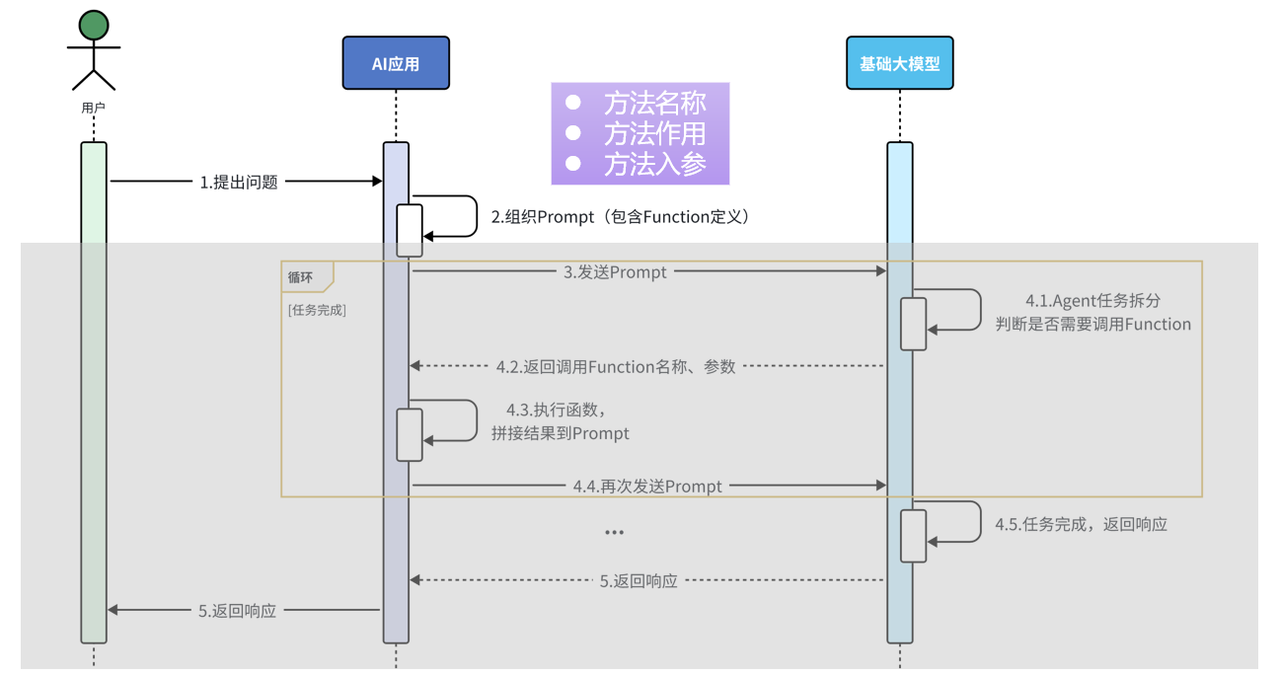
当用户把问题发送给AI应用,在AI应用的内部需要组织提交给大模型的数据,而这些数据中需要描述清楚我们的AI应用中有哪些函数能够被大模型调用。每一个函数的描述都包含三个部分,方法名称、方法作用、方法入参。当AI应用把这些数据发送给大模型后,大模型会先根据用户的问题以及上下文拆解任务,从而判断是否需要调用函数(具体调用哪个,是根据用户输入的意图和你的函数描述进行匹配),如果有函数需要调用,则把需要调用的函数的名称,以及调用时需要使用的参数准备好一并响应给AI应用。AI应用接收到响应后需要执行对应的函数,得到对应的结果,接下来把得到的结果和之前信息一块组织好再发送给大模型。
这里需要注意的是由于在一次任务的处理过程中可能需要根据顺序调用多个函数,所以当大模型接收到AI应用发送的数据继续拆解任务,如果发现还需要调用其他的函数,则会重复4.1~4.4这几个步骤,直到无需调用函数,最终把生成的结果响应该AI应用,并由AI应用发送给用户。
1.准备工具方法
LangChain4j提供了Tool注解用于对方法的作用进行描述,还有P注解用于对方法的参数进行描述,将来LangChain4j就能通过反射的方式获取到Tool注解中的作用描述、P注解中的参数描述、以及方法的名称,组织数据,一并发送给大模型。这里需要注意,ReservationTool需要注入到IOC容器对象中。
import com.itheima.consultant.pojo.Reservation;
import com.itheima.consultant.service.ReservationService;
import dev.langchain4j.agent.tool.P;
import dev.langchain4j.agent.tool.Tool;
import org.springframework.beans.factory.annotation.Autowired;
import org.springframework.stereotype.Component;

import java.time.LocalDateTime;

@Component
public class ReservationTool {
    @Autowired
    private ReservationService reservationService;

    //1.工具方法: 添加预约信息
    @Tool("预约志愿填报服务")
    public void  addReservation(
            @P("考生姓名") String name,
           @P("考生性别") String gender,
            @P("考生手机号") String phone,
            @P("预约沟通时间,格式为: yyyy-MM-dd'T'HH:mm") String communicationTime,
            @P("考生所在省份") String province,
            @P("考生预估分数") Integer estimatedScore
    ){
        Reservation reservation = new Reservation(null,name,gender,phone, LocalDateTime.parse(communicationTime),province,estimatedScore);
        reservationService.insert(reservation);
    }
    //2.工具方法: 查询预约信息
    @Tool("根据考生手机号查询预约单")
    public Reservation findReservation(@P("考生手机号") String phone){
        return reservationService.findByPhone(phone);
    }
}
2.配置工具方法
@AiService(
        wiringMode = AiServiceWiringMode.EXPLICIT,//手动装配
        chatModel = "openAiChatModel",//指定模型
        streamingChatModel = "openAiStreamingChatModel",
        //chatMemory = "chatMemory",//配置会话记忆对象
        chatMemoryProvider = "chatMemoryProvider",//配置会话记忆提供者对象
        contentRetriever = "contentRetriever",//配置向量数据库检索对象
        tools = "reservationTool"
)
//@AiService
public interface ConsultantService {
    //用于聊天的方法
    //public String chat(String message);
    //@SystemMessage("你是东哥的助手小月月,人美心善又多金!")
    @SystemMessage(fromResource = "system.txt")
    //@UserMessage("你是东哥的助手小月月,人美心善又多金!{{it}}")
    //@UserMessage("你是东哥的助手小月月,人美心善又多金!{{msg}}")
    public Flux<String> chat(/*@V("msg")*/@MemoryId String memoryId, @UserMessage String message);
}

有“AI”的1024 = 2048,欢迎大家加入2048 AI社区
更多推荐
 27
27 0
0- 0


 已为社区贡献8条内容

所有评论(0)