vue3+elementplus+ts实现持久化弹窗组件
本文介绍了如何实现一个持久化弹窗组件,在页面切换时不会关闭。通过Pinia状态管理存储弹窗状态和绑定路由路径,在App.vue层级挂载全局弹窗组件,确保弹窗只在特定路由页面显示。实现方法包括:1) 创建PersistentDialog.vue组件,包含遮罩层、标题、内容和关闭按钮;2) 使用Pinia存储弹窗可见状态和绑定路由;3) 在el-main下引入组件,使遮罩层不遮挡菜单和标签页。调用时只
·
实现持久化弹窗组件,切换页面时不会关闭
功能需求
- 创建全局弹窗状态管理 - 在Pinia中添加弹窗状态
- 创建全局弹窗组件 - 在App.vue层级挂载
- 确保弹窗只在router-view区域显示
创建一个持久化弹窗组件PersistentDialog.vue(简易版)
<template>
  <div
    v-if="showDialog"
    class="persistent-dialog-overlay"
  >
    <div class="persistent-dialog-container">
      <div class="persistent-dialog-header">
        <span class="persistent-dialog-title">{{ title }}</span>
        <el-icon class="persistent-dialog-close" @click="handleClose">
          <Close />
        </el-icon>
      </div>
      <div class="persistent-dialog-body">
        <slot>
          <!-- 默认内容 -->
          <p>这是一个持久化弹窗,切换页面时不会关闭。</p>
          <p>您可以在此处放置任何内容。</p>
        </slot>
      </div>
      <div class="persistent-dialog-footer">
        <slot name="footer">
          <!-- 默认底部内容 -->
        </slot>
      </div>
    </div>
  </div>
</template>

<script setup lang="ts" name="PersistentDialog">
import { computed } from "vue";
import { useRoute } from "vue-router";
import { usePersistentDialogStore } from "@/stores/modules/persistentDialog";
import { Close } from "@element-plus/icons-vue";

defineProps({
  title: {
    type: String,
    default: "持久化弹窗"
  }
});

const route = useRoute();
const persistentDialogStore = usePersistentDialogStore();

// 计算是否应该显示弹窗:只在绑定的路由页面显示
const showDialog = computed(() => {
  return persistentDialogStore.shouldShow(route.path);
});

// 关闭弹窗
const handleClose = () => {
  persistentDialogStore.close();
};
</script>

<style scoped lang="scss">
.persistent-dialog-overlay {
  position: absolute;
  top: 0;
  left: 0;
  right: 0;
  bottom: 0;
  background-color: rgba(0, 0, 0, 0.5);
  display: flex;
  justify-content: center;
  align-items: center;
  z-index: 1000;
  pointer-events: auto;
}

.persistent-dialog-container {
  background-color: var(--el-bg-color);
  border-radius: 8px;
  box-shadow: 0 2px 12px 0 rgba(0, 0, 0, 0.1);
  min-width: 400px;
  max-width: 80%;
  max-height: 80%;
  display: flex;
  flex-direction: column;
  overflow: hidden;
}

.persistent-dialog-header {
  padding: 16px 20px;
  border-bottom: 1px solid var(--el-border-color-lighter);
  display: flex;
  justify-content: space-between;
  align-items: center;
}

.persistent-dialog-title {
  font-size: 18px;
  font-weight: 500;
  color: var(--el-text-color-primary);
}

.persistent-dialog-close {
  font-size: 20px;
  cursor: pointer;
  color: var(--el-text-color-secondary);
  transition: color 0.2s;

  &:hover {
    color: var(--el-color-primary);
  }
}

.persistent-dialog-body {
  padding: 20px;
  flex: 1;
  overflow: auto;
  color: var(--el-text-color-regular);
}

.persistent-dialog-footer {
  padding: 12px 20px;
  border-top: 1px solid var(--el-border-color-lighter);
  display: flex;
  justify-content: flex-end;
  gap: 10px;
}
</style>
创建管理状态PersistentDialog.ts
/* PersistentDialogState */
export interface PersistentDialogState {
  visible: boolean; // 控制弹窗的显示与隐藏
  bindPath: string; // 绑定到当前路由
}
import { defineStore } from "pinia";
import { PersistentDialogState } from "@/stores/interface";
import piniaPersistConfig from "@/config/piniaPersist";

export const usePersistentDialogStore = defineStore({
  id: "persistent-dialog",
  state: (): PersistentDialogState => ({
    visible: false,
    bindPath: "" // 绑定的路由路径,弹窗只在该路径下显示
  }),
  getters: {
    // 判断当前路由是否应该显示弹窗
    shouldShow: (state) => (currentPath: string) => {
      return state.visible && state.bindPath === currentPath;
    }
  },
  actions: {
    // 打开弹窗并绑定到当前路由
    open(path: string) {
      this.visible = true;
      this.bindPath = path;
    },
    // 关闭弹窗
    close() {
      this.visible = false;
      this.bindPath = "";
    },
    // 设置显示状态(兼容旧方法)
    setVisible(visible: boolean, path?: string) {
      this.visible = visible;
      if (visible && path) {
        this.bindPath = path;
      } else if (!visible) {
        this.bindPath = "";
      }
    }
  },
  persist: piniaPersistConfig("persistent-dialog")
});
在el-main下面引入持久化弹窗组件
<el-main class="main-content-area">
    <router-view v-slot="{ Component, route }">
      <transition appear name="fade-transform" mode="out-in">
        <keep-alive :include="keepAliveName">
          <component :is="Component" :key="route.fullPath" v-if="isRouterShow" />
        </keep-alive>
      </transition>
    </router-view>
    <!-- 持久化弹窗组件 -->
    <PersistentDialog />
  </el-main>
  <script>
  import PersistentDialog from "@/components/PersistentDialog/index.vue";
  </script>
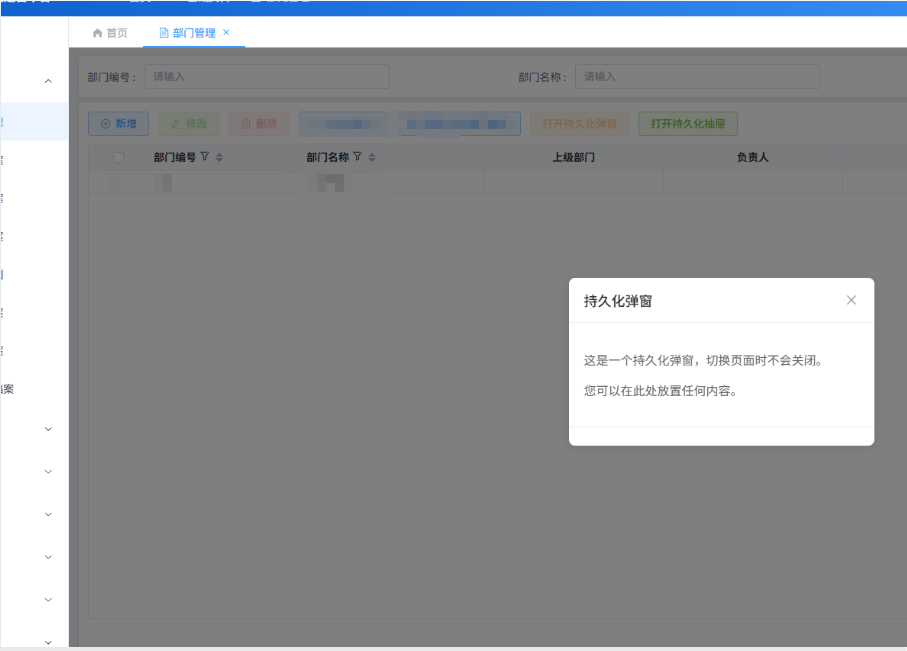
main下引入组件,弹窗展开时候,遮罩层不遮挡菜单和tabs,可以切换到其他界面,
搭配pinia状态管理,达到切换其他页面再返回当前页面弹窗数据未关闭现象
在需要使用到持久化弹窗的界面调用(index.vue)
<template>
<div>
		<el-button type="warning" plain @click="togglePersistentDialog" 			:disabled="isDialogOpenInCurrentPage">打开持久化弹窗</el-button>
  </div>
</template>
<script setup lang="ts" name="deptIndex">
	import { usePersistentDialogStore } from "@/stores/modules/persistentDialog";
	import { useRoute } from "vue-router";
	// 持久化弹窗store
	const persistentDialogStore = usePersistentDialogStore();
	const route = useRoute();

	// 计算当前页面弹窗是否打开
	const isDialogOpenInCurrentPage = computed(() => {
	  return persistentDialogStore.visible && persistentDialogStore.bindPath === route.path;
	});
	// 打开持久化弹窗
	const togglePersistentDialog = () => {
	  persistentDialogStore.open(route.path);
	};

</script>
持久化弹窗可以使用动态组件加载,需要调整持久化弹窗组件和store的接口定义
- 修改持久化弹窗组件的store,添加动态组件相关的状态和方法
- 修改持久化弹窗组件,支持动态加载组件
- 修改需要用到的界面(index.vue),传递对应的组件信息
效果图

有“AI”的1024 = 2048,欢迎大家加入2048 AI社区
更多推荐


 0
0 0
0- 0


 已为社区贡献1条内容

所有评论(0)