【大数据 & AI】Flink Agents 源码解读 --- (7) --- AgentsExecutionEnvironment
【大数据 & AI】Flink Agents 源码解读 — (7) — AgentsExecutionEnvironment
文章目录
0x00 概要
AgentsExecutionEnvironment 是在Flink基础上构建的一个更高层次的执行环境,专门为Agent而设计,同时保留了与原生 Flink API 的兼容性。
0x01 基础知识
可以把 Flink 原生的 StreamExecutionEnvironment / TableEnvironment 理解成“Agent 话题里所说的执行环境(Execution Environment)”,但是其无法直接被 Agent 使用。因此需要在其上做一些封装和适配,这就是 AgentsExecutionEnvironment。
- Flink Environment = 纯粹的计算资源与运行时容器
- 负责申请 Slot、管理 Checkpoint、调度算子链、网络 Shuffle
- 对“业务语义”一无所知,也不管用户写的是 ETL、CEP 还是 AI 推理
- 对应 Agent 词汇表里的“Runtime / Cluster / Engine”这一层
- Agent Environment = 在 Flink Runtime 之上包了一层语义抽象
- 替用户注册 Chat Model、Tools、Memory、Actions、Event Schema
- 把“用户消息”或“传感器事件”封装成 Event,按 AgentPlan 去调大模型、执行业务动作
- 内部仍然用
StreamExecutionEnvironment去提交算子,只是看不到显式的keyBy()和process()——框架帮用户生成了ActionExecutionOperator
类比关系如下:
传统 Flink 程序
├─ StreamExecutionEnvironment   ← 纯运行时
├─ your ProcessFunction         ← 用户的业务逻辑
└─ DataStream

Flink Agents 程序
├─ AgentsExecutionEnvironment   ← Agent 语义环境,内部仍持有 StreamExecutionEnvironment
├─ AgentPlan(your business)   ← 定义“遇到啥事件该干啥”
└─ ActionExecutionOperator     ← 框架替用户生成的算子,负责调大模型、更新记忆
1.1 定义
AgentsExecutionEnvironment 的代码如下。
/**
 * Base class for agent execution environment.
 *
 * <p>This class provides the main entry point for integrating Flink Agents with different types of
 * Flink data sources (DataStream, Table, or simple lists).
 */
public abstract class AgentsExecutionEnvironment {
    protected final Map<ResourceType, Map<String, Object>> resources;

    protected AgentsExecutionEnvironment() {
        this.resources = new HashMap<>();
        for (ResourceType type : ResourceType.values()) {
            this.resources.put(type, new HashMap<>());
        }
    }

    /**
     * Get agents execution environment.
     *
     * <p>Factory method that creates an appropriate execution environment based on the provided
     * StreamExecutionEnvironment. If no environment is provided, a local execution environment is
     * returned for testing and development.
     *
     * <p>When integrating with Flink DataStream/Table APIs, users should pass the Flink
     * StreamExecutionEnvironment to enable remote execution capabilities.
     *
     * @param env Optional StreamExecutionEnvironment for remote execution. If null, a local
     *     execution environment will be created.
     * @param tEnv Optional StreamTableEnvironment for table-to-stream conversion.
     * @return AgentsExecutionEnvironment appropriate for the execution context.
     */
    public static AgentsExecutionEnvironment getExecutionEnvironment(
            StreamExecutionEnvironment env, @Nullable StreamTableEnvironment tEnv) {
        if (env == null) {
            // Return local execution environment for testing/development
            try {
                Class<?> localEnvClass =
                        Class.forName(                                "org.apache.flink.agents.runtime.env.LocalExecutionEnvironment");
                return (AgentsExecutionEnvironment)
                        localEnvClass.getDeclaredConstructor().newInstance();
            } catch (Exception e) {
                throw new RuntimeException("Failed to create LocalExecutionEnvironment", e);
            }
        } else {
            // Return remote execution environment for Flink integration
            try {
                Class<?> remoteEnvClass =
                        Class.forName(                                "org.apache.flink.agents.runtime.env.RemoteExecutionEnvironment");
                return (AgentsExecutionEnvironment)
                        remoteEnvClass
                                .getDeclaredConstructor(
                                        StreamExecutionEnvironment.class,
                                        StreamTableEnvironment.class)
                                .newInstance(env, tEnv);
            } catch (Exception e) {
                throw new RuntimeException("Failed to create RemoteExecutionEnvironment", e);
            }
        }
    }
1.2 功能
AgentsExecutionEnvironment 的功能如下:
- 统一入口:
- 提供getExecutionEnvironment()系列静态工厂方法,可以依据是否传入Flink的 StreamExecutionEnvironment来创建本地或远程执行环境。
- 支持从不同数据源构建构建Agent管道,包括List,DataStream和Table。
- 资源配置管理:
- 内置 resources 映射结构,支持按照资源类型管理各种资源。
- 提供 addResource() 方法注册可序列化的资源或者资源描述符。
- 多输入源支持:
- fromList():支持从简单列表创建本地执行环境。
- fromDataStream():集成Flink DataStream API
- fromTable():集成Flink Table API
- 配置管理:
- 提供getConfig()抽象方法获取可写的配置对象。
1.3 与原生 Flink Environment 的区别
- 抽象层级更高:AgentExecutionEnvrionment是对Flink原生环境的封装,在其之上提供了面向Agent的编程模型。主要用于运行Agent,而非 直接处理数据流。
- 执行模式:AgentExecutionEnvrionment 通过 LocalExecutionEnvironment 和 RemoteExecutionEnvironment 分别支持本地测试和远程集群执行。原生 Flink 主要通过配置参数控制执行模式。
- 资源管理机制:AgentExecutionEnvrionment 内置了专门的资源注册和管理机制,支持按类型分类管理支援。原生 Flink 没有这种结构化的资源管理方式。
- API 设计目标:面向 Agent 编程范式,强调事件驱动的自主行为体模型。原生Flink 更关注数据流处理和批处理操作。
0x02 LocalExecutionEnvironment
LocalExecutionEnvironment 是 AgentsExecutionEnvironment 的一种实现形式。
Class<?> localEnvClass = Class.forName(                                "org.apache.flink.agents.runtime.env.LocalExecutionEnvironment");
                return (AgentsExecutionEnvironment)
                        localEnvClass.getDeclaredConstructor().newInstance();
LocalExecutionEnvironment 主要用于
- 开发阶段的快速测试和调试
- 无需 Flink 集群即可验证代理逻辑
- 简化Agent应用的本地开发流程
- 它与远程执行环境形成对比,后者支持完整的 Flink DataStream 和 Table API 集成。
2.1 定义
2.1.1 主要功能
LocalExecutionEnvironment 的主要功能如下:
- 本地执行环境实现
- 集成自 AgentExecutionEnvrionment,为本地测试和开发提供执行环境
- 不依赖 Flink 集群,可以在本地环境中运行和调试代理
- 数据源支持
- 通过from_list方法支持从列表数据源读取输入数据
- 不支持 Flink 的DataStream 和 Table API(这些在远程执行环境中使用)
- 资源配置和管理
- 存储和管理通过 add_resource 方法注册的资源
- 在构建Agent时,将环境中的资源注入到Agent实例中
- 代理执行管理
- 通过 set_agent 方法设置待执行的Agent、输入和输出
- 使用 LocalRunner 在本地执行代理逻辑
- 通过 execute 方法触发代理执行
- 结果收集
- 收集Agent执行的输出结果
- 通过 to_list 方法返回执行结果
根据代码分析, execute 函数在以下情况下被调用:
- 用户手动调用。当用户完成代理配置和输入数据设置后,需要显式调用execute() 方法来启动Agent 执行流程,这通常式配置完所有必要组件后的最后一步。
2.1.2 代码
LocalExecutionEnvironment 的定义如下,其中 LocalRunner 是核心。
class LocalExecutionEnvironment(AgentsExecutionEnvironment):
    """Implementation of AgentsExecutionEnvironment for local execution environment."""

    __input: List[Dict[str, Any]] = None
    __output: List[Any] = None
    __runner: LocalRunner = None
    __executed: bool = False
    __config: AgentConfiguration = AgentConfiguration()

    def set_agent(self, input: list, output: list, runner: LocalRunner) -> None:
        """Set agent input, output and runner."""
        self.__input = input
        self.__runner = runner
        self.__output = output

    def execute(self) -> None:
        """Execute agent individually."""
        if self.__executed:
            err_msg = (
                "LocalExecutionEnvironment doesn't support execute multiple times."
            )
            raise RuntimeError(err_msg)
        self.__executed = True
        for input in self.__input:
            self.__runner.run(**input)
        outputs = self.__runner.get_outputs()
        for output in outputs:
            self.__output.append(output)
2.1.3 执行流程
在 LocalExecutionEnvironment 中,execute 方法会:
- 遍历所有输入数据项
- 对每个输入调用 LocalRunner 的run方法进行处理
- 收集所有输出结果
典型的调用序列如下:
# 1. 获取执行环境
env = StreamExecutionEnvironment.get_execution_environment()
# 2. 添加所需资源
env.add_resource(...)
# 3. 设置输入数据
output_data = env.from_list(input_data)
# 4. 应用代理
builder.apply(agent)
# 5. 执行代理
env.execute()
# 6. 获取结果
results = builder.to_list()
关键特点:
- 手动触发: execute() 不会自动调用,必须由用户显式调用
- 一次性执行:只能调用一次,多次调用会抛出异常
- 阻塞操作:在本地环境中,这是个同步阻塞操作,会等待所有输入处理完成
2.1.4 组件关系
组件关系图如下:
LocalExecutionEnvironmet
    ↓
    ↓ creates
LocalAgentBuilder
    ↓
    ↓ creates
LocalRunner
    ↓
    ↓ creates & run(data)
LocalRunnerContext
关系说明:
- LocalExecutionEnvironmet 是入口点,管理整个执行环境。通过 from_list() 创建LocalAgentBuilder
- LocalAgentBuilder 负责构建Agent 执行管道,通过 apply() 创建 LocalRunner
- LocalRunner 是实际的执行器
- LocalRunner 为每个处理的记录创建 LocalRunnerContext
2.2 LocalRunner
LocalRunner 是本地执行环境中的核心执行器,负责实际运行Agent逻辑。LocalRunner 提供了一个完整的本地执行环境,模拟了Flink 流处理的行为,使得Agent可以在本地进行开发和测试。
2.2.1 LocalRunner 的主要功能
LocalRunner 的主要功能:
- 代理执行:将Agent转换为可执行的计划并执行
- 上下文管理:为每个处理单元创建和管理 LocalRunnerContext
- 事件处理:管理事件队列并驱动Agent的执行流程
- 结果收集:收集和存储Agent执行的输出结果
run函数是LocalRunner的核心方法,负责处理单个输入记录:
- 从输入数据中提取键值,用于上下文管理
- 为每个键创建或复用 LocalRunnerContext
- 将输入数据包装成 InputEvent 并发送到事件队列
- 事件循环处理,LocalRunner 的 run 函数使用 while 循环是为了处理事件驱动的代理执行模型。这种设计反映了代理执行的核心机制
- 持续处理事件队列直到为空
- 如果是输出事件、收集结果
- 根据事件类型查找对应的动作
- 执行动作
- 处理异步处理结果
    @override
    def run(self, **data: Dict[str, Any]) -> Any:
        """Execute the agent to process the given data.

        Parameters
        ----------
        **data : dict[str, Any]
            input record from upstream.

        Returns:
        -------
        key
            The key of the input that was processed.
        """
        if "key" in data:
            key = data["key"]
        elif "k" in data:
            key = data["k"]
        else:
            key = uuid.uuid4()

        if key not in self.__keyed_contexts:
            self.__keyed_contexts[key] = LocalRunnerContext(self.__agent_plan, key, self.__config)
        context = self.__keyed_contexts[key]

        if "value" in data:
            input_event = InputEvent(input=data["value"])
        elif "v" in data:
            input_event = InputEvent(input=data["v"])
        else:
            msg = "Input data must be dict has 'v' or 'value' field"
            raise RuntimeError(msg)

        context.send_event(input_event)

        while len(context.events) > 0:
            event = context.events.popleft()
            if isinstance(event, OutputEvent):
                self.__outputs.append({key: event.output})
                continue
            event_type = f"{event.__class__.__module__}.{event.__class__.__name__}"
            for action in self.__agent_plan.get_actions(event_type):
                context.action_name = action.name
                func_result = action.exec(event, context)
                if isinstance(func_result, Generator):
                    try:
                        for _ in func_result:
                            pass
                    except Exception:
                        logger.exception("Error in async execution")
                        raise
        return key
2.2.2 事件驱动执行模型
在 Flink Agents 框架中,代理的执行是基于事件的。每个动作 (action)处理一个事件并可能产生新的事件,这些新事件又会触发其他动作的执行。因此需要一个循环来持续处理事件队列中的事件,直到没有更多事件需要处理。
这种设计使得代理可以处理复杂的、多步骤的交互过程,而不需要预先确定执行步骤的数量。while 循环确保所有相关的事件都被处理完毕,形成了一个完整的事件处理链:
- 持续从事件队列 context.events 中取出事件进行处理
- 每个事件可能触发一个或多个动作的执行
- 动作执行可能产生新的事件,这些事件被添加回队列
递归事件处理:
- 初始时只有一个 InputEvent
- 动作处理 InputEvent 可能产生 ChatRequestEvent 等中间事件
- 中间事件可能触发其他动作,产生更多事件
- 最终产生 OutputEvent 完成处理
完整处理链:
InputEvent → → start_action → → ChatRequestEvent → → LLM处理 → → ChatResponseEvent → → stop_action → → OutputEvent
具体执行流程
-
初始化:
- 将输入数据包装成 InputEvent 并添加到事件队列
-
循环处理:
- 从队列取出事件
- 根据事件类型找到对应的 actions
- 执行所有监听该事件类型的动作
- 动作可能通过 send_event 发送新事件到队列
-
终止条件:
- 当事件队列为空时,处理完成
2.2.3 AgentPlan 和 LocalRunner 的关系
- LocalRunner 在初始化时候使用 AgentPlan
- 在执行过程中,LocalRunnerContext 通过 AgentPlan 获取资源和动作
- 在事件处理中查找对应的动作
具体为:LocalRunner 在初始化时候使用 AgentPlan
class LocalRunner(AgentRunner):
    """Agent runner implementation for local execution, which is
    convenient for debugging.

    Attributes:
    ----------
    __agent_plan : AgentPlan
        Internal agent plan.
    __keyed_contexts : dict[Any, LocalRunnerContext]
        Dictionary of active contexts indexed by key.
    __outputs:
        Outputs generated by agent execution.
    __config:
        Internal configration.
    """

    __agent_plan: AgentPlan
    __keyed_contexts: Dict[Any, LocalRunnerContext]
    __outputs: List[Dict[str, Any]]
    __config: AgentConfiguration

    def __init__(self, agent: Agent, config: AgentConfiguration) -> None:
        """Initialize the runner with the provided agent.

        Parameters
        ----------
        agent : Agent
            The agent class to convert and run.
        """
        self.__agent_plan = AgentPlan.from_agent(agent, config)
        self.__keyed_contexts = {}
        self.__outputs = []
        self.__config = config
具体为:在执行过程中,LocalRunnerContext 通过 AgentPlan 获取资源和动作
class LocalRunnerContext(RunnerContext):
    """Implementation of RunnerContext for local agent execution.

    Attributes:
    ----------
    __agent_plan : AgentPlan
        Internal agent plan for this context.
    __key : Any
        Unique identifier for the context, correspond to the key in flink KeyedStream.
    events : deque[Event]
        Queue of events to be processed in this context.
    action_name: str
        Name of the action being executed.
    """

    __agent_plan: AgentPlan
    __key: Any
    events: deque[Event]
    action_name: str
    _store: dict[str, Any]
    _short_term_memory: MemoryObject
    _config: AgentConfiguration

    def __init__(self, agent_plan: AgentPlan, key: Any, config: AgentConfiguration) -> None:
        """Initialize a new context with the given agent and key.

        Parameters
        ----------
        agent_plan : AgentPlan
            Agent plan used for this context.
        key : Any
            Unique context identifier, which is corresponding to the key in flink
            KeyedStream.
        """
        self.__agent_plan = agent_plan
        self.__key = key
        self.events = deque()
        self._store = {}
        self._short_term_memory = LocalMemoryObject(
            self._store, LocalMemoryObject.ROOT_KEY
        )
        self._config = config

    @override
    def get_resource(self, name: str, type: ResourceType) -> Resource:
        return self.__agent_plan.get_resource(name, type)
具体为:在事件处理中查找对应的动作
            for action in self.__agent_plan.get_actions(event_type):
                context.action_name = action.name
                func_result = action.exec(event, context) # 执行
                if isinstance(func_result, Generator):
                    try:
                        for _ in func_result:
                            pass
                    except Exception:
                        logger.exception("Error in async execution")
                        raise
2.2.4 为什么要为每种 key 维护独立的上下文
在 LocalRunner 中,每种 key 都有自己独立的上下文是为了模拟 Flink 流处理环境中 keyed state 的行为,并支持状态隔离和并发处理。
- 状态隔离:每个 key 对应的数据流需要维护自己的状态,避免不同 key 的数据相互干扰:
# 不同 key 的状态完全隔离
key1_context.short_term_memory.set("user_name", "Alice")
key2_context.short_term_memory.set("user_name", "Bob")
# 两个 key 有不同的状态值,互不影响
-
模拟 Flink 的 KeyedStream 行为:在 Flink 中,当使用
keyBy()操作时,每个 key 会有独立的状态管理。LocalRunner 通过这种方式模拟了相同的行为:- 相同 key 的事件会在同一个上下文中处理
- 不同 key 的事件拥有各自独立的内存和事件队列
这样保证了本地调试环境与实际 Flink 环境的一致性
-
支持并发处理:虽然 LocalRunner 是单线程运行的,但它模拟了多 key 并发处理的情况:
-
支持并发处理:虽然 LocalRunner 是单线程运行的,但它模拟了多 key 并发处理的情况:
# 可以同时处理多个 key 的数据
for input_record in inputs:
    runner.run(**input_record)  # 每个 key 有独立上下文
-
事件队列隔离:每个 key 都有自己的事件队列(events),这样可以保证:
- 同一 key 的事件按顺序处理
- 不同 key 的事件不会互相影响处理顺序
- 每个 key 可以独立地维护待处理事件队列
-
内存状态管理:每个 LocalRunnerContext 都有自己的短期记忆对象(_short_term_memory),允许:
# 每个 key 可以存储和检索自己的状态
context.short_term_memory.set("step_count", 1)
context.short_term_memory.get("step_count")  # 获取该 key 特定的状态
2.2.5 实际应用场景示例
考虑一个客户服务聊天机器人应用:
# 用户 Alice 和 Bob 的对话分别用不同的 key 处理
runner.run(key="user_alice", value={"message": "Hello"})
runner.run(key="user_bob", value={"message": "Hi there"})
# 每个用户的对话历史和状态都独立保存
# Alice 的上下文不会影响 Bob 的上下文,反之亦然
这种设计使 LocalRunner 能够准确模拟真实分布式环境中的行为,方便开发者在本地测试和调试复杂的状态依赖型代理应用。
2.3 LocalRunnerContext
LocalRunnerContext 是 Flink Agents 框架中用于本地执行环境的运行上下文实现。它的主要功能是为每个 key 提供独立的执行环境,模拟 Flink 分布式环境中 keyed state 的行为,确保了在本地环境中能够准确模拟基于 key 的状态管理和事件处理流程。
2.3.1 设计目的
LocalRunnerContext 的设计主要是为了:
- 本地调试:在本地环境中模拟 Flink 分布式执行的行为
- 状态隔离:确保不同 key 的处理状态完全隔离,避免相互干扰
- 行为一致性:保证本地测试环境与实际 Flink 执行环境的行为一致
- 简化开发:提供与生产环境相同的 API 接口,方便开发者测试和调试
2.3.2 主要功能
- 状态管理
- 为每个 key 维护独立的短期内存状态(_short_term_memory)
- 提供内存对象的读写操作,确保不同 key 的状态隔离
- 事件处理
- 维护每个 key 的事件队列(events)
- 提供 send_event 方法将事件添加到处理队列中
- 记录事件处理日志,便于调试
- 资源访问
- 提供 get_resource 方法访问 agent 所需的资源(如模型、工具等)
- 根据资源名称和类型获取相应的资源实例
- 配置管理
- 提供对 action 配置的访问(action_config, get_action_config_value)
- 提供全局配置信息(config)
- 度量和监控
- 提供度量组访问接口(agent_metric_group, action_metric_group)
- 目前在本地环境中尚未完全实现
- 异步执行支持
- 提供 execute_async 方法支持异步函数执行
- 在本地环境中降级为同步执行并给出警告
2.3.3 定义
class LocalRunnerContext(RunnerContext):
    """Implementation of RunnerContext for local agent execution.

    Attributes:
    ----------
    __agent_plan : AgentPlan
        Internal agent plan for this context.
    __key : Any
        Unique identifier for the context, correspond to the key in flink KeyedStream.
    events : deque[Event]
        Queue of events to be processed in this context.
    action_name: str
        Name of the action being executed.
    """

    __agent_plan: AgentPlan
    __key: Any
    events: deque[Event]
    action_name: str
    _store: dict[str, Any]
    _short_term_memory: MemoryObject
    _config: AgentConfiguration

    def __init__(self, agent_plan: AgentPlan, key: Any, config: AgentConfiguration) -> None:
        """Initialize a new context with the given agent and key.

        Parameters
        ----------
        agent_plan : AgentPlan
            Agent plan used for this context.
        key : Any
            Unique context identifier, which is corresponding to the key in flink
            KeyedStream.
        """
        self.__agent_plan = agent_plan
        self.__key = key
        self.events = deque()
        self._store = {}
        self._short_term_memory = LocalMemoryObject(
            self._store, LocalMemoryObject.ROOT_KEY
        )
        self._config = config

    @property
    def key(self) -> Any:
        """Get the unique identifier for this context.

        Returns:
        -------
        Any
            The unique identifier for this context.
        """
        return self.__key

    @override
    def send_event(self, event: Event) -> None:
        """Send an event to the context's event queue and log it.

        Parameters
        ----------
        event : Event
            The event to be added to the queue.
        """
        logger.info("key: %s, send_event: %s", self.__key, event)
        self.events.append(event)

    @override
    def get_resource(self, name: str, type: ResourceType) -> Resource:
        return self.__agent_plan.get_resource(name, type)

    @property
    @override
    def action_config(self) -> Dict[str, Any]:
        """Get config of the action."""
        return self.__agent_plan.get_action_config(action_name=self.action_name)

    @override
    def get_action_config_value(self, key: str) -> Any:
        """Get config option value of the key."""
        return self.__agent_plan.get_action_config_value(
            action_name=self.action_name, key=key
        )

    @property
    @override
    def short_term_memory(self) -> MemoryObject:
        """Get the short-term memory object associated with this context.

        Returns:
        -------
        MemoryObject
            The root object of the short-term memory.
        """
        return self._short_term_memory

    @property
    @override
    def agent_metric_group(self) -> MetricGroup:
        # TODO: Support metric mechanism for local agent execution.
        err_msg = "Metric mechanism is not supported for local agent execution yet."
        raise NotImplementedError(err_msg)

    @property
    @override
    def action_metric_group(self) -> MetricGroup:
        # TODO: Support metric mechanism for local agent execution.
        err_msg = "Metric mechanism is not supported for local agent execution yet."
        raise NotImplementedError(err_msg)

    def execute_async(
        self,
        func: Callable[[Any], Any],
        *args: Tuple[Any, ...],
        **kwargs: Dict[str, Any],
    ) -> Any:
        """Asynchronously execute the provided function. Access to memory
        is prohibited within the function.
        """
        logger.warning(
            "Local runner does not support asynchronous execution; falling back to synchronous execution."
        )
        func_result = func(*args, **kwargs)
        yield
        return func_result

    @property
    @override
    def config(self) -> AgentConfiguration:
        return self._config
0x03 RemoteExecutionEnvironment
RemoteExecutionEnvironment 是 Flink Agents 对原生 Flink RemoteEnvironment 的封装(适配 Agent 语义),是 Agent(智能体)与 Flink 集群融合的核心载体,核心目标是让 Agent 能够在 Flink 集群中处理 DataStream 和 Table 类型的流式数据,具体承担以下关键职责:
-
RemoteExecutionEnvironment是 Flink Agents 实现 Agent 远程执行的核心环境组件,封装了远程集群连接、作业提交、资源管理等能力; -
核心价值是屏蔽 Flink 远程执行的底层细节,让用户聚焦 Agent 逻辑定义,而非集群操作;
-
关键特性是兼容本地调试与远程执行,同时适配 Agent 特有的状态、事件、资源需求,是 Flink Agents 从 “本地单机” 走向 “分布式集群” 的核心支撑。
-
桥接 Agent 框架与 Flink 运行时:将 Agent 的执行逻辑嵌入 Flink 的 StreamExecutionEnvironment/StreamTableEnvironment,使 Agent 能利用 Flink 的分布式计算能力处理流式数据;
-
标准化 Agent 执行流程:提供统一的入口(fromDataStream/fromTable)、处理(apply Agent)、输出(toDataStream/toTable)接口,规范 Agent 在 Flink 中的数据处理链路;
-
配置管理:加载 Flink 集群中 Agent 的专属配置文件(config.yaml),为 Agent 执行提供环境配置支撑;
-
执行调度:最终触发 Flink 作业的执行(env.execute ()),完成 Agent 处理逻辑的分布式运行。
3.1 核心特色
| 特色维度 | 具体说明 |
|---|---|
| 环境适配性 | 专门面向 Flink 集群的远程执行场景设计,依赖 Flink 的流执行环境(StreamExecutionEnvironment)和表环境(StreamTableEnvironment),而非本地执行; |
| 数据类型聚焦 | 仅支持 Flink 原生的 DataStream/Table 作为输入输出,明确禁用本地场景的 List 类型(fromList/toList),贴合流式计算场景; |
| 分层设计 | 采用 “环境类(RemoteExecutionEnvironment)+ 构建器类(RemoteAgentBuilder)” 分层模式:环境类管控全局配置和 Flink 环境,构建器类聚焦单个 Agent 的执行链路; |
| 灵活的 Key 选择 | 支持自定义 KeySelector 对输入数据分片,无自定义 Key 时默认使用数据自身作为 Key,适配不同的分布式处理需求; |
| 配置解耦 | 从 Flink 配置目录加载 Agent 专属配置,配置文件与代码解耦,便于集群环境下的配置管理; |
| 容错与校验 | 包含关键流程校验(如调用 toDataStream 前必须先 apply Agent)、空值处理(TableEnvironment 懒加载)、异常封装(配置加载 / Agent 执行异常统一抛出 RuntimeException); |
| 表与流互通 | 支持 Table 与 DataStream 的双向转换(Table 转 DataStream 作为 Agent 输入、DataStream 转 Table 作为输出),适配 Flink SQL / 流处理双场景; |
| 资源关联 | 为 Agent 绑定运行时资源(resources),保障 Agent 执行所需的资源依赖; |
3.2 与原生 Flink RemoteEnvironment 的对比
| 特性 | Flink 原生 RemoteEnvironment | Flink Agents RemoteExecutionEnvironment |
|---|---|---|
| 核心定位 | 通用 Flink Job 的远程执行环境 | Agent 语义专属的远程执行环境 |
| 封装层级 | 底层 Flink Job 提交 | 上层 Agent/AgentPlan 提交 |
| 核心适配 | 无 Agent 语义,仅处理通用 JobGraph | 适配 AgentPlan → JobGraph 编译、Agent 状态管理 |
| 资源管理 | 通用 Slot / 资源分配 | 按 Agent 实例隔离资源,适配工具 / 动作资源需求 |
| 事件 / 状态处理 | 无内置事件语义 | 封装 Agent 事件(Event)的跨集群传输、状态序列化 |
3.3 如何使用 ActionExecutionOperator
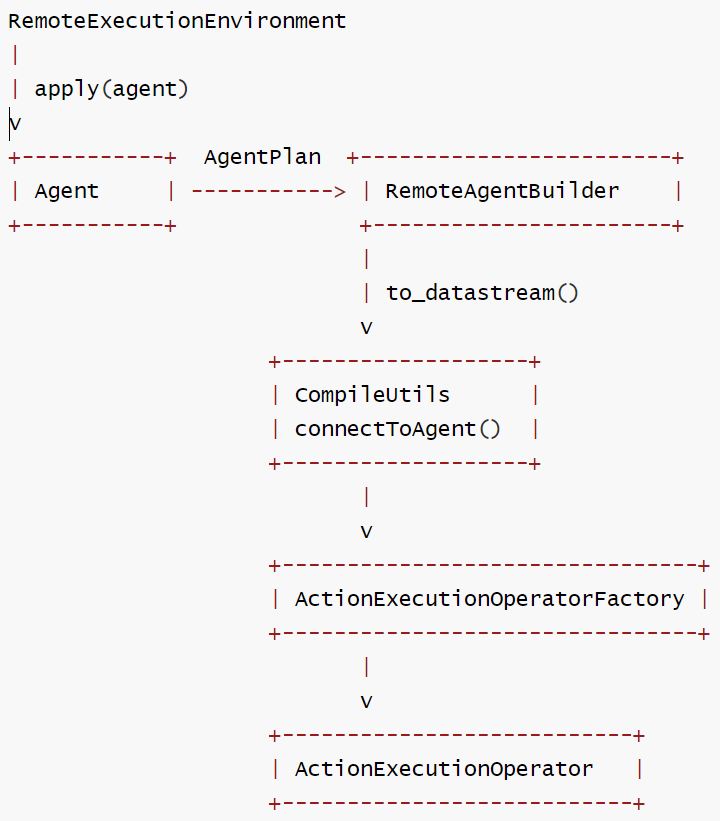
RemoteExecutionEnvironment 通过 Python 层的 RemoteAgentBuilder.to_datastream() 方法间接使用ActionExecutionOperator,过程为:
- 用户定义了一个Agent并应用到执行环境中
- 调用 to_datastream() 方法触发实际的操作符创建
- 通过 JNI 调用 Java 层的 CompileUtils.connectToAgent() 方法
- 最终在 Flink 作业图中创建并配置 ActionExecutionOperator
connectToAgent()中会:
- 接收输入的 Java DATa Stream 对象
- 接收序列化的 AgentPlan(包含所有动作和资源配置)
- 创建并连接 ActionExecutionOperator 到数据流处理图中
    // ============================ basic ====================================
    /**
     * Connects the given KeyedStream to the Flink Agents agent.
     *
     * <p>This method accepts a keyed DataStream and applies the specified agent plan to it. The
     * source of the input stream determines the data format: Java streams provide Objects, while
     * Python streams use serialized byte arrays.
     *
     * @param keyedInputStream The input keyed DataStream.
     * @param agentPlan The agent plan to be executed.
     * @param inputIsJava A flag indicating whether the input stream originates from Java. - If
     *     true, input and output types are Java Objects. - If false, input and output types are
     *     byte[].
     * @param <K> The type of the key used in the keyed DataStream.
     * @param <IN> The type of the input data (Object or byte[]).
     * @param <OUT> The type of the output data (Object or byte[]).
     * @return The processed DataStream as the result of the agent.
     */
    private static <K, IN, OUT> DataStream<OUT> connectToAgent(
            KeyedStream<IN, K> keyedInputStream,
            AgentPlan agentPlan,
            TypeInformation<OUT> outTypeInformation,
            boolean inputIsJava) {
        return (DataStream<OUT>)
                keyedInputStream
                        .transform(
                                "action-execute-operator",
                                outTypeInformation,
                                new ActionExecutionOperatorFactory(agentPlan, inputIsJava))
                        .setParallelism(keyedInputStream.getParallelism());
    }
3.4 典型流程
当用户编写基于 RemoteExecutionEnvironment 的应用程序时,典型流程如下:
# 获取Flink执行环境
env = StreamExecutionEnvironment.get_execution_environment()
# 创建 Agent 执行环境
agent_env = AgentsExecutionEnvironment.get_execution_environment(env)
# 添加所需资源
agent_env.add_resource(...)
# 设置输入数据流到Agent
input_stream = agent_env.from_Collection(input_data)
builder = agent_env.from_datastream(input_stream)
# 应用代理逻辑
agent = MyCustomAgent()
builder.apply(agent)
# 执行代理
output_stream = builder.to_datastream()
env.execute()
3.5 交互逻辑
RemoteExecutionEnvironment、ActionExecutionOperator 和 ActionTask 之间的交互逻辑如下。
这三个组件在 Flink Agents 框架中扮演不同的角色,协同工作来执行 Agent 逻辑:
- RemoteExecutionEnvironment:提供远程执行环境,负责构建和连接 Agent 到 Flink 数据流
- ActionExecutionOperator:Flink 流处理操作符,实际执行 Agent 的动作逻辑
- ActionTask:表示单个动作执行任务的抽象概念
交互流程图解
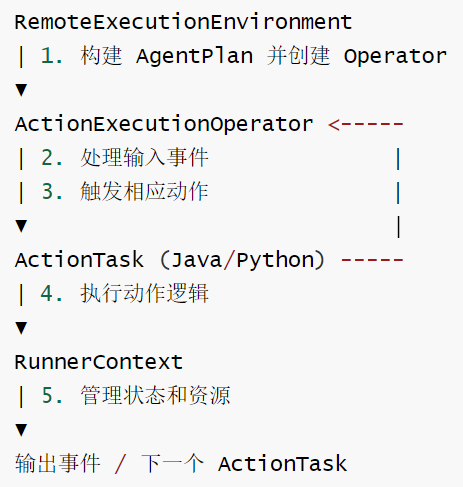
详细交互流程如下:
- 初始化阶段
- 运行时事件处理流程
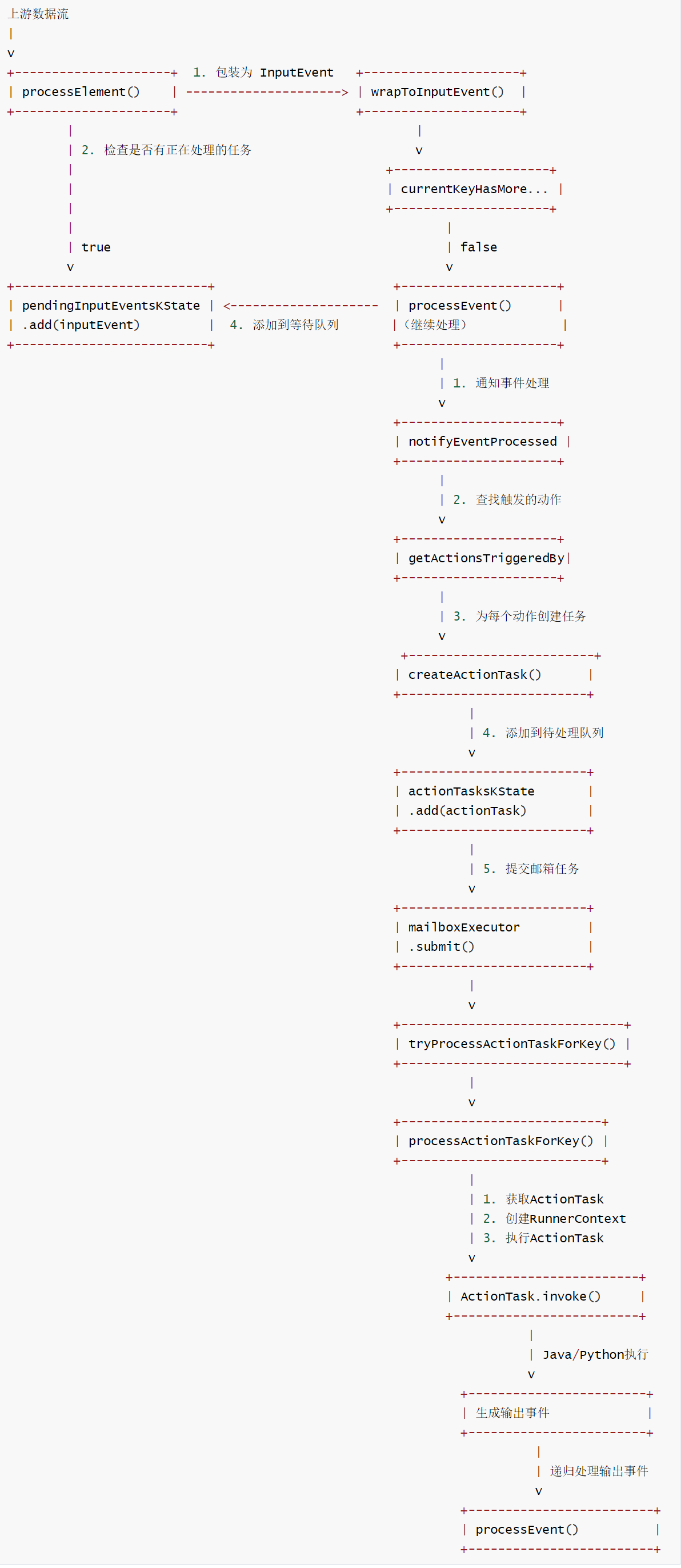
3.6 实现
RemoteAgentBuilder 的代码如下
class RemoteAgentBuilder(AgentBuilder):
    """RemoteAgentBuilder for integrating datastream/table and agent."""

    __input: DataStream
    __agent_plan: AgentPlan = None
    __output: DataStream = None
    __t_env: StreamTableEnvironment
    __config: AgentConfiguration
    __resources: Dict[ResourceType, Dict[str, Any]] = None

    def __init__(
        self,
        input: DataStream,
        config: AgentConfiguration,
        t_env: StreamTableEnvironment | None = None,
        resources: Dict[ResourceType, Dict[str, Any]] | None = None,
    ) -> None:
        """Init method of RemoteAgentBuilder."""
        self.__input = input
        self.__t_env = t_env
        self.__config = config
        self.__resources = resources

    @property
    def t_env(self) -> StreamTableEnvironment:
        """Get or crate table environment."""
        if self.__t_env is None:
            self.__t_env = StreamTableEnvironment.create(
                stream_execution_environment=self.__env
            )
        return self.__t_env

    def apply(self, agent: Agent) -> "AgentBuilder":
        """Set agent of execution environment.

        Parameters
        ----------
        agent : Agent
            The agent user defined to run in execution environment.
        """
        if self.__agent_plan is not None:
            err_msg = "RemoteAgentBuilder doesn't support apply multiple agents yet."
            raise RuntimeError(err_msg)

        # inspect refer actions and resources from env to agent.
        for type, name_to_resource in self.__resources.items():
            agent.resources[type] = name_to_resource | agent.resources[type]

        self.__agent_plan = AgentPlan.from_agent(agent, self.__config)

        return self

    def to_datastream(self, output_type: TypeInformation | None = None) -> DataStream:
        """Get output datastream of agent execution.

        Returns:
        -------
        DataStream
            Output datastream of agent execution.
        """
        if self.__agent_plan is None:
            err_msg = "Must apply agent before call to_datastream/to_table."
            raise RuntimeError(err_msg)

        # return the same output datastream when call to_datastream multiple.
        if self.__output is None:
            j_data_stream_output = invoke_method(
                None,
                "org.apache.flink.agents.runtime.CompileUtils",
                "connectToAgent",
                [
                    self.__input._j_data_stream,
                    self.__agent_plan.model_dump_json(serialize_as_any=True),
                ],
                [
                    "org.apache.flink.streaming.api.datastream.KeyedStream",
                    "java.lang.String",
                ],
            )
            output_stream = DataStream(j_data_stream_output)
            self.__output = output_stream.map(
                lambda x: cloudpickle.loads(x), output_type=output_type
            )
        return self.__output

    def to_table(self, schema: Schema, output_type: TypeInformation) -> Table:
        """Get output Table of agent execution.

        Parameters
        ----------
        schema : Schema
            Indicate schema of the output table.
        output_type : TypeInformation
            Indicate schema corresponding type information.

        Returns:
        -------
        Table
            Output Table of agent execution.
        """
        return self.t_env.from_data_stream(self.to_datastream(output_type), schema)

    def to_list(self) -> List[Dict[str, Any]]:
        """Get output list of agent execution.

        This method is not supported for remote execution environments.
        """
        msg = "RemoteAgentBuilder does not support to_list."
        raise NotImplementedError(msg)
RemoteExecutionEnvironment 的代码如下。
class RemoteExecutionEnvironment(AgentsExecutionEnvironment):
    """Implementation of AgentsExecutionEnvironment for execution with DataStream."""

    __env: StreamExecutionEnvironment
    __t_env: StreamTableEnvironment
    __config: AgentConfiguration

    def __init__(
        self,
        env: StreamExecutionEnvironment,
        t_env: StreamTableEnvironment | None = None,
    ) -> None:
        """Init method of RemoteExecutionEnvironment."""
        super().__init__()
        self.__env = env
        self.__t_env = t_env
        self.__config = AgentConfiguration()
        self.__load_config_from_flink_conf_dir()

    @property
    def t_env(self) -> StreamTableEnvironment:
        """Get or crate table environment."""
        if self.__t_env is None:
            self.__t_env = StreamTableEnvironment.create(
                stream_execution_environment=self.__env
            )
        return self.__t_env

    def get_config(self, path: str | None = None) -> AgentConfiguration:
        """Get the writable configuration for flink agents.

        Returns:
        -------
        LocalConfiguration
            The configuration for flink agents.
        """
        return self.__config

    @staticmethod
    def __process_input_datastream(
        input: DataStream, key_selector: KeySelector | Callable | None = None
    ) -> KeyedStream:
        if isinstance(input, KeyedStream):
            return input
        else:
            if key_selector is None:
                msg = "KeySelector must be provided."
                raise RuntimeError(msg)
            input = input.key_by(key_selector)
            return input

    def from_datastream(
        self, input: DataStream, key_selector: KeySelector | Callable | None = None
    ) -> RemoteAgentBuilder:
        """Set input datastream of agent.

        Parameters
        ----------
        input : DataStream
            Receive a DataStream as input.
        key_selector : KeySelector
            Extract key from each input record, must not be None when input is
            not KeyedStream.
        """
        input = self.__process_input_datastream(input, key_selector)

        return RemoteAgentBuilder(
            input=input,
            config=self.__config,
            t_env=self.__t_env,
            resources=self.resources,
        )

    def from_table(
        self,
        input: Table,
        key_selector: KeySelector | Callable | None = None,
    ) -> AgentBuilder:
        """Set input Table of agent.

        Parameters
        ----------
        input : Table
            Receive a Table as input.
        key_selector : KeySelector
            Extract key from each input record.
        """
        input = self.t_env.to_data_stream(table=input)

        input = input.map(lambda x: x, output_type=PickledBytesTypeInfo())

        input = self.__process_input_datastream(input, key_selector)
        return RemoteAgentBuilder(
            input=input,
            config=self.__config,
            t_env=self.t_env,
            resources=self.resources,
        )

    def from_list(self, input: List[Dict[str, Any]]) -> "AgentsExecutionEnvironment":
        """Set input list of agent execution.

        This method is not supported for remote execution environments.
        """
        msg = "RemoteExecutionEnvironment does not support from_list."
        raise NotImplementedError(msg)

    def execute(self) -> None:
        """Execute agent."""
        self.__env.execute()


    def __load_config_from_flink_conf_dir(self) -> None:
        """Load agent configuration from FLINK_CONF_DIR if available."""
        flink_conf_dir = os.environ.get("FLINK_CONF_DIR")
        if flink_conf_dir is None:
            return

        # Try to find config file, with fallback to legacy name
        config_path = self.__find_config_file(flink_conf_dir)

        if config_path is None:
            logging.error(f"Config file not found in {flink_conf_dir}")
        else:
            self.__config.load_from_file(str(config_path))

    def __find_config_file(self, flink_conf_dir: str) -> Path | None:
        """Find config file in the given directory, checking both new and legacy names.

        Parameters
        ----------
        flink_conf_dir : str
            Directory to search for config files.

        Returns:
        -------
        Path | None
            Path to the config file if found, None otherwise.
        """
        # Try legacy config file name first
        legacy_config_path = Path(flink_conf_dir).joinpath(_LEGACY_CONFIG_FILE_NAME)
        if legacy_config_path.exists():
            logging.warning(
                f"Using legacy config file {_LEGACY_CONFIG_FILE_NAME}"
            )
            return legacy_config_path

        # Try new config file name as fallback
        primary_config_path = Path(flink_conf_dir).joinpath(_CONFIG_FILE_NAME)
        if primary_config_path.exists():
            return primary_config_path

        return None
0xEE 个人信息
★★★★★★关于生活和技术的思考★★★★★★
微信公众账号:罗西的思考
如果您想及时得到个人撰写文章的消息推送,或者想看看个人推荐的技术资料,敬请关注。

0xFF 参考

有“AI”的1024 = 2048,欢迎大家加入2048 AI社区
更多推荐

 8
8 0
0- 0


 已为社区贡献34条内容

所有评论(0)