工具的调用(spring ai版)
这些工具不是我们自己用的而是给AI用的,把工具写好然后让ai去调用,就是比如说给ai一个问题然后他会自己判断要不要调用工具,然后在生成。因为大模型没有这些工具的能力。
这些工具不是我们自己用的而是给AI用的,把工具写好然后让ai去调用,就是比如说给ai一个问题然后他会自己判断要不要调用工具,然后在生成。因为大模型没有这些工具的能力。
1. 你把 prompt 给大模型
这是第一步。
你给 AI 的内容包括:
- 用户的问题
- 系统提示词(system prompt)
- 工具描述(由 Spring AI 自动生成)
2. 大模型分析 prompt
大模型会做两件事:
- 理解用户的问题
- 判断是否需要调用工具
这一步是关键。
3. 如果大模型判断需要调用工具
它会:
- 从 prompt 中自动提取参数
- 选择要调用的工具
- 生成工具调用指令(function call)
为什么要写工具?
因为 AI 自己没有这些能力。
AI 本质上只是:
- 会 “思考”
- 会 “理解”
- 会 “生成文字”
但它 不会:
- 不会访问互联网
- 不会读取你本地的文件
- 不会操作数据库
- 不会调用你公司的内部接口
- 不会生成 PDF
- 不会执行系统命令
- 不会爬取网页
- 不会做实时计算
- 不会连接硬件设备
这些能力 AI 都没有。
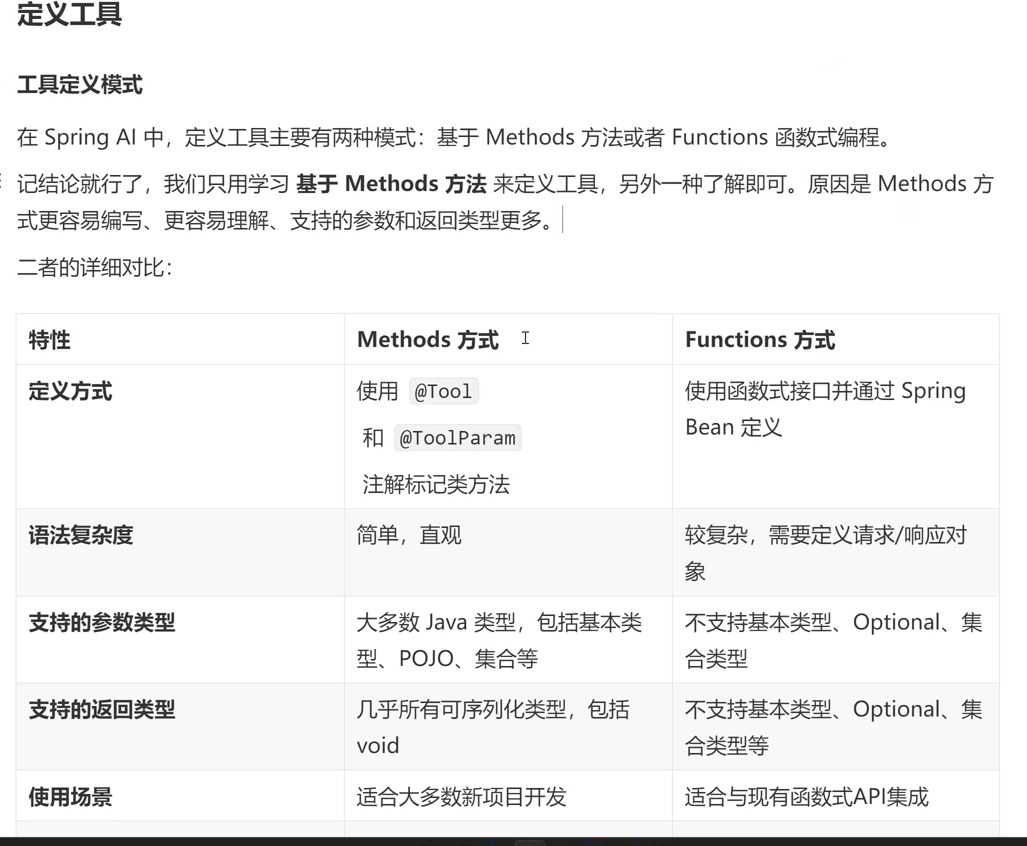
下面来讲一些工具:
1.文件操作工具类(提供文件读写功能)
代码如下:
package com.yupi.yuaiagent.tools;

import cn.hutool.core.io.FileUtil;
import com.yupi.yuaiagent.constant.FileConstant;
import org.springframework.ai.tool.annotation.Tool;
import org.springframework.ai.tool.annotation.ToolParam;

/**
 * 文件操作工具类(提供文件读写功能)
 */
public class FileOperationTool {

    private final String FILE_DIR = FileConstant.FILE_SAVE_DIR + "/file";

    @Tool(description = "Read content from a file")
    public String readFile(@ToolParam(description = "Name of a file to read") String fileName) {
        String filePath = FILE_DIR + "/" + fileName;
        try {
            return FileUtil.readUtf8String(filePath);
        } catch (Exception e) {
            return "Error reading file: " + e.getMessage();
        }
    }

    @Tool(description = "Write content to a file")
    public String writeFile(@ToolParam(description = "Name of the file to write") String fileName,
                            @ToolParam(description = "Content to write to the file") String content
    ) {
        String filePath = FILE_DIR + "/" + fileName;

        try {
            // 创建目录
            FileUtil.mkdir(FILE_DIR);
            FileUtil.writeUtf8String(content, filePath);
            return "File written successfully to: " + filePath;
        } catch (Exception e) {
            return "Error writing to file: " + e.getMessage();
        }
    }
}
第一个方法readFile就是读取
String filePath = FILE_DIR + "/" + fileName;下的文件并且返回
第二个方法writeFile顾名思义就是把东西写在某个位置,
FileUtil.writeUtf8String(content, filePath);这个代码就是content是要写的内容,filepath是要写的位置。
比如说给ai说 从某某文件下读取 大猴子为什么这么帅的原因 然后写在某某文件下,就会调用这个工具。
2. 网页搜索工具
比如说 问题是:给我搜一个詹姆斯的照片,他就会联网搜索。
这个需要用到searchapi.io这个工具的地址Google Search API for real-time SERP scraping
然后你需要进去
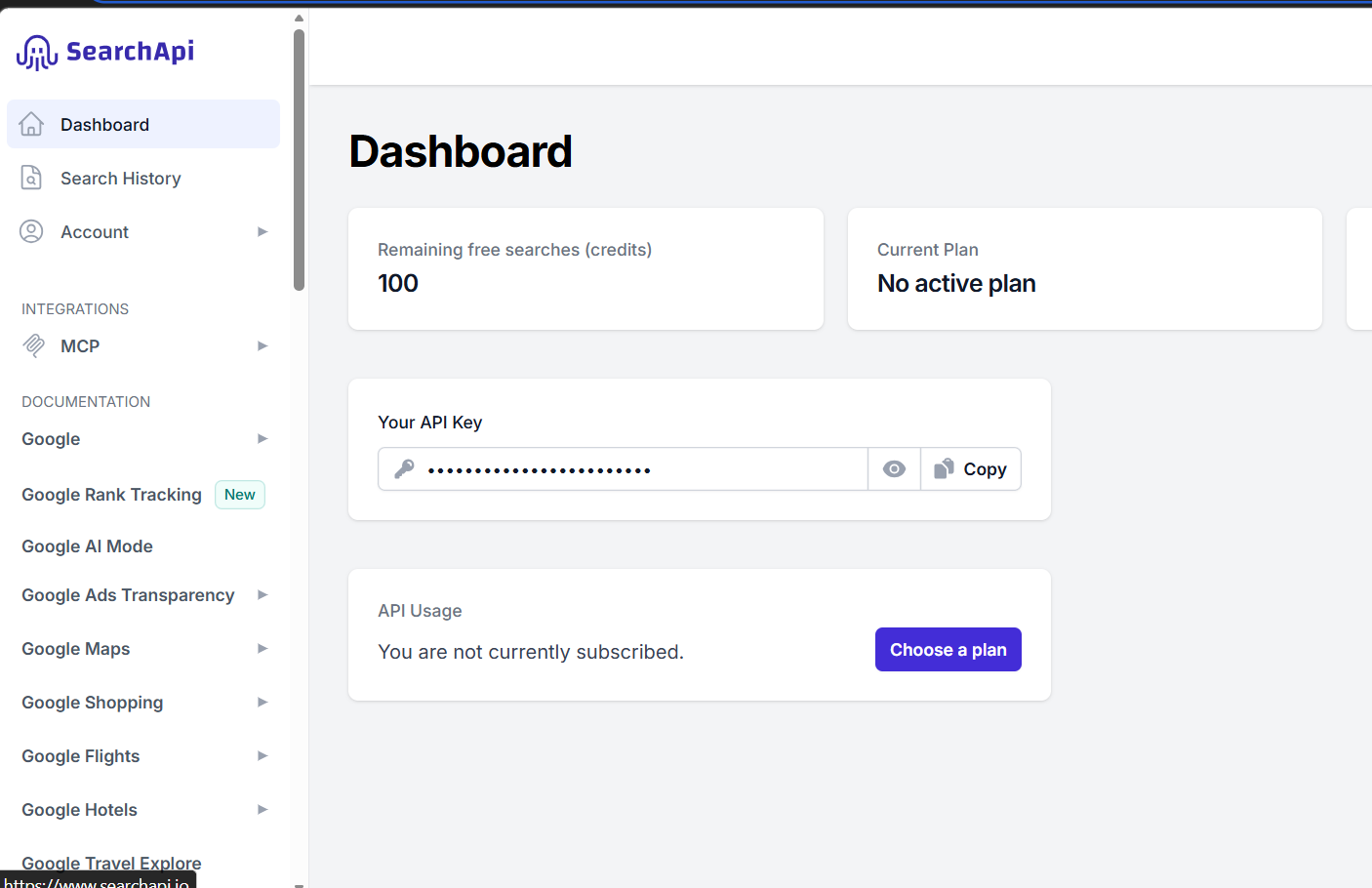
获取这个apikey,然后配置在yml中。
# searchAPI
search-api:
  # 需要替换为你自己的 key
具体代码如下:
package com.yupi.yuaiagent.tools;

import cn.hutool.http.HttpUtil;
import cn.hutool.json.JSONArray;
import cn.hutool.json.JSONObject;
import cn.hutool.json.JSONUtil;
import org.springframework.ai.tool.annotation.Tool;
import org.springframework.ai.tool.annotation.ToolParam;

import java.util.HashMap;
import java.util.List;
import java.util.Map;
import java.util.stream.Collectors;

/**
 * 网页搜索工具
 */
public class WebSearchTool {

    // SearchAPI 的搜索接口地址
    private static final String SEARCH_API_URL = "https://www.searchapi.io/api/v1/search";

    private final String apiKey;

    public WebSearchTool(String apiKey) {
        this.apiKey = apiKey;
    }

    @Tool(description = "Search for information from Baidu Search Engine")
    public String searchWeb(
            @ToolParam(description = "Search query keyword") String query) {
        Map<String, Object> paramMap = new HashMap<>();
        paramMap.put("q", query);
        paramMap.put("api_key", apiKey);
        paramMap.put("engine", "baidu");
        try {
            String response = HttpUtil.get(SEARCH_API_URL, paramMap);
            // 取出返回结果的前 5 条
            JSONObject jsonObject = JSONUtil.parseObj(response);
            // 提取 organic_results 部分
            JSONArray organicResults = jsonObject.getJSONArray("organic_results");
            List<Object> objects = organicResults.subList(0, 5);
            // 拼接搜索结果为字符串
            String result = objects.stream().map(obj -> {
                JSONObject tmpJSONObject = (JSONObject) obj;
                return tmpJSONObject.toString();
            }).collect(Collectors.joining(","));
            return result;
        } catch (Exception e) {
            return "Error searching Baidu: " + e.getMessage();
        }
    }
}
这是模版代码直接就可以用。
3.网页抓取工具
就是获取网页中的数据
你可以给ai说;提取写文章-CSDN创作中心这个网页的内容并且精简,然后写入某某文件中,他就会调用这个工具后半句调用的是文件操作工具类。
代码如下:
package com.yupi.yuaiagent.tools;

import org.jsoup.Jsoup;
import org.jsoup.nodes.Document;
import org.springframework.ai.tool.annotation.Tool;
import org.springframework.ai.tool.annotation.ToolParam;

/**
 * 网页抓取工具
 */
public class WebScrapingTool {

    @Tool(description = "Scrape the content of a web page")
    public String scrapeWebPage(@ToolParam(description = "URL of the web page to scrape") String url) {
        try {
            Document document = Jsoup.connect(url).get();
            return document.html();
        } catch (Exception e) {
            return "Error scraping web page: " + e.getMessage();
        }
    }
}
模版代码直接用即可。啥都不用改。
4.终端操作工具
顾名思义就是操作终端的
给ai的问题是 执行D:\apache-jmeter-5.6.3这段命令行然后ai会告诉你成功或者失败。
代码如下:
package com.yupi.yuaiagent.tools;

import org.springframework.ai.tool.annotation.Tool;
import org.springframework.ai.tool.annotation.ToolParam;

import java.io.BufferedReader;
import java.io.IOException;
import java.io.InputStreamReader;

/**
 * 终端操作工具
 */
public class TerminalOperationTool {

    @Tool(description = "Execute a command in the terminal")
    public String executeTerminalCommand(@ToolParam(description = "Command to execute in the terminal") String command) {
        StringBuilder output = new StringBuilder();
        try {
            ProcessBuilder builder = new ProcessBuilder("cmd.exe", "/c", command);
//            Process process = Runtime.getRuntime().exec(command);
            Process process = builder.start();
            try (BufferedReader reader = new BufferedReader(new InputStreamReader(process.getInputStream()))) {
                String line;
                while ((line = reader.readLine()) != null) {
                    output.append(line).append("\n");
                }
            }
            int exitCode = process.waitFor();
            if (exitCode != 0) {
                output.append("Command execution failed with exit code: ").append(exitCode);
            }
        } catch (IOException | InterruptedException e) {
            output.append("Error executing command: ").append(e.getMessage());
        }
        return output.toString();
    }
}
ProcessBuilder builder = new ProcessBuilder("cmd.exe", "/c", command);这行是可以自己设置的不用固定死"/c"。
int exitCode = process.waitFor();这个是命令行执行的结果,0为成功,非0为失败。
5. 资源下载工具
这个就是下载东西
给ai的问题是把写文章-CSDN创作下载到某某文件
或者ai从你的问题中提取到url
代码如下:
package com.yupi.yuaiagent.tools;

import cn.hutool.core.io.FileUtil;
import cn.hutool.http.HttpUtil;
import com.yupi.yuaiagent.constant.FileConstant;
import org.springframework.ai.tool.annotation.Tool;
import org.springframework.ai.tool.annotation.ToolParam;

import java.io.File;

/**
 * 资源下载工具
 */
public class ResourceDownloadTool {

    @Tool(description = "Download a resource from a given URL")
    public String downloadResource(@ToolParam(description = "URL of the resource to download") String url, @ToolParam(description = "Name of the file to save the downloaded resource") String fileName) {
        String fileDir = FileConstant.FILE_SAVE_DIR + "/download";
        String filePath = fileDir + "/" + fileName;
        try {
            // 创建目录
            FileUtil.mkdir(fileDir);
            // 使用 Hutool 的 downloadFile 方法下载资源
            HttpUtil.downloadFile(url, new File(filePath));
            return "Resource downloaded successfully to: " + filePath;
        } catch (Exception e) {
            return "Error downloading resource: " + e.getMessage();
        }
    }
}
6. PDF 生成工具
这个就是生成pdf
比如说:给我把这段数据生成pdf,生成到某某文件
代码如下:
package com.yupi.yuaiagent.tools;

import cn.hutool.core.io.FileUtil;
import com.itextpdf.kernel.font.PdfFont;
import com.itextpdf.kernel.font.PdfFontFactory;
import com.itextpdf.kernel.pdf.PdfDocument;
import com.itextpdf.kernel.pdf.PdfWriter;
import com.itextpdf.layout.Document;
import com.itextpdf.layout.element.Paragraph;
import com.yupi.yuaiagent.constant.FileConstant;
import org.springframework.ai.tool.annotation.Tool;
import org.springframework.ai.tool.annotation.ToolParam;

import java.io.IOException;

/**
 * PDF 生成工具
 */
public class  PDFGenerationTool {

    @Tool(description = "Generate a PDF file with given content", returnDirect = false)
    public String generatePDF(
            @ToolParam(description = "Name of the file to save the generated PDF") String fileName,
            @ToolParam(description = "Content to be included in the PDF") String content) {
        String fileDir = FileConstant.FILE_SAVE_DIR + "/pdf";
        String filePath = fileDir + "/" + fileName;
        try {
            // 创建目录
            FileUtil.mkdir(fileDir);
            // 创建 PdfWriter 和 PdfDocument 对象
            try (PdfWriter writer = new PdfWriter(filePath);
                 PdfDocument pdf = new PdfDocument(writer);
                 Document document = new Document(pdf)) {
                // 自定义字体(需要人工下载字体文件到特定目录)
//                String fontPath = Paths.get("src/main/resources/static/fonts/simsun.ttf")
//                        .toAbsolutePath().toString();
//                PdfFont font = PdfFontFactory.createFont(fontPath,
//                        PdfFontFactory.EmbeddingStrategy.PREFER_EMBEDDED);
                // 使用内置中文字体
                PdfFont font = PdfFontFactory.createFont("STSongStd-Light", "UniGB-UCS2-H");
                document.setFont(font);
                // 创建段落
                Paragraph paragraph = new Paragraph(content);
                // 添加段落并关闭文档
                document.add(paragraph);
            }
            return "PDF generated successfully to: " + filePath;
        } catch (IOException e) {
            return "Error generating PDF: " + e.getMessage();
        }
    }
}
package com.yupi.yuaiagent.constant;

/**
 * 文件常量
 */
public interface FileConstant {

    /**
     * 文件保存目录
     */
    String FILE_SAVE_DIR = System.getProperty("user.dir") + "/tmp";
}
String fileDir = FileConstant.FILE_SAVE_DIR + "/pdf";
String filePath = fileDir + "/" + fileName;这是所要写的目录下就是把pdf写在这里。
   // 自定义字体(需要人工下载字体文件到特定目录)
//                String fontPath = Paths.get("src/main/resources/static/fonts/simsun.ttf")
//                        .toAbsolutePath().toString();
//                PdfFont font = PdfFontFactory.createFont(fontPath,
//                        PdfFontFactory.EmbeddingStrategy.PREFER_EMBEDDED);
                // 使用内置中文字体
                PdfFont font = PdfFontFactory.createFont("STSongStd-Light", "UniGB-UCS2-H");
                document.setFont(font);
这是指定的字体一般不需要自己定义,用下面那个内置的就可以。
我们工具写完了该怎么用下面是如何用。
集中的工具注册类
代码入下:
package com.yupi.yuaiagent.tools;

import org.springframework.ai.support.ToolCallbacks;
import org.springframework.ai.tool.ToolCallback;
import org.springframework.beans.factory.annotation.Value;
import org.springframework.context.annotation.Bean;
import org.springframework.context.annotation.Configuration;

/**
 * 集中的工具注册类
 */
@Configuration
public class ToolRegistration {

    @Value("${search-api.api-key}")
    private String searchApiKey;

    @Bean
    public ToolCallback[] allTools() {
        FileOperationTool fileOperationTool = new FileOperationTool();
        WebSearchTool webSearchTool = new WebSearchTool(searchApiKey);
        WebScrapingTool webScrapingTool = new WebScrapingTool();
        ResourceDownloadTool resourceDownloadTool = new ResourceDownloadTool();
        TerminalOperationTool terminalOperationTool = new TerminalOperationTool();
        PDFGenerationTool pdfGenerationTool = new PDFGenerationTool();
        TerminateTool terminateTool = new TerminateTool();
        return ToolCallbacks.from(
                fileOperationTool,
                webSearchTool,
                webScrapingTool,
                resourceDownloadTool,
                terminalOperationTool,
                pdfGenerationTool,
                terminateTool
        );
    }
}
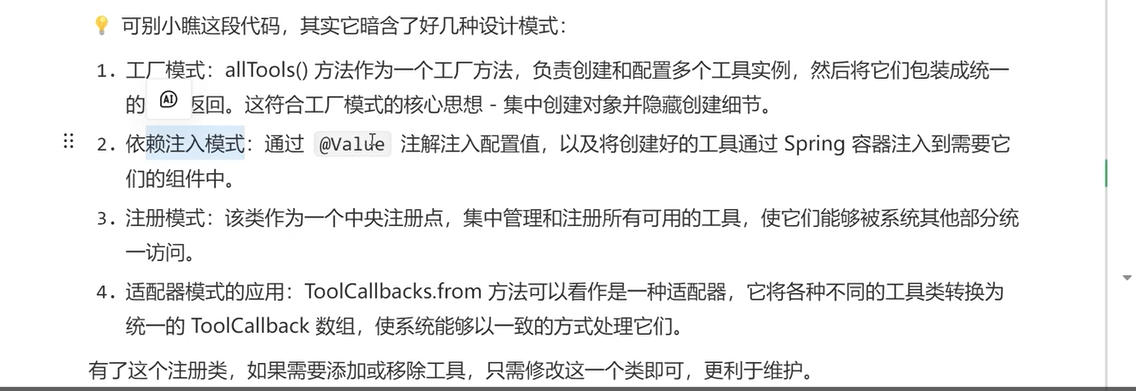
业务代码中的使用是:
 @Resource
    private ToolCallback[] allTools;

    /**
     * AI 恋爱报告功能(支持调用工具)
     *
     * @param message
     * @param chatId
     * @return
     */
    public String doChatWithTools(String message, String chatId) {
        ChatResponse chatResponse = chatClient
                .prompt()
                .user(message)
                .advisors(spec -> spec.param(ChatMemory.CONVERSATION_ID, chatId))
                // 开启日志,便于观察效果
                .advisors(new MyLoggerAdvisor())
                .toolCallbacks(allTools)
                .call()
                .chatResponse();
        String content = chatResponse.getResult().getOutput().getText();
        log.info("content: {}", content);
        return content;
    }
.toolCallbacks(allTools)是因为我们在工具类加了@tool注解他才可以这样写,才可以使用这个方法来通过对象就可以使用,不用调对象中的方法。
来看测试类:
  @Test
    void doChatWithTools() {
        // 测试联网搜索问题的答案
        testMessage("周末想带女朋友去上海约会,推荐几个适合情侣的小众打卡地?");

        // 测试资源下载:图片下载
        testMessage("直接下载一张适合做手机壁纸的星空情侣图片为文件");

        // 测试终端操作:执行代码
        testMessage("执行 Python3 脚本来生成数据分析报告");

        // 测试文件操作:保存用户档案
        testMessage("保存我的恋爱档案为文件");

        // 测试 PDF 生成
        testMessage("生成一份‘七夕约会计划’PDF,包含餐厅预订、活动流程和礼物清单");
    }

    private void testMessage(String message) {
        String chatId = UUID.randomUUID().toString();
        String answer = loveApp.doChatWithTools(message, chatId);
        Assertions.assertNotNull(answer);
    }
这就是工具类的调用。

有“AI”的1024 = 2048,欢迎大家加入2048 AI社区
更多推荐

 26
26 0
0- 0


 已为社区贡献8条内容

所有评论(0)