50天50个小项目 (React19 + Tailwindcss V4) ✨ | LiveUserFilter(实时用户过滤组件)
功能Vue 3React + TS响应式数据ref()useState()计算属性computed()useMemo()生命周期onMounted双向绑定v-model列表渲染v-for.map()条件渲染v-if类型安全中children数组中添加子路由path: '/',...})),},],},constants/index.tsx 添加组件预览常量省略部分....省略部分....id: 4
📅 今天我们继续 50 个小项目挑战!——LiveUserFilter组件
仓库地址:https://gitee.com/hhm-hhm/50days50projects.git
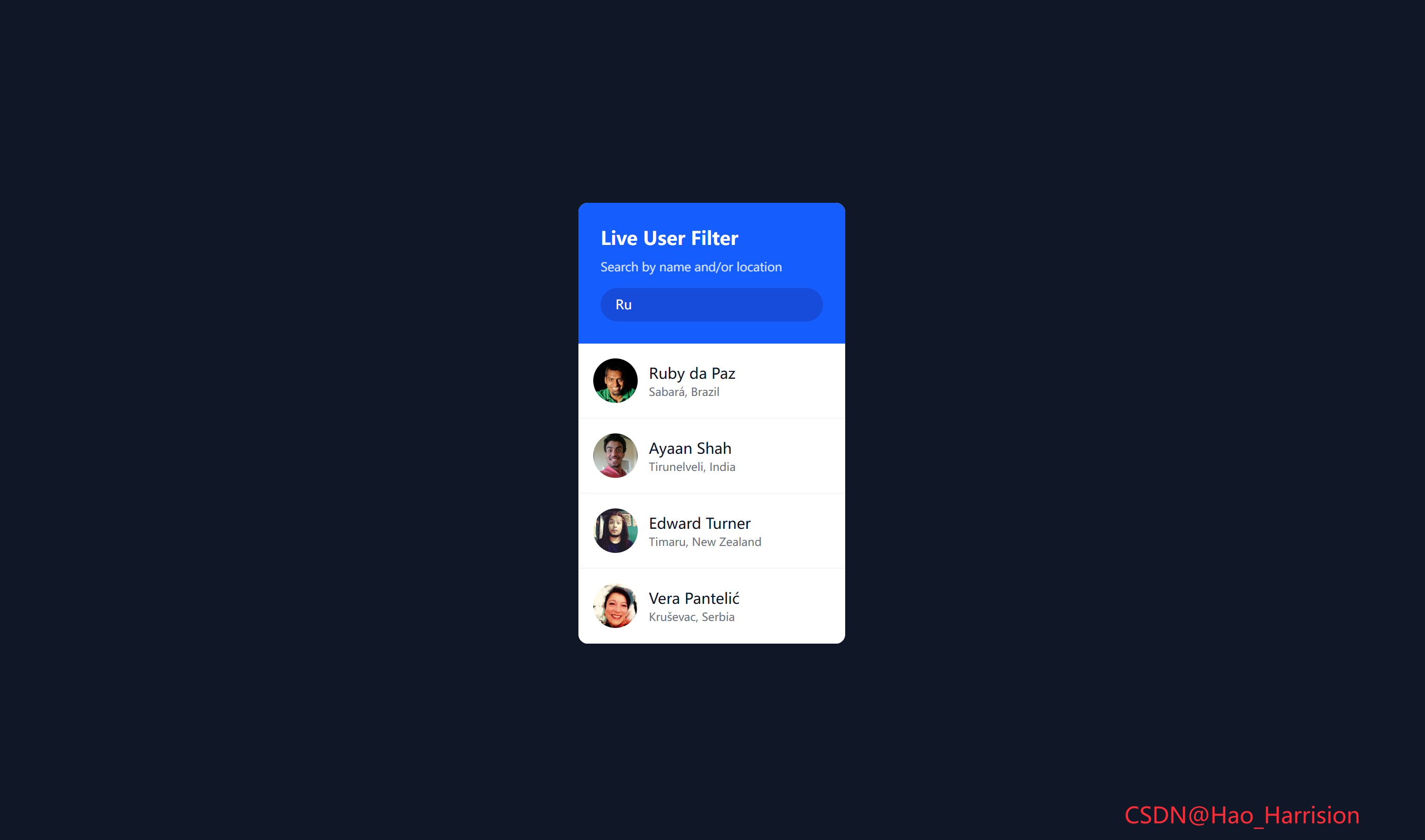
创建一个功能强大且视觉美观的实时用户搜索过滤组件。这个组件能够从远程 API 获取用户数据,并根据用户输入的关键词实时过滤并展示结果,非常适合用于构建用户目录、联系人列表或任何需要搜索功能的界面。
让我们开始吧!🚀
🌀 组件目标
- 实现基于姓名和/或位置的实时用户搜索过滤
- 展示加载状态和无结果状态
- 利用 Tailwind CSS 快速构建基础样式,并通过内联样式实现精确控制
- 优化用户体验,提供流畅的搜索反馈
🔧 LiveUserFilter.tsx组件实现
import React, { useState, useEffect, useMemo } from 'react'

// 定义用户数据类型(基于 randomuser.me API)
interface User {
    login: { uuid: string }
    name: { first: string; last: string }
    location: { city: string; country: string }
    picture: { large: string }
}

const LiveUserFilter: React.FC = () => {
    const [users, setUsers] = useState<User[]>([])
    const [searchTerm, setSearchTerm] = useState<string>('')
    const [isLoading, setIsLoading] = useState<boolean>(true)

    // 获取用户数据
    const fetchUsers = async () => {
        try {
            setIsLoading(true)
            const response = await fetch('https://randomuser.me/api?results=50')
            if (!response.ok) throw new Error('Failed to fetch')
            const data = await response.json()
            setUsers(data.results)
        } catch (error) {
            console.error('Error fetching users:', error)
        } finally {
            setIsLoading(false)
        }
    }

    // 组件挂载时获取数据
    useEffect(() => {
        fetchUsers()
    }, [])

    // 过滤用户(等价于 Vue 的 computed)
    const filteredUsers = useMemo(() => {
        if (!searchTerm.trim()) return users
        const term = searchTerm.toLowerCase()
        return users.filter((user) => {
            const fullName = `${user.name.first} ${user.name.last}`.toLowerCase()
            const location = `${user.location.city} ${user.location.country}`.toLowerCase()
            return fullName.includes(term) || location.includes(term)
        })
    }, [users, searchTerm])

    return (
        <div className="flex min-h-screen items-center justify-center overflow-hidden bg-gray-900 font-sans">
            <div className="w-72 overflow-hidden rounded-lg bg-white shadow-md">
                {/* 头部搜索区域 */}
                <div className="bg-blue-600 p-6 text-white">
                    <h4 className="mb-1 text-xl font-bold">Live User Filter</h4>
                    <small className="opacity-80">Search by name and/or location</small>
                    <input
                        type="text"
                        value={searchTerm}
                        onChange={(e) => setSearchTerm(e.target.value)}
                        className="mt-3 w-full rounded-full bg-blue-800/50 px-4 py-2 text-sm text-white focus:outline-none"
                        placeholder="Search"
                        aria-label="Search users by name or location"
                    />
                </div>

                {/* 用户列表区域 */}
                <ul className="max-h-96 overflow-y-auto">
                    {/* 加载状态 */}
                    {isLoading && (
                        <li className="p-6 text-center">
                            <h3>Loading...</h3>
                        </li>
                    )}

                    {/* 过滤后的用户列表 */}
                    {!isLoading &&
                        filteredUsers.map((user) => (
                            <li
                                key={user.login.uuid}
                                className="flex items-center border-b border-gray-100 p-4">
                                <img
                                    src={user.picture.large}
                                    alt={`${user.name.first} ${user.name.last}`}
                                    className="h-12 w-12 rounded-full object-cover"
                                    loading="lazy"
                                />
                                <div className="ml-3">
                                    <h4 className="font-medium text-gray-900">
                                        {user.name.first} {user.name.last}
                                    </h4>
                                    <p className="text-xs text-gray-500">
                                        {user.location.city}, {user.location.country}
                                    </p>
                                </div>
                            </li>
                        ))}

                    {/* 无结果状态 */}
                    {!isLoading && filteredUsers.length === 0 && (
                        <li className="p-6 text-center text-gray-500">No users found</li>
                    )}
                </ul>
            </div>
            <div className="fixed right-20 bottom-5 z-100 text-2xl text-red-500">
                CSDN@Hao_Harrision
            </div>
        </div>
    )
}

export default LiveUserFilter
🔄 关键差异总结
| 功能 | Vue 3 | React + TS |
|---|---|---|
| 响应式数据 | ref() |
useState() |
| 计算属性 | computed() |
useMemo() |
| 生命周期 | onMounted |
useEffect(..., []) |
| 双向绑定 | v-model |
value + onChange |
| 列表渲染 | v-for |
.map() |
| 条件渲染 | v-if |
{condition && element} |
| 类型安全 | — | interface User |
🔁 转换说明
1. 状态管理:ref → useState
| Vue | React |
|---|---|
const users = ref([]) |
const [users, setUsers] = useState<User[]>([]) |
const searchTerm = ref('') |
const [searchTerm, setSearchTerm] = useState('') |
const isLoading = ref(true) |
const [isLoading, setIsLoading] = useState(true) |
✅ 使用 TypeScript 接口 User 提供完整类型安全。
2. 生命周期:onMounted → useEffect(..., [])
useEffect(() => {
  fetchUsers();
}, []);
✅ 确保只在组件挂载时请求一次数据。
3. 计算属性:computed → useMemo
- Vue 的
filteredUsers是响应式计算属性; - React 中使用
useMemo缓存过滤结果,避免每次渲染都重新计算:
const filteredUsers = useMemo(() => {
  // ...过滤逻辑
}, [users, searchTerm]);
✅ 依赖项 [users, searchTerm] 确保仅在数据或搜索词变化时重新计算。
4. 事件处理:v-model + @input → value + onChange
<input
  value={searchTerm}
  onChange={(e) => setSearchTerm(e.target.value)}
/>
✅ 完全受控组件,实时同步输入值。
5. 条件渲染:v-if → {condition && (...)} 或三元
| Vue | React |
|---|---|
<li v-if="isLoading"> |
{isLoading && <li>...} |
<li v-for="user in filteredUsers"> |
{filteredUsers.map(...)} |
<li v-if="!isLoading && filteredUsers.length === 0"> |
{!isLoading && filteredUsers.length === 0 && <li>...} |
✅ 逻辑清晰,符合 React 渲染规范。
6. 类型定义:基于 API 响应结构
从 randomuser.me 返回的数据中提取关键字段,定义 User 接口:
interface User {
  login: { uuid: string };
  name: { first: string; last: string };
  location: { city: string; country: string };
  picture: { large: string };
}
✅ 避免 any,提升开发体验和安全性。
7. 无障碍与性能优化
- 添加
aria-label提升可访问性; - 图片添加
loading="lazy"优化性能; - 输入框使用
type="text"明确语义。
8. 错误处理
保留 try/catch,并在 finally 中关闭加载状态,确保 UI 状态正确。
✅ 注意事项
- 不要忘记依赖数组:
useMemo和useEffect必须正确声明依赖; - key 唯一性:使用
user.login.uuid作为 key 是安全的(来自 API); - 空搜索优化:
searchTerm.trim()避免空格触发无效过滤; - 网络错误处理:已包含基础错误日志,生产环境可扩展 toast 提示。
💡 可选增强
- 添加“重新加载”按钮;
- 支持防抖搜索(如
useDebounce); - 分页加载更多用户。
🎨 TailwindCSS 样式重点讲解
| 类名 | 作用 |
|---|---|
flex |
启用 Flexbox 布局 |
min-h-screen |
设置最小高度为视口高度,确保内容居中 |
items-center / justify-center |
在主轴和交叉轴上居中对齐 |
overflow-hidden |
隐藏溢出内容 |
bg-gray-100 |
设置浅灰色背景 |
font-sans |
使用无衬线字体 |
w-72 |
设置固定宽度(18rem) |
rounded-lg |
添加中等圆角 |
bg-white |
白色背景 |
shadow-md |
添加中等阴影,提升立体感 |
bg-blue-600 |
搜索区域深蓝色背景 |
p-6 |
内边距 |
text-white |
白色文字 |
mb-1 |
下边距 |
text-xl / text-sm |
字体大小 |
font-bold / font-medium |
字体粗细 |
opacity-80 |
降低不透明度 |
mt-3 |
上边距 |
rounded-full |
完全圆形(圆角) |
bg-blue-800/50 |
深蓝色背景,50% 透明度(使用 Tailwind CSS 新的透明度语法) |
px-4 py-2 |
水平/垂直内边距 |
focus:outline-none |
移除聚焦轮廓 |
max-h-96 |
设置最大高度(24rem),创建滚动区域 |
overflow-y-auto |
Y轴自动出现滚动条 |
border-b border-gray-100 |
底部浅灰色边框,分隔列表项 |
p-4 |
列表项内边距 |
flex items-center |
水平 Flex 布局,垂直居中 |
h-12 w-12 |
头像固定大小 |
rounded-full |
头像圆形 |
object-cover |
图片填充容器并保持比例 |
ml-3 |
左边距 |
text-gray-900 / text-gray-500 |
文字颜色 |
text-xs |
小号文字 |
🦌 路由组件 + 常量定义
router/index.tsx 中 children数组中添加子路由
{
    path: '/',
    element: <App />,
    children: [
       ...
         {
                path: '/LiveUserFilter',
                lazy: () =>
                    import('@/projects/LiveUserFilter').then((mod) => ({
                        Component: mod.default,
                    })),
            },
    ],
 },
constants/index.tsx 添加组件预览常量
import demo43Img from '@/assets/pic-demo/demo-43.png'
省略部分....
export const projectList: ProjectItem[] = [
    省略部分....
      {
        id: 43,
        title: 'Live User Filter',
        image: demo43Img,
        link: 'LiveUserFilter',
    },
]
🚀 小结
通过这篇文章,我们使用 React19 和 TailwindCSS 构建了一个功能完整、界面美观的实时用户搜索过滤组件,来实现高效的过滤逻辑, 快速搭建了现代化的 UI。
想要让你的用户过滤器更加强大?试试这些扩展功能:
✅ 防抖搜索:如果数据量巨大或 API 有调用限制,可以为搜索输入添加防抖(debounce)功能,避免过于频繁的计算或 API 调用。
✅ 高级筛选:除了搜索框,添加下拉菜单或复选框进行更精确的筛选(如按国家、性别等)。
✅ 分页:当用户数据量非常大时,实现分页功能。
✅ 缓存机制:缓存已获取的数据,避免重复请求。
✅ 错误处理 UI:除了 console.error,在界面上显示友好的错误提示。
✅ 键盘导航:支持使用键盘上下键在用户列表中导航。
📅 明日预告: 我们将完成FeedbackUiDesign组件,实现了一个好玩儿的好评反馈组件。🚀🚀
感谢阅读,欢迎点赞、收藏和分享 😊
原文链接:https://blog.csdn.net/qq_44808710/article/details/149782464
每天造一个轮子,码力暴涨不是梦!🚀

有“AI”的1024 = 2048,欢迎大家加入2048 AI社区
更多推荐


 24
24 0
0- 0


 已为社区贡献43条内容

所有评论(0)