【端侧部署yolo系列】yolox部署至全志开发板T736
注:awnpu_model_zoo\docs里有详细的开发文档以及参考指南
本文是根据《NPU开发环境部署参考指南》,部署PC的ubuntu环境,使用Docker镜像环境为例进行说明。
如果想对部署流程进行更加详细的了解,可以参考《NPU_模型部署_开发指南》
资源下载:https://open.allwinnertech.com/ https://open.allwinnertech.com/
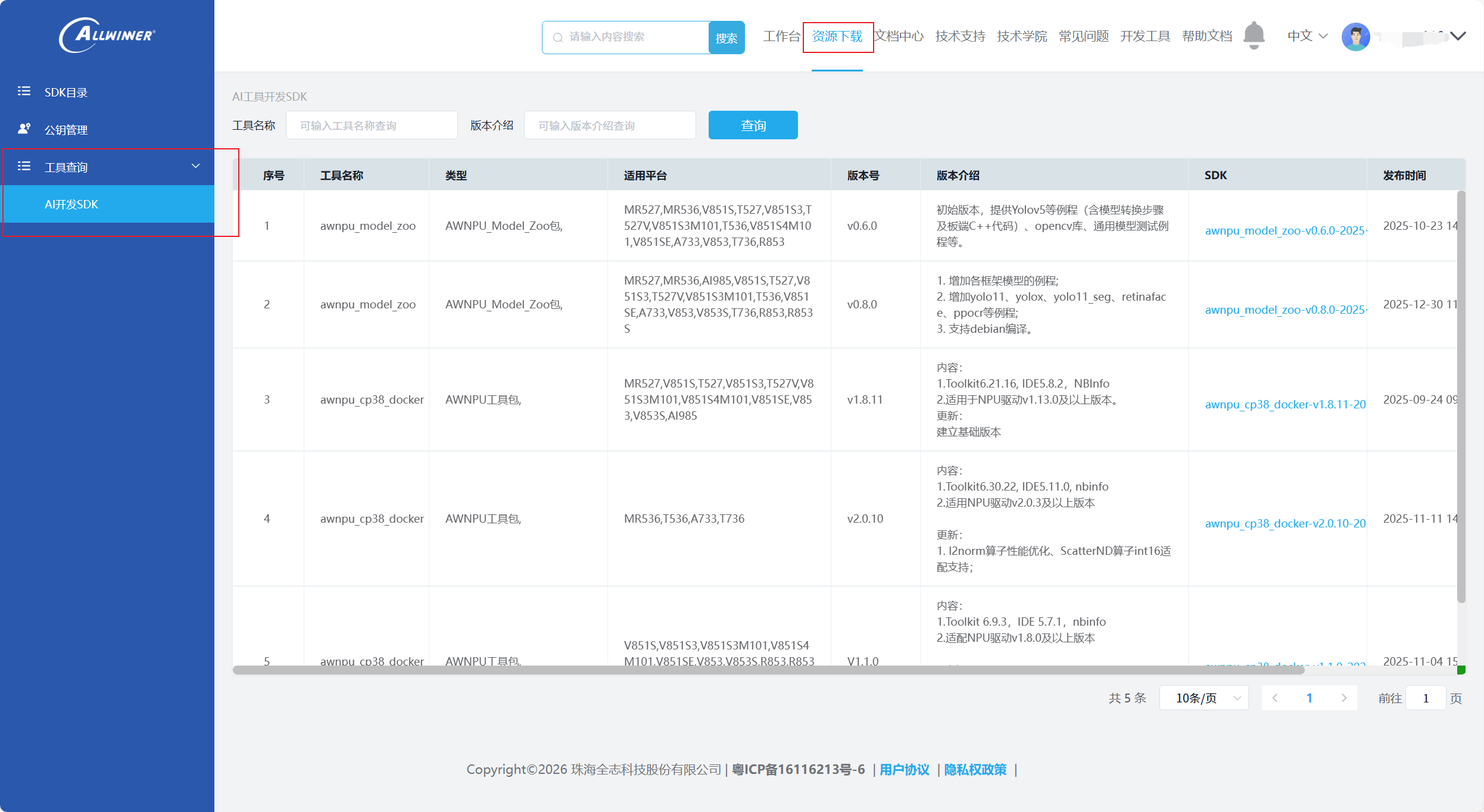
进入上面的链接,进行账号创建,完成之后进入首页,右上角有一个工作台,然后点击资源下载→工具查询→AI开发SDK,下载对应的工具包。
开发环境准备
下载资源包:
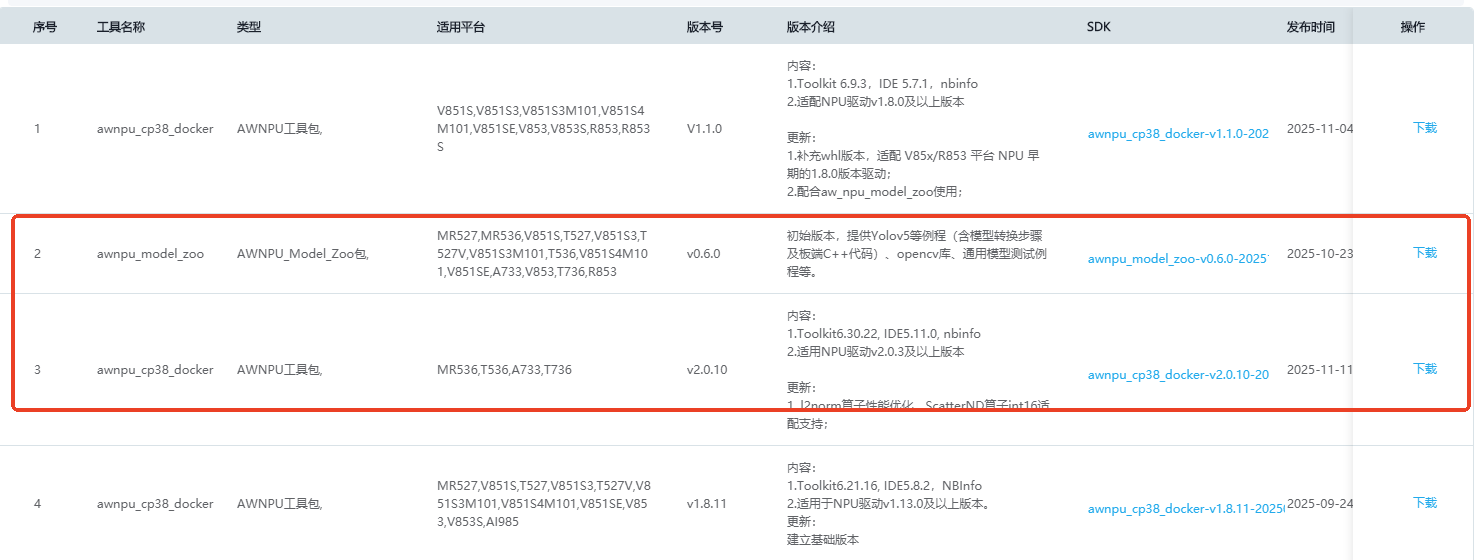
从全志科技官网下载AWNPU_Model_Zoo包以及根据开发板对应版本的镜像,这里选择awnpu_cp38_docker v2.0.10(根据自己开发板来下载对应的docker版本,注:开发板适用于高版本的docker,也能兼容低版本的docker。最好下载开发板所能支持最高版本的docker,新版的容器优化算子更多,适配的模型也就更多。AWNPU_Model_Zoo下载最新版的即可,由于这篇文章是在v0.9.0发布之前就写好了草稿,所以使用的版本是0.6.0的,新版本只是丰富了一些模型案例,其他没有影响)
创建环境(默认已安装docker)
1.解压下载好的镜像工具包
unzip docker_images_v2.0.x # 解压下载的工具包
cd docker_images_v2.0.x # 进入目录
unzip ubuntu-npu_v2.0.10.tar.zip # 解压镜像文件
sudo docker load -i ubuntu-npu_v2.0.10.tar # 载入镜像2.查看镜像
sudo docker images
会出现自己安装的docker镜像文件,ubuntu-npu:v2.0.10
3.创建工作区目录
新建一个工程文件夹,并在docker_data 目录下解压awnpu_model_zoo压缩包
mkdir docker_data
cd docker_data
unzip awnpu_model_zoo-v0.6.0
pwd例如 pwd 的输出为:/home/${USER}/projects/docker_data每个人的路径有所不同
4.创建容器
需要根据自己的目录来创建容器的工作目录。
注: --name npu_test,即npu_test为容器的名字,可自由修改
sudo docker run --ipc=host -itd -v /home/你的用户名/docker_data:/workspace --name npu_test ubuntu-npu:v2.0.10 /bin/bash
5.查看容器
sudo docker ps -a
6.进入容器
创建完成之后,容器一般会默认开启。如果没有出现容器未start的提示信息,需要把容器先进行start,才能进入容器。命令为:sudo docker start 容器ID
sudo docker exec -it 容器ID /bin/bash
cd /workspace/开发环境检查
进行开发环境检查,首先,使用pegasus --help命令检查 Acuity Toolkit 是否可用,打印关键信息如下:
2025-11-28 02:19:33.583296: W tensorflow/stream_executor/platform/default/dso_loader.cc:64] Could not load dynamic library 'libcudart.so.11.0'; dlerror: libcudart.so.11.0: cannot open shared object file: No such file or directory
2025-11-28 02:19:33.583347: I tensorflow/stream_executor/cuda/cudart_stub.cc:29] Ignore above cudart dlerror if you do not have a GPU set up on your machine.
usage: pegasus [-h] {import,export,generate,prune,inference,quantize,train,dump,measure,help} ...
Pegasus commands.
positional arguments:
{import,export,generate,prune,inference,quantize,train,dump,measure,help}
import Import models.
export Export models.
generate Generate metas.
prune prune models.
inference Inference model and get result.
quantize Quantize model.
train Train model.
dump Dump model activations.
measure Get amount of calculation, parameter and activation.
help Print a synopsis and a list of commands.
optional arguments:
-h, --help show this help message and exit
查看环境变量:
root@2ace7452eaeb:/workspace# echo ${ACUITY_PATH}
/root/acuity-toolkit-whl-6.30.22/bin
root@2ace7452eaeb:/workspace# ${VIV_SDK}
bash: /root/Vivante_IDE/VivanteIDE5.11.0/cmdtools: Is a directory
模型准备
首先,下载 yolox_s.onnx 模型文件,下载链接请参见yolox_s的github。
目前全志zoo包还没有yolox,所以需要新建yolox文件夹
按照其他模型内的文件,然后将文件进行复制过来
下载最新的model_zoo已经包含yolox模型文件,直接使用即可。
# 目录如下
.
├── CMakeLists.txt
├── convert_model
│ ├── config_yml.py # 模型的配置文件
│ ├── convert_model_env.sh # 工具链生成脚本
│ └── python
│ ├── coco_classes.py
│ ├── demo_utils.py
│ ├── sub_model.py # 简化模型
│ ├── visualize.py
│ └── yolox_sim.py # 运行推理onnx模型
├── figures
│ └── output_yolox.png
├── main.cpp # 主程序
├── model
│ └── bus.jpg
├── model_config.h
├── README.md
├── yolox_postprocess.cpp # 模型后处理
└── yolox_preprocess.cpp # 模型前处理4 directories, 15 files
将下载好的onnx模型放入awnpu_model_zoo/examples/yolox/model
模型配置
# 进入模型转化的工作目录
cd /workspace/awnpu_model_zoo/examples/yolox/convert_model
# 检查或修改config_yml.py文件的相关参数配置
vim config_yml.py
将配置文件修改为如下图所示:
# "database" allowed types: "TEXT, NPY, H5FS, SQLITE, LMDB, GENERATOR, ZIP"
DATASET = '../../dataset/coco_12/dataset.txt'
DATASET_TYPE = "TEXT"

# mean, scale
MEAN    = [0, 0, 0]
SCALE   = [1.0, 1.0, 1.0]

# reverse_channel: True bgr, False rgb
REVERSE_CHANNEL = True

# add_preproc_node, True or False
ADD_PREPROC_NODE = True
# "preproc_type" allowed types:"IMAGE_RGB, IMAGE_RGB888_PLANAR, IMAGE_RGB888_PLANAR_SEP, IMAGE_I420,
# IMAGE_NV12,IMAGE_NV21, IMAGE_YUV444, IMAGE_YUYV422, IMAGE_UYVY422, IMAGE_GRAY, IMAGE_BGRA, TENSOR"
PREPROC_TYPE = "IMAGE_RGB"

# add_postproc_node, quant output -> float32 output
ADD_POSTPROC_NODE = True
这里我就简单的解释一下配置文件参数的作用。
DATASE:用于量化校准的数据集
DATASE_TYPE:数据集类型,一般是TEXT和NPY。
MEAN和SCALE根据不同模型的归一化来进行修改,yolox的值就是如下MEAN=0 SCALE=0
归一化计算公式为normalized = (img / 255.0 - mean) / std
SCALE =(1/std)*255
REVERSE_CHANNEL:是否通道转换。(经过前处理之后的图像如果是RGB,True表示RGB→BGR,反之则不变化,根据模型的输入要求来进行配置)
ADD_PREPROC_NODE:是否打开前处理节点。False则表示对于转换后的nb模型,不使用通道转化和归一化操作
ADD_POSTPROC_NODE:是否打开后处理节点。True表示打开量化和反量化操作,最终输出的是float
模型简化
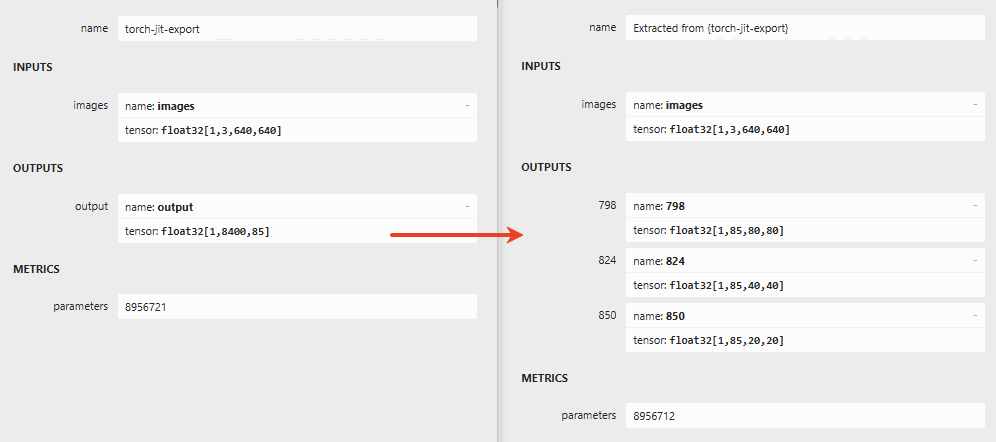
yolox网络的后处理部分如Transpose对NPU计算不友好,通过sub_model.py对模型剪枝,修改输出结构,同时将后处理部分使用cpu进行处理。模型输出差异如下,左边是官方模型,右边是修改后的模型。

cd python目录结构如下
.
├── coco_classes.py
├── demo_utils.py
├── sub_model.py # 简化模型
├── visualize.py
└── yolox_sim.py # 运行推理onnx模型
sub_model.py内容如下:代码中第一个参数是原始的模型,第二个参数是简化后模型,第三个参数是模型的输入名,第四个参数是模型的输出名,如果有多个输入输出,用逗号隔开。模型的输入输出名正好对应的是模型简化后的INPUTS和OUTPUTS中的name。
import onnx

onnx.utils.extract_model('../yolox_s.onnx', '../yolox_s_sim.onnx', ['images'], ['798',
                                                                                '824',
                                                                                '850'])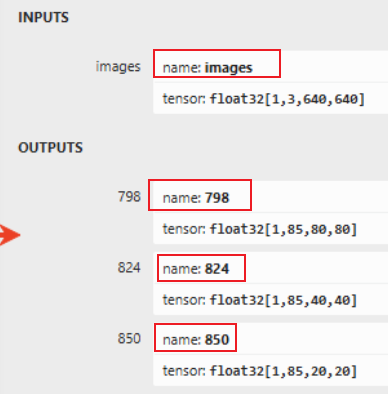
# 生成简化模型yolox_s_sim 结果保存上级目录
python3 sub_model.py

# 使用简化模型运行推理
python3 yolox_sim.py -m yolox_s_sim.onnx -i ../../model/bus.jpg -o output -s 0.5

# 结果如下
结果已保存至: output/bus.jpg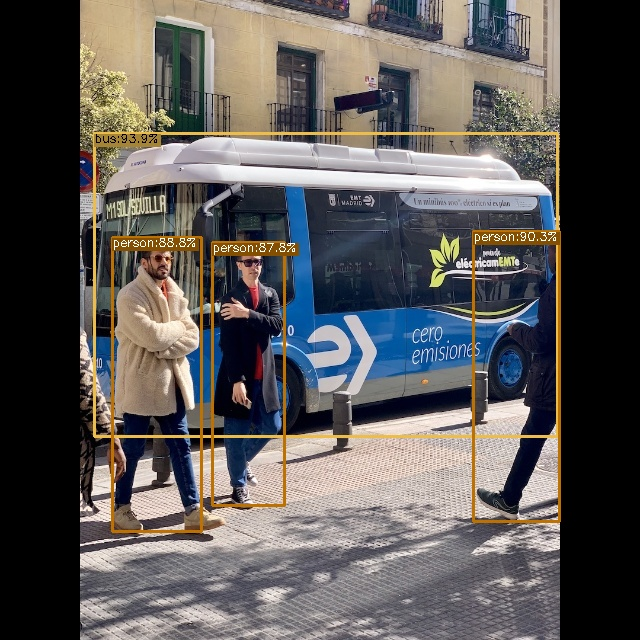
模型前后处理
这里参考全志的其他模型进行模型的前后处理,也可根据自己的实际模型的输入与输出来进行前后处理。
注:如果是下载的v0.9.0版本的AWNPU_Model_Zoo,那么前后处理的文件已经在里面了,直接运行即可。
配置文件model_config.h
#ifndef _MODEL_CONFIG_H_
#define _MODEL_CONFIG_H_

#include <iostream>
#include <vector>

#define COCO    1
//#define COCO    0

#if COCO
// coco, 80 class
#define CLASS_NUM           80

/* 640 * 640 */
#define LETTERBOX_ROWS      640
#define LETTERBOX_COLS      640

#define SCORE_THRESHOLD     0.45f
#define NMS_THRESHOLD       0.45f

const std::vector<std::string> g_classes_name{
    "person", "bicycle", "car", "motorcycle", "airplane", "bus", "train", "truck", "boat", "traffic_light",
    "fire_hydrant", "stop_sign", "parking_meter", "bench", "bird", "cat", "dog", "horse", "sheep", "cow",
    "elephant", "bear", "zebra", "giraffe", "backpack", "umbrella", "handbag", "tie", "suitcase", "frisbee",
    "skis", "snowboard", "sports_ball", "kite", "baseball_bat", "baseball_glove", "skateboard", "surfboard",
    "tennis_racket", "bottle", "wine_glass", "cup", "fork", "knife", "spoon", "bowl", "banana", "apple",
    "sandwich", "orange", "broccoli", "carrot", "hot_dog", "pizza", "donut", "cake", "chair", "couch",
    "potted_plant", "bed", "dining_table", "toilet", "tv", "laptop", "mouse", "remote", "keyboard", "cell_phone",
    "microwave", "oven", "toaster", "sink", "refrigerator", "book", "clock", "vase", "scissors", "teddy_bear",
    "hair_drier", "toothbrush"
};

#else
// eg: plant, 1 class
#define CLASS_NUM           1

#define LETTERBOX_ROWS      640
#define LETTERBOX_COLS      640

#define SCORE_THRESHOLD     0.4f
#define NMS_THRESHOLD       0.45f

const std::vector<std::string> g_classes_name{
    "plant"
};

#endif

#endif
前处理yolox_preprocess.cpp
#include <opencv2/core/core.hpp>
#include <opencv2/highgui/highgui.hpp>
#include <opencv2/imgproc/imgproc.hpp>
#include <iostream>
#include <stdio.h>
#include <stdint.h>
#include <string.h>
#include <math.h>
#include <chrono>

#include "model_config.h"

/* model_inputmeta.yml file param modify, eg:

    preproc_node_params:
      add_preproc_node: True
      preproc_type: IMAGE_BGR


demo model: model_rgb_xxx.nb.
*/

void get_input_data(const char* image_file, unsigned char* input_data, int letterbox_rows, int letterbox_cols)
{
    cv::Mat img = cv::imread(image_file, 1);
    if (img.empty()) {
        fprintf(stderr, "cv::imread %s failed\n", image_file);
        return;
    }

    fprintf(stderr, "Original image size: %dx%d\n", img.cols, img.rows);

    float scale_letterbox = 1.f;
    if ((letterbox_rows * 1.0 / img.rows) < (letterbox_cols * 1.0 / img.cols))
    {
        scale_letterbox = letterbox_rows * 1.0 / img.rows;
    }
    else
    {
        scale_letterbox = letterbox_cols * 1.0 / img.cols;
    }
    int resize_cols = int(round(scale_letterbox * img.cols));
    int resize_rows = int(round(scale_letterbox * img.rows));

    float dh = (float)(letterbox_rows - resize_rows);
    float dw = (float)(letterbox_cols - resize_cols);

    dh /= 2.0f;
    dw /= 2.0f;

    cv::resize(img, img, cv::Size(resize_cols, resize_rows));

    cv::Mat img_new(letterbox_rows, letterbox_cols, CV_8UC3, input_data);
    int top   = (int)(round(dh - 0.1));
    int bot   = (int)(round(dh + 0.1));
    int left  = (int)(round(dw - 0.1));
    int right = (int)(round(dw + 0.1));

    cv::copyMakeBorder(img, img_new, top, bot, left, right, cv::BORDER_CONSTANT, cv::Scalar(114, 114, 114));
}

int yolox_preprocess(const char* imagepath, void* buff_ptr, unsigned int buff_size)
{
    int img_c = 3;

    // set default letterbox size
    int letterbox_rows = LETTERBOX_ROWS;
    int letterbox_cols = LETTERBOX_COLS;
    int img_size = letterbox_rows * letterbox_cols * img_c;

    unsigned int data_size = img_size * sizeof(uint8_t);

    if (data_size > buff_size) {
        printf("data size > buff size, please check code. data_size=%u, buff_size=%u\n", data_size, buff_size);
        return -1;
    }

    get_input_data(imagepath, (unsigned char*)buff_ptr, letterbox_rows, letterbox_cols);

    printf("YOLOX preprocess completed: %s -> %dx%d, buffer size: %u\n",
           imagepath, letterbox_cols, letterbox_rows, data_size);
    return 0;
}
后处理yolox_postprocess.cpp
#include <opencv2/core/core.hpp>
#include <opencv2/highgui/highgui.hpp>
#include <opencv2/imgproc/imgproc.hpp>
#include <opencv2/dnn.hpp>
#include <iostream>
#include <stdio.h>
#include <vector>
#include <cmath>

#include "model_config.h"

using namespace std;

struct Object
{
    cv::Rect_<float> rect;
    int label;
    float prob;
};

static inline float intersection_area(const Object& a, const Object& b)
{
    cv::Rect_<float> inter = a.rect & b.rect;
    return inter.area();
}

static void qsort_descent_inplace(std::vector<Object>& objects, int left, int right)
{
    int i = left;
    int j = right;
    float p = objects[(left + right) / 2].prob;

    while (i <= j)
    {
        while (objects[i].prob > p)
            i++;

        while (objects[j].prob < p)
            j--;

        if (i <= j)
        {
            std::swap(objects[i], objects[j]);
            i++;
            j--;
        }
    }

#pragma omp parallel sections
    {
#pragma omp section
        {
            if (left < j) qsort_descent_inplace(objects, left, j);
        }
#pragma omp section
        {
            if (i < right) qsort_descent_inplace(objects, i, right);
        }
    }
}

static void qsort_descent_inplace(std::vector<Object>& objects)
{
    if (objects.empty())
        return;

    qsort_descent_inplace(objects, 0, objects.size() - 1);
}

static void nms_sorted_bboxes(const std::vector<Object>& objects, std::vector<int>& picked, float nms_threshold, bool agnostic = true)
{
    picked.clear();

    const int n = objects.size();

    std::vector<float> areas(n);
    for (int i = 0; i < n; i++)
    {
        areas[i] = objects[i].rect.area();
    }

    for (int i = 0; i < n; i++)
    {
        const Object& a = objects[i];

        int keep = 1;
        for (int j = 0; j < (int)picked.size(); j++)
        {
            const Object& b = objects[picked[j]];

            if (!agnostic && a.label != b.label)
                continue;

            float inter_area = intersection_area(a, b);
            float union_area = areas[i] + areas[picked[j]] - inter_area;
            if (inter_area / union_area > nms_threshold)
                keep = 0;
        }

        if (keep)
            picked.push_back(i);
    }
}

static inline float sigmoid(float x)
{
    return 1.0f / (1.0f + expf(-x));
}

static void generate_proposals_yolox(int stride, const float* feat, float prob_threshold, std::vector<Object>& objects,
                                    int letterbox_cols, int letterbox_rows)
{
    const int num_grid_w = letterbox_cols / stride;
    const int num_grid_h = letterbox_rows / stride;
    const int num_grid = num_grid_w * num_grid_h; //80*80 40*40 20*20

    const int num_class = CLASS_NUM; // 80 for COCO
    const int num_channel = CLASS_NUM + 5;      // YOLOX输出85通道: [x, y, w, h, obj_conf, class_conf[80]]
    int obj_count = 0;
    for (int i = 0; i < num_grid_h; i++)
    {
        for (int j = 0; j < num_grid_w; j++)
        {
            int grid_index = i * num_grid_w + j;

            float x_center = (feat[0 * num_grid_h * num_grid_w + grid_index] + j) * stride;
            float y_center = (feat[1 * num_grid_h * num_grid_w + grid_index] + i) * stride;
            float width = expf(feat[2 * num_grid_h * num_grid_w + grid_index]) * stride;
            float height = expf(feat[3 * num_grid_h * num_grid_w + grid_index]) * stride;

            // 对象置信度
            float obj_conf = feat[4 * num_grid_h * num_grid_w + grid_index];

            if (obj_conf < prob_threshold) {
                continue;
            }

            int class_id = -1;
            float class_conf = -FLT_MAX;
            for (int c = 0; c < num_class; c++)
            {
                float conf = feat[(5 + c) * num_grid_h * num_grid_w + grid_index];
                if (conf > class_conf)
                {
                    class_id = c;
                    class_conf = conf;
                }
            }

            float final_score = obj_conf * class_conf;
            if (final_score >= prob_threshold)
            {
                Object obj;
                obj.rect.x = x_center - width / 2.0f;
                obj.rect.y = y_center - height / 2.0f;
                obj.rect.width = width;
                obj.rect.height = height;
                obj.label = class_id;
                obj.prob = final_score;

                objects.push_back(obj);
            }
        }
    }
}

int detect_yolox_post(const cv::Mat& bgr, std::vector<Object>& objects, float **output)
{
    std::chrono::steady_clock::time_point Tbegin, Tend;
    Tbegin = std::chrono::steady_clock::now();

    const float *output0_ptr = output[0]; // 85x80x80
    const float *output1_ptr = output[1]; // 85x40x40
    const float *output2_ptr = output[2]; // 85x20x20
    printf("Output0 first values: %f, %f, %f\n", *output0_ptr, *output1_ptr, *output2_ptr);

    int letterbox_rows = LETTERBOX_ROWS;
    int letterbox_cols = LETTERBOX_COLS;

    const float prob_threshold = SCORE_THRESHOLD;
    const float nms_threshold = NMS_THRESHOLD;

    std::vector<Object> proposals;
    std::vector<Object> objects80;
    std::vector<Object> objects40;
    std::vector<Object> objects20;

    {
        generate_proposals_yolox(8, output0_ptr, prob_threshold, objects80, letterbox_cols, letterbox_rows);
        proposals.insert(proposals.end(), objects80.begin(), objects80.end());
    }
    {
        generate_proposals_yolox(16, output1_ptr, prob_threshold, objects40, letterbox_cols, letterbox_rows);
        proposals.insert(proposals.end(), objects40.begin(), objects40.end());
    }

    {
        generate_proposals_yolox(32, output2_ptr, prob_threshold, objects20, letterbox_cols, letterbox_rows);
        proposals.insert(proposals.end(), objects20.begin(), objects20.end());
    }

    qsort_descent_inplace(proposals);

    std::vector<int> picked;
    nms_sorted_bboxes(proposals, picked, nms_threshold);

    float scale_letterbox = 1.0f;
    if ((letterbox_rows * 1.0 / bgr.rows) < (letterbox_cols * 1.0 / bgr.cols))
    {
        scale_letterbox = letterbox_rows * 1.0 / bgr.rows;
    }
    else
    {
        scale_letterbox = letterbox_cols * 1.0 / bgr.cols;
    }
    float ratio = 1.0f / scale_letterbox;

    int resize_cols = int(round(scale_letterbox * bgr.cols));
    int resize_rows = int(round(scale_letterbox * bgr.rows));

    int hpad = (letterbox_rows - resize_rows)/ 2;
    int wpad = (letterbox_cols - resize_cols)/ 2;


    int count = picked.size();
    objects.resize(count);
    for (int i = 0; i < count; i++)
    {
        objects[i] = proposals[picked[i]];

        float x0 = (objects[i].rect.x - wpad) * ratio;
        float y0 = (objects[i].rect.y - hpad) * ratio;
        float x1 = (objects[i].rect.x + objects[i].rect.width - wpad) * ratio;
        float y1 = (objects[i].rect.y + objects[i].rect.height - hpad) * ratio;

        x0 = std::max(std::min(x0, (float)(bgr.cols - 1)), 0.f);
        y0 = std::max(std::min(y0, (float)(bgr.rows - 1)), 0.f);
        x1 = std::max(std::min(x1, (float)(bgr.cols - 1)), 0.f);
        y1 = std::max(std::min(y1, (float)(bgr.rows - 1)), 0.f);

        objects[i].rect.x = x0;
        objects[i].rect.y = y0;
        objects[i].rect.width = x1 - x0;
        objects[i].rect.height = y1 - y0;
    }

    struct
    {
        bool operator()(const Object& a, const Object& b) const
        {
            return a.rect.area() > b.rect.area();
        }
    } objects_area_greater;
    std::sort(objects.begin(), objects.end(), objects_area_greater);

    Tend = std::chrono::steady_clock::now();
    float f = std::chrono::duration_cast<std::chrono::milliseconds>(Tend - Tbegin).count();

    fprintf(stderr, "detection num: %d\n", count);

    return 0;
}

static void draw_objects(const cv::Mat& bgr, const std::vector<Object>& objects, const char *imagepath)
{
    cv::Mat image = bgr.clone();

    for (size_t i = 0; i < objects.size(); i++)
    {
        const Object& obj = objects[i];

        if (obj.prob > 1.0) {
            fprintf(stderr, "%2d: %3.0f%%, [%4.0f, %4.0f, %4.0f, %4.0f], score is illegal ........ \n", obj.label, obj.prob * 100, obj.rect.x,
                    obj.rect.y, obj.rect.x + obj.rect.width, obj.rect.y + obj.rect.height);
            continue;
        }

        fprintf(stderr, "%2d: %3.0f%%, [%4.0f, %4.0f, %4.0f, %4.0f], %s\n", obj.label, obj.prob * 100, obj.rect.x,
                obj.rect.y, obj.rect.x + obj.rect.width, obj.rect.y + obj.rect.height, g_classes_name[obj.label].c_str());

        cv::rectangle(image, obj.rect, cv::Scalar(255, 0, 0));

        char text[256];
        sprintf(text, "%s %.1f%%", g_classes_name[obj.label].c_str(), obj.prob * 100);

        int baseLine = 0;
        cv::Size label_size = cv::getTextSize(text, cv::FONT_HERSHEY_SIMPLEX, 0.5, 1, &baseLine);

        int x = obj.rect.x;
        int y = obj.rect.y - label_size.height - baseLine;
        if (y < 0)
            y = 0;
        if (x + label_size.width > image.cols)
            x = image.cols - label_size.width;

        cv::rectangle(image, cv::Rect(cv::Point(x, y), cv::Size(label_size.width, label_size.height + baseLine)),
            cv::Scalar(255, 255, 255), -1);

        cv::putText(image, text, cv::Point(x, y + label_size.height),
            cv::FONT_HERSHEY_SIMPLEX, 0.5, cv::Scalar(0, 0, 0));
    }

    cv::imwrite("out_yolox.png", image);
}

int yolox_postprocess(const char *imagepath, float **output)
{
    cv::Mat m = cv::imread(imagepath, 1);
    if (m.empty()) {
        fprintf(stderr, "cv::imread %s failed\n", imagepath);
        return -1;
    }

    std::vector<Object> objects;
    detect_yolox_post(m, objects, output);

    draw_objects(m, objects, imagepath);

    return 0;
}
主函数:main()
#include <stdio.h>
#include <stdlib.h>
#include <string.h>
#include <sys/time.h>

#include "npulib.h"

/*-------------------------------------------
        Macros and Variables
-------------------------------------------*/

extern int yolox_preprocess(const char* imagepath, void* buff_ptr, unsigned int buff_size);
extern int yolox_postprocess(const char *imagepath, float **output);

const char *usage =
    "yolox_demo -nb modle_path -i input_path -l loop_run_count -m malloc_mbyte \n"
    "-nb modle_path:    the NBG file path.\n"
    "-i input_path:     the input file path.\n"
    "-l loop_run_count: the number of loop run network.\n"
    "-m malloc_mbyte:   npu_unit init memory Mbytes.\n"
    "-h : help\n"
    "example: yolox_demo -nb model.nb -i input.jpg -l 10 -m 20 \n";

enum time_idx_e {
    NPU_INIT = 0,
    NETWORK_CREATE,
    NETWORK_PREPARE,
    NETWORK_PREPROCESS,
    NETWORK_RUN,
    NETWORK_LOOP,
    TIME_IDX_MAX = 9
};

#if defined(__linux__)
#define TIME_SLOTS   10
static uint64_t time_begin[TIME_SLOTS];
static uint64_t time_end[TIME_SLOTS];
static uint64_t GetTime(void)
{
    struct timeval time;
    gettimeofday(&time, NULL);
    return (uint64_t)(time.tv_usec + time.tv_sec * 1000000);
}

static void TimeBegin(int id)
{
    time_begin[id] = GetTime();
}

static void TimeEnd(int id)
{
    time_end[id] = GetTime();
}

static uint64_t TimeGet(int id)
{
    return time_end[id] - time_begin[id];
}
#endif

int main(int argc, char** argv)
{
    int status = 0;
    int i = 0;
    unsigned int count = 0;
    long long total_infer_time = 0;

    char *model_file = NULL;
    char *input_file = NULL;
    unsigned int loop_count = 1;
    unsigned int malloc_mbyte = 10;

    if (argc < 2) {
        printf("%s\n", usage);
        return -1;
    }

    for (i = 0; i< argc; i++) {
        if (!strcmp(argv[i], "-nb")) {
            model_file = argv[++i];
        }
        else if (!strcmp(argv[i], "-i")) {
            input_file = argv[++i];
        }
        else if (!strcmp(argv[i], "-l")) {
            loop_count = atoi(argv[++i]);
        }
        else if (!strcmp(argv[i], "-m")) {
            malloc_mbyte = atoi(argv[++i]);
        }
        else if (!strcmp(argv[i], "-h")) {
            printf("%s\n", usage);
            return 0;
        }
    }
    printf("model_file=%s, input=%s, loop_count=%d, malloc_mbyte=%d \n", model_file, input_file, loop_count, malloc_mbyte);

    if (model_file == nullptr)
        return -1;

    /* NPU init*/
    NpuUint npu_uint;

//    int ret = npu_uint.npu_init(malloc_mbyte*1024*1024);    // 85x
    int ret = npu_uint.npu_init();
    if (ret != 0) {
        return -1;
    }

    NetworkItem yolox_net;
    unsigned int network_id = 0;
    status = yolox_net.network_create(model_file, network_id);
    if (status != 0) {
        printf("network %d create failed.\n", network_id);
        return -1;
    }

    status = yolox_net.network_prepare();
    if (status != 0) {
        printf("network prepare fail, status=%d\n", status);
        return -1;
    }

    TimeBegin(NETWORK_PREPROCESS);
    // input jpg file, no copy way
    void *input_buffer_ptr = nullptr;
    unsigned int input_buffer_size = 0;
    yolox_net.get_network_input_buff_info(0, &input_buffer_ptr, &input_buffer_size);

    printf("buffer ptr: %p, buffer size: %d \n", input_buffer_ptr, input_buffer_size);

    yolox_preprocess(input_file, input_buffer_ptr, input_buffer_size);

    TimeEnd(NETWORK_PREPROCESS);
    printf("feed input cost: %lu us.\n", (unsigned long)TimeGet(NETWORK_PREPROCESS));

    // create yolox output buffer
    int output_cnt = yolox_net.get_output_cnt();     // network output count

    float **output_data = new float*[output_cnt]();

    for (int i = 0; i < output_cnt; i++)
        output_data[i] = new float[yolox_net.m_output_data_len[i]];

    i = network_id;
    /* run network */
    TimeBegin(NETWORK_LOOP);
    while (count < loop_count) {
        count++;

        printf("network: %d, loop count: %d\n", i, count);
        status = yolox_net.network_input_output_set();
        if (status != 0) {
            printf("set network input/output %d failed.\n", i);
            return -1;
        }

        #if defined (__linux__)
        TimeBegin(NETWORK_RUN);
        #endif

        status = yolox_net.network_run();
        if (status != 0) {
            printf("fail to run network, status=%d, batchCount=%d\n", status, i);
            return -2;
        }

        #if defined (__linux__)
        TimeEnd(NETWORK_RUN);
        printf("run time for this network %d: %lu us.\n", i, (unsigned long)TimeGet(NETWORK_RUN));
        #endif

        total_infer_time += (unsigned long)TimeGet(NETWORK_RUN);

        yolox_net.get_output(output_data);
        yolox_postprocess(input_file, output_data);
    }
    TimeEnd(NETWORK_LOOP);

    if (loop_count > 1) {
        printf("network: %d, this network run avg inference time=%d us,  total avg cost: %d us\n", i,
                (uint32_t)(total_infer_time / loop_count), (unsigned int)(TimeGet(NETWORK_LOOP) / loop_count));
    }

    // free output buffer
    for (int i = 0; i < output_cnt; i++) {
        delete[] output_data[i];
        output_data[i] = nullptr;
    }

    if (output_data != nullptr)
        delete[] output_data;

    return ret;
}
模型转换
接下来使用全志的工具包进行模型的导入导出
# 软链接
./convert_model_env.sh
export VSI_USE_IMAGE_PROCESS=1
目录如下
.
├── config_yml.py
├── convert_model_env.sh
├── pegasus_export_ovx_nbg.sh # 模型导出
├── pegasus_import.sh # 模型导入
├── pegasus_inference.sh # 模型仿真
├── pegasus_quantize.sh # 模型量化
├── python
│ ├── coco_classes.py
│ ├── demo_utils.py
│ ├── output
│ │ └── bus.jpg
│ ├── __pycache__
│ │ ├── coco_classes.cpython-38.pyc
│ │ ├── demo_utils.cpython-38.pyc
│ │ └── visualize.cpython-38.pyc
│ ├── sub_model.py
│ ├── visualize.py
│ └── yolox_sim.py
├── yolox_s.onnx # 原始模型
└── yolox_s_sim.onnx # 简化的模型
1.模型导入
# 导入
# pegasus_import.sh <model_name>
./pegasus_import.sh yolox_s_sim
目录如下
.
...
├── yolox_s.onnx
├── yolox_s_sim.data # 网络权重文件
├── yolox_s_sim_inputmeta.yml # 前处理的配置文件
├── yolox_s_sim.json # 导入的模型结构文件,可使用Netron查看
├── yolox_s_sim.onnx
└── yolox_s_sim_postprocess_file.yml # 后处理的配置文件
2.模型量化
# 量化
# pegasus_quantize.sh <model_name> <quantize_type> <calibration_set_size>
./pegasus_quantize.sh yolox_s_sim uint8 12
3.模型仿真(可选)
# 仿真(可选)
# pegasus_inference.sh <model_name> <quantize_type>
./pegasus_inference.sh yolox_s_sim uint8
./pegasus_inference.sh yolox_s_sim float
目录结构如下
inf/
├── yolox_s_sim_fp32
│ ├── iter_0_attach_798_out0_0_out0_1_85_80_80.tensor
│ ├── iter_0_attach_824_out0_1_out0_1_85_40_40.tensor
│ ├── iter_0_attach_850_out0_2_out0_1_85_20_20.tensor
│ └── iter_0_images_277_out0_1_3_640_640.tensor
└── yolox_s_sim_uint8
├── iter_0_attach_798_out0_0_out0_1_85_80_80.qnt.tensor
├── iter_0_attach_798_out0_0_out0_1_85_80_80.tensor
├── iter_0_attach_824_out0_1_out0_1_85_40_40.qnt.tensor
├── iter_0_attach_824_out0_1_out0_1_85_40_40.tensor
├── iter_0_attach_850_out0_2_out0_1_85_20_20.qnt.tensor
├── iter_0_attach_850_out0_2_out0_1_85_20_20.tensor
├── iter_0_images_277_out0_1_3_640_640.qnt.tensor
└── iter_0_images_277_out0_1_3_640_640.tensor
# 运行仿真命令(是uint8与float相比较)
python3 $ACUITY_PATH/tools/compute_tensor_similarity.py inf/yolox_s_sim_fp32/a.tensor inf/yolox_s_sim_uint8/b.tensor
结果如下
root@2ace7452eaeb:/workspace/awnpu_model_zoo/examples/yolox/convert_model# python3 $ACUITY_PATH/tools/compute_tensor_similarity.py inf/yolox_s_sim_fp32/iter_0_attach_798_out0_0_out0_1_85_80_80.tensor inf/yolox_s_sim_uint8/iter_0_attach_798_out0_0_out0_1_85_80_80.tensor
2025-11-28 05:35:18.303416: W tensorflow/stream_executor/platform/default/dso_loader.cc:64] Could not load dynamic library 'libcudart.so.11.0'; dlerror: libcudart.so.11.0: cannot open shared object file: No such file or directory
2025-11-28 05:35:18.303468: I tensorflow/stream_executor/cuda/cudart_stub.cc:29] Ignore above cudart dlerror if you do not have a GPU set up on your machine.
2025-11-28 05:35:27.017172: W tensorflow/stream_executor/platform/default/dso_loader.cc:64] Could not load dynamic library 'libcuda.so.1'; dlerror: libcuda.so.1: cannot open shared object file: No such file or directory
2025-11-28 05:35:27.017243: W tensorflow/stream_executor/cuda/cuda_driver.cc:269] failed call to cuInit: UNKNOWN ERROR (303)
2025-11-28 05:35:27.017293: I tensorflow/stream_executor/cuda/cuda_diagnostics.cc:156] kernel driver does not appear to be running on this host (2ace7452eaeb): /proc/driver/nvidia/version does not exist
WARNING:tensorflow:From /usr/local/lib/python3.8/dist-packages/tensorflow/python/util/dispatch.py:1096: calling cosine_distance (from tensorflow.python.ops.losses.losses_impl) with dim is deprecated and will be removed in a future version.
Instructions for updating:
dim is deprecated, use axis instead
euclidean_distance 70.03282 # 欧几里得距离,数值越小表示越相似
cos_similarity 0.945539 # 余弦相似度,数值越大表示越相似
4.模型导出
# 导出nb模型
# pegasus_export_ovx_nbg.sh <model_name> <quantize_type> <platform>
./pegasus_export_ovx_nbg.sh yolox_s_sim uint8 t736

# 导出的模型文件存放在../model目录
# 例如 ../model/yolox_s_sim_uint8_t736.nb
交叉编译
由于一般都是在服务器上编译,再把模型发送至板端进行推理,所以需要用到交叉编译。如果直接在板端编译,直接进行推理即可。解压文件需要退出docker(Ctrl + d)
1.解压opencv压缩包
# 进入目录
cd ../../../3rdparty/opencv/
# 解压,选择对应平台,这里选择linux aarch64
# armhf, eg: V85x, R853
unzip opencv-3.4.16-gnueabihf-linux.zip
# linux aarch64, eg: T527/MR527/MR536/T536/A733/T736
unzip opencv-4.9.0-aarch64-linux-sunxi-glibc.zip
# android aarch64, eg: T527/A733/T736
unzip opencv-4.9.0-android.zip2.准备交叉编译工具链
# 进入目录
cd ../../0-toolchains/
# 解压
# aarch64, MR527, T527, MR536
tar xvf gcc-arm-10.3-2021.07-x86_64-aarch64-none-linux-gnu.tar.xz3.开始编译
# 进行如examples目录
cd ../examples
# ./build_linux.sh -t <platform> -p <model>
# 可能权限不够,使用chmod增加执行权限。
./build_linux.sh -t t736 -p yolox
# 编译完成之后会在yolox文件夹内生成一个install目录
tree yolox/install/目录结构如下
yolox/install/
└── yolox_demo_linux_t736
├── model
│ ├── bus.jpg
│ └── yolox_s_sim_uint8_t736.nb # nb模型文件
└── yolox_demo_t736 # 推理脚本
模型推理
将上述生成的文件推送至开发板,方式不限于adb这一种
# 这里是采用ADB的方式发送至板端。
adb push Z:\projects\docker_data\awnpu_model_zoo\examples\yolox\install /mnt/UDISK/
# 在板端进入yolox_demo_linux_t736目录
cd /mnt/UDISK/install/yolox_demo_linux_t736/
# 推理
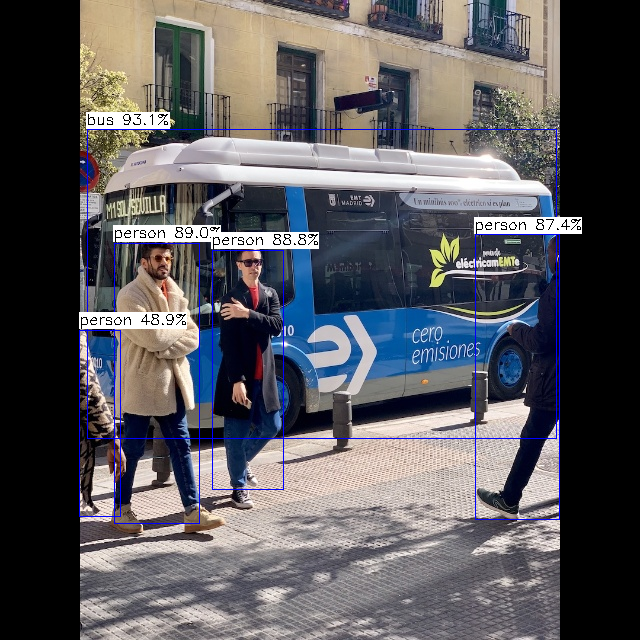
./yolox_demo_t736 -nb model/yolox_s_sim_uint8_t736.nb -i model/bus.jpg
# 运行后,打印log输出,能看到检测信息输出,并将检测结果画框保存为图片out_yolox.png,可以通过adb pull的方式在服务器端进行查看。运行后,打印log输出,能看到检测信息输出;
...
detection num: 5
5: 93%, [ 87, 129, 557, 439], bus
0: 87%, [ 475, 228, 560, 520], person
0: 89%, [ 114, 243, 200, 524], person
0: 89%, [ 212, 250, 284, 490], person
0: 49%, [ 79, 330, 121, 516], person
destory npu finished.
~NpuUint.
板端的运行结果:

有“AI”的1024 = 2048,欢迎大家加入2048 AI社区
更多推荐

 21
21 0
0- 0


 已为社区贡献1条内容

所有评论(0)