Python装饰器完全指南:从基础到元编程的进阶之路
目录
摘要
本文全面深入解析Python装饰器的核心原理与高级应用,涵盖函数装饰器、类装饰器、参数化装饰器等关键技术,重点探讨装饰器工厂模式与元类结合的实际应用。通过性能分析、实战案例和最佳实践,帮助开发者掌握装饰器在日志记录、权限控制、缓存优化等场景的高效运用,提升代码质量和系统性能。
1 装饰器基础:从概念到核心原理
在我多年的Python开发经验中,装饰器是最具Pythonic特性的功能之一。它不仅是语法糖,更是一种设计哲学的体现——"对扩展开放,对修改封闭"。
1.1 装饰器的本质
装饰器的核心原理基于Python的"一切皆对象"理念。函数可以作为参数传递、作为返回值,也可以赋值给变量。
def simple_decorator(func):
    def wrapper():
        print("函数执行前")
        func()
        print("函数执行后")
    return wrapper

@simple_decorator
def greet():
    print("Hello, Python!")

# 等价于 greet = simple_decorator(greet)
greet()执行流程分析:
-
解释器遇到
@simple_decorator,立即执行simple_decorator(greet) -
返回
wrapper函数并重新绑定到greet名称 -
调用
greet()时实际执行的是wrapper()
1.2 闭包机制:装饰器的灵魂
装饰器强大的关键在于闭包(Closure)——内部函数可以访问外部函数的变量,即使外部函数已经执行完毕。
def counter_decorator():
    count = 0  # 闭包变量

    def decorator(func):
        def wrapper(*args, **kwargs):
            nonlocal count
            count += 1
            print(f"函数第{count}次调用")
            return func(*args, **kwargs)
        return wrapper
    return decorator

@counter_decorator()
def example_function():
    print("函数执行中")

example_function()  # 输出:函数第1次调用
example_function()  # 输出:函数第2次调用
2 🔧 装饰器进阶技术深度解析
2.1 带参数装饰器:三层嵌套结构
在实际项目中,我们经常需要让装饰器能够接收参数,这就需要三层嵌套函数结构。
def retry(max_attempts=3, delay=1):
    """
    重试装饰器:当函数执行失败时自动重试
    """
    def decorator(func):
        import time
        from functools import wraps

        @wraps(func)
        def wrapper(*args, **kwargs):
            last_exception = None
            for attempt in range(max_attempts):
                try:
                    result = func(*args, **kwargs)
                    if attempt > 0:
                        print(f"第{attempt+1}次尝试成功!")
                    return result
                except Exception as e:
                    last_exception = e
                    print(f"第{attempt+1}次尝试失败: {e}")
                    if attempt < max_attempts - 1:
                        time.sleep(delay)

            raise last_exception
        return wrapper
    return decorator

@retry(max_attempts=5, delay=2)
def call_external_api(url):
    """
    模拟调用可能失败的外部API
    """
    import random
    if random.random() < 0.7:
        raise ConnectionError("API连接失败")
    return "API调用成功"

# 测试
result = call_external_api("https://api.example.com")
print(f"最终结果: {result}")
2.2 类装饰器:状态保持的优雅方案
当装饰器需要维护状态时,类装饰器是更好的选择。
class Timer:
    """
    计时装饰器:记录函数执行时间和调用次数
    """
    def __init__(self, func):
        self.func = func
        self.call_count = 0
        self.total_time = 0.0

    def __call__(self, *args, **kwargs):
        import time
        start_time = time.perf_counter()

        result = self.func(*args, **kwargs)

        end_time = time.perf_counter()
        execution_time = end_time - start_time

        self.call_count += 1
        self.total_time += execution_time

        print(f"{self.func.__name__} 执行时间: {execution_time:.6f}秒, "
              f"平均时间: {self.total_time/self.call_count:.6f}秒")

        return result

@Timer
def expensive_operation(n):
    """
    模拟耗时操作
    """
    import time
    time.sleep(0.1)
    return sum(i * i for i in range(n))

# 测试
for i in range(3):
    result = expensive_operation(10000)
    print(f"结果: {result}")
2.3 保留元信息:@wraps的重要性
很多开发者会忽略的一个关键细节:装饰器会覆盖原函数的元信息。
from functools import wraps

def debug_decorator(func):
    """
    调试装饰器:记录函数调用信息
    """
    @wraps(func)  # 保留原函数元信息
    def wrapper(*args, **kwargs):
        print(f"调用函数: {func.__name__}")
        print(f"参数: args={args}, kwargs={kwargs}")
        result = func(*args, **kwargs)
        print(f"返回值: {result}")
        return result
    return wrapper

def bad_decorator(func):
    """
    没有使用@wraps的装饰器(不推荐)
    """
    def wrapper(*args, **kwargs):
        return func(*args, **kwargs)
    return wrapper

@debug_decorator
def calculate(a, b):
    """计算两个数的乘积"""
    return a * b

@bad_decorator
def bad_calculate(a, b):
    """计算两个数的乘积"""
    return a * b

# 测试元信息保留
print("使用@wraps:")
print(f"函数名: {calculate.__name__}")
print(f"文档字符串: {calculate.__doc__}")

print("\n未使用@wraps:")
print(f"函数名: {bad_calculate.__name__}")
print(f"文档字符串: {bad_calculate.__doc__}")
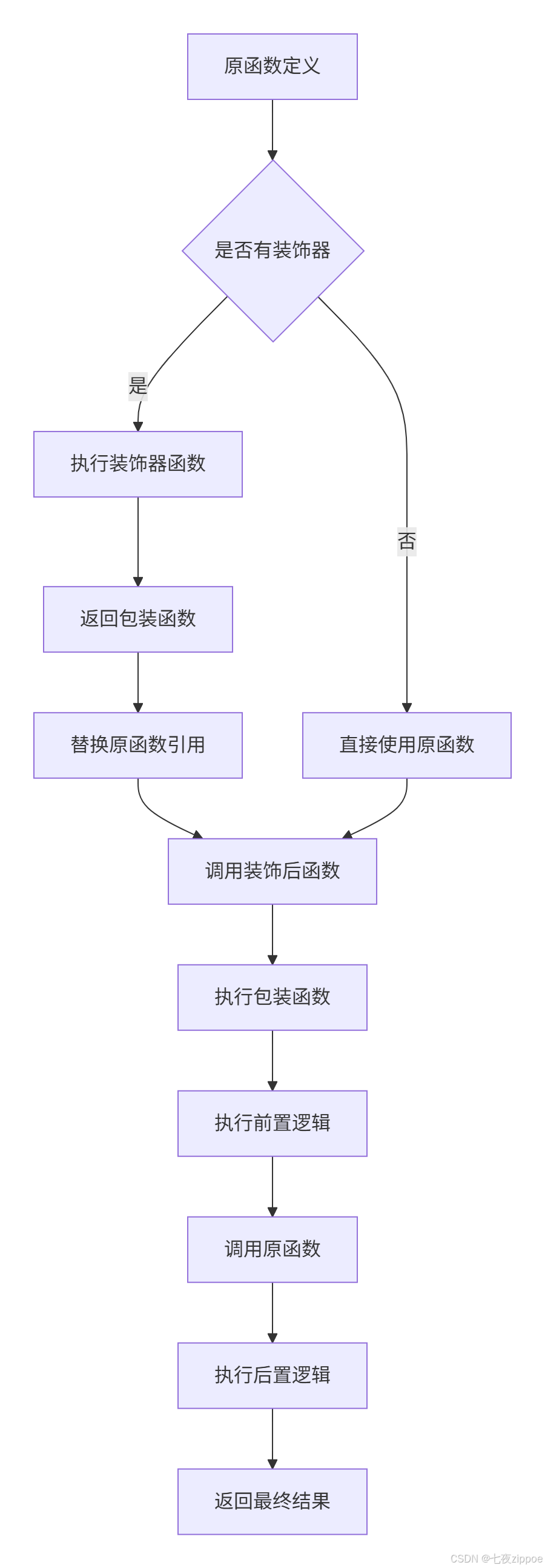
下面是装饰器执行流程的完整示意图:
3 ⚡ 性能分析与优化策略
3.1 装饰器性能开销测试
装饰器会引入额外的函数调用开销,在性能敏感的场景需要特别注意。
import time
from functools import wraps

def simple_decorator(func):
    @wraps(func)
    def wrapper(*args, **kwargs):
        return func(*args, **kwargs)
    return wrapper

def complex_decorator(func):
    @wraps(func)
    def wrapper(*args, **kwargs):
        # 模拟复杂的装饰器逻辑
        start = time.perf_counter()
        result = func(*args, **kwargs)
        end = time.perf_counter()
        if end - start > 0.1:
            print(f"警告: {func.__name__} 执行缓慢")
        return result
    return wrapper

@simple_decorator
def fast_function():
    return sum(i for i in range(1000))

@complex_decorator
def slow_function():
    time.sleep(0.05)
    return sum(i for i in range(1000))

def benchmark():
    """性能基准测试"""
    iterations = 10000

    # 测试无装饰器
    start = time.perf_counter()
    for _ in range(iterations):
        fast_function()
    no_decorator_time = time.perf_counter() - start

    # 测试有装饰器
    start = time.perf_counter()
    for _ in range(iterations):
        slow_function()
    with_decorator_time = time.perf_counter() - start

    print(f"无装饰器执行时间: {no_decorator_time:.6f}秒")
    print(f"有装饰器执行时间: {with_decorator_time:.6f}秒")
    print(f"性能开销: {((with_decorator_time - no_decorator_time) / no_decorator_time) * 100:.2f}%")

if __name__ == "__main__":
    benchmark()
3.2 缓存装饰器性能优化
对于计算密集型函数,使用缓存可以大幅提升性能。
from functools import lru_cache
import time

def manual_cache(size=128):
    """
    手动实现缓存装饰器
    """
    def decorator(func):
        cache = {}
        cache_keys = []

        @wraps(func)
        def wrapper(*args, **kwargs):
            # 创建缓存键
            key = str(args) + str(kwargs)

            if key in cache:
                return cache[key]

            result = func(*args, **kwargs)

            # 缓存管理(LRU策略)
            if len(cache_keys) >= size:
                oldest_key = cache_keys.pop(0)
                del cache[oldest_key]

            cache[key] = result
            cache_keys.append(key)

            return result
        return wrapper
    return decorator

@lru_cache(maxsize=128)
def fibonacci_lru(n):
    """使用lru_cache的斐波那契数列"""
    if n < 2:
        return n
    return fibonacci_lru(n-1) + fibonacci_lru(n-2)

@manual_cache(size=128)
def fibonacci_manual(n):
    """使用手动缓存的斐波那契数列"""
    if n < 2:
        return n
    return fibonacci_manual(n-1) + fibonacci_manual(n-2)

def fibonacci_naive(n):
    """原生递归实现(性能差)"""
    if n < 2:
        return n
    return fibonacci_naive(n-1) + fibonacci_naive(n-2)

# 性能对比测试
def performance_comparison():
    n = 30

    # 测试原生实现
    start = time.perf_counter()
    result1 = fibonacci_naive(n)
    time1 = time.perf_counter() - start

    # 测试lru_cache实现
    start = time.perf_counter()
    result2 = fibonacci_lru(n)
    time2 = time.perf_counter() - start

    # 测试手动缓存实现
    start = time.perf_counter()
    result3 = fibonacci_manual(n)
    time3 = time.perf_counter() - start

    print(f"斐波那契数列第{n}项: {result1}")
    print(f"原生实现: {time1:.6f}秒")
    print(f"lru_cache实现: {time2:.6f}秒")
    print(f"手动缓存实现: {time3:.6f}秒")
    print(f"lru_cache加速比: {time1/time2:.1f}倍")

performance_comparison()
4 🏢 企业级实战应用案例
4.1 Web框架路由装饰器实现
在企业级Web开发中,装饰器用于路由注册是非常常见的模式。
class Router:
    """
    简易Web框架路由器
    """
    _routes = {}
    _middlewares = []

    @classmethod
    def route(cls, path, methods=None):
        if methods is None:
            methods = ['GET']

        def decorator(func):
            @wraps(func)
            def wrapper(*args, **kwargs):
                # 执行中间件
                for middleware in cls._middlewares:
                    middleware(request=kwargs.get('request'))

                return func(*args, **kwargs)

            # 注册路由
            for method in methods:
                cls._routes[(path, method)] = wrapper

            return wrapper
        return decorator

    @classmethod
    def middleware(cls, func):
        """中间件装饰器"""
        cls._middlewares.append(func)
        return func

    @classmethod
    def handle_request(cls, path, method='GET', **kwargs):
        """处理HTTP请求"""
        handler = cls._routes.get((path, method))
        if handler:
            return handler(**kwargs)
        return "404 Not Found", 404

# 使用装饰器定义路由
@Router.middleware
def log_middleware(request):
    print(f"日志中间件: 请求路径 {getattr(request, 'path', 'Unknown')}")

@Router.route("/home", methods=["GET"])
def home_page(request=None):
    return "<h1>欢迎来到首页</h1>"

@Router.route("/api/user/<user_id>", methods=["GET", "POST"])
def user_api(request=None, user_id=None):
    return {"user_id": user_id, "name": "张三"}

# 测试路由系统
if __name__ == "__main__":
    response = Router.handle_request("/home", "GET")
    print(response)

    response = Router.handle_request("/api/user/123", "GET")
    print(response)
4.2 数据库事务管理装饰器
在数据库操作中,事务管理是装饰器的典型应用场景。
import sqlite3
from contextlib import contextmanager
from functools import wraps

class DatabaseManager:
    """
    数据库事务管理装饰器
    """
    def __init__(self, db_path):
        self.db_path = db_path

    @contextmanager
    def get_connection(self):
        """获取数据库连接(上下文管理器)"""
        conn = sqlite3.connect(self.db_path)
        try:
            yield conn
            conn.commit()
        except Exception:
            conn.rollback()
            raise
        finally:
            conn.close()

    def transactional(self, func):
        """
        事务装饰器:自动管理数据库事务
        """
        @wraps(func)
        def wrapper(*args, **kwargs):
            with self.get_connection() as conn:
                # 将连接对象注入到kwargs中
                kwargs['conn'] = conn
                return func(*args, **kwargs)
        return wrapper

# 创建数据库管理器实例
db_manager = DatabaseManager(":memory:")

@db_manager.transactional
def create_user(conn, username, email):
    """
    创建用户(自动事务管理)
    """
    cursor = conn.cursor()
    cursor.execute(
        "CREATE TABLE IF NOT EXISTS users (id INTEGER PRIMARY KEY, username TEXT, email TEXT)"
    )
    cursor.execute(
        "INSERT INTO users (username, email) VALUES (?, ?)",
        (username, email)
    )
    return cursor.lastrowid

@db_manager.transactional
def get_user(conn, user_id):
    """
    查询用户信息
    """
    cursor = conn.cursor()
    cursor.execute("SELECT * FROM users WHERE id = ?", (user_id,))
    return cursor.fetchone()

# 测试数据库操作
try:
    user_id = create_user(username="testuser", email="test@example.com")
    print(f"创建用户成功,ID: {user_id}")

    user_info = get_user(user_id=user_id)
    print(f"用户信息: {user_info}")
except Exception as e:
    print(f"操作失败: {e}")
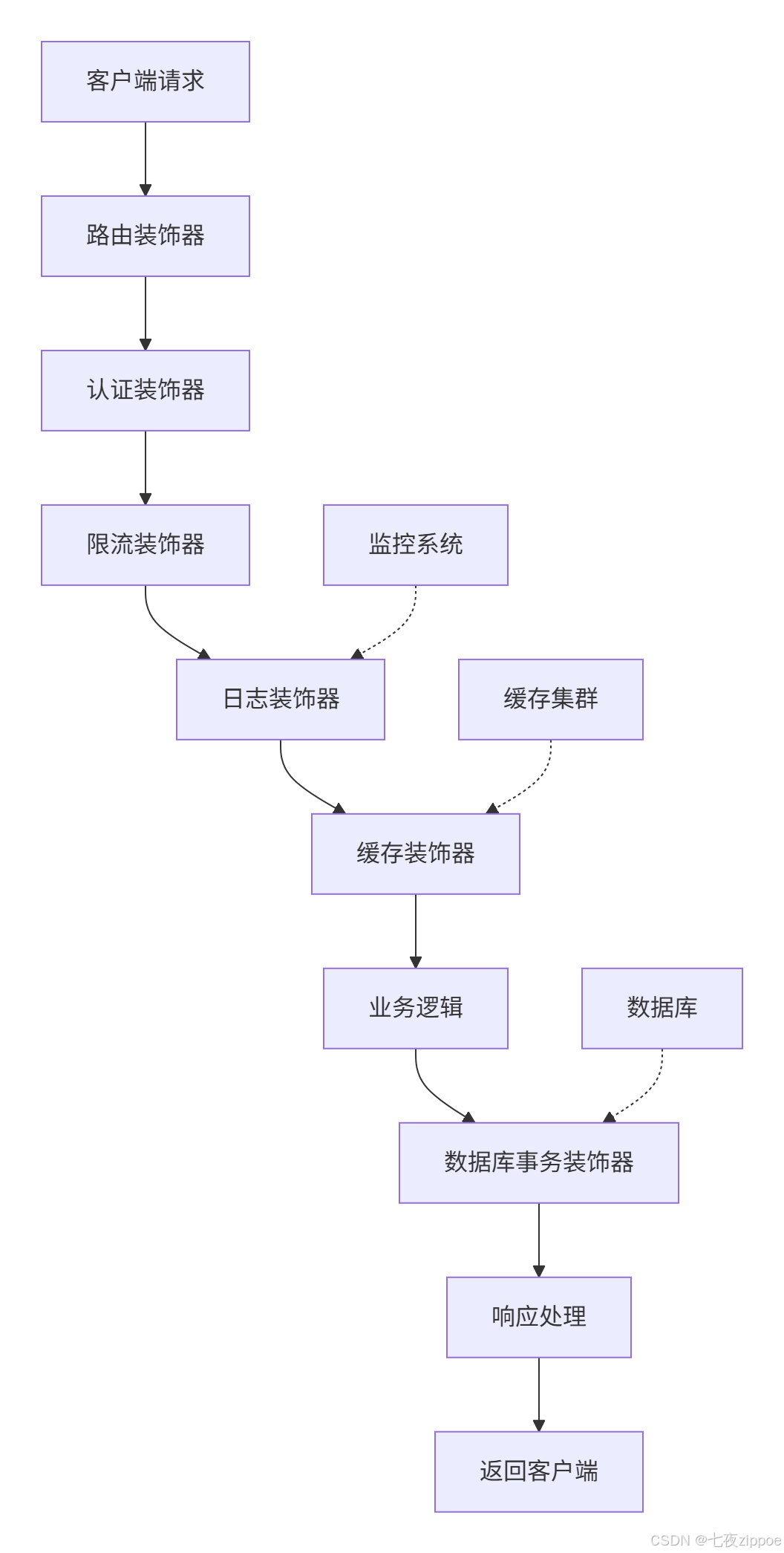
下面是装饰器在企业应用中的架构示意图:
5 🔄 高级模式与元编程结合
5.1 元类与装饰器的协同应用
元类和装饰器结合可以实现强大的类级别控制。
class MetaDecorator(type):
    """
    元类:自动为所有方法添加装饰器
    """
    def __new__(cls, name, bases, attrs):
        # 定义要应用的装饰器
        def log_method_call(method):
            @wraps(method)
            def wrapper(self, *args, **kwargs):
                print(f"调用方法: {name}.{method.__name__}")
                return method(self, *args, **kwargs)
            return wrapper

        # 为所有方法添加装饰器
        new_attrs = {}
        for attr_name, attr_value in attrs.items():
            if callable(attr_value) and not attr_name.startswith('_'):
                new_attrs[attr_name] = log_method_call(attr_value)
            else:
                new_attrs[attr_name] = attr_value

        return super().__new__(cls, name, bases, new_attrs)

def auto_register(plugin_name):
    """
    插件自动注册装饰器
    """
    def decorator(cls):
        if not hasattr(cls, '_plugins'):
            cls._plugins = {}
        cls._plugins[plugin_name] = cls
        return cls
    return decorator

class PluginBase(metaclass=MetaDecorator):
    """
    插件基类:结合元类和装饰器
    """
    def execute(self):
        raise NotImplementedError

@auto_register("database")
class DatabasePlugin(PluginBase):
    def execute(self):
        return "执行数据库操作"

@auto_register("cache")
class CachePlugin(PluginBase):
    def execute(self):
        return "执行缓存操作"

# 测试元类与装饰器结合
if __name__ == "__main__":
    db_plugin = DatabasePlugin()
    db_plugin.execute()  # 自动输出: 调用方法: DatabasePlugin.execute

    cache_plugin = CachePlugin()
    cache_plugin.execute()  # 自动输出: 调用方法: CachePlugin.execute

    # 查看自动注册的插件
    print(f"已注册插件: {PluginBase._plugins}")
5.2 描述符与装饰器的融合
描述符协议可以与装饰器结合,创建强大的属性控制系统。
class ValidatedProperty:
    """
    属性验证描述符:结合装饰器使用
    """
    def __init__(self, validator=None):
        self.validator = validator
        self.name = None

    def __set_name__(self, owner, name):
        self.name = name

    def __get__(self, instance, owner):
        if instance is None:
            return self
        return instance.__dict__[self.name]

    def __set__(self, instance, value):
        if self.validator and not self.validator(value):
            raise ValueError(f"属性 {self.name} 验证失败: {value}")
        instance.__dict__[self.name] = value

def validate_property(validator=None):
    """
    属性验证装饰器工厂
    """
    def decorator(func):
        # 将函数转换为描述符
        return ValidatedProperty(validator)
    return decorator

# 预定义验证器
def validate_email(email):
    return isinstance(email, str) and '@' in email

def validate_age(age):
    return isinstance(age, int) and 0 <= age <= 150

class User:
    """
    使用验证装饰器的用户类
    """
    @validate_property(validate_email)
    def email(self):
        return self._email

    @validate_property(validate_age)
    def age(self):
        return self._age

    def __init__(self, email, age):
        self.email = email  # 触发验证
        self.age = age      # 触发验证

# 测试属性验证
try:
    user1 = User("test@example.com", 25)
    print("用户创建成功")

    user2 = User("invalid-email", 200)  # 会抛出异常
except ValueError as e:
    print(f"验证错误: {e}")
6 🚀 性能优化与最佳实践
6.1 装饰器性能优化技巧
通过优化技术减少装饰器的运行时开销。
import time
from functools import wraps, lru_cache

def optimized_decorator(func):
    """
    优化版装饰器:减少不必要的开销
    """
    # 使用__wrapped__属性避免双重包装
    if hasattr(func, '__wrapped__'):
        return func  # 避免重复装饰

    @wraps(func)
    def wrapper(*args, **kwargs):
        # 快速路径:对于无参数情况优化
        if not args and not kwargs:
            return func()
        return func(*args, **kwargs)

    # 缓存包装器以减少调用开销
    wrapper = lru_cache(maxsize=128)(wrapper)
    return wrapper

class SelectiveDecorator:
    """
    选择性装饰器:根据条件启用装饰功能
    """
    def __init__(self, enabled=True):
        self.enabled = enabled

    def __call__(self, func):
        if not self.enabled:
            return func  # 直接返回原函数,零开销

        @wraps(func)
        def wrapper(*args, **kwargs):
            # 装饰器逻辑
            start = time.perf_counter()
            result = func(*args, **kwargs)
            end = time.perf_counter()

            if self.enabled:
                print(f"{func.__name__} 执行时间: {end-start:.6f}秒")

            return result
        return wrapper

# 性能对比测试
def performance_test():
    @optimized_decorator
    def optimized_func(n):
        return sum(i for i in range(n))

    @SelectiveDecorator(enabled=False)  # 装饰器禁用,零开销
    def disabled_decorator_func(n):
        return sum(i for i in range(n))

    # 测试性能
    import timeit

    optimized_time = timeit.timeit(lambda: optimized_func(1000), number=10000)
    disabled_time = timeit.timeit(lambda: disabled_decorator_func(1000), number=10000)

    print(f"优化装饰器耗时: {optimized_time:.6f}秒")
    print(f"禁用装饰器耗时: {disabled_time:.6f}秒")
    print(f"性能差异: {abs(optimized_time - disabled_time)/disabled_time * 100:.2f}%")

performance_test()
6.2 异步装饰器开发
现代Python开发中,异步装饰器变得越来越重要。
import asyncio
from functools import wraps
from typing import Any, Callable

def async_retry(max_attempts: int = 3, delay: float = 1.0):
    """
    异步重试装饰器
    """
    def decorator(func: Callable) -> Callable:
        @wraps(func)
        async def wrapper(*args, **kwargs) -> Any:
            last_exception = None
            for attempt in range(max_attempts):
                try:
                    result = await func(*args, **kwargs)
                    if attempt > 0:
                        print(f"异步重试第{attempt+1}次成功")
                    return result
                except Exception as e:
                    last_exception = e
                    print(f"异步重试第{attempt+1}次失败: {e}")
                    if attempt < max_attempts - 1:
                        await asyncio.sleep(delay * (2 ** attempt))  # 指数退避

            raise last_exception
        return wrapper
    return decorator

def async_timing(func: Callable) -> Callable:
    """
    异步函数计时装饰器
    """
    @wraps(func)
    async def wrapper(*args, **kwargs) -> Any:
        start = asyncio.get_event_loop().time()
        result = await func(*args, **kwargs)
        end = asyncio.get_event_loop().time()
        print(f"异步函数 {func.__name__} 执行时间: {end-start:.6f}秒")
        return result
    return wrapper

@async_timing
@async_retry(max_attempts=3, delay=0.5)
async def fetch_data(url: str) -> str:
    """
    模拟异步数据获取
    """
    await asyncio.sleep(0.1)  # 模拟网络延迟
    if "error" in url:
        raise ConnectionError(f"无法连接到 {url}")
    return f"从 {url} 获取的数据"

# 测试异步装饰器
async def test_async_decorators():
    print("=== 测试成功请求 ===")
    try:
        result = await fetch_data("https://api.example.com/data")
        print(f"请求结果: {result}")
    except Exception as e:
        print(f"请求失败: {e}")

    print("\n=== 测试失败请求 ===")
    try:
        result = await fetch_data("https://api.example.com/error")
        print(f"请求结果: {result}")
    except Exception as e:
        print(f"请求失败: {e}")

# 运行测试
if __name__ == "__main__":
    asyncio.run(test_async_decorators())
7 🛠️ 调试与故障排查指南
7.1 常见装饰器问题与解决方案
在实际开发中,装饰器可能引发各种难以调试的问题。
import logging
from functools import wraps

def debug_decorator(func):
    """
    调试友好的装饰器:记录详细执行信息
    """
    @wraps(func)
    def wrapper(*args, **kwargs):
        logger = logging.getLogger(func.__module__)

        # 记录函数调用信息
        logger.debug(f"调用 {func.__name__} with args={args}, kwargs={kwargs}")

        try:
            result = func(*args, **kwargs)
            logger.debug(f"{func.__name__} 返回: {result}")
            return result
        except Exception as e:
            logger.error(f"{func.__name__} 执行出错: {e}", exc_info=True)
            raise
        finally:
            logger.debug(f"{func.__name__} 执行完成")

    return wrapper

class DebugMeta(type):
    """
    调试元类:自动为所有方法添加调试装饰器
    """
    def __new__(cls, name, bases, attrs):
        # 只在调试模式下启用
        import os
        if os.getenv('DEBUG', 'False').lower() == 'true':
            for attr_name, attr_value in attrs.items():
                if callable(attr_value) and not attr_name.startswith('_'):
                    attrs[attr_name] = debug_decorator(attr_value)

        return super().__new__(cls, name, bases, attrs)

# 配置日志
logging.basicConfig(level=logging.DEBUG, format='%(asctime)s - %(name)s - %(levelname)s - %(message)s')

class DataProcessor(metaclass=DebugMeta):
    """
    使用调试元类的数据处理器
    """
    def process_data(self, data):
        """处理数据"""
        if not data:
            raise ValueError("数据不能为空")
        return [item * 2 for item in data]

    def validate_data(self, data):
        """验证数据"""
        return all(isinstance(item, (int, float)) for item in data)

# 测试调试功能
def test_debugging():
    processor = DataProcessor()

    print("=== 正常执行 ===")
    result = processor.process_data([1, 2, 3])
    print(f"处理结果: {result}")

    print("\n=== 异常情况 ===")
    try:
        processor.process_data([])
    except ValueError as e:
        print(f"捕获异常: {e}")

if __name__ == "__main__":
    test_debugging()
7.2 装饰器堆栈跟踪优化
当多个装饰器堆叠时,调试信息可能变得混乱,需要特殊处理。
import traceback
from functools import wraps

def stack_trace_decorator(name):
    """
    提供清晰堆栈跟踪的装饰器
    """
    def decorator(func):
        @wraps(func)
        def wrapper(*args, **kwargs):
            print(f"↳ 进入装饰器: {name}")
            try:
                result = func(*args, **kwargs)
                print(f"↳ 离开装饰器: {name}")
                return result
            except Exception as e:
                print(f"✗ 装饰器 {name} 中发生错误:")
                # 提供清晰的错误跟踪
                stack = traceback.format_exc()
                for line in stack.split('\n'):
                    if 'File' in line or 'wrapper' in line:
                        print(f"  {line}")
                raise
        return wrapper
    return decorator

@stack_trace_decorator("装饰器A")
@stack_trace_decorator("装饰器B")
@stack_trace_decorator("装饰器C")
def problematic_function():
    """
    一个有问题的函数,用于演示调试
    """
    data = [1, 2, 3]
    # 故意制造错误
    return data[10]  # IndexError

# 测试堆栈跟踪
try:
    problematic_function()
except Exception as e:
    print(f"\n最终错误: {e}")
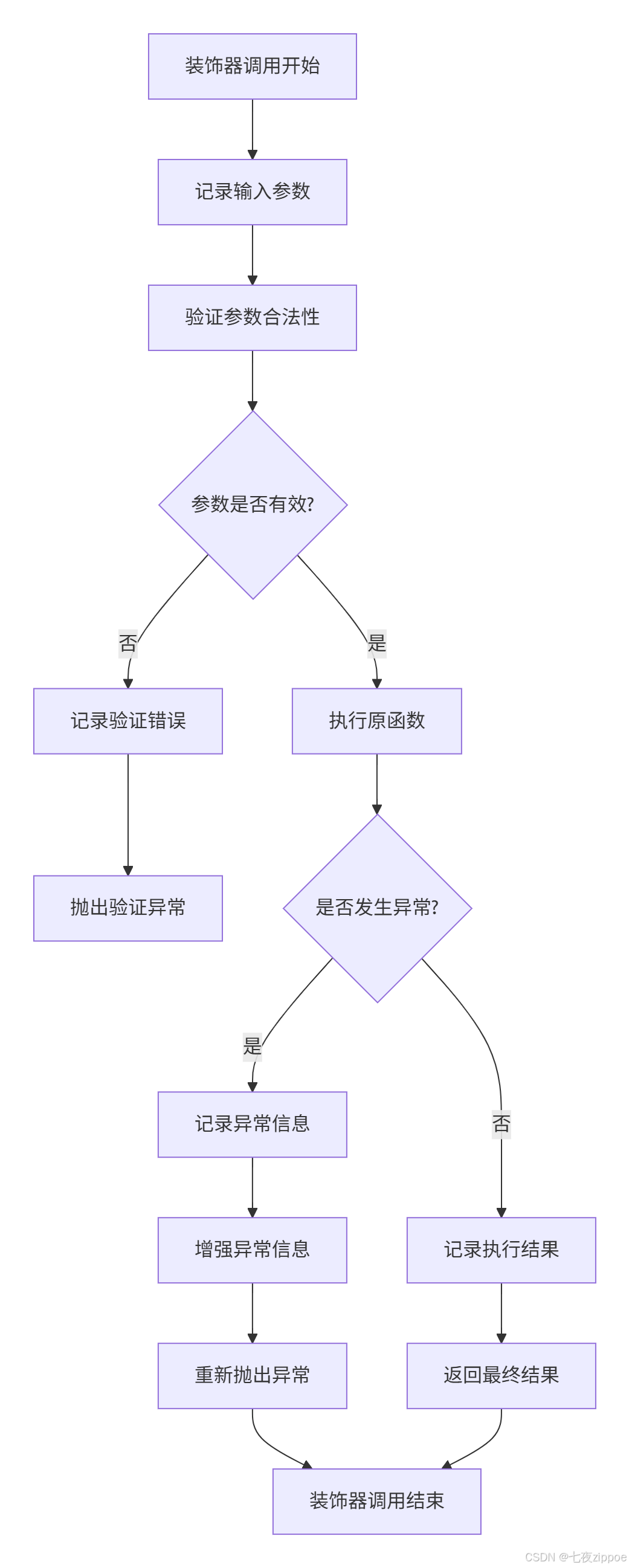
下面是装饰器调试的完整流程图:
8 📊 企业级最佳实践总结
根据我多年的项目经验,以下是装饰器使用的最佳实践:
8.1 装饰器设计原则
-
单一职责原则:每个装饰器只负责一个特定功能
-
可组合性:确保装饰器可以安全地堆叠使用
-
可配置性:通过参数支持不同的使用场景
-
文档完整性:为每个装饰器提供完整的文档字符串
8.2 性能与可维护性平衡
from functools import wraps
from typing import Any, Callable, Optional

class ProductionReadyDecorator:
    """
    生产环境就绪的装饰器模板
    """
    def __init__(self, config: Optional[dict] = None):
        self.config = config or {}
        self._setup_logging()

    def _setup_logging(self):
        """设置日志系统"""
        self.logger = logging.getLogger(self.__class__.__name__)

    def __call__(self, func: Callable) -> Callable:
        @wraps(func)
        def wrapper(*args, **kwargs) -> Any:
            # 前置处理
            self._pre_process(func, args, kwargs)

            try:
                # 执行原函数
                result = func(*args, **kwargs)

                # 后置处理
                self._post_process(func, result)

                return result
            except Exception as e:
                # 异常处理
                self._error_handler(func, e)
                raise

        return wrapper

    def _pre_process(self, func: Callable, args: tuple, kwargs: dict):
        """前置处理逻辑"""
        if self.config.get('enable_timing'):
            self.start_time = time.perf_counter()

        if self.config.get('enable_logging'):
            self.logger.info(f"开始执行: {func.__name__}")

    def _post_process(self, func: Callable, result: Any):
        """后置处理逻辑"""
        if self.config.get('enable_timing'):
            execution_time = time.perf_counter() - self.start_time
            self.logger.info(f"{func.__name__} 执行时间: {execution_time:.6f}秒")

        if self.config.get('enable_logging'):
            self.logger.info(f"{func.__name__} 执行完成")

    def _error_handler(self, func: Callable, error: Exception):
        """错误处理逻辑"""
        self.logger.error(f"{func.__name__} 执行失败: {error}")

# 使用示例
@ProductionReadyDecorator(config={
    'enable_timing': True,
    'enable_logging': True
})
def critical_business_operation(data: list) -> dict:
    """关键业务操作"""
    if not data:
        raise ValueError("数据不能为空")
    return {"status": "success", "processed_items": len(data)}

# 测试
try:
    result = critical_business_operation([1, 2, 3, 4, 5])
    print(f"操作结果: {result}")
except Exception as e:
    print(f"操作失败: {e}")
9 总结与前瞻
通过本文的深入探讨,我们全面了解了Python装饰器从基础到高级应用的各个方面。装饰器作为Python的核心特性,其重要性不仅体现在语法层面,更体现在设计哲学和工程实践层面。
9.1 关键知识点回顾
-
装饰器本质:基于闭包的高阶函数,遵循"一切皆对象"理念
-
进阶技术:参数化装饰器、类装饰器、元类集成
-
性能优化:缓存策略、选择性启用、异步支持
-
调试技巧:堆栈跟踪、日志记录、错误处理
-
最佳实践:单一职责、可配置性、生产就绪
9.2 未来发展趋势
随着Python生态的发展,装饰器在以下领域将有更多应用:
-
AI与机器学习:模型训练装饰器、自动微分装饰器
-
云原生架构:分布式追踪装饰器、服务网格集成
-
类型系统增强:类型安全的装饰器、运行时类型验证
官方文档与权威参考
装饰器是Python程序员从中级向高级进阶的重要里程碑。掌握装饰器不仅意味着技术的提升,更代表着对Python设计哲学理解的深化。希望本文能帮助你在Python开发道路上走得更远!
思考与实践:在你的下一个项目中,尝试使用装饰器解决一个具体的横切关注点问题,比如日志记录、性能监控或权限验证。

有“AI”的1024 = 2048,欢迎大家加入2048 AI社区
更多推荐

 25
25 0
0- 0



 已为社区贡献23条内容

所有评论(0)