Yolo使用教程
print(f"警告: 未知标签 '{label_name}',跳过此标注")print(f"成功转换: {json_file} -> {base_name}.txt")Train:训练集 图片和标签的合集就叫做训练集 图片文件夹名称images标签文件夹名称 labels。print(f"转换 {json_file} 时出错: {e}")将LabelMe目录中的所有JSON文件转换为YOLO T
一、已有模型的使用
打开YOLO官方地址
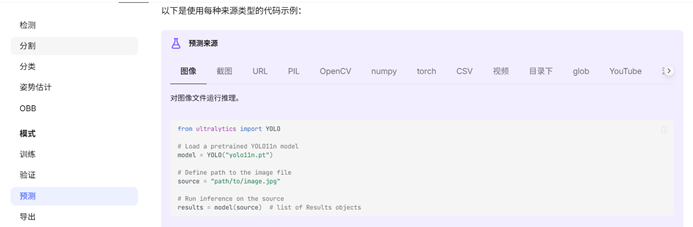
代码如下:
from ultralytics import YOLO

# Load a pretrained YOLO11n model 从不知道什么地方下载训练好的模型

model = YOLO("yolo11n.pt")

# Define path to the image file 定

你的检测素材路径。格式

source = "path/to/image.jpg"

# Run inference on the source 定义你要怎样运行这个模型  一般把 show 改为 True

#像这样 results = model(source,show = True)

results = model(source)  # list of Results objects
二、训练自己的模型(要用标注工具做好训练集与验证集的)
文件夹层级关系
Run_Mode/
├── Train/
│ ├── Images/
│ └── Labels/
├── Val/
│ ├── Images/
│ └── Labels/
└── xxxxxx.yaml
Train:训练集 图片和标签的合集就叫做训练集 图片文件夹名称images 标签文件夹名称 labels
Val:验证集 图片和标签的合集就叫做训练集 图片文件夹名称images 标签文件夹名称 labels
【训练集和验证集的内容不能重复】
【验证集是训练集的10%-20%】
【或者说训练集与验证机8:2】
Yaml文件格式:
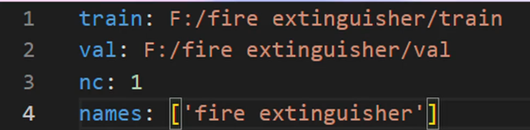
把配置文件(yaml)路径放到data处即可

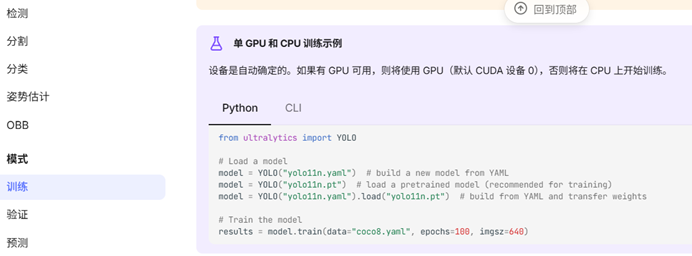
代码:
from ultralytics import YOLO


# Load a model

#model = YOLO("yolo11n.yaml")  # build a new model from YAML

#model = YOLO("yolo11n.pt")  # load a pretrained model (recommended for training)

model = YOLO("yolo11n.yaml").load("yolo11n.pt")  # build from YAML and transfer weights

# Train the model  把配置文件(yaml)路径放到data处即可

results = model.train(data="coco8.yaml", epochs=100, imgsz=640)
训练集的构建
数据类型转换
import json
import os


def labelme_polygon_to_yolo_bbox_directory(labelme_json_dir, output_dir, class_mapping=None):
    """将LabelMe目录中的所有JSON文件转换为YOLO TXT格式"""

    # 默认类别映射(根据你的实际类别修改)
    if class_mapping is None:
        class_mapping = {
            "person": 0,  # 类别0
            "car": 1,  # 类别1
            "bicycle": 2,  # 类别2
            # 添加更多类别...
        }

    # 确保输出目录存在
    os.makedirs(output_dir, exist_ok=True)

    # 遍历目录中的所有JSON文件
    for json_file in os.listdir(labelme_json_dir):
        if json_file.endswith('.json'):
            json_path = os.path.join(labelme_json_dir, json_file)

            try:
                with open(json_path, 'r') as f:
                    data = json.load(f)

                # 创建对应的TXT文件名
                base_name = os.path.splitext(json_file)[0]
                txt_path = os.path.join(output_dir, f"{base_name}.txt")

                img_height = data.get('imageHeight', 640)
                img_width = data.get('imageWidth', 480)

                with open(txt_path, 'w') as f:
                    for shape in data.get('shapes', []):
                        if shape.get('shape_type') == 'polygon':
                            label_name = shape.get('label', '')
                            points = shape.get('points', [])

                            if len(points) < 2:
                                continue  # 跳过无效的多边形

                            # 获取类别ID
                            if label_name in class_mapping:
                                class_id = class_mapping[label_name]
                            else:
                                print(f"警告: 未知标签 '{label_name}',跳过此标注")
                                continue

                            # 计算外接矩形
                            x_coords = [p[0] for p in points]
                            y_coords = [p[1] for p in points]

                            x_min = min(x_coords)
                            x_max = max(x_coords)
                            y_min = min(y_coords)
                            y_max = max(y_coords)

                            # 转换为YOLO格式
                            x_center = (x_min + x_max) / 2 / img_width
                            y_center = (y_min + y_max) / 2 / img_height
                            width = (x_max - x_min) / img_width
                            height = (y_max - y_min) / img_height

                            # 确保坐标在0-1范围内
                            x_center = max(0, min(1, x_center))
                            y_center = max(0, min(1, y_center))
                            width = max(0, min(1, width))
                            height = max(0, min(1, height))

                            # 写入YOLO格式,包含正确的类别ID
                            f.write(f"{class_id} {x_center:.6f} {y_center:.6f} {width:.6f} {height:.6f}\n")

                print(f"成功转换: {json_file} -> {base_name}.txt")

            except Exception as e:
                print(f"转换 {json_file} 时出错: {e}")


# 使用示例
labelme_polygon_to_yolo_bbox_directory(
    labelme_json_dir=r"C:\Users\21039\Desktop\Run\val\json",
    output_dir=r"C:\Users\21039\Desktop\Run\val\labels",
    class_mapping={
        "cat": 0,  # 猫 - 类别0
        "dog": 1,  # 狗 - 类别1
        "bird": 2,  # 鸟 - 类别2
    }
Model的参数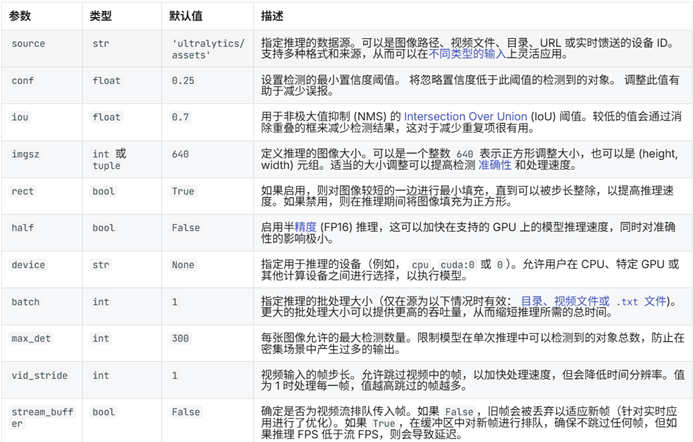
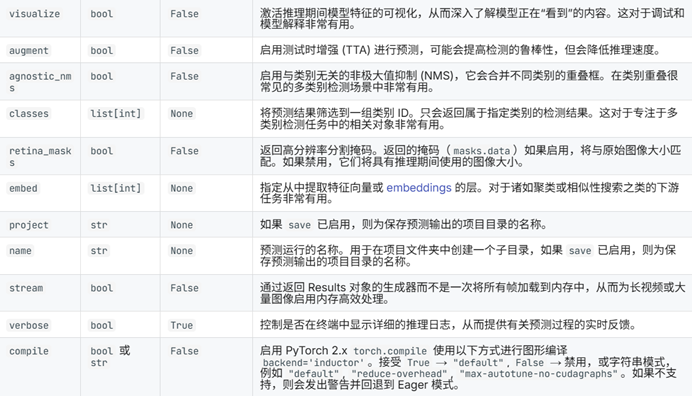
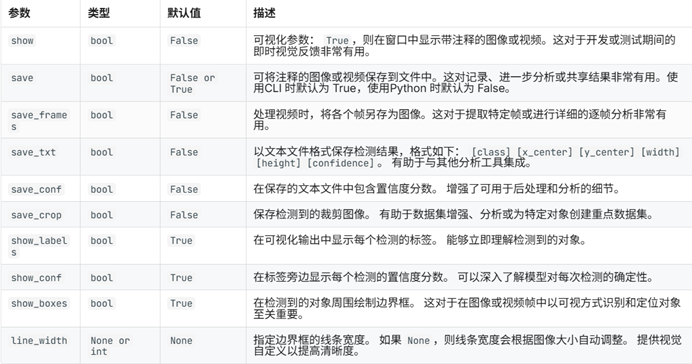
补充 ::
另一种数据处理方式
2. 输入文件层级要求
原始数据目录/
├── image_dir/ # 所有原始图片(.jpg/png)
│ ├── image1.jpg
│ ├── image2.jpg
│ └── ...
└── txt_dir/ # 所有标签文件(.txt/json)
├── image1.txt
├── image2.txt
└── ...
数据处理代码
import shutil
import random
import os
import argparse
import json

# 支持的图片格式列表
SUPPORTED_IMAGE_FORMATS = ['.jpg', '.jpeg', '.png', '.bmp', '.tiff', '.tif']


# 检查文件夹是否存在
def mkdir(path):
    if not os.path.exists(path):
        os.makedirs(path)


def find_image_file(image_dir, base_name):
    """根据基础文件名查找图片文件,支持多种格式"""
    for ext in SUPPORTED_IMAGE_FORMATS:
        image_path = os.path.join(image_dir, base_name + ext)
        if os.path.exists(image_path):
            return image_path
    return None


def convert_labelme_to_yolo_bbox(json_path, output_txt_path, class_mapping=None):
    """将单个LabelMe JSON文件转换为YOLO TXT格式"""

    # 默认类别映射(根据你的实际类别修改)
    if class_mapping is None:
        class_mapping = {
            "person": 0,  # 类别0
            "car": 1,  # 类别1
            "bicycle": 2,  # 类别2
            # 添加更多类别...
        }

    try:
        with open(json_path, 'r', encoding='utf-8') as f:
            data = json.load(f)

        img_height = data.get('imageHeight', 640)
        img_width = data.get('imageWidth', 480)

        with open(output_txt_path, 'w', encoding='utf-8') as f:
            for shape in data.get('shapes', []):
                if shape.get('shape_type') == 'polygon':
                    label_name = shape.get('label', '')
                    points = shape.get('points', [])

                    if len(points) < 2:
                        continue  # 跳过无效的多边形

                    # 获取类别ID
                    if label_name in class_mapping:
                        class_id = class_mapping[label_name]
                    else:
                        print(f"警告: 未知标签 '{label_name}',跳过此标注")
                        continue

                    # 计算外接矩形
                    x_coords = [p[0] for p in points]
                    y_coords = [p[1] for p in points]

                    x_min = min(x_coords)
                    x_max = max(x_coords)
                    y_min = min(y_coords)
                    y_max = max(y_coords)

                    # 转换为YOLO格式
                    x_center = (x_min + x_max) / 2 / img_width
                    y_center = (y_min + y_max) / 2 / img_height
                    width = (x_max - x_min) / img_width
                    height = (y_max - y_min) / img_height

                    # 确保坐标在0-1范围内
                    x_center = max(0, min(1, x_center))
                    y_center = max(0, min(1, y_center))
                    width = max(0, min(1, width))
                    height = max(0, min(1, height))

                    # 写入YOLO格式,包含正确的类别ID
                    f.write(f"{class_id} {x_center:.6f} {y_center:.6f} {width:.6f} {height:.6f}\n")

        return True
    except Exception as e:
        print(f"转换 {json_path} 时出错: {e}")
        return False


def process_annotation_files(txt_dir, temp_txt_dir, class_mapping=None):
    """处理标注文件:如果是json则转换为txt,如果是txt则直接复制"""

    mkdir(temp_txt_dir)

    # 获取所有标注文件
    annotation_files = [f for f in os.listdir(txt_dir) if f.endswith('.txt') or f.endswith('.json')]

    for ann_file in annotation_files:
        base_name = os.path.splitext(ann_file)[0]
        src_path = os.path.join(txt_dir, ann_file)
        dst_path = os.path.join(temp_txt_dir, base_name + '.txt')

        if ann_file.endswith('.json'):
            # JSON文件:转换为TXT
            print(f"转换JSON文件: {ann_file} -> {base_name}.txt")
            convert_labelme_to_yolo_bbox(src_path, dst_path, class_mapping)
        else:
            # TXT文件:直接复制
            print(f"复制TXT文件: {ann_file}")
            shutil.copyfile(src_path, dst_path)

    return temp_txt_dir


def main(image_dir, txt_dir, save_dir, class_mapping=None):
    # 创建临时目录用于存放处理后的TXT文件
    temp_txt_dir = os.path.join(save_dir, 'temp_txt')

    # 处理标注文件:JSON转TXT或直接复制TXT
    processed_txt_dir = process_annotation_files(txt_dir, temp_txt_dir, class_mapping)

    # 创建文件夹
    mkdir(save_dir)
    images_dir = os.path.join(save_dir, 'images')
    labels_dir = os.path.join(save_dir, 'labels')

    img_train_path = os.path.join(images_dir, 'train')
    img_test_path = os.path.join(images_dir, 'test')
    img_val_path = os.path.join(images_dir, 'val')

    label_train_path = os.path.join(labels_dir, 'train')
    label_test_path = os.path.join(labels_dir, 'test')
    label_val_path = os.path.join(labels_dir, 'val')

    mkdir(images_dir)
    mkdir(labels_dir)
    mkdir(img_train_path)
    mkdir(img_test_path)
    mkdir(img_val_path)
    mkdir(label_train_path)
    mkdir(label_test_path)
    mkdir(label_val_path)

    # 数据集划分比例,训练集75%,验证集15%,测试集15%,按需修改
    train_percent = 0.9
    val_percent = 0.1
    test_percent = 0

    total_txt = os.listdir(processed_txt_dir)
    num_txt = len(total_txt)
    list_all_txt = range(num_txt)  # 范围 range(0, num)

    num_train = int(num_txt * train_percent)
    num_val = int(num_txt * val_percent)
    num_test = num_txt - num_train - num_val

    train = random.sample(list_all_txt, num_train)
    # 在全部数据集中取出train
    val_test = [i for i in list_all_txt if not i in train]
    # 再从val_test取出num_val个元素,val_test剩下的元素就是test
    val = random.sample(val_test, num_val)

    print("训练集数目:{}, 验证集数目:{},测试集数目:{}".format(len(train), len(val), len(val_test) - len(val)))

    for i in list_all_txt:
        name = total_txt[i][:-4]  # 去掉.txt后缀

        # 查找对应的图片文件
        srcImage = find_image_file(image_dir, name)
        srcLabel = os.path.join(processed_txt_dir, name + '.txt')

        if srcImage is None:
            print(f"警告: 找不到与标注文件 {name}.txt 对应的图片文件")
            continue

        # 获取图片文件的扩展名
        _, image_ext = os.path.splitext(srcImage)

        if i in train:
            dst_train_Image = os.path.join(img_train_path, name + image_ext)
            dst_train_Label = os.path.join(label_train_path, name + '.txt')
            shutil.copyfile(srcImage, dst_train_Image)
            shutil.copyfile(srcLabel, dst_train_Label)
        elif i in val:
            dst_val_Image = os.path.join(img_val_path, name + image_ext)
            dst_val_Label = os.path.join(label_val_path, name + '.txt')
            shutil.copyfile(srcImage, dst_val_Image)
            shutil.copyfile(srcLabel, dst_val_Label)
        else:
            dst_test_Image = os.path.join(img_test_path, name + image_ext)
            dst_test_Label = os.path.join(label_test_path, name + '.txt')
            shutil.copyfile(srcImage, dst_test_Image)
            shutil.copyfile(srcLabel, dst_test_Label)

    # 清理临时目录
    try:
        shutil.rmtree(temp_txt_dir)
        print("临时目录已清理")
    except:
        print("警告: 临时目录清理失败")


if __name__ == '__main__':
    """
    使用示例:
    python split_datasets.py --image-dir my_datasets/color_rings/imgs --txt-dir my_datasets/color_rings/annotations --save-dir my_datasets/color_rings/train_data

    注意:txt-dir目录可以包含.txt文件或.json文件,程序会自动处理
    """

    # 在这里定义你的类别映射
    CLASS_MAPPING = {
        "bucket": 0,  # 猫 - 类别0

        # 根据你的实际类别添加更多映射...
    }

    parser = argparse.ArgumentParser(description='split datasets to train,val,test params')
    parser.add_argument('--image-dir', type=str, default=r'C:\Users\21039\Desktop\Test\images',
                        help='image path dir')
    parser.add_argument('--txt-dir', type=str, default=r'C:\Users\21039\Desktop\Test\labels',
                        help='annotation path dir (can contain .txt or .json files)')
    parser.add_argument('--save-dir', default=r'C:\Users\21039\Desktop\Test\sava', type=str,
                        help='save dir')
    args = parser.parse_args()
    image_dir = args.image_dir
    txt_dir = args.txt_dir
    save_dir = args.save_dir

main(image_dir, txt_dir, save_dir, CLASS_MAPPING)- 转换程序输出 → YAML配置路径
save_dir/ path: ../datasets/coco8
├── images/ train: images/train
│ ├── train/ val: images/val
│ ├── val/
│ └── test/
└── labels/
├── train/
├── val/
└── test/
示例代码:
path: ../datasets/coco8 # dataset root dir
train: images/train # train images (relative to 'path') 4 images
val: images/val # val images (relative to 'path') 4 images
test: # test images (optional)

# Classes (有几个写几个就行了)
names:
  0: person
  1: bicycle
  2: car
  3: motorcycle
#    ⋮
#    ⋮
有“AI”的1024 = 2048,欢迎大家加入2048 AI社区
更多推荐
 5
5 0
0- 0


 已为社区贡献1条内容

所有评论(0)