书生大模型训练营6期L1 玩转书生大模型 API 与 MCP
本文介绍了Intern系列模型API的使用方法,主要包括:1)获取API密钥和开发机配置;2)文本生成、图像分析、工具调用等基本功能实现;3)MCP协议的安装与配置,支持天气查询和文件系统操作等扩展功能。详细说明了环境准备、代码示例和注意事项,帮助开发者快速接入和使用该AI服务。
一:前置准备
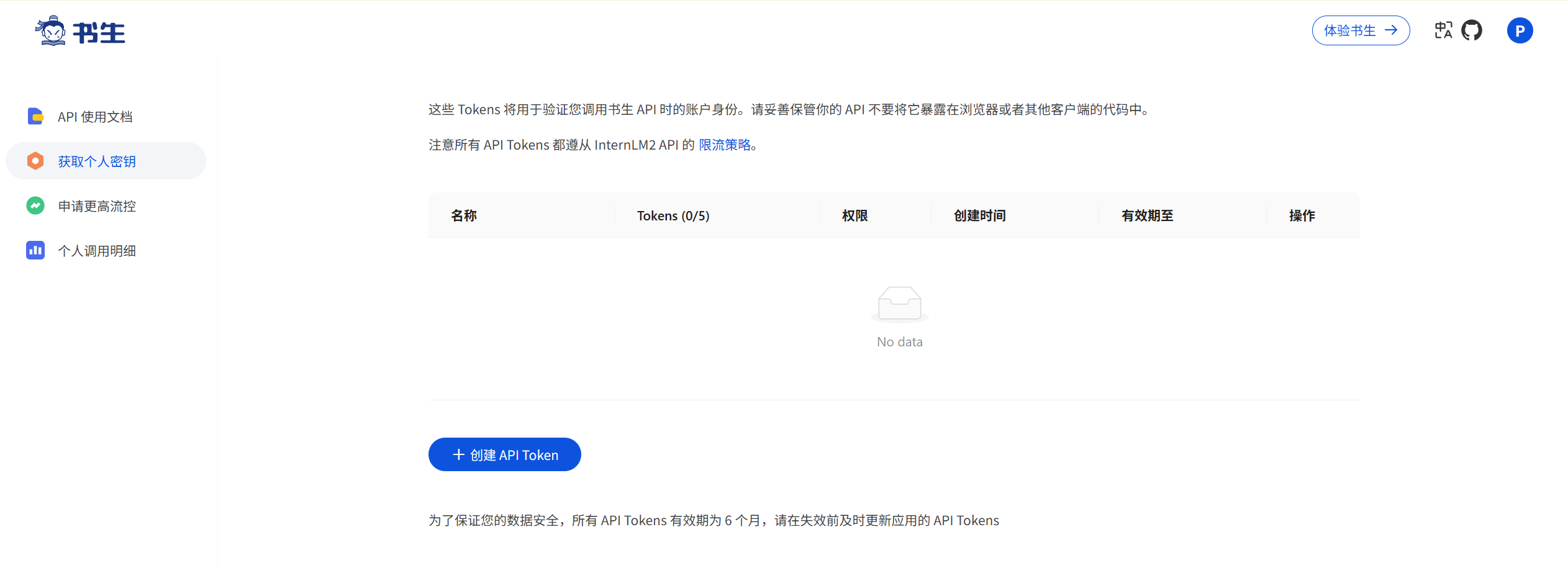
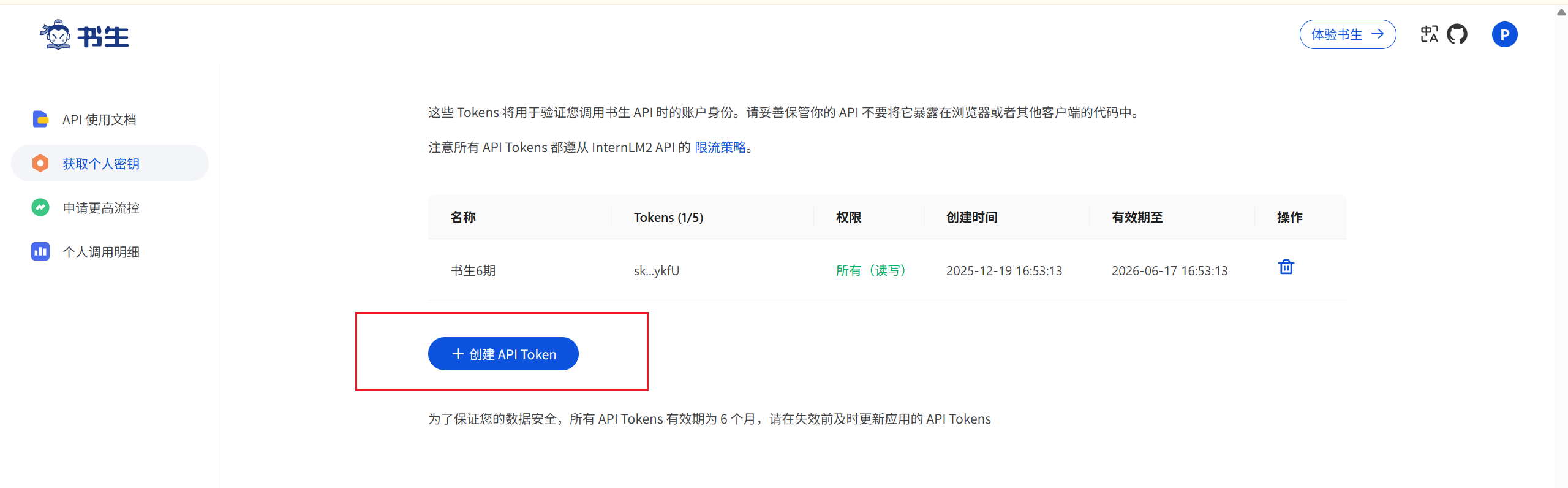
1.1. 获取 API KEY
Intern 系列模型提供免费的 OpenAI 兼容格式 API。获取步骤如下:
-
确保使用正常注册且可用的账户
-
为 API Token 命名并生成
-
重要提醒:API Token 只能复制一次,生成后请妥善保管,切勿在代码中显式暴露
1.2开发机配置
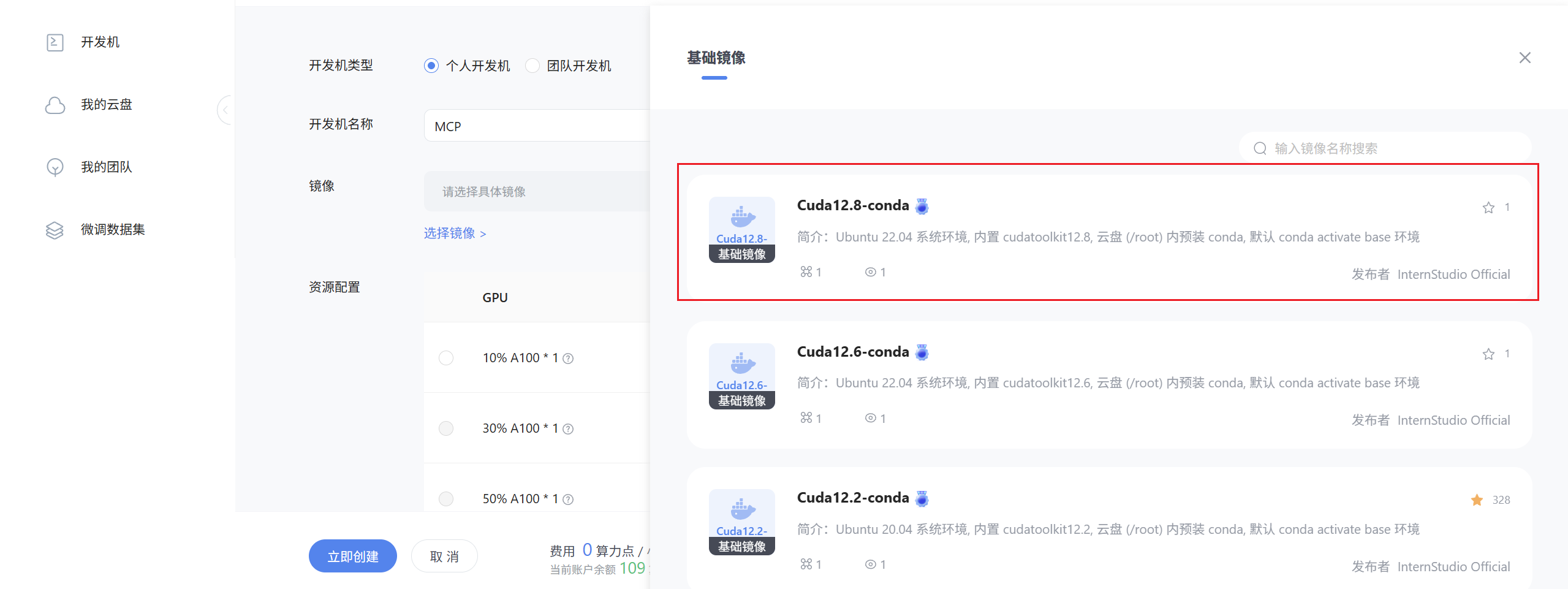
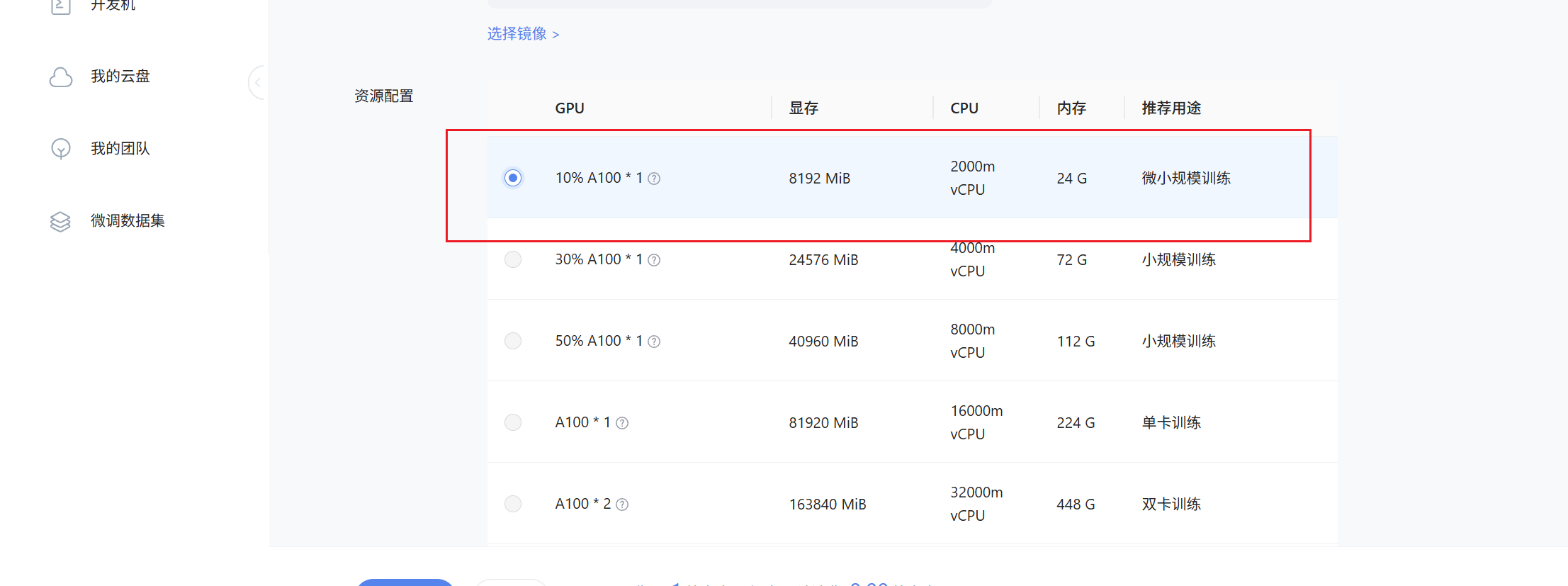
在创建开发机界面进行如下配置:
-
镜像选择:Cuda12.8-conda
-
GPU 配置:10% A100
这个实验不需要显存,故最小资源即可。

等待开发机创建成功......
二 快速开始
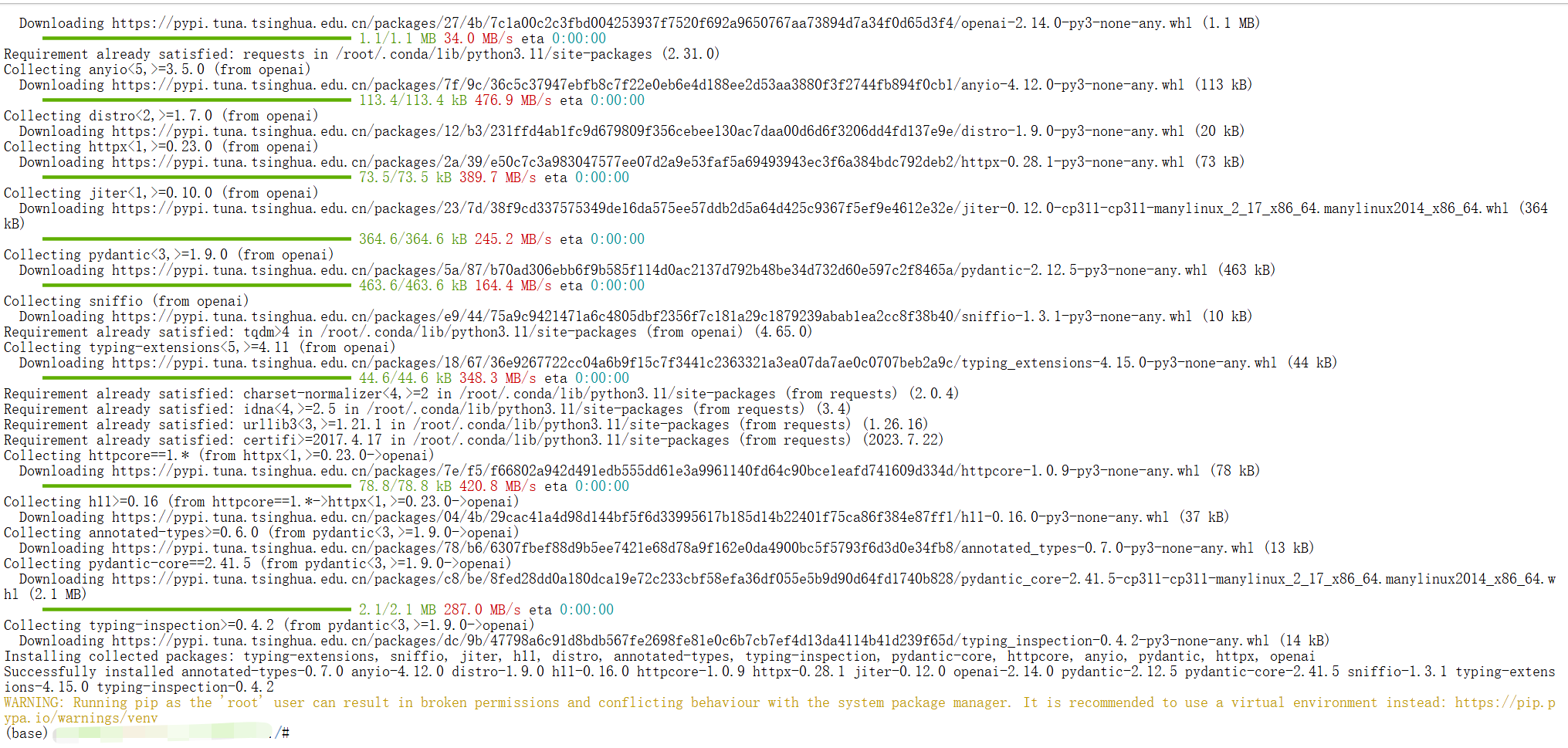
2.1 环境安装
conda activate base
pip install openai requests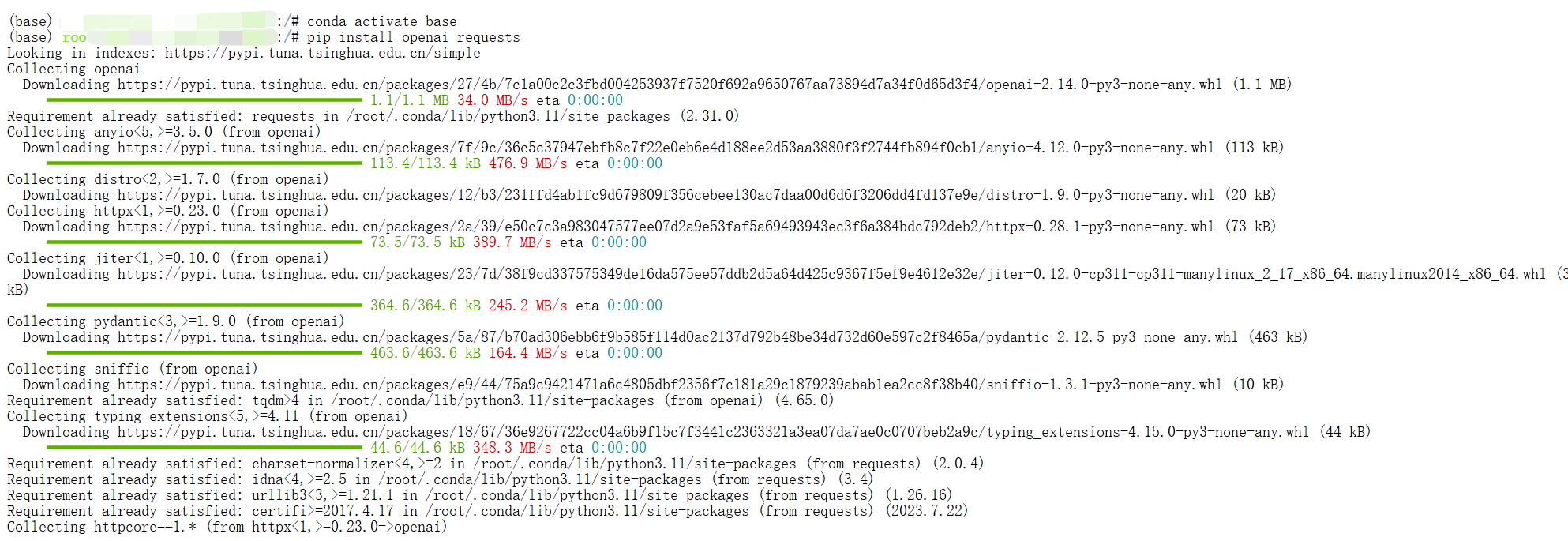
2.2文本生成
Intern API 兼容 OpenAI API,为最新的Intern-S1 模型提供了一个简单的接口,用于文本生成、自然语言处理、计算机视觉等。本示例是文生文,根据提示生成文本输出——像您在使用网页端 Intern 一样。
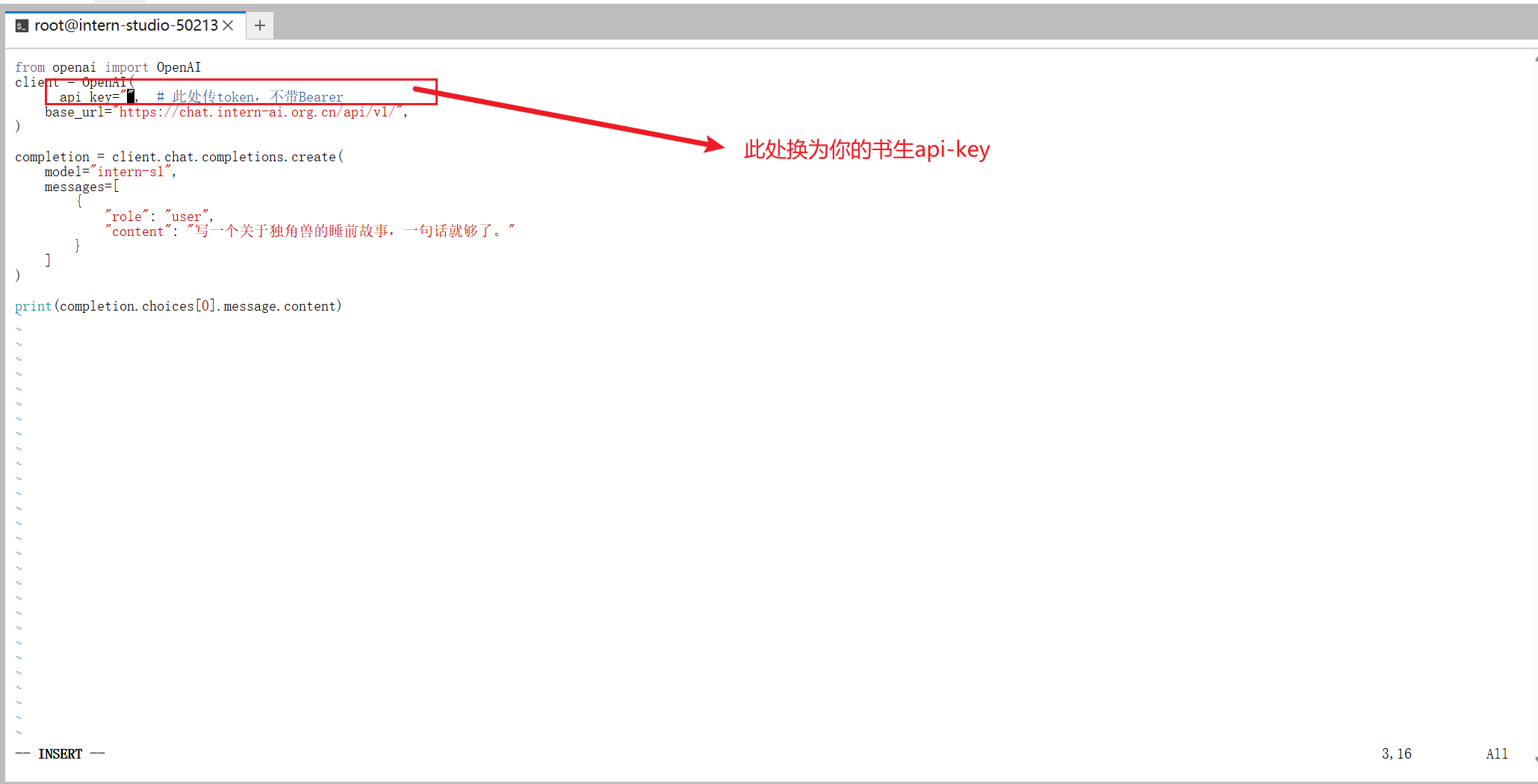
from openai import OpenAI
client = OpenAI(
      api_key="api-key",  # 此处传token,不带Bearer
    base_url="https://chat.intern-ai.org.cn/api/v1/",
)

completion = client.chat.completions.create(
    model="intern-s1",
    messages=[
        {
            "role": "user",
            "content": "写一个关于哆啦A梦的故事,发挥你的想象力"
        }
    ]
)

print(completion.choices[0].message.content)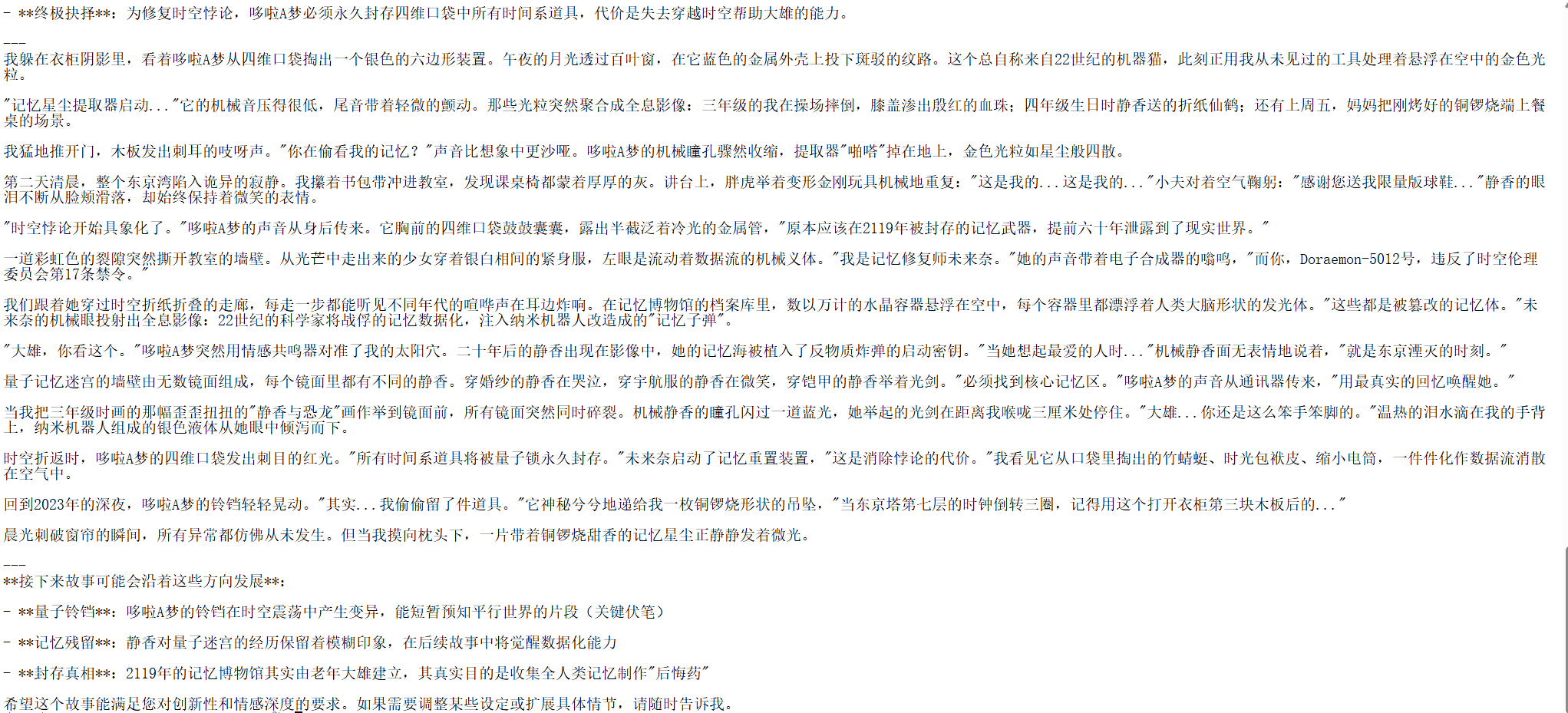
2.3分析图像输入
你也可以向模型提供图像输入。扫描收据、分析截图,或使用计算机视觉技术在现实世界中寻找物体。
2.3.1输入图像为 url
转换图片URL工具 https://www.superbed.cn/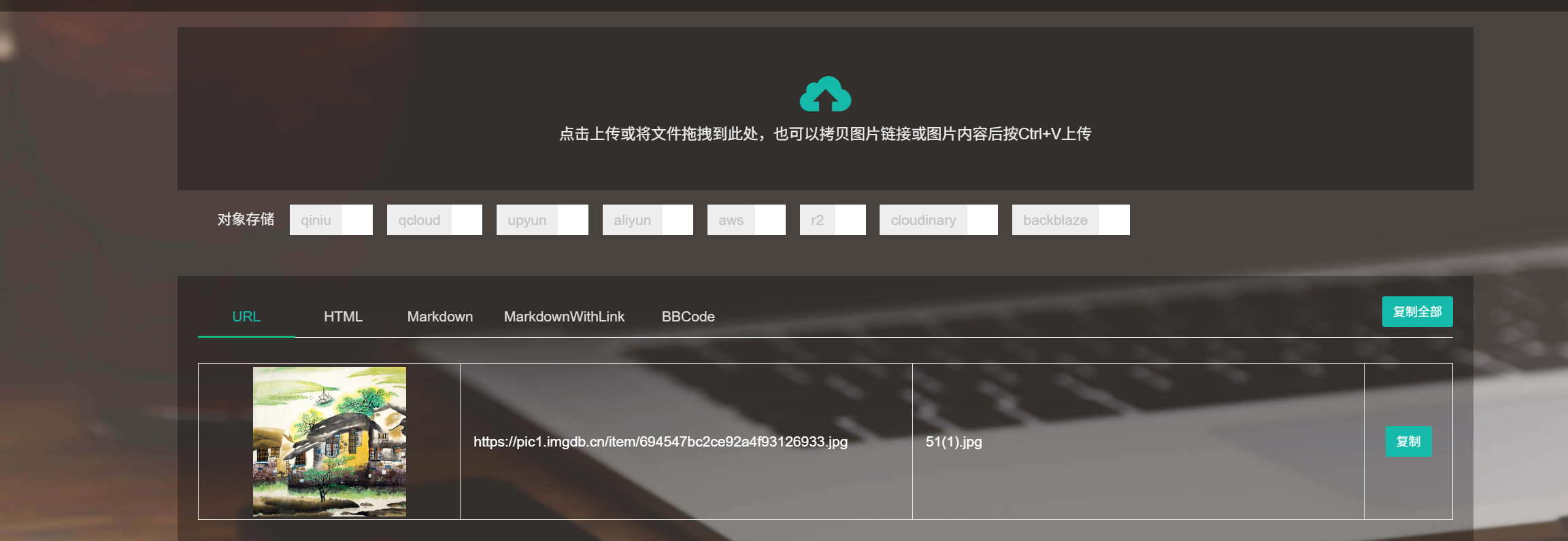
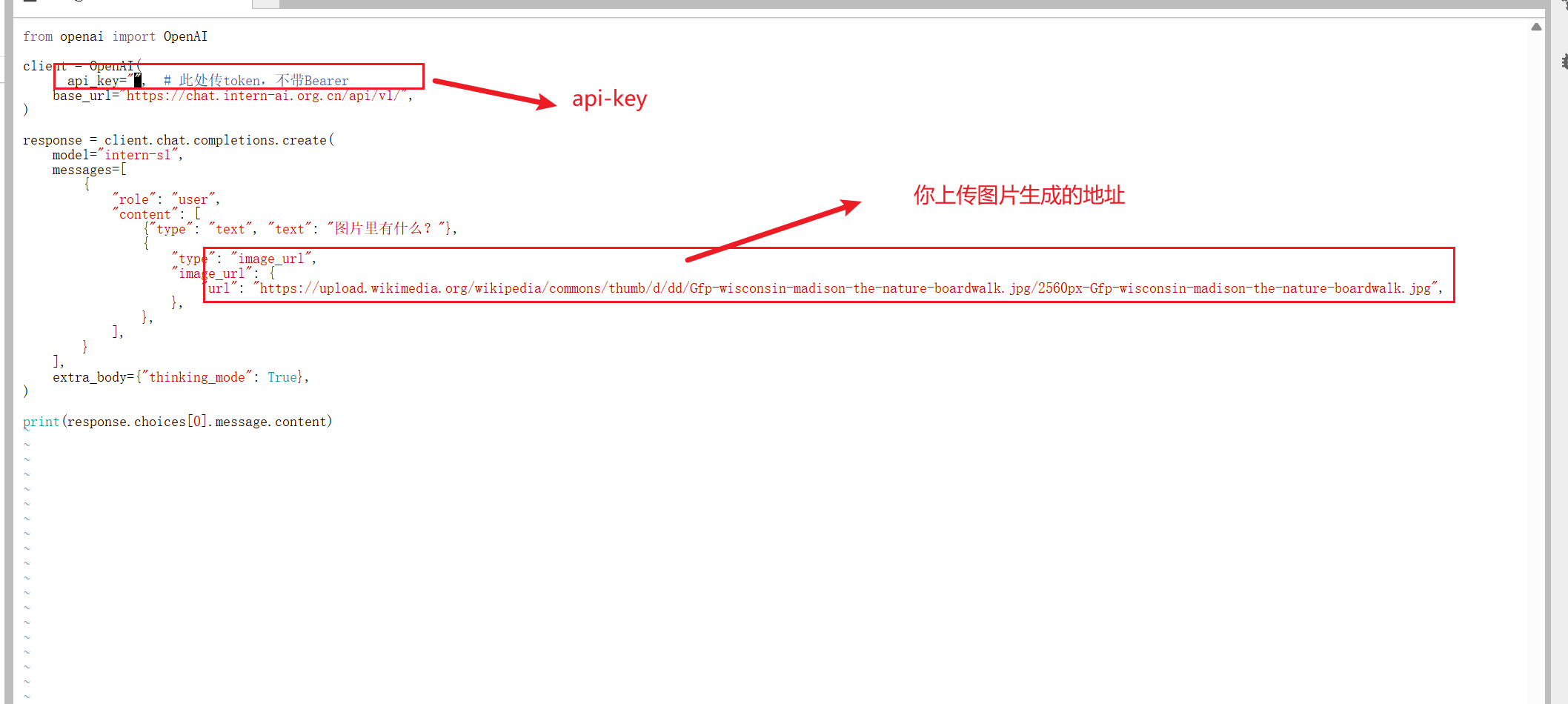
(base) root@intern-studio-50213348:~# touch i2t.py
(base) root@intern-studio-50213348:~# vim i2t.py
(base) root@intern-studio-50213348:~#
(base) root@intern-studio-50213348:~#
(base) root@intern-studio-50213348:~# cat i2t.py
from openai import OpenAI

client = OpenAI(
      api_key="api-key",  # 此处传token,不带Bearer
    base_url="https://chat.intern-ai.org.cn/api/v1/",
)

response = client.chat.completions.create(
    model="intern-s1",
    messages=[
        {
            "role": "user",
            "content": [
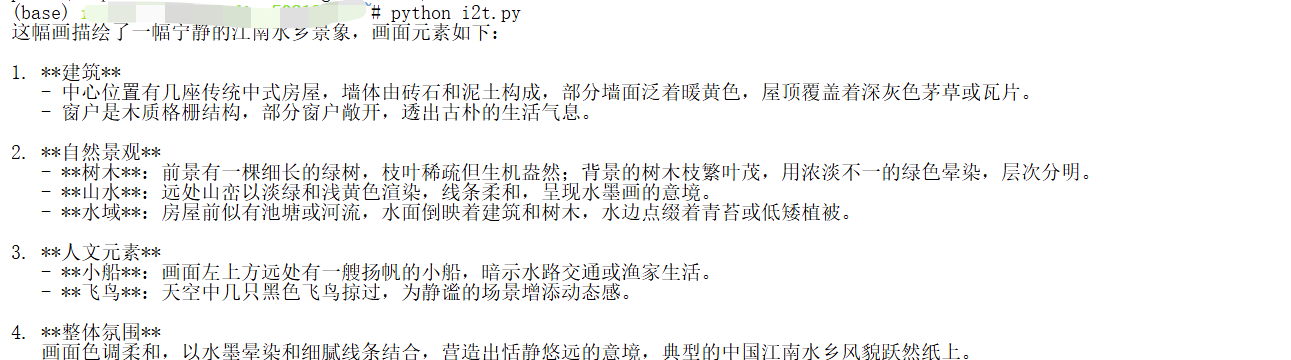
                {"type": "text", "text": "图片里有什么?"},
                {
                    "type": "image_url",
                    "image_url": {
                        "url": "https://pic1.imgdb.cn/item/694547bc2ce92a4f93126933.jpg",
                    },
                },
            ],
        }
    ],
    extra_body={"thinking_mode": True},
)

print(response.choices[0].message.content)
2.3.2 输入图像为文件
import base64
from openai import OpenAI

client = OpenAI(
      api_key="eyJ0eXxx",  # 此处传token,不带Bearer
    base_url="https://chat.intern-ai.org.cn/api/v1/",
)
# Function to encode the image
def encode_image(image_path):
    with open(image_path, "rb") as image_file:
        return base64.b64encode(image_file.read()).decode("utf-8")


# Path to your image
image_path = "/root/share/intern.jpg"

# Getting the Base64 string
base64_image = encode_image(image_path)

completion = client.chat.completions.create(
    model="intern-s1",
    messages=[
        {
            "role": "user",
            "content": [
                { "type": "text", "text": "图片里有什么?" },
                {
                    "type": "image_url",
                    "image_url": {
                        "url": f"data:image/jpeg;base64,{base64_image}",
                    },
                },
            ],
        }
    ],
)

print(completion.choices[0].message.content)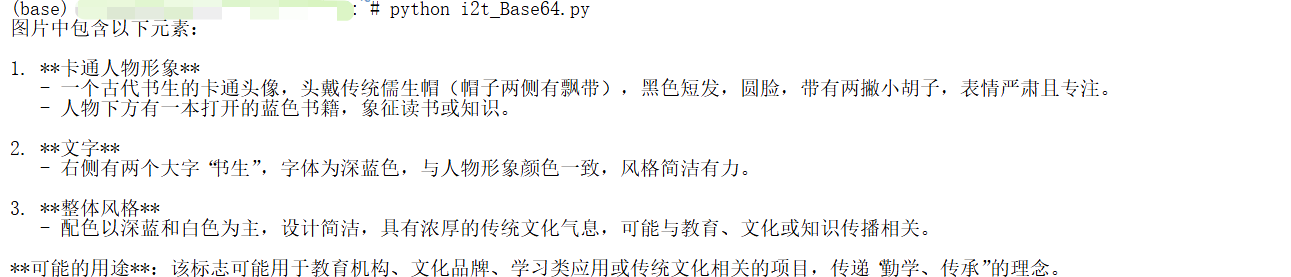
2.4模型使用工具
Openai 格式
from openai import OpenAI


client = OpenAI(     api_key="sk-lYQQ6Qxx,不带Bearer
    base_url="https://chat.intern-ai.org.cn/api/v1/",
)
tools = [{
    "type": "function",
    "function": {
        "name": "get_weather",
        "description": "Get current temperature for a given location.",
        "parameters": {
            "type": "object",
            "properties": {
                "location": {
                    "type": "string",
                    "description": "City and country e.g. Bogotá, Colombia"
                }
            },
            "required": [
                "location"
            ],
            "additionalProperties": False
        },
        "strict": True
    }
}]

completion = client.chat.completions.create(
    model="intern-s1",
    messages=[{"role": "user", "content": "What is the weather like in Paris today?"}],
    tools=tools
)

print(completion.choices[0].message.tool_calls)
Python 原生调用
import requests
import json
# API 配置
API_KEY = "eyJ0exxxxQ"
BASE_URL = "https://chat.intern-ai.org.cn/api/v1/"
ENDPOINT = f"{BASE_URL}chat/completions"
# 定义天气查询工具
WEATHER_TOOLS = [{
"type": "function",
"function": {
"name": "get_weather",
"description": "获取指定城市或坐标的当前温度(摄氏度)",
"parameters": {
"type": "object",
"properties": {
"latitude": {"type": "number", "description": "纬度"},
"longitude": {"type": "number", "description": "经度"}
},
"required": ["latitude", "longitude"],
"additionalProperties": False
},
"strict": True
}
}]
def get_weather(latitude, longitude):
"""
获取指定坐标的天气信息
Args:
latitude: 纬度
longitude: 经度
Returns:
当前温度(摄氏度)
"""
try:
# 调用开放气象API
response = requests.get(
f"https://api.open-meteo.com/v1/forecast?latitude={latitude}&longitude={longitude}¤t=temperature_2m,wind_speed_10m&hourly=temperature_2m,relative_humidity_2m,wind_speed_10m"
)
data = response.json()
temperature = data['current']['temperature_2m']
return f"{temperature}"
except Exception as e:
return f"获取天气信息时出错: {str(e)}"
def make_api_request(messages, tools=None):
"""发送API请求"""
headers = {
"Content-Type": "application/json",
"Authorization": f"Bearer {API_KEY}"
}
payload = {
"model": "intern-s1",
"messages": messages,
"temperature": 0.7
}
if tools:
payload["tools"] = tools
payload["tool_choice"] = "auto"
try:
response = requests.post(ENDPOINT, headers=headers, json=payload, timeout=30)
response.raise_for_status()
return response.json()
except requests.exceptions.RequestException as e:
print(f"API请求失败: {e}")
return None
def main():
# 初始消息 - 巴黎的坐标
messages = [{"role": "user", "content": "请查询当前北京的温度"}]
print("🌤️ 正在查询天气...")
# 第一轮API调用
response = make_api_request(messages, WEATHER_TOOLS)
if not response:
return
assistant_message = response["choices"][0]["message"]
# 检查工具调用
if assistant_message.get("tool_calls"):
print("🔧 执行工具调用...")
print("tool_calls:",assistant_message.get("tool_calls"))
messages.append(assistant_message)
# 处理工具调用
for tool_call in assistant_message["tool_calls"]:
function_name = tool_call["function"]["name"]
function_args = json.loads(tool_call["function"]["arguments"])
tool_call_id = tool_call["id"]
if function_name == "get_weather":
latitude = function_args["latitude"]
longitude = function_args["longitude"]
weather_result = get_weather(latitude, longitude)
print(f"温度查询结果: {weather_result}°C")
# 添加工具结果
tool_message = {
"role": "tool",
"content": weather_result,
"tool_call_id": tool_call_id
}
messages.append(tool_message)
# 第二轮API调用获取最终答案
final_response = make_api_request(messages)
if final_response:
final_message = final_response["choices"][0]["message"]
print(f"✅ 最终回答: {final_message['content']}")
else:
print(f"直接回答: {assistant_message.get('content', 'No content')}")
if __name__ == "__main__":
main()

2.5.使用流式传输
stream=True,打开流式传输,体验如同网页端 Intern 吐字的感觉。
from openai import OpenAI

client = OpenAI(
    api_key="eyxxxx",
    base_url="https://chat.intern-ai.org.cn/api/v1/",
)

stream = client.chat.completions.create(
    model="intern-s1",
    messages=[
        {
            "role": "user",
            "content": "Say '1 2 3 4 5 6 7' ten times fast.",
        },
    ],
    stream=True,
)

# 只打印逐字输出的内容
for chunk in stream:
    if chunk.choices[0].delta.content:
        print(chunk.choices[0].delta.content, end="", flush=True)  # 逐字输出,不换行
2.6开关think 模式
通过extra_body={"thinking_mode": True}打开思考模式
from openai import OpenAI
client = OpenAI(
      api_key="eyxxA",  # 此处传token,不带Bearer
    base_url="https://chat.intern-ai.org.cn/api/v1/",
)

completion = client.chat.completions.create(
    model="intern-s1",
    messages=[
        {
            "role": "user",
            "content": "写一个关于独角兽的睡前故事,一句话就够了。"
        }
    ],
    extra_body={"thinking_mode": True,},
)

print(completion.choices[0].message)
from openai import OpenAI
client = OpenAI(
api_key="eyJ0xxxmA", # 此处传token,不带Bearer
base_url="https://chat.intern-ai.org.cn/api/v1/",
)
completion = client.chat.completions.create(
model="intern-s1",
messages=[
{
"role": "user",
"content": "写一个关于独角兽的睡前故事,一句话就够了。"
}
],
extra_body={"thinking_mode": False,},
)
print(completion.choices[0].message)
从上面两个结果图中,可以看出,没有开启思考模式和开启思考模式的回答有很大区别的。
2.7 科学能力
数学
from getpass import getpass
from openai import OpenAI

api_key = getpass("请输入 API Key(输入不可见):")
client = OpenAI(
    api_key=api_key,  # 此处传token,不带Bearer
    base_url="https://chat.intern-ai.org.cn/api/v1/",
)

response = client.chat.completions.create(
    model="intern-s1",
    messages=[
        {
            "role": "user",
            "content": [
                {"type": "text", "text": "这道题选什么"},
                {
                    "type": "image_url",
                    "image_url": {
                        "url": "https://pic1.imgdb.cn/item/68d24759c5157e1a882b2505.jpg",
                    },
                },
            ],
        }
    ],
    extra_body={"thinking_mode": True,},
)

print(response.choices[0].message.content)
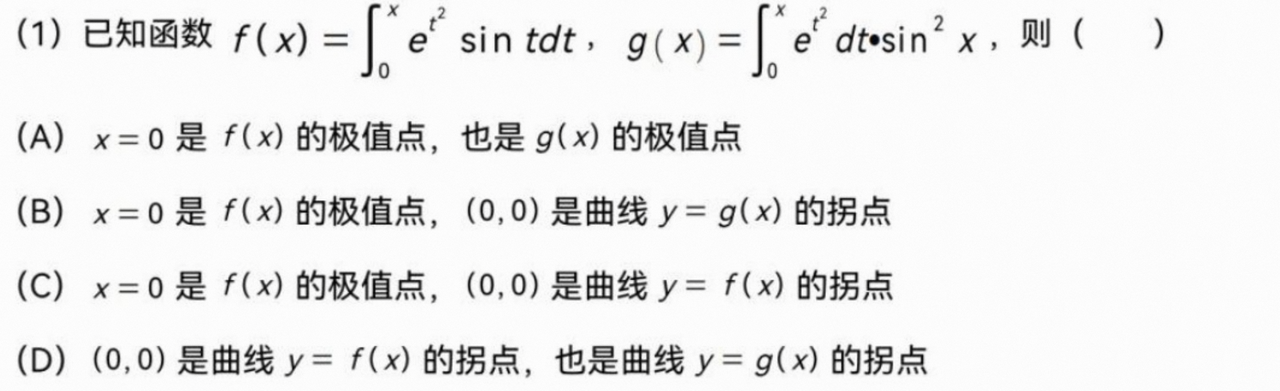
详细解答过程请看https://zhuanlan.zhihu.com/p/1916892757294843774https://zhuanlan.zhihu.com/p/1916892757294843774

化学
from getpass import getpass
from openai import OpenAI

api_key = getpass("请输入 API Key(输入不可见):")
client = OpenAI(
    api_key=api_key,  # 此处传token,不带Bearer
    base_url="https://chat.intern-ai.org.cn/api/v1/",
)

response = client.chat.completions.create(
    model="intern-s1",
    messages=[
        {
            "role": "user",
            "content": [
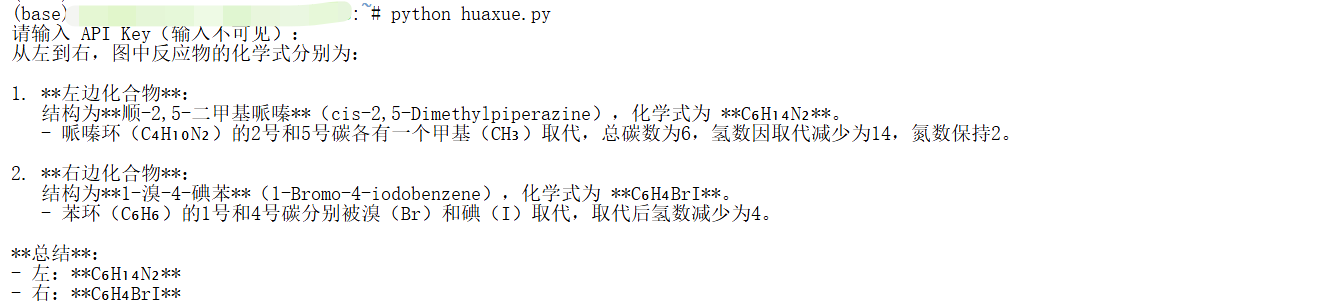
                {"type": "text", "text": "从左到右,给出图中反应物的化学式"},
                {
                    "type": "image_url",
                    "image_url": {
                        "url": "https://pic1.imgdb.cn/item/68d23c82c5157e1a882ad47f.png",
                    },
                },
            ],
        }
    ],
    extra_body={
        "thinking_mode": True,
        "temperature": 0.7,
        "top_p": 1.0,
        "top_k": 50,
        "min_p": 0.0,
    },
)

print(response.choices[0].message.content)

三 玩转 MCP
3.1什么是 MCP?
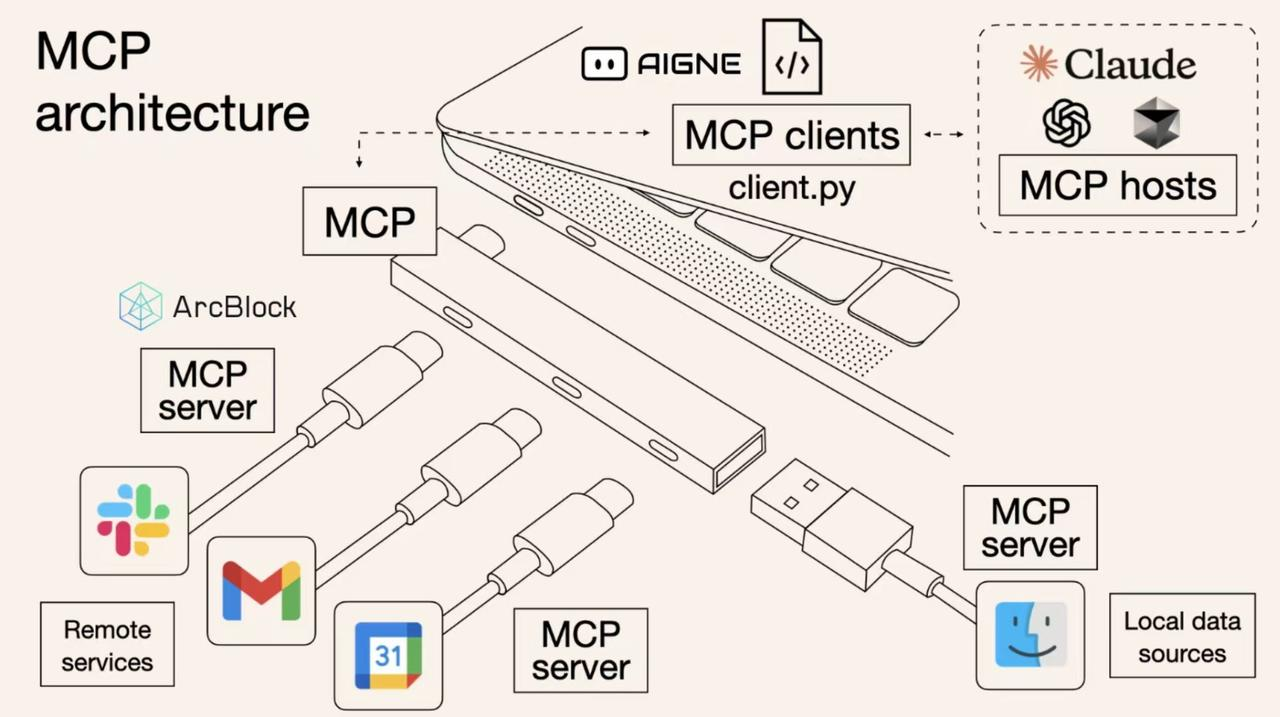
MCP(Model Control Protocol)是一种专为 AI 设计的协议(类别 USB-C接口转换器),其核心作用是扩充 AI 的能力。通过 MCP,AI 可以:
-
获取外部数据
-
操作文件系统
-
调用各种服务接口
-
实现复杂的工作流程
通过本教程,您将掌握如何让 Intern-S1 API 突破传统对话限制,实现以下核心功能:
-
外部数据获取:连接并处理来自各种外部源的数据
-
文件系统操作:具备完整的文件创建、读取、修改和删除能力,实现一个命令行版本的 cursor。
让我们开始探索 MCP 的无限可能!
Github 代码:https://github.com/fak111/mcp_tutorialhttp://官方项目,欢迎👏大家点 star 🌟
3.2环境准备
#git clone https://github.com/fak111/mcp_tutorial.git
git clone https://gh.llkk.cc/https://github.com/fak111/mcp_tutorial.git
cd mcp_tutorial
bash install.sh
直接执行报错了
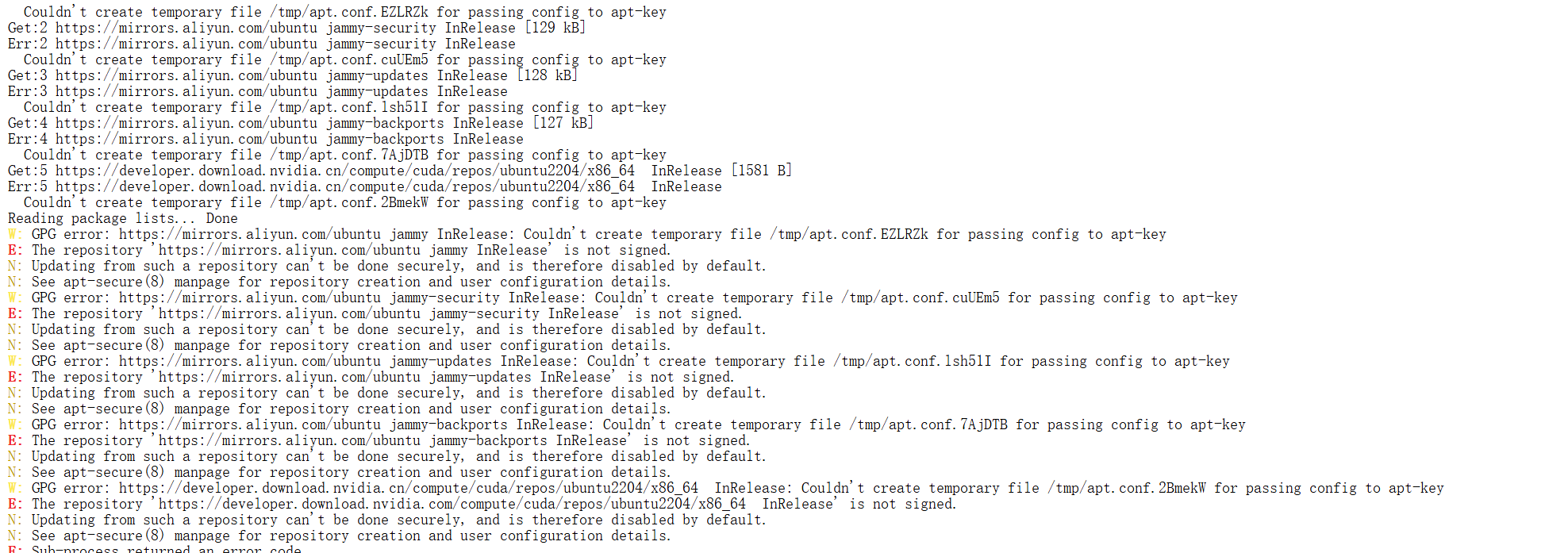
解决办法步骤如下所示:
(base) root@intern-studio-:~/mcp/mcp_tutorial# ls /tmp
(base) root@intern-studio-:~/mcp/mcp_tutorial# sudo chmod 1777 /tmp
bash: sudo: command not found
(base) root@intern-studio-5:~/mcp/mcp_tutorial# chmod 1777 /tmp
(base) root@intern-studio-5:~/mcp/mcp_tutorial# bash install.sh
================================
开始安装 MCP 开发环境
================================
🔧 正在安装 Node.js...
Get:1 https://mirrors.aliyun.com/ubuntu jammy InRelease [270 kB]
Get:2 https://mirrors.aliyun.com/ubuntu jammy-security InRelease [129 kB]
Get:3 https://mirrors.aliyun.com/ubuntu jammy-updates InRelease [128 kB]
Get:4 https://mirrors.aliyun.com/ubuntu jammy-backports InRelease [127 kB]
Get:5 https://mirrors.aliyun.com/ubuntu jammy/multiverse Sources [361 kB]
Get:6 https://mirrors.aliyun.com/ubuntu jammy/main Sources [1668 kB]
Get:7 https://mirrors.aliyun.com/ubuntu jammy/universe Sources [22.0 MB]
Get:8 https://developer.download.nvidia.cn/compute/cuda/repos/ubuntu2204/x86_64  InRelease [1581 B]
Get:9 https://developer.download.nvidia.cn/compute/cuda/repos/ubuntu2204/x86_64  Packages [2205 kB]
Get:10 https://mirrors.aliyun.com/ubuntu jammy/restricted Sources [28.2 kB]
Get:11 https://mirrors.aliyun.com/ubuntu jammy/multiverse amd64 Packages [266 kB]
Get:12 https://mirrors.aliyun.com/ubuntu jammy/main amd64 Packages [1792 kB]
Get:13 https://mirrors.aliyun.com/ubuntu jammy/restricted amd64 Packages [164 kB]
Get:14 https://mirrors.aliyun.com/ubuntu jammy/universe amd64 Packages [17.5 MB]
Get:15 https://mirrors.aliyun.com/ubuntu jammy-security/universe Sources [393 kB]
Get:16 https://mirrors.aliyun.com/ubuntu jammy-security/restricted Sources [104 kB]
Get:17 https://mirrors.aliyun.com/ubuntu jammy-security/multiverse Sources [26.2 kB]
Get:18 https://mirrors.aliyun.com/ubuntu jammy-security/main Sources [414 kB]
Get:19 https://mirrors.aliyun.com/ubuntu jammy-security/main amd64 Packages [3633 kB]
Get:20 https://mirrors.aliyun.com/ubuntu jammy-security/universe amd64 Packages [1287 kB]
Get:21 https://mirrors.aliyun.com/ubuntu jammy-security/restricted amd64 Packages [6205 kB]
Get:22 https://mirrors.aliyun.com/ubuntu jammy-security/multiverse amd64 Packages [60.9 kB]
Get:23 https://mirrors.aliyun.com/ubuntu jammy-updates/multiverse Sources [39.3 kB]
Get:24 https://mirrors.aliyun.com/ubuntu jammy-updates/restricted Sources [110 kB]
Get:25 https://mirrors.aliyun.com/ubuntu jammy-updates/universe Sources [603 kB]
Get:26 https://mirrors.aliyun.com/ubuntu jammy-updates/main Sources [721 kB]
Get:27 https://mirrors.aliyun.com/ubuntu jammy-updates/multiverse amd64 Packages [69.3 kB]
Get:28 https://mirrors.aliyun.com/ubuntu jammy-updates/main amd64 Packages [3966 kB]
Get:29 https://mirrors.aliyun.com/ubuntu jammy-updates/restricted amd64 Packages [6411 kB]
Get:30 https://mirrors.aliyun.com/ubuntu jammy-updates/universe amd64 Packages [1598 kB]
Get:31 https://mirrors.aliyun.com/ubuntu jammy-backports/universe Sources [12.8 kB]
Get:32 https://mirrors.aliyun.com/ubuntu jammy-backports/main Sources [10.3 kB]
Get:33 https://mirrors.aliyun.com/ubuntu jammy-backports/universe amd64 Packages [40.7 kB]
Get:34 https://mirrors.aliyun.com/ubuntu jammy-backports/main amd64 Packages [114 kB]
Fetched 71.7 MB in 6s (12.3 MB/s)
Reading package lists... Done
Building dependency tree... Done
Reading state information... Done
83 packages can be upgraded. Run 'apt list --upgradable' to see them.
Reading package lists... Done
Building dependency tree... Done
Reading state information... Done
The following additional packages will be installed:
  libcurl4
The following packages will be upgraded:
  curl libcurl4
2 upgraded, 0 newly installed, 0 to remove and 81 not upgraded.
Need to get 484 kB of archives.
After this operation, 0 B of additional disk space will be used.
Get:1 https://mirrors.aliyun.com/ubuntu jammy-security/main amd64 curl amd64 7.81.0-1ubuntu1.21 [194 kB]
Get:2 https://mirrors.aliyun.com/ubuntu jammy-security/main amd64 libcurl4 amd64 7.81.0-1ubuntu1.21 [290 kB]
Fetched 484 kB in 0s (1827 kB/s)
debconf: delaying package configuration, since apt-utils is not installed
(Reading database ... 24489 files and directories currently installed.)
Preparing to unpack .../curl_7.81.0-1ubuntu1.21_amd64.deb ...
Unpacking curl (7.81.0-1ubuntu1.21) over (7.81.0-1ubuntu1.20) ...
Preparing to unpack .../libcurl4_7.81.0-1ubuntu1.21_amd64.deb ...
Unpacking libcurl4:amd64 (7.81.0-1ubuntu1.21) over (7.81.0-1ubuntu1.20) ...
Setting up libcurl4:amd64 (7.81.0-1ubuntu1.21) ...
Setting up curl (7.81.0-1ubuntu1.21) ...
Processing triggers for libc-bin (2.35-0ubuntu3.8) ...
2025-12-19 22:09:40 - Installing pre-requisites
Hit:1 https://mirrors.aliyun.com/ubuntu jammy InRelease
Hit:2 https://mirrors.aliyun.com/ubuntu jammy-security InRelease
Hit:3 https://mirrors.aliyun.com/ubuntu jammy-updates InRelease
Hit:4 https://mirrors.aliyun.com/ubuntu jammy-backports InRelease
Hit:5 https://developer.download.nvidia.cn/compute/cuda/repos/ubuntu2204/x86_64  InRelease
Reading package lists... Done
Building dependency tree... Done
Reading state information... Done
81 packages can be upgraded. Run 'apt list --upgradable' to see them.
Reading package lists... Done
Building dependency tree... Done
Reading state information... Done
ca-certificates is already the newest version (20240203~22.04.1).
curl is already the newest version (7.81.0-1ubuntu1.21).
The following additional packages will be installed:
  dirmngr gnupg-l10n gnupg-utils gpg gpg-agent gpg-wks-client gpg-wks-server gpgconf gpgsm gpgv
Suggested packages:
  dbus-user-session libpam-systemd pinentry-gnome3 tor parcimonie xloadimage scdaemon
The following NEW packages will be installed:
  apt-transport-https
The following packages will be upgraded:
  dirmngr gnupg gnupg-l10n gnupg-utils gpg gpg-agent gpg-wks-client gpg-wks-server gpgconf gpgsm gpgv
11 upgraded, 1 newly installed, 0 to remove and 70 not upgraded.
Need to get 2249 kB of archives.
After this operation, 170 kB of additional disk space will be used.
Get:1 https://mirrors.aliyun.com/ubuntu jammy-security/main amd64 gpg-wks-client amd64 2.2.27-3ubuntu2.4 [62.7 kB]
Get:2 https://mirrors.aliyun.com/ubuntu jammy-security/main amd64 dirmngr amd64 2.2.27-3ubuntu2.4 [293 kB]
Get:3 https://mirrors.aliyun.com/ubuntu jammy-security/main amd64 gpg-wks-server amd64 2.2.27-3ubuntu2.4 [57.5 kB]
Get:4 https://mirrors.aliyun.com/ubuntu jammy-security/main amd64 gnupg-utils amd64 2.2.27-3ubuntu2.4 [309 kB]
Get:5 https://mirrors.aliyun.com/ubuntu jammy-security/main amd64 gpg-agent amd64 2.2.27-3ubuntu2.4 [209 kB]
Get:6 https://mirrors.aliyun.com/ubuntu jammy-security/main amd64 gpg amd64 2.2.27-3ubuntu2.4 [518 kB]
Get:7 https://mirrors.aliyun.com/ubuntu jammy-security/main amd64 gpgconf amd64 2.2.27-3ubuntu2.4 [94.5 kB]
Get:8 https://mirrors.aliyun.com/ubuntu jammy-security/main amd64 gnupg-l10n all 2.2.27-3ubuntu2.4 [54.7 kB]
Get:9 https://mirrors.aliyun.com/ubuntu jammy-security/main amd64 gnupg all 2.2.27-3ubuntu2.4 [315 kB]
Get:10 https://mirrors.aliyun.com/ubuntu jammy-security/main amd64 gpgsm amd64 2.2.27-3ubuntu2.4 [197 kB]
Get:11 https://mirrors.aliyun.com/ubuntu jammy-security/main amd64 gpgv amd64 2.2.27-3ubuntu2.4 [137 kB]
Get:12 https://mirrors.aliyun.com/ubuntu jammy-updates/universe amd64 apt-transport-https all 2.4.14 [1510 B]
Fetched 2249 kB in 0s (5808 kB/s)
debconf: delaying package configuration, since apt-utils is not installed
(Reading database ... 24489 files and directories currently installed.)
Preparing to unpack .../00-gpg-wks-client_2.2.27-3ubuntu2.4_amd64.deb ...
Unpacking gpg-wks-client (2.2.27-3ubuntu2.4) over (2.2.27-3ubuntu2.1) ...
Preparing to unpack .../01-dirmngr_2.2.27-3ubuntu2.4_amd64.deb ...
Unpacking dirmngr (2.2.27-3ubuntu2.4) over (2.2.27-3ubuntu2.1) ...
Preparing to unpack .../02-gpg-wks-server_2.2.27-3ubuntu2.4_amd64.deb ...
Unpacking gpg-wks-server (2.2.27-3ubuntu2.4) over (2.2.27-3ubuntu2.1) ...
Preparing to unpack .../03-gnupg-utils_2.2.27-3ubuntu2.4_amd64.deb ...
Unpacking gnupg-utils (2.2.27-3ubuntu2.4) over (2.2.27-3ubuntu2.1) ...
Preparing to unpack .../04-gpg-agent_2.2.27-3ubuntu2.4_amd64.deb ...
Unpacking gpg-agent (2.2.27-3ubuntu2.4) over (2.2.27-3ubuntu2.1) ...
Preparing to unpack .../05-gpg_2.2.27-3ubuntu2.4_amd64.deb ...
Unpacking gpg (2.2.27-3ubuntu2.4) over (2.2.27-3ubuntu2.1) ...
Preparing to unpack .../06-gpgconf_2.2.27-3ubuntu2.4_amd64.deb ...
Unpacking gpgconf (2.2.27-3ubuntu2.4) over (2.2.27-3ubuntu2.1) ...
Preparing to unpack .../07-gnupg-l10n_2.2.27-3ubuntu2.4_all.deb ...
Unpacking gnupg-l10n (2.2.27-3ubuntu2.4) over (2.2.27-3ubuntu2.1) ...
Preparing to unpack .../08-gnupg_2.2.27-3ubuntu2.4_all.deb ...
Unpacking gnupg (2.2.27-3ubuntu2.4) over (2.2.27-3ubuntu2.1) ...
Preparing to unpack .../09-gpgsm_2.2.27-3ubuntu2.4_amd64.deb ...
Unpacking gpgsm (2.2.27-3ubuntu2.4) over (2.2.27-3ubuntu2.1) ...
Preparing to unpack .../10-gpgv_2.2.27-3ubuntu2.4_amd64.deb ...
Unpacking gpgv (2.2.27-3ubuntu2.4) over (2.2.27-3ubuntu2.1) ...
Setting up gpgv (2.2.27-3ubuntu2.4) ...
Selecting previously unselected package apt-transport-https.
(Reading database ... 24489 files and directories currently installed.)
Preparing to unpack .../apt-transport-https_2.4.14_all.deb ...
Unpacking apt-transport-https (2.4.14) ...
Setting up apt-transport-https (2.4.14) ...
Setting up gnupg-l10n (2.2.27-3ubuntu2.4) ...
Setting up gpgconf (2.2.27-3ubuntu2.4) ...
Setting up gpg (2.2.27-3ubuntu2.4) ...
Setting up gnupg-utils (2.2.27-3ubuntu2.4) ...
Setting up gpg-agent (2.2.27-3ubuntu2.4) ...
Setting up gpgsm (2.2.27-3ubuntu2.4) ...
Setting up dirmngr (2.2.27-3ubuntu2.4) ...
Setting up gpg-wks-server (2.2.27-3ubuntu2.4) ...
Setting up gpg-wks-client (2.2.27-3ubuntu2.4) ...
Setting up gnupg (2.2.27-3ubuntu2.4) ...
Hit:1 https://mirrors.aliyun.com/ubuntu jammy InRelease
Hit:2 https://mirrors.aliyun.com/ubuntu jammy-security InRelease
Hit:3 https://mirrors.aliyun.com/ubuntu jammy-updates InRelease
Hit:4 https://mirrors.aliyun.com/ubuntu jammy-backports InRelease
Get:5 https://deb.nodesource.com/node_20.x nodistro InRelease [12.1 kB]
Hit:6 https://developer.download.nvidia.cn/compute/cuda/repos/ubuntu2204/x86_64  InRelease
Get:7 https://deb.nodesource.com/node_20.x nodistro/main amd64 Packages [13.3 kB]
Fetched 25.4 kB in 2s (10.9 kB/s)
Reading package lists... Done
Building dependency tree... Done
Reading state information... Done
70 packages can be upgraded. Run 'apt list --upgradable' to see them.
2025-12-19 22:09:53 - Repository configured successfully.
2025-12-19 22:09:53 - To install Node.js, run: apt install nodejs -y
2025-12-19 22:09:53 - You can use N|solid Runtime as a node.js alternative
2025-12-19 22:09:53 - To install N|solid Runtime, run: apt install nsolid -y

Reading package lists... Done
Building dependency tree... Done
Reading state information... Done
The following NEW packages will be installed:
  nodejs
0 upgraded, 1 newly installed, 0 to remove and 70 not upgraded.
Need to get 32.0 MB of archives.
After this operation, 197 MB of additional disk space will be used.
Get:1 https://deb.nodesource.com/node_20.x nodistro/main amd64 nodejs amd64 20.19.6-1nodesource1 [32.0 MB]
Fetched 32.0 MB in 20s (1591 kB/s)
debconf: delaying package configuration, since apt-utils is not installed
Selecting previously unselected package nodejs.
(Reading database ... 24493 files and directories currently installed.)
Preparing to unpack .../nodejs_20.19.6-1nodesource1_amd64.deb ...
Unpacking nodejs (20.19.6-1nodesource1) ...
Setting up nodejs (20.19.6-1nodesource1) ...
✅ Node.js 安装完成
🌐 配置淘宝镜像...
🔍 验证安装...
Node.js 版本: v20.19.6
npm 版本: 10.8.2
镜像配置: https://registry.npmmirror.com
📦 安装 pnpm...

added 1 package in 5s

1 package is looking for funding
  run `npm fund` for details
pnpm 版本: 10.26.1
⚙️ 配置 uv 环境变量...
install.sh: line 39: uv: command not found
uv 版本:
⛅ 安装天气 MCP 服务器...
Lockfile is up to date, resolution step is skipped
Packages: +91
+++++++++++++++++++++++++++++++++++++++++++++++++++++++++++++++++++++++++++++++++++++++++++
Progress: resolved 91, reused 0, downloaded 6, added 0
(node:34912) MaxListenersExceededWarning: Possible EventEmitter memory leak detected. 11 socket listeners added to [ClientRequest]. MaxListeners is 10. Use emitter.setMaxListeners() to increase limit
(Use `node --trace-warnings ...` to show where the warning was created)
Progress: resolved 91, reused 0, downloaded 91, added 91, doner memory leak detected. 11 socket listeners added to [ClientRequest]. MaxListeners is 10. Use emitter.setMaxListeners() to increase limit

dependencies:
+ @modelcontextprotocol/sdk 1.6.1
+ zod 3.24.2

devDependencies:
+ @types/node 22.13.9
+ typescript 5.8.2

Done in 12.7s using pnpm v10.26.1

> @fak111/weather-mcp@1.0.2 build /root/mcp/mcp_tutorial/mcp-server/weather
> tsc && node -e "require('fs').chmodSync('build/index.js', '755')"

✅ 天气 MCP 安装完成
📁 安装文件系统 MCP 服务器...
Lockfile is up to date, resolution step is skipped
Packages: +395
+++++++++++++++++++++++++++++++++++++++++++++++++++++++++++++++++++++++++++++++++++++++++++++++++++++++++++++++++++++++++++++++++++++++++++++++++++++++++++++++++++++++++++++++++++++++++++++++++++++++
Progress: resolved 395, reused 55, downloaded 9, added 13
(node:35416) MaxListenersExceededWarning: Possible EventEmitter memory leak detected. 11 socket listeners added to [ClientRequest]. MaxListeners is 10. Use emitter.setMaxListeners() to increase limit
Progress: resolved 395, reused 55, downloaded 339, added 395, doneated)

dependencies:
+ @modelcontextprotocol/sdk 1.17.5
+ diff 5.2.0
+ glob 10.4.5
+ minimatch 10.0.3
+ zod 4.1.5
+ zod-to-json-schema 3.24.6

devDependencies:
+ @jest/globals 29.7.0
+ @types/diff 5.2.3
+ @types/jest 29.5.14
+ @types/minimatch 5.1.2
+ @types/node 22.18.1
+ jest 29.7.0
+ shx 0.3.4
+ ts-jest 29.4.1
+ ts-node 10.9.2
+ typescript 5.9.2

> @modelcontextprotocol/server-filesystem@0.6.3 prepare /root/mcp/mcp_tutorial/mcp-server/filesystem
> pnpm run build


> @modelcontextprotocol/server-filesystem@0.6.3 build /root/mcp/mcp_tutorial/mcp-server/filesystem
> tsc && shx chmod +x dist/*.js


Done in 46.4s using pnpm v10.26.1

> @modelcontextprotocol/server-filesystem@0.6.3 build /root/mcp/mcp_tutorial/mcp-server/filesystem
> tsc && shx chmod +x dist/*.js

✅ 文件系统 MCP 安装完成
🚀 安装 uv...
Looking in indexes: https://pypi.tuna.tsinghua.edu.cn/simple
Collecting uv
  Downloading https://pypi.tuna.tsinghua.edu.cn/packages/31/91/1042d0966a30e937df500daed63e1f61018714406ce4023c8a6e6d2dcf7c/uv-0.9.18-py3-none-manylinux_2_17_x86_64.manylinux2014_x86_64.whl (22.2 MB)
     ━━━━━━━━━━━━━━━━━━━━━━━━━━━━━━━━━━━━━━━━ 22.2/22.2 MB 199.7 MB/s eta 0:00:00
Installing collected packages: uv
Successfully installed uv-0.9.18
WARNING: Running pip as the 'root' user can result in broken permissions and conflicting behaviour with the system package manager. It is recommended to use a virtual environment instead: https://pip.pypa.io/warnings/venv
✅ uv 安装完成
💻 安装 MCP 客户端依赖...
Using CPython 3.11.5 interpreter at: /root/.conda/bin/python3
Creating virtual environment at: .venv
Activate with: source .venv/bin/activate
warning: Indexes specified via `--index-url` will not be persisted to the `pyproject.toml` file; use `--default-index` instead.
Resolved 48 packages in 2.32s
Prepared 45 packages in 14.01s
Installed 45 packages in 9.95s
 + annotated-types==0.7.0
 + anthropic==0.49.0
 + anyio==4.8.0
 + cachetools==6.2.4
 + certifi==2025.1.31
 + charset-normalizer==3.4.4
 + click==8.1.8
 + distro==1.9.0
 + google-api-core==2.28.1
 + google-api-python-client==2.187.0
 + google-auth==2.41.1
 + google-auth-httplib2==0.3.0
 + google-auth-oauthlib==1.2.3
 + googleapis-common-protos==1.72.0
 + h11==0.14.0
 + httpcore==1.0.7
 + httplib2==0.31.0
 + httpx==0.28.1
 + httpx-sse==0.4.0
 + idna==3.10
 + jiter==0.8.2
 + mcp==1.3.0
 + oauthlib==3.3.1
 + openai==1.68.2
 + proto-plus==1.27.0
 + protobuf==6.33.2
 + pyasn1==0.6.1
 + pyasn1-modules==0.4.2
 + pydantic==2.10.6
 + pydantic-core==2.27.2
 + pydantic-settings==2.8.1
 + pyparsing==3.2.5
 + python-dotenv==1.0.1
 + requests==2.32.5
 + requests-oauthlib==2.0.0
 + rsa==4.9.1
 + sniffio==1.3.1
 + socksio==1.0.0
 + sse-starlette==2.2.1
 + starlette==0.46.1
 + tqdm==4.67.1
 + typing-extensions==4.12.2
 + uritemplate==4.2.0
 + urllib3==2.6.2
 + uvicorn==0.34.0
✅ MCP 客户端依赖安装完成
================================
🎉 MCP 环境安装完成!
================================
可用服务:
  - 天气 MCP: mcp-server/weather
  - 文件系统 MCP: mcp-server/filesystem
  - MCP 客户端: mcp-client
================================
环境工具:
  - Node.js: v20.19.6
  - npm: 10.8.2
  - pnpm: 10.26.1
  - uv: uv 0.9.18
================================
3.3 配置 API
cd mcp-client
cp .env.example .env
Vscode模式下,在相应的文件目录中创建 .env 文件,填写你的 API_KEY。
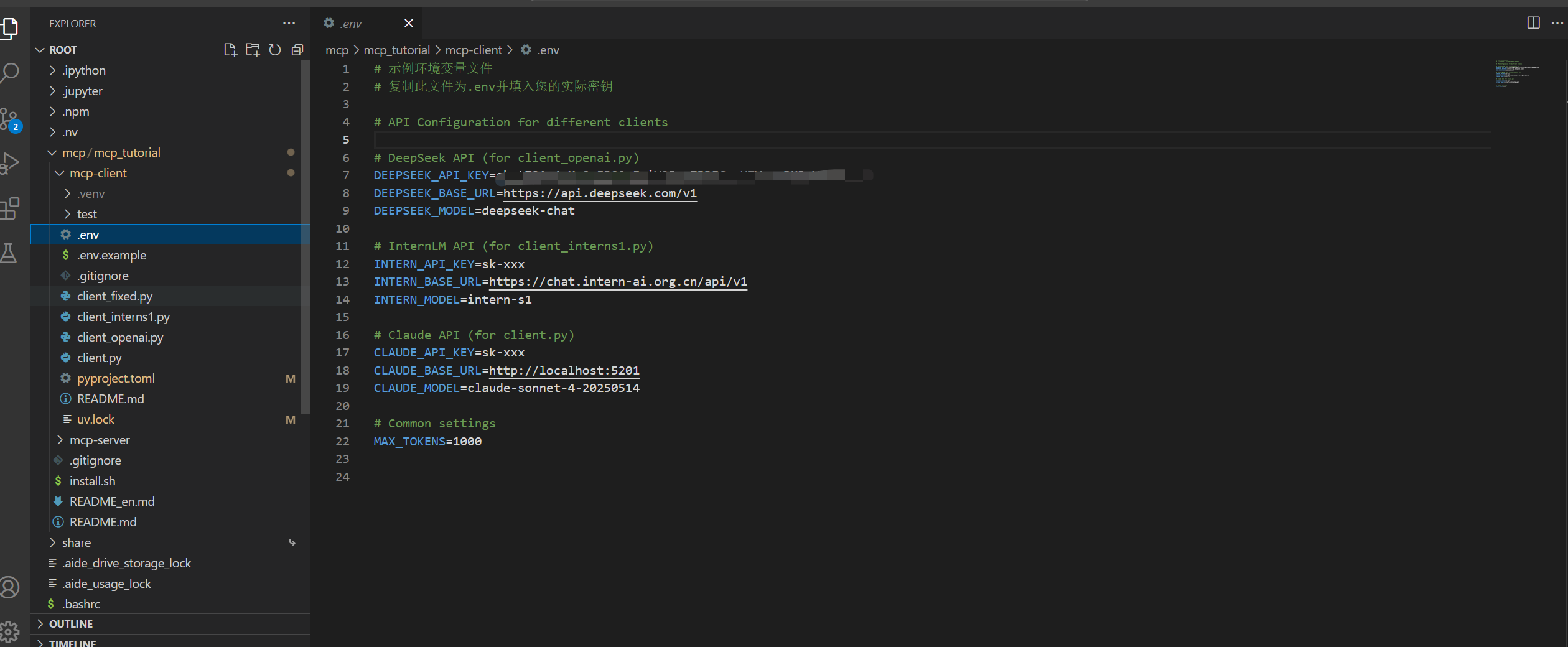
推荐:学习阶段建议使用书生的intern-s1模型,访问 https://internlm.intern-ai.org.cn/api/strategy 获取详细信息。
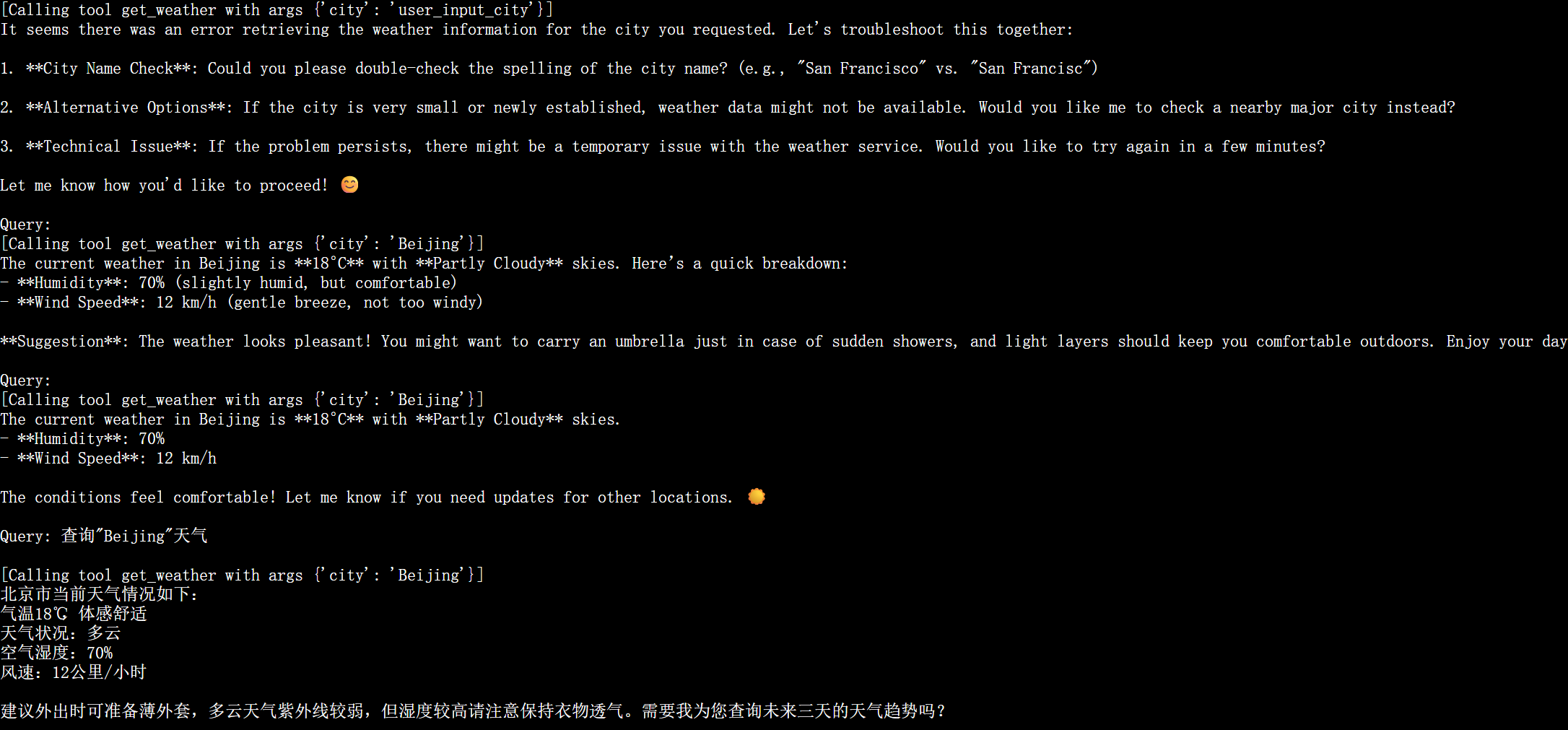
3.4🌤️ 天气服务使用示例
启动天气服务
cd mcp-client
source .venv/bin/activate
uv run client_interns1.py  ../mcp-server/weather/build/index.js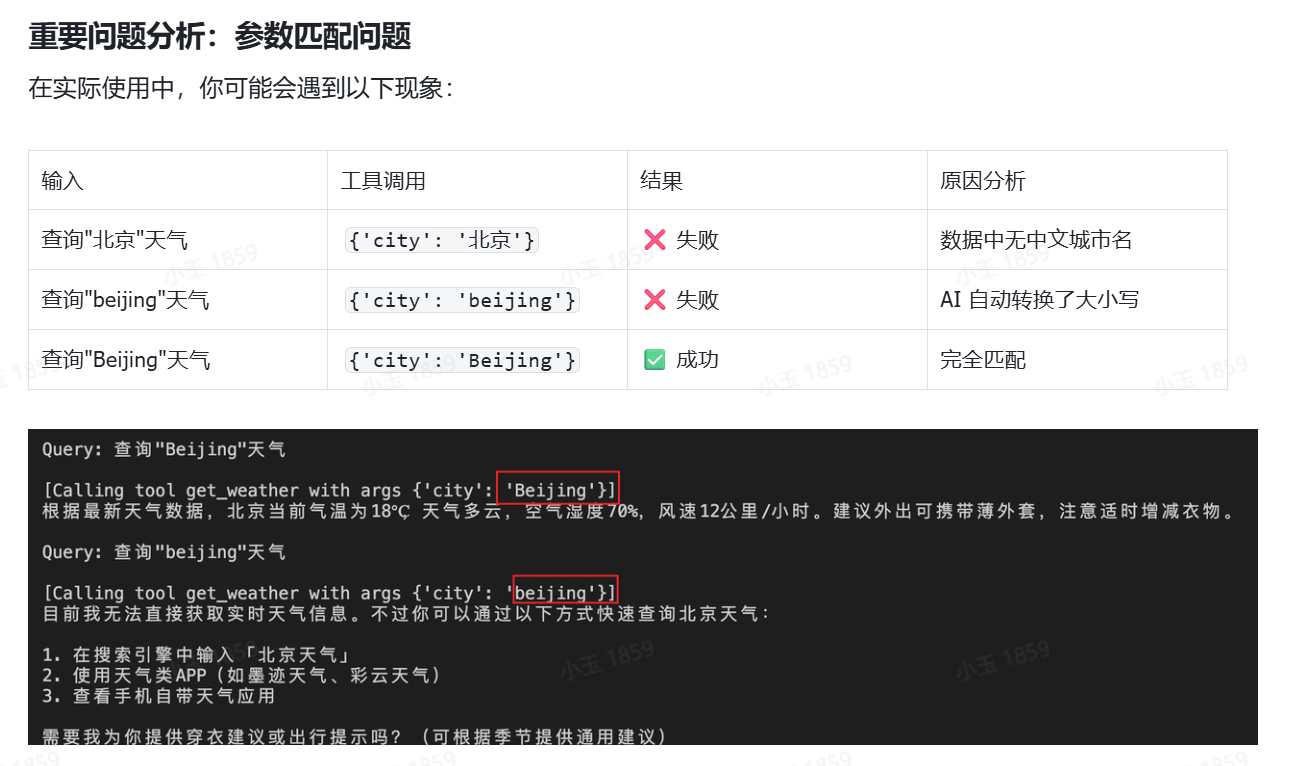
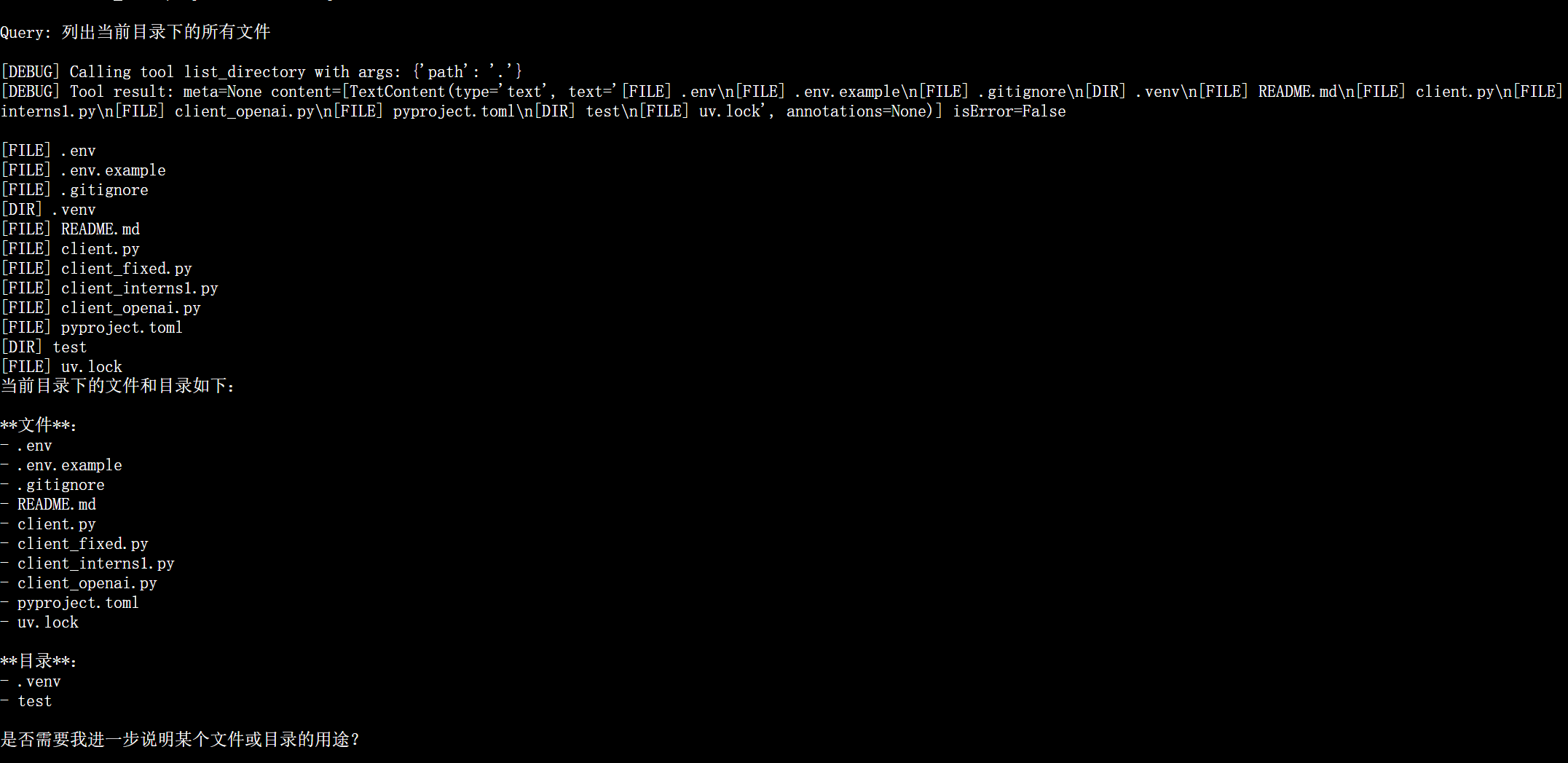
3.5 📁 文件系统服务
启动文件服务
文件服务的启动命令格式如下:
文件服务启动 uv run client_fixed.py arg1 arg2
参数说明:
-
arg1:MCP 文件操作服务的路径 -
arg2:运行文件操作的工作目录路径
cd mcp-client
source .venv/bin/activate
uv run client_fixed.py ../mcp-server/filesystem/dist/index.js ../
功能示例
-
列出文件:
列出当前目录下的所有文件 -
读取文件:
读取 README.md 文件的内容 -
创建文件:
请在../目录下写一个hello.txt,里面内容为“你好 书生 intern-s1" -
搜索文件:
搜索所有 .md 文件

有“AI”的1024 = 2048,欢迎大家加入2048 AI社区
更多推荐


 14
14 0
0- 0


 已为社区贡献5条内容

所有评论(0)