LVGL移植-Tina系统下的Gui Guider工程移植
本文介绍了基于全志U7-T113芯片的7寸串口屏在Tina Linux系统下的GUI开发流程。主要内容包括:1) SDK环境搭建与全局编译;2) 使用Gui-Guider工具创建UI工程并移植到Tina系统;3) 修改驱动配置文件(lv_drv_conf.h)和主程序(main.c)适配开发板硬件;4) 实现TV-IN信号切换功能,通过fork()和execlp()调用tvdtest程序;5) 交
简介
这里使用的是基于U7-T113的7寸串口屏,深圳荣品电子科技出的一款linux芯片串口屏。
只要是全志tina系统的板子应该都差不多。
实现了Tina系统下的Gui Guider工程移植与TV-IN信号的可选择切换
资料
以下是资料下载,内含SDK:
U7-T113-SX 链接: https://pan.baidu.com/s/1wg9hKpUu9zhCfDFhFzjeVQ?pwd=z622 提取码: z622
教程
1.全局编译SDK
根据资料里的教程解压好SDK,在SDK目录中先进行一次全编译具体操作在以下路径,按照文档做到6.3,不编译qt库。
"Linux开发板资料\全志屏幕cdrom-u7-t113-sx\02-软件文档\T113-Linux使用指导文档.pdf"
2.创建Gui Guider工程
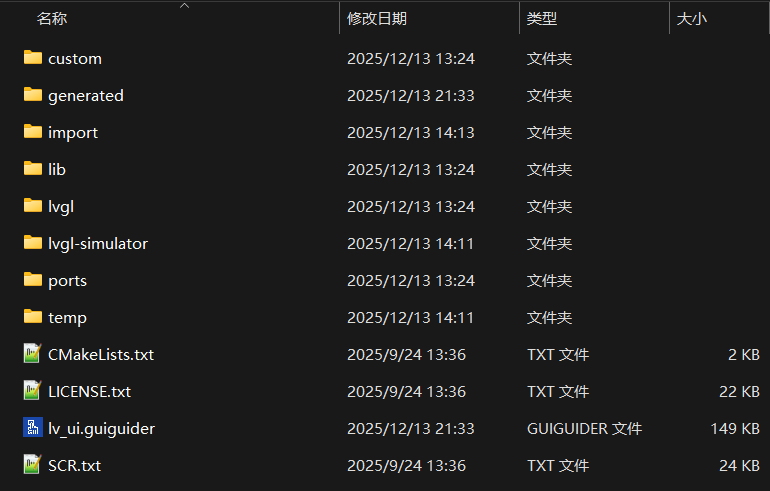
这里只需要生成的custom和generated这两个文件夹,将这两个文件夹通过共享文件夹传到虚拟机。
3.创建LVGL模版工程
找到SDK下的"t113-linux/platform/apps/lvgl8-tina"目录
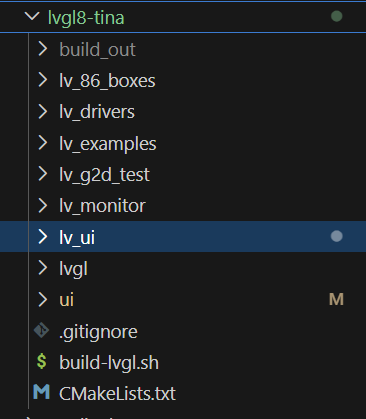
文件夹介绍
lv_drivers: tina系统的lvgl屏幕驱动,包含了显示驱动以及触控驱动。
lvgl: lvgl8.3.10版本的官方库
lv_g2d_test: 初始模板文件,后续在此文件基础上改造出ui文件夹gui移植模板文件
其他文件没有用
1.复制lv_g2d_test文件夹重命名为ui(用命令清除所有.o文件)
2.复制lv_drivers与lvgl文件夹到ui目录下的src文件夹
3.在ui文件夹下创建src的同级目录bin
4.将上面提到的custom和generated这两个文件夹移动到src目录下
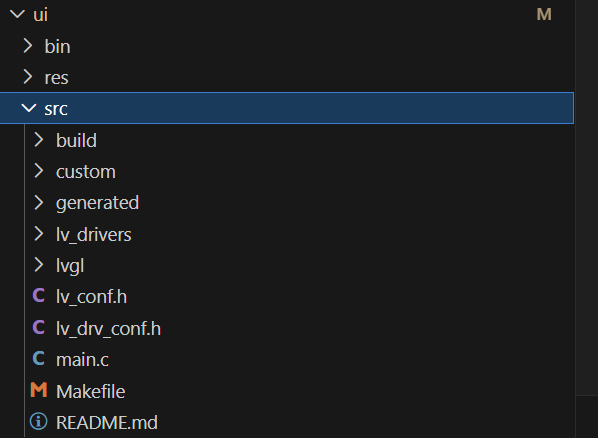
最终目录结构如上。
4.修改main.c,makefile,lv_drv_conf.h以及lv_conf文件
lv_drv_conf.h找到461行附近修改EVDEV_NAME的宏定义修改输入设备
不同开发板的具体输入设备可以在lvgl例程的运行日志找到
/*-------------------------------------------------
 * Mouse or touchpad as evdev interface (for Linux based systems)
 *------------------------------------------------*/
#ifndef USE_EVDEV
#  define USE_EVDEV           1
#endif

#ifndef USE_BSD_EVDEV
#  define USE_BSD_EVDEV       0
#endif

#if USE_EVDEV || USE_BSD_EVDEV
#  define EVDEV_NAME   "/dev/input/event3"        /*You can use the "evtest" Linux tool to get the list of devices and test them*/
#  define EVDEV_SWAP_AXES         0               /*Swap the x and y axes of the touchscreen*/

#  define EVDEV_CALIBRATE         0               /*Scale and offset the touchscreen coordinates by using maximum and minimum values for each axis*/

#  if EVDEV_CALIBRATE
#    define EVDEV_HOR_MIN         0               /*to invert axis swap EVDEV_XXX_MIN by EVDEV_XXX_MAX*/
#    define EVDEV_HOR_MAX      4096               /*"evtest" Linux tool can help to get the correct calibraion values>*/
#    define EVDEV_VER_MIN         0
#    define EVDEV_VER_MAX      4096
#  endif  /*EVDEV_CALIBRATE*/
#endif  /*USE_EVDEV*/
重新编写makefile文件-类似于Keil中添加文件路径,编译时如果报错可以根据实际情况更改。
# 使用 SDK 里的 ARM 交叉编译器
CC := /home/leon/Desktop/t113-linux/brandy/brandy-2.0/tools/toolchain/gcc-linaro-7.2.1-2017.11-x86_64_arm-linux-gnueabi/bin/arm-linux-gnueabi-gcc

# CFLAGS 加入 SDK 提供的架构选项(适用于 ARMv7-A)
CFLAGS := -Wall -I. -I./lvgl -I./lvgl/src -I./lv_drivers -I./generated -I./custom -march=armv7-a -I/home/leon/Desktop/t113-linux/platform/apps/lvgl8-tina/ui2/src/lvgl/src/extra/widgets/textprogress


# LVGL 核心模块
LVGL_CORE   := $(wildcard ./lvgl/src/core/*.c)
LVGL_DRAW   := $(wildcard ./lvgl/src/draw/*.c) \
               $(wildcard ./lvgl/src/draw/*/*.c)
LVGL_FONT   := $(wildcard ./lvgl/src/font/*.c)
LVGL_MISC   := $(wildcard ./lvgl/src/misc/*.c)
LVGL_HAL    := $(wildcard ./lvgl/src/hal/*.c)
LVGL_WIDGET := $(wildcard ./lvgl/src/widgets/*.c)

LVGL_EXTRA  := $(filter-out ./lvgl/src/extra/layouts/*/*.c, \
                $(wildcard ./lvgl/src/extra/*/*.c)) \
               $(wildcard ./lvgl/src/extra/*/*/*.c) \
               ./lvgl/src/extra/lv_extra.c\
               ./lvgl/src/extra/widgets/textprogress/lv_textprogress.c
LVGL_THEME  := $(wildcard ./lvgl/src/themes/*/*.c)

LVGL_FONTS := $(wildcard ./generated/guider_fonts/*.c) \
              $(wildcard ./generated/guider_fonts/*/*.c)

LVGL_SRC := $(LVGL_CORE) $(LVGL_DRAW) $(LVGL_FONT) $(LVGL_MISC) \
            $(LVGL_HAL) $(LVGL_WIDGET) $(LVGL_EXTRA) $(LVGL_THEME) $(LVGL_FONTS)

# lv_drivers
DRIVER_SRC := $(wildcard ./lv_drivers/*.c) \
              $(wildcard ./lv_drivers/*/*.c)

# GUI Guider 和 custom 源文件
GUI_SRC := $(wildcard ./generated/*.c)
CUSTOM_SRC := $(wildcard ./custom/*.c)
IMG_SRC := $(wildcard ./generated/images/*.c)

# 所有源文件
SRC := main.c $(LVGL_SRC) $(DRIVER_SRC) $(GUI_SRC) $(CUSTOM_SRC) $(IMG_SRC)

OBJ := $(SRC:.c=.o)

TARGET := ../bin/lv_ui

all: prepare $(TARGET)

prepare:
	@mkdir -p ../bin

# 链接生成可执行文件
$(TARGET): $(OBJ)
	@echo "Using cross compiler: $(CC)"
	$(CC) $(OBJ) -o $@ $(LDFLAGS)

# 编译每个 .c 文件为 .o
%.o: %.c
	$(CC) $(CFLAGS) -c $< -o $@

clean:
	rm -f $(OBJ) $(TARGET)

.PHONY: all clean prepare
修改main.c,保留lv_g2d_test中的main.c的初始化部分的代码,添加Gui Guider的结构体变量,引入相关头文件,调用 GUI Guider 初始化界面;
#include "lvgl/lvgl.h"               // 引入 LittlevGL 主头文件
#include "lv_drivers/display/sunxifb.h"  // 引入 Sunxi Framebuffer 显示驱动头文件
#include "lv_drivers/indev/evdev.h"      // 引入 Linux 输入设备驱动头文件(evdev)
#include <unistd.h>                   // 提供 usleep 等函数
#include <pthread.h>                  // 线程相关函数(目前代码没用到线程)
#include <time.h>                     // 时间相关函数
#include <sys/time.h>                 // gettimeofday 用于获取精确时间
#include <stdlib.h>                   // malloc/free 等标准函数
#include <stdio.h>                    // printf 函数

#include "gui_guider.h"                 // 包含GUI Guider生成的UI相关函数声明
#include "events_init.h"                // 包含事件初始化相关函数声明
#include "custom.h"                     // 包含自定义功能相关函数声明

lv_ui guider_ui;                        // 声明GUI Guider生成的UI结构体实例

static lv_style_t rect_style;         // 定义一个样式变量
static lv_obj_t *rect_obj;            // 定义一个指向对象的指针(矩形)
static lv_obj_t *canvas;              // 定义一个画布对象指针


int main(int argc, char *argv[]) {
    lv_disp_drv_t disp_drv;           // 显示驱动结构体
    lv_disp_draw_buf_t disp_buf;      // 显示缓冲区结构体
    lv_indev_drv_t indev_drv;         // 输入设备驱动结构体
    uint32_t rotated = LV_DISP_ROT_NONE; // 显示旋转角度,0 表示不旋转

    lv_disp_drv_init(&disp_drv);      // 初始化显示驱动结构体

    /* 初始化 LittlevGL */
    lv_init();

    /* 初始化 Linux framebuffer 设备 */
    sunxifb_init(rotated);

    /* 获取屏幕尺寸,并申请绘图缓冲区 */
    static uint32_t width, height;
    sunxifb_get_sizes(&width, &height);  // 获取屏幕宽高

    static lv_color_t *buf;
    // 为 LittlevGL 分配绘图缓冲区
    buf = (lv_color_t*) sunxifb_alloc(width * height * sizeof(lv_color_t), "lv_2048");

    if (buf == NULL) {
        // 如果分配失败,释放 framebuffer 并退出程序
        sunxifb_exit();
        printf("malloc draw buffer fail\n");
        return 0;
    }

    /* 初始化显示缓冲区描述符 */
    lv_disp_draw_buf_init(&disp_buf, buf, NULL, width * height);

    /* 初始化并注册显示驱动 */
    disp_drv.draw_buf = &disp_buf;      // 设置绘图缓冲区
    disp_drv.flush_cb = sunxifb_flush;  // 设置刷新回调函数
    disp_drv.hor_res = width;           // 设置水平分辨率
    disp_drv.ver_res = height;          // 设置垂直分辨率
    disp_drv.rotated = rotated;         // 设置旋转角度
    disp_drv.screen_transp = 0;         // 屏幕是否透明
    lv_disp_drv_register(&disp_drv);    // 注册显示驱动

    /* 初始化输入设备(鼠标、触摸板等) */
    evdev_init();                        // 初始化 evdev 输入
    lv_indev_drv_init(&indev_drv);       // 输入驱动基本初始化
    indev_drv.type = LV_INDEV_TYPE_POINTER; // 输入设备类型为指针(鼠标或触摸屏)
    indev_drv.read_cb = evdev_read;         // 输入读取回调函数
    // 注册输入设备并获取输入设备对象
    lv_indev_t *evdev_indev = lv_indev_drv_register(&indev_drv);

    /* 调用 GUI Guider 初始化界面 */
    setup_ui(&guider_ui);     // guider_ui 是 lv_ui 类型的结构体
    events_init(&guider_ui);  // 绑定事件
    custom_init(&guider_ui);  // 自定义功能初始化


    /* 主循环:处理 LittlevGL 任务(tickless 模式) */
    while (1) {
        lv_task_handler();  // LittlevGL 的任务处理函数
        usleep(1000);       // 延时 1 毫秒,防止 CPU 占用过高
    }

    return 0;
}

/*
 * 自定义系统时间获取函数
 * 在 lv_conf.h 中设置 LV_TICK_CUSTOM_SYS_TIME_EXPR = custom_tick_get();
 * 返回系统启动以来的毫秒数
 */
uint32_t custom_tick_get(void) {
    static uint64_t start_ms = 0;      // 程序启动时间(毫秒)
    if (start_ms == 0) {
        struct timeval tv_start;
        gettimeofday(&tv_start, NULL);  // 获取当前时间
        start_ms = (tv_start.tv_sec * 1000000 + tv_start.tv_usec) / 1000; // 转换为毫秒
    }

    struct timeval tv_now;
    gettimeofday(&tv_now, NULL);         // 获取当前时间
    uint64_t now_ms;
    now_ms = (tv_now.tv_sec * 1000000 + tv_now.tv_usec) / 1000; // 转换为毫秒

    uint32_t time_ms = now_ms - start_ms; // 计算程序运行的毫秒数
    return time_ms;                       // 返回给 LVGL 使用
}
根据屏幕的实际参数修改lv_conf.h文件,色深,屏幕尺寸等等
修改在generated目录的event_init.c与event_init.h文件实现按键与其他输入的事件响应;
/*
* Copyright 2025 NXP
* NXP Proprietary. This software is owned or controlled by NXP and may only be used strictly in
* accordance with the applicable license terms. By expressly accepting such terms or by downloading, installing,
* activating and/or otherwise using the software, you are agreeing that you have read, and that you agree to
* comply with and are bound by, such license terms.  If you do not agree to be bound by the applicable license
* terms, then you may not retain, install, activate or otherwise use the software.
*/


#ifndef EVENTS_INIT_H_
#define EVENTS_INIT_H_
#ifdef __cplusplus
extern "C" {
#endif

#include "gui_guider.h"

void events_init(lv_ui *ui);

void events_init_screen_2(lv_ui *ui);
void events_init_screen_1(lv_ui *ui);
/* 停止 tvdtest */
static void stop_tvdtest(void);
/* 启动 tvdtest */
static void start_tvdtest(void);
#ifdef __cplusplus
}
#endif
#endif /* EVENT_CB_H_ */
/*
* Copyright 2025 NXP
* NXP Proprietary. This software is owned or controlled by NXP and may only be used strictly in
* accordance with the applicable license terms. By expressly accepting such terms or by downloading, installing,
* activating and/or otherwise using the software, you are agreeing that you have read, and that you agree to
* comply with and are bound by, such license terms.  If you do not agree to be bound by the applicable license
* terms, then you may not retain, install, activate or otherwise use the software.
*/

#include "events_init.h"
#include <stdio.h>
#include "lvgl.h"

#include <signal.h>   // 用于 SIGTERM
#include <unistd.h>   // 用于 fork() 和 execlp()
#include <sys/types.h>
#include <stdio.h>

static pid_t tvd_pid = -1;      // tvdtest 进程 ID,初始值 -1
static int tvd_running = 0;     // tvdtest 是否正在运行,0=未运行,1=运行


#if LV_USE_GUIDER_SIMULATOR && LV_USE_FREEMASTER
#include "freemaster_client.h"
#endif


static void screen_2_event_handler (lv_event_t *e)
{
    lv_event_code_t code = lv_event_get_code(e);
    switch (code) {
    case LV_EVENT_CLICKED:
    {
		  /* 1. 先停 tvdtest */
        stop_tvdtest();
        ui_load_scr_animation(&guider_ui, &guider_ui.screen_1, guider_ui.screen_1_del, &guider_ui.screen_2_del, setup_scr_screen_1, LV_SCR_LOAD_ANIM_NONE, 200, 200, false, true);
        break;
    }
    default:
        break;
    }
}

void events_init_screen_2 (lv_ui *ui)
{
    lv_obj_add_event_cb(ui->screen_2, screen_2_event_handler, LV_EVENT_ALL, ui);
}

static void screen_1_Catch1_event_handler (lv_event_t *e)
{
    lv_event_code_t code = lv_event_get_code(e);
    switch (code) {
    case LV_EVENT_CLICKED:
    {
/*        ui_load_scr_animation(
            &guider_ui,
            &guider_ui.screen_2,
             guider_ui.screen_2_del,
            &guider_ui.screen_1_del,
             setup_scr_screen_2,
             LV_SCR_LOAD_ANIM_OVER_LEFT,
             200,
             200,
             true,
             true);
*/
        // new_scr_del = false,不重新创建屏幕
        // is_clean = false,不清空当前屏幕
        // auto_del = false,不删除旧屏幕
        ui_load_scr_animation(
            &guider_ui,                   // UI结构体
            &guider_ui.screen_2,          // 目标屏幕
            guider_ui.screen_2_del,                        // 不重新创建屏幕
            &guider_ui.screen_1_del,      // 旧屏幕删除标记,可以传已有指针
            setup_scr_screen_2,                         // setup_scr函数不用,传NULL
            LV_SCR_LOAD_ANIM_NONE,        // 不要动画
            0,                            // 动画时间
            0,                            // 动画延迟i
            false,                        // 不清空当前屏幕
            false                         // 不删除旧屏幕
        );
        /* 2. 启动 tvdtest */
        start_tvdtest();
		break;
    }
    default:
        break;
    }
}

void events_init_screen_1 (lv_ui *ui)
{
    lv_obj_add_event_cb(ui->screen_1_Catch1, screen_1_Catch1_event_handler, LV_EVENT_ALL, ui);
}


void events_init(lv_ui *ui)
{

}
/* 启动 tvdtest */
static void start_tvdtest(void)
{
    if(tvd_running)
        return;   // 已经在跑,直接返回

    tvd_pid = fork();

    if(tvd_pid == 0)
    {
        execlp("tvdtest_usrptr",
               "tvdtest_usrptr",
               "2", "0", "720", "576",
               "/tmp/",
               "4", "10000", "25",
               NULL);

        _exit(1);
    }

    tvd_running = 1;
}


/* 停止 tvdtest */
static void stop_tvdtest(void)
{
    if(tvd_running && tvd_pid > 0)
    {
        kill(tvd_pid, SIGTERM);
        tvd_pid = -1;
        tvd_running = 0;
    }
}
5.进入ui下的src文件夹进行make操作(这里的lv_ui就是ui,两个用的是不同的guider工程,操作过程是一样的)
(base) leon@ubuntu:~/Desktop/t113-linux/platform/apps/lvgl8-tina/lv_ui/src$ make clean && make这里会输出bin文件到ui下的bin目录,使用adb工具将生成的bin文件传输到开发板上

6.上机验证
打开根目录下的root文件夹
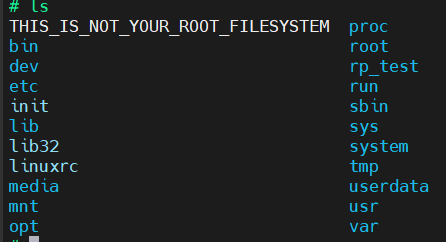
给bin文件可执行权限并运行
# cd root
# ls
# lv_ui
# chmod +x lv_ui
# ./lv_ui
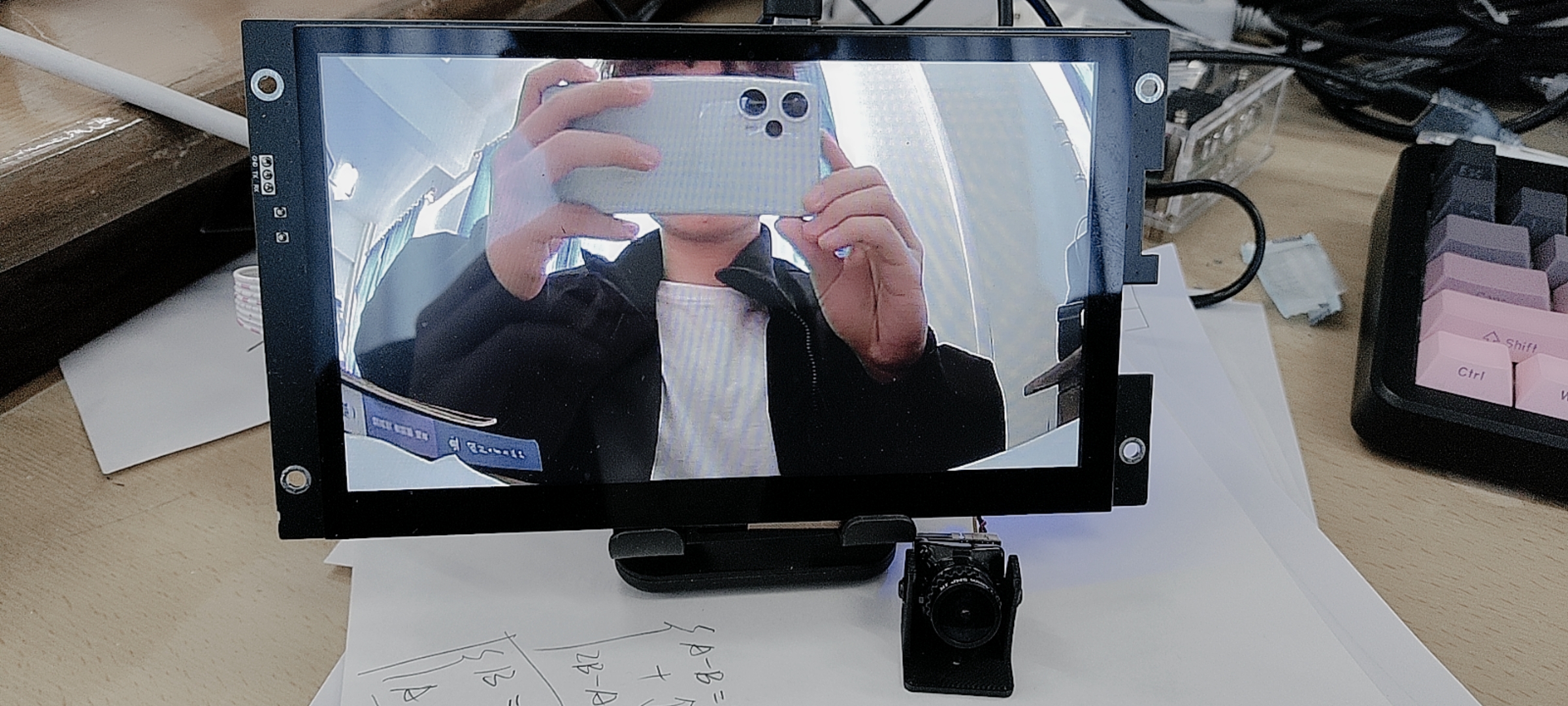
7.现象展示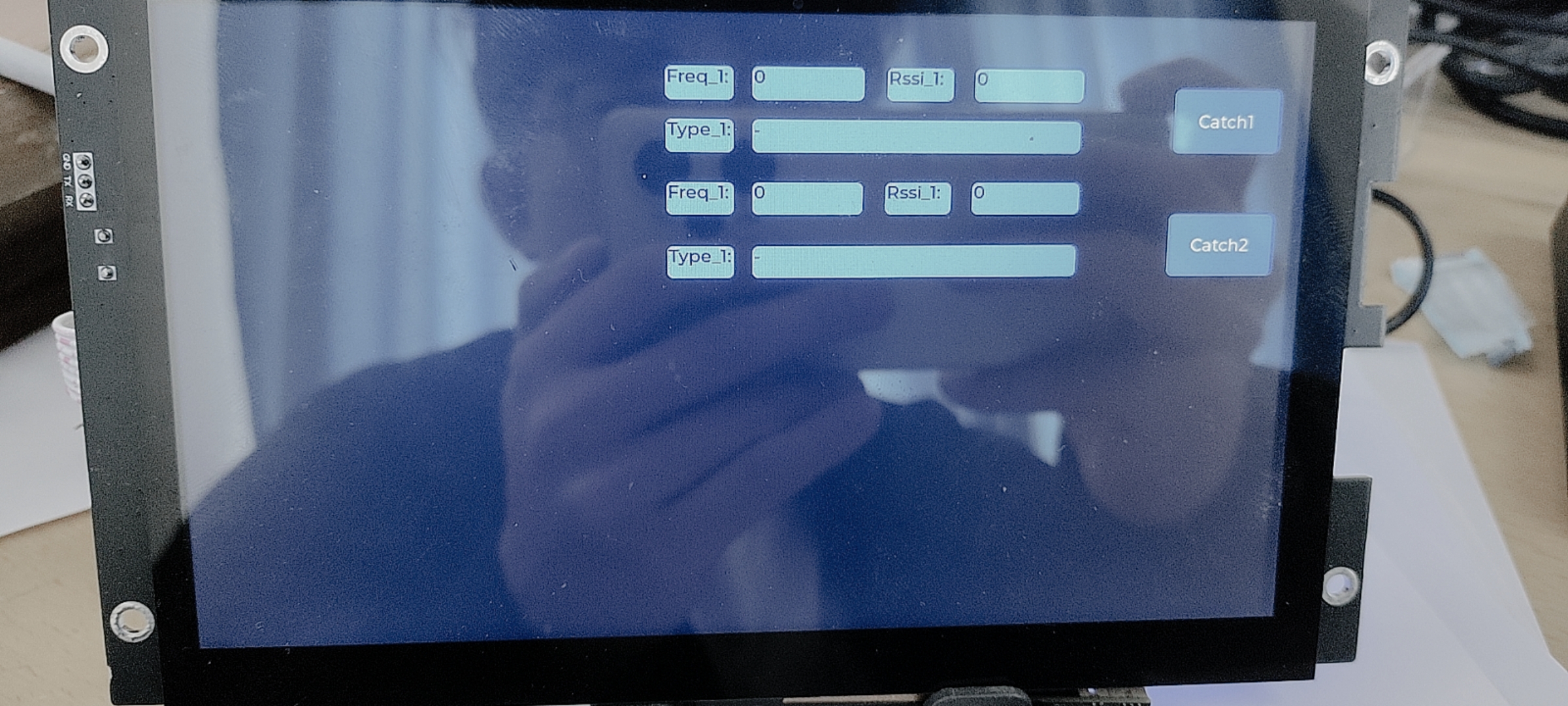

有“AI”的1024 = 2048,欢迎大家加入2048 AI社区
更多推荐

 5
5 0
0- 0


 已为社区贡献1条内容

所有评论(0)