YOLO目标检测模型如何对接Apipost平台
前言
今天要给大家分享一个在工业巡检场景中非常实用的 AI 边缘计算部署实践。文中涉及的系统架构、接口设计和代码实现均为示例,主要用于说明整体思路和工程方法。我本人也是在实际项目中第一次系统性地接触边缘计算与算法接口化,很多经验都是在不断调试和联调过程中逐步摸索出来的,希望能对同样处在“模型落地阶段”的同学有所帮助。
工业巡检处理流程
在传统的工业巡检系统中,图像数据往往由摄像头、无人机或移动终端采集,然后上传至中心服务器或云端进行分析。这种方式在实验环境下尚可,但在真实工业现场往往会面临网络不稳定、带宽受限、响应延迟较高以及数据外传风险等问题。因此,在本项目中引入了AI 边缘计算的思路,将模型推理能力直接部署在靠近数据源的本地计算节点上。
从整体上看,这其中主要有三个部分:巡检平台、边缘计算节点以及检测模型。巡检平台负责业务调度与任务管理,当某个巡检点位产生检测需求时,平台会通过 HTTP 接口向边缘计算节点发送请求,请求中包含任务标识、巡检点位信息以及待检测的图像数据。
边缘计算节点部署在本地服务器上,在服务启动时会提前加载目标检测模型(如 YOLO),从而避免在每次请求中重复初始化模型带来的性能损耗。当接收到平台请求后,边缘节点首先对上传的图像进行解析和预处理,然后调用本地模型完成推理,得到目标的类别、位置框和置信度等信息。随后,这些原始检测结果会被进一步整理成结构化的 JSON 数据,例如是否存在异常目标、异常类型集合以及相关的检测框信息。
最后,边缘计算节点会将处理结果通过 HTTP 响应返回给巡检平台。平台只需要关心返回的结构化结果,而不需要了解具体使用了哪种模型或推理框架。
本地机测试
API接口定义
用于巡检平台向 AI 边缘计算节点发送巡检图像,边缘节点基于本地部署的目标检测模型完成推理,并返回检测结果。
请求参数用于描述巡检任务的基础信息及检测配置,对应如下数据模型:
from pydantic import BaseModel
from typing import List, Optional, Dict, Any

class DetectRequest(BaseModel):
    id: str
    pointid: str
    imagefile: str
    threshold: Optional[float] = 0.5
在实际部署中,imagefile 通常通过 form-data 的方式上传图片文件,而非直接传递本地文件路径,以避免平台与边缘节点之间的环境依赖。
接口响应用于返回边缘节点的检测结果及相关信息,对应如下数据模型:
class DetectResponse(BaseModel):
    id: str
    code: int
    message: str
    result: bool
    ident_type: List[str]
    max_similarity: str
    image_size: Dict[str, int]
    detections: List[Dict[str, Any]]
    model_info: Dict[str, str]
服务器端
服务器端主要的代码如下,yolo_infer.py里面的代码很简单,就是一个yolo模型处理图像并返回信息的操作。
from fastapi import FastAPI
from schemas import DetectRequest
from yolo_infer import YOLODetector

app = FastAPI(title="Inspection YOLO API")

detector = YOLODetector(
    weight_path="yolo11n.pt",
    conf_thres=0.5
)

@app.post("/api/v1/inspection/detect")
def detect(req: DetectRequest):
    try:
        infer_res = detector.infer(req.imagefile)
    except Exception as e:
        return {
            "id": req.id,
            "code": 1002,
            "message": f"image load or inference failed: {str(e)}",
            "result": False
        }
    detections = infer_res["detections"]

    if detections:
        ident_types = list(set(d["class_name"] for d in detections))
        max_conf = max(d["confidence"] for d in detections)
        result = True
    else:
        ident_types = []
        max_conf = 0.0
        result = False

    return {
        "id": req.id,
        "code": 0,
        "message": "success",
        "result": result,
        "ident_type": ident_types,
        "max_similarity": f"{max_conf * 100:.2f}%",
        "detections": detections,
    }
这是一个基于 FastAPI 的 AI 边缘计算推理服务,对外提供一个目标检测接口,内部调用 YOLO 模型完成巡检图像的检测,并返回结构化结果。
定义一个 HTTP POST 接口路径是 /api/v1/inspection/detect,请求体自动映射为 DetectRequest
客户端
首先启动我们的服务器端:
if __name__=="__main__":
    import uvicorn
    uvicorn.run(app, host="0.0.0.0", port=8088)
这样就说明是启动成功了。
客户端我们先进行本地的测试,test.jpg为本地的测试图片
import requests

url = "http://127.0.0.1:8088/api/v1/inspection/detect"


data = {
    "id": "test_003",
    "pointid": "P_03",
    "imagefile": "test.jpg",
    "threshold": 0.5
}

try:
    resp = requests.post(url, json=data, timeout=30)
    from pprint import pprint
    pprint(resp.json())
except requests.exceptions.ConnectionError as e:
    print(f"❌ 连接失败!请检查:")
    print(f"1. 服务器IP是否正确:192.168.31.214")
    print(f"2. 服务器是否正在运行?")
    print(f"3. 防火墙是否开放了8088端口?")
    print(f"错误详情:{e}")
这里的url的端口和地址请与前面的保持一致,运行后返回的结果如下所示:
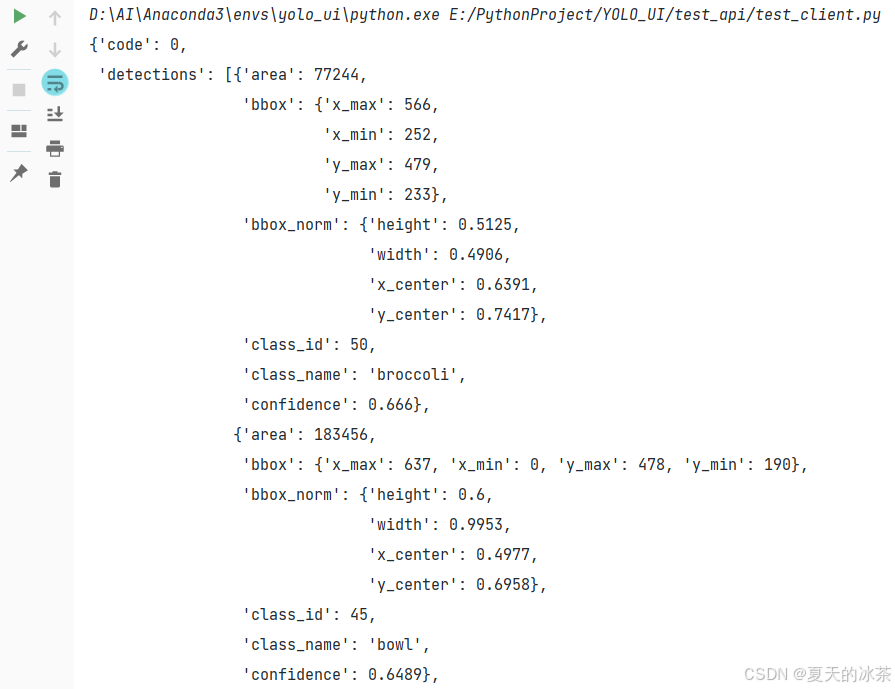
这样就说明是成功了。
不同机器间的测试
首先采用ipconfig查看服务器的IP地址:192.168.xx.xxx。
这里重新采用本地服务器的地址运行
uvicorn.run(app, host="192.168.xx.xxx", port=8088)然后对于客户端那边,也要修改:
url = "http://192.168.xx.xxx:8080/api/v1/inspection/detect"还是一样先运行服务器,然后在其他的机子上运行客户端代码,只是说你需要让两台机子处于同一个WiFi,或者是说在公网下,或者就使用云端。
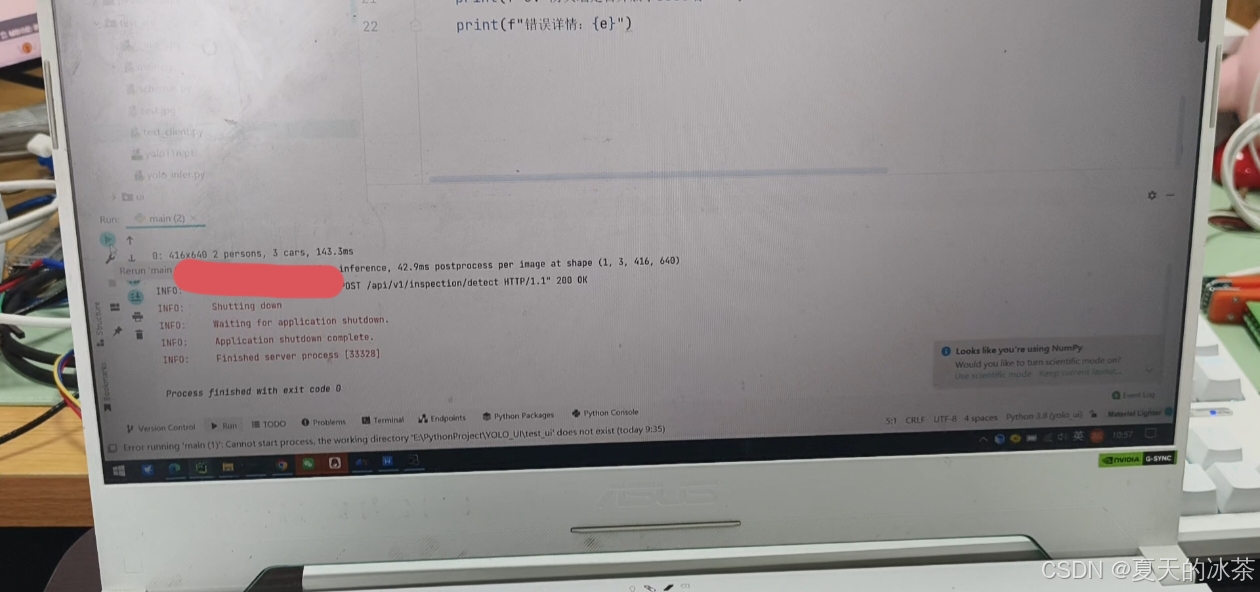
下面是我的服务器端运行效果
下面是我借的同学的电脑做的测试:
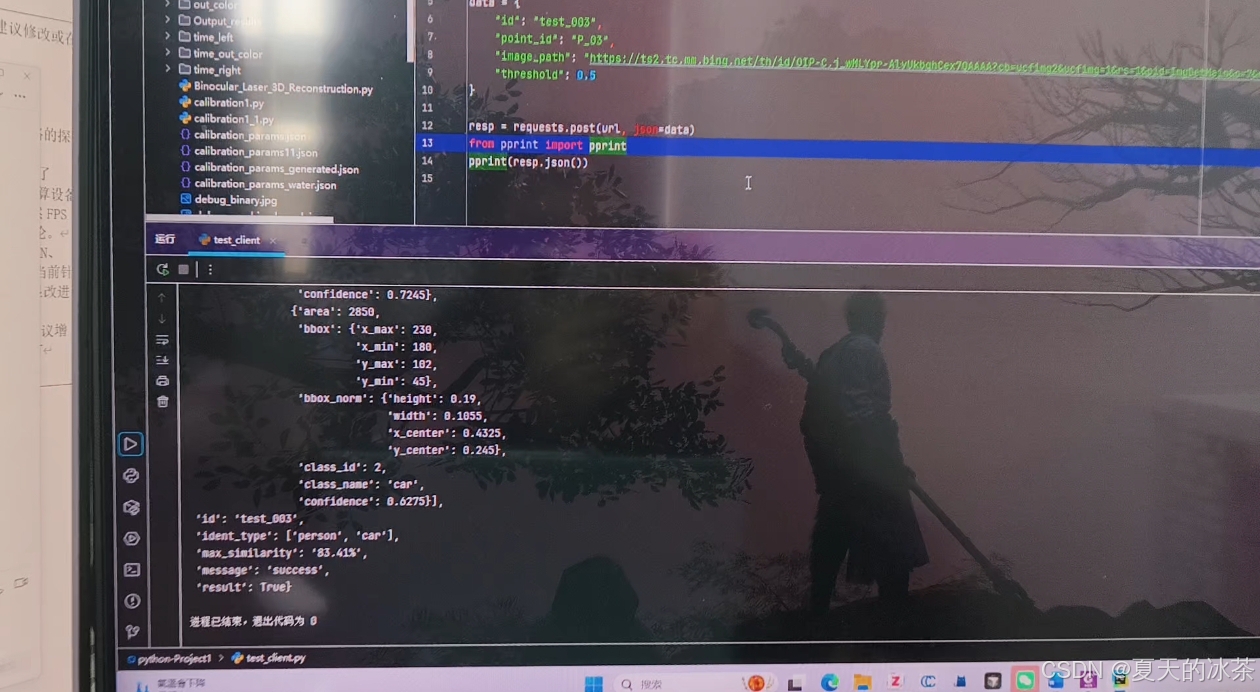
一般来说,这种检测平台与服务器应该是在同一个局域网下的。
在Apipost平台做测试
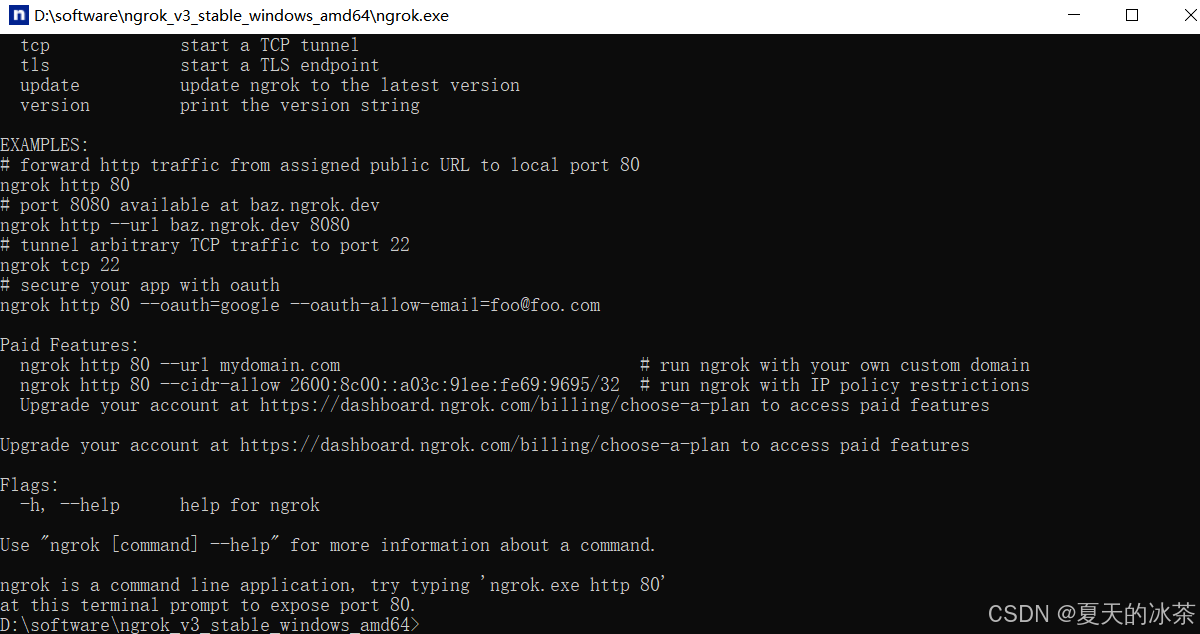
这里要先进行内网穿透,进入官网:ngrok,下载一个windows安装包
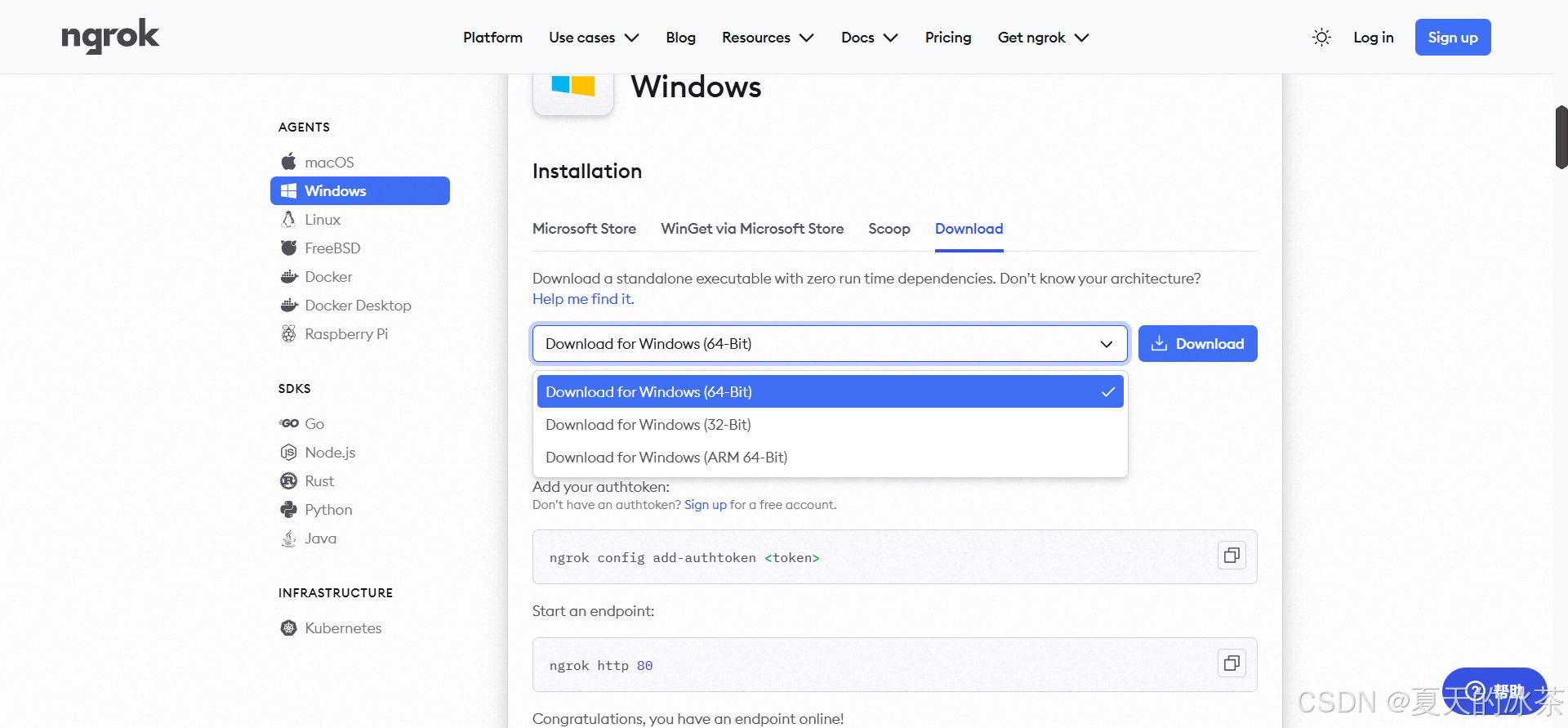
在本地解压后会出现一个.exe可执行文件,运行会出现一个终端。
然后,你需要去注册一个ngrok的账号主要是为了获得密钥:
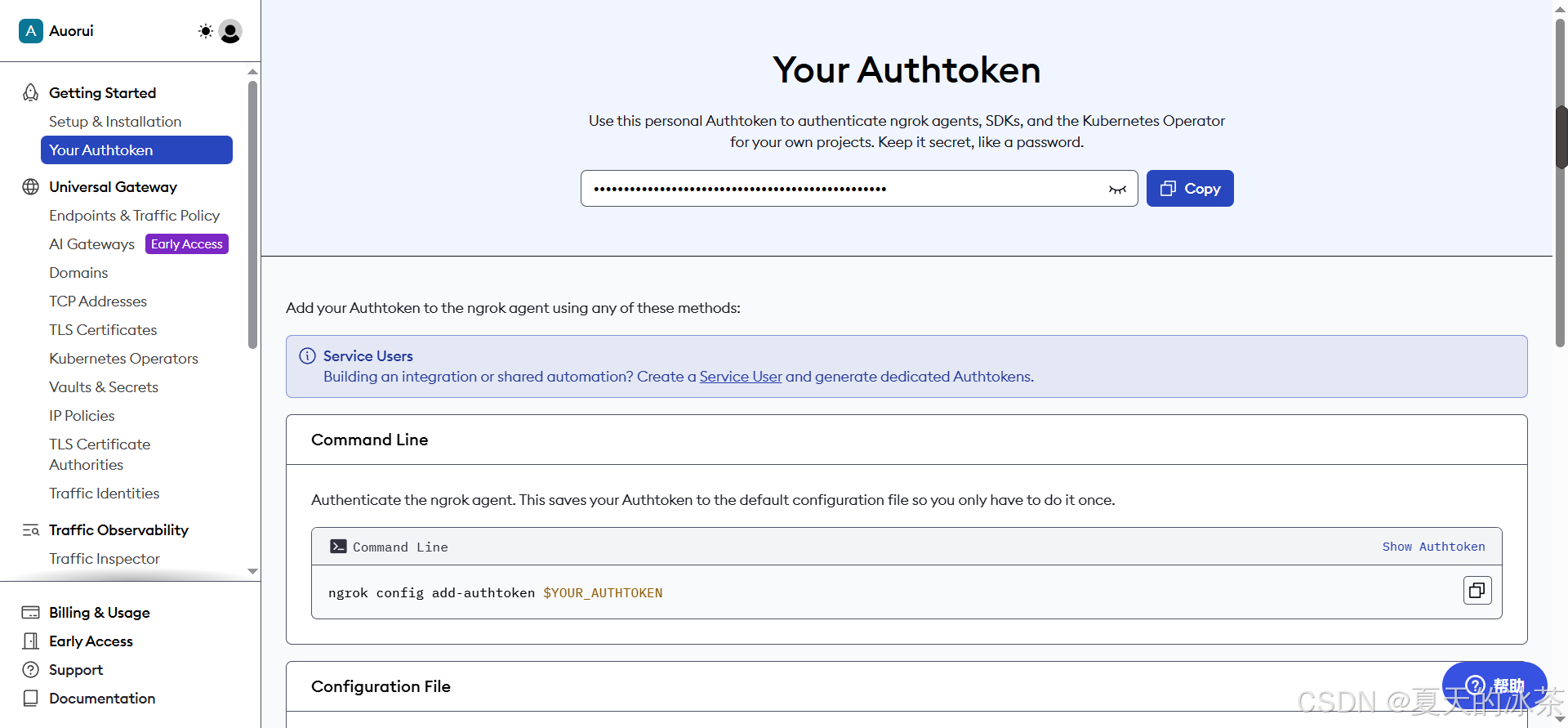
然后执行下面的命令:
ngrok authtoken 密钥执行成功后,命令行界面中会出现在本地保存的信息。大致内容如下所示:
Authtoken saved to configuration file: C:\Users\ASUS\AppData\Local/ngrok/ngrok.yml
在命令行界面中,执行下面命令,就会将本地端口88映射到外网中,也可以选择其他的端口
ngrok http 8088然后我们会得到一个公网可以访问的地址了,如果连接失败,可以试一试是否是网络的问题。
https://greasy-kelsey-schizogenetically.ngrok-free.dev我们在Apipost客户机中新建一个HTTP项目
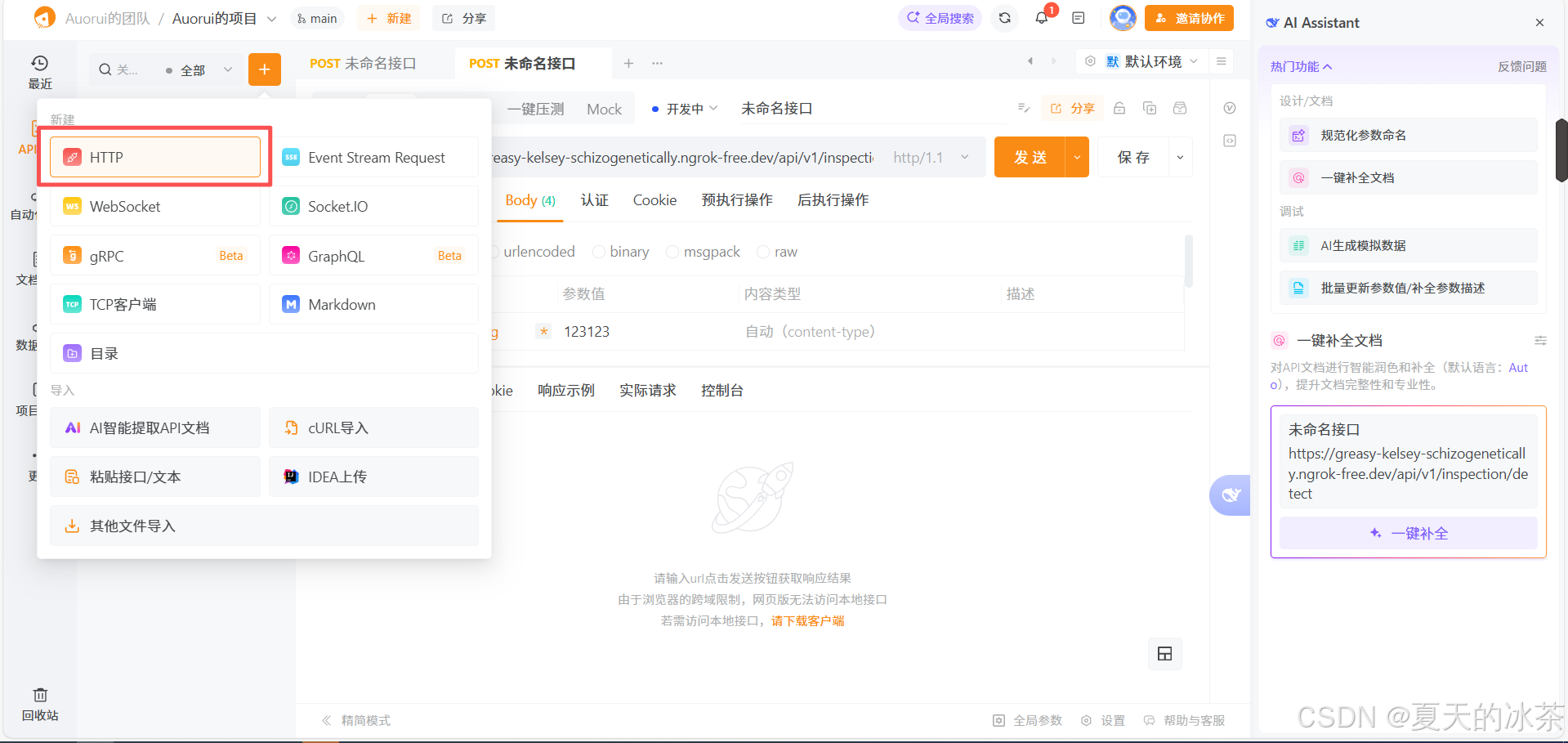
将下面这个地址填入到里面去,请将GET修改为POST。
https://greasy-kelsey-schizogenetically.ngrok-free.dev/api/v1/inspection/detect接着填写我们的发送信息,请在Body-raw,选择JSON填入下面的信息。
{
    "id": "test_001",
    "pointid": "P_01",
    "imagefile": "https://ts2.tc.mm.bing.net/th/id/OIP-C.j_wMLYpr-AlvUkbqhCex7QAAAA?cb=ucfimg2&ucfimg=1&rs=1&pid=ImgDetMain&o=7&rm=3",
    "threshold": 0.5
}
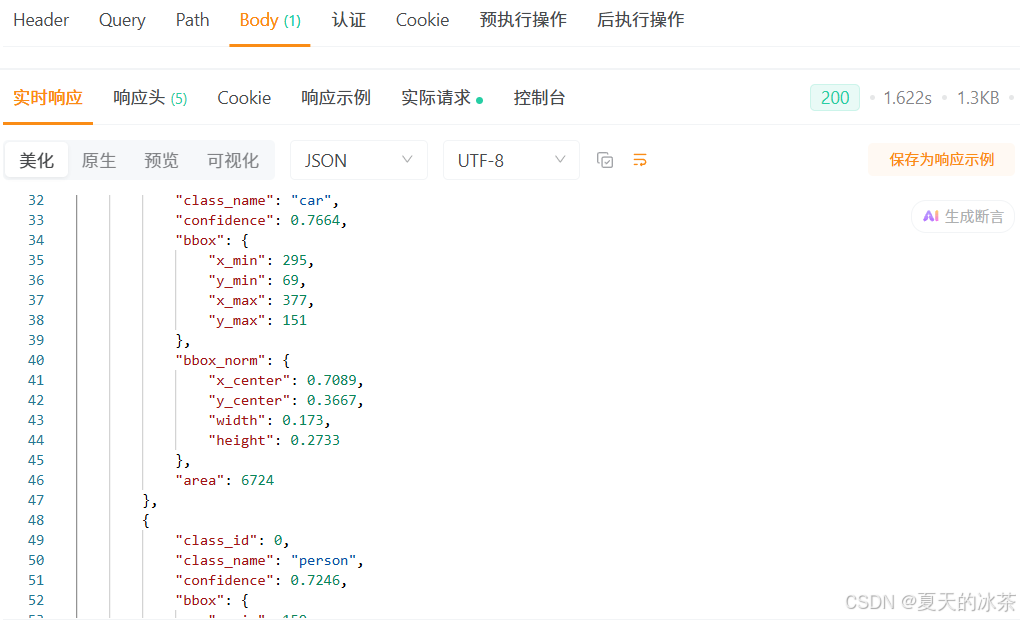
然后发送我们的请求即可,出现下面的响应,说明这里我们的流程完成。只是需要注意的是,我这里发送的是一个图像网络链接,而不是图像数据本身。
平台传递图片的测试
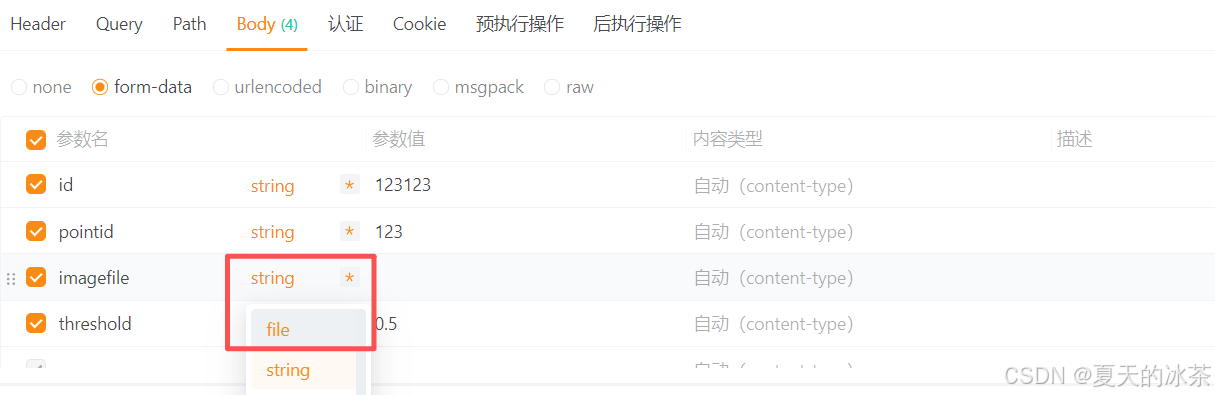
刚刚上面图片的处理方式均为采用网络链接,现在我们来测试一下怎么将图片本身作为输入传输,首先要回到Apipost平台上,打开控制台,选择form-data,将imagefile换成file模式,然后上传图片即可
这里测试图片的主代码是:
from fastapi import FastAPI, UploadFile, File, Form
from schemas import DetectResponse
from yolo_infer import YOLODetector
import os
import inspect

app = FastAPI(title="Inspection YOLO API")

detector = YOLODetector(
    weight_path="yolo11n.pt",
    conf_thres=0.5
)


@app.post("/api/v1/inspection/detect", response_model=DetectResponse)
async def detect(
        id: str = Form(...),
        pointid: str = Form(...),
        imagefile: UploadFile = File(...),
        threshold: float = Form(0.5)
):
    # 检查继承关系
    from fastapi import UploadFile as FastAPIUploadFile
    print(f"Is instance of FastAPI UploadFile: {isinstance(imagefile, FastAPIUploadFile)}")
    # 验证文件类型
    allowed_extensions = ['.jpg', '.jpeg', '.png', '.bmp', '.tiff', '.webp']
    file_extension = os.path.splitext(imagefile.filename)[1].lower()
    if file_extension not in allowed_extensions:
        return DetectResponse(
            id=id,
            code=1001,
            message=f"Unsupported file type: {file_extension}. Allowed: {allowed_extensions}",
            result=False,
            ident_type=[],
            max_similarity="0.00%",
            image_size={"width": 0, "height": 0},
            detections=[],
            model_info={"name": "yolo11n", "version": "1.0"}
        )

    try:
        print("DEBUG: 调用detector.infer...")
        # 直接调用infer方法,并传递类型信息
        infer_res = detector.infer(imagefile, conf_thres=threshold)

        detections = infer_res["detections"]

        if detections:
            ident_types = list(set(d["class_name"] for d in detections))
            max_conf = max(d["confidence"] for d in detections)
            result = True
        else:
            ident_types = []
            max_conf = 0.0
            result = False

        return DetectResponse(
            id=id,
            code=0,
            message="success",
            result=result,
            ident_type=ident_types,
            max_similarity=f"{max_conf * 100:.2f}%",
            image_size={
                "width": infer_res["image_width"],
                "height": infer_res["image_height"]
            },
            detections=detections,
            model_info={
                "name": "yolo11n",
                "version": "1.0"
            }
        )

    except Exception as e:
        print(f"DEBUG: 发生错误: {str(e)}")
        import traceback
        traceback.print_exc()

        return DetectResponse(
            id=id,
            code=1002,
            message=f"image load or inference failed: {str(e)}",
            result=False,
            ident_type=[],
            max_similarity="0.00%",
            image_size={"width": 0, "height": 0},
            detections=[],
            model_info={"name": "yolo11n", "version": "1.0"}
        )


if __name__ == "__main__":
    import uvicorn

    uvicorn.run(app, host="0.0.0.0", port=8088, log_level="info")
关于yolo处理文件的方式,我想我这里也不用多说了,这里给出UploadFile加载的方式
    def _infer_from_uploadfile(self, file, conf_thres: float = None):
        """从UploadFile进行推理"""
        print(f"YOLO DEBUG: _infer_from_uploadfile被调用")
        print(f"YOLO DEBUG: 文件名: {file.filename}")

        try:
            # 读取文件内容
            contents = file.file.read()
            # 将字节数据转换为numpy数组
            nparr = np.frombuffer(contents, np.uint8)
            # 解码图像
            img = cv2.imdecode(nparr, cv2.IMREAD_COLOR)
            if img is None:
                raise ValueError("Failed to decode image from uploaded file")
            result = self._process_image(img, conf_thres)
            return result

        finally:
            # 重置文件指针
            if hasattr(file, 'file') and hasattr(file.file, 'seek'):
                file.file.seek(0)
关于视频部分作为扩展,可以对其进行抽帧处理,将抽帧的结果进行检测,然后返回检测到的帧的位置和检测结果即可,例如下面是我获得的检测结果的内容,我们将其保存到json文件当中:
{
	"id": "test_003",
	"code": 0,
	"message": "success",
	"result": true,
	"media_type": "video",
	"ident_type": [
		"bed",
		"bottle",
		"cat",
		"toilet",
		"person",
		"dog"
	],
	"max_similarity": "91.21%",
	"total_frames": 619,
	"duration": 20.61,
	"sampled_frames": 42,
	"frame_detections": [
		{
			"frame_index": 0,
			"timestamp": 0,
			"detections": [],
			"image_size": {
				"width": 380,
				"height": 506
			}
		},
		{
			"frame_index": 15,
			"timestamp": 0.5,
			"detections": [],
			"image_size": {
				"width": 380,
				"height": 506
			}
		},
		{
			"frame_index": 30,
			"timestamp": 1,
			"detections": [],
			"image_size": {
				"width": 380,
				"height": 506
			}
		},
		{
			"frame_index": 45,
			"timestamp": 1.5,
			"detections": [
				{
					"class_id": 16,
					"class_name": "dog",
					"confidence": 0.5683,
					"bbox": {
						"x_min": 75,
						"y_min": 201,
						"x_max": 285,
						"y_max": 445
					},
					"bbox_norm": {
						"x_center": 0.4737,
						"y_center": 0.6383,
						"width": 0.5526,
						"height": 0.4822
					},
					"area": 51240
				},
				{
					"class_id": 15,
					"class_name": "cat",
					"confidence": 0.5247,
					"bbox": {
						"x_min": 12,
						"y_min": 80,
						"x_max": 307,
						"y_max": 432
					},
					"bbox_norm": {
						"x_center": 0.4197,
						"y_center": 0.5059,
						"width": 0.7763,
						"height": 0.6957
					},
					"area": 103840
				},
				{
					"class_id": 16,
					"class_name": "dog",
					"confidence": 0.5189,
					"bbox": {
						"x_min": 11,
						"y_min": 81,
						"x_max": 308,
						"y_max": 433
					},
					"bbox_norm": {
						"x_center": 0.4197,
						"y_center": 0.5079,
						"width": 0.7816,
						"height": 0.6957
					},
					"area": 104544
				}
			],
			"image_size": {
				"width": 380,
				"height": 506
			}
		},
		{
			"frame_index": 60,
			"timestamp": 2,
			"detections": [],
			"image_size": {
				"width": 380,
				"height": 506
			}
		},
		{
			"frame_index": 75,
			"timestamp": 2.5,
			"detections": [],
			"image_size": {
				"width": 380,
				"height": 506
			}
		},
		{
			"frame_index": 90,
			"timestamp": 3,
			"detections": [
				{
					"class_id": 0,
					"class_name": "person",
					"confidence": 0.7302,
					"bbox": {
						"x_min": 60,
						"y_min": 98,
						"x_max": 307,
						"y_max": 487
					},
					"bbox_norm": {
						"x_center": 0.4829,
						"y_center": 0.5781,
						"width": 0.65,
						"height": 0.7688
					},
					"area": 96083
				}
			],
			"image_size": {
				"width": 380,
				"height": 506
			}
		},
		{
			"frame_index": 105,
			"timestamp": 3.5,
			"detections": [
				{
					"class_id": 15,
					"class_name": "cat",
					"confidence": 0.556,
					"bbox": {
						"x_min": 59,
						"y_min": 47,
						"x_max": 308,
						"y_max": 480
					},
					"bbox_norm": {
						"x_center": 0.4829,
						"y_center": 0.5208,
						"width": 0.6553,
						"height": 0.8557
					},
					"area": 107817
				}
			],
			"image_size": {
				"width": 380,
				"height": 506
			}
		},
		{
			"frame_index": 120,
			"timestamp": 4,
			"detections": [
				{
					"class_id": 15,
					"class_name": "cat",
					"confidence": 0.6901,
					"bbox": {
						"x_min": 113,
						"y_min": 3,
						"x_max": 307,
						"y_max": 242
					},
					"bbox_norm": {
						"x_center": 0.5526,
						"y_center": 0.2421,
						"width": 0.5105,
						"height": 0.4723
					},
					"area": 46366
				}
			],
			"image_size": {
				"width": 380,
				"height": 506
			}
		},
		{
			"frame_index": 135,
			"timestamp": 4.5,
			"detections": [
				{
					"class_id": 15,
					"class_name": "cat",
					"confidence": 0.9121,
					"bbox": {
						"x_min": 111,
						"y_min": 3,
						"x_max": 306,
						"y_max": 241
					},
					"bbox_norm": {
						"x_center": 0.5487,
						"y_center": 0.2411,
						"width": 0.5132,
						"height": 0.4704
					},
					"area": 46410
				}
			],
			"image_size": {
				"width": 380,
				"height": 506
			}
		},
		{
			"frame_index": 150,
			"timestamp": 4.99,
			"detections": [
				{
					"class_id": 15,
					"class_name": "cat",
					"confidence": 0.911,
					"bbox": {
						"x_min": 111,
						"y_min": 7,
						"x_max": 306,
						"y_max": 240
					},
					"bbox_norm": {
						"x_center": 0.5487,
						"y_center": 0.2441,
						"width": 0.5132,
						"height": 0.4605
					},
					"area": 45435
				}
			],
			"image_size": {
				"width": 380,
				"height": 506
			}
		},
		{
			"frame_index": 165,
			"timestamp": 5.49,
			"detections": [
				{
					"class_id": 15,
					"class_name": "cat",
					"confidence": 0.9006,
					"bbox": {
						"x_min": 101,
						"y_min": 3,
						"x_max": 307,
						"y_max": 235
					},
					"bbox_norm": {
						"x_center": 0.5368,
						"y_center": 0.2352,
						"width": 0.5421,
						"height": 0.4585
					},
					"area": 47792
				}
			],
			"image_size": {
				"width": 380,
				"height": 506
			}
		},
		{
			"frame_index": 180,
			"timestamp": 5.99,
			"detections": [
				{
					"class_id": 15,
					"class_name": "cat",
					"confidence": 0.9082,
					"bbox": {
						"x_min": 98,
						"y_min": 16,
						"x_max": 307,
						"y_max": 253
					},
					"bbox_norm": {
						"x_center": 0.5329,
						"y_center": 0.2658,
						"width": 0.55,
						"height": 0.4684
					},
					"area": 49533
				}
			],
			"image_size": {
				"width": 380,
				"height": 506
			}
		},
		{
			"frame_index": 195,
			"timestamp": 6.49,
			"detections": [
				{
					"class_id": 15,
					"class_name": "cat",
					"confidence": 0.8704,
					"bbox": {
						"x_min": 91,
						"y_min": 19,
						"x_max": 307,
						"y_max": 255
					},
					"bbox_norm": {
						"x_center": 0.5237,
						"y_center": 0.2708,
						"width": 0.5684,
						"height": 0.4664
					},
					"area": 50976
				}
			],
			"image_size": {
				"width": 380,
				"height": 506
			}
		},
		{
			"frame_index": 210,
			"timestamp": 6.99,
			"detections": [
				{
					"class_id": 15,
					"class_name": "cat",
					"confidence": 0.8896,
					"bbox": {
						"x_min": 85,
						"y_min": 21,
						"x_max": 306,
						"y_max": 257
					},
					"bbox_norm": {
						"x_center": 0.5145,
						"y_center": 0.2747,
						"width": 0.5816,
						"height": 0.4664
					},
					"area": 52156
				}
			],
			"image_size": {
				"width": 380,
				"height": 506
			}
		},
		{
			"frame_index": 225,
			"timestamp": 7.49,
			"detections": [
				{
					"class_id": 15,
					"class_name": "cat",
					"confidence": 0.8763,
					"bbox": {
						"x_min": 86,
						"y_min": 34,
						"x_max": 306,
						"y_max": 257
					},
					"bbox_norm": {
						"x_center": 0.5158,
						"y_center": 0.2875,
						"width": 0.5789,
						"height": 0.4407
					},
					"area": 49060
				}
			],
			"image_size": {
				"width": 380,
				"height": 506
			}
		},
		{
			"frame_index": 240,
			"timestamp": 7.99,
			"detections": [
				{
					"class_id": 15,
					"class_name": "cat",
					"confidence": 0.7661,
					"bbox": {
						"x_min": 87,
						"y_min": 44,
						"x_max": 306,
						"y_max": 255
					},
					"bbox_norm": {
						"x_center": 0.5171,
						"y_center": 0.2955,
						"width": 0.5763,
						"height": 0.417
					},
					"area": 46209
				}
			],
			"image_size": {
				"width": 380,
				"height": 506
			}
		},
		{
			"frame_index": 255,
			"timestamp": 8.49,
			"detections": [
				{
					"class_id": 15,
					"class_name": "cat",
					"confidence": 0.8295,
					"bbox": {
						"x_min": 99,
						"y_min": 21,
						"x_max": 307,
						"y_max": 252
					},
					"bbox_norm": {
						"x_center": 0.5342,
						"y_center": 0.2698,
						"width": 0.5474,
						"height": 0.4565
					},
					"area": 48048
				}
			],
			"image_size": {
				"width": 380,
				"height": 506
			}
		},
		{
			"frame_index": 270,
			"timestamp": 8.99,
			"detections": [
				{
					"class_id": 15,
					"class_name": "cat",
					"confidence": 0.6565,
					"bbox": {
						"x_min": 99,
						"y_min": 26,
						"x_max": 307,
						"y_max": 250
					},
					"bbox_norm": {
						"x_center": 0.5342,
						"y_center": 0.2727,
						"width": 0.5474,
						"height": 0.4427
					},
					"area": 46592
				}
			],
			"image_size": {
				"width": 380,
				"height": 506
			}
		},
		{
			"frame_index": 285,
			"timestamp": 9.49,
			"detections": [
				{
					"class_id": 15,
					"class_name": "cat",
					"confidence": 0.8963,
					"bbox": {
						"x_min": 110,
						"y_min": 28,
						"x_max": 307,
						"y_max": 246
					},
					"bbox_norm": {
						"x_center": 0.5487,
						"y_center": 0.2708,
						"width": 0.5184,
						"height": 0.4308
					},
					"area": 42946
				}
			],
			"image_size": {
				"width": 380,
				"height": 506
			}
		},
		{
			"frame_index": 300,
			"timestamp": 9.99,
			"detections": [
				{
					"class_id": 0,
					"class_name": "person",
					"confidence": 0.6076,
					"bbox": {
						"x_min": 105,
						"y_min": 24,
						"x_max": 306,
						"y_max": 230
					},
					"bbox_norm": {
						"x_center": 0.5408,
						"y_center": 0.251,
						"width": 0.5289,
						"height": 0.4071
					},
					"area": 41406
				}
			],
			"image_size": {
				"width": 380,
				"height": 506
			}
		},
		{
			"frame_index": 315,
			"timestamp": 10.49,
			"detections": [],
			"image_size": {
				"width": 380,
				"height": 506
			}
		},
		{
			"frame_index": 330,
			"timestamp": 10.99,
			"detections": [
				{
					"class_id": 15,
					"class_name": "cat",
					"confidence": 0.822,
					"bbox": {
						"x_min": 121,
						"y_min": 6,
						"x_max": 307,
						"y_max": 252
					},
					"bbox_norm": {
						"x_center": 0.5632,
						"y_center": 0.2549,
						"width": 0.4895,
						"height": 0.4862
					},
					"area": 45756
				}
			],
			"image_size": {
				"width": 380,
				"height": 506
			}
		},
		{
			"frame_index": 345,
			"timestamp": 11.49,
			"detections": [
				{
					"class_id": 0,
					"class_name": "person",
					"confidence": 0.8723,
					"bbox": {
						"x_min": 64,
						"y_min": 10,
						"x_max": 309,
						"y_max": 299
					},
					"bbox_norm": {
						"x_center": 0.4908,
						"y_center": 0.3053,
						"width": 0.6447,
						"height": 0.5711
					},
					"area": 70805
				}
			],
			"image_size": {
				"width": 380,
				"height": 506
			}
		},
		{
			"frame_index": 360,
			"timestamp": 11.99,
			"detections": [
				{
					"class_id": 0,
					"class_name": "person",
					"confidence": 0.5034,
					"bbox": {
						"x_min": 33,
						"y_min": 29,
						"x_max": 297,
						"y_max": 222
					},
					"bbox_norm": {
						"x_center": 0.4342,
						"y_center": 0.248,
						"width": 0.6947,
						"height": 0.3814
					},
					"area": 50952
				}
			],
			"image_size": {
				"width": 380,
				"height": 506
			}
		},
		{
			"frame_index": 375,
			"timestamp": 12.49,
			"detections": [
				{
					"class_id": 59,
					"class_name": "bed",
					"confidence": 0.8357,
					"bbox": {
						"x_min": 6,
						"y_min": 179,
						"x_max": 308,
						"y_max": 495
					},
					"bbox_norm": {
						"x_center": 0.4132,
						"y_center": 0.666,
						"width": 0.7947,
						"height": 0.6245
					},
					"area": 95432
				}
			],
			"image_size": {
				"width": 380,
				"height": 506
			}
		},
		{
			"frame_index": 390,
			"timestamp": 12.99,
			"detections": [],
			"image_size": {
				"width": 380,
				"height": 506
			}
		},
		{
			"frame_index": 405,
			"timestamp": 13.49,
			"detections": [
				{
					"class_id": 16,
					"class_name": "dog",
					"confidence": 0.677,
					"bbox": {
						"x_min": 71,
						"y_min": 99,
						"x_max": 293,
						"y_max": 273
					},
					"bbox_norm": {
						"x_center": 0.4789,
						"y_center": 0.3676,
						"width": 0.5842,
						"height": 0.3439
					},
					"area": 38628
				},
				{
					"class_id": 59,
					"class_name": "bed",
					"confidence": 0.6218,
					"bbox": {
						"x_min": 10,
						"y_min": 175,
						"x_max": 307,
						"y_max": 492
					},
					"bbox_norm": {
						"x_center": 0.4171,
						"y_center": 0.6591,
						"width": 0.7816,
						"height": 0.6265
					},
					"area": 94149
				}
			],
			"image_size": {
				"width": 380,
				"height": 506
			}
		},
		{
			"frame_index": 420,
			"timestamp": 13.99,
			"detections": [
				{
					"class_id": 16,
					"class_name": "dog",
					"confidence": 0.6553,
					"bbox": {
						"x_min": 69,
						"y_min": 91,
						"x_max": 303,
						"y_max": 264
					},
					"bbox_norm": {
						"x_center": 0.4895,
						"y_center": 0.3508,
						"width": 0.6158,
						"height": 0.3419
					},
					"area": 40482
				}
			],
			"image_size": {
				"width": 380,
				"height": 506
			}
		},
		{
			"frame_index": 435,
			"timestamp": 14.49,
			"detections": [],
			"image_size": {
				"width": 380,
				"height": 506
			}
		},
		{
			"frame_index": 450,
			"timestamp": 14.98,
			"detections": [
				{
					"class_id": 59,
					"class_name": "bed",
					"confidence": 0.5242,
					"bbox": {
						"x_min": 7,
						"y_min": 4,
						"x_max": 306,
						"y_max": 450
					},
					"bbox_norm": {
						"x_center": 0.4118,
						"y_center": 0.4486,
						"width": 0.7868,
						"height": 0.8814
					},
					"area": 133354
				}
			],
			"image_size": {
				"width": 380,
				"height": 506
			}
		},
		{
			"frame_index": 465,
			"timestamp": 15.48,
			"detections": [],
			"image_size": {
				"width": 380,
				"height": 506
			}
		},
		{
			"frame_index": 480,
			"timestamp": 15.98,
			"detections": [
				{
					"class_id": 16,
					"class_name": "dog",
					"confidence": 0.7683,
					"bbox": {
						"x_min": 66,
						"y_min": 213,
						"x_max": 208,
						"y_max": 330
					},
					"bbox_norm": {
						"x_center": 0.3605,
						"y_center": 0.5366,
						"width": 0.3737,
						"height": 0.2312
					},
					"area": 16614
				},
				{
					"class_id": 59,
					"class_name": "bed",
					"confidence": 0.6593,
					"bbox": {
						"x_min": 9,
						"y_min": 3,
						"x_max": 308,
						"y_max": 486
					},
					"bbox_norm": {
						"x_center": 0.4171,
						"y_center": 0.4832,
						"width": 0.7868,
						"height": 0.9545
					},
					"area": 144417
				}
			],
			"image_size": {
				"width": 380,
				"height": 506
			}
		},
		{
			"frame_index": 495,
			"timestamp": 16.48,
			"detections": [
				{
					"class_id": 16,
					"class_name": "dog",
					"confidence": 0.7294,
					"bbox": {
						"x_min": 56,
						"y_min": 199,
						"x_max": 222,
						"y_max": 342
					},
					"bbox_norm": {
						"x_center": 0.3658,
						"y_center": 0.5346,
						"width": 0.4368,
						"height": 0.2826
					},
					"area": 23738
				},
				{
					"class_id": 59,
					"class_name": "bed",
					"confidence": 0.5411,
					"bbox": {
						"x_min": 9,
						"y_min": 4,
						"x_max": 309,
						"y_max": 492
					},
					"bbox_norm": {
						"x_center": 0.4184,
						"y_center": 0.4901,
						"width": 0.7895,
						"height": 0.9644
					},
					"area": 146400
				}
			],
			"image_size": {
				"width": 380,
				"height": 506
			}
		},
		{
			"frame_index": 510,
			"timestamp": 16.98,
			"detections": [
				{
					"class_id": 59,
					"class_name": "bed",
					"confidence": 0.5328,
					"bbox": {
						"x_min": 7,
						"y_min": 3,
						"x_max": 307,
						"y_max": 487
					},
					"bbox_norm": {
						"x_center": 0.4132,
						"y_center": 0.4842,
						"width": 0.7895,
						"height": 0.9565
					},
					"area": 145200
				}
			],
			"image_size": {
				"width": 380,
				"height": 506
			}
		},
		{
			"frame_index": 525,
			"timestamp": 17.48,
			"detections": [
				{
					"class_id": 15,
					"class_name": "cat",
					"confidence": 0.5246,
					"bbox": {
						"x_min": 40,
						"y_min": 163,
						"x_max": 258,
						"y_max": 352
					},
					"bbox_norm": {
						"x_center": 0.3921,
						"y_center": 0.5089,
						"width": 0.5737,
						"height": 0.3735
					},
					"area": 41202
				}
			],
			"image_size": {
				"width": 380,
				"height": 506
			}
		},
		{
			"frame_index": 540,
			"timestamp": 17.98,
			"detections": [
				{
					"class_id": 15,
					"class_name": "cat",
					"confidence": 0.7833,
					"bbox": {
						"x_min": 33,
						"y_min": 156,
						"x_max": 261,
						"y_max": 355
					},
					"bbox_norm": {
						"x_center": 0.3868,
						"y_center": 0.5049,
						"width": 0.6,
						"height": 0.3933
					},
					"area": 45372
				}
			],
			"image_size": {
				"width": 380,
				"height": 506
			}
		},
		{
			"frame_index": 555,
			"timestamp": 18.48,
			"detections": [
				{
					"class_id": 61,
					"class_name": "toilet",
					"confidence": 0.8169,
					"bbox": {
						"x_min": 11,
						"y_min": 3,
						"x_max": 307,
						"y_max": 458
					},
					"bbox_norm": {
						"x_center": 0.4184,
						"y_center": 0.4555,
						"width": 0.7789,
						"height": 0.8992
					},
					"area": 134680
				}
			],
			"image_size": {
				"width": 380,
				"height": 506
			}
		},
		{
			"frame_index": 570,
			"timestamp": 18.98,
			"detections": [
				{
					"class_id": 61,
					"class_name": "toilet",
					"confidence": 0.8112,
					"bbox": {
						"x_min": 11,
						"y_min": 5,
						"x_max": 311,
						"y_max": 408
					},
					"bbox_norm": {
						"x_center": 0.4237,
						"y_center": 0.4081,
						"width": 0.7895,
						"height": 0.7964
					},
					"area": 120900
				},
				{
					"class_id": 39,
					"class_name": "bottle",
					"confidence": 0.6574,
					"bbox": {
						"x_min": 258,
						"y_min": 311,
						"x_max": 306,
						"y_max": 471
					},
					"bbox_norm": {
						"x_center": 0.7421,
						"y_center": 0.7727,
						"width": 0.1263,
						"height": 0.3162
					},
					"area": 7680
				}
			],
			"image_size": {
				"width": 380,
				"height": 506
			}
		},
		{
			"frame_index": 585,
			"timestamp": 19.48,
			"detections": [],
			"image_size": {
				"width": 380,
				"height": 506
			}
		},
		{
			"frame_index": 600,
			"timestamp": 19.98,
			"detections": [],
			"image_size": {
				"width": 380,
				"height": 506
			}
		},
		{
			"frame_index": 615,
			"timestamp": 20.48,
			"detections": [],
			"image_size": {
				"width": 380,
				"height": 506
			}
		}
	],
	"detections": null,
	"image_size": null,
	"model_info": {
		"name": "yolo11n",
		"version": "1.0"
	}
}
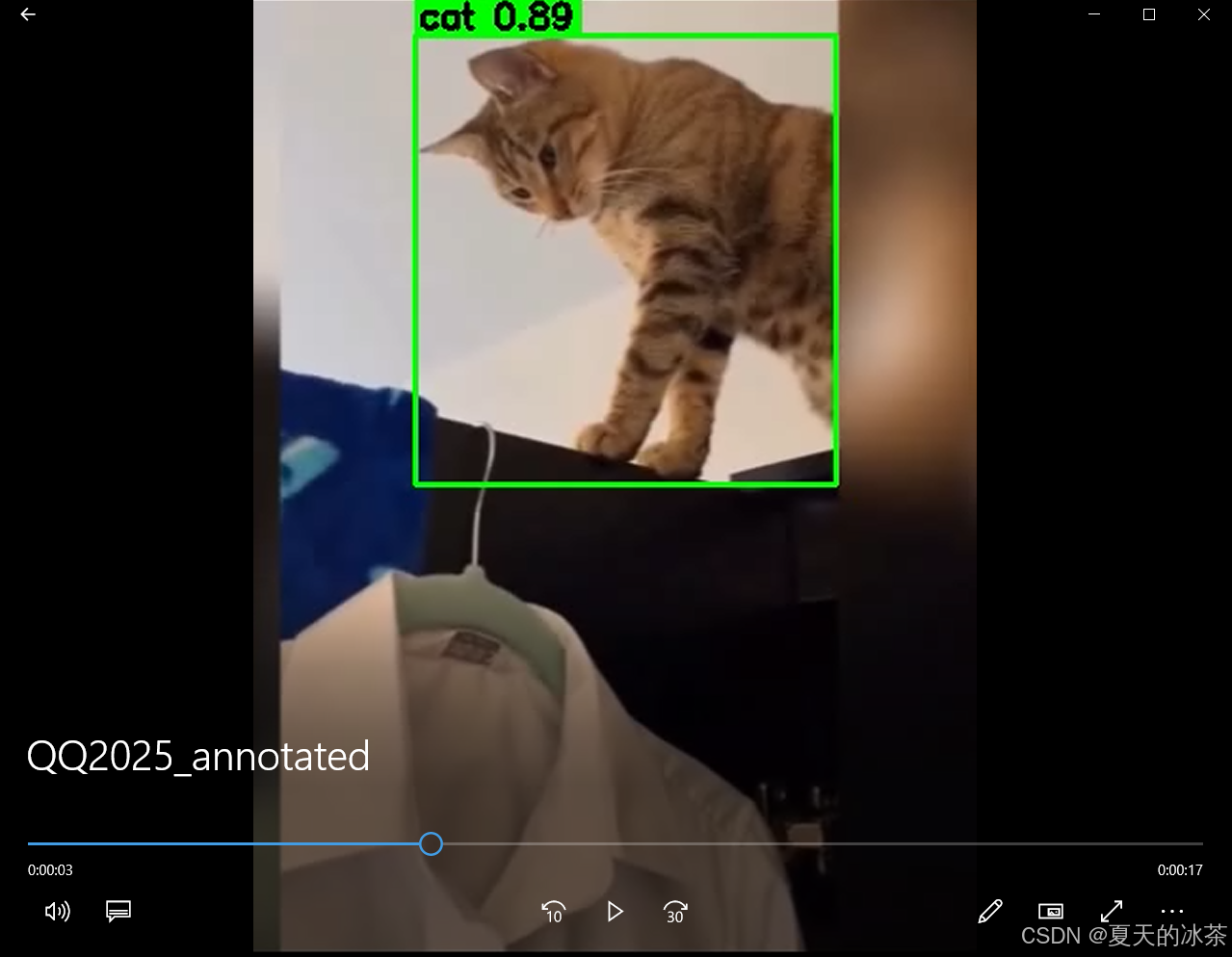
然后让检测平台那边根据这个信息直接绘制在原视频上面,下面是一个示例的脚本:
import cv2
import json

# 配置路径
VIDEO_PATH = r"C:\Users\ASUS\Desktop\QQ2025.mp4"
JSON_PATH = "video_respone.json"
OUTPUT_PATH = "QQ2025_annotated.mp4"

# 读取检测 JSON
with open(JSON_PATH, "r", encoding="utf-8") as f:
    result = json.load(f)

frame_detections = result.get("frame_detections", [])

# 建立 frame_index -> detections 的映射
frame_map = {
    item["frame_index"]: item["detections"]
    for item in frame_detections
}


# 打开视频
cap = cv2.VideoCapture(VIDEO_PATH)
if not cap.isOpened():
    raise RuntimeError(f"Cannot open video: {VIDEO_PATH}")

fps = cap.get(cv2.CAP_PROP_FPS)
width = int(cap.get(cv2.CAP_PROP_FRAME_WIDTH))
height = int(cap.get(cv2.CAP_PROP_FRAME_HEIGHT))
total_frames = int(cap.get(cv2.CAP_PROP_FRAME_COUNT))

print(f"[INFO] Video info: {width}x{height}, fps={fps}, frames={total_frames}")

# 创建输出视频
fourcc = cv2.VideoWriter_fourcc(*"mp4v")
writer = cv2.VideoWriter(
    OUTPUT_PATH,
    fourcc,
    fps,
    (width, height)
)

# 逐帧处理
frame_idx = 0

while True:
    ret, frame = cap.read()
    if not ret:
        break

    # 如果该帧有检测结果
    if frame_idx in frame_map:
        detections = frame_map[frame_idx]

        for det in detections:
            bbox = det["bbox"]
            cls_name = det["class_name"]
            conf = det["confidence"]

            x1 = bbox["x_min"]
            y1 = bbox["y_min"]
            x2 = bbox["x_max"]
            y2 = bbox["y_max"]

            # 画检测框
            cv2.rectangle(
                frame,
                (x1, y1),
                (x2, y2),
                (0, 255, 0),
                2
            )

            # 标签文本
            label = f"{cls_name} {conf:.2f}"

            # 文本背景
            (tw, th), _ = cv2.getTextSize(
                label,
                cv2.FONT_HERSHEY_SIMPLEX,
                0.6,
                2
            )
            cv2.rectangle(
                frame,
                (x1, y1 - th - 6),
                (x1 + tw + 4, y1),
                (0, 255, 0),
                -1
            )

            # 文本
            cv2.putText(
                frame,
                label,
                (x1 + 2, y1 - 4),
                cv2.FONT_HERSHEY_SIMPLEX,
                0.6,
                (0, 0, 0),
                2
            )

    writer.write(frame)
    frame_idx += 1

# 释放资源
cap.release()
writer.release()

print(f"Output saved to: {OUTPUT_PATH}")
如下为视频抽帧后检测结果的后处理截图:
总结
这部分对于工业巡检这类对实时性和稳定性要求较高的应用场景来说,这是一种非常实用且易于落地的技术方案。

有“AI”的1024 = 2048,欢迎大家加入2048 AI社区
更多推荐

 25
25 0
0- 0


 已为社区贡献7条内容

所有评论(0)