在 Windows + Python 3.12 虚拟环境中源码编译 Detectron2 全流程记录
本文详细记录了在Windows 11环境下,使用Python 3.12虚拟环境源码编译Detectron2的全过程。主要内容包括:创建虚拟环境、安装匹配的PyTorch CUDA版本、解决NumPy 2.x的ABI兼容问题、修改setup.py跳过CUDA版本校验、最终完成源码编译并验证安装成功。该流程解决了Windows平台下Detectron2安装的常见问题,特别是针对Python 3.12新
在 Windows + Python 3.12 虚拟环境中源码编译 Detectron2 全流程记录
日期:2025-11-28
关键词:Detectron2、Windows、Python 3.12、CUDA、源码编译、虚拟环境、NumPy、PyTorch
一、背景
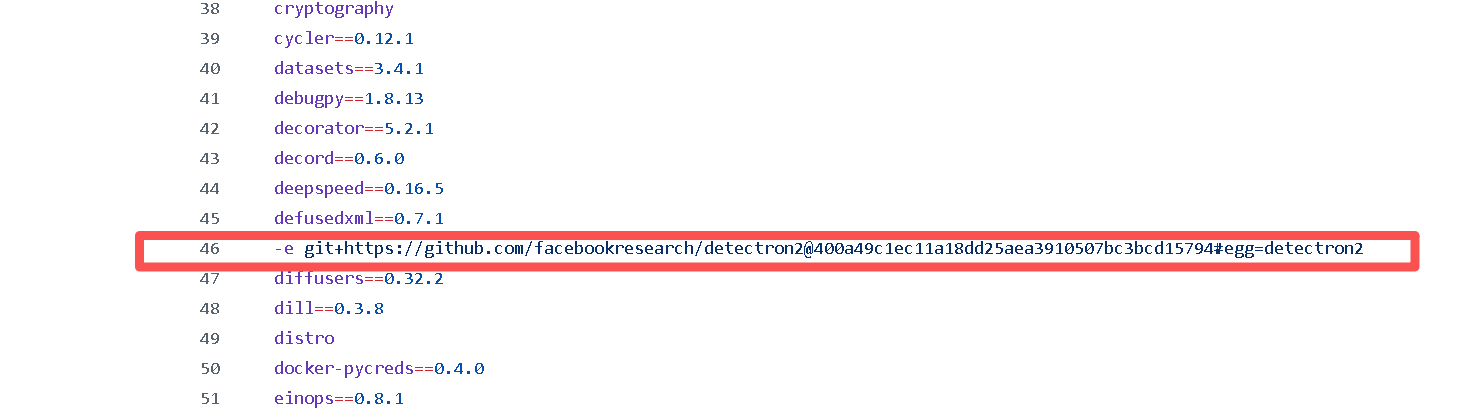
MagicTryOn:利用扩散变压器实现服装保存视频虚拟试穿 项目依赖包含 Detectron2,直接安装大概率会失败;
且 Detectron2 官方并未提供 Python 3.12 的预编译 wheel,网上只能找到 python3.10 版本的1个.whl,不适用于本环境;
Detectron2 对 Windows 支持有限。
本文完整记录如何在 Windows 10/11 上,于 Python 3.12 venv 中源码编译 Detectron2,并解决常见依赖冲突、CUDA 版本不匹配、NumPy 2.x ABI 等问题,最终通过验证,使其他依赖的安装得以继续。
二、环境一览
组件 版本
OS Windows 11 26H1
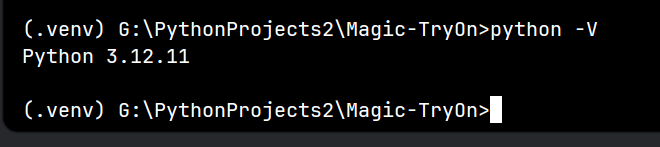
Python 3.12.0(venv)
PyTorch 2.2.0+cu121
Windows 系统级安装 CUDA Runtime 13.0(Toolkit)
编译器 Visual Studio Build Tools 2022 (MSVC v143)
NumPy 1.26.4(降级后)
三、步骤总览
- 创建并激活虚拟环境
- 安装 PyTorch(CUDA 12.1 版 或其他版本)
- 降级 NumPy 到 1.x
- 克隆 detectron2 源码
- 修改
setup.py跳过 CUDA 版本校验 - 源码编译 & 安装
- 验证安装结果
四、详细操作
1. 创建虚拟环境
# 在工程根目录
python -m venv .venv
.venv\Scripts\activate
# 后续所有命令均在虚拟环境中执行
2. 安装 PyTorch(本次项目演示用的是 CUDA 12.1)

pip install torch==2.2.0 torchvision==0.17.0 torchaudio==2.2.0 --index-url https://download.pytorch.org/whl/cu121
该版本会安装以下依赖库版本:
Installing collected packages: mpmath, sympy, pillow, numpy, networkx, fsspec, torch, torchvision, torchaudio
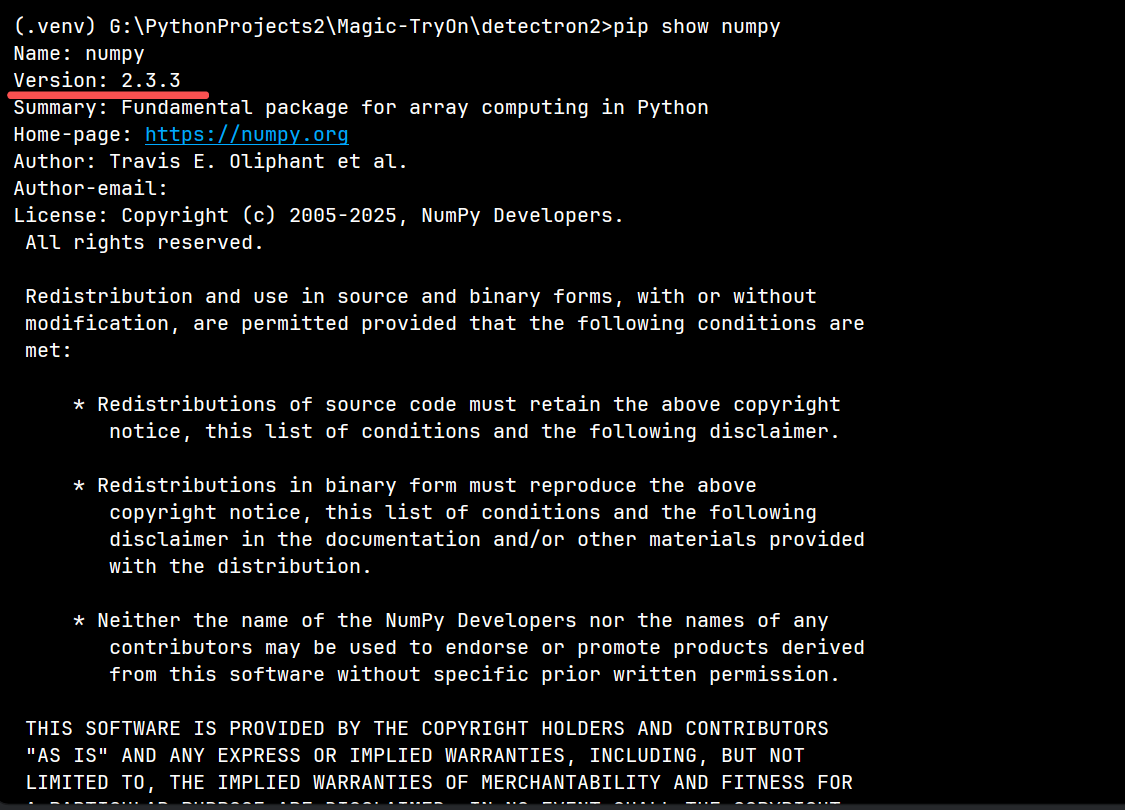
Successfully installed fsspec-2025.9.0 mpmath-1.3.0 networkx-3.5 numpy-2.3.3 pillow-11.3.0 sympy-1.14.0 torch-2.2.0+cu121 torchaudio-2.2.0+cu121 torchvision-0.17.0+cu121

验证:
可能会因为 torch 安装时的 numpy 版本过高而产生 ABI 警告
python -c "import torch, torchvision; print(torch.__version__, torch.cuda.is_available())"
# 期望输出:2.2.0+cu121 True

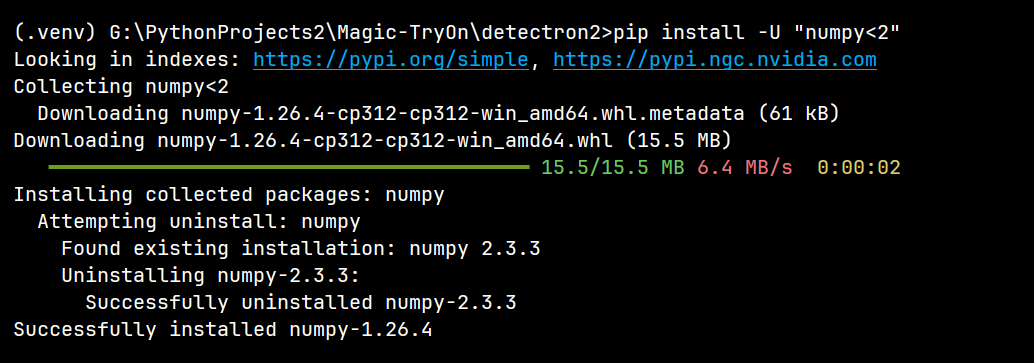
3. 降级 NumPy(解决 ABI 警告)
pip uninstall -y numpy
pip install "numpy<2"   # 1.26.4
# 或者更直接简单地安全降级
pip install -U "numpy<2"   # 1.26.4
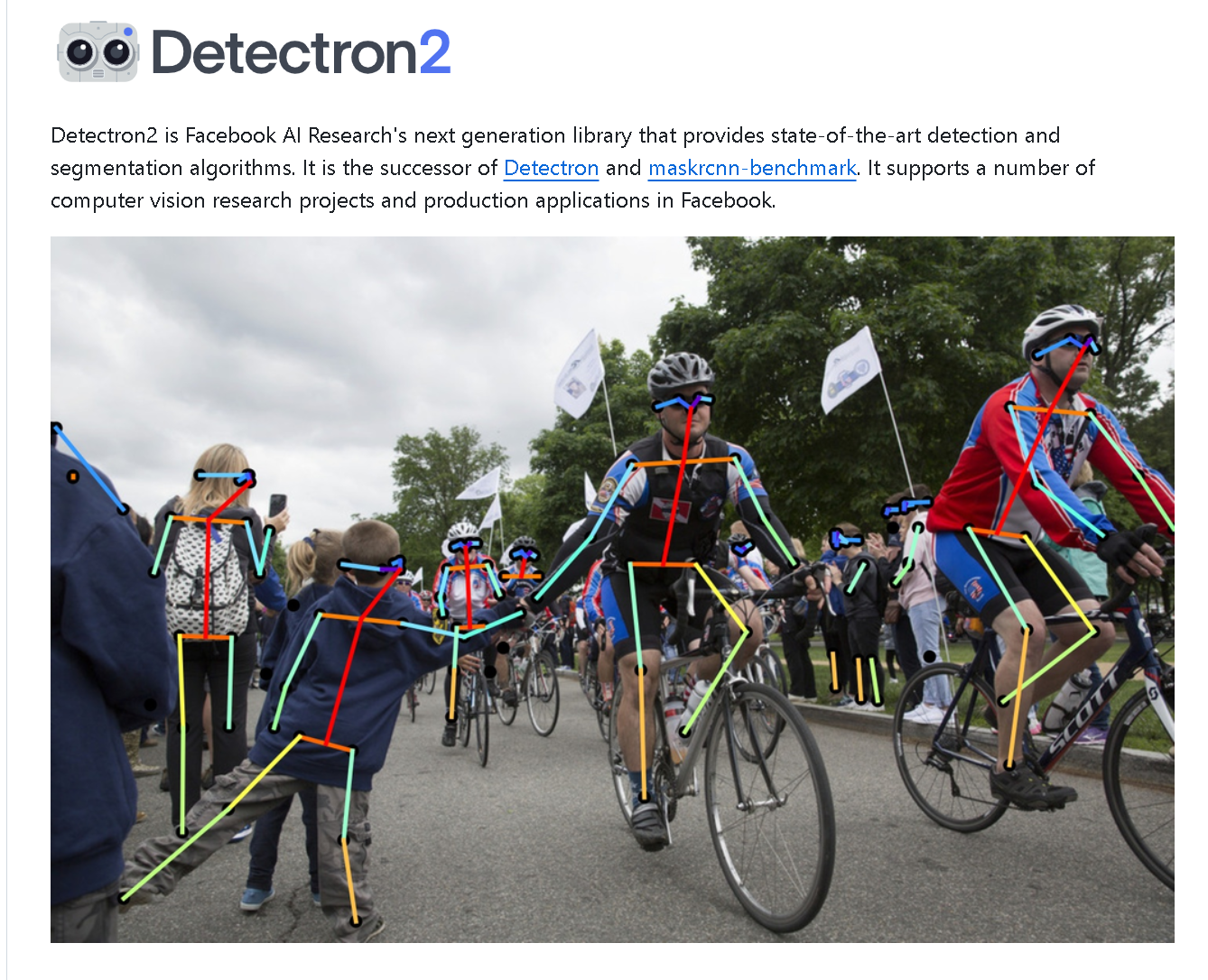
4. 克隆源码
# 克隆 Detectron2 仓库到项目目录下
git clone https://github.com/facebookresearch/detectron2.git

# 进入 Detectron2 目录 准备修改 setup.py 文件后再进行编译
cd detectron2
5. 修改 setup.py 跳过 CUDA 版本校验
修改前请先备份!
在文件 最底部、setup() 调用前加入:
# ============== 强制跳过 CUDA 版本校验 =================
import torch.utils.cpp_extension as _cpp_ext
_check_cuda_version_orig = getattr(_cpp_ext, "_check_cuda_version", None)
def _no_check_cuda_version(compiler_name, compiler_version):
    pass
_cpp_ext._check_cuda_version = _no_check_cuda_version
# ========================================================
并把 cmdclass 行改为:
cmdclass={"build_ext": _cpp_ext.BuildExtension},
保存即可。
下面是一份「开箱即用」的完整 setup.py :
在文件末尾、真正调用 setup() 之前,把 PyTorch 的 _check_cuda_version
校验函数整体替换为空函数,从而强制跳过“系统 CUDA 版本必须与编译 PyTorch 时的 CUDA 版本一致” 的检查。
其余逻辑(宏定义、编译 flag、扩展模块列表等)保持原样,可直接覆盖原文件使用。
#!/usr/bin/env python
# Copyright (c) Facebook, Inc. and its affiliates.

import glob
import os
import shutil
from os import path
from setuptools import find_packages, setup
from typing import List
import torch
from torch.utils.cpp_extension import CUDA_HOME, CppExtension, CUDAExtension

torch_ver = [int(x) for x in torch.__version__.split(".")[:2]]
assert torch_ver >= [1, 8], "Requires PyTorch >= 1.8"


def get_version():
    init_py_path = path.join(path.abspath(path.dirname(__file__)), "detectron2", "__init__.py")
    init_py = open(init_py_path, "r").readlines()
    version_line = [l.strip() for l in init_py if l.startswith("__version__")][0]
    version = version_line.split("=")[-1].strip().strip("'\"")

    # The following is used to build release packages.
    # Users should never use it.
    suffix = os.getenv("D2_VERSION_SUFFIX", "")
    version = version + suffix
    if os.getenv("BUILD_NIGHTLY", "0") == "1":
        from datetime import datetime

        date_str = datetime.today().strftime("%y%m%d")
        version = version + ".dev" + date_str

        new_init_py = [l for l in init_py if not l.startswith("__version__")]
        new_init_py.append('__version__ = "{}"\n'.format(version))
        with open(init_py_path, "w") as f:
            f.write("".join(new_init_py))
    return version


def get_extensions():
    this_dir = path.dirname(path.abspath(__file__))
    extensions_dir = path.join(this_dir, "detectron2", "layers", "csrc")

    main_source = path.join(extensions_dir, "vision.cpp")
    sources = glob.glob(path.join(extensions_dir, "**", "*.cpp"))

    from torch.utils.cpp_extension import ROCM_HOME

    is_rocm_pytorch = (
        True if ((torch.version.hip is not None) and (ROCM_HOME is not None)) else False
    )
    if is_rocm_pytorch:
        assert torch_ver >= [1, 8], "ROCM support requires PyTorch >= 1.8!"

    # common code between cuda and rocm platforms, for hipify version [1,0,0] and later.
    source_cuda = glob.glob(path.join(extensions_dir, "**", "*.cu")) + glob.glob(
        path.join(extensions_dir, "*.cu")
    )
    sources = [main_source] + sources

    extension = CppExtension

    extra_compile_args = {"cxx": []}
    define_macros = []

    if (torch.cuda.is_available() and ((CUDA_HOME is not None) or is_rocm_pytorch)) or os.getenv(
        "FORCE_CUDA", "0"
    ) == "1":
        extension = CUDAExtension
        sources += source_cuda

        if not is_rocm_pytorch:
            define_macros += [("WITH_CUDA", None)]
            extra_compile_args["nvcc"] = [
                "-O3",
                "-DCUDA_HAS_FP16=1",
                "-D__CUDA_NO_HALF_OPERATORS__",
                "-D__CUDA_NO_HALF_CONVERSIONS__",
                "-D__CUDA_NO_HALF2_OPERATORS__",
            ]
        else:
            define_macros += [("WITH_HIP", None)]
            extra_compile_args["nvcc"] = []

        nvcc_flags_env = os.getenv("NVCC_FLAGS", "")
        if nvcc_flags_env != "":
            extra_compile_args["nvcc"].extend(nvcc_flags_env.split(" "))

        if torch_ver < [1, 7]:
            # supported by https://github.com/pytorch/pytorch/pull/43931
            CC = os.environ.get("CC", None)
            if CC is not None:
                extra_compile_args["nvcc"].append("-ccbin={}".format(CC))

    include_dirs = [extensions_dir]

    ext_modules = [
        extension(
            "detectron2._C",
            sources,
            include_dirs=include_dirs,
            define_macros=define_macros,
            extra_compile_args=extra_compile_args,
        )
    ]

    return ext_modules


def get_model_zoo_configs() -> List[str]:
    """
    Return a list of configs to include in package for model zoo. Copy over these configs inside
    detectron2/model_zoo.
    """

    # Use absolute paths while symlinking.
    source_configs_dir = path.join(path.dirname(path.realpath(__file__)), "configs")
    destination = path.join(
        path.dirname(path.realpath(__file__)), "detectron2", "model_zoo", "configs"
    )
    # Symlink the config directory inside package to have a cleaner pip install.

    # Remove stale symlink/directory from a previous build.
    if path.exists(source_configs_dir):
        if path.islink(destination):
            os.unlink(destination)
        elif path.isdir(destination):
            shutil.rmtree(destination)

    if not path.exists(destination):
        try:
            os.symlink(source_configs_dir, destination)
        except OSError:
            # Fall back to copying if symlink fails: ex. on Windows.
            shutil.copytree(source_configs_dir, destination)

    config_paths = glob.glob("configs/**/*.yaml", recursive=True) + glob.glob(
        "configs/**/*.py", recursive=True
    )
    return config_paths


# For projects that are relative small and provide features that are very close
# to detectron2's core functionalities, we install them under detectron2.projects
PROJECTS = {
    "detectron2.projects.point_rend": "projects/PointRend/point_rend",
    "detectron2.projects.deeplab": "projects/DeepLab/deeplab",
    "detectron2.projects.panoptic_deeplab": "projects/Panoptic-DeepLab/panoptic_deeplab",
}

# ====================== 强制跳过 CUDA 版本校验 ======================
import torch.utils.cpp_extension as _cpp_ext
# 保存原函数(可选,调试用)
_check_cuda_version_orig = getattr(_cpp_ext, "_check_cuda_version", None)
def _no_check_cuda_version(compiler_name, compiler_version):
    """直接放行,不做 CUDA 版本比对"""
    pass
# 把校验函数替换掉
_cpp_ext._check_cuda_version = _no_check_cuda_version
# =================================================================

setup(
    name="detectron2",
    version=get_version(),
    author="FAIR",
    url="https://github.com/facebookresearch/detectron2",
    description="Detectron2 is FAIR's next-generation research platform for object detection and segmentation.",
    packages=find_packages(exclude=("configs", "tests*")) + list(PROJECTS.keys()),
    package_dir=PROJECTS,
    package_data={"detectron2.model_zoo": get_model_zoo_configs()},
    python_requires=">=3.7",
    install_requires=[
        "Pillow>=7.1",
        "matplotlib",
        "pycocotools>=2.0.2",
        "termcolor>=1.1",
        "yacs>=0.1.8",
        "tabulate",
        "cloudpickle",
        "tqdm>4.29.0",
        "tensorboard",
        "fvcore>=0.1.5,<0.1.6",
        "iopath>=0.1.7,<0.1.10",
        "dataclasses; python_version<'3.7'",
        "omegaconf>=2.1,<2.4",
        "hydra-core>=1.1",
        "black",
        "packaging",
    ],
    extras_require={
        "all": [
            "fairscale",
            "timm",
            "scipy>1.5.1",
            "shapely",
            "pygments>=2.2",
            "psutil",
            "panopticapi @ https://github.com/cocodataset/panopticapi/archive/master.zip",
        ],
        "dev": [
            "flake8==3.8.1",
            "isort==4.3.21",
            "flake8-bugbear",
            "flake8-comprehensions",
            "black==22.3.0",
        ],
    },
    ext_modules=get_extensions(),
    cmdclass={"build_ext": _cpp_ext.BuildExtension},  # 使用已被 patch 的模块
)
6. 编译安装
set DISTUTILS_USE_SDK=1          # Windows
pip install -e . --no-build-isolation
参数说明:DISTUTILS_USE_SDK 并不是「编译必过」的开关,而是「当机器上装有多套 MSVC 时,告诉 distutils 到底用哪一套」的辅助变量。
你的环境里只有 一套 VS Build Tools 2022,且安装器已经把它写进了系统 PATH / 注册表,所以 distutils 自己能找到,于是:
- 不设
DISTUTILS_USE_SDK→ 也能编译 - 设了 → 只是显式指定,结果一样
典型需要手动设置的场景:
- 同时装了 VS2019 + VS2022,想强制用 2022
- 只在
cmd里临时开了 “x64 Native Tools Command Prompt” 的环境,但后来又切回普通终端 - 用
conda的vs2019_win-64包,与系统 VS 冲突
因此——只要 where cl 能打印出路径,且版本 ≥19.28(VS2019 16.8+),就可以省略这行;设了也只是多一重保险。
--no-build-isolation 是 PEP 517 引入的 构建隔离 开关,把它关掉(设成 no)后,pip 会:
- 不再为项目单独创建临时虚拟环境
- 不再单独安装「构建时依赖」(pyproject.toml 里
[build-system]段的requires = [...]) - 直接复用当前解释器及其已装好的包(torch、numpy、setuptools、wheel…)
对 detectron2 这种「编译阶段就要 import torch」的 C++ 扩展项目,好处很明显:
- 编译脚本
setup.py里会import torch拿头文件路径、ABI 标志 - 如果让 pip 隔离构建,它会在一个干净临时环境里重新装一份 torch,经常与你手动装的 CUDA 版本不一致,导致编译或运行时符号冲突
- 关掉隔离后,setup.py 直接用的是你现在这台环境的 torch,版本、CUDA、NumPy 全部对齐,少走弯路
副作用/注意点:
- 你必须提前手动装好所有构建依赖(torch、numpy、setuptools、wheel、pybind11…),否则构建阶段直接报错
- 如果系统里有多套编译器,仍需自己保证
cl.exe能被找到(where cl有输出) - 隔离关闭后,build 目录会留在本地(
build/、*.egg-info),方便调试;pip uninstall时也能正常清掉
一句话总结:
「不想让编译程序另起炉灶,就用我现成的环境」 —— 这对需要大量原生扩展、且依赖当前解释器里特定版本二进制库的项目(detectron2、detectron2-3d、fairseq、apex 等)尤其有用。
成功标志:
Successfully built detectron2
Installing collected packages: detectron2
Successfully installed detectron2-0.6
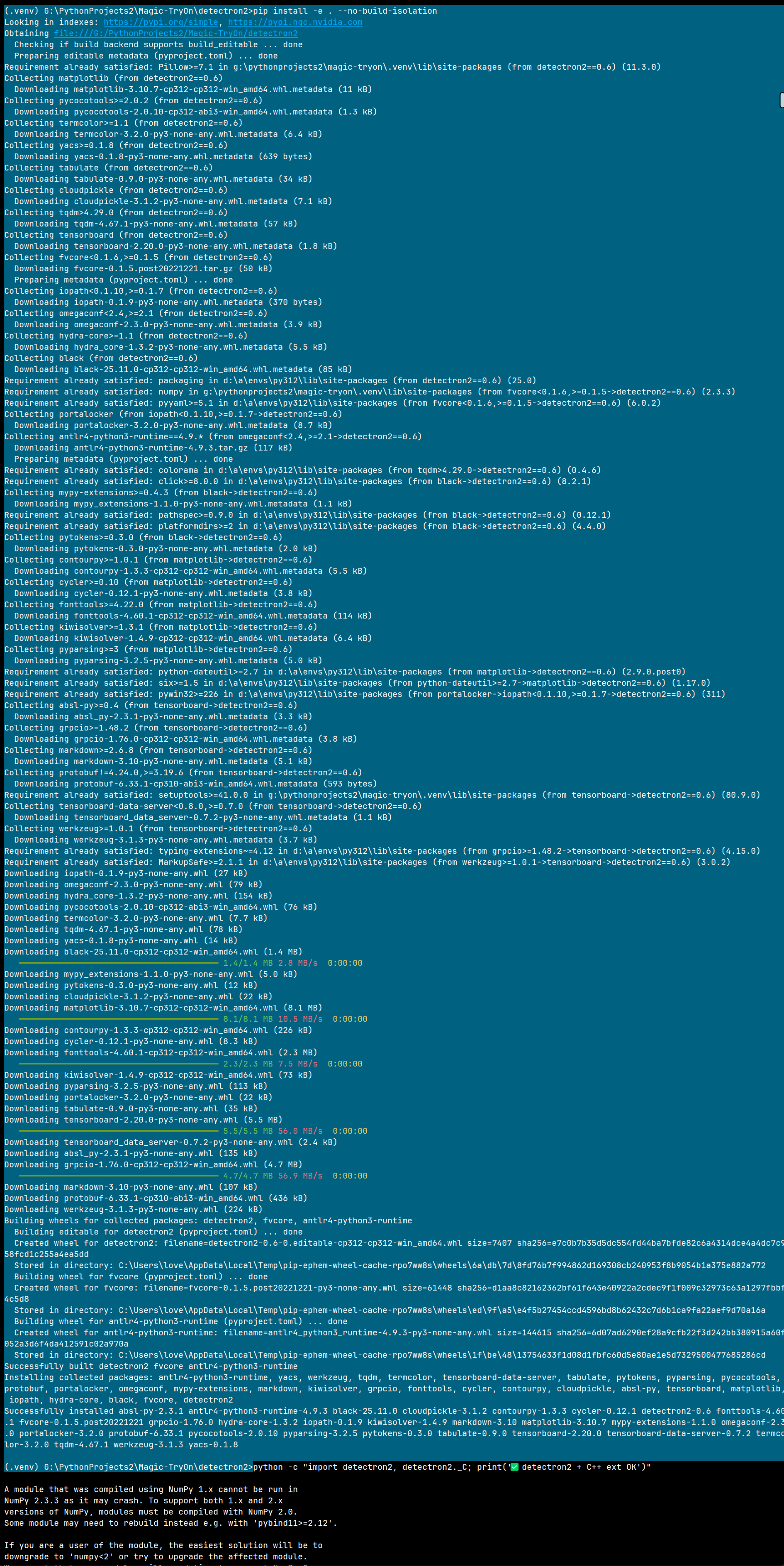
附完整的编译安装成功日志谨供参考:
(.venv) G:\PythonProjects2\Magic-TryOn\detectron2>pip install -e . --no-build-isolation
Looking in indexes: https://pypi.org/simple, https://pypi.ngc.nvidia.com
Obtaining file:///G:/PythonProjects2/Magic-TryOn/detectron2
  Checking if build backend supports build_editable ... done
  Preparing editable metadata (pyproject.toml) ... done
Requirement already satisfied: Pillow>=7.1 in g:\pythonprojects2\magic-tryon\.venv\lib\site-packages (from detectron2==0.6) (11.3.0)
Collecting matplotlib (from detectron2==0.6)
  Downloading matplotlib-3.10.7-cp312-cp312-win_amd64.whl.metadata (11 kB)
Collecting pycocotools>=2.0.2 (from detectron2==0.6)
  Downloading pycocotools-2.0.10-cp312-abi3-win_amd64.whl.metadata (1.3 kB)
Collecting termcolor>=1.1 (from detectron2==0.6)
  Downloading termcolor-3.2.0-py3-none-any.whl.metadata (6.4 kB)
Collecting yacs>=0.1.8 (from detectron2==0.6)
  Downloading yacs-0.1.8-py3-none-any.whl.metadata (639 bytes)
Collecting tabulate (from detectron2==0.6)
  Downloading tabulate-0.9.0-py3-none-any.whl.metadata (34 kB)
Collecting cloudpickle (from detectron2==0.6)
  Downloading cloudpickle-3.1.2-py3-none-any.whl.metadata (7.1 kB)
Collecting tqdm>4.29.0 (from detectron2==0.6)
  Downloading tqdm-4.67.1-py3-none-any.whl.metadata (57 kB)
Collecting tensorboard (from detectron2==0.6)
  Downloading tensorboard-2.20.0-py3-none-any.whl.metadata (1.8 kB)
Collecting fvcore<0.1.6,>=0.1.5 (from detectron2==0.6)
  Downloading fvcore-0.1.5.post20221221.tar.gz (50 kB)
  Preparing metadata (pyproject.toml) ... done
Collecting iopath<0.1.10,>=0.1.7 (from detectron2==0.6)
  Downloading iopath-0.1.9-py3-none-any.whl.metadata (370 bytes)
Collecting omegaconf<2.4,>=2.1 (from detectron2==0.6)
  Downloading omegaconf-2.3.0-py3-none-any.whl.metadata (3.9 kB)
Collecting hydra-core>=1.1 (from detectron2==0.6)
  Downloading hydra_core-1.3.2-py3-none-any.whl.metadata (5.5 kB)
Collecting black (from detectron2==0.6)
  Downloading black-25.11.0-cp312-cp312-win_amd64.whl.metadata (85 kB)
Requirement already satisfied: packaging in d:\a\envs\py312\lib\site-packages (from detectron2==0.6) (25.0)
Requirement already satisfied: numpy in g:\pythonprojects2\magic-tryon\.venv\lib\site-packages (from fvcore<0.1.6,>=0.1.5->detectron2==0.6) (2.3.3)
Requirement already satisfied: pyyaml>=5.1 in d:\a\envs\py312\lib\site-packages (from fvcore<0.1.6,>=0.1.5->detectron2==0.6) (6.0.2)
Collecting portalocker (from iopath<0.1.10,>=0.1.7->detectron2==0.6)
  Downloading portalocker-3.2.0-py3-none-any.whl.metadata (8.7 kB)
Collecting antlr4-python3-runtime==4.9.* (from omegaconf<2.4,>=2.1->detectron2==0.6)
  Downloading antlr4-python3-runtime-4.9.3.tar.gz (117 kB)
  Preparing metadata (pyproject.toml) ... done
Requirement already satisfied: colorama in d:\a\envs\py312\lib\site-packages (from tqdm>4.29.0->detectron2==0.6) (0.4.6)
Requirement already satisfied: click>=8.0.0 in d:\a\envs\py312\lib\site-packages (from black->detectron2==0.6) (8.2.1)
Collecting mypy-extensions>=0.4.3 (from black->detectron2==0.6)
  Downloading mypy_extensions-1.1.0-py3-none-any.whl.metadata (1.1 kB)
Requirement already satisfied: pathspec>=0.9.0 in d:\a\envs\py312\lib\site-packages (from black->detectron2==0.6) (0.12.1)
Requirement already satisfied: platformdirs>=2 in d:\a\envs\py312\lib\site-packages (from black->detectron2==0.6) (4.4.0)
Collecting pytokens>=0.3.0 (from black->detectron2==0.6)
  Downloading pytokens-0.3.0-py3-none-any.whl.metadata (2.0 kB)
Collecting contourpy>=1.0.1 (from matplotlib->detectron2==0.6)
  Downloading contourpy-1.3.3-cp312-cp312-win_amd64.whl.metadata (5.5 kB)
Collecting cycler>=0.10 (from matplotlib->detectron2==0.6)
  Downloading cycler-0.12.1-py3-none-any.whl.metadata (3.8 kB)
Collecting fonttools>=4.22.0 (from matplotlib->detectron2==0.6)
  Downloading fonttools-4.60.1-cp312-cp312-win_amd64.whl.metadata (114 kB)
Collecting kiwisolver>=1.3.1 (from matplotlib->detectron2==0.6)
  Downloading kiwisolver-1.4.9-cp312-cp312-win_amd64.whl.metadata (6.4 kB)
Collecting pyparsing>=3 (from matplotlib->detectron2==0.6)
  Downloading pyparsing-3.2.5-py3-none-any.whl.metadata (5.0 kB)
Requirement already satisfied: python-dateutil>=2.7 in d:\a\envs\py312\lib\site-packages (from matplotlib->detectron2==0.6) (2.9.0.post0)
Requirement already satisfied: six>=1.5 in d:\a\envs\py312\lib\site-packages (from python-dateutil>=2.7->matplotlib->detectron2==0.6) (1.17.0)
Requirement already satisfied: pywin32>=226 in d:\a\envs\py312\lib\site-packages (from portalocker->iopath<0.1.10,>=0.1.7->detectron2==0.6) (311)
Collecting absl-py>=0.4 (from tensorboard->detectron2==0.6)
  Downloading absl_py-2.3.1-py3-none-any.whl.metadata (3.3 kB)
Collecting grpcio>=1.48.2 (from tensorboard->detectron2==0.6)
  Downloading grpcio-1.76.0-cp312-cp312-win_amd64.whl.metadata (3.8 kB)
Collecting markdown>=2.6.8 (from tensorboard->detectron2==0.6)
  Downloading markdown-3.10-py3-none-any.whl.metadata (5.1 kB)
Collecting protobuf!=4.24.0,>=3.19.6 (from tensorboard->detectron2==0.6)
  Downloading protobuf-6.33.1-cp310-abi3-win_amd64.whl.metadata (593 bytes)
Requirement already satisfied: setuptools>=41.0.0 in g:\pythonprojects2\magic-tryon\.venv\lib\site-packages (from tensorboard->detectron2==0.6) (80.9.0)
Collecting tensorboard-data-server<0.8.0,>=0.7.0 (from tensorboard->detectron2==0.6)
  Downloading tensorboard_data_server-0.7.2-py3-none-any.whl.metadata (1.1 kB)
Collecting werkzeug>=1.0.1 (from tensorboard->detectron2==0.6)
  Downloading werkzeug-3.1.3-py3-none-any.whl.metadata (3.7 kB)
Requirement already satisfied: typing-extensions~=4.12 in d:\a\envs\py312\lib\site-packages (from grpcio>=1.48.2->tensorboard->detectron2==0.6) (4.15.0)
Requirement already satisfied: MarkupSafe>=2.1.1 in d:\a\envs\py312\lib\site-packages (from werkzeug>=1.0.1->tensorboard->detectron2==0.6) (3.0.2)
Downloading iopath-0.1.9-py3-none-any.whl (27 kB)
Downloading omegaconf-2.3.0-py3-none-any.whl (79 kB)
Downloading hydra_core-1.3.2-py3-none-any.whl (154 kB)
Downloading pycocotools-2.0.10-cp312-abi3-win_amd64.whl (76 kB)
Downloading termcolor-3.2.0-py3-none-any.whl (7.7 kB)
Downloading tqdm-4.67.1-py3-none-any.whl (78 kB)
Downloading yacs-0.1.8-py3-none-any.whl (14 kB)
Downloading black-25.11.0-cp312-cp312-win_amd64.whl (1.4 MB)
   ━━━━━━━━━━━━━━━━━━━━━━━━━━━━━━━━━━━━━━━━ 1.4/1.4 MB 2.8 MB/s  0:00:00
Downloading mypy_extensions-1.1.0-py3-none-any.whl (5.0 kB)
Downloading pytokens-0.3.0-py3-none-any.whl (12 kB)
Downloading cloudpickle-3.1.2-py3-none-any.whl (22 kB)
Downloading matplotlib-3.10.7-cp312-cp312-win_amd64.whl (8.1 MB)
   ━━━━━━━━━━━━━━━━━━━━━━━━━━━━━━━━━━━━━━━━ 8.1/8.1 MB 10.5 MB/s  0:00:00
Downloading contourpy-1.3.3-cp312-cp312-win_amd64.whl (226 kB)
Downloading cycler-0.12.1-py3-none-any.whl (8.3 kB)
Downloading fonttools-4.60.1-cp312-cp312-win_amd64.whl (2.3 MB)
   ━━━━━━━━━━━━━━━━━━━━━━━━━━━━━━━━━━━━━━━━ 2.3/2.3 MB 7.5 MB/s  0:00:00
Downloading kiwisolver-1.4.9-cp312-cp312-win_amd64.whl (73 kB)
Downloading pyparsing-3.2.5-py3-none-any.whl (113 kB)
Downloading portalocker-3.2.0-py3-none-any.whl (22 kB)
Downloading tabulate-0.9.0-py3-none-any.whl (35 kB)
Downloading tensorboard-2.20.0-py3-none-any.whl (5.5 MB)
   ━━━━━━━━━━━━━━━━━━━━━━━━━━━━━━━━━━━━━━━━ 5.5/5.5 MB 56.0 MB/s  0:00:00
Downloading tensorboard_data_server-0.7.2-py3-none-any.whl (2.4 kB)
Downloading absl_py-2.3.1-py3-none-any.whl (135 kB)
Downloading grpcio-1.76.0-cp312-cp312-win_amd64.whl (4.7 MB)
   ━━━━━━━━━━━━━━━━━━━━━━━━━━━━━━━━━━━━━━━━ 4.7/4.7 MB 56.9 MB/s  0:00:00
Downloading markdown-3.10-py3-none-any.whl (107 kB)
Downloading protobuf-6.33.1-cp310-abi3-win_amd64.whl (436 kB)
Downloading werkzeug-3.1.3-py3-none-any.whl (224 kB)
Building wheels for collected packages: detectron2, fvcore, antlr4-python3-runtime
  Building editable for detectron2 (pyproject.toml) ... done
  Created wheel for detectron2: filename=detectron2-0.6-0.editable-cp312-cp312-win_amd64.whl size=7407 sha256=e7c0b7b35d5dc554fd44ba7bfde82c6a4314dce4a4dc7c958fcd1c255a4ea5dd
  Stored in directory: C:\Users\love\AppData\Local\Temp\pip-ephem-wheel-cache-rpo7ww8s\wheels\6a\db\7d\8fd76b7f994862d169308cb240953f8b9054b1a375e882a772
  Building wheel for fvcore (pyproject.toml) ... done
  Created wheel for fvcore: filename=fvcore-0.1.5.post20221221-py3-none-any.whl size=61448 sha256=d1aa8c82162362bf61f643e40922a2cdec9f1f009c32973c63a1297fbbf4c5d8
  Stored in directory: C:\Users\love\AppData\Local\Temp\pip-ephem-wheel-cache-rpo7ww8s\wheels\ed\9f\a5\e4f5b27454ccd4596bd8b62432c7d6b1ca9fa22aef9d70a16a
  Building wheel for antlr4-python3-runtime (pyproject.toml) ... done
  Created wheel for antlr4-python3-runtime: filename=antlr4_python3_runtime-4.9.3-py3-none-any.whl size=144615 sha256=6d07ad6290ef28a9cfb22f3d242bb380915a60f052a3d6f4da412591c02a970a
  Stored in directory: C:\Users\love\AppData\Local\Temp\pip-ephem-wheel-cache-rpo7ww8s\wheels\1f\be\48\13754633f1d08d1fbfc60d5e80ae1e5d7329500477685286cd
Successfully built detectron2 fvcore antlr4-python3-runtime
Installing collected packages: antlr4-python3-runtime, yacs, werkzeug, tqdm, termcolor, tensorboard-data-server, tabulate, pytokens, pyparsing, pycocotools, protobuf, portalocker, omegaconf, mypy-extensions, markdown, kiwisolver, grpcio, fonttools, cycler, contourpy, cloudpickle, absl-py, tensorboard, matplotlib, iopath, hydra-core, black, fvcore, detectron2
Successfully installed absl-py-2.3.1 antlr4-python3-runtime-4.9.3 black-25.11.0 cloudpickle-3.1.2 contourpy-1.3.3 cycler-0.12.1 detectron2-0.6 fonttools-4.60.1 fvcore-0.1.5.post20221221 grpcio-1.76.0 hydra-core-1.3.2 iopath-0.1.9 kiwisolver-1.4.9 markdown-3.10 matplotlib-3.10.7 mypy-extensions-1.1.0 omegaconf-2.3.0 portalocker-3.2.0 protobuf-6.33.1 pycocotools-2.0.10 pyparsing-3.2.5 pytokens-0.3.0 tabulate-0.9.0 tensorboard-2.20.0 tensorboard-data-server-0.7.2 termcolor-3.2.0 tqdm-4.67.1 werkzeug-3.1.3 yacs-0.1.8

(.venv) G:\PythonProjects2\Magic-TryOn\detectron2>
7. 验证
python -c "import detectron2, detectron2._C; print('✅ detectron2 + C++ ext OK')"
再验证一次:
python -c "import numpy, torch, detectron2._C; print('NumPy:', numpy.__version__, 'PyTorch:', torch.__version__, '✅ all OK')"
无报错、无 NumPy ABI 警告即为通过。

五、常见问题 & 解决方案
| 现象 | 解决 |
|---|---|
| CUDA 13.0 mismatches PyTorch 12.1 | 修改 setup.py 跳过校验(本文方法) |
NumPy 2.x 导致 _ARRAY_API not found |
降级 numpy<2 |
| 缺少 MSVC | 安装 Visual Studio Build Tools 2022 → 工作负载 “C++ build tools” |
| ImportError: DLL load failed | 确保在同一终端下激活虚拟环境,且 CUDA/bin 在 PATH |
六、30 秒快速跑通 demo
pip install opencv-python
curl -o demo.jpg https://github.com/pytorch/hub/raw/master/images/dog.jpg
python detectron2/projects/PanopticFCNN/predict.py \
  --config-file detectron2/configs/COCO-PanopticSegmentation/panoptic_fpn_R_50_1x.yaml \
  --input demo.jpg \
  --output . \
  MODEL.WEIGHTS detectron2://COCO-PanopticSegmentation/panoptic_fpn_R_50_1x/139514544/model_final_dbfeb4.pkl
输出 demo_panoptic.png 即表示全流程成功。
七、结语
至此,我们完成了:
- Windows + Python 3.12 源码编译 Detectron2
- 绕过 CUDA 版本硬校验
- 解决 NumPy 2.x ABI 冲突
- 通过官方 panoptic demo 验证
你可以在此基础上训练自己的检测/分割模型,或把这份经验迁移到其它 PyTorch C++ 扩展项目。祝使用愉快!
其他参考资料
本文由 AITechLab 针对「Detectron2 Windows 编译踩坑记录」实践整理而成,欢迎转载,转载请注明出处。

有“AI”的1024 = 2048,欢迎大家加入2048 AI社区
更多推荐

 30
30 0
0- 0


 已为社区贡献53条内容

所有评论(0)