centos7下安装mysql5.7数据库
转:https://blog.csdn.net/WYA1993/article/details/88890883
1.下载MySQL安装
[root@localhost data]# wget https://dev.mysql.com/get/mysql57-community-release-el7-11.noarch.rpm
如果提示wget命令不存在,先执行:yum -y install wget
下载完成后多了一个mysql57-xxx的文件,这个就是mysql安装源
2.安装mysql安装源
[root@localhost data]# yum -y localinstall mysql57-community-release-el7-11.noarch.rpm
3.在线安装MySQL
[root@localhost data]# yum -y install mysql-community-server
下载的东西有点多,需要等待一会
安装mysql数据库 , 遇到这个问题可以看下图:
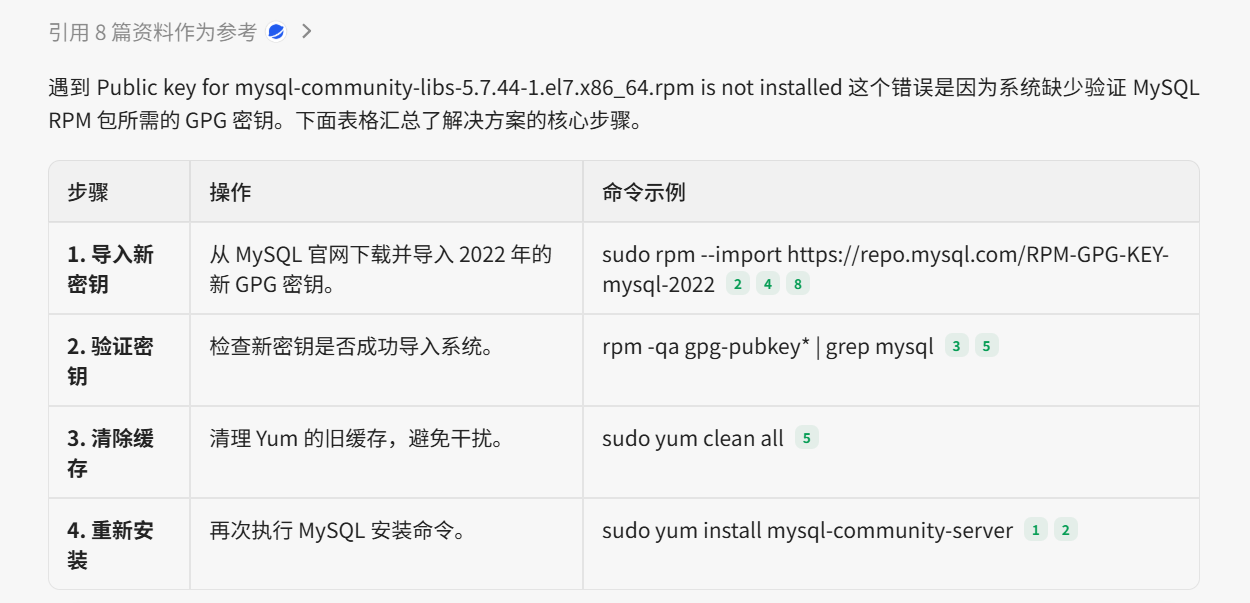
4.启动MySQL服务
[root@localhost data]# systemctl start mysqld
查看服务状态
[root@localhost data]# sudo service mysqld status
查看数据库日志:sudo tail -f /var/log/mysqld.log
5.设置开机启动
[root@localhost data]# sudo systemctl enable mysqld
[root@localhost data]# sudo systemctl daemon-reload
6.修改root登录密码
mysql安装完成之后,会在/var/log/mysqld.log文件中给root生成了一个临时的默认密码。
[root@localhost data]# vim /var/log/mysqld.log

复制此密码,使用此密码登录root
[root@localhost data]# mysql -u root -p
Enter password:
Welcome to the MySQL monitor.  Commands end with ; or \g.
Your MySQL connection id is 2
Server version: 5.7.25

Copyright (c) 2000, 2019, Oracle and/or its affiliates. All rights reserved.

Oracle is a registered trademark of Oracle Corporation and/or its
affiliates. Other names may be trademarks of their respective
owners.

Type 'help;' or '\h' for help. Type '\c' to clear the current input statement.

mysql>
修改密码, mysql5.7默认密码策略要求密码必须是大小写字母数字特殊字母的组合,至少8位

mysql> ALTER USER 'root'@'localhost' IDENTIFIED BY 'Test2016@';
Query OK, 0 rows affected (0.01 sec)
7.设置允许远程登录
mysql> GRANT ALL PRIVILEGES ON *.* TO 'root'@'%' IDENTIFIED BY 'Test2016@' WITH GRANT OPTION;
Query OK, 0 rows affected, 1 warning (0.00 sec)
配置立即生效:
mysql> FLUSH PRIVILEGES;
Query OK, 0 rows affected, 1 warning (0.00 sec)
第七步,退出
mysql> exit
Bye
8.,防火墙开放3306端口
在这之前您需要,查看防火墙状态,保证防火墙是开启状态
sudo systemctl status firewalld
开启防火墙
sudo systemctl start firewalld
[root@localhost data]# firewall-cmd --zone=public --add-port=3306/tcp --permanent
success
让防火墙重新加载-生效
[root@localhost data]# firewall-cmd --reload
success
[root@localhost data]#
9.配置mysql默认编码为utf-8
修改/etc/my.cnf配置文件,在[mysqld]下添加编码配置
character_set_server=utf8
init_connect='SET NAMES utf8'
:wq!保存退出
10.重启MySQL
[root@localhost data]# systemctl restart mysqld
11.登录root用户查看编码
命令:show variables like '%character%';

12.测试远程连接


有“AI”的1024 = 2048,欢迎大家加入2048 AI社区
更多推荐

 0
0 0
0- 0


 已为社区贡献1条内容

所有评论(0)