langchain1.0工具模块tools的基本使用
langchain在10月20号发布了1.0版本,与旧版本相比做了不小的改动,涉及到很多api的迁移,也有新增的模块,不过本质上都是为了简化agent的开发,学习langchain智能体的话,直觉上可能tools是最容易上手的,毕竟智能体=LLM+工具+记忆+规划+执行,langchain的tools在概念上很好理解,就是一个提供了自身功能描述和入参的函数,通过prompt告诉大模型,并让大模型输出符合工具调用的入参格式,在研究了新版langchain文档后发现它还是有点东西的,不能满足于简单理解。下面记录一下 官方文档 中介绍tools的基本内容。
创建工具
基本工具定义
首先创建工具最简单的方式就是使用@tool装饰器,如下所示:
from langchain.tools import tool

@tool
def search_database(query: str, limit: int = 10) -> str:
    """Search the customer database for records matching the query.

    Args:
        query: Search terms to look for
        limit: Maximum number of results to return
    """
    return f"Found {limit} results for '{query}'"
工具函数的docstring即是工具的描述,还有参数的类型和描述,这些关键信息是供大模型理解工具并提取参数的,所以这个还不能乱写,根据langchain文档所说,描述要言简意丰。
自定义工具属性
自定义工具名称
函数名字即为工具的默认名字,但是也可以自定义名称使其更有意义,如下所示:
@tool("web_search")  # Custom name
def search(query: str) -> str:
    """Search the web for information."""
    return f"Results for: {query}"

print(search.name)  # web_search
自定义工具描述
通过指定tool的description参数也可以覆盖docstring作为工具的描述,如下:
@tool("calculator", description="Performs arithmetic calculations. Use this for any math problems.")
def calc(expression: str) -> str:
    """Evaluate mathematical expressions."""
    return str(eval(expression))
高级模式定义
可以使用pydantic的model或者json来为工具定义更复杂的输入,如下:
from pydantic import BaseModel, Field
from typing import Literal

class WeatherInput(BaseModel):
    """Input for weather queries."""
    location: str = Field(description="City name or coordinates")
    units: Literal["celsius", "fahrenheit"] = Field(
        default="celsius",
        description="Temperature unit preference"
    )
    include_forecast: bool = Field(
        default=False,
        description="Include 5-day forecast"
    )

@tool(args_schema=WeatherInput)
def get_weather(location: str, units: str = "celsius", include_forecast: bool = False) -> str:
    """Get current weather and optional forecast."""
    temp = 22 if units == "celsius" else 72
    result = f"Current weather in {location}: {temp} degrees {units[0].upper()}"
    if include_forecast:
        result += "\nNext 5 days: Sunny"
    return result
使用上下文
通过使用智能体agent状态、运行时上下文或长期记忆,可以大大增强工具。它们使得工具可以作出上下文相关的决定或个性化的回应,或者跨对话获取信息。
同时运行时上下文也提供了一种依赖注入(数据库连接、用户ID或配置)的途径。
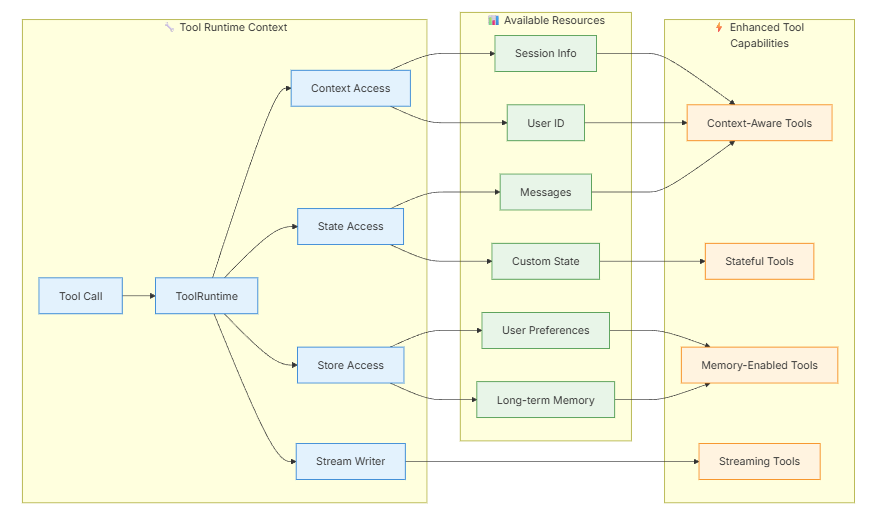
工具可以通过ToolRuntime参数使用运行时信息,ToolRuntime参数可以提供:
- State:伴随着执行流程的易变数据(消息、计数器、自定义字段)
- Context:诸如用户ID、会话详情和应用特定配置的不易变配置信息
- Store:跨会话的持久化长期记忆
- Stream Writer:伴随工具执行的自定义流式输出
- Config:执行中的
RunnableConfig - Tool Call ID:当前工具调用的ID
通过下图可以看出,通过使用运行时信息,工具可以具备上下文感知能力、具备状态、或是具有记忆、或者可以流式输出,所以说这个ToolRuntime是一个比较强大的功能。
ToolRuntime
只要将runtime: ToolRuntime加入到工具的方法签名中,它们就会被自动注入进去,而在执行时不会暴露给大模型,也就是大模型是不感知这些参数的。
获取状态:
工具可以使用ToolRuntime获取当前的图运行状态,如下:
from langchain.tools import tool, ToolRuntime

# Access the current conversation state
@tool
def summarize_conversation(
    runtime: ToolRuntime
) -> str:
    """Summarize the conversation so far."""
    messages = runtime.state["messages"]

    human_msgs = sum(1 for m in messages if m.__class__.__name__ == "HumanMessage")
    ai_msgs = sum(1 for m in messages if m.__class__.__name__ == "AIMessage")
    tool_msgs = sum(1 for m in messages if m.__class__.__name__ == "ToolMessage")

    return f"Conversation has {human_msgs} user messages, {ai_msgs} AI responses, and {tool_msgs} tool results"

# Access custom state fields
@tool
def get_user_preference(
    pref_name: str,
    runtime: ToolRuntime  # ToolRuntime parameter is not visible to the model
) -> str:
    """Get a user preference value."""
    preferences = runtime.state.get("user_preferences", {})
    return preferences.get(pref_name, "Not set")
更新状态:
通过使用Command来更新图状态,以控制图的执行流程:
from langgraph.types import Command
from langchain.messages import RemoveMessage
from langgraph.graph.message import REMOVE_ALL_MESSAGES
from langchain.tools import tool, ToolRuntime

# Update the conversation history by removing all messages
@tool
def clear_conversation() -> Command:
    """Clear the conversation history."""

    return Command(
        update={
            "messages": [RemoveMessage(id=REMOVE_ALL_MESSAGES)],
        }
    )

# Update the user_name in the agent state
@tool
def update_user_name(
    new_name: str,
    runtime: ToolRuntime
) -> Command:
    """Update the user's name."""
    return Command(update={"user_name": new_name})
上下文
通过runtime.context来获取不易变的配置和上下文数据,如用户ID、会话详情和应用特定配置,如下所示:
from dataclasses import dataclass
from langchain_openai import ChatOpenAI
from langchain.agents import create_agent
from langchain.tools import tool, ToolRuntime


USER_DATABASE = {
    "user123": {
        "name": "Alice Johnson",
        "account_type": "Premium",
        "balance": 5000,
        "email": "alice@example.com"
    },
    "user456": {
        "name": "Bob Smith",
        "account_type": "Standard",
        "balance": 1200,
        "email": "bob@example.com"
    }
}

@dataclass
class UserContext:
    user_id: str

@tool
def get_account_info(runtime: ToolRuntime[UserContext]) -> str:
    """Get the current user's account information."""
    user_id = runtime.context.user_id

    if user_id in USER_DATABASE:
        user = USER_DATABASE[user_id]
        return f"Account holder: {user['name']}\nType: {user['account_type']}\nBalance: ${user['balance']}"
    return "User not found"

model = ChatOpenAI(model="gpt-4o")
agent = create_agent(
    model,
    tools=[get_account_info],
    context_schema=UserContext,
    system_prompt="You are a financial assistant."
)

result = agent.invoke(
    {"messages": [{"role": "user", "content": "What's my current balance?"}]},
    context=UserContext(user_id="user123")
)
记忆(存储)
通过存储来获取跨会话的持久化数据。使用runtime.store获取存储,通过runtime.store可以保存并检索用户特定或应用特定的数据。如下所示:
from typing import Any
from langgraph.store.memory import InMemoryStore
from langchain.agents import create_agent
from langchain.tools import tool, ToolRuntime


# Access memory
@tool
def get_user_info(user_id: str, runtime: ToolRuntime) -> str:
    """Look up user info."""
    store = runtime.store
    user_info = store.get(("users",), user_id)
    return str(user_info.value) if user_info else "Unknown user"

# Update memory
@tool
def save_user_info(user_id: str, user_info: dict[str, Any], runtime: ToolRuntime) -> str:
    """Save user info."""
    store = runtime.store
    store.put(("users",), user_id, user_info)
    return "Successfully saved user info."

store = InMemoryStore()
agent = create_agent(
    model,
    tools=[get_user_info, save_user_info],
    store=store
)

# First session: save user info
agent.invoke({
    "messages": [{"role": "user", "content": "Save the following user: userid: abc123, name: Foo, age: 25, email: foo@langchain.dev"}]
})

# Second session: get user info
agent.invoke({
    "messages": [{"role": "user", "content": "Get user info for user with id 'abc123'"}]
})
# Here is the user info for user with ID "abc123":
# - Name: Foo
# - Age: 25
# - Email: foo@langchain.dev
流式输出
使用runtime.stream_writer可以在工具内自定义流式输出。这在输出实时反馈时很有用,它可以让用户知道工具正在干什么,如下:
from langchain.tools import tool, ToolRuntime

@tool
def get_weather(city: str, runtime: ToolRuntime) -> str:
    """Get weather for a given city."""
    writer = runtime.stream_writer

    # Stream custom updates as the tool executes
    writer(f"Looking up data for city: {city}")
    writer(f"Acquired data for city: {city}")

    return f"It's always sunny in {city}!"
注意:使用
runtime.stream_writer必须位于langgraph的执行上下文中。
以上介绍了langchain1.0的工具基本用法,包括工具定义、自定义工具属性(名称与描述)和高级输入模式,还介绍了工具使用agent上下文的方法,即通过ToolRuntime参数,ToolRuntime中包括State、Context、Store、Stream Writer、Config和ToolCallID,通过使用上下文可以大大增强工具的功能。使工具可以根据上下文作出反应,并可以使用记忆,还可以使用流式输出实时反馈信息。
使用@tool装饰器可以方便的包装一个工具,我也看到一些代码直接继承了BaseTool来实现工具,可以很好的封装工具并实现工具的继承体系,@tool其实就是把函数包装为了BaseTool,很多场景下@tool就够用了,关于langchain1.0的工具,就先记录到这里。

有“AI”的1024 = 2048,欢迎大家加入2048 AI社区
更多推荐

 7
7 0
0- 0


 已为社区贡献2条内容

所有评论(0)