java基础
目录
java


https://blog.csdn.net/CHUANZExiaodaima/article/details/120028237
规范
阿里巴巴java开发手册
https://alibaba.github.io/p3c/%E7%BC%96%E7%A8%8B%E8%A7%84%E7%BA%A6/%E9%9B%86%E5%90%88%E5%A4%84%E7%90%86.html
为什么计算机采用补码而不是原码或反码?
https://www.zhihu.com/question/352057791/answer/1898969182856517598
生动的比喻:调手表
目标:将手表从4点调到3点,即完成 4 - 1。
限制:手表指针只能顺时针旋转(只能做加法)。
解决方案:不倒转1格,而是正转11格 (4 + 11 = 15)。由于表盘只有12小时,15点就是3点,目标达成。
结论:在这个12进制的系统中,“-1”的效果和“+11”是完全等价的。
与计算机补码的对应关系
手表(12格) 对应 计算机的n位二进制系统(如8位有256个“格”)。
倒转指针(减法) 对应 计算机的减法指令。
正转等效格数(加法) 对应 计算机将减法转化为加上一个“补码”。
例如,在8位系统中:
-1 的等效正数(即补码)是 255 (-1 + 256)。
所以计算 4 - 1,计算机实际执行的是 4 + 255 = 259。
由于8位系统只能表示0-255,259会溢出,自动丢掉最高位,结果就是 3,完全正确。
“取反加一”的由来
求补码的数学本质是:补码 = 模(如256) + 负数。
“取反加一”是这个计算过程的快捷方式:
取反:相当于用最大值(全1,即255)减去该数。
加一:连同之前的运算,就等同于 (255 - 该数) + 1 = 256 - 该数,这正是补码的定义。
对于硬件来说,“取反”是极快的操作,因此这个方法是最高效的。
总而言之,补码之所以能正确进行二进制运算,是因为它巧妙地利用了有限
获取一个类所有属性
https://blog.csdn.net/tengdazhang770960436/article/details/56834693
package com.test.field;

public class Test {
    private int id;
    private String name;
    public int getId() {
        return id;
    }
    public void setId(int id) {
        this.id = id;
    }
    public String getName() {
        return name;
    }
    public void setName(String name) {
        this.name = name;
    }
}
public class GetFieldNamesUtils {
    public static void main(String[] args) {
        getFiledsNameWithBlankLine("com.test.field.Test");
        System.out.println("===================");
        getFiledsNameWithPoint("com.test.field.Test");
    }

    /**
     *  把属性通过换行的方式输出出来
     * @author ztd
     * @param classPath
     */
    private static void getFiledsNameWithBlankLine(String classPath) {
        Class<?> clazz = null;

        try {
            clazz = Class.forName(classPath);
        } catch (ClassNotFoundException e) {

            e.printStackTrace();

        }
        Field[] fields = clazz.getDeclaredFields();
        for(Field f : fields) {
            System.out.println(f.getName());
        }
    }

    /**
     *  把属性通过“,”连接起来输出
     * @author ztd
     * @param classPath
     */
    private static void getFiledsNameWithPoint(String classPath) {
        Class<?> clazz = null;
        try {
            clazz = Class.forName(classPath);
        } catch (ClassNotFoundException e) {

            e.printStackTrace();

        }
        Field[] fields = clazz.getDeclaredFields();
        StringBuffer sb = new StringBuffer();
        for(Field f : fields) {
            sb.append(f.getName()).append(",");
        }
        System.out.println(sb.toString());
    }
}
java 除法运算只保留整数位的4种方式
 Math.floor(num)   只保留整数位
 Math.rint(num)     余数四舍五入
 Math.ceil(num)     取整位,再+1

double num = 3.1415926;
// 直接使用int进行强制转换
System.out.println((int)num);//3
num = 3.789;
System.out.println((int)num);//3
// 整数运算,默认将运算结果强制转换成了整数(只保留整数位)
int i4 = 1/10;
System.out.println(i4);//0
二维数组赋值
#include<bits/stdc++.h>
#define m 3
#define n 2
using namespace std;

void print(int a[][n])
{
	int i, j;
	for(i = 0;i < m; i++)
	{
		for(j = 0; j < n; j++)
			cout << a[i][j] << " " ;
		cout << endl;
	}
	cout << endl;
}

int main()
{
	int i, j;
	// 第一个元素赋值,其余默认为0
	int a[m][n] = {8};
	cout << "a" << endl;
	print(a);

	//
	int b[m][n] = {1,2,3,4,5,6};
	cout << "b" << endl;
	print(b);

	//{}为一行的赋值
	int c[m][n] = {{1,2},{3}};
	cout << "c" << endl;
	print(c);

	//
	int d[m][n] = {{1,2},{3},{0,4}};
	cout << "d" << endl;
	print(d);

	//循环手动输入
	for(i = 0; i < m; i++)
		for(j = 0; j< n; j++)
			scanf("%d", &a[i][j]);

	return 0;
}

“” 和 null 是不一样的
https://www.cnblogs.com/qiuting/p/5373571.html
String a;

null
a != null

""
a.length()!=0
== 和 equals()
https://www.cnblogs.com/qianguyihao/p/3929585.html
String 的 equals()
https://www.cnblogs.com/qianguyihao/p/3929585.html
java获取前一个月
https://blog.csdn.net/tjcyjd/article/details/6981382#
	Calendar ca = Calendar.getInstance();// 得到一个Calendar的实例
	//ca.setTime(new Date()); // 设置时间为当前时间
	ca.set(2011, 11, 17);// 月份是从0开始的,所以11表示12月
	ca.add(Calendar.YEAR, -1); // 年份减1
	ca.add(Calendar.MONTH, -1);// 月份减1
	ca.add(Calendar.DATE, -1);// 日期减1
	Date resultDate = ca.getTime(); // 结果
	SimpleDateFormat sdf = new SimpleDateFormat("yyyy-MM-dd");
	System.out.println(sdf.format(resultDate));
hashmap 3种获取key value的方式
https://www.cnblogs.com/xuezhaochang/p/14875275.html
public class MapTest {

    public static void main(String[] args) {
        HashMap<String, String> map = new HashMap<>();
        map.put("1", "张三");
        map.put("2", "李四");
        map.put("3", "王五");
        map.put("4", "赵六");

        //1 通过map.keyset遍历输出集合
        for (String s : map.keySet()) {
            System.out.println("key: " + s + " value: " + map.get(s));
        }
        for (String s2 : map.values()) {//遍历map的值
            System.out.println("值value :" + s2);
        }


        //2 Map.Entry<String, String>的加强for循环遍历输出键key和值value
        for (Map.Entry<String, String> entry : map.entrySet()) {
            System.out.println("key: " + entry.getKey() + ",value: " + entry.getValue());
        }

        //3 Iterator遍历获取,然后获取到Map.Entry<String, String>,再得到getKey()和getValue()
        Iterator<Map.Entry<String, String>> iterator = map.entrySet().iterator();
        while (iterator.hasNext()){
            Map.Entry<String, String> next = iterator.next();
            System.out.println("key: " + next.getKey() + ",value: " + next.getValue());
        }
    }
}
Java Map的初始化
https://www.jianshu.com/p/4a1515374a34
class MapTest {
	// 1
    private static final Map<String, String> TEST_1 =
	    Map.ofEntries(
	        Map.entry("1", "A"),
	        Map.entry("2", "B")
	        // Map.entry(null, null)
	        // 运行时空指针异常,不支持存放null key&&value
    );

	// 2
    private static final Map<String, String> TEST_2 = new HashMap<>() {
        {
            put("1", "A");
            put("2", "B");
        }
    };

	// 3
	private static HashMap<String,String> networkAttrMap;
    static {
	    networkAttrMap = new HashMap<>();
        networkAttrMap.put("08","企");
        networkAttrMap.put("24","红");
        networkAttrMap.put("2","区");
        networkAttrMap.put("3","绿");
        networkAttrMap.put("47","其它");
    }
Properties类
https://blog.csdn.net/weixin_53972936/article/details/1238993682
时间设置 获取
获取现在时间:
    public void setTime(Map<String, Object> map, String key, int day) {
        SimpleDateFormat sdf = new SimpleDateFormat("yyyy-MM-dd");
        Date date = new Date();
        Calendar calendar = Calendar.getInstance();
        calendar.setTime(date);
        calendar.add(Calendar.DAY_OF_MONTH, day); // 前day天
        date = calendar.getTime();

        map.put(key, sdf.format(date));
    }
Date date = new Date();
SimpleDateFormat sdf = new SimpleDateFormat("yyyy-MM-dd");
String formattedDate = sdf.format(date);
System.out.println("Formatted date: " + formattedDate);
获取字符串对应的时间 的前x天
    public void setCustomTime(Map<String, Object> params, Date time, String key, int day) throws ParseException {
        SimpleDateFormat sdf = new SimpleDateFormat("yyyy-MM-dd");
        Date date = sdf.parse(String.valueOf(time));
        Calendar calendar = Calendar.getInstance();
        calendar.setTime(date);
        calendar.add(Calendar.DAY_OF_MONTH, day); // 前day天
        date = calendar.getTime();

        params.put(key, sdf.format(date));
    }
SimpleDateFormat
java 日期格式化-- SimpleDateFormat
https://blog.csdn.net/qq_27093465/article/details/53034427
yyyy:年
MM:月
dd:日
hh:1~12小时制(1-12)
HH:24小时制(0-23)
mm:分
ss:秒
S:毫秒
E:星期几
D:一年中的第几天
F:一月中的第几个星期(会把这个月总共过的天数除以7)
w:一年中的第几个星期
W:一月中的第几星期(会根据实际情况来算)
a:上下午标识
k:和HH差不多,表示一天24小时制(1-24)。
K:和hh差不多,表示一天12小时制(0-11)。
z:表示时区
SimpleDateFormat sdf = new SimpleDateFormat("yyyy-MM-dd HH:mm:ss");
sdf.format(new Date()) = 2024-03-26 15:53:58
http 时间
Timeout.ofMilliseconds(5000L);
这里是5000毫秒=5秒
java transient
https://www.cnblogs.com/lanxuezaipiao/p/3369962.html
sql 注入攻击
https://www.cnblogs.com/xzwblog/p/6959500.html
XSS注入攻击
https://zhuanlan.zhihu.com/p/409379105
JNDI注入解析
https://blog.csdn.net/gental_z/article/details/122303540
参数校验
参数校验,不符合要求的要
throw new InvalidParameterException("field is error");
这样会返回400状态码
否则mybati 报错就返回500状态码了
类校验
private Order order;
用于mysql的排序字段

public class Order {
    /**
     * @排序字段
     *
     * @取值范围:lastModifiedTime 最后修改时间
     * @默认为lastModifiedTime
     */
    @Size(max = 512, message = "长度必须大于等于0或小于等于512")
    private String field;

    /**
     * @升降序方式
     * @asc 升序排列
     * @desc 降序排列(默认)
     */
    @Size(max = 4, message = "长度必须大于等于0或小于等于4")
    private String direction;

    public Order() {
        this.setDirection("desc");
    }

    @Override
    public String toString() {
        return field + " " + direction;
    }
}
public void checkParameter() {
        boolean flag = false;
        if (this.order != null) {
            if (this.order.getField() != null && this.order.getField().length() != 0) {
                FIELD[] fields = FIELD.values();
                for (FIELD field : fields) {
                    if (field.toString().equals(this.order.getField())) {
                        flag = true;
                        break;
                    }
                }
            } else {
                flag = true;
            }
            if (flag == false) {
                throw new InvalidParameterException("field is error");
            }

            if (!this.getOrder().getDirection().equalsIgnoreCase("asc")
                    && !this.getOrder().getDirection().equalsIgnoreCase("desc")) {
                throw new InvalidParameterException("direction is error");
            }

            if (this.order.getField() != null
                    && this.order.getField().length() == 0
                    && this.order.getDirection() != null) {
                this.order.setDirection("");
            }
        }
    }
// 排序设置
request.checkParameter();
if (request.getOrder() != null) {
    if (!request.getOrder().toString().equals(" ")) {
        request.setOrderBy(request.getOrder().toString());
    } else {
        request.setOrderBy(null);
    }
}
参数 别名接收
https://www.jianshu.com/p/4f7f191fe825
服务器字段和客户端字段名称区分,不用保持一一对应关系,客户端定义的字段不用根据服务端接口字段改变而改变,只需要更改@SerializedName中的取值即可
@SerializedName(value = "bookmarkId", alternate = {"bookmark_id"})
private String bookmarkId;
枚举小技巧
枚举的规范是 全大写
public enum FIELD {
    ACCOUNTNAME("accountName"),
    SECURITYROLEID("securityRoleId"),
    OPERATIONDEVICEID("operationDeviceId"),
    DEVICEID("deviceId"),
    NETWORKATTRID("networkAttrId"),
    OPERATIONIP("operationIp"),
    OPERATIONTIME("operationTime"),
    CREATETIME("createTime");

    private FIELD(String type) {
        this.setType(type);
    }

    public String getType() {
        return type;
    }

    /**
     * 功能说明:
     *
     * @param type type
     */
    public void setType(String type) {
        this.type = type;
    }

    private String type;
}
正则表达式
https://www.laobuluo.com/8372.html
校验数字的表达式
数字:^[0-9]*$
n位的数字:^\d{n}$
至少n位的数字:^\d{n,}$
m-n位的数字:^\d{m,n}$
零和非零开头的数字:^(0|[1-9][0-9]*)$
非零开头的最多带两位小数的数字:^([1-9][0-9]*)+(\.[0-9]{1,2})?$
带1-2位小数的正数或负数:^(\-)?\d+(\.\d{1,2})$
正数、负数、和小数:^(\-|\+)?\d+(\.\d+)?$
有两位小数的正实数:^[0-9]+(\.[0-9]{2})?$
有1~3位小数的正实数:^[0-9]+(\.[0-9]{1,3})?$
非零的正整数:^[1-9]\d*$ 或 ^([1-9][0-9]*){1,3}$ 或 ^\+?[1-9][0-9]*$
非零的负整数:^\-[1-9][]0-9"*$ 或 ^-[1-9]\d*$
非负整数:^\d+$ 或 ^[1-9]\d*|0$
非正整数:^-[1-9]\d*|0$ 或 ^((-\d+)|(0+))$
非负浮点数:^\d+(\.\d+)?$ 或 ^[1-9]\d*\.\d*|0\.\d*[1-9]\d*|0?\.0+|0$
非正浮点数:^((-\d+(\.\d+)?)|(0+(\.0+)?))$ 或 ^(-([1-9]\d*\.\d*|0\.\d*[1-9]\d*))|0?\.0+|0$
正浮点数:^[1-9]\d*\.\d*|0\.\d*[1-9]\d*$ 或 ^(([0-9]+\.[0-9]*[1-9][0-9]*)|([0-9]*[1-9][0-9]*\.[0-9]+)|([0-9]*[1-9][0-9]*))$
负浮点数:^-([1-9]\d*\.\d*|0\.\d*[1-9]\d*)$ 或 ^(-(([0-9]+\.[0-9]*[1-9][0-9]*)|([0-9]*[1-9][0-9]*\.[0-9]+)|([0-9]*[1-9][0-9]*)))$
浮点数:^(-?\d+)(\.\d+)?$ 或 ^-?([1-9]\d*\.\d*|0\.\d*[1-9]\d*|0?\.0+|0)$
校验字符的表达式
汉字:^[\u4e00-\u9fa5]{0,}$
英文和数字:^[A-Za-z0-9]+$ 或 ^[A-Za-z0-9]{4,40}$
长度为3-20的所有字符:^.{3,20}$
由26个英文字母组成的字符串:^[A-Za-z]+$
由26个大写英文字母组成的字符串:^[A-Z]+$
由26个小写英文字母组成的字符串:^[a-z]+$
由数字和26个英文字母组成的字符串:^[A-Za-z0-9]+$
由数字、26个英文字母或者下划线组成的字符串:^\w+$ 或 ^\w{3,20}$
中文、英文、数字包括下划线:^[\u4E00-\u9FA5A-Za-z0-9_]+$
中文、英文、数字但不包括下划线等符号:^[\u4E00-\u9FA5A-Za-z0-9]+$ 或 ^[\u4E00-\u9FA5A-Za-z0-9]{2,20}$
可以输入含有^%&',;=?$\"等字符:[^%&',;=?$\x22]+
禁止输入含有~的字符:[^~]+
特殊需求表达式
Email地址:^\w+([-+.]\w+)*@\w+([-.]\w+)*\.\w+([-.]\w+)*$
域名:[a-zA-Z0-9][-a-zA-Z0-9]{0,62}(\.[a-zA-Z0-9][-a-zA-Z0-9]{0,62})+\.?
InternetURL:[a-zA-z]+://[^\s]* 或 ^http://([\w-]+\.)+[\w-]+(/[\w-./?%&=]*)?$
手机号码:^(13[0-9]|14[01456879]|15[0-35-9]|16[2567]|17[0-8]|18[0-9]|19[0-35-9])\d{8}$
电话号码("XXX-XXXXXXX"、"XXXX-XXXXXXXX"、"XXX-XXXXXXX"、"XXX-XXXXXXXX"、"XXXXXXX"和"XXXXXXXX):^(\(\d{3,4}-)|\d{3.4}-)?\d{7,8}$
国内电话号码(0511-4405222、021-87888822):\d{3}-\d{8}|\d{4}-\d{7}
电话号码正则表达式(支持手机号码,3-4位区号,7-8位直播号码,1-4位分机号): ((\d{11})|^((\d{7,8})|(\d{4}|\d{3})-(\d{7,8})|(\d{4}|\d{3})-(\d{7,8})-(\d{4}|\d{3}|\d{2}|\d{1})|(\d{7,8})-(\d{4}|\d{3}|\d{2}|\d{1}))$)
身份证号(15位、18位数字),最后一位是校验位,可能为数字或字符X:(^\d{15}$)|(^\d{18}$)|(^\d{17}(\d|X|x)$)
帐号是否合法(字母开头,允许5-16字节,允许字母数字下划线):^[a-zA-Z][a-zA-Z0-9_]{4,15}$
密码(以字母开头,长度在6~18之间,只能包含字母、数字和下划线):^[a-zA-Z]\w{5,17}$
强密码(必须包含大小写字母和数字的组合,不能使用特殊字符,长度在 8-10 之间):^(?=.*\d)(?=.*[a-z])(?=.*[A-Z])[a-zA-Z0-9]{8,10}$
强密码(必须包含大小写字母和数字的组合,可以使用特殊字符,长度在8-10之间):^(?=.*\d)(?=.*[a-z])(?=.*[A-Z]).{8,10}$
日期格式:^\d{4}-\d{1,2}-\d{1,2}
一年的12个月(01~09和1~12):^(0?[1-9]|1[0-2])$
一个月的31天(01~09和1~31):^((0?[1-9])|((1|2)[0-9])|30|31)$
钱的输入格式:
1 有四种钱的表示形式我们可以接受:"10000.00" 和 "10,000.00", 和没有 "分" 的 "10000" 和 "10,000":^[1-9][0-9]*$
2 这表示任意一个不以0开头的数字,但是,这也意味着一个字符"0"不通过,所以我们采用下面的形式:^(0|[1-9][0-9]*)$
3 一个0或者一个不以0开头的数字.我们还可以允许开头有一个负号:^(0|-?[1-9][0-9]*)$
4 这表示一个0或者一个可能为负的开头不为0的数字.让用户以0开头好了.把负号的也去掉,因为钱总不能是负的吧。下面我们要加的是说明可能的小数部分:^[0-9]+(.[0-9]+)?$
5 必须说明的是,小数点后面至少应该有1位数,所以"10."是不通过的,但是 "10" 和 "10.2" 是通过的:^[0-9]+(.[0-9]{2})?$
6 这样我们规定小数点后面必须有两位,如果你认为太苛刻了,可以这样:^[0-9]+(.[0-9]{1,2})?$
7 这样就允许用户只写一位小数.下面我们该考虑数字中的逗号了,我们可以这样:^[0-9]{1,3}(,[0-9]{3})*(.[0-9]{1,2})?$
8 1到3个数字,后面跟着任意个 逗号+3个数字,逗号成为可选,而不是必须:^([0-9]+|[0-9]{1,3}(,[0-9]{3})*)(.[0-9]{1,2})?$
9 备注:这就是最终结果了,别忘了"+"可以用"*"替代如果你觉得空字符串也可以接受的话(奇怪,为什么?)最后,别忘了在用函数时去掉去掉那个反斜杠,一般的错误都在这里
xml文件:^([a-zA-Z]+-?)+[a-zA-Z0-9]+\\.[x|X][m|M][l|L]$
中文字符的正则表达式:[\u4e00-\u9fa5]
双字节字符:[^\x00-\xff] (包括汉字在内,可以用来计算字符串的长度(一个双字节字符长度计2,ASCII字符计1))
空白行的正则表达式:\n\s*\r (可以用来删除空白行)
HTML标记的正则表达式:<(\S*?)[^>]*>.*?|<.*? /> ( 首尾空白字符的正则表达式:^\s*|\s*$或(^\s*)|(\s*$) (可以用来删除行首行尾的空白字符(包括空格、制表符、换页符等等),非常有用的表达式)
腾讯QQ号:[1-9][0-9]{4,} (腾讯QQ号从10000开始)
中国邮政编码:[1-9]\d{5}(?!\d) (中国邮政编码为6位数字)
IPv4地址:((2(5[0-5]|[0-4]\d))|[0-1]?\d{1,2})(\.((2(5[0-5]|[0-4]\d))|[0-1]?\d{1,2})){3}
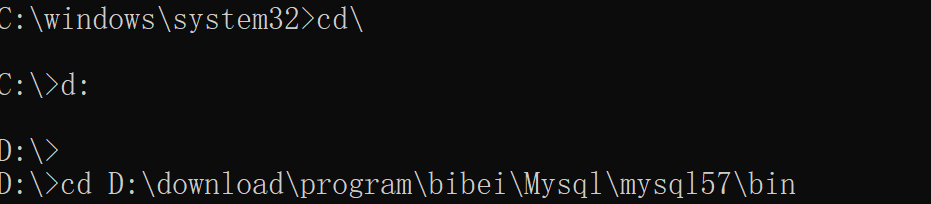
cmd控制台 进入d盘
字符减1
https://blog.51cto.com/u_16175519/6885958
public class StringSubtractionExample {
    public static String subtractOne(String str) {
        StringBuilder sb = new StringBuilder(str);
        int index = sb.length() - 1;
        while (index >= 0) {
            char c = sb.charAt(index);
            if (c != '0') {
                sb.setCharAt(index, (char) (c - 1));
                break;
            } else {
                sb.setCharAt(index, '9');
                index--;
            }
        }
        return sb.toString();
    }

    public static void main(String[] args) {
        String str = "100";
        System.out.println("原始字符串: " + str);
        String result = subtractOne(str);
        System.out.println("减1后的字符串: " + result);
    }
}
java后端 优雅参数校验
注解
https://juejin.cn/post/6844903902811275278
https://blog.csdn.net/suprezheng/article/details/104007310
https://blog.csdn.net/CSDN2497242041/article/details/122272752
https://juejin.cn/post/6977614729103540261
https://www.peiluming.com/article/24
注解太笨拙了
多重注解? 自定义注解? 顾汇宁
手动写方法进行参数校验
httpclient升级5.2.1
    private CloseableHttpClient httpClient =  HttpClients.createDefault();

    private RequestConfig requestConfig = RequestConfig.custom()
            //从连接池中获取连接的超时时间
            .setConnectionRequestTimeout(Timeout.ofMilliseconds(timeout*2))
            //建立连接的超时时间
            .setConnectTimeout(Timeout.ofMilliseconds(timeout*2))
            //设置响应超时时间
            .setResponseTimeout(Timeout.ofMilliseconds(timeout*2))
            // 是否自动重定向
            .setRedirectsEnabled(false)
            .build();
均是毫秒
1000毫秒=1秒
https://blog.csdn.net/T2080305/article/details/80551855
超时时间设置过短会造成:
java.net.SocketTimeoutException: Read timed out
	at java.net.SocketInputStream.socketRead0(Native Method) ~[?:1.8.0_201]
	at java.net.SocketInputStream.socketRead(SocketInputStream.java:116) ~[?:1.8.0_201]
	at java.net.SocketInputStream.read(SocketInputStream.java:171) ~[?:1.8.0_201]
	at java.net.SocketInputStream.read(SocketInputStream.java:141) ~[?:1.8.0_201]
	at org.apache.hc.core5.http.impl.io.SessionInputBufferImpl.fillBuffer(SessionInputBufferImpl.java:149) ~[httpcore5-5.1.5.jar:5.1.5]
	at org.apache.hc.core5.http.impl.io.SessionInputBufferImpl.readLine(SessionInputBufferImpl.java:280) ~[httpcore5-5.1.5.jar:5.1.5]
	at org.apache.hc.core5.http.impl.io.AbstractMessageParser.parse(AbstractMessageParser.java:241) ~[httpcore5-5.1.5.jar:5.1.5]
	at org.apache.hc.core5.http.impl.io.AbstractMessageParser.parse(AbstractMessageParser.java:53) ~[httpcore5-5.1.5.jar:5.1.5]
	at org.apache.hc.core5.http.impl.io.DefaultBHttpClientConnection.receiveResponseHeader(DefaultBHttpClientConnection.java:298) ~[httpcore5-5.1.5.jar:5.1.5]
	at org.apache.hc.core5.http.impl.io.HttpRequestExecutor.execute(HttpRequestExecutor.java:175) ~[httpcore5-5.1.5.jar:5.1.5]
	at org.apache.hc.core5.http.impl.io.HttpRequestExecutor.execute(HttpRequestExecutor.java:218) ~[httpcore5-5.1.5.jar:5.1.5]
	at org.apache.hc.client5.http.impl.io.PoolingHttpClientConnectionManager$InternalConnectionEndpoint.execute(PoolingHttpClientConnectionManager.java:712) ~[httpclient5-5.2.1.jar:5.2.1]
	at org.apache.hc.client5.http.impl.classic.InternalExecRuntime.execute(InternalExecRuntime.java:216) ~[httpclient5-5.2.1.jar:5.2.1]
	at org.apache.hc.client5.http.impl.classic.MainClientExec.execute(MainClientExec.java:116) ~[httpclient5-5.2.1.jar:5.2.1]
	at org.apache.hc.client5.http.impl.classic.ExecChainElement.execute(ExecChainElement.java:51) ~[httpclient5-5.2.1.jar:5.2.1]
	at org.apache.hc.client5.http.impl.classic.ConnectExec.execute(ConnectExec.java:188) ~[httpclient5-...
javax.net.ssl.SSLException: Connection reset
https://www.cnblogs.com/colder/p/16612582.html
httpClient = HttpClients.custom().setDefaultRequestConfig(config)
        .setConnectionReuseStrategy(NoConnectionReuseStrategy.INSTANCE)
        .setConnectionManager(poolingConnManager)
        .build();
解决NoHttpResponseException问题
.setConnectionReuseStrategy(NoConnectionReuseStrategy.INSTANCE) = 禁止连接重用,每次请求不再链接复用,而是创建一个新的链接
https://blog.csdn.net/yzf279533105/article/details/126963611
https://blog.csdn.net/enweitech/article/details/79261439
https://www.cnblogs.com/yunnick/p/11290429.html
https://cloud.tencent.com/developer/article/1683704
检查参数
发出 GET 请求,服务器返回的内容会在命令行输出
curl "链接"
https://www.ruanyifeng.com/blog/2019/09/curl-reference.html
sysctl -a |grep "net.ipv4.tcp_tw_recycle"
sysctl -a |grep "net.netfilter.nf_conntrack_tcp_be_liberal"
https://blog.csdn.net/whatday/article/details/113427085
net.ipv4.tcp_tw_recycle = 1 表示开启TCP连接中TIME-WAIT sockets的快速回收,默认为0,表示关闭。应是0,而不是1
其他方案记录
https://blog.csdn.net/qq_35847021/article/details/115524923
https://blog.csdn.net/weixin_48184989/article/details/126153823
https://blog.csdn.net/flysun3344/article/details/81117403
https://www.cnblogs.com/zhouj850/p/13957713.html
https://zhuanlan.zhihu.com/p/130464111?utm_id=0
https://blog.csdn.net/weixin_46028606/article/details/120809449
字符串判空
https://developer.aliyun.com/article/644782
方法一: 直观, 方便, 但效率很低
if(s == null ||"".equals(s));
方法二: 效率高
if(s == null || s.length() <= 0);
方法三: Java SE 6.0 才开始提供的方法, 效率和方法二几乎相等, 但出于兼容性考虑, 推荐使用方法二.
if(s == null || s.isEmpty());
方法四:
if (s == null || s == "");
s == null 是有必要存在的
如果 String 类型为null, 而去进行 equals(String) 或 length() 等操作会抛出java.lang.NullPointerException.
s==null 的顺序必须出现在前面,不然同样会抛出java.lang.NullPointerException.
重试
https://blog.csdn.net/sinat_32502451/article/details/133774582
类似登录客户端的处理,有时会出现网络抖动、连接超时等异常,这时候就需要进行多次重试
	<dependency>
	    <groupId>org.springframework.retry</groupId>
	    <artifactId>spring-retry</artifactId>
	</dependency>
	<dependency>
	    <groupId>org.springframework.boot</groupId>
	    <artifactId>spring-boot-starter-aop</artifactId>
	</dependency>
Application 启动类上,添加 @EnableRetry 注解
@SpringBootApplication(scanBasePackages = {"com.example.demo"})
@EnableRetry
public class DemoApplication {
}
@Slf4j
@Service
public class RetryServiceImpl {

    @Retryable(value = Exception.class,maxAttempts = 3,backoff = @Backoff(delay = 3000,multiplier = 1.5))
    public void doSomething() {
        log.info("doSomething start.");
        int result = 1/0;
        log.info("doSomething end.");
    }

    /**
     * @Recover 的返回类型,必须跟 @Retryable修饰的方法返回值一致。否则不生效。
     *
     */
    @Recover
    public void recover(Exception e) {
        log.info("retry failed recover");
        log.info("retry Exception:"+e);
        //是否需要入库记录
    }

}
value:抛出指定异常才会重试
exclude:指定不处理的异常
maxAttempts:最大重试次数,默认3次
backoff:重试等待策略,默认使用@Backoff
@Backoff的value(相当于delay)表示隔多少毫秒后重试,默认为1000L
multiplier(指定延迟倍数)默认为0,表示固定暂停1秒后进行重试
@Retryable 底层使用的是 AOP,因此不能在同一个类里调用 @Retryable修饰的方法,不会生效
删除进程
https://blog.csdn.net/qq_53158952/article/details/126911589
netstat -aon|findstr "xxxx"
taskkill /f /t /im xxxx
String
split
https://zhuanlan.zhihu.com/p/45151144
public String[] split(String regex)

public String[] split(String regex, int limit)
limit > 0: 最多匹配limit-1次,得到一个长度为limit的数组. String[limit-1]为余下未匹配的字符串
limit = 0: 尽可能的多匹配, 且长度无限制, 但结尾空字符串将被丢弃
limit < 0: 尽可能的多匹配, 且长度无限制


转义:
string.split("\\.");  // .=\\.
string.split("\\"); //  \ = \\

string.split("and|or");

\d 数字
\D 非数字
\s 空白字符
\S 非空白字符
\w 单词字符
\W 非单词字符
检索
int indexOf(String str) :返回第1次出现的指定子字符串在此字符串中的索引
int indexOf(String str, int startIndex):从指定的索引处开始,返回第1次出现的指定子字符串在此字符串中的索引
int lastIndexOf(String str) :返回在此字符串中最右边出现的指定子字符串的索引
int lastIndexOf(String str, int startIndex) :从指定的索引处开始向后搜索,返回在此字符串中最后一次出现的指定子字符串的索引
异常
在单个catch代码块中捕获多个异常
Java7之前:
catch (IOException ex) {
     logger.error(ex);
     throw new MyException(ex.getMessage());
catch (SQLException ex) {
     logger.error(ex);
     throw new MyException(ex.getMessage());
}catch (Exception ex) {
     logger.error(ex);
     throw new MyException(ex.getMessage());
}
catch(IOException | SQLException | Exception ex){
     logger.error(ex);
     throw new MyException(ex.getMessage());
}
多个异常
避免throws 非自定义的异常,因为自定义的异常会输出我们能控制的消息,默认的异常抛出的异常信息可能会很杂乱
throw代表动作,表示抛出一个异常的动作;throws代表一种状态,代表方法可能有异常抛出
throw用在方法实现中,而throws用在方法声明中

有“AI”的1024 = 2048,欢迎大家加入2048 AI社区
更多推荐

 0
0 0
0- 0


 已为社区贡献3条内容

所有评论(0)