ai网关 Higress 的开发实战
基于higress做大模型流控,控制访问大模型的速率。
基础:k8s, 网关基本概念,大模型开发基础
一、higress 和 apisix ai 插件对比
| 功能 | apisix | higress | 备注 | |
|---|---|---|---|---|
| ai代理 | ✅ | ✅ | higress支持健康监测 | |
| 负载均衡 | ✅ 多模型负载均衡(最小请求数、GPU 感知、fallback、多厂商切换) | ✅基于权重、最小请求数、前缀匹配、gpu感知负载均衡等 | ||
| 速率限制 | ✅ 可以基于route,consumer配置速率 | ✅ 只能基于consumer | ||
| token限制 | ✅ 全局, 动态key:url、请求头、ip、consumer、cookie等 速率:时间窗口 | ✅ 全局, 动态key:url、请求头、ip、consumer、cookie等 速率:token/s, token/min…tokne/day | ||
| 提示词拼接 | ✅ | ✅ | prepend & append | |
| 对接向量库 | 仅支持 Azure OpenAI 和 Azure AI Search 服务分别用于生成嵌入和执行向量搜索 | |||
| 数据脱敏 | 基于ai service | 基于插件 | ||
| ai缓存 | ❌ | 关键字缓存,向量缓存 | ||
| 内容审核 | 仅支持与 AWS Comprehend 集成以进行内容审核 | 对接阿里云内容安全检测大模型的输入输出,保障 AI 应用内容合法合规 | ||
| function call | ❌ | ✅ | ||
| json格式化 | ❌ | ✅ | Higress 提供的 AI JSON 格式化插件可以根据用户配置的 jsonSchema 将大语言模型的输出转换为结构化的 JSON 格式,以便于后续的处理和展示。 |
|
| 搜索增强 | ❌ | ✅ | 网络搜索 | |
| 可观测性 | ✅ | ✅ | ||
| ip地理位置 | ❌ | ✅ | 基于github上ip2region项目的全世界的ip网段库 | |
| 历史对话 | ❌ | ✅ | 基于请求头实现用户身份识 | |
| 意图识别 | ❌ | ✅ | 基于新的llm链路,判断使用哪个agent | |
| 请求响应转换 | – | ✅ | 过LLM对请求/响应的header以及body进行修改 |
二、higress 配置流程
higress 基础知识
基础介绍
官方文档地址: https://higress.cn/docs/latest/plugins/traffic/traffic-tag/?utm_source=chatgpt.com
Higress 是一款云原生 API 网关,内核基于 Istio 和 Envoy,可以用 Go/Rust/JS 等编写 Wasm 插件,提供了数十个现成的通用插件,以及开箱即用的控制台。
基础组件
| 名称 | 对应k8s crd 资源名称 | 示例配置 | 备注 |
|---|---|---|---|
| 上游服务 | McpBridge | ```yaml apiVersion: networking.higress.io/v1 kind: McpBridge metadata: annotations: name: default namespace: higress spec: registries: - domain: 10.151.35.37:8103 name: llm-qwen3-32b.internal port: 80 protocol: http type: static - domain: 10.198.20.51:8300 name: sensetime-mock-service port: 80 protocol: http type: static - domain: redis-master-cp.weave.svc.cluster.local name: redis-cp port: 6379 type: dns ``` | higress 中 annotations 中的值会在底层生效,不要随意修改。 |
| 路由 | Ingress | ```yaml apiVersion: networking.k8s.io/v1 kind: Ingress metadata: annotations: higress.io/comment: PLEASE DO NOT EDIT DIRECTLY. This resource is managed by Higress. higress.io/destination: llm-qwen3-32b.internal.static:80 higress.io/ignore-path-case: “false” labels: higress.io/domain_higress-default-domain: “true” higress.io/internal: “true” higress.io/resource-definer: higress name: ai-route-qwen-watched.internal namespace: higress spec: ingressClassName: higress rules: - http: paths: - backend: resource: apiGroup: networking.higress.io kind: McpBridge name: default path: /v1/chat pathType: Prefix ``` | Prefix表示进行前缀匹配, path: /v1/chat 表示会对/v1/chat开头的请求进行转发。 |
| 插件 | WasmPlugin | ```yaml apiVersion: extensions.higress.io/v1alpha1 kind: WasmPlugin metadata: annotations: higress.io/wasm-plugin-description: Implement cluster-level rate limiting based on specific key values, which can be derived from URL parameters, HTTP request headers, client IP addresses, etc. higress.io/wasm-plugin-icon: https://img.alicdn.com/imgextra/i3/O1CN01bAFa9k1t1gdQcVTH0_!!6000000005842-2-tps-42-42.png higress.io/wasm-plugin-title: Key Cluster Rate Limit labels: higress.io/resource-definer: higress higress.io/wasm-plugin-built-in: “true” higress.io/wasm-plugin-category: traffic higress.io/wasm-plugin-name: cluster-key-rate-limit higress.io/wasm-plugin-version: 1.0.0 name: cluster-key-rate-limit-1.0.0 namespace: higress spec: defaultConfigDisable: true failStrategy: FAIL_OPEN imagePullPolicy: UNSPECIFIED_POLICY matchRules: - config: redis: database: 0 password: redis123 service_name: redis-cp.dns service_port: 6379 timeout: 30000 rejected_code: 429 rejected_msg: 请求速率过快 rule_items: - limit_by_per_header: Accesstoken limit_keys: - key: ‘*’ token_per_minute: 100 rule_name: cluster-key-rate-limit-lh show_limit_quota_header: true configDisable: false ingress: - ai-route-qwen-watched.internal phase: UNSPECIFIED_PHASE priority: 20 url: oci://higress-registry.cn-hangzhou.cr.aliyuncs.com/plugins/cluster-key-rate-limit:2.0.0 ``` | rule_items:插件规则配置 可以基于请求头,请求参数等等做流控。 key: ‘*’ + token_per_minute: 100表示每个Accesstoken每分钟的请求速率上线是100次 |
插件执行流程
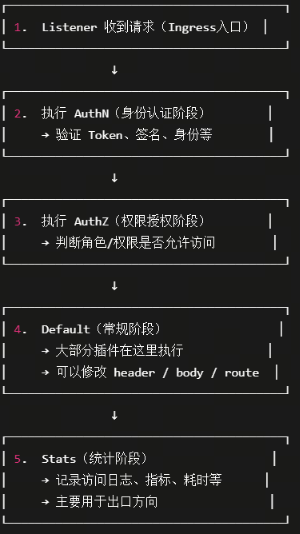
在higress中,默认插件都在Default阶段中,同一个阶段中,priority(1-1000) 越大,执行越靠前。
自定义插件
目前 higress dashboard 提供的插件不多,如果需要用到自定义插件,可以在官网 github上查找并配置。
这里以日志插件为例,演示插件的配置过程。
higress 默认的日志,没有记录请求和相应,如果需要日志中打印出 request 信息和 resopnse 信息,需要使用自定义插件 log-request-response.
下面是配置流程:
- 新增插件
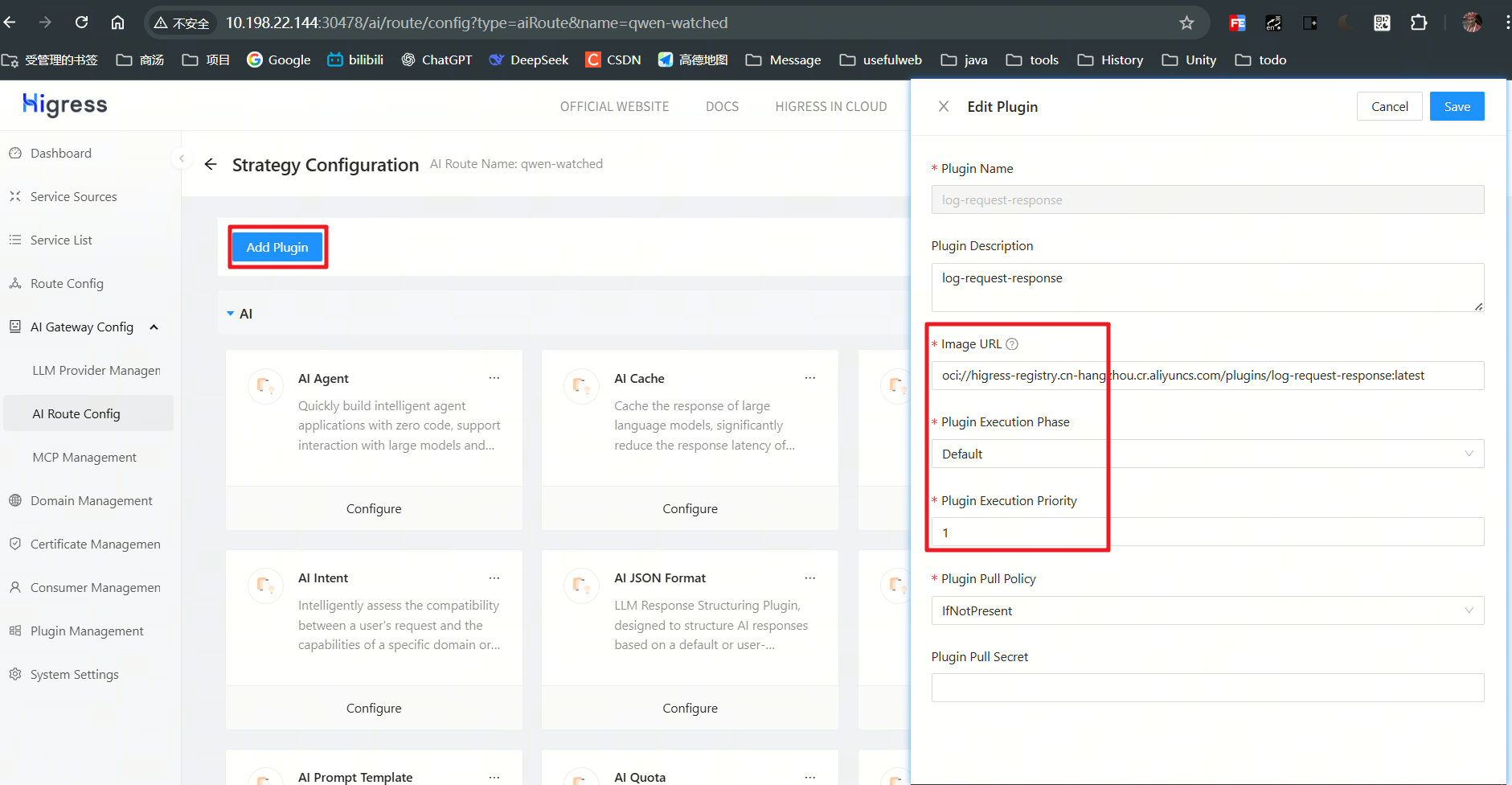
这里插件的镜像地址可以在官网中找到,也可以自定义提交到私有仓库,只要能pull到即可。
也只直接定义k8s资源:
apiVersion: extensions.higress.io/v1alpha1
kind: WasmPlugin
metadata:
  annotations:
    higress.io/wasm-plugin-description: log-request-response
    higress.io/wasm-plugin-title: log-request-response
  labels:
    higress.io/resource-definer: higress
    higress.io/wasm-plugin-built-in: "false"
    higress.io/wasm-plugin-category: custom
    higress.io/wasm-plugin-name: log-request-response
    higress.io/wasm-plugin-version: 1.0.0
  name: log-request-response-1.0.0
  namespace: higress
spec:
  defaultConfig:
    request:
      body:
        contentTypes:
        - application/json
        - application/xml
        - application/x-www-form-urlencoded
        - text/plain
        enabled: true
        maxSize: 10240
      headers:
        enabled: true
    response:
      body:
        contentTypes:
        - application/json
        - application/xml
        - text/plain
        - text/html
        enabled: true
        maxSize: 10240
      headers:
        enabled: true
  defaultConfigDisable: false
  failStrategy: FAIL_OPEN
  imagePullPolicy: IfNotPresent
  phase: AUTHN
  priority: 500
  url: oci://higress-registry.cn-hangzhou.cr.aliyuncs.com/plugins/log-request-response:latest
- 配置插件参数:
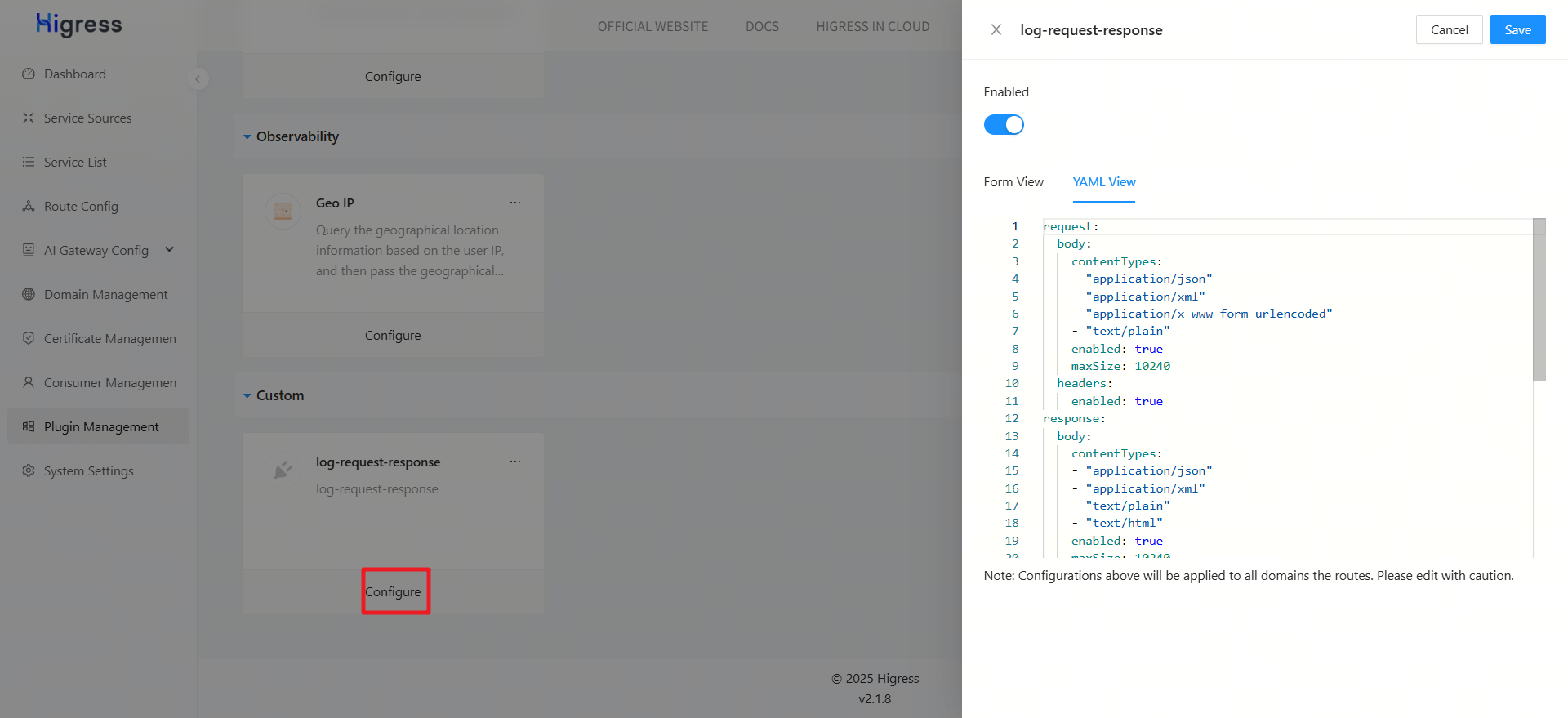
contentTypes: 表示要记录哪些请求类型,当然也可以根据 httpMethod 等参数定义。
request:
  body:
    contentTypes:
    - "application/json"
    - "application/xml"
    - "application/x-www-form-urlencoded"
    - "text/plain"
    enabled: true
    maxSize: 10240
  headers:
    enabled: true
response:
  body:
    contentTypes:
    - "application/json"
    - "application/xml"
    - "text/plain"
    - "text/html"
    enabled: true
    maxSize: 10240
  headers:
    enabled: true
- 配置日志格式:

在末尾加上我们新增的 请求和相应部分:
{
    "request_headers": "%FILTER_STATE(wasm.log-request-headers:PLAIN)%",
    "request_body": "%FILTER_STATE(wasm.log-request-body:PLAIN)%",
    "response_headers": "%FILTER_STATE(wasm.log-response-headers:PLAIN)%",
    "response_body": "%FILTER_STATE(wasm.log-response-body:PLAIN)%"
}
也可以直接修改 higress 的 ConfigMap: higress-config
- 查看日志
{
    "ai_log": "{\"api\":\"-\",\"chat_id\":\"chatcmpl-a8d5dcd2-fff8-4e28-a30d-d1a90e4de488\",\"chat_round\":1,\"input_token\":16,\"input_token_details\":{},\"llm_service_duration\":420,\"model\":\"Qwen3-32B\",\"output_token\":6,\"output_token_details\":{},\"response_type\":\"normal\",\"total_token\":22,\"x-ca-key\":\"\"}",
    "authority": "10.198.22.144:31035",
    "bytes_received": "135",
    "bytes_sent": "294",
    "downstream_local_address": "10.244.5.214:80",
    "downstream_remote_address": "10.244.0.0:52828",
    "duration": "421",
    "istio_policy_status": "-",
    "method": "POST",
    "path": "/v1/chat/completions",
    "protocol": "HTTP/1.1",
    "request_id": "a8d5dcd2-fff8-4e28-a30d-d1a90e4de488",
    "requested_server_name": "-",
    "response_code": "200",
    "response_flags": "-",
    "route_name": "ai-route-qwen-watched.internal",
    "start_time": "2025-10-26T06:41:11.367Z",
    "trace_id": "-",
    "upstream_cluster": "outbound|80||llm-qwen3-32b.internal.static",
    "upstream_host": "10.151.35.37:8103",
    "upstream_local_address": "10.244.5.214:39112",
    "upstream_service_time": "412",
    "upstream_transport_failure_reason": "-",
    "user_agent": "Apifox/1.0.0 (https://apifox.com)",
    "x_forwarded_for": "10.244.0.0",
    "response_code_details": "via_upstream",
    "request_headers": "{\"authority\":\"10.151.35.37:8103\",\"path\":\"/v1/chat/completions\",\"scheme\":\"http\",\"method\":\"POST\",\"user-agent\":\"Apifox/1.0.0 (https://apifox.com)\",\"content-type\":\"application/json\",\"x-forwarded-for\":\"10.244.0.0\",\"x-forwarded-proto\":\"http\",\"authorization\":\"Bearer Sk9X3q7ZvF2cL8pR5T1mNgH6yI4k0S7x\",\"accesstoken\":\"864b1eb8ebde4518aeb6a4d071b06919\",\"accept\":\"*/*\",\"x-envoy-internal\":\"true\",\"x-request-id\":\"a8d5dcd2-fff8-4e28-a30d-d1a90e4de488\",\"x-envoy-decorator-operation\":\"llm-qwen3-32b.internal.static:80/v1/chat/*\",\"rate-limit-key\":\"limit\",\"x-envoy-original-host\":\"10.198.22.144:31035\"}",
    "request_body": "{\n  \"model\":\"Qwen3-32B\",\n  \"messages\":[\n    {\n      \"role\":\"user\",\n      \"content\":\"你好,请回复 你好/no_think\"\n  \n}",
    "response_headers": "{\"status\":\"200\",\"date\":\"Sun, 26 Oct 2025 06:41:10 GMT\",\"server\":\"uvicorn\",\"content-length\":\"439\",\"content-type\":\"application/json\",\"req-cost-time\":\"419\",\"req-arrive-time\":\"1761460871367\",\"resp-start-time\":\"1761460871786\",\"x-envoy-upstream-service-time\":\"412\"}",
    "response_body": "{\"id\":\"chatcmpl-a8d5dcd2-fff8-4e28-a30d-d1a90e4de488\",\"object\":\"chat.completion\",\"created\":1761460871,\"model\":\"Qwen3-32B\",\"choices\":[{\"index\":0,\"message\":{\"role\":\"assistant\",\"reasoning_content\":null,\"content\":\"<think>\\n\\n</think>\\n\\n你好\",\"tool_calls\":[]},\"logprobs\":null,\"finish_reason\":\"stop\",\"stop_reason\":null}],sage\":{\"prompt_tokens\":16,\"total_tokens\":22,\"completion_tokens\":6,\"prompt_tokens_details\":null},\"prompt_logprobs\":null}"
}
higress 并发控制
higress 只有基于 request 的限流,无法像apisix 那样,给上游服务配置令牌桶或者时间窗口来直接保护上游服务。
我们如果想实现类似的并发控制,来保护上游服务,可以通过 **染色 + 限流 **的方式来实现。
基本思路就是,给所有的请求加上特定请求头,再基于这个请求头做流控。由于所有请求的请求头都是一样的,流控的大小即是上游服务的并发大小。
配置染色插件
给所有请求加上新请求头:rage-limit-key: limit
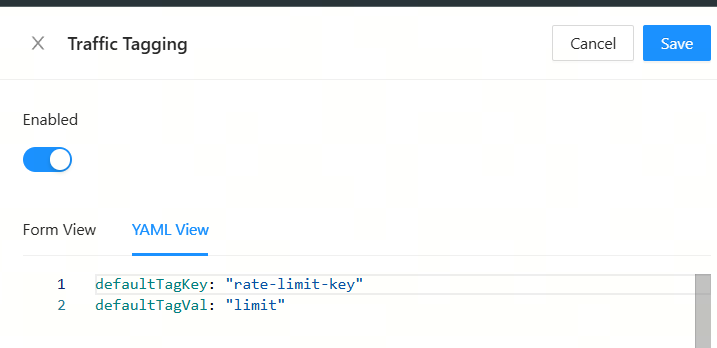
defaultTagKey: "rate-limit-key"
defaultTagVal: "limit"
配置流控插件
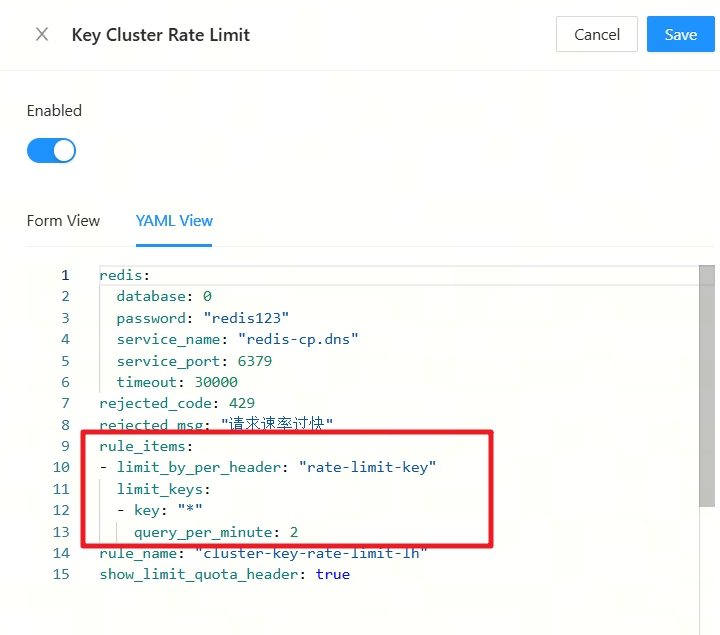
redis:
  database: 0
  password: "redis123"
  service_name: "redis-cp.dns"
  service_port: 6379
  timeout: 30000
rejected_code: 429
rejected_msg: "请求速率过快"
rule_items:
- limit_by_per_header: "rate-limit-key"
  limit_keys:
  - key: "*"
  query_per_second: 10
rule_name: "cluster-key-rate-limit-lh"
show_limit_quota_header: true
注意点:
higress 默认插件执行都是default阶段, 优先级越高执行越靠前,再自定义插件或者插件组合调用的时候,需要注意执行顺序和优先级。
三、 项目中对流控的处理
代码中,处理流控主要分成两部分,
- 流式对话中,如果触发流控,需要返回请求频繁的回答,而不是直接抛出异常。
- 非流式对话中,例如提取属性,workflow处理流程节点等,需要基于业务场景做try catch处理。
下面我们分别聊一下这两种情况。
流式对话
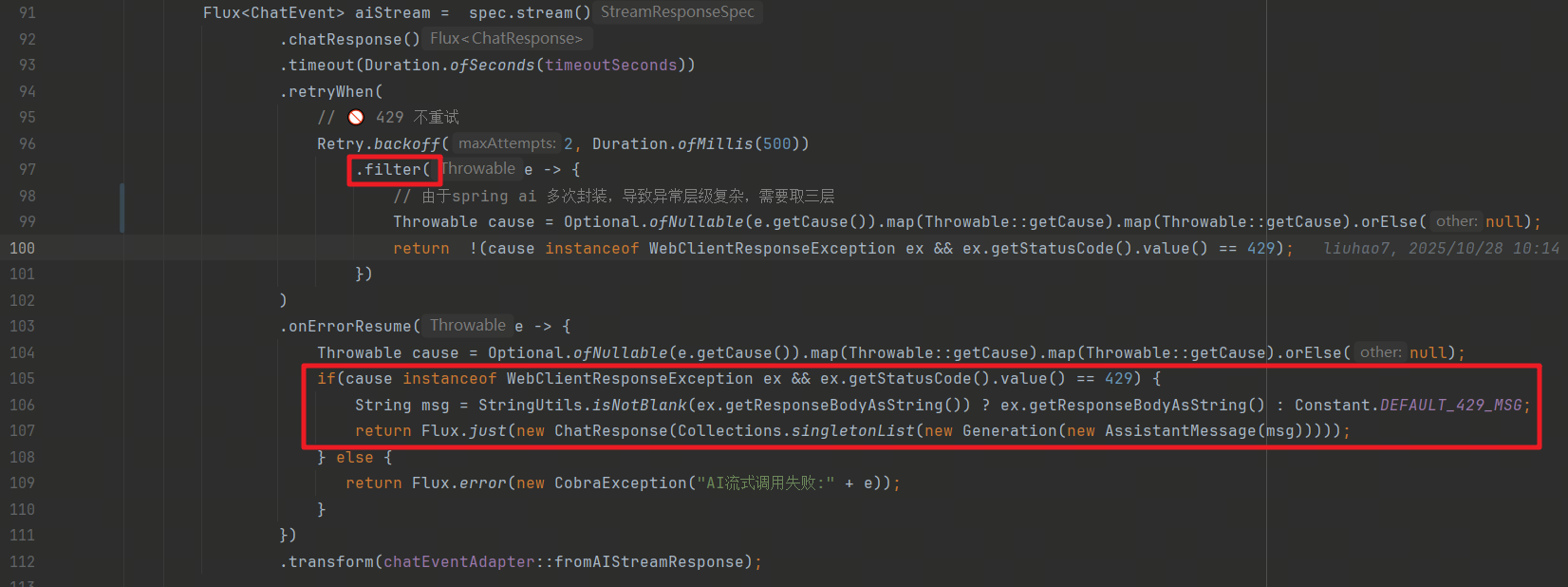
在流式对话中,我们增加了重试的过滤,触发限流不进行重试,避免资源紧张时多次调用大模型。
另外,我们在异常处理中,单独处理了429的异常,直接返回对话内容,而不是抛出异常。
非流式对话
非流式对话中,我们主要是调用的大模型的 .call() 方法,示例如下:
chatClient
  .prompt()
  .system(systemPromptTemplate.render())
  .user(promptTemplate.render(Map.of("number", number)))
  .messages(historyMessages)
  .call();
在触发限流时,我们发现报错并不是429报错,这是因为spring ai 请求是基于 restTemplate 来发起的,在发生错误时,SpringAiRetryAutoConfiguration 会转换成自己的异常,这对我们开发很不利, 我们希望能直接拿到限流异常做业务上的自定义处理,这里我们可以参照spring ai重写 responseErrorHandler bean ,由于 SpringAiRetryAutoConfiguration有 @ConditionalOnMissingBean注解,我们的handler会覆盖spring ai 的handler。
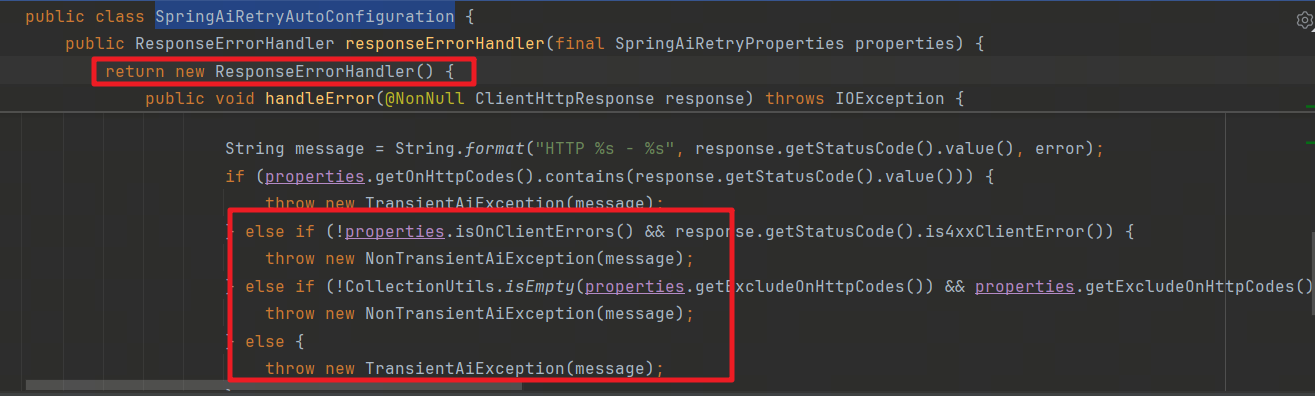
重写ResponseErrorHandler
@Slf4j
@Configuration
public class AiErrorHandlerConfig {

    @Bean
    public ResponseErrorHandler responseErrorHandler() {
        return new ResponseErrorHandler() {
            @Override
            public boolean hasError(ClientHttpResponse response) throws IOException {
                return response.getStatusCode().isError();
            }

            @Override
            public void handleError(ClientHttpResponse response) throws IOException {
                if (response.getStatusCode() == HttpStatus.TOO_MANY_REQUESTS) {
                    throw new AiRateLimitException("429 - 请求过多,请稍后重试");
                } else {
                    throw new RuntimeException("AI服务错误:" + response.getStatusCode());
                }
            }
        };
    }
}
自定义异常:
public class AiRateLimitException extends RuntimeException {
    public AiRateLimitException(String message) {
        super(message);
    }
}
自定义全局异常
@Slf4j
@RestControllerAdvice
public class CustomExceptionHandler {

    @ExceptionHandler(AiRateLimitException.class)
    public ResponseEntity<?> handleRateLimit(AiRateLimitException ex) {
        log.warn("触发限流:{}", ex.getMessage());
        return ResponseEntity
                .status(HttpStatus.TOO_MANY_REQUESTS)
                .body(Map.of("code", 429, "msg", "请求过多,请稍后再试"));
    }
}
在业务修改时,只需要捕获 AiRateLimitException 即可知道触发了限流,可以进行业务上的 fallback。
示例:
public RecommendQuestions getRecommandQuestions(List<Message> historyMessages, Integer number) {
        try {
            return chatClient
                .prompt()
                .system(systemPromptTemplate.render())
                .user(promptTemplate.render(Map.of("number", number)))
                .messages(historyMessages)
                .call()
                .entity(RecommendQuestions.class);
        }catch (AiRateLimitException e) {
            log.error("AiRateLimitException: {}", e.getMessage());
            return new RecommendQuestions();
        }
    }

有“AI”的1024 = 2048,欢迎大家加入2048 AI社区
更多推荐
 14
14 0
0- 0


 已为社区贡献2条内容

所有评论(0)