java agent配合javaassist无侵入式动态hook java程序
背景:在测试过程中经常需要一种功能可以固定某些程序数据,特别是在写自动化测试用例时,这种需求尤为强烈。比如在做后端接口测试时,期望某些不影响业务逻辑的接口能返回固定值,于是想到是不是可以写一个后端mock服务接口,每次调用接口都返回固定值。实际这种方法多数情况下并不能解决我们的问题,因为我们测试的服务正常情况都是从固定开发地址进行请求,如果想改变这些请求地址必须修改后端服务配置,或者修改开发代码,
背景:
在测试过程中经常需要一种功能可以固定某些程序数据,特别是在写自动化测试用例时,这种需求尤为强烈。比如在做后端接口测试时,期望某些不影响业务逻辑的接口能返回固定值,于是想到是不是可以写一个后端mock服务接口,每次调用接口都返回固定值。实际这种方法多数情况下并不能解决我们的问题,因为我们测试的服务正常情况都是从固定开发地址进行请求,如果想改变这些请求地址必须修改后端服务配置,或者修改开发代码,将地址指向我们的测试mock服务。这种方式多数情况下是不可行的,开发怎么可能允许测试来修改他们代码呢?即使修改了,如果出现问题,能确认不是之前修改地址导致的吗?所以我们需要的mock方式应该是不修改任何开发代码的情况下,能够改变java应用的行为,来符合我们测试的需求。
前提条件:待hook的无论是Android 程序还是java后端服务都需要有root权限。
技术栈:java agent , javaassist
1. 新建java maven工程
pom.xml内容如下:
<?xml version="1.0" encoding="UTF-8"?>
<project xmlns="http://maven.apache.org/POM/4.0.0"
         xmlns:xsi="http://www.w3.org/2001/XMLSchema-instance"
         xsi:schemaLocation="http://maven.apache.org/POM/4.0.0 http://maven.apache.org/xsd/maven-4.0.0.xsd">
    <modelVersion>4.0.0</modelVersion>

    <groupId>org.example</groupId>
    <artifactId>study</artifactId>
    <version>1.0-SNAPSHOT</version>

    <properties>
        <maven.compiler.source>8</maven.compiler.source>
        <maven.compiler.target>8</maven.compiler.target>
    </properties>
    <dependencies>
        <dependency>
            <groupId>org.javassist</groupId>
            <artifactId>javassist</artifactId>
            <version>3.29.0-GA</version>
        </dependency>
        <dependency>
            <groupId>org.ow2.asm</groupId>
            <artifactId>asm</artifactId>
            <version>9.3</version>
        </dependency>
        <dependency>
            <groupId>com.sun</groupId>
            <artifactId>tools</artifactId>
            <version>1.8.0</version> <!-- 或者适合你的 JDK 版本 -->
            <scope>system</scope>
            <systemPath>C:/Program Files/Java/jdk1.8.0_301/lib/tools.jar</systemPath>
        </dependency>
    </dependencies>
    <build>
        <plugins>
            <plugin>
                <groupId>org.apache.maven.plugins</groupId>
                <artifactId>maven-jar-plugin</artifactId>
                <version>3.1.0</version>
                <configuration>
                    <archive>
                        <manifestFile>src/main/resources/META-INF/MANIFEST.MF</manifestFile>
                    </archive>
                </configuration>
            </plugin>

            <plugin>
                <groupId>org.apache.maven.plugins</groupId>
                <artifactId>maven-shade-plugin</artifactId>
                <version>3.2.4</version>
                <executions>
                    <execution>
                        <phase>package</phase>
                        <goals>
                            <goal>shade</goal>
                        </goals>
                        <configuration>
                            <createDependencyReducedPom>false</createDependencyReducedPom>
                            <finalName>study-1.0-SNAPSHOT</finalName>
                        </configuration>

                    </execution>
                </executions>
            </plugin>
        </plugins>
    </build>
</project>
2. 在resources目录下创建MANIFEST.MF文件
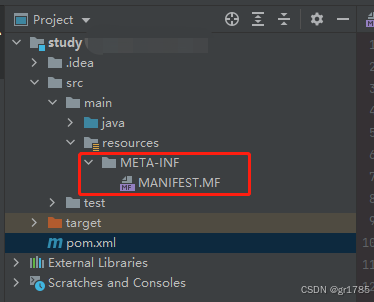
文件内容:
Manifest-Version: 1.0
Premain-Class: xxx.xxx.BServiceAgent
Agent-Class: xxx.xxx.BServiceAgent
Can-Redefine-Classes: true
Can-Retransform-Classes: true
3. 创建agent类
package xxx.xxx;
import java.lang.instrument.Instrumentation;

public class BServiceAgent {
    public static void premain(String agentArgs, Instrumentation inst) {
        System.out.println("premain:B Service Agent Started!");
    }
    public static void agentmain(String agentArgs, Instrumentation inst)
    {
        System.out.println("agentmain:B Service Agent Started!!!");
        inst.addTransformer(new HookTransformer(), true);
        try {
            for (Class<?> clazz : inst.getAllLoadedClasses()) {
                if (clazz.getName().equals("com.xxx.xxx.service.xxxService")) {
                    System.out.println("Retransforming class: " + clazz.getName());
                    inst.retransformClasses(clazz);
                }
            }
        } catch (Exception e) {
            e.printStackTrace();
        }
    }

}
创建HookTransformer 继承 ClassFileTransformer接口,代码如下:
package xxx.xxx;

import javassist.ClassPool;
import javassist.CtClass;
import javassist.CtMethod;

import java.lang.instrument.ClassFileTransformer;
import java.lang.instrument.IllegalClassFormatException;
import java.security.ProtectionDomain;

public class HookTransformer implements ClassFileTransformer {
    @Override
    public byte[] transform(ClassLoader loader, String className, Class<?> classBeingRedefined, ProtectionDomain protectionDomain, byte[] classfileBuffer) throws IllegalClassFormatException {
        byte[] byteCode = classfileBuffer;
        if ("com/xxx/xxx/service/xxxService".equals(className)) {
            try {
                ClassPool cp = ClassPool.getDefault();
                CtClass ctClass = cp.get("com.xxx.xxx.service.xxxService");
                CtMethod method = ctClass.getDeclaredMethod("editTask");
                method.insertBefore("{ System.out.println(\"Hooked by B Service!\"); }");
                byteCode = ctClass.toBytecode();
                ctClass.detach();
            } catch (Exception e) {
                e.printStackTrace();
            }
        }
        return byteCode;
    }
}
注:"com/xxx/xxx/service/xxxService" 是待hook 服务类的全路径名
4. 创建执行类 AttachBService
package xxx.xxx;

import com.sun.tools.attach.AgentInitializationException;
import com.sun.tools.attach.AgentLoadException;
import com.sun.tools.attach.AttachNotSupportedException;
import com.sun.tools.attach.VirtualMachine;

import java.io.IOException;
import java.util.Scanner;

public class AttachBService {
    public static void main(String[] args) throws IOException, AttachNotSupportedException, AgentLoadException, AgentInitializationException {
        System.out.println("请输入进程号:");
        String pid = new Scanner(System.in).next();
        String agentPath = "E:\\IDEA\\xxx\study\\target\\study-1.0-SNAPSHOT.jar";
        VirtualMachine vm = VirtualMachine.attach(pid);
        vm.loadAgent(agentPath);
        vm.detach();
    }
}
注:String agentPath = "E:\\IDEA\\xxx\study\\target\\study-1.0-SNAPSHOT.jar"; 为agent工程打包之后生成的jar包全路径
5. 执行验证
5.1 启动待测服务
我验证的待测项目是一个springboot服务项目,启动之后获取到 进程号。
5.2 启动hook程序
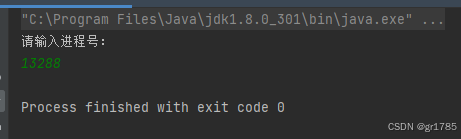
启动之后将springboot项目进程号输入,回车之后会在springboot服务项目日志中看到此时代码已经被hook,注入的日志信息在springboot服务中已被打印出来。

5.3 验证hook方法
发送post请求,触发springboot项目被hook的函数
下图为agent中hook代码

下图为待hook的springboot服务接口被触发,打印的日志,说明方法已被hook。

以上操作过程,演示了在不需要修改任何开发代码的情况下,通过java agent 直接在jvm中重新修改字节流实现对待测服务源码的修改而不影响源码实现,进而满足我们测试的要求。
5.4 hook 入参
待hook springboot服务中方法为
public String editTask(WebTaskBean myWebTaskBean)
{
	myWebTaskBean.setInsertTime(DateUtil.getDate());
	Integer myResult= myBusinessTaskMapper.updateData(myWebTaskBean);
	return "编辑保存成功!";
}
agent 中如下实现即可将入参myWebTaskBean内容hook掉
method.insertBefore("{ " +
                "System.out.println(\"Hooked by B Service!\"); " +
                // 确保类路径池中包含了必要的类,如 DateUtil 和 WebTaskBean
                "WebTaskBean fixedBean = new WebTaskBean();" +
                "fixedBean.setInsertTime(DateUtil.getDate());" +
                "fixedBean.setTaskName(\"Fixed Task Name\");" +
                "myWebTaskBean = fixedBean;" +  // 修改传入的参数为新的固定对象
                "}");
后面无论post发送什么样的参数,myBusinessTaskMapper.updateData()的入参都是固定值
5.5 hook 返回值
hook返回值更加简单
// 插入代码使方法返回固定值
method.setBody("{ return \"固定返回内容!\"; }");
后面无论post入参为啥,都是只会返回 固定内容。
注意:
以上代码建议不要应用到生产环境,另外如果服务为多人同时测试,在hook之前需要进行沟通,避免交叉测试产生错误结果,如果需要恢复代码,重启待测服务即可。这种方法完全满足我在测试环境的mock需求。

有“AI”的1024 = 2048,欢迎大家加入2048 AI社区
更多推荐

 17
17 0
0- 0


 已为社区贡献2条内容

所有评论(0)