解决VS Code 打开项目后 TypeScript 一直加载问题
·
📌 一、问题描述
在 VS Code 中打开 TS 项目时,TypeScript 相关功能出现以下情况:
- 状态栏显示 “正在初始化 tsconfig.json”
- 提示 “正在分析** .ts 及其依赖项”
- 悬停提示(hover)显示 “正在加载…”
- 代码跳转、查找引用功能全部失效
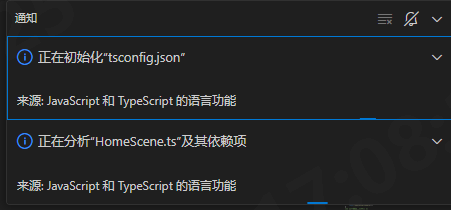
此问题在 项目体量较大或 TypeScript 版本过高 时尤为明显。
🔍 二、原因分析
- 项目使用了 VS Code 内置 TypeScript 版本(一般是 5.x),与 引擎或者 声明文件不兼容。
tsconfig.json扫描范围过大,包含bin/、release/等目录,导致 tsserver 加载过慢。- TypeScript 语言服务(tsserver)内存不足或陷入循环分析。
⚙️ 三、解决方案汇总
✅ 1. 在项目中安装独立 TypeScript 版本
在项目根目录执行:
npm install typescript@4.8.4 --save-dev --save-exact
💡 某些引擎(例如LayaAir) 推荐 TypeScript 版本区间为 4.4 – 4.9,
过高版本(如 5.x)会触发类型不兼容与性能问题。
✅ 2. 让 VS Code 使用项目自带 TypeScript 版本
创建或修改文件 .vscode/settings.json:
{
  "typescript.tsdk": "node_modules/typescript/lib",
  "typescript.tsserver.maxTsServerMemory": 4096
}
重启 VS Code 后:
- 打开命令面板 (Ctrl+Shift+P)
- 输入:TypeScript: Select TypeScript Version
- 选择:Use Workspace Version (4.8.4)
(一般到这里为止,降低ts版本就能解决问题,以下为优化方案)
如果对你有帮助,请帮我点个赞 ! (* __ *) 嘻嘻……
✅ 3. 优化 tsconfig.json 配置(可选)
修改为优化版 tsconfig.json:
{
  "compilerOptions": {
    "target": "ESNext",
    "module": "es6",
    "moduleResolution": "node",
    "noEmitHelpers": true,
    "sourceMap": false,

    // 性能优化
    "skipLibCheck": true,
    "allowJs": true,
    "checkJs": false,
    "strict": false,
    "incremental": true,
    "tsBuildInfoFile": "./.tsbuildinfo",
    "forceConsistentCasingInFileNames": true,
    "baseUrl": "./",
    "paths": {
      "@/*": ["src/*"]
    }
  },
  "include": [
    "src"
  ],
  "exclude": [
    "node_modules",
    "bin",
    "release",
    "build",
    "temp",
    "**/*.min.js"
  ]
}
⚡ 仅包含
src与核心声明文件,避免扫描bin/release等生成目录。
这样 tsserver 启动速度可提升 5–10 倍。
✅ 4. VS Code 性能设置优化
在 .vscode/settings.json 补充以下内容:
{
  "typescript.disableAutomaticTypeAcquisition": true,
  "typescript.tsserver.experimental.enableProjectDiagnostics": false,
  "files.watcherExclude": {
    "**/bin/**": true,
    "**/release/**": true
  },
  "files.exclude": {
    "**/node_modules": true,
    "**/bin": true,
    "**/release": true
  }
}
✅ 5. 建立轻量类型索引文件(可选提升,针对LayaAir引擎)
在 src/ 下创建 global.d.ts:
/// <reference path="../libs/laya.core.d.ts" />
/// <reference path="../libs/laya.ui.d.ts" />
/// <reference path="../libs/laya.webgl.d.ts" />

declare const ui: any;
并在 tsconfig.json 的 include 中加入:
"src/global.d.ts"
这样可避免 VS Code 自动全量扫描 libs/ 目录。
✅ 6. 重启与清理缓存
# 清除缓存
rm -rf node_modules/.cache
rm -rf .tsbuildinfo

# 重新安装依赖
npm install
然后在 VS Code 中执行:
TypeScript: Restart TS Server
🚀 四、验证结果
完成后应出现以下现象:
- 状态栏显示
TypeScript 4.8.4 (workspace) - 不再出现 “正在初始化 tsconfig.json”
- 悬停、跳转、查找引用功能恢复正常
- 打开大型 Laya 项目时 CPU 占用显著下降
🧠 五、总结
| 问题 | 根因 | 解决方案 |
|---|---|---|
| VS Code 卡在 “正在初始化” | TypeScript 版本过高 | 安装并切换到 4.8.4 |
| 智能提示加载慢 | tsconfig 扫描范围过大 | 优化 include/exclude |
| 内存溢出或 tsserver 重启 | 默认内存过小 | 设置 maxTsServerMemory = 4096 |
| hover/跳转失效 | 类型文件太多 or 不兼容 | 限制加载的 .d.ts 文件 |
✅ 最终结论:
通过安装项目专属 TypeScript 4.8.4 版本,
优化 tsconfig.json 扫描范围,
并调整 VS Code 设置,
可彻底解决 LayaAir2 项目中 TypeScript 加载卡顿与智能提示失效的问题。
如果对你有帮助,请帮我点个赞 ! (* __ *) 嘻嘻……

有“AI”的1024 = 2048,欢迎大家加入2048 AI社区
更多推荐


 12
12 0
0- 0


 已为社区贡献3条内容

所有评论(0)