C#语言入门详解(19)委托详解
·
C#语言入门详解(19)委托详解
内容来自刘铁猛C#语言入门详解课程。
参考文档:CSharp language specification 5.0 中文版
一、什么是委托
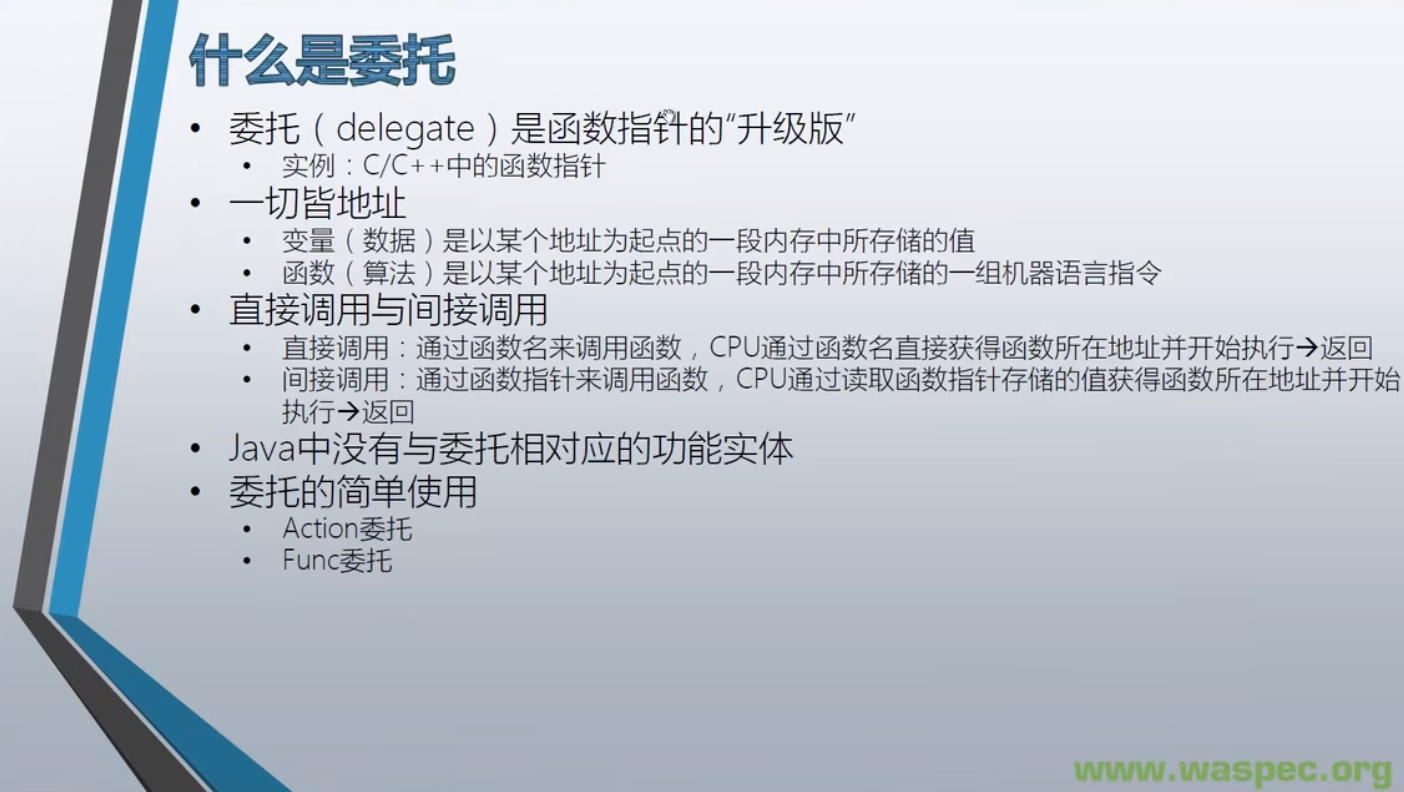
- C 语言通过声明函数指针来实现间接调用:
#include <stdio.h>
//声明有两个 int 形参返回类型为 int 的函数指针类型
typedef int(*Calc)(int a, int b);
int Add(int a, int b)
{
int result = a+ b;
return result;
}
int Sub(int a, int b)
{
int result = a-b,
return result;
}
int main()
{
int x=100
int y=200;
int z =0;
//通过函数指针间接调用函数地址
Calc funcPoint1 = &Add;
Calc funcPoint2 = ⋐
z=funcPoint1(x, y);
printf("%d+%d=%d\n", x, y, z):
z = funcPoint2(x, y);
printf("%d-%d=%d\n", x,y, z):
system("pause");
return O;
}
- Java 语言由 C++ 发展而来,为了提高应用安全性,Java 语言禁止程序员直接访问内存地址。即 Java 语言把 C++ 中所有与指针相关的内容都舍弃掉了。C#同样由 C++ 发展而来,但通过委托保留了函数指针相对应的功能。
- Action/Func是 C# 内置的 无/有 返回值委托实例,有很多重载以方便使用。
class Program
{
    static void Main(string[] args)
    {
        var calculator = new Calculator();
        // Action 用于无形参无返回值的方法。
        Action action = new Action(calculator.Report);
        calculator.Report();
        action.Invoke();
        // 模仿函数指针的简略写法。
        action();

        Func<int, int, int> func1 = new Func<int, int, int>(calculator.Add);
        Func<int, int, int> func2 = new Func<int, int, int>(calculator.Sub);

        int x = 100;
        int y = 200;
        int z = 0;

        z = func1.Invoke(x, y);
        Console.WriteLine(z);
        z = func2.Invoke(x, y);
        Console.WriteLine(z);

        // Func 也有简略写法。
        z = func1(x, y);
        Console.WriteLine(z);
        z = func2(x, y);
        Console.WriteLine(z);
    }
}

class Calculator
{
    public void Report()
    {
        Console.WriteLine("I have 3 methods.");
    }

    public int Add(int a, int b)
    {
        return a + b;
    }

    public int Sub(int a, int b)
    {
        return a - b;
    }
}
二、委托的声明(自定义委托)
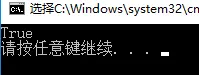
- 委托是一种类
static void Main(string[] args)
{
    Type t = typeof(Action);
    Console.WriteLine(t.IsClass);
}
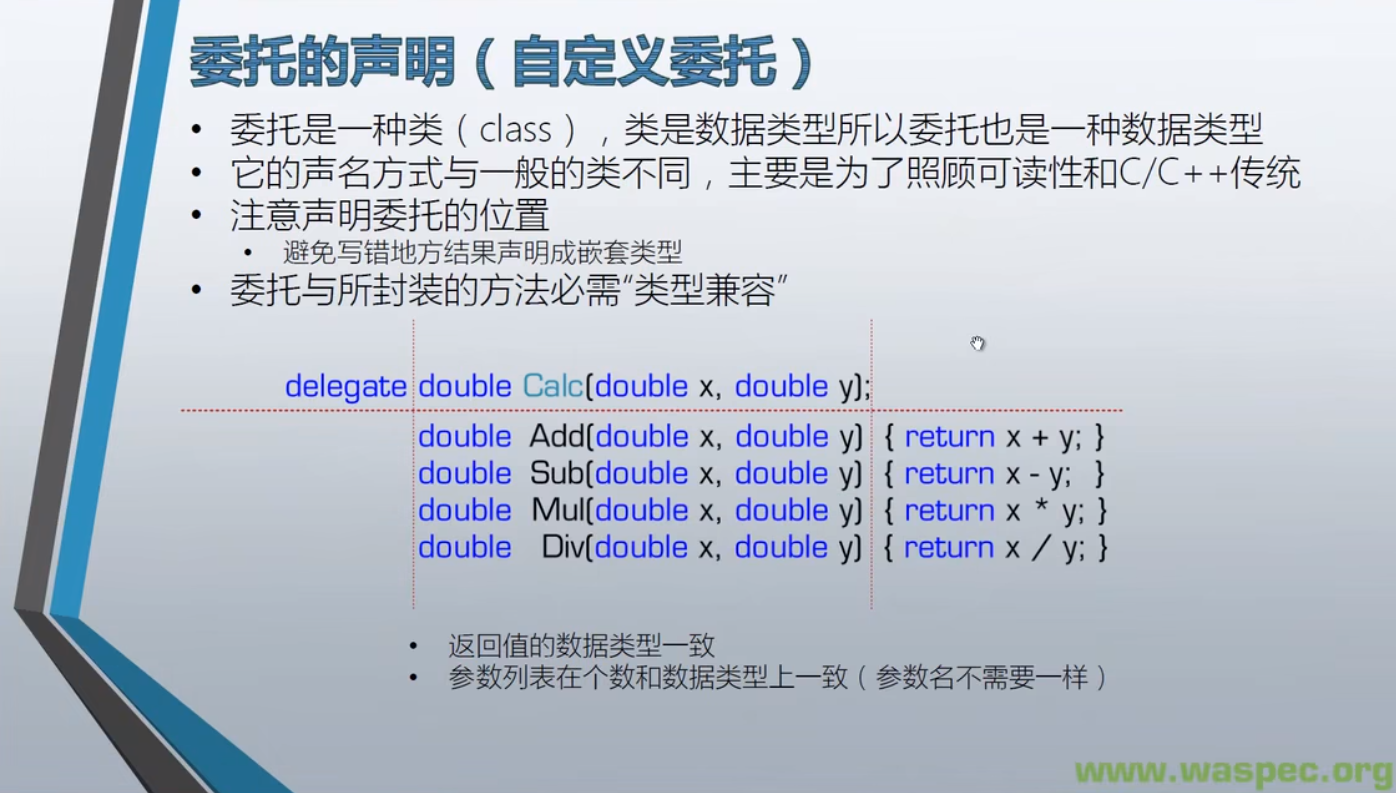
- 委托是类,所以声明位置是和 class 处于同一个级别。但 C# 允许嵌套声明类(一个类里面可以声明另一个类),所以有时也会有 delegate 在 class 内部声明的情况。
public delegate double Calc(double x, double y);

class Program
{
    static void Main(string[] args)
    {
        Calculator calculator = new Calculator();
        Calc calc1 = new Calc(calculator.Add);
        Calc calc2 = new Calc(calculator.Sub);
        Calc calc3 = new Calc(calculator.Mul);
        Calc calc4 = new Calc(calculator.Div);

		double a = 200;
		double b = 100;
		double c = 0;
		c = calc1.invoke(a, b);
        Console.WriteLine(c);

		c = calc2.invoke(a, b);
		Console.WriteLine(c);

		c = calc3.invoke(a, b);
		Console.WriteLine(c);

		c = calc4(a, b);
		Console.WriteLine(c);
    }
}

class Calculator
{
    public double Add(double x, double y)
    {
        return x + y;
    }

    public double Sub(double x, double y)
    {
        return x - y;
    }

    public double Mul(double x, double y)
    {
        return x * y;
    }

    public double Div(double x, double y)
    {
        return x / y;
    }
}
三、委托的使用
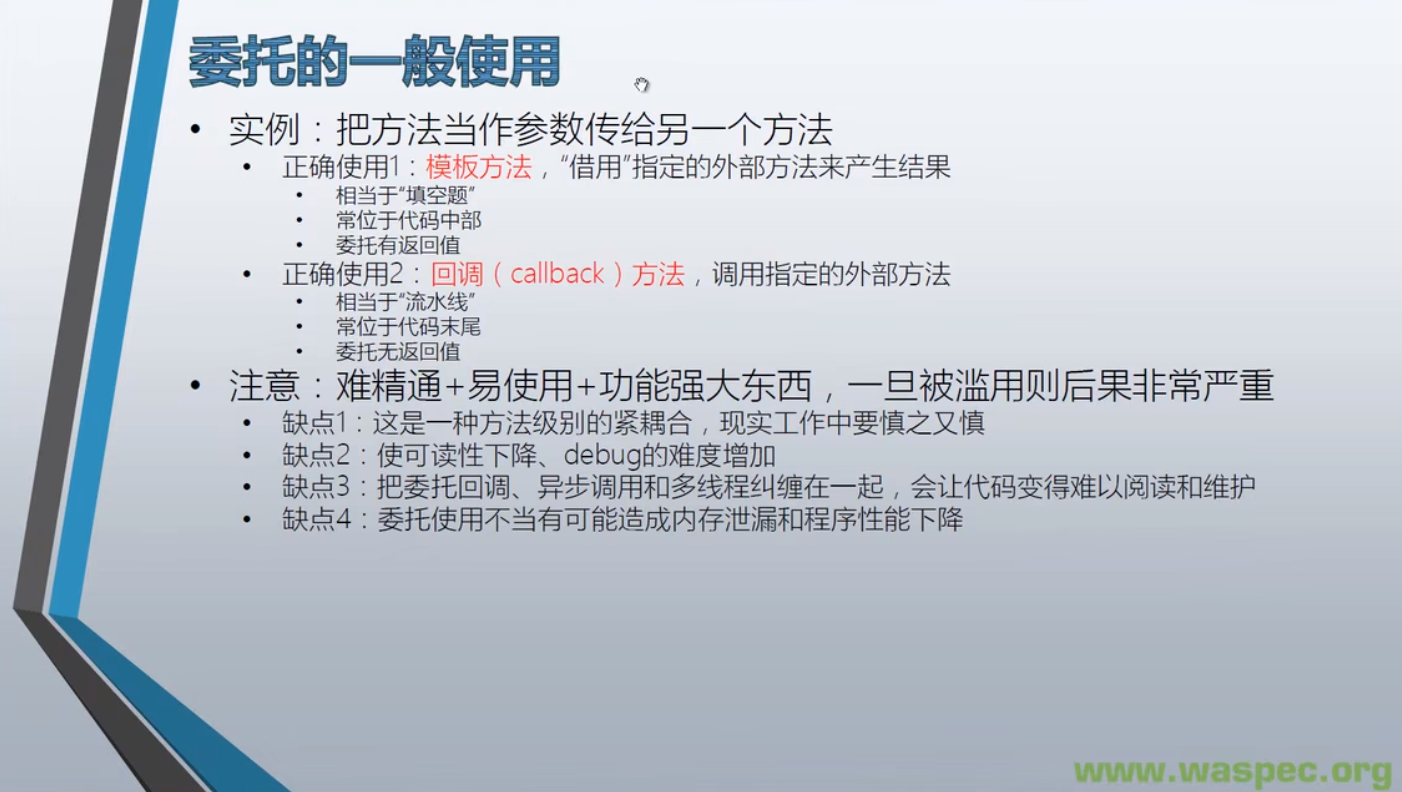
- 利用模板方法,提高代码复用性。 下例中 Product、Box、WrapFactory 都不用修改,只需要在 ProductFactory 里面新增不同的 MakeXXX 然后作为委托传入 WrapProduct 就可以对其进行包装。
- Reuse,重复使用,也叫“复用”。代码的复用不但可以提高工作效率,还可以减少 bug 的引入。
class Program
{
    static void Main(string[] args)
    {
        ProductFactory productFactory = new ProductFactory();
        WrapFactory wrapFactory = new WrapFactory();

        Func<Product> func1 = new Func<Product>(productFactory.MakePizza);
        Func<Product> func2 = new Func<Product>(productFactory.MakeToyCar);


        Box box1 = wrapFactory.WrapProduct(func1);
        Box box2 = wrapFactory.WrapProduct(func2);

        Console.WriteLine(box1.Product.Name);
        Console.WriteLine(box2.Product.Name);
    }
}

class Product
{
    public string Name { get; set; }
}

class Box
{
    public Product Product { get; set; }
}

class WrapFactory
{
    // 模板方法,提高复用性
    public Box WrapProduct(Func<Product> getProduct)
    {
        var box = new Box();
        Product product = getProduct.Invoke();
        box.Product = product;
        return box;
    }
}

class ProductFactory
{
    public Product MakePizza()
    {
        Product product = new Product();
        product.Name = "Pizza";
        return product;
    }

    public Product MakeToyCar()
    {
        Product product = new Product();
        product.Name = "Toy Car";
        return product;
    }
}
- 回调方法。回调方法是通过委托类型参数传入主调方法的被调用方法,主调方法根据自己的逻辑决定是否调用这个方法。
class Program
{
    static void Main(string[] args)
    {
        var productFactory = new ProductFactory();

        // Func 前面是传入参数,最后一个是返回值,所以此处以 Product 为返回值
        Func<Product> func1 = new Func<Product>(productFactory.MakePizza);
        Func<Product> func2 = new Func<Product>(productFactory.MakeToyCar);

        var wrapFactory = new WrapFactory();
        var logger = new Logger();
        // Action 只有传入参数,所以此处以 Product 为参数
        Action<Product> log = new Action<Product>(logger.Log);

        Box box1 = wrapFactory.WrapProduct(func1, log);
        Box box2 = wrapFactory.WrapProduct(func2, log);

        Console.WriteLine(box1.Product.Name);
        Console.WriteLine(box2.Product.Name);
    }
}

class Logger
{
    public void Log(Product product)
    {
        // Now 是带时区的时间,存储到数据库应该用不带时区的时间 UtcNow。
        Console.WriteLine("Product '{0}' created at {1}.Price is {2}", product.Name, DateTime.UtcNow, product.Price);
    }
}

class Product
{
    public string Name { get; set; }
    public double Price { get; set; }
}

class Box
{
    public Product Product { get; set; }
}

class WrapFactory
{
    // 模板方法,提高复用性
    public Box WrapProduct(Func<Product> getProduct, Action<Product> logCallBack)
    {
        var box = new Box();
        Product product = getProduct.Invoke();

        // 只 log 价格高于 50 的
        if (product.Price >= 50)
        {
            logCallBack(product);
        }

        box.Product = product;
        return box;
    }
}

class ProductFactory
{
    public Product MakePizza()
    {
        var product = new Product
        {
            Name = "Pizza",
            Price = 12
        };
        return product;
    }

    public Product MakeToyCar()
    {
        var product = new Product
        {
            Name = "Toy Car",
            Price = 100
        };
        return product;
    }
}
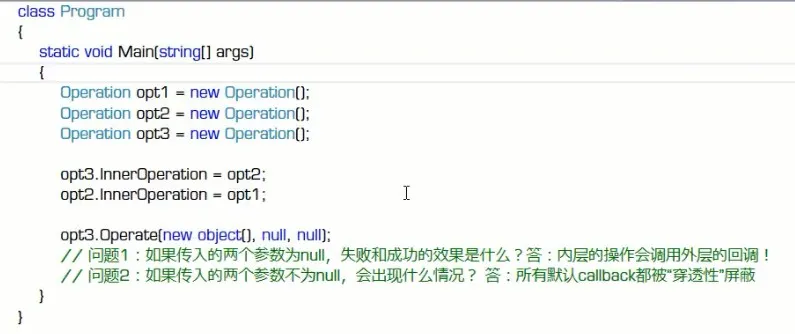
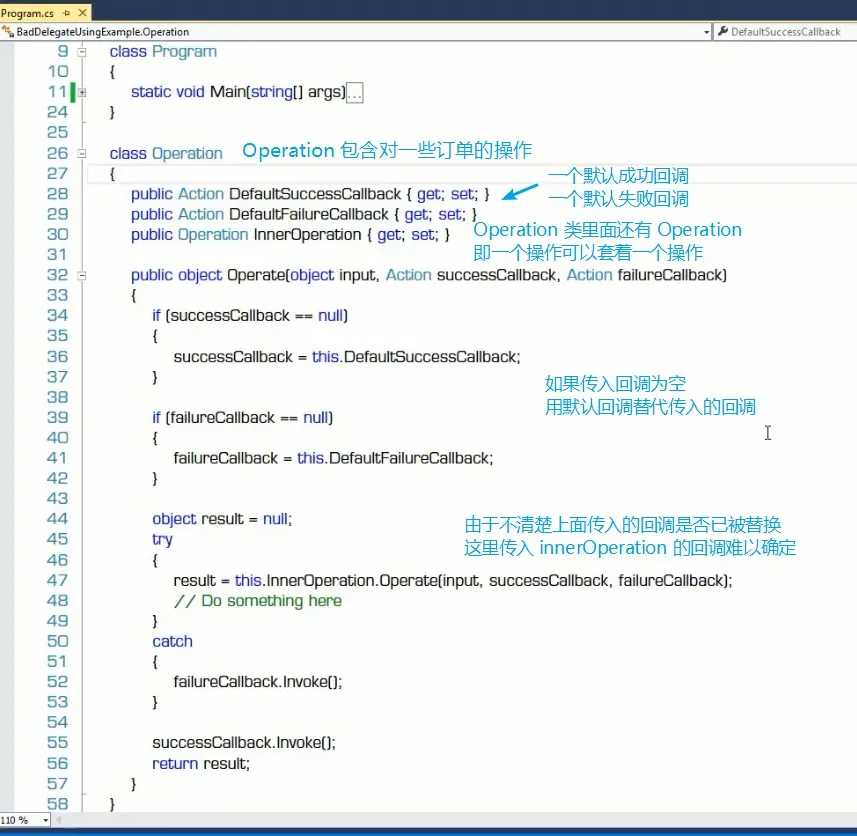
- 注意委托滥用
四、委托的高级使用
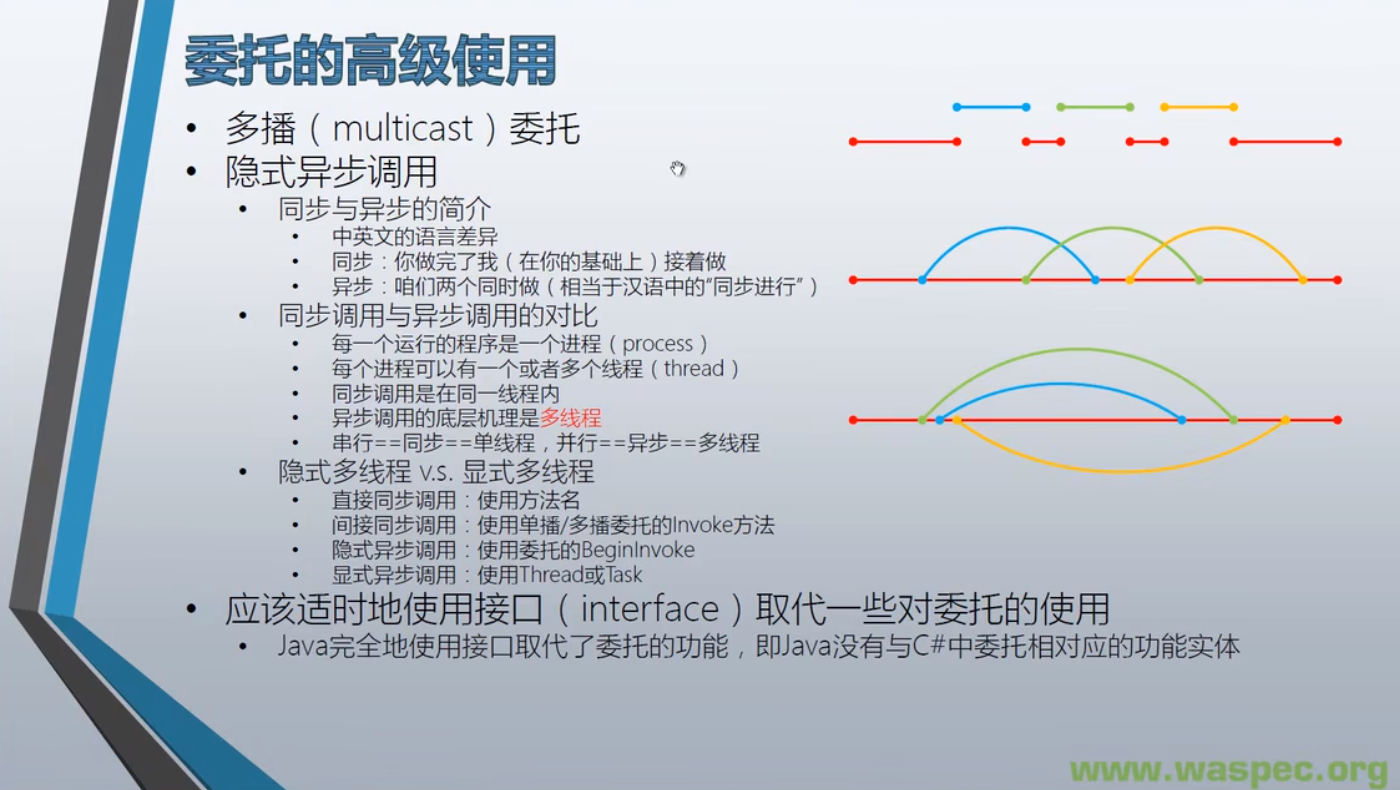
- 直接同步调用与间接同步调用
using System;
using System.Threading;

namespace DelegateExample
{
    class Program
    {
        static void Main(string[] args)
        {
            var stu1 = new Student { ID = 1, PenColor = ConsoleColor.Yellow };
            var stu2 = new Student { ID = 2, PenColor = ConsoleColor.Green };
            var stu3 = new Student { ID = 3, PenColor = ConsoleColor.Red };

            // 直接同步调用
            //stu1.DoHomework();
            //stu2.DoHomework();
            //stu3.DoHomework();

            var action1 = new Action(stu1.DoHomework);
            var action2 = new Action(stu2.DoHomework);
            var action3 = new Action(stu3.DoHomework);

            // 间接同步调用
            //action1.Invoke();
            //action2.Invoke();
            //action3.Invoke();

            // 多播委托,间接同步调用
            action1 += action2;
            action1 += action3;

            action1.Invoke();

            // 主线程模拟在做某些事情。
            for (var i = 0; i < 10; i++)
            {
                Console.ForegroundColor=ConsoleColor.Cyan;
                Console.WriteLine("Main thread {0}",i);
                Thread.Sleep(1000);
            }
        }
    }

    class Student
    {
        public int ID { get; set; }
        public ConsoleColor PenColor { get; set; }

        public void DoHomework()
        {
            for (int i = 0; i < 5; i++)
            {
                Console.ForegroundColor = PenColor;
                Console.WriteLine("Student {0} doing homework {1} hour(s)", ID, i);
                Thread.Sleep(1000);
            }
        }
    }
}
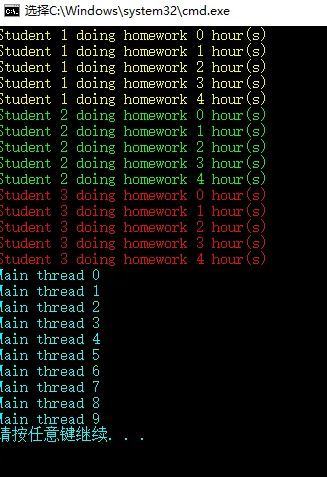
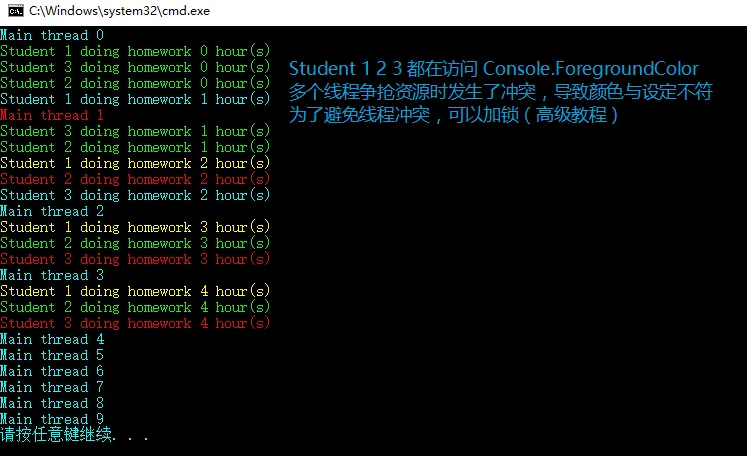
- 使用委托隐式异步调用 BeginInvoke
using System;
using System.Threading;

namespace DelegateExample
{
    class Program
    {
        static void Main(string[] args)
        {
            var stu1 = new Student { ID = 1, PenColor = ConsoleColor.Yellow };
            var stu2 = new Student { ID = 2, PenColor = ConsoleColor.Green };
            var stu3 = new Student { ID = 3, PenColor = ConsoleColor.Red };

            var action1 = new Action(stu1.DoHomework);
            var action2 = new Action(stu2.DoHomework);
            var action3 = new Action(stu3.DoHomework);

            // 使用委托进行隐式异步调用。
            // BeginInvoke 自动生成分支线程,并在分支线程内调用方法。
            action1.BeginInvoke(null, null);
            action2.BeginInvoke(null, null);
            action3.BeginInvoke(null, null);

            // 主线程模拟在做某些事情。
            for (var i = 0; i < 10; i++)
            {
                Console.ForegroundColor = ConsoleColor.Cyan;
                Console.WriteLine("Main thread {0}",i);
                Thread.Sleep(1000);
            }
        }
    }

    class Student
    {
        public int ID { get; set; }
        public ConsoleColor PenColor { get; set; }

        public void DoHomework()
        {
            for (int i = 0; i < 5; i++)
            {
                Console.ForegroundColor = PenColor;
                Console.WriteLine("Student {0} doing homework {1} hour(s)", ID, i);
                Thread.Sleep(1000);
            }
        }
    }
}
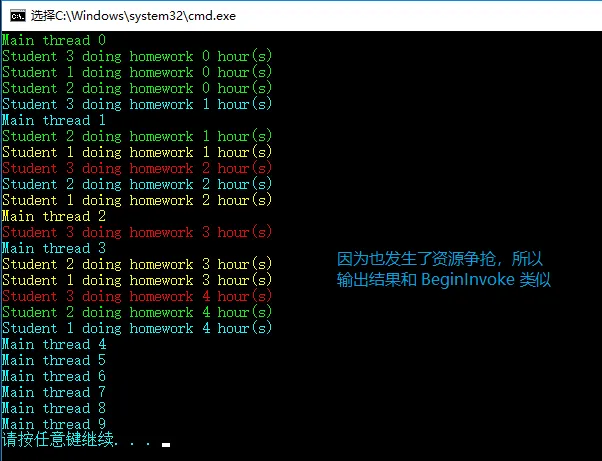
- 使用 Thread 与 Task 进行X显式异步调用
using System;
using System.Threading;
using System.Threading.Tasks;

namespace DelegateExample
{
    class Program
    {
        static void Main(string[] args)
        {
            var stu1 = new Student { ID = 1, PenColor = ConsoleColor.Yellow };
            var stu2 = new Student { ID = 2, PenColor = ConsoleColor.Green };
            var stu3 = new Student { ID = 3, PenColor = ConsoleColor.Red };

            // 老的显式异步调用方式 Thread
            //var thread1 = new Thread(new ThreadStart(stu1.DoHomework));
            //var thread2 = new Thread(new ThreadStart(stu2.DoHomework));
            //var thread3 = new Thread(new ThreadStart(stu3.DoHomework));

            //thread1.Start();
            //thread2.Start();
            //thread3.Start();

            // 使用 Task
            var task1 = new Task(new Action(stu1.DoHomework));
            var task2 = new Task(new Action(stu2.DoHomework));
            var task3 = new Task(new Action(stu3.DoHomework));

            task1.Start();
            task2.Start();
            task3.Start();

            // 主线程模拟在做某些事情。
            for (var i = 0; i < 10; i++)
            {
                Console.ForegroundColor = ConsoleColor.Cyan;
                Console.WriteLine("Main thread {0}", i);
                Thread.Sleep(1000);
            }
        }
    }

    class Student
    {
        public int ID { get; set; }
        public ConsoleColor PenColor { get; set; }

        public void DoHomework()
        {
            for (int i = 0; i < 5; i++)
            {
                Console.ForegroundColor = PenColor;
                Console.WriteLine("Student {0} doing homework {1} hour(s)", ID, i);
                Thread.Sleep(1000);
            }
        }
    }
}
- 适时地使用接口(interface)取代委托。Java 完全使用接口取代了委托功能,以前面的模板方法举列,通过接口也能实现方法的可替换。
using System;

namespace DelegateExample
{
    class Program
    {
        static void Main(string[] args)
        {
            IProductFactory pizzaFactory = new PizzaFactory();
            IProductFactory toyCarFactory = new ToyCarFactory();
            var wrapFactory = new WrapFactory();

            Box box1 = wrapFactory.WrapProduct(pizzaFactory);
            Box box2 = wrapFactory.WrapProduct(toyCarFactory);

            Console.WriteLine(box1.Product.Name);
            Console.WriteLine(box2.Product.Name);
        }
    }

    interface IProductFactory
    {
        Product Make();
    }

    class PizzaFactory : IProductFactory
    {
        public Product Make()
        {
            var product = new Product();
            product.Name = "Pizza";
            return product;
        }
    }

    class ToyCarFactory : IProductFactory
    {
        public Product Make()
        {
            var product = new Product();
            product.Name = "Toy Car";
            return product;
        }
    }

    class Product
    {
        public string Name { get; set; }
    }

    class Box
    {
        public Product Product { get; set; }
    }

    class WrapFactory
    {
        // 模板方法,提高复用性
        public Box WrapProduct(IProductFactory productFactory)
        {
            var box = new Box();
            Product product = productFactory.Make();
            box.Product = product;
            return box;
        }
    }
}

有“AI”的1024 = 2048,欢迎大家加入2048 AI社区
更多推荐

 4
4 0
0- 0


 已为社区贡献2条内容

所有评论(0)