虹软(ArcSoft)人脸识别,人脸登录java,win下idea开发,linux下部署
下载虹软
下载地址:https://ai.arcsoft.com.cn/ucenter/resource/build/index.html#/addFreesdk/1002?from=index
需要注册,开发者可以免费使用,几乎就是免费,就看你想不想花钱。
解压以后就可以拿到jar包;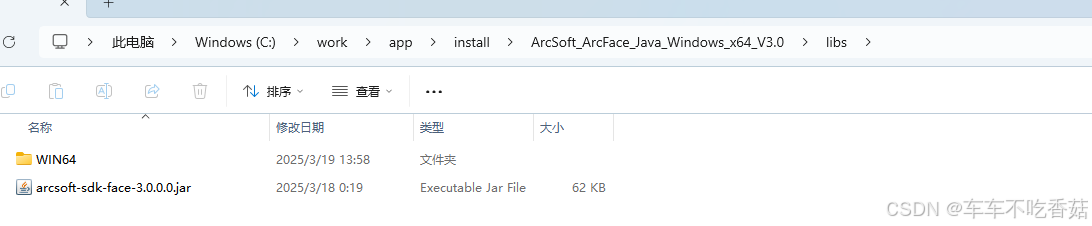
构建maven包,在libs下CMD执行命令,将arcsoft-sdk-face-3.0.0.0.jar安装到本地仓库:
注:如果不执行,linux部署的时候会出现异常,class缺失;
mvn install:install-file -DgroupId=com.arcsoft.face -DartifactId=arcsoft-sdk-face -Dversion=3.0.0.0 -Dpackaging=jar -Dfile=arcsoft-sdk-face-3.0.0.0.jar
安装完成后开始引入本地依赖:
<dependency>
    <groupId>com.arcsoft.face</groupId>
    <artifactId>arcsoft-sdk-face</artifactId>
    <version>3.0.0.0</version>
</dependency>
需要配置电脑环境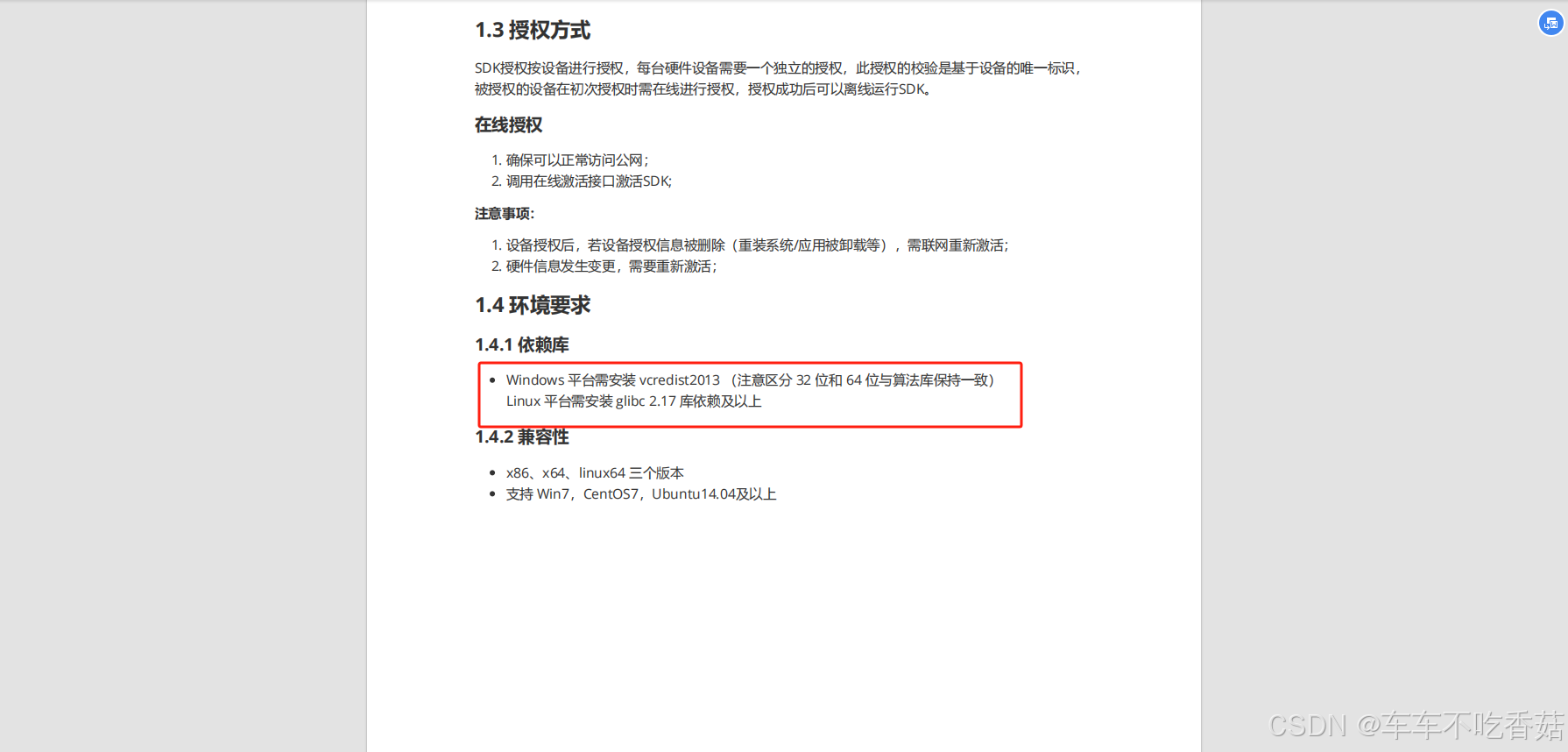
文档里面写了,我当时配置了2012报错了,然后下载了2013搞定了,否则无法认证;
主要根据自己的业务场景进行代码调用,文件里面提供了案例,可以自己研究,我的方向是人脸对比登录;
Visual C++ Redistributable Packages for Visual Studio 2013下载地址:
https://www.microsoft.com/en-us/download/details.aspx?id=40784
人脸录入和识别帮助类
在这之前你需要根据案例去激活你的sdk,然后就可以正常使用了;
package com.ktg.common.vo;

import io.swagger.annotations.ApiModelProperty;
import lombok.Data;
import lombok.EqualsAndHashCode;
import lombok.experimental.Accessors;

import java.io.Serializable;

@EqualsAndHashCode(callSuper = false)
@Data
@Accessors(chain = true)
public class FaceCutVO implements Serializable {

    private static final long serialVersionUID = 1L;

    @ApiModelProperty(value = "用户id")
    private Long userId;

    @ApiModelProperty(value = "类型(1-指纹图片 2-面部图片)")
    private String type;

    @ApiModelProperty(value = "内容")
    private String content;

    @ApiModelProperty(value = "图片地址")
    private String imageUrl;

    @ApiModelProperty(value = "图片路径")
    private String imagePath;


}
package com.ktg.common.utils.face;

import cn.hutool.core.lang.Assert;
import cn.hutool.core.util.ObjectUtil;
import com.arcsoft.face.*;
import com.arcsoft.face.enums.DetectMode;
import com.arcsoft.face.enums.DetectOrient;
import com.arcsoft.face.enums.ErrorInfo;
import com.arcsoft.face.toolkit.ImageInfo;
import com.google.common.collect.Lists;
import com.ktg.common.config.RuoYiConfig;
import com.ktg.common.utils.StringUtils;
import com.ktg.common.vo.FaceCutVO;
import com.ktg.common.vo.FaceMatchVO;
import lombok.extern.slf4j.Slf4j;
import org.springframework.beans.factory.annotation.Value;
import org.springframework.web.multipart.MultipartFile;

import java.io.File;
import java.io.IOException;
import java.nio.file.Files;
import java.nio.file.Path;
import java.nio.file.Paths;
import java.util.*;
import java.util.concurrent.CompletableFuture;
import java.util.concurrent.ExecutionException;
import java.util.concurrent.ExecutorService;
import java.util.concurrent.Executors;

import static com.arcsoft.face.toolkit.ImageFactory.getRGBData;

/**
 * 面部裁剪工具
 *
 * @author cgj
 */
@Slf4j
public class ArcSoftMothodUtil {

    @Value("${ktg-mes.prod}")
    private static String prodApi;

    static FaceEngine faceEngine;

    static {
        //从官网获取
        String appId = "5j9Uw8b5t9svFzVyVjBrCXtizjojgnjXJrNAg64UUYU4";
        String sdkKey = "7yGfT9CQVmTrXfBmmPYeJTK3YTREQSTbM4XNVjPWzRbj";

        faceEngine = new FaceEngine("C:\\work\\app\\install\\ArcSoft_ArcFace_Java_Windows_x64_V3.0\\libs\\WIN64");
        //激活引擎
        int errorCode = faceEngine.activeOnline(appId, sdkKey);

        if (errorCode != ErrorInfo.MOK.getValue() && errorCode != ErrorInfo.MERR_ASF_ALREADY_ACTIVATED.getValue()) {
            System.out.println("引擎激活失败");
        }


        ActiveFileInfo activeFileInfo = new ActiveFileInfo();
        errorCode = faceEngine.getActiveFileInfo(activeFileInfo);
        if (errorCode != ErrorInfo.MOK.getValue() && errorCode != ErrorInfo.MERR_ASF_ALREADY_ACTIVATED.getValue()) {
            System.out.println("获取激活文件信息失败");
        }

        //引擎配置
        EngineConfiguration engineConfiguration = new EngineConfiguration();
        engineConfiguration.setDetectMode(DetectMode.ASF_DETECT_MODE_IMAGE);
        engineConfiguration.setDetectFaceOrientPriority(DetectOrient.ASF_OP_ALL_OUT);
        engineConfiguration.setDetectFaceMaxNum(10);
        engineConfiguration.setDetectFaceScaleVal(16);
        //功能配置
        FunctionConfiguration functionConfiguration = new FunctionConfiguration();
        functionConfiguration.setSupportAge(true);
        functionConfiguration.setSupportFace3dAngle(true);
        functionConfiguration.setSupportFaceDetect(true);
        functionConfiguration.setSupportFaceRecognition(true);
        functionConfiguration.setSupportGender(true);
        functionConfiguration.setSupportLiveness(true);
        functionConfiguration.setSupportIRLiveness(true);
        engineConfiguration.setFunctionConfiguration(functionConfiguration);

        //初始化引擎
        errorCode = faceEngine.init(engineConfiguration);

        if (errorCode != ErrorInfo.MOK.getValue()) {
            System.out.println("初始化引擎失败");
        }
    }


    /**
     * 图片人脸检测
     */
    public static FaceCutVO saveArcData(MultipartFile file, Long userId, String url) throws IOException {
        int errorCode;
        // 1.判断这个文件是否有效
        Assert.isFalse(file.isEmpty(), "请上传人脸文件!");
        // 2.-----------------开始存储上传的照片--------------------
        // 人脸存储基础路径
        String profile = RuoYiConfig.getProfile();
        String basePath = profile + "/face/" + userId + "/";
        if (StringUtils.isBlank(prodApi)) {
            basePath = "C:" + basePath;
        }
        // 原文件转存后的路径
        String imagePath;
        // 原文件转存后的前端请求路径
        String imageUrl = null;

        // 时间戳
        long currentTimestamp = System.currentTimeMillis();
        // 设置文件路径
        String filePath = basePath;
        // 确保目录存在,不存在则创建一个
        Path uploadPath = Paths.get(filePath);
        if (!Files.exists(uploadPath)) {
            Files.createDirectories(uploadPath);
        }
        // 获取文件名并构建目标路径
        String fileName = userId + "_" + currentTimestamp + "_" + file.getOriginalFilename();
        Path targetLocation = uploadPath.resolve(fileName);
        imagePath = filePath + fileName;
        // 获取前端的请求路径地址
        if (imagePath.contains("C:" + profile)) {
            imageUrl = imagePath.replace("C:" + profile, url + "/profile");
        } else if (imagePath.contains(profile)) {
            imageUrl = imagePath.replace(profile, url + "/prod-api" + "/profile");
        }
        // 将文件写入目标路径
        file.transferTo(targetLocation.toFile());

        // 3--------------------------开始读取照片的特征值-------------------------------
        ImageInfo imageInfo = getRGBData(new File(imagePath));
        List<FaceInfo> faceInfoList = new ArrayList<>();
        errorCode = faceEngine.detectFaces(imageInfo.getImageData(), imageInfo.getWidth(), imageInfo.getHeight(), imageInfo.getImageFormat(), faceInfoList);
        Assert.isFalse(errorCode != ErrorInfo.MOK.getValue(), "获取人脸失败!");

        //特征提取
        FaceFeature faceFeature = new FaceFeature();
        errorCode = faceEngine.extractFaceFeature(imageInfo.getImageData(), imageInfo.getWidth(), imageInfo.getHeight(), imageInfo.getImageFormat(), faceInfoList.get(0), faceFeature);
        Assert.isFalse(errorCode != ErrorInfo.MOK.getValue(), "获取人脸特征值失败!");
        byte[] featureData = faceFeature.getFeatureData();
        // 4------------------------返回解析的数据---------------------
        FaceCutVO faceCutVO = new FaceCutVO();
        faceCutVO.setType("2");
        faceCutVO.setContent(Arrays.toString(featureData));
        faceCutVO.setImageUrl(imageUrl);
        faceCutVO.setImagePath(imagePath);
        return faceCutVO;
    }


    // 相似度门槛
    private static final double THRESHOLD = 0.8; // THRESHOLD越高,错误率越低,阈值[0,1]
    private static final ExecutorService THREAD_POOL_EXECUTOR = Executors.newFixedThreadPool(4); // 线程池

    public static FaceMatchVO completableFutureComparison(final MultipartFile file, final Set<String> matcher) throws IOException {
        int errorCode;
        // 提取当前人脸的特征值,比对文件零时存储,人脸存储基础路径
        String profile = RuoYiConfig.getProfile();
        String basePath = profile + "/face/" + 0 + "/";
        if (StringUtils.isBlank(prodApi)) {
            basePath = "C:" + basePath;
        }
        // 时间戳
        long currentTimestamp = System.currentTimeMillis();
        String filePath = basePath;
        // 确保目录存在,不存在则创建一个
        Path uploadPath = Paths.get(filePath);
        if (!Files.exists(uploadPath)) {
            Files.createDirectories(uploadPath);
        }
        // 获取文件名并构建目标路径
        String fileName = filePath + currentTimestamp + "_" + file.getOriginalFilename();
        Path targetLocation = uploadPath.resolve(fileName);
        // 将文件写入目标路径
        file.transferTo(targetLocation.toFile());
        try {
            //人脸检测
            ImageInfo imageInfo = getRGBData(new File(fileName));
            List<FaceInfo> faceInfoList = new ArrayList<>();
            errorCode = faceEngine.detectFaces(imageInfo.getImageData(), imageInfo.getWidth(), imageInfo.getHeight(), imageInfo.getImageFormat(), faceInfoList);
            Assert.isFalse(errorCode != ErrorInfo.MOK.getValue(), "未识别到人脸!");

            //特征提取
            FaceFeature faceFeature = new FaceFeature();
            errorCode = faceEngine.extractFaceFeature(imageInfo.getImageData(), imageInfo.getWidth(), imageInfo.getHeight(), imageInfo.getImageFormat(), faceInfoList.get(0), faceFeature);
            Assert.isFalse(errorCode != ErrorInfo.MOK.getValue(), "获取人脸特征值失败!");
            byte[] featureData = faceFeature.getFeatureData();

            // 转成list
            List<String> matcherFeatureDataList = new ArrayList<>(matcher);
            /*FaceFeature targetFaceFeature = new FaceFeature();
            targetFaceFeature.setFeatureData(featureData);
            FaceFeature sourceFaceFeature = new FaceFeature();
            FaceSimilar faceSimilar = new FaceSimilar();
            for (String matcherData : matcherFeatureDataList) {
                // 输入的人脸和人脸库中的人脸进行对比,找到当前线程中的分数最高的人脸
                byte[] matchData = strToBytes(matcherData);
                //特征比对
                sourceFaceFeature.setFeatureData(matchData);
                int errorCode1 = faceEngine.compareFaceFeature(targetFaceFeature, sourceFaceFeature, faceSimilar);
                Assert.isFalse(errorCode1 != ErrorInfo.MOK.getValue(), "人脸对比异常" + errorCode1 + "!");
                // 相似度
                float score = faceSimilar.getScore();
                if (score > THRESHOLD) {
                    return new FaceMatchVO().setContent(matcherData).setScore((double) score);
                }
            }*/

            // 切分四等份
            int denominator = 1;
            if (matcherFeatureDataList.size() >= 4) {
                denominator = 4;
            }
            List<List<String>> averageMatcherFeatureDataList = Lists.partition(matcherFeatureDataList, matcherFeatureDataList.size() / denominator);

            // 构建四个线程进行处理,防止人员过多对比速度太慢
            CompletableFuture<FaceMatchVO>[] completableFutureArray = averageMatcherFeatureDataList.stream().map(partitionFeatureData -> CompletableFuture.supplyAsync(() -> comparison(featureData, new ArrayList<>(partitionFeatureData)), THREAD_POOL_EXECUTOR)).toArray(CompletableFuture[]::new);
            // 等待所有任务执行完
            CompletableFuture.allOf(completableFutureArray).join();
            List<FaceMatchVO> verificationList = new ArrayList<>();
            for (CompletableFuture<FaceMatchVO> completableFuture : completableFutureArray) {
                try {
                    FaceMatchVO verification = completableFuture.get();
                    if (ObjectUtil.isNotEmpty(verification)) {
                        verificationList.add(verification);
                    }
                } catch (InterruptedException | ExecutionException e) {
                    log.error(e.getMessage(), e);
                }
            }
            // 找出最匹配的人脸(匹配度最高)
            if (ObjectUtil.isNotEmpty(verificationList)) {
                FaceMatchVO max = verificationList.stream().max(Comparator.comparing(FaceMatchVO::getScore)).get();
                log.info("相似值最佳的的人脸:{},分数{}", max.getContent(), max.getScore());
                return max;
            }
        } catch (Exception e) {
            log.error("人脸比对异常:{}", e.getMessage());
        } finally {
            //特征值提取完毕后清除数据
            removeFile(fileName);
        }
        return null;
    }

    public static FaceMatchVO comparison(final byte[] featureData, final List<String> matcherFeatureDataList) {
        try {
            if (!matcherFeatureDataList.isEmpty()) {
                // 最匹配的人脸
                String match = null;
                // 峰值
                double high = 0;
                FaceFeature targetFaceFeature = new FaceFeature();
                targetFaceFeature.setFeatureData(featureData);
                FaceFeature sourceFaceFeature = new FaceFeature();
                FaceSimilar faceSimilar = new FaceSimilar();
                for (String matcherData : matcherFeatureDataList) {
                    // 输入的人脸和人脸库中的人脸进行对比,找到当前线程中的分数最高的人脸
                    byte[] matchData = strToBytes(matcherData);
                    //特征比对
                    sourceFaceFeature.setFeatureData(matchData);
                    int errorCode = faceEngine.compareFaceFeature(targetFaceFeature, sourceFaceFeature, faceSimilar);
                    Assert.isFalse(errorCode != ErrorInfo.MOK.getValue(), "人脸对比异常" + errorCode + "!");
                    // 相似度
                    float score = faceSimilar.getScore();
                    if (score > high) {
                        high = score;
                        match = matcherData;
                    }
                }
                return high >= THRESHOLD ? new FaceMatchVO().setContent(match).setScore(high) : null;
            }
        } catch (Exception e) {
            log.error("人脸比对异常:{}", e.getMessage());
        }
        return null;
    }

    private static byte[] strToBytes(String string) {
        // Remove the brackets and spaces from the string
        string = string.substring(1, string.length() - 1).replaceAll("\\s", "");
        // Split the string by commas to get each number as a string
        String[] numbers = string.split(",");
        // Create a new byte array with the same length as the original
        byte[] newBytes = new byte[numbers.length];
        // Convert each string number back to a byte and store it in the new array
        for (int i = 0; i < numbers.length; i++) {
            newBytes[i] = Byte.parseByte(numbers[i]);
        }
        // Print the new byte array to verify it matches the original
        // System.out.println("New byte array: " + Arrays.toString(newBytes));
        return newBytes;
    }

    private static void removeFile(String path) {
        try {
            File file = new File(path);
            if (!file.delete()) {
                log.error("DAT文件删除失败: " + path);
            }
        } catch (Exception e) {
            log.error("存在异常文件:{}", e);
        }
    }

}
linux下部署
注意事项一:由于规定一个sdk只能在一个设备使用,所以你需要下载一个没有激活的linux的sdk,将文件安放至linux路径下,注意路径的访问权限,如果不确定最好放到开放路径下:/usr/lib
注意事项二:打包的代码注意更换成linux的对应参数:appId、sdkKey、libarcsoftFaceDllPath(引擎地址)
注意事项三:win下的jar包和linux下的ja如是一样的,打包时不用更换,注意linux下按照arcsoft文档配置好基础环境即可

有“AI”的1024 = 2048,欢迎大家加入2048 AI社区
更多推荐
 5
5 0
0- 0


 已为社区贡献1条内容

所有评论(0)