python模块-引入和使用模块,随机数,math,os,sys,time模块
目录
1.定义
模块是一个包含 Python 定义和语句的文件,文件名就是模块名加上 .py 后缀。模块可以定义函数、类和变量,也可以包含可执行的代码。
2.引入和使用模块
1.import 模块名
查询模块中的成员:dir(模块名)
调用模块中的函数:模块名.函数名(实参1,实参2...)
获取模块中变量:模块名.变量名
>>> import math

>>> dir(math)
['__doc__', '__loader__', '__name__', '__package__', '__spec__', 'acos', 'acosh', 'asin', 'asinh', 'atan', 'atan2', 'atanh', 'ceil', 'copysign', 'cos', 'cosh', 'degrees', 'e', 'erf', 'erfc', 'exp', 'expm1', 'fabs', 'factorial', 'floor', 'fmod', 'frexp', 'fsum', 'gamma', 'gcd', 'hypot', 'inf', 'isclose', 'isfinite', 'isinf', 'isnan', 'ldexp', 'lgamma', 'log', 'log10', 'log1p', 'log2', 'modf', 'nan', 'pi', 'pow', 'radians', 'remainder', 'sin', 'sinh', 'sqrt', 'tan', 'tanh', 'tau', 'trunc']

>>> math.fabs(-10)
10.0

>>> math.pi
3.141592653589793
特点:
- 需要使用模块名作为前缀访问内容
- 避免命名冲突
- 代码清晰,容易知道函数/变量来自哪个模块
2.from 模块名 import 函数/类/变量
调用模块中的函数:函数名(实参1,实参2...)
获取模块中变量:变量名
>>> from math import fabs,pi
#直接使用,不需要模块名前缀
>>> fabs(-3)
3.0

>>> pi
3.141592653589793
特点:
- 不需要模块名前缀
- 代码更简洁
- 可能引起命名冲突(如果导入的内容与现有名称相同)
3.import 模块名 as 模块别名
from 模块名 import 函数/类/变量 as 别名
# 给模块起别名
>>> import math as m
>>> m.sqrt(16)
4.0

# 给特定内容起别名
>>> from math import sqrt as square_root
>>> square_root(25)
5.0
特点:
- 可以解决命名冲突问题
- 可以使长模块名变短,提高代码可读性
- 符合特定命名约定或偏好
注:
- 避免使用
from module import *:这会导入模块中的所有内容,容易引起命名冲突,且代码可读性差。 - PEP 8 建议:Python 官方风格指南建议:
-
- 导入语句应放在文件顶部
- 先导入标准库模块,再导入第三方模块,最后导入自定义模块
- 每组导入之间空一行
- 循环导入:避免模块之间相互导入,这可能导致循环导入错误。
3.自定义模块
#创建一个名为 mymodule.py 的文件
# mymodule.py
def greet(name):
    return f"Hello, {name}!"

def add(a, b):
    return a + b

PI = 3.14159

#main.py
导入自定义模块
#import mymodule
#from mymodule import greet,add,PI
4.python标准库模块
1.随机数模块
任何使用算法生成的随机数都被称为“伪随机数”。
#导入模块
>>> import random

#获取random模块的所有功能函数
>>> dir(random)
['BPF', 'LOG4', 'NV_MAGICCONST', 'RECIP_BPF', 'Random', 'SG_MAGICCONST', 'SystemRandom', 'TWOPI', '_BuiltinMethodType', '_MethodType', '_Sequence', '_Set', '__all__', '__builtins__', '__cached__', '__doc__', '__file__', '__loader__', '__name__', '__package__', '__spec__', '_acos', '_bisect', '_ceil', '_cos', '_e', '_exp', '_inst', '_itertools', '_log', '_os', '_pi', '_random', '_sha512', '_sin', '_sqrt', '_test', '_test_generator', '_urandom', '_warn', 'betavariate', 'choice', 'choices', 'expovariate', 'gammavariate', 'gauss', 'getrandbits', 'getstate', 'lognormvariate', 'normalvariate', 'paretovariate', 'randint', 'random', 'randrange', 'sample', 'seed', 'setstate', 'shuffle', 'triangular', 'uniform', 'vonmisesvariate', 'weibullvariate']
1>random()
float random.random();
返回一个[0.0,1.0)之间的随机浮点数。
random.random()
>>> random.random()
0.7149803406532834
>>> random.random()
0.9252346504463517
>>> random.random()
0.549056463564891

#生成一个[10000,99999]的一个5位数字随机码!
>>> int(random.random()*90000+10000)
11191
重现伪随机数
random.getstate()
返回捕获当前生成器内部状态的对象;
返回的对象可以传递给下面的 setstate()函数,用于恢复状态。
random.setstate(state)
设罟生成器的内部状态;
传入一个先前利用 getstate()函数获得的状态对象,使得生成器恢复到这个状态。
getstate()和setstate(state)搭配使用,可以重现之前获取到的随机数。
>>> x=random.getstate()

>>> random.random()
0.28548128669289574
>>> random.random()
0.9726326668647931
>>> random.random()
0.23948123741486294

>>> random.setstate(x)

>>> random.random()
0.28548128669289574
>>> random.random()
0.9726326668647931
>>> random.random()
0.23948123741486294
2>choice()
Object random.choice(seq)
从非空序列(字符串,列表,元祖,range)中随机选择一个元素。
>>> random.choice("abcddsad")
'b'
>>> random.choice(["abc","100",123,10])
'100'
>>> colors = ('red', 'green', 'blue')
>>> random.choice(colors)
'blue'
>>> random.choice(range(10))
9
3>randint()
int randint(int min,int max);
返回[min,max]之间的一个随机整数;
# 生成 1 到 10 之间的随机整数(包括 1 和 10)
>>> random.randint(1, 10)
2
# 生成 0 或 1(模拟硬币抛掷)
>>> random.randint(0, 1)
1
>>> random.randint(-5, 5)
-1
4>randrange()
int random.randrange(int min,int max,[int step=1]);
返回在[min,max)范围内的一个随机整数;
>>> random.randrange(10)
2

# 从 1 到 10 中随机选择一个整数
>>> random.randrange(1, 11)
9

# 从 0 到 100 中选择一个偶数
>>> random.randrange(0, 101, 2)
22

# 从 10 到 0 中选择一个整数(递减)
>>> random.randrange(10, 0, -1)
1
5>uniform()
float random.uniform(min,max)
float random.uniform(max,min)
返回一个[min,max]中的随机浮点数。
>>> random.uniform(1, 10)
4.258937267095945
>>> random.uniform(10, 1)
6.331317728155648
6>sample()
List random.sample(seq,count)
从序列中随机获取count个唯一元素,返回一个新列表(无放回抽样),count值不能大于序列长度,否则会报错。
# 从列表中随机选择 3 个不重复的元素
>>> numbers = [1, 2, 3, 4, 5, 6, 7, 8, 9, 10]
>>> random.sample(numbers, 3)
[6, 8, 1]

# 从范围中随机选择5个不重复元素
>>> random.sample(range(100), 5)
[85, 55, 16, 0, 42]
7>seed()
random.seed()用于设置随机数生成器的种子,确保每次运行生成相同的随机数序列。
只要种子固定,random模块生成的随机数序列就完全一致。
#设置随机数种子
>>> random.seed(4)
>>> random.random()
0.23604808973743452
>>> random.randint(1,100)
14

#再次设置相同种子,结果相同
>>> random.seed(4)
>>> random.random()
0.23604808973743452
>>> random.randint(1,100)
14
2.math模块
>>> import math
>>> dir(math)
['__doc__', '__loader__', '__name__', '__package__', '__spec__', 'acos', 'acosh', 'asin', 'asinh', 'atan', 'atan2', 'atanh', 'ceil', 'copysign', 'cos', 'cosh', 'degrees', 'e', 'erf', 'erfc', 'exp', 'expm1', 'fabs', 'factorial', 'floor', 'fmod', 'frexp', 'fsum', 'gamma', 'gcd', 'hypot', 'inf', 'isclose', 'isfinite', 'isinf', 'isnan', 'ldexp', 'lgamma', 'log', 'log10', 'log1p', 'log2', 'modf', 'nan', 'pi', 'pow', 'radians', 'remainder', 'sin', 'sinh', 'sqrt', 'tan', 'tanh', 'tau', 'trunc']
1>fabs()
float math.fabs(Objecr x)
求一个数的绝对值
>>> math.fabs(-10)
10.0
>>> math.fabs(5)
5.0
2>floor()
int math.floor(float x)
对x进行向下取整
print(math.floor(10.7)) #10
print(math.floor(10.1)) #10
print(math.floor(-10.7)) #-11
print(math.floor(-10.1)) #-11
3>trunc()
int math.trunc(float x)
直接截取。只要整数部分!不四舍五入
print(math.trunc(10.7)) #10
print(math.trunc(10.1)) #10
print(math.trunc(-10.7)) #-10
print(math.trunc(-10.1)) #-10
4>pow()
float math.pow(int x,int y)
求x的y次方
>>> math.pow(3,4)
81.0
3.os,sys模块
>>> import os,sys
>>> dir(os)
['DirEntry', 'F_OK', 'MutableMapping', 'O_APPEND', 'O_BINARY', 'O_CREAT', 'O_EXCL', 'O_NOINHERIT', 'O_RANDOM', 'O_RDONLY', 'O_RDWR', 'O_SEQUENTIAL', 'O_SHORT_LIVED', 'O_TEMPORARY', 'O_TEXT', 'O_TRUNC', 'O_WRONLY', 'P_DETACH', 'P_NOWAIT', 'P_NOWAITO', 'P_OVERLAY', 'P_WAIT', 'PathLike', 'R_OK', 'SEEK_CUR', 'SEEK_END', 'SEEK_SET', 'TMP_MAX', 'W_OK', 'X_OK', '_Environ', '__all__', '__builtins__', '__cached__', '__doc__', '__file__', '__loader__', '__name__', '__package__', '__spec__', '_execvpe', '_exists', '_exit', '_fspath', '_get_exports_list', '_putenv', '_unsetenv', '_wrap_close', 'abc', 'abort', 'access', 'altsep', 'chdir', 'chmod', 'close', 'closerange', 'cpu_count', 'curdir', 'defpath', 'device_encoding', 'devnull', 'dup', 'dup2', 'environ', 'error', 'execl', 'execle', 'execlp', 'execlpe', 'execv', 'execve', 'execvp', 'execvpe', 'extsep', 'fdopen', 'fsdecode', 'fsencode', 'fspath', 'fstat', 'fsync', 'ftruncate', 'get_exec_path', 'get_handle_inheritable', 'get_inheritable', 'get_terminal_size', 'getcwd', 'getcwdb', 'getenv', 'getlogin', 'getpid', 'getppid', 'isatty', 'kill', 'linesep', 'link', 'listdir', 'lseek', 'lstat', 'makedirs', 'mkdir', 'name', 'open', 'pardir', 'path', 'pathsep', 'pipe', 'popen', 'putenv', 'read', 'readlink', 'remove', 'removedirs', 'rename', 'renames', 'replace', 'rmdir', 'scandir', 'sep', 'set_handle_inheritable', 'set_inheritable', 'spawnl', 'spawnle', 'spawnv', 'spawnve', 'st', 'startfile', 'stat', 'stat_result', 'statvfs_result', 'strerror', 'supports_bytes_environ', 'supports_dir_fd', 'supports_effective_ids', 'supports_fd', 'supports_follow_symlinks', 'symlink', 'sys', 'system', 'terminal_size', 'times', 'times_result', 'truncate', 'umask', 'uname_result', 'unlink', 'urandom', 'utime', 'waitpid', 'walk', 'write']
>>> dir(sys)
['__breakpointhook__', '__displayhook__', '__doc__', '__excepthook__', '__interactivehook__', '__loader__', '__name__', '__package__', '__spec__', '__stderr__', '__stdin__', '__stdout__', '_base_executable', '_clear_type_cache', '_current_frames', '_debugmallocstats', '_enablelegacywindowsfsencoding', '_framework', '_getframe', '_git', '_home', '_xoptions', 'api_version', 'argv', 'base_exec_prefix', 'base_prefix', 'breakpointhook', 'builtin_module_names', 'byteorder', 'call_tracing', 'callstats', 'copyright', 'displayhook', 'dllhandle', 'dont_write_bytecode', 'exc_info', 'excepthook', 'exec_prefix', 'executable', 'exit', 'flags', 'float_info', 'float_repr_style', 'get_asyncgen_hooks', 'get_coroutine_origin_tracking_depth', 'get_coroutine_wrapper', 'getallocatedblocks', 'getcheckinterval', 'getdefaultencoding', 'getfilesystemencodeerrors', 'getfilesystemencoding', 'getprofile', 'getrecursionlimit', 'getrefcount', 'getsizeof', 'getswitchinterval', 'gettrace', 'getwindowsversion', 'hash_info', 'hexversion', 'implementation', 'int_info', 'intern', 'is_finalizing', 'last_traceback', 'last_type', 'last_value', 'maxsize', 'maxunicode', 'meta_path', 'modules', 'path', 'path_hooks', 'path_importer_cache', 'platform', 'prefix', 'set_asyncgen_hooks', 'set_coroutine_origin_tracking_depth', 'set_coroutine_wrapper', 'setcheckinterval', 'setprofile', 'setrecursionlimit', 'setswitchinterval', 'settrace', 'stderr', 'stdin', 'stdout', 'thread_info', 'version', 'version_info', 'warnoptions', 'winver']
os模块
1.路径操作
1>getcwd()
String os.getcwd()
获取当前目录的绝对路径,相当于linux命令:pwd
os.getcwd()
'F:\\test_install\\python3.10.6_install'
2>chdir(path)
os.chdir(path)
切换当前工作目录,用于临时调整文件操作路径。
os.getcwd()
'F:\\test_install\\python3.10.6_install'
os.chdir('../')
os.getcwd()
'F:\\test_install'
3>path.abspath(path)
os.path.abspath(path)
获取文件或目录的绝对路径,避免相对路径歧义。
os.path.abspath('python.exe')
'F:\\test_install\\python3.10.6_install\\python.exe'

os.getcwd()
'F:\\test_install\\python3.10.6_install'
os.chdir('../')
os.getcwd()
'F:\\test_install'
os.path.abspath('python.exe')
'F:\\test_install\\python.exe'当使用os.path.abspath('python.exe')时,Python会基于当前工作目录解析这个相对路径,而不是基于Python解释器所在目录。
- 如果当前工作目录是
F:\\test_install,那么os.path.abspath('python.exe')将返回F:\\test_install\\python.exe - 这个函数不会检查文件是否实际存在,它只是进行路径拼接操作
- 要获取Python解释器的真实路径,应该使用
sys.executable
import sys
# 获取当前运行的Python解释器的完整路径
sys.executable
'F:\\test_install\\python3.10.6_install\\pythonw.exe'

# 获取Python解释器所在的目录路径
#os.path.dirname()提取目录部分(去掉文件名)
os.path.dirname(sys.executable)
'F:\\test_install\\python3.10.6_install'
4>path.join(a,b)
os.path.join(a, b)
跨平台拼接路径,自动处理斜杠。
config_path = os.path.join("configs", "dev.yaml")
print(config_path)  # Linux输出:configs/dev.yaml;Windows输出:configs\dev.yaml

os.path.join('temp','a.yaml')
'temp\\a.yaml'
2.文件和目录管理
1>listdir(path)
List os.listdir([String dir_path])
列出目录dir_path下的所有文件或目录的名称!如果dir_path没给,默认列出当前目录下所有的文件或目录的名称! 不包括子目录
os.listdir()
['data.pkl', 'DLLs', 'Doc', 'ff_test', 'hello.txt', 'include', 'Lib', 'libs', 'LICENSE.txt', 'log', 'NEWS.txt', 'python-3.10.6-amd64.exe', 'python.exe', 'python3.dll', 'python310.dll', 'pythonw.exe', 'Scripts', 'tcl', 'Tools', 'vcruntime140.dll', 'vcruntime140_1.dll']
os.listdir('F:\\api_jiaoben')
['websocket.zip', '台账查询当前页.jmx']
2>mkdir(dirPath)
void mkdir(String dirPath)
创建目录dirPath
os.mkdir("C:/B")
os.mkdir("./C") #当前目录下创建目录C
os.mkdir("C")#当前目录下创建目录C
3>makedirs(path)
os.makedirs(path)
递归创建多层目录(自动处理父目录缺失)。无返回值
os.makedirs("F:/A/B/C") #一次性创建多级目录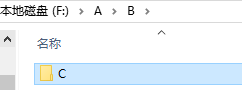
4>remove(path)
os.remove(path)
删除指定文件,常用于清理临时文件。
if os.path.exists("F:/A/B/C/temp.log"):
    os.remove('F:/A/B/C/temp.log')# 删除临时日志文件
5>rmdir(path)
os.rmdir(path)
删除空目录(目录非空时报错)
os.rmdir(path)
删除空目录(目录非空时报错)。
os.rmdir('F:/A/B')
Traceback (most recent call last):
  File "<pyshell#13>", line 1, in <module>
    os.rmdir('F:/A/B')
OSError: [WinError 145] 目录不是空的。: 'F:/A/B'

os.rmdir('F:/A/B/C')
3.进程管理
1>system(command)
os.system(command)
执行系统命令(如调用外部工具)
# 生成Allure测试报告
os.system("allure generate reports/allure_results -o reports/allure_report")
4.文件属性检查
1>path.exists(path)
os.path.exists(path)
检查文件或目录是否存在
if not os.path.exists("logs"):
    os.makedirs("logs")  # 若logs目录不存在则创建
sys模块
1>sys.path.append(path)
sys.path 是一个列表,包含了 Python 解释器在导入模块时搜索的目录路径。当使用 import 语句导入模块时,Python 会按照 sys.path 中的路径顺序查找模块。
sys.path 通常包含以下内容(按搜索顺序):
- 当前脚本所在目录(如果是运行脚本的话)
- 环境变量
PYTHONPATH中指定的目录 - Python 标准库的安装目录
- 第三方库的安装目录(如 site-packages)
sys.path
['', 'F:\\test_install\\python3.10.6_install\\Lib\\idlelib', 'F:\\test_install\\python3.10.6_install', ...]
#使用 append() 方法添加新路径
sys.path.append("D:/WK/WK_Pycharm/P_01")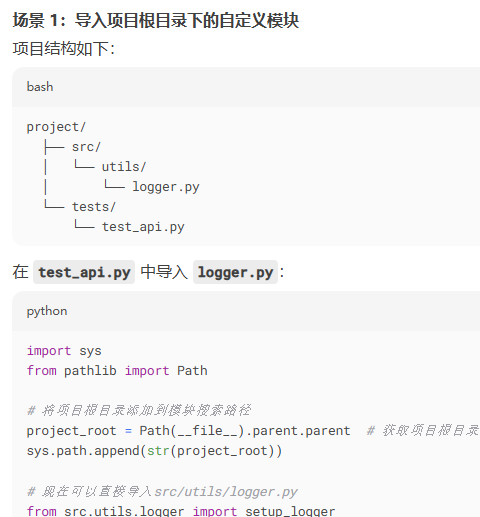
路径有效性:确保添加的是绝对路径(推荐用 os.path.abspath() 或 pathlib 处理)。
临时性:通过 sys.path.append() 添加的路径仅在当前 Python 会话中有效。
避免重复:添加前可检查路径是否已存在
2>sys.argv
sys.argv 是一个列表,包含从命令行运行 Python 脚本时传递的参数。列表的第一个元素 sys.argv[0] 是脚本的名称,后续元素是命令行参数。
import sys

# 打印所有命令行参数
print("脚本名称:", sys.argv[0])
print("参数数量:", len(sys.argv) - 1)

if len(sys.argv) > 1:
    print("参数列表:")
    #使用 enumerate() 函数遍历 sys.argv[1:](从第二个元素开始的所有参数)
    #enumerate(sys.argv[1:], 1) 中的 1 表示索引从 1 开始计数(而不是默认的 0)
    for i, arg in enumerate(sys.argv[1:], 1):
        print(f"  参数 {i}: {arg}")
else:
    print("没有提供命令行参数")
将这段代码保存为 args_demo.py,然后在命令行中运行;
1.不带参数运行:python args_demo.py
输出:
脚本名称: args_demo.py
参数数量: 0
没有提供命令行参数
2.带参数运行:python args_demo.py hello world 123
输出:
脚本名称: args_demo.py
参数数量: 3
参数列表:
参数 1: hello
参数 2: world
参数 3: 123
4.time模块
1>sleep()
time.sleep(seconds)
用于暂停程序执行指定的秒数;
seconds:暂停的秒数,可以是整数或浮点数(支持小数秒);
import time

print("开始执行")
time.sleep(2.5)  # 暂停 2.5 秒
print("2.5 秒后继续执行")


for i in range(5):
    print(f"倒计时: {5-i}")
    time.sleep(1)  # 每秒执行一次
print("时间到!")
2>strftime()
time.strftime(format[, t])
将时间元组或 struct_time 转换为指定格式的字符串;
参数
format:格式化字符串,包含特殊指令;
t:可选参数,时间元组或 struct_time 对象。如果未提供,使用当前时间;
>>> time.strftime("%Y-%m-%d %X")
'2025-09-01 16:30:14'

>>> time.strftime("%Y-%m-%d %H:%M:%S")
'2025-09-01 16:30:36'
有“AI”的1024 = 2048,欢迎大家加入2048 AI社区
更多推荐


 31
31 0
0- 0


 已为社区贡献3条内容

所有评论(0)