流式输出与非流式输出相结合,基于芋道源码AI代码改造,升级SpringAIalibabagraph 1.0.0.3 版本
典型应用场景中,KeyStrategyFactory更适合需要部分状态更新的工作流(如RAG场景中query参数需替换而documents参数需追加)39,而OverAllStateFactory更适用于简单的一次性状态替换场景。比较注意的我现在用的豆包、deepseek 开始输出固定key 为空,这个不知道是大模型能力问题。还是我写代码的问题导致。1、根据芋道源码中的AiChatMessageS
一、 具体效果下方截图
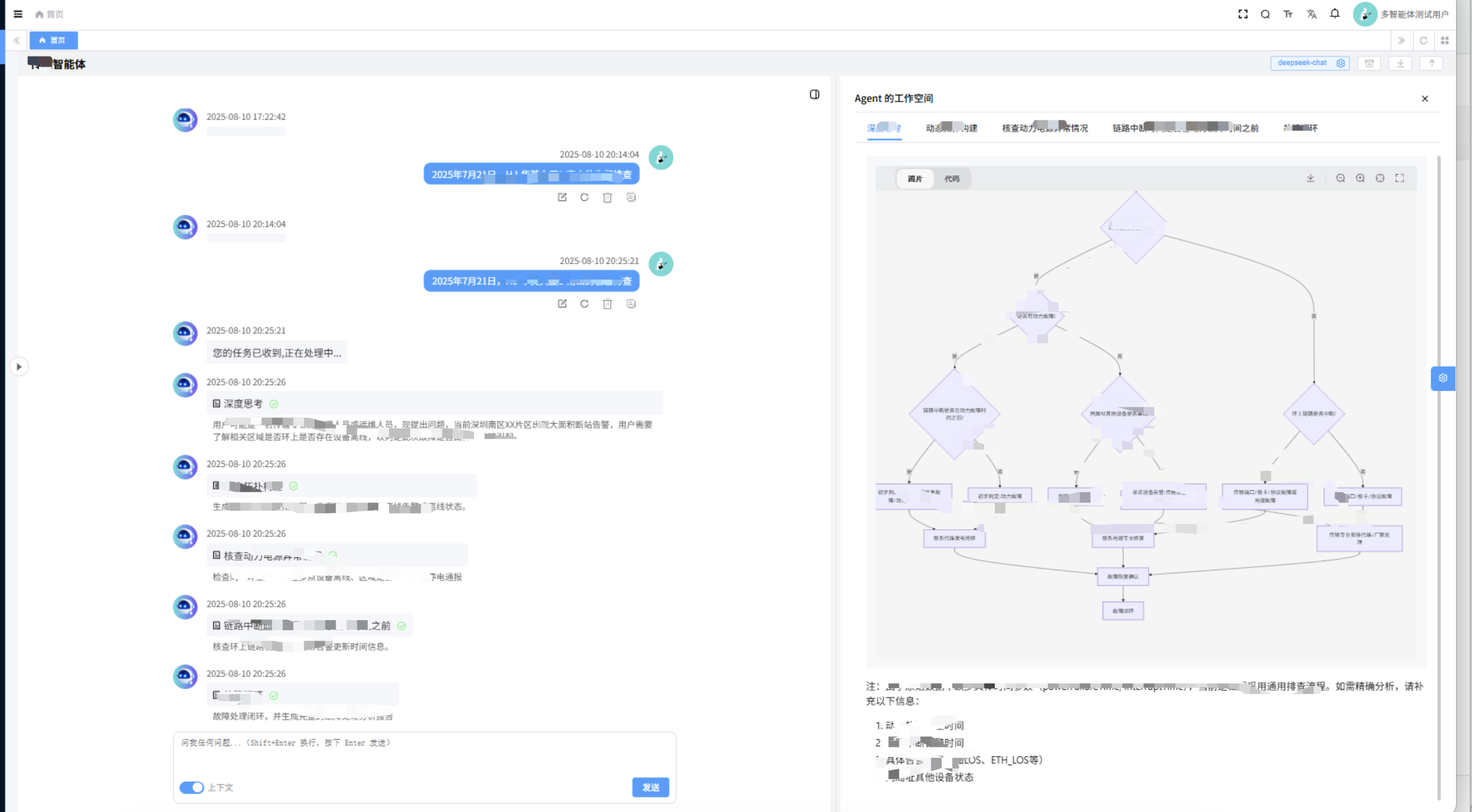
二、 实现多个graph 根据问题以及选择智能体调用
芋道源码下载地址 :https://gitee.com/zhijiantianya/yudao-cloud
1、根据芋道源码中的AiChatMessageServiceImpl中的代码改造
我这边现在开发多个graph,单个graph 不用这么复杂
RunnableConfig runnableConfig = RunnableConfig.builder().threadId(String.valueOf(sendReqVO.getConversationId())).build();
        Map<String, Object> map = new HashMap<>();
        map.put("query",sendReqVO.getContent());
        map.put("modelId",model.getId());


多个智能体判断

GraphProcess graphProcess = null ;
        AsyncGenerator<NodeOutput> resultFuture = null ;
        if (conversation.getSystemMessage().equals(AiChatRoleEnum.AI_CSW_AGENT.getName())){
             graphProcess = new GraphProcess(this.aGraph);
             resultFuture = aGraph.stream(map, runnableConfig);
        }else if(conversation.getSystemMessage().equals(AiChatRoleEnum.AI_WXW_AGENT.getName())){
             graphProcess = new GraphProcess(this.bGraph);
             resultFuture = bGraph.stream(map, runnableConfig);
        }


       Sinks.Many<ServerSentEvent<String>> sink = Sinks.many().unicast().onBackpressureBuffer();
        graphProcess.processStream(resultFuture, sink,chatMessageMapper,modalService);
        return sink.asFlux()
                .doOnCancel(() -> {
                    log.info("Client disconnected from stream");
                    TenantUtils.executeIgnore(() -> chatMessageMapper.updateById(
                            new AiChatMessageDO().setId(assistantMessage.getId()).setContent("Client disconnected from stream")));
                })
                .doOnError(e -> {
                    log.error("Error occurred during streaming", e);
                    TenantUtils.executeIgnore(() -> chatMessageMapper.updateById(
                            new AiChatMessageDO().setId(assistantMessage.getId()).setContent("Error occurred during streaming")));
                });
创建多个graph适配工厂类,只有一个graph不需要配置
@Component
public class GraphProcessorFactory {

    private final Map<String, CompiledGraph> graphMap;

    public GraphProcessorFactory(@Qualifier("aGraph") StateGraph aGraph,
                                @Qualifier("bGraph") StateGraph bGraph) throws GraphStateException {
        graphMap = new HashMap<>();
        graphMap.put(AiChatRoleEnum.AI_A_AGENT.getName(), aGraph.compile());
        graphMap.put(AiChatRoleEnum.AI_B_AGENT.getName(), bGraph.compile());
    }

    public GraphProcess getProcessor(String systemMessage) {
        CompiledGraph graph = graphMap.get(systemMessage);
        if (graph != null) {
            return new GraphProcess(graph);
        }
        // 返回默认处理器
        return new GraphProcess(graphMap.values().iterator().next());
    }

    public AsyncGenerator<NodeOutput> getStream(String systemMessage, Map<String, Object> map, RunnableConfig config) throws GraphRunnerException {
        CompiledGraph graph = graphMap.get(systemMessage);
        if (graph != null) {
            return graph.stream(map, config);
        }
        // 返回默认流
        return graphMap.values().iterator().next().stream(map, config);
    }
}
二 、区分OverAllStateFactory和KeyStrategyFactory
在Spring AI Alibaba Graph框架中,OverAllStateFactory和KeyStrategyFactory是两种不同的状态管理机制,主要区别体现在设计理念和功能实现上:
- 功能定位差异
- OverAllStateFactory是旧版(1.0.0.2及之前)用于创建全局状态对象的工厂接口,直接生成包含完整状态的OverAllState实例510
- KeyStrategyFactory是新版(1.0.0.3起)推荐的策略模式实现,通过提供参数更新策略的映射(Map<String, KeyStrategy>)来间接控制状态更新行为
// OverAllStateFactory典型用法(旧版)
OverAllStateFactory factory = () -> new OverAllState(initialData);

// KeyStrategyFactory典型用法(新版)
KeyStrategyFactory strategyFactory = () -> {
    Map<String, KeyStrategy> strategies = new HashMap<>();
    strategies.put("query", new ReplaceStrategy());
    strategies.put("documents", new AppendStrategy());
    return strategies;
};
- 状态更新机制
- OverAllStateFactory产生的状态对象会完全替换原有状态
- KeyStrategyFactory允许为每个状态参数指定独立的更新策略(如ReplaceStrategy全量替换、AppendStrategy增量合并)
- 设计演进
新版本改用KeyStrategyFactory的主要优势在于:
- 细粒度控制:支持不同参数采用差异化更新逻辑
- 职责分离:将状态存储与更新策略解耦
- 扩展性:便于新增自定义策略类型而不影响核心状态结构
典型应用场景中,KeyStrategyFactory更适合需要部分状态更新的工作流(如RAG场景中query参数需替换而documents参数需追加)39,而OverAllStateFactory更适用于简单的一次性状态替换场景。
三、graphConfig 配置
package cn.iocoder.yudao.module.ai.service.graph.config.chat;

import cn.iocoder.yudao.module.ai.dal.mysql.chat.AiChatMessageMapper;
import cn.iocoder.yudao.module.ai.service.chat.AiChatConversationService;
import cn.iocoder.yudao.module.ai.service.graph.ipran.*;
import cn.iocoder.yudao.module.ai.service.model.AiChatRoleService;
import cn.iocoder.yudao.module.ai.service.model.AiModelService;
import cn.iocoder.yudao.module.bus.service.MajorDataService;
import com.alibaba.cloud.ai.graph.*;
import com.alibaba.cloud.ai.graph.action.AsyncNodeAction;
import com.alibaba.cloud.ai.graph.exception.GraphStateException;
import com.alibaba.cloud.ai.graph.state.strategy.ReplaceStrategy;
import jakarta.annotation.Resource;
import lombok.extern.slf4j.Slf4j;
import org.springframework.context.annotation.Bean;
import org.springframework.context.annotation.Configuration;

import java.util.HashMap;

import static com.alibaba.cloud.ai.graph.action.AsyncNodeAction.node_async;

@Configuration
@Slf4j
public class CswGraphConfig {


    @Resource
    private AiChatMessageMapper chatMessageMapper;

    @Resource
    private AiChatConversationService chatConversationService;
    @Resource
    private AiChatRoleService chatRoleService;
    @Resource
    private AiModelService modalService;

    @Resource
    private MajorDataService majorDataService;


    @Bean("aGraph")
    public StateGraph aGraph() throws GraphStateException {
        KeyStrategyFactory keyStrategyFactory = () -> {
            HashMap<String, KeyStrategy> state = new HashMap<>();
            state.put("content", new ReplaceStrategy());
            state.put("conversationId", new ReplaceStrategy());
            state.put("userId", new ReplaceStrategy());
            state.put("useContext", new ReplaceStrategy());
            state.put("conversation", new ReplaceStrategy());
            state.put("historyMessages", new ReplaceStrategy());
            state.put("knowledgeSegments", new ReplaceStrategy());
            state.put("modelId", new ReplaceStrategy());
            state.put("query", new ReplaceStrategy());
            state.put("replyId", new ReplaceStrategy());
            state.put("roleId", new ReplaceStrategy());
            state.put("title", new ReplaceStrategy());

            return state;
        };
//        OverAllStateFactory stateFactory = () -> {
//            OverAllState state = new OverAllState();
//            state.registerKeyAndStrategy("content", new ReplaceStrategy());
//            state.registerKeyAndStrategy("conversationId", new ReplaceStrategy());
//            state.registerKeyAndStrategy("userId", new ReplaceStrategy());
//            state.registerKeyAndStrategy("useContext", new ReplaceStrategy());
//            state.registerKeyAndStrategy("conversation", new ReplaceStrategy());
//            state.registerKeyAndStrategy("historyMessages", new ReplaceStrategy());
//            state.registerKeyAndStrategy("knowledgeSegments", new ReplaceStrategy());
//            state.registerKeyAndStrategy("modelId", new ReplaceStrategy());
//            state.registerKeyAndStrategy("query", new ReplaceStrategy());
//            state.registerKeyAndStrategy("replyId", new ReplaceStrategy());
//            state.registerKeyAndStrategy("roleId", new ReplaceStrategy());
//            state.registerKeyAndStrategy("title", new ReplaceStrategy());
//
//            return state;
//        };


        StateGraph stateGraph = new StateGraph("csw",keyStrategyFactory)
                .addNode("xx_node", node_async(new ANodeAction( modalService,majorDataService)))
                .addNode("a_node", node_async(new BNodeAction(modalService,majorDataService)))
                .addNode("b_node",node_async(new CNodeAction(modalService,majorDataService)))
                .addNode("b_node",node_async(new DNdodeAction( modalService,majorDataService)))

                .addEdge(StateGraph.START, "xx_node")
                .addEdge("xx_node", "a_node")
                .addEdge("a_node", "b_node")
                .addEdge("b_node", "c_node")
                .addEdge("c_node", StateGraph.EN);

        // 添加 PlantUML 打印
        GraphRepresentation representation = stateGraph.getGraph(GraphRepresentation.Type.PLANTUML,
                "expander flow");
        log.info("\n=== expander UML Flow ===");
        log.info(representation.content());
        log.info("==================================\n");

        return stateGraph;
    }


}
node 节点开发
@Component
@Slf4j
public class ANodeActioin implements NodeAction {

    @Autowired
    private AiModelService modalService;
    @Autowired
    private MajorDataService majorDataService;

    public CswAlarmThinkNode(
            AiModelService modalService,
            MajorDataService majorDataService)
    {
        this.modalService = modalService;
        this.majorDataService = majorDataService;
    }

    @Override
    public Map<String, Object> apply(OverAllState state) throws Exception {
        AiChatConversationDO conversation = state.value("conversation", AiChatConversationDO.class).orElse(null);
        long modelId = state.value("modelId", Long.class).orElse(null);
        ChatModel chatModel = modalService.getChatModel(modelId);        AiChatMessageSendReqVO sendReqVO = state.value("sendReqVO", AiChatMessageSendReqVO.class).orElse(null);
        HashMap<String, Object> resultMap = new HashMap<>();

        List<Map<String, Object>> maps = aService.selectList(参数1, 参数2。。。。。。);

        SystemPromptTemplate systemPromptTemplate = new SystemPromptTemplate("""

                    提示词内容
                """);
        Message message = systemPromptTemplate.createMessage(Map.of("total", maps.size()));

        Prompt prompt = new Prompt(message);

        Flux<ChatResponse> chatResponseFlux = chatModel.stream(prompt);

        AsyncGenerator<? extends NodeOutput> generator = StreamingChatGenerator.builder()
                .startingNode("cswThinkingNode")
                .startingState(state)
                .mapResult(response -> {
                    String text = response.getResult().getOutput().getText();
                    List<String> queryVariants = Arrays.asList(text.split("\n"));
                    Map<String,Object> nodeMap = new HashMap<>();
                       // 流式输出参数
                    nodeMap.put("data", queryVariants);
                        // 每次输出参数,不是流式
                    nodeMap.put("nodeType", "cswThinkingNode");
                    nodeMap.put("showType", "thinking");
                    nodeMap.put("dataType", "data");
                    nodeMap.put("content", "深度思考");

                    return nodeMap;
                }).build(chatResponseFlux);
        // 解析AI输出,提取结构化信息
         resultMap.put("data", generator);
        return resultMap;
    }
}
比较注意的我现在用的豆包、deepseek 开始输出固定key 为空,这个不知道是大模型能力问题。还是我写代码的问题导致。
三、流式数据返回
package com.alibaba.cloud.ai.graph.controller.GraphProcess;

import com.alibaba.cloud.ai.graph.CompiledGraph;
import com.alibaba.cloud.ai.graph.NodeOutput;
import com.alibaba.cloud.ai.graph.async.AsyncGenerator;
import com.alibaba.cloud.ai.graph.streaming.StreamingOutput;
import com.alibaba.fastjson.JSON;
import com.alibaba.fastjson.JSONObject;
import org.slf4j.Logger;
import org.slf4j.LoggerFactory;
import org.springframework.http.codec.ServerSentEvent;
import reactor.core.publisher.Sinks;

import java.util.Map;
import java.util.concurrent.CompletionException;
import java.util.concurrent.ExecutorService;
import java.util.concurrent.Executors;

/**
 * @author yingzi
 * @since 2025/6/13
 */

public class GraphProcess {

    private static final Logger logger = LoggerFactory.getLogger(GraphProcess.class);

    private final ExecutorService executor = Executors.newSingleThreadExecutor();

    private CompiledGraph compiledGraph;

    public GraphProcess(CompiledGraph compiledGraph) {
        this.compiledGraph = compiledGraph;
    }

    public void processStream(AsyncGenerator<NodeOutput> generator, Sinks.Many<ServerSentEvent<String>> sink) {
        executor.submit(() -> {
            generator.forEachAsync(output -> {
                try {
                    logger.info("output = {}", output);
                    String nodeName = output.node();
                    String content;
                    if (output instanceof StreamingOutput streamingOutput) {
                        content = JSON.toJSONString(Map.of(nodeName, streamingOutput.chunk()));
                    } else {
                        JSONObject nodeOutput = new JSONObject();
                        nodeOutput.put("data", output.state().data());
                        nodeOutput.put("node", nodeName);
                        content = JSON.toJSONString(nodeOutput);
                    }
                    sink.tryEmitNext(ServerSentEvent.builder(content).build());
                } catch (Exception e) {
                    throw new CompletionException(e);
                }
            }).thenAccept(v -> {
                // 正常完成
                sink.tryEmitComplete();
            }).exceptionally(e -> {
                sink.tryEmitError(e);
                return null;
            });
        });
    }
}

有“AI”的1024 = 2048,欢迎大家加入2048 AI社区
更多推荐

 22
22 0
0- 0


 已为社区贡献5条内容

所有评论(0)