python异常---try-except,raise,assert语句,goto,traceback.format_exc()
目录
1.try-except
try:
检测范围
except [expression [as identifier]]:
异常处理代码
try中某一行出现异常后,后面代码不会执行,直接调用except中的代码;
try:
    1/0
except:
    print('出错了')
出错了

try:
    1/0
except ZeroDivisionError:
    print('除数不能为0')
除数不能为0

#except类型后可通过as提取原因:
try:
    1/0
except ZeroDivisionError as e:
    print(e)
division by zero

#若except指定的异常类型错误,也会报错:
try:
    520+'hello'
except ZeroDivisionError as e:
    print(e)

Traceback (most recent call last):
  File "<pyshell#482>", line 2, in <module>
    520+'hello'
TypeError: unsupported operand type(s) for +: 'int' and 'str'

#将多个可能出现的异常用元组包起来:
try:
    1/0
    520+"hello"
except(ZeroDivisionError,ValueError,TypeError):
    pass

#可以单独处理不同的异常,使用多个 except 语句
try:
    520+'hello'
    1/0
except ZeroDivisionError:
    print('除数不能为0')
except ValueError as e:
    print(e)
except TypeError as e:
    print(e)
unsupported operand type(s) for +: 'int' and 'str'
2.try-except-else
try语句中没有检测到任何异常,就会执行else语句中内容;
try:
检测范围
except [expression [as identifier]]:
异常处理代码
else:
没有异常时执行的语句
else要和try...except配合使用,若使用了else,则代码中不能没有except,否则会报错。
try:
    1/1
except:
    print('出错')
else:
    print('通过')

1.0
通过
3.try-except-finally
无论异常是否发生,finally语句中的内容都会执行。
try:
检测范围
except [expression [as identifier]]:
异常处理代码
finally:
语句
try:
    1/1
except:
    print('出错')
else:
    print('通过')
finally:
    print('收尾了')

1.0
通过
收尾了
常用于文件的收尾工作。
无论try语句中是否存在异常,文件都能正常关闭。
try:
    f=open('hello.txt','w')
    f.write('aaaaaa')
except:
    print('出错')
else:
    print('通过')
finally:
    f.close()


6
通过
finally可以结合try...except,try...except...else使用,也可以仅有try和finally。
try:
检测范围
except [expression [as identifier]]:
异常处理代码
[except [expression [as identifier]]:
异常处理代码]*
[else:
没有触发异常时执行的代码]
[finally:
收尾工作执行的代码]
或者
try:
检测范围
finally:
收尾工作执行的代码
异常的嵌套
try:
    try:
        520+'hello'
    except:
        print('内部异常!')
    1/0
except:
    print('外部异常!')
finally:
    print('收尾工作')
内部异常!
外部异常!
收尾工作
4.raise语句
raise [Exception [("message")]]
raise后加异常类名称(异常描述信息)
可以不带参数;
执行了raise语句,raise后面的语句将不能执行。
# 抛出内置异常
def validate_age(age):
    if age < 0:
        raise ValueError("年龄不能为负数")
    if age > 120:
        raise ValueError("年龄不能超过120岁")
    return age

#不能够raise 一个并不存在的异常。
raise helloError('错误')
Traceback (most recent call last):
  File "<pyshell#507>", line 1, in <module>
    raise helloError('错误')
NameError: name 'helloError' is not defined
异常链,raise后加from
5.assert语句
功能:断言条件为真,如果条件为假则抛出 AssertionError
assert condition [, message]
s='hello'
assert s=='hello' #得到期待的结果,通过
assert s!='hello' #没有得到期待结果,引发异常
Traceback (most recent call last):
  File "<pyshell#511>", line 1, in <module>
    assert s!='hello' #没有得到期待结果,引发异常
AssertionError


# 复杂条件断言
def process_user_data(user):
    assert isinstance(user, dict), "用户数据必须是字典"
    assert "id" in user, "用户数据必须包含id字段"
    assert "name" in user, "用户数据必须包含name字段"
    assert isinstance(user["name"], str), "用户名必须是字符串"
6.用异常实现goto
在 Python 中,虽然没有传统的 goto 语句,但可以利用异常机制实现类似的功能,
特别是在需要从多层嵌套循环中直接跳出的场景。
这种方法可以让代码更加简洁,避免使用多个标志变量来控制循环。
通过自定义异常类,可以在任何需要的地方抛出异常,然后在适当的位置捕获它,从而实现从深层嵌套结构中直接跳出的效果。(指哪打哪)
class BreakAllLoops(Exception):
    """自定义异常用于跳出所有循环"""
    pass

# 示例1: 基本用法
try:
    while True:
        while True:
            for i in range(10):
                if i > 3:
                    raise BreakAllLoops()  # 抛出异常跳出所有循环
                print(i)
            print('这行不会执行')
        print('这行不会执行')
    print('这行不会执行')
except BreakAllLoops:
    print('引发异常后执行了')

print("程序继续执行...")

0
1
2
3
引发异常后执行了
程序继续执行...
7.traceback.format_exc()
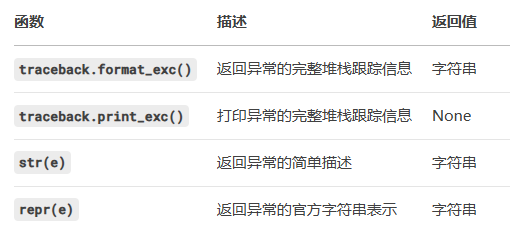
traceback.format_exc() 是 Python 标准库中 traceback 模块的一个重要函数,用于获取当前异常的完整堆栈跟踪信息并以字符串形式返回。
获取异常详情,它会返回一个字符串,包含以下内容:
异常类型(如 AssertionError)。
异常的描述信息。
整的调用堆栈(从触发异常的代码到顶层调用链),显示错误发生的代码位置。
import traceback

try:
    # 可能引发异常的代码
    result = 1 / 0
except Exception as e:
    # 获取完整的异常堆栈信息
    error_details = traceback.format_exc()
    #完整错误信息
    print(error_details)

    # 也可以只获取异常的基本信息
    print(f"异常类型: {type(e).__name__}")
print(f"异常消息: {str(e)}")调试友好:直接使用 except Exception as e 只能获取简单的错误类型(如 str(e)),但缺乏代码位置和调用链信息。
精准定位:通过堆栈跟踪,可以明确知道错误发生在哪一行代码、哪个函数调用中。

有“AI”的1024 = 2048,欢迎大家加入2048 AI社区
更多推荐



 13
13 0
0- 0


 已为社区贡献3条内容

所有评论(0)